resetreportedcount & updatetags doesn't verify appid param
The resetreportedcount and updatetags endpoints did not verify the id parameter, allowing an admin of one community hub to reset reports on or update tags of content in another hub.

- Triaged in 10 days
- Fixed in 24 days
- Paid in 24 days
- Disclosed after 51 days
This requires an account that has admin permissions on any community hub & Fiddler (not 100% required, but I'll use it for the demonstration.)
resetreportedcount:
Step 1: Go to any UGC in the hub you have admin access on, open Fiddler if you haven't yet, click Clear Reports and click OK on the dialogbox.
Step 2: Drag that request over to the composer tab, modify the id param in the body to any UGC (Outside your hub!), and execute the request! You've now reset all reports on that UGC item.
updatetags:
Step 1: Go to any guide in the hub you have admin access on, open Fiddler if you haven't yet, click Update Tags and just select a few checkboxes and click Update.
Step 2: Drag that request over to the composer tab, modify the id param in the body to any guide (Outside your hub!), and execute the request! You've now updated that guide's tags.
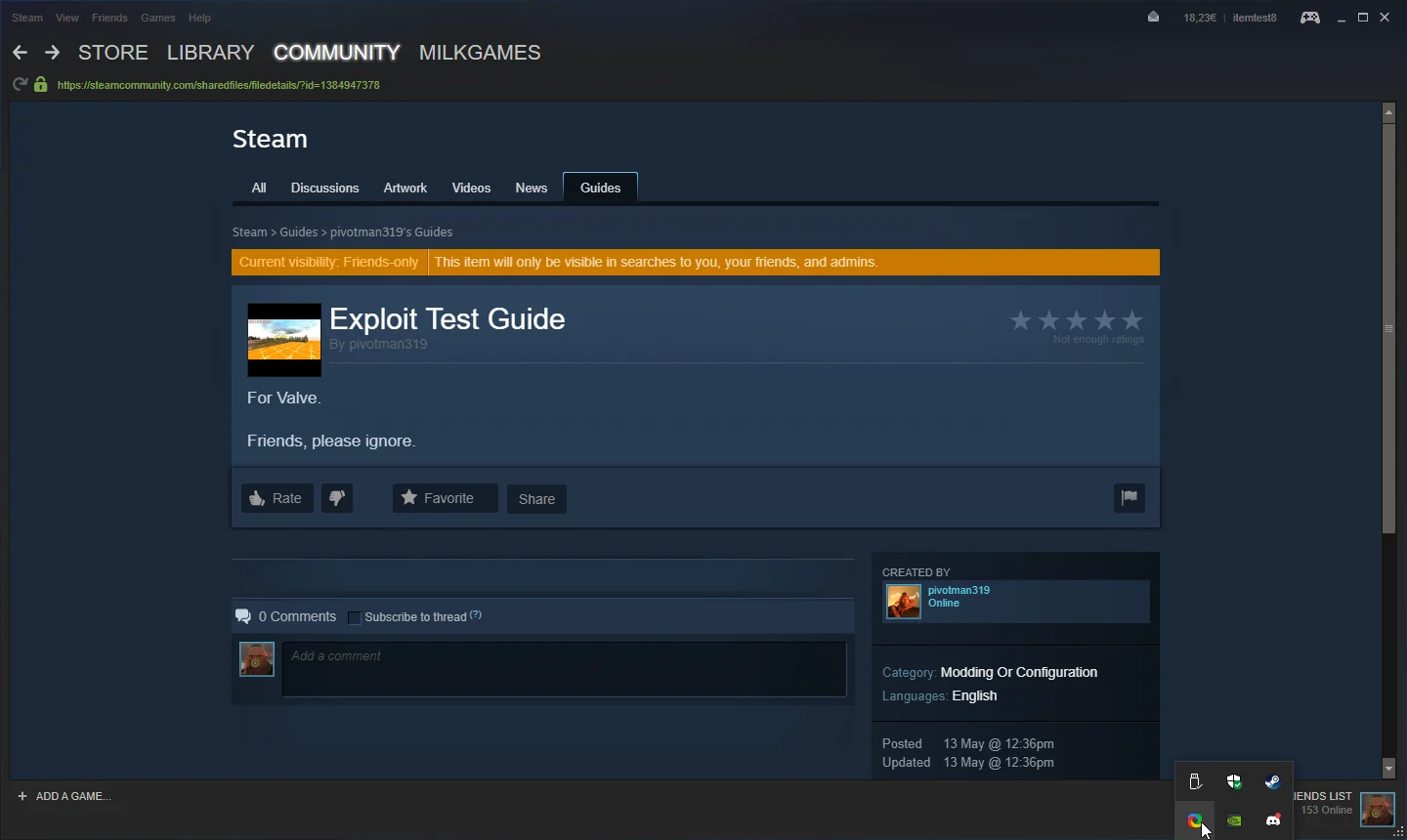
Guide before
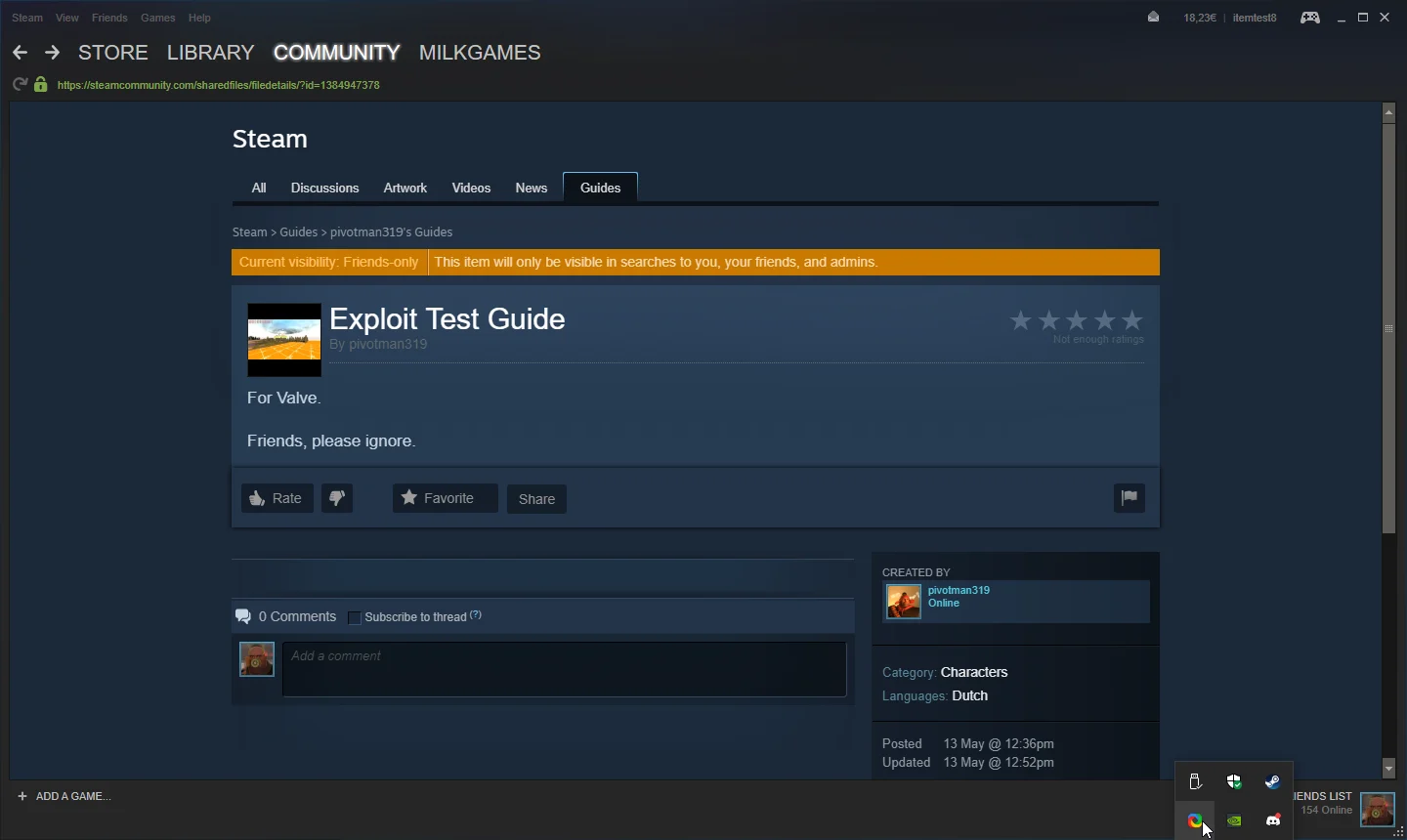
Guide after
Impact
An attacker could reset all reports on UGC, and could also change a guide's tags.
Context
Steam Community hubs let users with administrative rights manage user-generated content (UGC) and guides that belong to their hub. Two administrative actions are relevant here: clearing the reports on a UGC item (resetreportedcount) and updating the tags on a guide (updatetags). Both are performed from the hub administration interface and both send a request whose body carries an id parameter identifying the item being acted on.
The report shows that neither action verifies that the id in the request body belongs to a hub the caller administers. The report's title states that the appid parameter is not verified.
Setup
The only precondition is an account with admin permissions on any community hub. The researcher also used Fiddler to capture and replay requests, noting that it is not strictly required for the demonstration.
- An account with admin rights on at least one community hub.
- Fiddler (or any intercepting proxy) to capture a legitimate administrative request and resend it with a modified body.
Finding it
The researcher captured the two administrative requests while performing them normally inside a hub they controlled, then moved each request to the composer tab and changed the id parameter in the body to point at an item outside that hub. The requests were accepted, which showed that the server trusted the id supplied by the client without confirming that the caller had authority over the item it referred to.
Exploitation
Step 1: resetreportedcount
- Go to any UGC item in the hub you have admin access on.
- Open Fiddler if you have not already.
- Click Clear Reports and confirm with OK in the dialogue box.
- Drag the captured request to the composer tab.
- Modify the
idparameter in the body to the identifier of any UGC item, including one outside your hub. - Execute the request.
The result is that all reports on that UGC item are reset, even though the caller has no administrative rights over the hub that owns it.
Step 2: updatetags
- Go to any guide in the hub you have admin access on.
- Open Fiddler if you have not already.
- Click Update Tags, select a few checkboxes and click Update.
- Modify the
idparameter in the body to the identifier of any guide, including one outside your hub. - Execute the request.
The result is that the target guide's tags are updated.
The report illustrates the effect on a guide with a before and after screenshot. The guide before the request:
The same guide after the request, with its tags changed:
Root cause
The server acts on whatever id the client supplies in the request body without confirming the caller has authority over that item. Because the appid parameter is not verified, there is no check that the item identified by id belongs to an application or hub the caller controls. The authorisation decision and the object being modified are therefore decoupled: the caller passes the permission check for their own hub and then names a different hub's object in the same request.
Impact
An attacker with admin rights on any hub could reset all reports on UGC items belonging to other hubs, and could also change the tags on other hubs' guides. The report does not describe any further consequence of either action, such as content removal or ranking effects.
Fix
The report does not state what was changed. A fix would be to verify, server-side, that the id in the request body belongs to a hub the authenticated caller administers.
Variants to test
- Apply the same body-tampering approach to other hub administrative actions that take an item identifier, such as moderation, pinning or deletion. A positive result is the action succeeding on an item outside the hub you administer.
- Change the
appidparameter alongsideidto see whether the application context is validated at all. A positive result is the request being accepted with anappidyou have no rights over. - Replay the captured request with an
idbelonging to a hub where you have no role whatsoever, rather than merely a different hub you do not administer. A positive result is the same success as in the report.
Hunting notes
This class of bug hides in administrative features where the UI scopes an action to the current hub but the request body carries the object identifier independently. During recon, look for multi-tenant or community features with per-group admin roles, capture the administrative requests, and check whether the object identifier in the body is validated against the caller's role. The researcher demonstrated impact with before and after screenshots of the changed guide.
What happened, in plain words
Steam Community is Valve's website where players gather in hubs, which are pages dedicated to a particular game or topic. Some users are given admin rights on a hub, meaning they can manage the content that other people post there. Two of those management actions are described in this report: clearing the reports on a piece of user-generated content (UGC), and changing the tags on a guide.
A report, in this context, is a flag raised against a piece of content. Clearing the reports makes those flags disappear. Tags are short labels attached to a guide.
Both actions are carried out from the hub administration pages. When you click the button, your browser sends a request to Steam's server. That request contains a small piece of data called an id, which tells the server which item you want to act on. The report shows that an id from another hub was accepted. You could put any item's identifier in there, including one from a completely different hub, and the server would carry out the action anyway.
This kind of flaw is called a broken access control or authorisation bug: the server checks that you are an admin somewhere, but not that you are an admin of the specific thing you are touching. A useful comparison is a hotel key card. The card opens your own room, and the door reader confirms the card is valid. But if the reader never checks which room the card belongs to, the same valid card opens every door in the building.
Background: what you need to know first
Before the steps make sense, a few everyday concepts:
- Request and response: when you click something on a website, your browser sends a message to a server (the request) and the server sends one back (the response). The request says what you want; the response contains the result.
- Request body: some requests carry extra data, like a form you fill in. That data travels in the body of the request. Here the body contains the
idof the item being acted on. - Parameter: a named value inside a request, written as a name and a value, for example
id=12345. The name is the parameter, the value is what you put in it. appid: an application identifier. On Steam, it ties an item to the game or application it belongs to, and therefore to the hub that owns it. The report's title says this parameter is not verified.- Intercepting proxy: a tool that sits between your browser and the server and lets you look at, pause and edit requests before they are sent. Fiddler is one such tool. The researcher used it, but noted it is not strictly required for the demonstration.
- Composer tab: a part of Fiddler where you can take a captured request, edit it by hand and send it again.
- UGC: user-generated content, meaning anything users post, such as screenshots, videos or workshop items.
- Guide: a longer written article that a user publishes on Steam, often a walkthrough or tips page.
Setup
The only precondition is an account that has admin permissions on any community hub. The researcher also used Fiddler to capture and replay requests, noting that it is not strictly required for the demonstration.
- An account with admin rights on at least one community hub.
- Fiddler (or any intercepting proxy) to capture a legitimate administrative request and resend it with a modified body.
Why this setup: you need a real admin action to copy, because the trick is to take a request the server already trusts from you and change one value inside it. You also need a hub you control so that the button is available to you in the first place.
Finding it
The researcher performed the two administrative actions normally inside a hub they controlled, so that Fiddler could capture the exact requests the browser sent. Each captured request was then moved to the composer tab and the id parameter in the body was changed to point at an item outside that hub. The server accepted the requests. That showed the server trusted the id supplied by the client without confirming that the caller had authority over the item it referred to.
In other words, the permission check and the object being changed were two separate things, and nothing linked them together.
Exploitation
Step 1: resetreportedcount
- Go to any UGC item in the hub you have admin access on.
- Open Fiddler if you have not already.
- Click Clear Reports and confirm with OK in the dialogue box.
- Drag the captured request to the composer tab.
- Modify the
idparameter in the body to the identifier of any UGC item, including one outside your hub. - Execute the request.
The result is that all reports on that UGC item are reset, even though the caller has no administrative rights over the hub that owns it.
Why each step: steps 1 to 3 produce a genuine, valid request from an admin (you) so that the server sees a familiar shape. Step 4 puts that request somewhere you can edit it. Step 5 is the actual attack: you swap the identifier of your own item for the identifier of someone else's. Step 6 sends it. If the server had checked that the id belonged to your hub, it would have refused; it did not, so the reports were cleared.
Step 2: updatetags
- Go to any guide in the hub you have admin access on.
- Open Fiddler if you have not already.
- Click Update Tags, select a few checkboxes and click Update.
- Modify the
idparameter in the body to the identifier of any guide, including one outside your hub. - Execute the request.
The result is that the target guide's tags are updated.
Why each step: this is the same pattern applied to a different button. You first do the action legitimately on your own guide so the request is captured, then change only the id so it points at a guide in another hub.
The report illustrates the effect on a guide with a before and after screenshot. The guide before the request:
The same guide after the request, with its tags changed:
Root cause
The server acts on whatever id the client supplies in the request body without confirming the caller has authority over that item. Because the appid parameter is not verified, there is no check that the item identified by id belongs to an application or hub the caller controls. The authorisation decision and the object being modified are therefore decoupled: the caller passes the permission check for their own hub and then names a different hub's object in the same request.
Put simply: the guard at the door checks that you have a key, not that the key is for this door.
Impact
An attacker with admin rights on any hub could reset all reports on UGC items belonging to other hubs, and could also change the tags on other hubs' guides. The report does not describe any further consequence of either action, such as content removal or ranking effects.
Fix
The report does not state what was changed. A fix would be to verify, server-side, that the id in the request body belongs to a hub the authenticated caller administers.
Variants to test
These are follow-up ideas in the same spirit, for anyone repeating the research:
- Apply the same body-tampering approach to other hub administrative actions that take an item identifier, such as moderation, pinning or deletion. A positive result is the action succeeding on an item outside the hub you administer.
- Change the
appidparameter alongsideidto see whether the application context is validated at all. A positive result is the request being accepted with anappidyou have no rights over. - Replay the captured request with an
idbelonging to a hub where you have no role whatsoever, rather than merely a different hub you do not administer. A positive result is the same success as in the report.
Hunting notes
This class of bug hides in administrative features where the UI scopes an action to the current hub but the request body carries the object identifier independently. During recon, look for multi-tenant or community features with per-group admin roles, capture the administrative requests, and check whether the object identifier in the body is validated against the caller's role. The researcher demonstrated impact with before and after screenshots of the changed guide.
Glossary
- Admin rights: permissions that let a user manage content and settings in a particular area, here a Steam Community hub.
appid: an application identifier that ties an item to the game or application, and therefore to the hub, it belongs to.- Authorisation: the process of deciding whether a user is allowed to perform a particular action on a particular thing.
- Broken access control: a flaw where the server does not properly check that a user is allowed to do what they are asking; also called an authorisation bug.
- Composer tab: a Fiddler feature where a captured request can be edited by hand and sent again.
- Fiddler: a tool that sits between your browser and a server so you can inspect, pause and edit requests.
- Guide: a longer article published by a user on Steam, often a walkthrough or tips page.
- Hub: a Steam Community page dedicated to a game or topic, with its own admins and content.
id: an identifier for a single item, such as one UGC item or one guide, sent in the request body to say which item the action applies to.- Intercepting proxy: software that relays traffic between your browser and a server and lets you view and modify it.
- Parameter: a named value in a request, written as a name and a value, for example
id=12345. - Report (on content): a flag raised by a user against a piece of content, for example for spam or inappropriate material.
- Request: the message your browser sends to a server when you do something on a website.
- Request body: the part of a request that carries extra data, such as form values.
- Response: the message the server sends back after a request.
- Root cause: the underlying reason a vulnerability exists, as opposed to its visible symptom.
- Tags: short labels attached to a guide that describe or categorise it.
- UGC: user-generated content, anything users post such as screenshots, videos or workshop items.
- Vulnerability: a weakness in software that allows someone to do something they should not be able to do.


