Stored XXS @ https://steamcommunity.com/search/users/#text= via Profile Name
A user's profile name was inserted unescaped into an inline onclick handler on the user search page, so a crafted name could break out of the function call and run script. An attacker could get script to run in a victim's session when the victim clicked the 'Add as friend' button next to the attacker's profile in search results.
 Originally disclosed on HackerOne
- Triaged in 27 hours
- Fixed in 2 days
- Paid in 2 days
- Disclosed after 11 days
Dear Valve security staff,
Short description
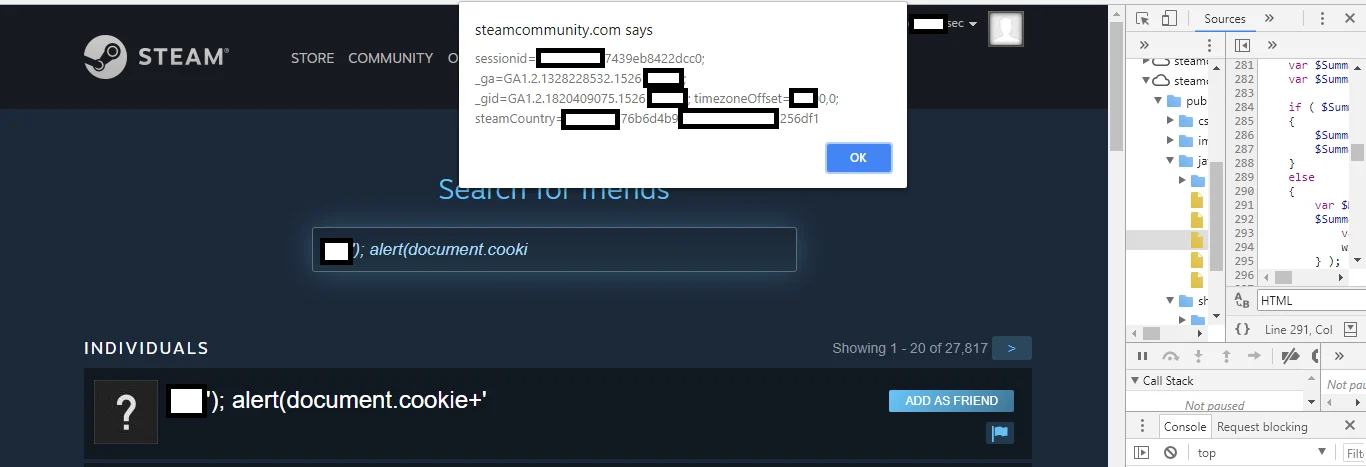
There is a stored cross-site-scripting vulnerability present at the user search endpoint which can be exploited by modifying profile name of the would be attacking account. See POC picture.
Steps to reproduce
- Obtain a account to act as a attacker and log in
- Go to https://steamcommunity.com/profiles/PROFILE_NUMBER/edit
- Edit field "Profile Name" to contain short name, and the payload. For example: "NAME'); alert(document.cookie+'", without the outermost double quotes
- With another browser or session, obtain a account to act as a victim and log in
- Navigate to https://steamcommunity.com/search/users/#text=
- Using the search field, search for the attacking account "NAME'); alert(document.cookie+'" without the outermost double quotes
- Click "ADD AS FRIEND" button next to the profile name
- Verify that clicking the button launches the payload and pops an alert dialog
Why is it there
All culminates on AddFriend-function call on the following line of code in user search html and the fact, that the function call can be escaped. The payload is "NAME'); alert(document.cookie+'" without the outermost quotes in the snippet.
<a href="#" onclick="AddFriend(false,'PROFILE_NUMBER','NAME'); alert(document.cookie+''); $J(this).hide(); return false;" class="btnv6_blue_hoverfade btn_small btn_uppercase" style="display: none;">
    <span>Add as friend</span>
</a>
Impact and assesment
As on any cross-site-scripting vulnerability. The top line would be that the attacker might steals cookies to abuse users session. For this particular vulnerability only by it self, successful exploiting is a bit more tricky, as currently the Profile Name -field only accepts 32 characters and it requires the victim to click on the button. Payloads can also utilize jQuery on the domain context.
As a mitigation of this, and vulnerabilities like this: addition to <, > and &, characters such as ' ; $ ( and ) should also be encoded when retrieved from the database, or even better, could be stored encoded.
PS. It was funny to see that many users had tried to exploit the Profile Name -field previously, as they show on the search when searching for "alert(...)". I hope I'm in time not to be on the duplicate pool!
Impact
As on any cross-site-scripting vulnerability. The top line would be that the attacker might steals cookies to abuse users session. For this particular vulnerability only by it self, successful exploiting is a bit more tricky, as currently the Profile Name -field only accepts 32 characters and it requires the victim to click on the button.
As a mitigation of this, and vulnerabilities like this: characters such as ' ; $ ( and ) should also be encoded when retrieved from the database, or even better, could be stored encoded.
The hacker selected the Cross-site Scripting (XSS) - Stored weakness. This vulnerability type requires contextual information from the hacker. They provided the following answers:
URL https://steamcommunity.com/search/users/#text=
Verified Yes
Attachments
Context
Steam Community (steamcommunity.com) is Valve's social platform for Steam accounts. Among its features is a user search, reachable at https://steamcommunity.com/search/users/#text=, which lets a logged-in user find other accounts by name and add them as friends directly from the results list. Each result row carries an "Add as friend" button that calls a JavaScript function, AddFriend, with the target's profile number and name baked into an inline onclick handler.
The report describes a stored cross-site scripting (XSS) issue in that endpoint: the profile name of an attacker-controlled account is reflected into the inline handler without sufficient escaping, so a crafted name executes script in the browser of anyone who clicks the button next to it in the search results. The weakness was classified as stored XSS, with a CVSS score of 5.5 (medium), and a bounty of 750.00 USD was paid. The report was disclosed on 2018-05-24.
Setup
Two accounts are needed, one acting as the attacker and one as the victim, each logged in from a separate browser or session. No special tooling is mentioned; the proof of concept is carried out entirely through the web interface. The attacker needs access to the profile edit page at https://steamcommunity.com/profiles/PROFILE_NUMBER/edit, where the "Profile Name" field lives. The victim only needs to be able to reach the user search and click a button.
Finding it
The user search results embed the profile name inside a JavaScript function call in an inline onclick attribute. Because the name is placed inside a quoted string argument, a name containing a single quote can close that string and inject further statements. The researcher also observed that many other users had already tried to exploit the same field: searching for __alert(...)__ shows those attempts in the results, which suggests the field had been probed before.
Exploitation
Step 1: Prepare the attacker account
Log in with the attacker account and open the profile edit page:
https://steamcommunity.com/profiles/PROFILE_NUMBER/edit
Step 2: Set the malicious profile name
Edit the "Profile Name" field so that it contains a short name followed by the payload. The example given is:
__NAME'); alert(document.cookie+'__
The leading __NAME is the visible short name. The '); closes the string argument and the AddFriend call, and alert(document.cookie+'__ starts a new statement that reads the document cookie. The trailing __ keeps the remainder of the original code inside a string so the handler still parses.
Step 3: Search as the victim
With a second browser or session, log in as the victim and navigate to the user search:
https://steamcommunity.com/search/users/#text=
Using the search field, search for the attacking account's name, that is the same string:
__NAME'); alert(document.cookie+'__
Step 4: Click the button
Click the "ADD AS FRIEND" button next to the profile name in the results. The payload fires and an alert dialog pops up showing the victim's cookie.
The screenshot shows the resulting alert dialog with the document cookie, confirming that script ran in the victim's session on the steamcommunity.com origin.
Root cause
The problem is in the HTML of the user search results, specifically the AddFriend call. The rendered markup, with the payload in place, looks like this:
<a href="#" onclick="AddFriend(false,'PROFILE_NUMBER','NAME'); alert(document.cookie+''); $J(this).hide(); return false;" class="btnv6_blue_hoverfade btn_small btn_uppercase" style="display: none;">
    <span>Add as friend</span>
</a>
The profile name is interpolated into a single-quoted JavaScript string inside an inline event handler. A single quote in the name terminates that string, and the rest of the name is parsed as JavaScript. The report recommends encoding <, >, & and also ', ;, $, ( and ) when the value is retrieved from the database. The payload can also use jQuery, which is present on the domain, so an attacker is not limited to plain DOM APIs.
Impact
As with any XSS, the top-line risk is that an attacker can steal cookies and abuse the victim's session. For this particular vulnerability on its own, successful exploitation is more tricky: the Profile Name field accepts only 32 characters, and the victim has to click the button for the payload to run. The researcher notes that the payload can also use jQuery in the domain context.
Fix
The report recommends that, in addition to <, > and &, characters such as ', ;, $, ( and ) should be encoded when the value is retrieved from the database, or, better still, stored encoded. The report does not state which change was actually made.
Variants to test
- Look for other places where a user-controlled display name is interpolated into an inline handler or a JavaScript string, such as friend lists, activity feeds or notification text. A positive result is a name containing a single quote that breaks the surrounding script when the page renders.
- Try the same payload shape in other search or listing endpoints that render action buttons with embedded arguments. A positive result is an alert or other script execution when the button is clicked.
- Check whether the length limit can be bypassed by splitting the payload across fields (for example first and last name) if the application concatenates them. A positive result is a working payload longer than the single-field limit.
Hunting notes
This kind of bug tends to hide in features that build inline JavaScript from stored user data: search results, friend lists, admin panels and anywhere a name is passed as an argument to a function in an onclick or similar attribute. During recon, look for pages that render user-supplied strings inside quoted JavaScript arguments, and check whether the application encodes quotes as well as angle brackets. The researcher demonstrated impact by showing the rendered markup, the step-by-step reproduction with two accounts, and a screenshot of the alert containing the cookie.
What happened, in plain words
Steam Community is Valve's social website for Steam accounts. One of its features is a user search, at https://steamcommunity.com/search/users/#text=, where a logged-in person can look up other accounts by name and add them as friends straight from the list of results. Each result row has an "Add as friend" button. That button is not a link to another page: it runs a small piece of JavaScript, a function called AddFriend, and the account's profile number and name are written directly into the button's onclick attribute, which is the part of the HTML that says what happens when you click.
The report describes a stored cross-site scripting (XSS) bug in that search page. "Stored" means the dangerous text is saved on the server first (here, as a profile name) and then shown to other people later, rather than being sent once in a link. The attacker's profile name is placed into that inline handler without enough escaping, so a carefully crafted name runs script in the browser of anyone who clicks the button next to it in the search results. The weakness was classified as stored XSS, with a CVSS score of 5.5 (medium), and a bounty of 750.00 USD was paid. The report was disclosed on 2018-05-24.
A quick comparison: escaping is like putting a label on a box that says "this is just text, do not open it". If the label is missing, the browser opens the box and treats the contents as instructions.
Setup
You need two accounts: one acting as the attacker and one as the victim, each logged in from a separate browser or session. A session is simply the state of being logged in; using two different browsers (or one normal window and one private window) keeps the two logins apart. No special tooling is mentioned; the whole proof of concept is done through the normal web interface.
The attacker needs access to the profile edit page at https://steamcommunity.com/profiles/PROFILE_NUMBER/edit, where the "Profile Name" field lives. PROFILE_NUMBER is a placeholder for the account's numeric profile identifier. The victim only needs to be able to reach the user search and click a button.
Finding it
The user search results put the profile name inside a JavaScript function call in an inline onclick attribute. Because the name sits inside a quoted string argument, a name containing a single quote can close that string and inject further statements. In everyday terms: the page builds a sentence like say hello to 'NAME', and if NAME itself contains a quote, the sentence can be broken and extra words added.
The researcher also observed that many other users had already tried to exploit the same field: searching for __alert(...)__ shows those attempts in the results, which suggests the field had been probed before.
Exploitation
Step 1: Prepare the attacker account
Log in with the attacker account and open the profile edit page:
https://steamcommunity.com/profiles/PROFILE_NUMBER/edit
This is the page where a user changes their own profile details. The attacker opens it to change their own display name, which is the value that will later be shown to the victim.
Step 2: Set the malicious profile name
Edit the "Profile Name" field so that it contains a short name followed by the payload. The example given is:
__NAME'); alert(document.cookie+'__
Line by line, in plain words:
__NAMEis the visible short name, the part a person would read as the account's name.');closes the string argument and theAddFriendcall. The single quote ends the text string, the closing parenthesis ends the function call, and the semicolon ends that statement.alert(document.cookie+'__starts a new statement that reads the document cookie.alertopens a pop-up box with a message;document.cookieis the browser's way of reading the cookies for the current site.- The trailing
__keeps the remainder of the original code inside a string so the handler still parses. Without it, the leftover code from the page would be broken and the browser would refuse to run the handler.
A cookie is a small piece of data a website asks the browser to keep and send back on later requests. On a logged-in site it often acts like a wristband at an event: whoever holds it is treated as the logged-in user, which is why stealing it matters.
Step 3: Search as the victim
With a second browser or session, log in as the victim and navigate to the user search:
https://steamcommunity.com/search/users/#text=
This is the search page. The part after # is handled by the browser and the page's own script; it is where the search text goes. The victim goes here to look for the attacker's account, just as any normal user would.
Using the search field, search for the attacking account's name, that is the same string:
__NAME'); alert(document.cookie+'__
Searching for the exact name makes the attacker's account appear in the results, with the malicious name rendered in the row and in the button's handler.
Step 4: Click the button
Click the "ADD AS FRIEND" button next to the profile name in the results. The payload fires and an alert dialog pops up showing the victim's cookie.
The screenshot shows the resulting alert dialog with the document cookie, confirming that script ran in the victim's session on the steamcommunity.com origin. "Origin" here means the site the script is running as; because the script runs on steamcommunity.com, it can read that site's cookies for the logged-in victim.
Root cause
The problem is in the HTML of the user search results, specifically the AddFriend call. The rendered markup, with the payload in place, looks like this:
<a href="#" onclick="AddFriend(false,'PROFILE_NUMBER','NAME'); alert(document.cookie+''); $J(this).hide(); return false;" class="btnv6_blue_hoverfade btn_small btn_uppercase" style="display: none;">
    <span>Add as friend</span>
</a>
Line by line:
<a ...>starts a link element.href="#"means it does not go anywhere by itself.onclick="..."is the inline event handler: the JavaScript the browser runs when the element is clicked.AddFriend(false,'PROFILE_NUMBER','NAME')is the original function call.PROFILE_NUMBERis the target's numeric profile id andNAMEis the profile name, both placed inside single-quoted strings.; alert(document.cookie+'');is the injected statement. It runs after the original call and shows the cookie in a pop-up.$J(this).hide(); return false;is the rest of the original handler: it hides the button and stops the link's default behaviour.- The
<span>Add as friend</span>is the visible button text.
The profile name is interpolated into a single-quoted JavaScript string inside an inline event handler. A single quote in the name terminates that string, and the rest of the name is parsed as JavaScript. The report recommends encoding <, >, & and also ', ;, $, ( and ) when the value is retrieved from the database. In other words, the site defended against someone writing HTML tags into a name, but not against someone writing JavaScript syntax into it.
The payload can also use jQuery, which is present on the domain, so an attacker is not limited to plain DOM APIs. jQuery is a JavaScript library that makes it easy to find and change page elements; if it is already loaded on the page, injected script can use it too.
Impact
As with any XSS, the top-line risk is that an attacker can steal cookies and abuse the victim's session. For this particular vulnerability on its own, successful exploitation is more tricky: the Profile Name field accepts only 32 characters, and the victim has to click the button for the payload to run. The researcher notes that the payload can also use jQuery in the domain context.
Fix
The report recommends that, in addition to <, > and &, characters such as ', ;, $, ( and ) should be encoded when the value is retrieved from the database, or, better still, stored encoded. Encoding means turning a character into a safe representation so the browser shows it as text instead of treating it as code. The report does not state which change was actually made.
Variants to test
- Look for other places where a user-controlled display name is interpolated into an inline handler or a JavaScript string, such as friend lists, activity feeds or notification text. A positive result is a name containing a single quote that breaks the surrounding script when the page renders.
- Try the same payload shape in other search or listing endpoints that render action buttons with embedded arguments. A positive result is an alert or other script execution when the button is clicked.
- Check whether the length limit can be bypassed by splitting the payload across fields (for example first and last name) if the application concatenates them. A positive result is a working payload longer than the single-field limit.
Hunting notes
This kind of bug tends to hide in features that build inline JavaScript from stored user data: search results, friend lists, admin panels and anywhere a name is passed as an argument to a function in an onclick or similar attribute. During recon, look for pages that render user-supplied strings inside quoted JavaScript arguments, and check whether the application encodes quotes as well as angle brackets. The researcher demonstrated impact by showing the rendered markup, the step-by-step reproduction with two accounts, and a screenshot of the alert containing the cookie.
Glossary
- Stored XSS: XSS where the malicious text is saved on the server (for example in a profile name) and shown to other users later.
- Payload: the specially crafted piece of text or code that triggers the bug.
- Cookie: a small piece of data a site asks the browser to keep and send back on later requests; on a logged-in site it often identifies the session.
- Session: the state of being logged in to a site, usually tied to a cookie.
- Origin: the combination of scheme, host and port that a page belongs to; scripts on one origin can read that origin's data.
- Endpoint: a specific address on a server that a browser or program can send requests to.
- API: a defined way for one piece of software to talk to another; here, the site's own pages and scripts act as the interface.
- HTML: the language that describes the structure of a web page, such as links and buttons.
- Attribute: a setting on an HTML element, such as
onclickorhref. - Inline event handler: JavaScript written directly in an HTML attribute, such as
onclick, that runs when the event happens. - JavaScript: the programming language browsers run to make pages interactive.
- Function: a named block of code that can be called to do something, such as
AddFriend. - String: a piece of text in code, usually written between quotes.
- Escaping / encoding: converting characters into a safe form so they are treated as text rather than as code.
- DOM: the browser's in-memory model of the page, which scripts can read and change.
- jQuery: a JavaScript library that makes it easier to find and change page elements; it is loaded on the domain.
- CVSS: a scoring system for the severity of a vulnerability; 5.5 is medium.
- Bounty: a payment a company makes to a researcher who reports a valid vulnerability.
- Recon: the exploratory phase of looking around a target to find interesting features and weaknesses.
- Duplicate: a report for a bug that someone else has already reported.



