Watch Paint Dry: How I got a game on the Steam Store without anyone from Valve ever looking at it.
The Steamworks publishing form trusted a client-supplied status value, so a developer could set their own trading cards to 'Released' without Valve review. The same missing authorisation check on the ReleaseGame function let the author publish a game to the Steam store without any Valve approval.
 Published on medium.com
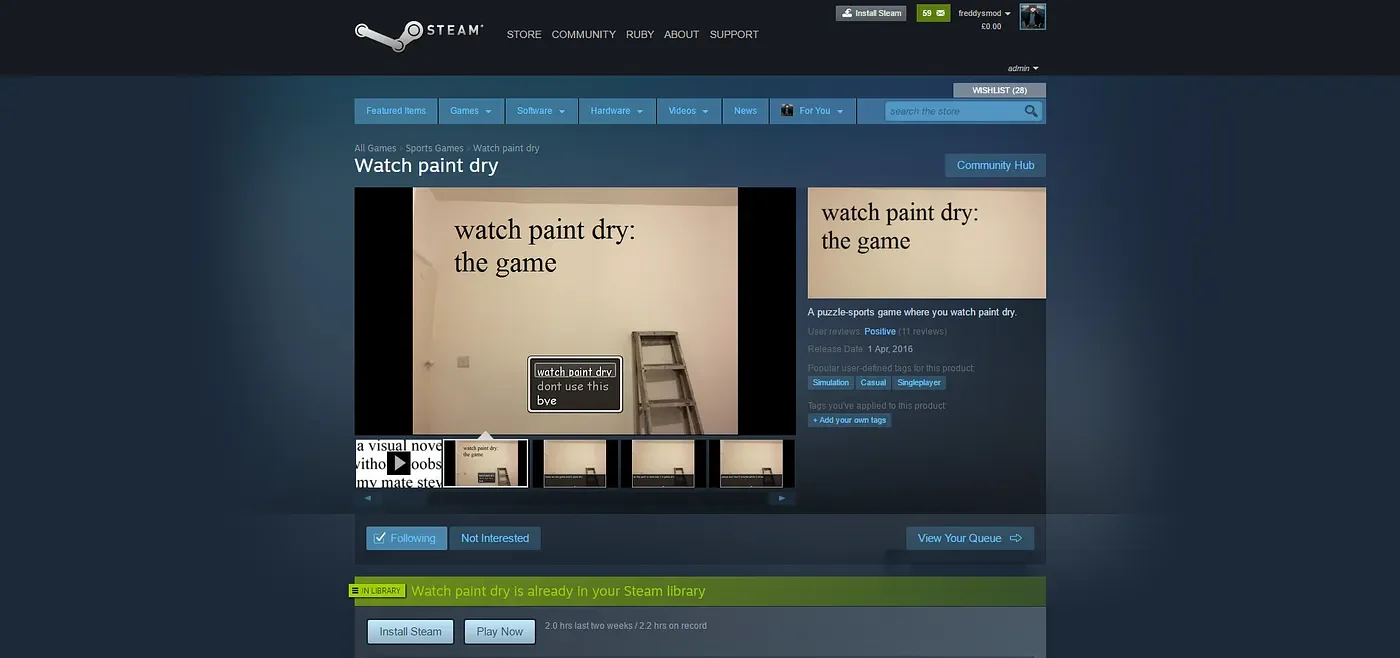
If you were on the Steam homepage on Sunday night, you might have noticed a somewhat interesting new title available: “Watch paint dry”. This sparked a lot of controversy (and I, honestly, had a little bit of fun in the forum :p) on Steam as people were claiming that Valve/Steam had lost all quality control for games…
The full write-up lives on its author's site
It belongs to its author, so we link to it rather than copy it. The other two tabs are our own rewrites, checked against it.
Context
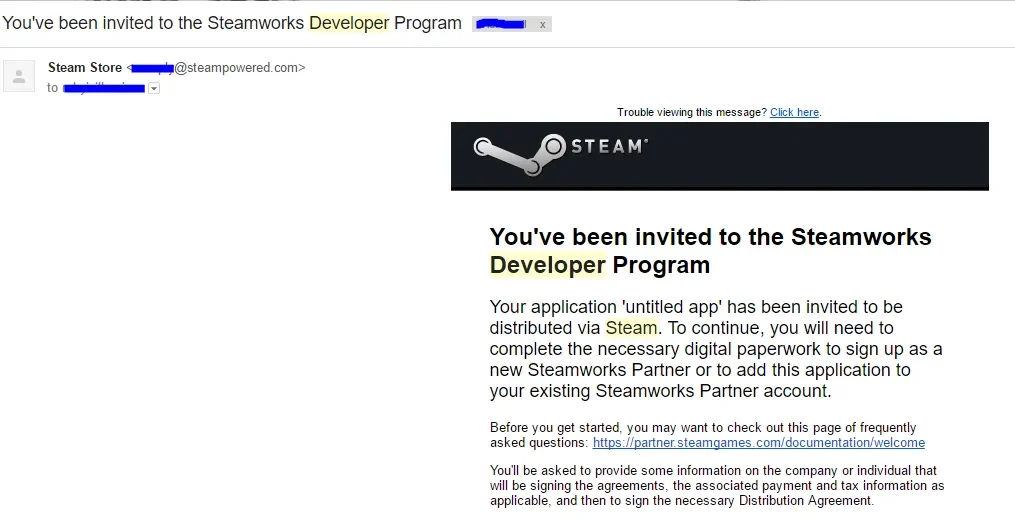
On a Sunday night in 2016, a title called “Watch paint dry” appeared in the new releases section of the Steam store. It had never been submitted to Greenlight, and the author had not paid the $100 fee to post games there. The author had access to Steamworks, Valve’s publishing platform for Steam, and used it to test whether a game could be released without Valve reviewing it. The report describes how the trading card set for an “untitled app” was approved without Valve’s review, and how the app itself was released to the store. Valve has since fixed the issues, so the steps below no longer work.
Setup
The author had a Steamworks account and an app (appid 445730) that was not yet released. The report does not explain how the Steamworks access was obtained, except to say it was not through exploiting web forms, not through Greenlight, and not through direct contact with someone at Valve. The author had made a basic trading card set in Photoshop. The Steamworks site is heavily AJAX-based, and its JavaScript is not obfuscated and is readable by anyone authenticated to Steamworks.
Finding it
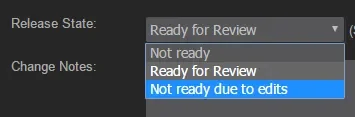
The author noticed that the trading card set could be released without Valve’s review. On the trading card configuration page, the release status had a few options. The page source showed that the form tracked the session and the editor account ID. The author changed the editor account ID to 1 (someone who might work at Valve) and changed the value of the select to something that does not exist, to see if a different form was returned.
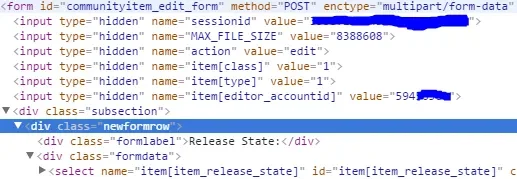
Editor Note: Some elements from the page have been removed to save space in photos and not give out irrelevant information
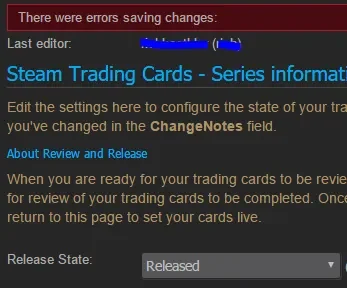
The response showed a new “Last editor” who is someone from Valve. The author then saved the form again with the value of the selected “Released” box.
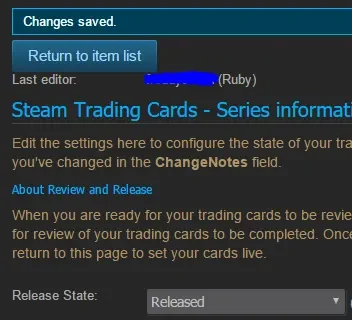
Exploitation
Step 1: Manipulating the trading card release status
The author changed the editor account ID to 1 and set the select value to something invalid. The server returned a full list of options with their values, including “Released” with value 5. The author then refreshed the form to get the original editor_accountid back, changed the value of the select box for “Ready for Review” from 3 to 5, and saved it. The server accepted the request as if it were a genuine request from a developer whose trading cards were approved, and set the status to released. The server did not check whether someone from Valve had already approved the cards.
Step 2: Finding the release function
The author looked at the JavaScript functions on the Steamworks site and found a function called ReleaseGame(appid, data). It made an AJAX request to Steam without any authentication in it, and appeared to release the app.
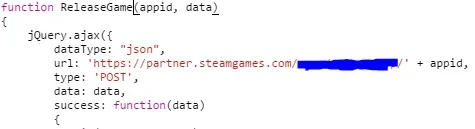
A quick overview of the ReleaseGame function
Step 3: Calling ReleaseGame without a session ID
Calling ReleaseGame with the parameters 445730 (the appid) and blank data returned a 403 (access forbidden) error. The author then looked at other functions in the file and noticed that almost all of them added a value to the JSON request called “sessionid” with the Session ID that was seen before when releasing the trading card set.
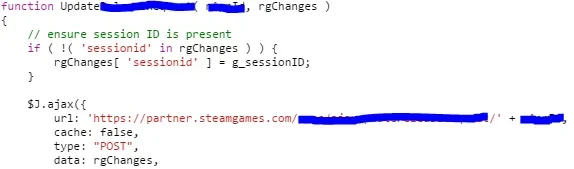
The comment helped too!
Step 4: Calling ReleaseGame with a session ID
The author called ReleaseGame(445730, { ‘sessionid’: ‘my_session_id’ }).
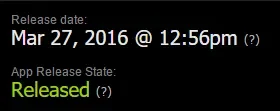
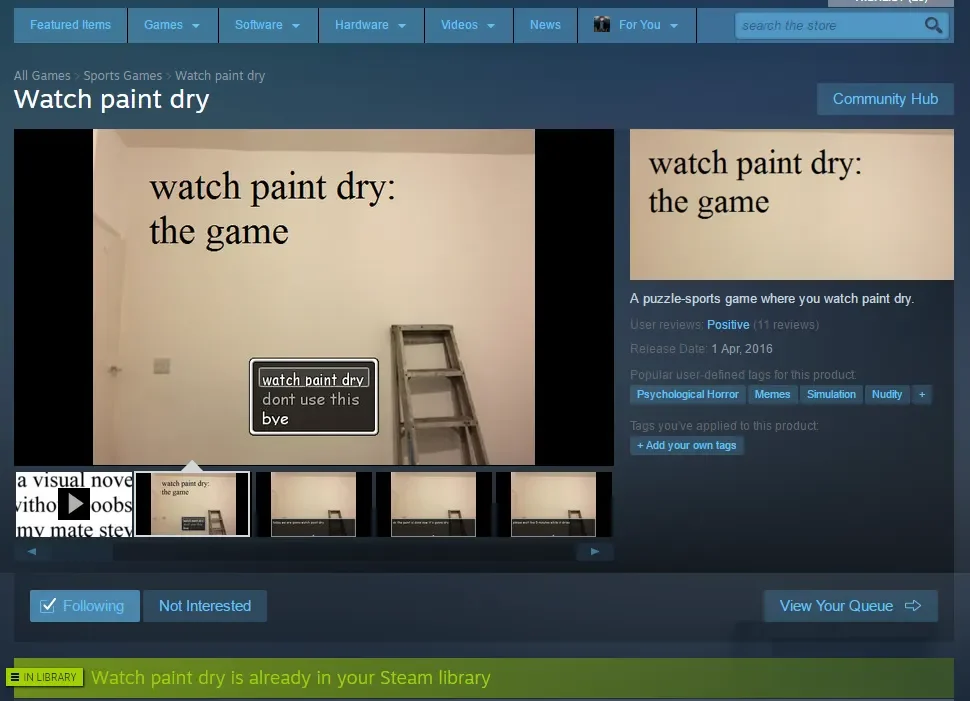
The app then appeared on the Steam store.
Root cause
The trading card release form allowed the client to set the release status directly. The server did not verify that a Valve employee had approved the content before accepting the “Released” status. The ReleaseGame request carried no authentication, but other functions added a sessionid value, and adding it made the call succeed. The server did not check whether a Valve employee had approved the cards before setting the status to released.
Impact
An attacker with a Steamworks account could release a game to the Steam store without Valve’s review. The author demonstrated this with a prank app. The author says the app was not listed for sale. The author notes that the app appeared in the new releases section immediately, which was an oversight on their part. The author was in contact with Valve, who fixed the vulnerability.
Fix
Valve fixed the vulnerability. The author suggests that when working with user-generated content that needs approval, do not have “Review Ready” and “Reviewed” as two states of existence for the content. Instead, use an audit trail, such as a “review ticket” for each piece of content, and do not allow the content to switch to the Released state until there is a review ticket. Alternatively, do not allow users to set the item to “Released”.
Variants to test
- Direct state manipulation: On forms that set a status, try changing the value to a privileged state (e.g. “Released”, “Approved”) and see if the server accepts it without checking the previous state or the user’s role. A positive result is the status changing without authorisation.
- Editor ID tampering: Change the editor account ID to another user (e.g. an admin) and see if the form returns different options or allows saving with that ID. A positive result is the server accepting the change and attributing the action to the other user.
- Missing session ID in AJAX calls: For AJAX endpoints that perform privileged actions, try calling them without a session ID or with a blank one. A positive result is a 403 without a session ID, then success once a valid session ID is added.
- Client-side only checks: Look for JavaScript functions that perform actions without server-side authentication. Try calling them directly from the console with parameters for a different app or user. A positive result is the action being performed without proper authorisation.
What happened, in plain words
On a Sunday night in 2016, a game called “Watch paint dry” appeared in the new releases section of the Steam store. Steam is a large online shop for computer games, and the new releases section is where freshly published games are shown to everyone who visits the shop.
The game had never gone through Greenlight. Greenlight was Steam's system where developers post their game ideas and the community votes on them, and posting there cost a $100 fee. The author had not paid that fee and had not submitted anything to Greenlight. Instead, the author had access to Steamworks, which is Valve's own publishing platform: the private website where game developers fill in the details of their game, upload files, and tell Steam when the game is ready to go on sale. Valve is the company that runs Steam.
The author used that access to test whether a game could be released to the store without Valve reviewing it. The answer turned out to be yes, in two separate places. First, the trading card set for the game was approved without Valve's review. Trading cards are small collectible pictures that Steam users earn by playing a game, and Valve normally reviews them before they go live. Second, the game itself was released to the store.
Valve has since fixed both issues, so none of the steps below work any more. The report is a description of what was possible at the time.
Setting the scene
The author had a Steamworks account and an app that was not yet released. An “app” here just means a game or other product on Steam; every one of them gets a number called an appid, and this one was 445730. The report does not explain how the Steamworks access was obtained. It only says it was not through exploiting web forms, not through Greenlight, and not through direct contact with someone at Valve.
That set was the first thing to play with.
One important detail about the Steamworks website: it is heavily AJAX-based. AJAX is a technique where a web page talks to the server in the background, without reloading the whole page. When you click a button and a small part of the page updates while everything else stays put, that is usually AJAX. The JavaScript is the code that runs inside your browser and makes those background requests. On Steamworks, that JavaScript was not obfuscated. Obfuscation means deliberately scrambling code so it is hard for a human to read, and unobfuscated code can be read by anyone who is logged in to Steamworks. The browser's “view source” feature shows you the HTML and code that the server sent to your browser, which is a normal, built-in way to see how a page is put together.
Finding the first problem
The author noticed that the trading card set could be released without Valve's review. On the trading card configuration page, the release status had a few options. The page source showed that the form tracked two things: the session and the editor account ID.
A session is how a website remembers who you are between page loads. When you log in, the server gives your browser a session identifier, and the browser sends it back with every request so the server knows the request is yours. Think of it like a wristband at an event: you show it once at the door, and after that staff recognise you by the band rather than asking for your ID again. The editor account ID is simply the number that identifies which account last edited the item.
The author changed the editor account ID to 1, on the guess that account number 1 might be someone who works at Valve, and changed the value of the select to something that does not exist. A select is the dropdown menu on a web form. Every option in a dropdown has a hidden value behind it, and the browser sends that value to the server when the form is submitted. By sending a value that does not match any real option, the author hoped the server would react differently, perhaps by returning a different form or an error that revealed more.
Editor Note: Some elements from the page have been removed to save space in photos and not give out irrelevant information
The response showed a new “Last editor” who is someone from Valve. The author then saved the form again with the value of the selected “Released” box.
Exploiting it
Step 1: Manipulating the trading card release status
The author changed the editor account ID to 1 and set the select value to something invalid. The server returned a full list of options with their values, including “Released” with value 5. In other words, the server's error response handed over the complete menu of statuses and the number behind each one, which is exactly the information needed to forge a request.
The author then refreshed the form to get the original editor_accountid back, changed the value of the select box for “Ready for Review” from 3 to 5, and saved it. The server accepted the request as if it were a genuine request from a developer whose trading cards were approved, and set the status to released. The server did not check whether someone from Valve had already approved the cards.
This is a broken authorisation problem, combined with a logic flaw. Authorisation means deciding whether a logged-in user is allowed to do a particular thing. A logic flaw means the program's rules can be bent because a step in the intended process is missing. The intended process was: developer marks cards ready, Valve reviews them, Valve marks them approved. The server did not check whether someone from Valve had approved the cards before setting the status to released. It is like a form at an office that asks for a manager's signature but never checks the signature, so anyone can write one.
Step 2: Finding the release function
The author looked at the JavaScript functions on the Steamworks site and found a function called ReleaseGame(appid, data). A function is a named block of code that does one job; here the name says it releases a game. It made an AJAX request to Steam without any authentication in it, and appeared to release the app. Authentication means proving who you are, for example by logging in. A request with no authentication is one that carries no proof of identity at all.
A quick overview of the ReleaseGame function
Step 3: Calling ReleaseGame without a session ID
Calling ReleaseGame with the parameters 445730 (the appid) and blank data returned a 403 (access forbidden) error. A 403 is an HTTP status code, the short number a web server sends back to say how a request went. 200 means fine, 404 means not found, and 403 means the server understood the request but refused to allow it. So the server was doing some kind of check, just not the one you might expect.
The author then looked at other functions in the file and noticed that almost all of them added a value to the JSON request called “sessionid” with the Session ID that was seen before when releasing the trading card set. JSON is a simple text format for sending structured data between a browser and a server, made of names and values in curly braces. The sessionid field is where the browser puts the session identifier described earlier, so the server can tell whose request it is.
The comment helped too!
Step 4: Calling ReleaseGame with a session ID
The author called ReleaseGame(445730, { ‘sessionid’: ‘my_session_id’ }).
ReleaseGame(445730, { ‘sessionid’: ‘my_session_id’ })
Line by line: ReleaseGame is the name of the function being called. 445730 is the appid, the number of the game to release. The curly braces hold the data being passed along, and inside them ‘sessionid’ is the name of the field and ‘my_session_id’ is the placeholder for the author's own session identifier. In plain words: “release app 445730, and here is my session so you know it is me.”
The app then appeared on the Steam store.
Why it worked
The trading card release form allowed the client to set the release status directly. “Client” means the browser on the user's side, as opposed to the server, the machine that stores the data and makes the decisions. The server did not verify that a Valve employee had approved the content before accepting the “Released” status. The ReleaseGame request carried no authentication, but other functions added a sessionid value, and adding it made the call succeed. The server likely relied on the client to enforce the review process, and did not check the state transition on the server side. A state transition is simply a change from one status to another, such as going from “Ready for Review” to “Released”. If the server does not check that the transition is allowed, anyone who can send the request can make the change.
What it meant
An attacker with a Steamworks account could release a game to the Steam store without Valve's review. The author demonstrated this with a prank app. The author says the app was not listed for sale. The author notes that the app appeared in the new releases section immediately, which was an oversight on their part. The author was in contact with Valve, who fixed the vulnerability.
The fix
Valve fixed the vulnerability. The author suggests that when working with user-generated content that needs approval, do not have “Review Ready” and “Reviewed” as two states of existence for the content. Instead, use an audit trail, such as a “review ticket” for each piece of content, and do not allow the content to switch to the Released state until there is a review ticket. An audit trail is a record of who did what and when, so the history can be checked later. Alternatively, do not allow users to set the item to “Released”.
Things worth trying elsewhere
- Direct state manipulation: On forms that set a status, try changing the value to a privileged state (e.g. “Released”, “Approved”) and see if the server accepts it without checking the previous state or the user's role. A positive result is the status changing without authorisation.
- Editor ID tampering: Change the editor account ID to another user (e.g. an admin) and see if the form returns different options or allows saving with that ID. A positive result is the server accepting the change and attributing the action to the other user.
- Missing session ID in AJAX calls: For AJAX endpoints that perform privileged actions, try calling them without a session ID or with a blank one. A positive result is a 403 without a session ID, then success once a valid session ID is added.
- Client-side only checks: Look for JavaScript functions that perform actions without server-side authentication. Try calling them directly from the console with parameters for a different app or user. A positive result is the action being performed without proper authorisation.
Glossary
- AJAX: A technique where a web page exchanges data with the server in the background, without reloading the whole page.
- Appid: The number that identifies a particular game or product on Steam.
- Audit trail: A record of who did what and when, kept so the history can be checked later.
- Authentication: Proving who you are, for example by logging in.
- Authorisation: Deciding whether a logged-in user is allowed to perform a particular action.
- Broken authorisation: A flaw where the server does not properly check whether a user is allowed to do something.
- Client: The browser or program on the user's side, as opposed to the server.
- Editor account ID: The number identifying which account last edited an item.
- Function: A named block of code that performs one job.
- Greenlight: Steam's old system where developers posted game ideas and the community voted on them, with a $100 fee to submit.
- HTTP status code: A short number a web server returns to say how a request went, such as 200 (fine), 403 (forbidden) or 404 (not found).
- JavaScript: The code that runs inside your browser and makes web pages interactive.
- JSON: A simple text format for sending structured data as names and values.
- Logic flaw: A flaw where the program's intended rules can be bent because a step in the process is missing or unchecked.
- Obfuscation: Deliberately scrambling code so it is hard for a human to read.
- Select: A dropdown menu on a web form, where each option has a hidden value sent to the server.
- Server: The machine that stores data and makes decisions on behalf of a website.
- Session: How a website remembers who you are between page loads, usually via a session identifier.
- Session ID: The identifier the browser sends back with each request so the server knows whose request it is.
- State transition: A change from one status to another, such as from “Ready for Review” to “Released”.
- Steam: Valve's online shop and platform for computer games.
- Steamworks: Valve's private publishing platform where developers configure and release their games.
- Trading cards: Small collectible pictures on Steam that users earn by playing a game.
- Valve: The company that runs Steam and Steamworks.
- Vulnerability: A weakness in software that can be used to make it behave in ways its makers did not intend.