Downloading password protected / restricted videos
An API endpoint for Apple TV clients returned video metadata and a signed playback URL for a password-protected or private video without requiring authentication. An attacker could use this to view the title and description and download the video file, bypassing the privacy settings.

- Triaged in 13 days
- Fixed in 13 days
- Paid in 14 days
- Disclosed after 3 months
Using: https://vimeo.com/api/atv/clip/VideoID it is possible to get the title, description & download the file regardless on any privacy settings (this includes both setting the video to 'Only me' and using a password)
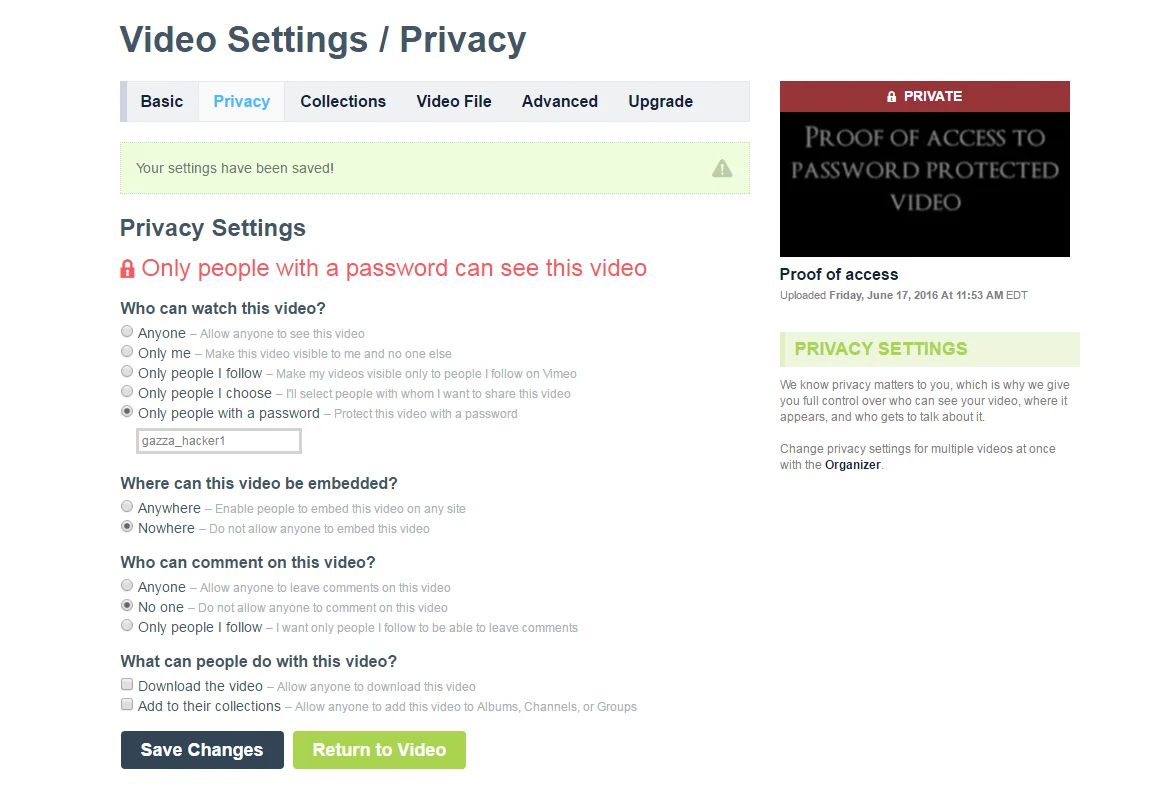
For proof using my own video: https://vimeo.com/171116158 which has the password gazza_hacker1 (as shown in the screenshot) - all testing was done in a separate browser to avoid already being authenticated
Metadata page: https://vimeo.com/api/atv/clip/171116158/
<key>title</key> <string>Proof of access</string> <key>subtitle</key> <string>by aaaa aaaa</string> ... <key>summary</key> <string> Viewing metadata and subsequently downloading of this video without entering password proves that this is a vulnerability </string>
In order to download the video, the play xml file with signature is used:
<key>event-handlers</key> <dict> <key>action</key> <string>load-url</string> <key>parameters</key> <dict> <key>url</key> <string> https://vimeo.com/api/atv/clip/171116158/play?signature=4537ede998fa162e9d9ea1c7c9dcfd88ac3092df×tamp=1466180664 </string>
Which when visited, contains the URL where the file can be downloaded:
<key>media-url</key> <string> https://vimeo-prod-src-std-eu.storage.googleapis.com/videos/550779256?GoogleAccessId=GOOGHOVZWCHVINHSLPGA&Expires=1466184013&Signature=5RHxaH9oQogEKeUQ3NaDtVU%2FBNU%3D </string>
P.S: The above link may have expired by the time this report is viewed; replicating the steps starting from https://vimeo.com/api/atv/clip/171116158/ will allow it to be downloaded. In addition, depending on the browser, it may simply be named 550779256 when it is downloaded. It is in fact an mp4 file and if renamed such (or playback is attempted) you will see this is the same video.
Attachments
Not written yet. The AI write-up for this report has not been written yet. The Original tab links to the source.
How it worked
Root cause
Likely the API endpoint for Apple TV clients did not enforce the video's privacy settings or password protection before returning metadata and a signed playback URL.
Impact
An attacker could view metadata and download private or password-protected videos without authentication, bypassing the owner's privacy settings.
What the attacker needed
Knowledge of the video ID; no authentication required
How it was found
- Request the metadata endpoint for a video ID.
- Extract the signed play URL from the metadata.
- Visit the play URL to obtain the media download URL.
- Download the file and confirm it is the protected video.
Explained by bugbounty.wiki with AI from the original and checked against quotes from it; it can still be wrong. Read the original before relying on a detail.
Not written yet. The AI write-up for this report has not been written yet. The Original tab links to the source.
A video hosting site lets you mark videos as private or password-protected. A special API meant for TV apps did not check whether the person asking was allowed to see the video. So anyone who knew the video's ID could get its details and a download link without the password.
What is Access control?
A user can do something their role should not allow: reach an admin function, act on a feature they have not paid for, or skip a permission check. IDOR is the special case where the object belongs to someone else.

