Critical information disclosure on Wappalyzer.com
The administrative area of Wappalyzer.com was accessible without authentication by changing the case of the URL path (e.g., 'admin' to 'Admin'), exposing recent orders and allowing order status changes. An attacker could view private order information and potentially manipulate orders to obtain datasets for free.
 Published on nc-lp.com
24th Mar 2017 web scraping, full disclosure
The full write-up lives on its author's site
It belongs to its author, so we link to it rather than copy it. The other two tabs are our own rewrites, checked against it.
Context
Wappalyzer is a tool for identifying the technologies that power a website, available as browser extensions for Chrome and Firefox, with its source code published on GitHub. A few weeks before this research, Wappalyzer started selling its technology dataset and relaunched its site with a new design and new features. The assessment described here was carried out against Wappalyzer.com, and the issue was fixed before this write-up was published.
The researcher was already a regular visitor to the site through a side project.
Setup
The work was inspired by an article on SQL injection, XXE and file path traversal in Deutsche Telekom, whose theme was that reconnaissance never ends: vulnerabilities are often triggered by small details, perhaps on a test subdomain nobody maintains. The tools used were:
- SubBrute, to look for interesting subdomains.
- DirBuster, to enumerate paths and directories once subdomain discovery produced nothing.
No accounts, roles or special preconditions are described beyond running these tools against the live site.
Finding it
SubBrute found no interesting subdomains, so the researcher moved to DirBuster and let it run. After some time it surfaced something interesting: a directory that required authentication.
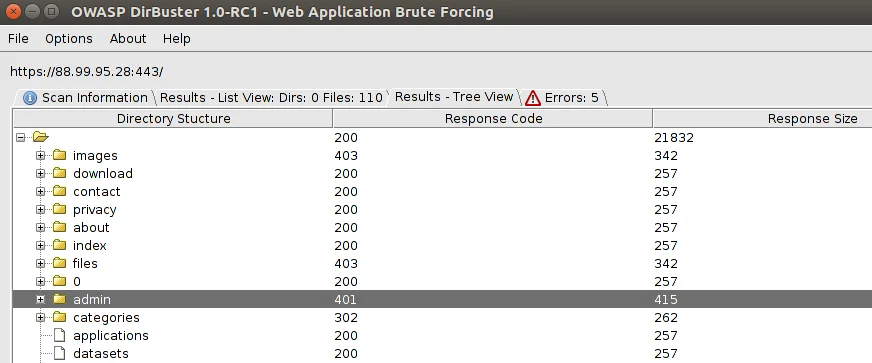
The first reaction was to consider brute forcing weak passwords on that login, but the directory scan was left running in case something else appeared. It did: a second path, differing from the first only in the case of its name. admin required authentication, but Admin did not.
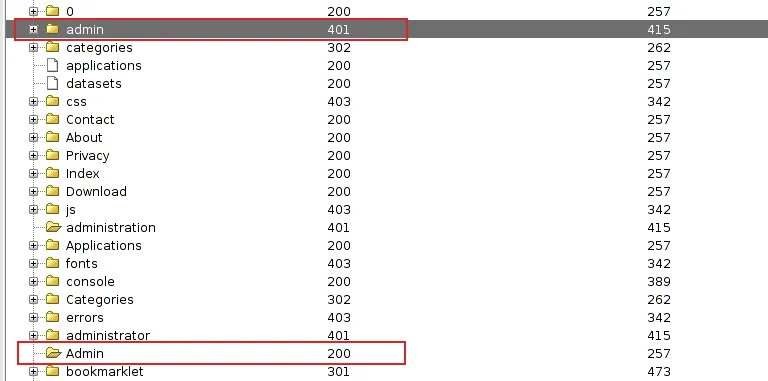
The protected path was enforced, the differently-cased variant was not, which suggested access to the administrative area.
Exploitation
Step 1: enumerate directories with DirBuster
After SubBrute returned nothing, DirBuster was run against the site. It identified a directory that prompted for authentication, and later a case variant of the same name that did not. The report does not give the exact paths, so the specific directory names are not reproduced here; the observable difference is that one spelling of the path was challenged and the other was served.
Step 2: open the unprotected case variant
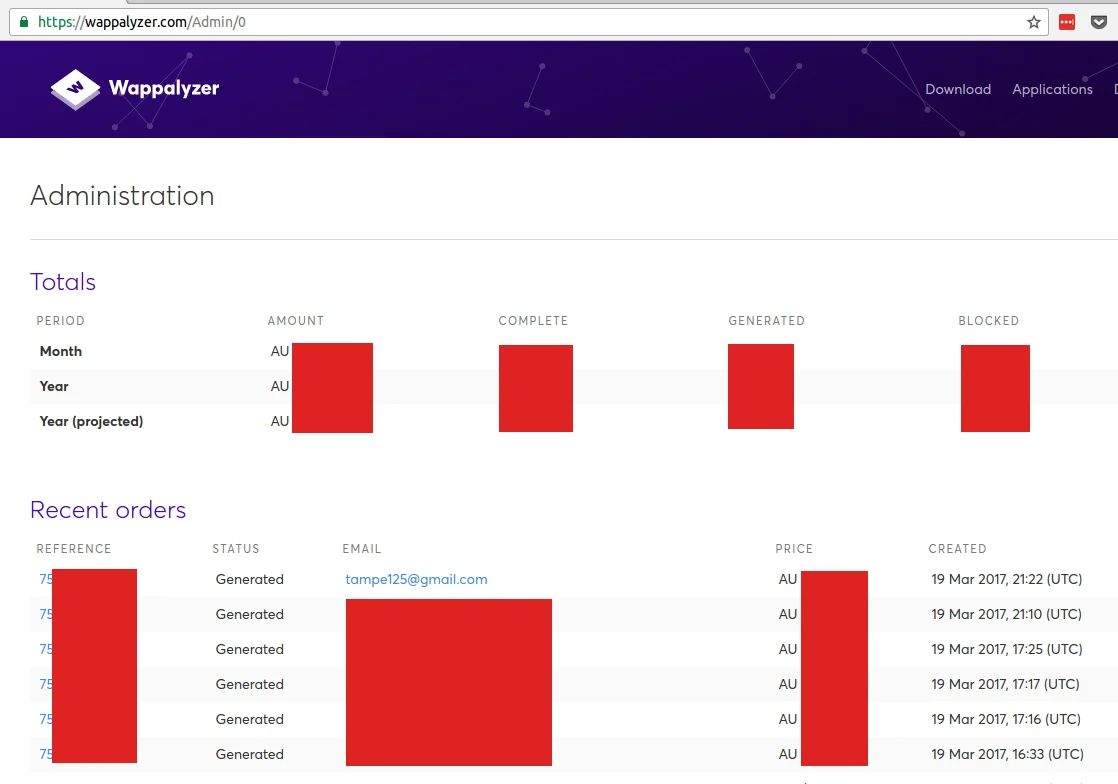
The differently-cased path led to the admin interface, which showed the most recent orders and their value. The interface exposed the most recent orders and their value. In the published screenshot the data is heavily redacted; the only visible email address is the researcher's own, used to run tests.
Step 3: reach order details by changing the case again
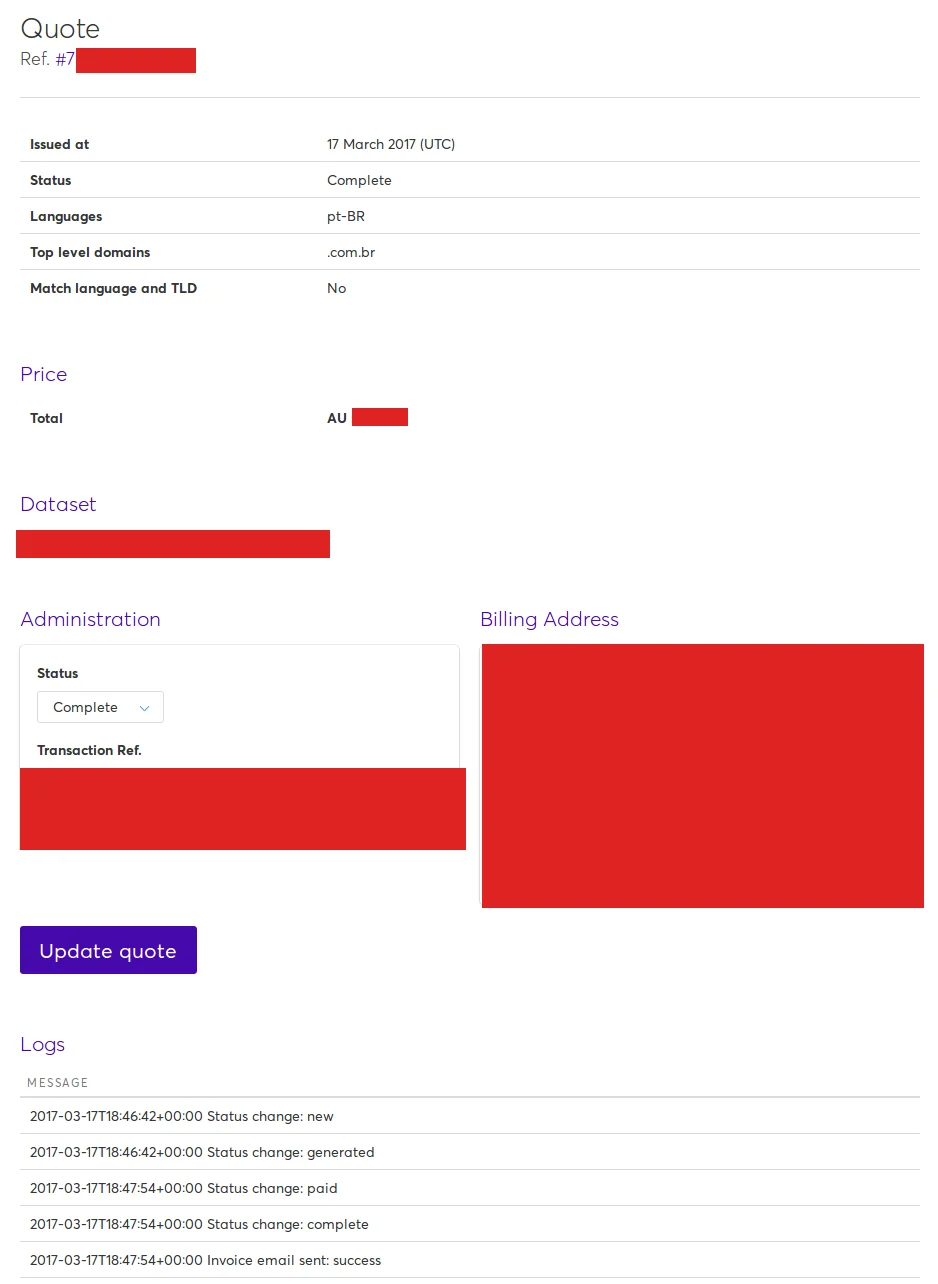
Links to individual order details were also protected, but the same trick applied: switching the case of the folder in the URL gave access to the detail page. There, the status of an order could be changed.
Root cause
The report does not describe the server configuration or code behind the authentication check, so the precise mechanism is not stated. What the behaviour shows is that access control was applied to one exact spelling of the path and not to a case variant of it, both for the admin area and for the order-details folder. If the filesystem or routing layer is case-insensitive, both spellings can resolve to the same resource, so a check keyed on the literal path string may leave the resource reachable through the other spelling.
Impact
The exposed administrative area disclosed recent orders and their value, and allowed the status of an order to be changed. The researcher describes a plausible abuse scenario: request a quote for all the available datasets, change the status of that order to Complete, and then download everything free of charge. The researcher did not attempt this, since it could have had disruptive results, and presents it as a plausible scenario. The report does not quantify how many orders or customers were exposed.
Fix
Once access to the admin area and the disclosure of private information were confirmed, the researcher contacted the Wappalyzer owners, who fixed the issue within a couple of hours. The timeline given is:
2017-03-20    Initial report to Wappalyzer
2017-03-20    Fix by the vendor
2017-03-24    Full disclosure
Variants to test
A positive result is a response that serves the protected content instead of an authentication challenge or a redirect. 2. Case variants of nested folders: repeat the test on subpaths such as order or record detail folders, since protection may be applied at one level and not another. A positive result is a detail page rendering without authentication. A positive result is the same content served under a path the access rule did not match. 4. Compare every enumerated path against its variants: when DirBuster or a similar tool reports a protected directory, add its case variants to the wordlist for the next run, so the unprotected spelling is discovered automatically. 5. Check state-changing actions, not just reads: where an unprotected variant exposes an interface, look for actions such as status changes or order updates. A positive result is a form or endpoint that accepts the change without authentication.
What happened, in plain words
Wappalyzer is a small tool that tells you which technologies a website is built with: which web server, which programming framework, which analytics service and so on. It runs as an extension in Chrome and Firefox, and its source code is public on GitHub. A few weeks before this research, Wappalyzer started selling its large database of technology data, and relaunched its website with a new design and new features. Selling data means handling orders, and the site had an administrative area behind it.
The researcher already visited the site often for a side project. The work was inspired by an article about SQL injection, XXE and file path traversal in Deutsche Telekom, whose theme was that reconnaissance never ends: vulnerabilities are often triggered by small details, perhaps on a test subdomain that nobody maintains.
What follows is the story of how a differently-cased path appeared to lead into a private administrative area. The issue was fixed before this write-up was published.

The tools, and why they were used
Before touching anything, the researcher picked two tools:
- SubBrute, to look for interesting subdomains. A subdomain is the part of a web address before the main name: in
shop.example.com,shopis a subdomain ofexample.com. Companies often have many of them, and some are forgotten test systems. - DirBuster, to enumerate paths and directories once subdomain discovery produced nothing. A path (or directory) is the part of a web address after the domain: in
example.com/admin, the path is/admin. DirBuster tries a long list of common names against a site and reports which ones exist, a bit like walking down a corridor trying every door handle to see which doors are there.
No accounts, roles or special preconditions are described beyond running these tools against the live site.
Finding it
SubBrute found no interesting subdomains, so the researcher moved to DirBuster and let it run. After some time it surfaced something interesting: a directory that required authentication.
Authentication is the process of proving who you are, usually with a username and password. A directory that requires authentication shows a login prompt instead of its content. Seeing that prompt is useful information in itself: it tells you there is something behind it worth protecting.
The first reaction was to consider brute forcing weak passwords on that login. Brute forcing means trying many passwords automatically, one after another, hoping one is weak. But the researcher left the directory scan running in case something else appeared. It did: a second path, differing from the first only in the case of its name. admin required authentication, but Admin did not.
This is the key moment of the whole story, and it is worth slowing down. To a computer, admin and Admin are two different strings of characters, because a lowercase a and an uppercase A are different characters. To a person, they are obviously the same word. Many systems treat web addresses as case-sensitive, meaning the two spellings are different addresses; other systems, and often the underlying file storage, treat them as the same thing. When a protection rule is written against one exact spelling and the system underneath serves both spellings from the same place, you get a gap: the rule checks one door, but the corridor has two doors into the same room.
The protected path was enforced, the differently-cased variant was not, which suggested access to the administrative area.
Exploitation
Step 1: enumerate directories with DirBuster
After SubBrute returned nothing, DirBuster was run against the site. It identified a directory that prompted for authentication, and later a case variant of the same name that did not. The report does not give the exact paths, so the specific directory names are not reproduced here; the observable difference is that one spelling of the path was challenged and the other was served.
Why do this step at all? Because you cannot attack what you have not found. Enumeration is the map-making phase: you list what exists, then look at the list for anything that behaves inconsistently. The inconsistency here was not a missing door, it was two doors to the same room with only one of them locked.
Step 2: open the unprotected case variant
The differently-cased path led to the admin interface, which showed the most recent orders and their value. The interface exposed the most recent orders and their value. In the published screenshot the data is heavily redacted; the only visible email address is the researcher's own, used to run tests.
Redaction means covering or blurring sensitive parts of a screenshot before publishing it, so that real customers' data is not exposed a second time by the write-up itself. The image is heavily redacted, and the only visible email is the researcher's own, used to run tests.
Step 3: reach order details by changing the case again
Links to individual order details were also protected, but the same trick applied: switching the case of the folder in the URL gave access to the detail page. There, the status of an order could be changed.
A URL is simply a web address. A folder in a URL is one of the path segments between slashes, like the orders in example.com/orders/123. The detail page for a single order lives inside such a folder, and that folder had the same weakness as the admin area: one spelling was checked, another was not. In the detail page the status of an order could be changed.
Root cause
The report does not describe the server configuration or code behind the authentication check, so the precise mechanism is not stated. What the behaviour shows is that access control was applied to one exact spelling of the path and not to a case variant of it, both for the admin area and for the order-details folder. If the filesystem or routing layer is case-insensitive, both spellings can resolve to the same resource, so a check keyed on the literal path string may leave the resource reachable through the other spelling.
In everyday terms: imagine a building where the security guard has a list of room names to lock, written in lowercase. The building's signage ignores capitalisation, so a visitor who writes the room name with a capital letter is sent to the same room, but the guard does not recognise the name on the list and does not lock it. The room is the same; only the label the guard compares against differs.
Impact
The exposed administrative area disclosed recent orders and their value, and allowed the status of an order to be changed. The researcher describes a plausible abuse scenario: request a quote for all the available datasets, change the status of that order to Complete, and then download everything free of charge. The researcher did not attempt this, since it could have had disruptive results, and presents it as a plausible scenario. The report does not quantify how many orders or customers were exposed.
Fix
Once access to the admin area and the disclosure of private information were confirmed, the researcher contacted the Wappalyzer owners, who fixed the issue within a couple of hours. The timeline given is:
2017-03-20    Initial report to Wappalyzer
2017-03-20    Fix by the vendor
2017-03-24    Full disclosure
Line by line: on 20 March 2017 the researcher sent the initial report to Wappalyzer; the same day the vendor applied a fix; on 24 March 2017 the researcher published the full details. Full disclosure means publishing the technical details of a fixed vulnerability so that others can learn from it.
Variants to test
If you ever find yourself in a similar situation, these are follow-up checks worth trying. Each one is a small variation on the same idea: the protection rule and the system underneath may disagree about what a path is.
- Case variants of protected paths. For every authenticated or restricted directory found during enumeration, request the same path with different capitalisation (for example
admin,Admin,ADMIN). A positive result is a response that serves the protected content instead of an authentication challenge or a redirect. - Case variants of nested folders. Repeat the test on subpaths such as order or record detail folders, since protection may be applied at one level and not another. A positive result is a detail page rendering without authentication.
- Trailing characters and path normalisation. Try trailing slashes, double slashes and encoded characters on protected paths. A positive result is the same content served under a path the access rule did not match. Path normalisation is the process by which a server tidies up a messy address into a standard form; if the rule checks the messy form and the server serves the tidy one, the same gap appears.
- Compare every enumerated path against its variants. When DirBuster or a similar tool reports a protected directory, add its case variants to the wordlist for the next run, so the unprotected spelling is discovered automatically. A wordlist is simply the list of names the tool tries.
- Check state-changing actions, not just reads. Where an unprotected variant exposes an interface, look for actions such as status changes or order updates. A positive result is a form or endpoint that accepts the change without authentication. An endpoint is a specific address on a server that accepts a request and does something with it.
Glossary
- Authentication: the process of proving who you are, usually with a username and password, before a system lets you in.
- Access control: the rules that decide who is allowed to see or change what.
- Admin area: the private part of a website where its owners manage content, orders and settings.
- Brute forcing: trying many passwords or names automatically, one after another, hoping one works.
- Case-sensitive: treating uppercase and lowercase letters as different characters, so
adminandAdminare two different strings. - Case-insensitive: treating uppercase and lowercase letters as the same, so
adminandAdminpoint to the same thing. - Directory: a folder in a web address, one of the path segments between slashes.
- Endpoint: a specific address on a server that accepts a request and performs an action.
- Enumeration: systematically listing what exists on a system, such as paths or subdomains, by trying many candidate names.
- Full disclosure: publishing the technical details of a fixed vulnerability so others can learn from it.
- Path: the part of a web address after the domain, such as
/admininexample.com/admin. - Path normalisation: the process by which a server tidies a messy address (extra slashes, encoded characters) into a standard form before serving it.
- Reconnaissance: the information-gathering phase of security testing, before any attack is attempted.
- Redaction: covering or blurring sensitive parts of a screenshot or document before publishing it.
- Routing layer: the part of a web application that decides which code handles a given address.
- Subdomain: the part of a web address before the main domain, such as
shopinshop.example.com. - URL: a web address, the full string you type into a browser to reach a page.
- Wordlist: a list of candidate names that a tool such as DirBuster tries against a site.
- XXE: a class of vulnerability where a server is tricked into processing malicious XML input.
- File path traversal: a class of vulnerability where an attacker manipulates a file path to reach files outside the intended folder.

