403 Forbidden Bypass Leading to Admin Endpoint Access.
An admin API endpoint returned 403 Forbidden, but the server intermittently returned 200 OK after a fixed number of unauthorised requests, exposing admin data. An attacker could repeatedly request the endpoint until the authorisation check lapsed and then read admin-only information.
 Published on medium.com
Hi everyone! This is my very first write-up i recently decided to start giving back to the community, pardon me for any mistakes.
The full write-up lives on its author's site
It belongs to its author, so we link to it rather than copy it. The other two tabs are our own rewrites, checked against it.
Context
This is a write-up of a 403 Forbidden bypass on an administrative API endpoint. The target was a private bug bounty program, and the host in question was admin.redacted.com; the organisation is referred to as redacted.com for privacy. The endpoint of interest lived under a control panel path, https://admin.redacted.com/cpanel/view-credentials/. Accessing the host directly returned a 403 Forbidden response.
The weakness class recorded for the report is a 403 bypass leading to information disclosure. The page, once reached, revealed admin data.
Setup
The researcher was working against a private program and had already performed sub-domain enumeration, which surfaced several sub-subdomains. No accounts, roles or credentials are described in the report.
The tools used, in the order they appear:
- FFUF, configured in recursion mode, for content discovery.
byp4xx, a Python tool, andbypass-403, a bash tool, for 403 bypass attempts.- Manual tricks: URL capitalisation,
X-Forwarded-IP, and User-Agent changes. - Burp Suite's param-miner extension for hidden parameter discovery.
waybackurlsto pull historical URLs from the Wayback Machine, combined with grep.- Burp Repeater and the Burp request log for observing response behaviour.
No versions are given for any of these tools.
Finding it
A direct request to admin.redacted.com returned 403 Forbidden. That alone was enough to make the host interesting, so the researcher ran FFUF in recursion mode against it. After a while this surfaced some empty directories, including the control panel path:
https://admin.redacted.com/cpanel/view-credentials/
That path still returned 403 Forbidden.

Exploitation
Step 1: conventional 403 bypass attempts
The first round was standard bypass tooling and tricks. The researcher ran the Python tool byp4xx and the bash tool bypass-403, then tried URL capitalisation, the X-Forwarded-IP header, and changing the User-Agent. None of these worked. At that point the endpoint looked like a waste of time, but the decision was made to look for hidden parameters instead.
Step 2: hidden parameter discovery with param-miner
param-miner was run against the endpoint and within a few minutes it identified a parameter named userId. The researcher had no userId value to supply, so the parameter alone was not immediately useful.
Step 3: harvesting userId values from the Wayback Machine
waybackurls was used to retrieve all URLs for admin.redacted.com from the Wayback Machine. There were too many URLs to check by hand, so the output was grepped for ?userId=. This turned up URLs that leaked userId values.
Step 4: POST with userId in the body
With a value in hand, a POST request was constructed sending the userId in the body. The response was 404. The report does not reproduce the exact request.
Step 5: switching to GET
The request method was changed to GET and the parameter was sent as a GET request. The response was still 403 Forbidden.
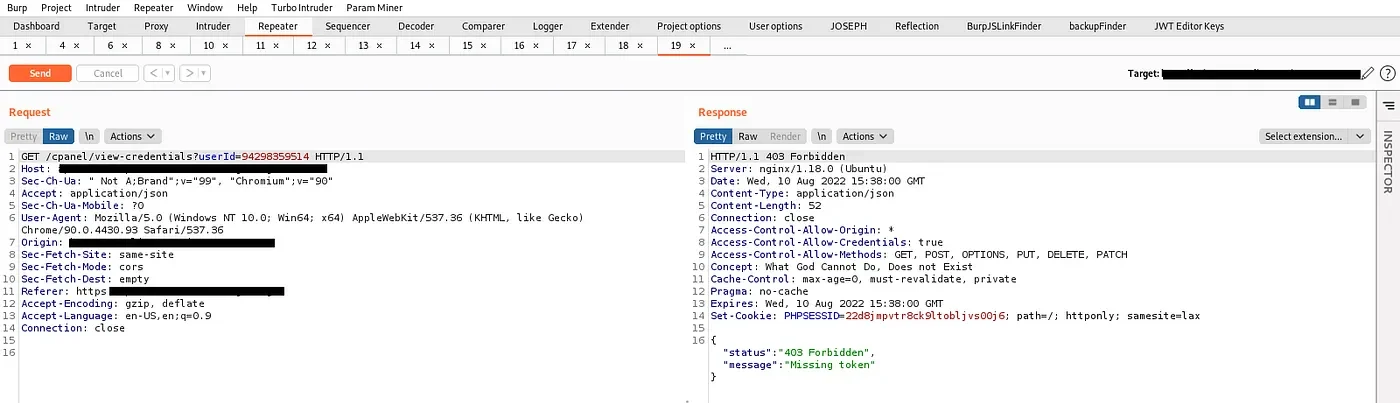
Step 6: the accidental 200 OK
While sending requests from the Repeater tab and watching how the API responded, a GET request to the same endpoint returned 200 OK. Re-sending the same GET request to understand why returned 403 Forbidden again.
Step 7: reading the request log
The Burp request log was reviewed carefully, and nothing in the individual requests explained the 200 OK. It took a few hours to work out the pattern: after every 12 unauthorised requests that result in 403 Forbidden, the next 4 requests return 200 OK, thereby bypassing the authorisation check.
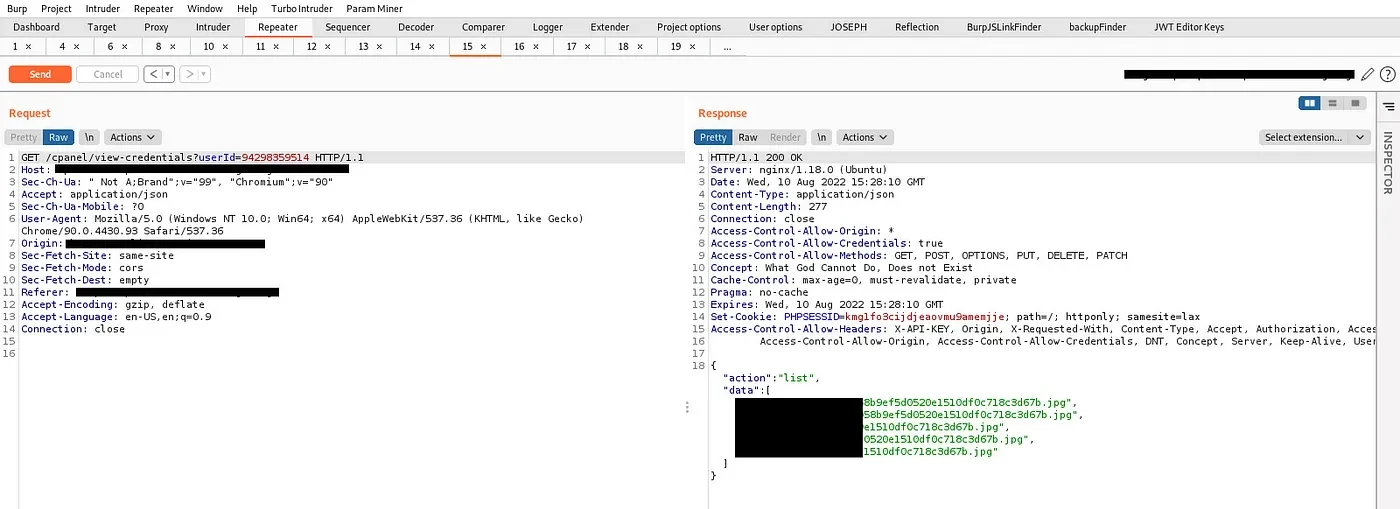
In other words, the bypass did not depend on a crafted header, a parameter value or a method change. It depended on request volume and timing: a repeating cycle of 12 forbidden responses followed by 4 successful ones. The report does not explain the mechanism behind the cycle.
Root cause
The report does not state a root cause in the code. What it establishes is the observable behaviour: the authorisation decision for this endpoint is not applied consistently, and a fixed pattern of 12 failures followed by 4 successes lets an unauthenticated client reach the page. Whether that comes from a rate limiter, a cache, a load-balanced backend with inconsistent configuration, or a stateful counter is not said. Any of those would be consistent with the observed cycle, but the report does not identify which.
The conventional defences did not help here because the bypass was not a matter of spoofing the source of the request. Header tricks, path case changes and User-Agent changes all failed, and so did the two dedicated bypass tools. The weakness only appeared across a sequence of requests, which is why a single request in Repeater looked random until the log was read as a whole.
Impact
The endpoint reached through the bypass was https://admin.redacted.com/cpanel/view-credentials/, and the report states that the page revealed admin data. The researcher describes the issue as an authorisation bypass on an API endpoint, letting the page reveal admin data that should have been forbidden.
The report does not enumerate which credentials or records were exposed, nor how many. The practical condition for exploitation is simply the ability to send a sustained sequence of requests to the endpoint, since the bypass emerges from the 12-then-4 pattern rather than from any single crafted request.
The issue was accepted as P2, High Severity, and rewarded 1800 USD.
Fix
The report says only that the issue was fixed within a week of submission.
Variants to test
- Send a long sequence of identical requests to a forbidden endpoint and log the status codes. A positive result is a repeating pattern of 403s interrupted by 200s, as seen here.
- Repeat the sequence against sibling paths under the same host, such as other directories found by recursive fuzzing. A positive result is the same cycle appearing on a path that returns 403 in isolation.
- Repeat the sequence with different methods (GET, POST) and with the discovered parameter in the body versus the query string. A positive result is a 200 carrying data rather than an error page.
- Run param-miner on forbidden endpoints to find parameters such as
userId, then harvest real values from archived URLs withwaybackurlsand grep. A positive result is a parameter value that changes the response when the authorisation check is skipped. - Test whether the cycle length changes with concurrency, with different source addresses, or across repeated sessions. A positive result is a stable, predictable window in which requests succeed, which makes the bypass scriptable.
What happened, in plain words
A security researcher found a web page that was supposed to be off limits. When anyone tried to open it, the server answered "403 Forbidden", which is the web's way of saying "you are not allowed in here". The researcher tried many standard tricks to get past that wall and none of them worked. Then, by accident, one request got through and the page loaded. After a few hours of staring at the log of every request that had been sent, the pattern became clear: after every 12 requests that were refused, the next 4 requests were allowed. Nothing about the individual request had changed. The server was simply letting people in on a repeating cycle. The page that opened showed administrative data, the issue was accepted as P2, High Severity, and the researcher was paid 1800 USD.
This article walks through that story from the beginning, explaining each idea as it comes up, so you can follow it even if you have never done security testing before.
Some words you will meet straight away
Before the story starts, a few everyday ideas need explaining, because the whole report leans on them.
A server and a browser. When you type an address into your browser, the browser sends a request across the internet to a computer called a server, and the server sends back a response. The response has a number attached to it, called a status code, that summarises what happened. You have probably seen 404 when a page does not exist. The codes that matter here are:
200 OK: the request succeeded and here is the content.403 Forbidden: the server understood the request but refuses to authorise it. You are not allowed.404 Not Found: there is nothing at that address.
An API. Think of a restaurant. The dining room is the website you see in a browser, with menus and pictures. The kitchen is the database and the business logic behind it. The API is the waiter: a fixed set of addresses that take an order and bring back data, without any decoration. APIs often return raw data rather than pretty pages, and they are frequently the place where access rules matter most, because the data behind them is the real thing.
A sub-domain. A domain is the name of a site, like example.com. A sub-domain puts a word in front of it, like admin.example.com or shop.example.com, and usually points at a different server or a different part of the same organisation. Finding sub-domains is a common first step in testing, because organisations often forget about the less obvious ones.
A parameter. When a web address contains a question mark followed by name=value, that is a parameter. In https://shop.example.com/order?orderId=42, the parameter is called orderId and its value is 42. Parameters are how you tell an API which specific record you want. A hidden parameter is one the site accepts but never advertises in its links or documentation.
A header. Every request carries small pieces of extra information called headers, alongside the address. Your browser sends headers describing itself, for example which browser and version it is. Servers use headers to make decisions, and testers sometimes add or change headers to see whether a server trusts them too much.
A token or identifier. Many systems identify a record, or a person, with a long unique string, like a ticket number. If you have the right ticket, you get the right data. If a ticket leaks into a public place, anyone who finds it can try to use it. The userId in this story is exactly that kind of identifier.
Fuzzing. Fuzzing means sending lots of automated requests with slightly different addresses or values, to discover things the site does not link to. It is like trying every door in a long corridor instead of only the ones with signs.
A bug bounty program. An organisation invites outside researchers to test its systems and pays for genuine problems found, under agreed rules. A private program means only invited researchers may take part. This report comes from one.
The target
The researcher was working on a private bug bounty program. After searching for sub-domains, several sub-subdomains turned up, and one of them stood out: admin.redacted.com. The real organisation name has been replaced with redacted.com to protect privacy, and the same substitution is used throughout.
Opening that host directly returned 403 Forbidden. That refusal is itself interesting. A page that says "you are not allowed" is a page that exists and is guarding something, so it is worth a closer look.
Finding the control panel path
To see what else lived on the host, the researcher ran a tool called FFUF in recursion mode. FFUF takes a list of common names and requests each one against the target, reporting which ones exist. Recursion mode means that whenever it finds a directory, it starts fuzzing inside that directory too, like opening a door and then trying every door in the room behind it.
After a while this turned up some empty directories, and among them a control panel path:
https://admin.redacted.com/cpanel/view-credentials/
Read that address from left to right. admin.redacted.com is the host. cpanel suggests a control panel, the administrative area of a system. view-credentials suggests a page that displays stored credentials. The trailing slash marks it as a directory rather than a single file.
That path still returned 403 Forbidden. So the researcher now had a specific address that was clearly sensitive and clearly locked.
Trying the usual ways past a 403
The first round of attempts used well known techniques. Each one rests on a different assumption about how a server might be making its decision, which is why testers try them in a batch.
- Two dedicated tools were run:
byp4xx, written in Python, andbypass-403, written in bash. These automate a long list of known tricks. - URL capitalisation: changing the case of letters in the path, for example
CPanelinstead ofcpanel. Some servers match paths case-insensitively for one rule and case-sensitively for another, so the two rules can disagree. - The
X-Forwarded-IPheader: a header that claims the request came from a particular address. If a server trusts it and believes the request comes from an internal, trusted address, it may allow it through. - Changing the User-Agent: the header that says which browser is asking. Some servers treat known browsers differently from unknown tools.
None of these worked. At that point the endpoint looked like a waste of time, but the researcher decided to look for hidden parameters instead. That is a different question: not "can I pretend to be someone else?" but "is the server waiting for an input I have not supplied?".
Finding a hidden parameter
A tool called param-miner, an extension for the Burp Suite testing proxy, was run against the endpoint. Burp Suite sits between the browser and the server and lets a tester read and edit every request and response. param-miner tries large lists of parameter names against a page and watches for any change in the response, which reveals parameters the site accepts but never mentions.
Within a few minutes it identified a parameter named userId. That was a lead, but an incomplete one: the researcher had no userId value to supply. Knowing the name of the field is like knowing a form asks for a membership number when you do not have a membership.
Harvesting userId values from old URLs
To find real values, the researcher used waybackurls. The Wayback Machine is a public archive that has been saving copies of web pages for years. waybackurls asks that archive for every address it has ever recorded for a given host and prints them out.
The output for admin.redacted.com was far too long to read by hand, so it was filtered with grep, a command line tool that prints only the lines matching a pattern. The pattern was ?userId=, which matches any archived address that carried a userId parameter. This turned up URLs that leaked userId values.
Sending the value as a POST
With a value in hand, the researcher built a POST request with the userId in the body. POST is the method used when you are submitting data rather than just asking for a page; the body is the part of the request that carries that data, as opposed to the address itself.
The response was 404 Not Found. The report does not reproduce the exact request, so the precise shape of it is not recorded here.
Switching to GET
The method was then changed to GET, with the parameter sent in the address instead of the body. GET is the method your browser uses every time you open a page or click a link; the data travels in the address, in the part after the question mark.
The response was still 403 Forbidden.
The accidental success
At this point the researcher was ready to give up. While casually sending requests from Burp's Repeater tab, which lets you send one request over and over and watch each response, a GET request to the same endpoint came back 200 OK. The page loaded.
Re-sending the same GET request, to work out why, returned 403 Forbidden again. That is the strange part: the identical request produced two different answers. If a single request can succeed and then fail with nothing changed, the cause is not in the request at all. It is in the server, or in something between the researcher and the server, and it depends on what happened before.
Reading the log
The Burp request log records every request and response that passes through the proxy. The researcher went through it carefully and could find nothing in any individual request that explained the 200 OK. It took a few hours to spot the pattern: after every 12 unauthorised requests that result in 403 Forbidden, the next 4 requests return 200 OK, thereby bypassing the authorisation check.
So the bypass had nothing to do with a crafted header, a parameter value or a method change. It depended on how many requests had been sent and in what order. Twelve refusals, then four successes, repeating. The report does not explain the mechanism behind the cycle.
Why it worked
The report does not state a root cause in the code. What it establishes is the observable behaviour: the authorisation decision for this endpoint is not applied consistently, and a fixed pattern of 12 failures followed by 4 successes lets an unauthenticated client reach the page. Whether that comes from a rate limiter, a cache, a load-balanced backend with inconsistent configuration, or a stateful counter is not said. Any of those would be consistent with the observed cycle, but the report does not identify which.
The conventional tricks failed because the bypass was never about pretending to be someone else. Spoofing headers, changing letter case and changing the browser identity all failed, and so did the two dedicated bypass tools. The weakness only appeared across a sequence of requests, which is why a single request in Repeater looked random until the log was read as a whole.
What it exposed
The endpoint reached through the bypass was https://admin.redacted.com/cpanel/view-credentials/, and the report states that the page revealed admin data. In other words, the page revealed administrative content that should have been forbidden.
The report does not enumerate which credentials or records were exposed, nor how many. The practical condition for exploitation is simply the ability to send a sustained sequence of requests to the endpoint, since the bypass emerges from the 12-then-4 pattern rather than from any single crafted request.
The issue was accepted as P2, High Severity, and rewarded 1800 USD.
The fix
The report says only that the issue was fixed within a week of submission.
How you could look for the same thing
- Send a long sequence of identical requests to a forbidden endpoint and log the status codes. A positive result is a repeating pattern of 403s interrupted by 200s, as seen here.
- Repeat the sequence against sibling paths under the same host, such as other directories found by recursive fuzzing. A positive result is the same cycle appearing on a path that returns 403 in isolation.
- Repeat the sequence with different methods (GET, POST) and with the discovered parameter in the body versus the query string. A positive result is a 200 carrying data rather than an error page.
- Run param-miner on forbidden endpoints to find parameters such as
userId, then harvest real values from archived URLs withwaybackurlsand grep. A positive result is a parameter value that changes the response when the authorisation check is skipped. - Test whether the cycle length changes with concurrency, with different source addresses, or across repeated sessions. A positive result is a stable, predictable window in which requests succeed, which makes the bypass scriptable.
Glossary
- 200 OK: the status code a server returns when a request succeeds and the content is being sent.
- 403 Forbidden: the status code a server returns when it understands the request but refuses to authorise it.
- 404 Not Found: the status code a server returns when there is nothing at the requested address.
- API: a fixed set of addresses that a program uses to request data or actions from a server, usually returning raw data rather than a web page.
- Authorisation: the decision about whether a given request is allowed to do what it is asking. Distinct from authentication, which is about who you are.
- Bug bounty program: an arrangement where an organisation invites outside researchers to test its systems and pays for genuine problems found. A private program is invitation only.
- Burp Suite: a testing proxy that sits between a browser and a server so every request and response can be read and edited. Repeater is the part that resends one request on demand; the request log records everything that passed through.
- byp4xx: a Python tool that automates known techniques for getting past 403 responses.
- bypass-403: a bash tool that automates known techniques for getting past 403 responses.
- Control panel: the administrative area of a system, where settings and stored data are managed.
- FFUF: a content discovery tool that requests many candidate names against a target and reports which exist. Recursion mode makes it fuzz inside every directory it finds.
- Fuzzing: sending many automated requests with varied inputs to discover things a site does not link to.
- GET: the request method used to ask for a page or data, with any parameters carried in the address.
- grep: a command line tool that prints only the lines of its input matching a given pattern.
- Header: a small piece of extra information sent alongside a request or response, such as the browser identity or a claimed source address.
- Information disclosure: a weakness where data that should be private becomes readable by someone who should not have it.
- Load balancing: spreading incoming requests across several backend servers, which can lead to inconsistent behaviour if they are configured differently.
- Parameter: a
name=valuepair in an address or request body that tells the server which record or option is wanted. - param-miner: a Burp Suite extension that tries many parameter names against a page and watches for changes in the response, revealing hidden parameters.
- POST: the request method used to submit data, with the data carried in the request body rather than the address.
- Rate limiter: a control that restricts how many requests may be made in a period of time.
- Status code: the number in a response summarising the outcome, such as 200, 403 or 404.
- Sub-domain: a name placed in front of a domain, like
admin.example.com, usually pointing at a separate server or service. - Token or identifier: a unique string used to refer to a record or a person, which grants access to that record if you know it.
- User-Agent: the header that states which browser or tool is making the request.
- userId: the parameter name found on the endpoint, whose value identifies a user.
- waybackurls: a tool that retrieves every address the Wayback Machine has archived for a host.
- Wayback Machine: a public archive that has saved copies of web pages over many years.
- X-Forwarded-IP: a header that claims the request originated from a particular address, sometimes trusted by servers that sit behind a proxy.

