500$ Bug: Sensitive Data Exposure to Broken Access Control leads, How I able to take over any account of India’s Biggest College Ever.👨💻
The forgot-password endpoint disclosed the registered mobile number for any admission number, and the OTP verification only checked the phone number on the client side, so an attacker could reset any user's password by substituting their own number.
 Published on gowtham-naidu.medium.com
GowthamNaidu
The full write-up lives on its author's site
It belongs to its author, so we link to it rather than copy it. The other two tabs are our own rewrites, checked against it.
Context
The target was a college in India with two domains. The researcher calls the first one example.com, where students sit exams and check results; it has few functionalities. The second, target.com, is the main domain, with the payment system, student ID creation, the whole student dataset including credit cards, and much more. The researcher deliberately does not name the college.
The vulnerability chain sits in the Forgot Password flow of example.com. What it actually did was disclose the registered mobile number for any admission number supplied, and then let the client decide which number the OTP went to.
Setup
No special tooling is described beyond a browser and the usual proxy workflow: the researcher browsed the site, read JavaScript files, captured requests and inspected responses. The precondition is an admission number for a student, which the first flaw turns into that student's registered mobile number. The researcher had no credentials for target.com and could not log in there, which is why the work started on example.com instead.
Finding it
Because target.com could not be reached without credentials, the researcher moved to example.com and started looking through JavaScript files, capturing requests and reading their responses. In the Forgot Password flow one response stood out: after supplying his own admission number, the response disclosed the Registered Mobile Number.
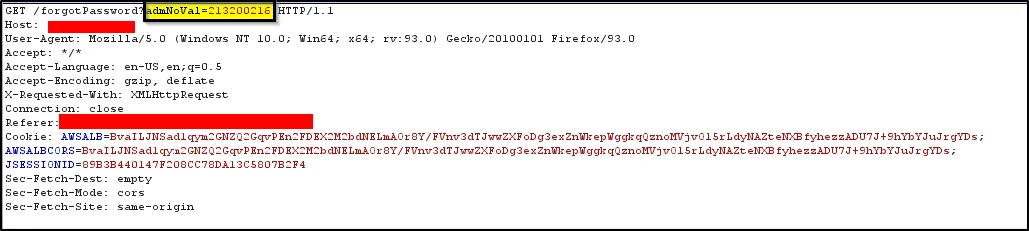
The significance is that the lookup is not scoped to the caller. Supplying another user's admission number returns that user's mobile number just as readily. The site then asks for the mobile number to send the password reset OTP to.

Exploitation
Step 1: harvest a registered mobile number
Submit any admission number to the Forgot Password request. The response contains the registered mobile number belonging to that admission number. This is the sensitive data exposure half of the chain, and it needs no authentication.
Step 2: probe the phone number validation
Enter a number other than the registered one. The site responds with a message asking for the registered number. That message is the tell: the check is happening in the browser, so the server is not the one enforcing it.
Step 3: satisfy the client-side check, then swap the number
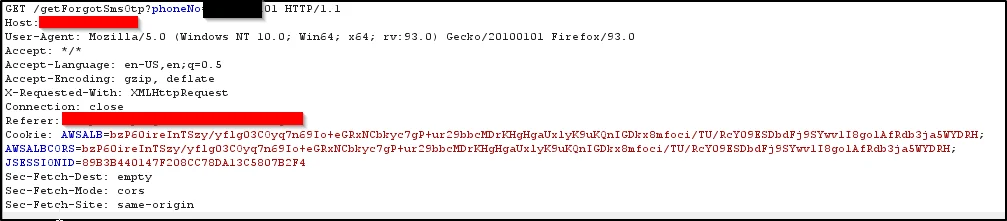
Enter the registered mobile number obtained in step 1, which passes the client-side validation. With the check satisfied, change the phone number field to the attacker's own number so the OTP is delivered there instead of to the registered mobile number.
Step 4: take over the account
The OTP arrives at the attacker's phone. Enter it, and the password of the victim can be reset without knowing anything about them. The researcher notes this allows takeover of anyone on the second domain.

Root cause
The chain is two mistakes that compound.
-
Excessive data exposure in the reset lookup. The Forgot Password endpoint returns the registered mobile number for whatever admission number is supplied, with no check that the requester owns that account. That is the information disclosure.
-
Broken access control on the OTP destination. The phone number that receives the OTP is taken from the client and only validated in the browser. The server accepts a number that does not belong to the account being reset, so the OTP is sent to an attacker-controlled destination. The client-side message asking for the registered number is cosmetic; it stops nothing once the request is edited.
Likely, the server trusted the submitted phone number as the delivery address for the reset token rather than deriving it from the account record identified by the admission number. The two flaws together mean the attacker does not even need to guess: the first hands over the value needed to pass the check, and the second lets the attacker redirect the OTP.
Impact
An unauthenticated attacker who knows or can obtain an admission number can read the registered mobile number behind it, then reset that account's password and take it over. The researcher states this leads to account takeover of anyone on the second domain, which holds payment functionality, student ID creation and student data including credit cards. The researcher describes doing this within about three minutes.
The report does not describe any rate limiting, logging or detection encountered along the way, and does not state how admission numbers are formatted or how easily they can be enumerated.
Fix
The report does not say what the administrator changed. Based on the two flaws, the fixes would be:
- Stop returning the registered mobile number from the Forgot Password lookup. At most, confirm that a reset was initiated, and mask any number shown to the account owner only.
- Derive the OTP destination server-side from the account record identified by the admission number. Never accept the delivery number from the client, and never rely on client-side validation for it.
Variants to test
- Reset lookup enumeration. Submit admission numbers, roll numbers, employee IDs or email addresses to the Forgot Password endpoint and compare responses. A positive result is any response that differs per identifier or leaks a phone number, masked or not.
- Client-side-only validation. Enter a value the UI rejects and then edit the request to send it anyway. A positive result is the server accepting the value and acting on it.
- OTP destination tampering. Where a phone number or email is submitted alongside the account identifier, swap it for one you control. A positive result is the OTP arriving at your destination while the account identifier still points at the victim.
- OTP binding. Request an OTP for your own account, then use it against another account's reset session. A positive result is the OTP being accepted for the wrong account.
- Response body inspection. Read the full JSON or HTML of reset and profile endpoints rather than the rendered page; fields the UI never shows are common. A positive result is any personal data returned for an identifier you do not own.
Final note
The researcher reported the bug to the domain administrator, was appreciated, and received a bounty of 500 USD. A follow-up post was planned on using these vulnerabilities to bypass the payment system and pay for every student at 1 USD.

What happened, in plain words
A security researcher found a way to take over any student account on a college website in India. The college had two websites. The first one, which the researcher calls example.com, is where students sit exams and check their results. The second one, target.com, is the main site: it handles payments, creates student ID cards, and stores all the student data, including credit card details. The researcher does not name the college.
The researcher could not log in to target.com because he had no username or password for it. So he started on example.com instead, opened the Forgot Password page, and watched the messages the site sent back and forth. Two mistakes in that page combined into a serious problem:
- When you typed in a student's admission number, the site's reply included that student's registered mobile number. Anyone could do this for any admission number, without logging in.
- When the site asked for the mobile number to send a one-time password (OTP) to, the check that the number belonged to the account happened only inside the browser. By editing the request, the researcher could make the OTP go to his own phone instead.
With those two mistakes together, he could reset the password of any student without knowing anything about them. He reported it, was thanked, and received a 500 USD bounty. He describes the whole thing as taking about three minutes.
The two websites, and why he started on the smaller one
A website like this is really a set of programs running on a server that your browser talks to. When you click a button, your browser sends a request (a message asking the server to do something) and the server sends back a response (the answer, often containing data).
The college had two domains. A domain is the name you type in the address bar, like example.com. The first domain, example.com, was used for exams and results and had few features. The second, target.com, was the main one: payment system, student ID creation, the whole student dataset including credit cards, and much more.
Most people start testing the biggest, most feature-rich site, and the researcher says he did the same. But he could not log in to target.com because he did not have credentials (a username and password). Without being logged in, most of that site is closed to you. So he switched to example.com, which he could reach, and began looking at the JavaScript files.
JavaScript is the programming language that runs inside your browser and makes pages interactive. Sites often ship large JavaScript files that contain the logic for forms, buttons and requests. Reading them, and watching the requests the page makes, is a common way to understand how a site works. That is what the researcher did: he read the JavaScript files, captured the requests the page sent, and inspected the responses that came back.
Finding the first flaw: the Forgot Password reply
A Forgot Password feature is the "I lost my password" button. Normally it works like this: you tell the site who you are (often with an email address, a username, or in this case an admission number), the site sends a code to a contact method it already has on file (here, a mobile number), and you type that code to prove it is really you. Only then can you set a new password.
An admission number is the identifier the college gives each student. It is not secret in the way a password is; it may be printed on documents or known to classmates. That matters later.
While looking at the Forgot Password flow, the researcher supplied his own admission number and looked at the response. The response contained the Registered Mobile Number for that admission number.
The screenshot shows the Forgot Password request and the response that comes back, with the registered mobile number visible in it.
The important part is not that his own number came back. It is that the lookup was not tied to who was asking. When he supplied another user's admission number, the site returned that user's mobile number just as readily. In security terms this is sensitive data exposure (also called information disclosure): the site hands out private data to someone who should not have it. No login was needed.
After showing the number, the site asked him to enter the mobile number so it could send the password reset OTP.
The screenshot shows the page asking for the mobile number to send the OTP to, after the admission number has been supplied.
An OTP (one-time password) is a short code, usually sent by SMS, that is valid once and for a short time. It is meant to prove that whoever is resetting the password also controls the phone registered to the account. The whole security of the reset rests on the OTP going to the right phone.
The second flaw: the OTP goes wherever the browser says
Next the researcher tested what happens if you enter a number that is not the registered one. The site showed a message asking for the registered number. That message is the clue. If the browser can decide the number is wrong before anything is sent to the server, then the check is happening in the browser, not on the server.
This is a classic mistake. Anything that happens only in your browser can be changed by you, because the browser is on your computer and you control it. A check that only exists in the browser is like a nightclub bouncer who checks your ticket, then lets you walk in and swap tickets with someone inside: the check looked real, but nothing behind it enforces anything. The server, the computer that actually sends the SMS and stores the accounts, has to do the checking.
So the researcher took the registered mobile number he had obtained for another user, entered it to satisfy the browser check, and then changed the phone number field to his own number. The site accepted it, and the OTP went to his phone instead of the victim's.
The screenshot shows the registered mobile number entered first, and then the phone number value changed to the researcher's own number.
This is broken access control: the server let the requester choose where the OTP was delivered, instead of deciding that itself from the account record. Access control means rules about who is allowed to do what. When those rules are missing or can be bypassed, that is broken access control.
Taking over the account
The OTP arrived on the researcher's phone. He entered it, and the site let him set a new password for the victim's account. He could now log in as that student. He notes this works for anyone on the second domain, target.com.
An account takeover is exactly what it sounds like: someone else gains control of your account, here by changing your password so you can no longer get in. The researcher says he could do this without knowing the victim at all, in about three minutes.
Why it worked, in two parts
The chain is two separate mistakes that make each other worse.
- The reset lookup gave away the mobile number. The Forgot Password endpoint returned the registered mobile number for whatever admission number was supplied, with no check that the requester owned that account. That is the information disclosure.
- The OTP destination was chosen by the browser. The phone number that receives the OTP came from the client (your browser) and was only validated in the browser. The server accepted a number that did not belong to the account being reset, so the OTP went to a phone the attacker controlled. The message asking for the registered number was cosmetic; once the request is edited, it stops nothing.
Most likely, the server trusted the submitted phone number as the delivery address for the reset code instead of looking it up from the account record identified by the admission number. Together, the two flaws mean the attacker does not even need to guess: the first hands over the value needed to pass the check, and the second lets the attacker redirect the OTP.
What an attacker could do with this
Someone who is not logged in, and who knows or can obtain an admission number, can read the registered mobile number behind it, then reset that account's password and take it over. The researcher states this leads to account takeover of anyone on the second domain, which holds payment functionality, student ID creation and student data including credit cards.
The report does not describe any rate limiting (a limit on how many requests you can make in a period), logging or detection encountered along the way. It also does not state how admission numbers are formatted or how easily they can be enumerated (tried one after another).
How it should be fixed
Based on the two flaws, the fixes would be:
- Stop returning the registered mobile number from the Forgot Password lookup. At most, confirm that a reset was initiated, and mask any number shown, and only to the account owner.
- Derive the OTP destination on the server from the account record identified by the admission number. Never accept the delivery number from the browser, and never rely on browser-side validation for it.
Similar things to look for
If you are learning, these are the same ideas in other shapes. You do not need special tools to try them; a browser and its developer tools are enough.
- Reset lookup enumeration. Submit admission numbers, roll numbers, employee IDs or email addresses to the Forgot Password endpoint and compare responses. A positive result is any response that differs per identifier or leaks a phone number, masked or not.
- Browser-only validation. Enter a value the page rejects, then edit the request to send it anyway. A positive result is the server accepting the value and acting on it.
- OTP destination tampering. Where a phone number or email is submitted alongside the account identifier, swap it for one you control. A positive result is the OTP arriving at your destination while the account identifier still points at the victim.
- OTP binding. Request an OTP for your own account, then use it against another account's reset session. A positive result is the OTP being accepted for the wrong account.
- Response body inspection. Read the full JSON or HTML of reset and profile endpoints rather than the rendered page; fields the page never shows are common. A positive result is any personal data returned for an identifier you do not own.
After the report
The researcher reported the bug to the domain administrator, was appreciated, and received a bounty of 500 USD. He planned a follow-up post about using these vulnerabilities to bypass the payment system and pay for every student at 1 USD.
Glossary
- Account takeover: when someone else gains control of your account, for example by changing your password so you cannot log in.
- Admission number: the identifier a college gives each student; not secret in the way a password is.
- API: a way for one program to talk to another; here, the requests your browser sends to the server and the responses it gets back.
- Broken access control: when the rules about who may do what are missing or can be bypassed, so someone can act on data or actions that are not theirs.
- Browser (client): the program on your computer that shows web pages and sends requests; anything it checks can be changed by you.
- Bounty: a reward paid by an organisation to someone who reports a security problem responsibly.
- Credentials: a username and password (or similar) used to log in.
- Domain: the name you type in the address bar, such as
example.com. - Endpoint: a specific address on a server that a request is sent to, such as the Forgot Password handler.
- Enumeration: trying identifiers one after another to see which ones exist or what they return.
- Forgot Password: the feature that lets you reset a lost password, usually by sending a code to a contact method on file.
- Information disclosure (sensitive data exposure): when a site hands out private data to someone who should not have it.
- JavaScript: the programming language that runs in your browser and makes pages interactive; its files often reveal how a site works.
- JSON: a common text format for data exchanged between a browser and a server.
- OTP (one-time password): a short code, usually sent by SMS, valid once and for a short time, used to prove you control a phone or email.
- Rate limiting: a limit on how many requests you can make in a period, used to slow down guessing and abuse.
- Request: a message your browser sends to a server asking it to do something.
- Response: the server's answer to a request, often containing data.
- Server: the computer that stores accounts and data and sends the SMS; checks must happen here to be real.
- Session: a short-lived record that the server keeps to remember who you are between requests.
- Token: a value used to prove identity or authorise an action, often short-lived and single-use.




