$500 for Cracking Invitation Code For Unauthorized Access & Account Takeover
A low-privileged user could brute-force the invitation key because it was a base64-encoded user ID plus a 7-character OTP with no rate limiting. An attacker could accept invitations meant for other users, potentially taking over higher-privileged accounts.
 Published on infosecwriteups.com
Hi everyone! Today, I’m excited to share a fascinating vulnerability I discovered in a platform we’ll call “ExampleSpark.” This particular security flaw allowed me to access and accept invitations meant for other users, leading to potential unauthorized access and account takeovers.
The full write-up lives on its author's site
It belongs to its author, so we link to it rather than copy it. The other two tabs are our own rewrites, checked against it.
Context
ExampleSpark is a pseudonym for a platform built for team management and project collaboration. It provides tools for managing users, projects and permissions. The feature at the centre of this write-up is the invitation flow: an administrator invites a user to the team, and the platform generates an invitation link that contains a base64-encoded token. That token carries the invited user's ID together with a 7-digit OTP (one-time password). Accepting the invitation is done through a GraphQL mutation called AcceptInvitation.
Normally only the invited user, holding the correct invitation key, should be able to accept the invitation. The researcher found that a low-privileged account could accept invitations meant for other users, which opens the door to unauthorised access and account takeover.
Setup
Two accounts on ExampleSpark were used:
- An admin account, to create the invitation.
- A low-level account with viewer permission, from which the attack was carried out.
The main tool was Burp Suite, with its Intruder module used to send the brute-force requests. A short Python script generated the payload list.
Finding it
The researcher describes the flaw as an authorisation bypass: a low-privileged user can access and accept invitations intended for other users. Two properties of the invitation design make this practical. The invitation key is a base64 encoding of userid:otpcode, and the OTP is only 7 alphanumeric characters. The report states there is no rate limiting on the AcceptInvitation operation, so the key space can be walked through with automated requests.
Exploitation
Step 1: Invite a user
- Log in to the admin account on ExampleSpark.
- Navigate to the team management section.
- Invite a user. This generates an invitation link containing a base64-encoded token with the user ID and a 7-digit OTP.
Step 2: Access from a low-level account
Log in to an account with viewer permission on ExampleSpark. This is the account that will perform the attack.
Step 3: Extract the user ID and OTP format
In the team management section, select the invited user. The user ID is visible in the URL:
https://app.examplespark.com/users/User:<user_id>
Step 4: Prepare the payload word list
The payload has the format userid:otpcode, for example:
018dee9c-a9be-04f8-0000-fb5b23eef4d2:39426NQ
A word list of all possible 7-digit alphanumeric combinations is generated, each combination is converted to base64, and the results form the payload list. The report provides this Python code for generating the payloads:
import randomimport base64def generate_otp(): # Generate a random 7-digit alphanumeric OTP characters = "[redacted]" otp = ''.join(random.choice(characters) for i in range(7)) return otpdef convert_to_base64(data): # Convert the data to base64 data_bytes = data.encode('utf-8') base64_encoded = base64.b64encode(data_bytes).decode('utf-8') return base64_encoded# Constant user IDuser_id = "018dee9c-a9be-04f8-0000-fb5b23eef4d2"# Number of OTPs to generate (updated to 1000)num_otps = 1000# Generate payloads and create a listpayload_list = []for _ in range(num_otps): otp = generate_otp() payload = f"{user_id}:{otp}" base64_payload = convert_to_base64(payload) payload_list.append(base64_payload)# Print the generated payloads and their base64 representationsfor i, payload in enumerate(payload_list, start=1): print(f"Payload {i}: {payload}")# You can now use the 'payload_list' for further processing.
The script builds the string user_id:otp for each generated OTP, base64-encodes it, and collects the results in payload_list. The OTP alphabet is [redacted], and the example run generates 1000 OTPs.
Step 5: Exploit the authorisation bypass
Burp Suite's Intruder is used to send a POST request to /graphql/frontend?n=AcceptInvitation with the payload list. The captured request is:
POST /graphql/frontend?n=AcceptInvitation HTTP/2Host: app.examplespark.comCookie: [session cookies]Content-Length: 616Sec-Ch-Ua: "Not A;Brand";v="99", "Chromium";v="100", "Google Chrome";v="100"Sec-Ch-Ua-Mobile: ?0User-Agent: Mozilla/5.0 (X11; Linux x86_64) AppleWebKit/537.36 (KHTML, like Gecko) Chrome/100.0.4896.127 Safari/537.36Content-Type: application/jsonAccept: */*X-Graphql-Operation: AcceptInvitationSec-Ch-Ua-Platform: "Linux"Origin: https://app.examplespark.comReferer: https://app.examplespark.com/invitations/[redacted]{"operationName":"AcceptInvitation","variables":{"invitation_key":"","name":"","password":""},"query":"mutation AcceptInvitation($invitation_key: String!, $name: String!, $password: String!) {\n accept_invitation(\n input: {invitation_key: $invitation_key, name: $name, password: $password}\n ) {\n account_id\n user {\n id\n status\n ...AuthUserLogin\n __typename\n }\n __typename\n }\n}\n\nfragment AuthUserLogin on User {\n id\n email\n display_name\n session_valid_until\n __typename\n}"}
The important parts:
- The operation is selected by the query string parameter
n=AcceptInvitationand mirrored in theX-Graphql-Operationheader. - The GraphQL mutation takes three variables:
invitation_key,nameandpassword. Theinvitation_keyis the value that will be replaced by each base64 payload. - The mutation returns
account_idand auserobject withid,status, and theAuthUserLoginfragment fields (id,email,display_name,session_valid_until).
In Intruder, the invitation_key parameter is selected as the injection point and the attack is started.
Step 6: Account takeover
Responses are monitored for a 200 OK status with code 1142, which indicates that the invitation was accepted successfully. Once the correct OTP is identified, the attacker can accept the invitation and gain unauthorised access, potentially escalating privileges depending on the role of the invited user.
Root cause
Base64 is an encoding, not a protection: anyone who can read the key can decode the user ID and the OTP format. The OTP space is small enough to enumerate, and the report states that the AcceptInvitation operation has no rate limiting, so the brute force is not slowed or blocked. The report describes the flaw as an authorisation bypass: a low-privileged viewer account can accept invitations intended for other users.
Impact
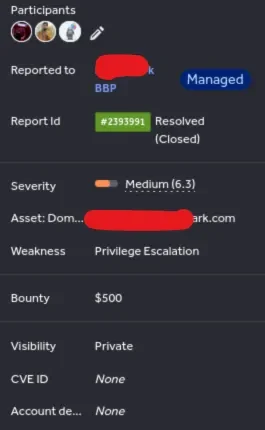
An attacker with a low-privileged account can bypass the authorisation mechanism, accept invitations intended for other users, and potentially take over higher-privileged accounts. The severity depends on the role of the invited user: the higher that role, the greater the privilege the attacker gains. The report says the bounty reflected the medium severity of the vulnerability.
Fix
ExampleSpark's security team acknowledged the severity and implemented a patch to secure the platform. The report does not describe the patch itself. The takeaway it gives is to secure invitation mechanisms, use strong encoding, and implement robust rate limiting to prevent brute-force attacks.
Variants to test

What happened, in plain words
A security researcher found a flaw in a team collaboration platform, which the write-up calls "ExampleSpark" (a made-up name used to keep the real company private). The flaw let someone with a very low level of permission on the platform accept invitations that were meant for other people. If you can accept an invitation that was meant for someone else, you may end up with access to that person's account, and if that person is an administrator, potentially with their powers. That is why this kind of bug is called an account takeover.
The researcher reported it, the company fixed it, and the researcher was paid a bounty of $500, which the report says reflected the medium severity of the vulnerability.
This article walks through the same steps the researcher took, but explains every idea from scratch. You only need to be comfortable using a browser and a computer to follow along.
The target, explained
ExampleSpark is a platform for managing teams and projects. It has users, projects and permissions. Permissions are the rules about what each person is allowed to do: an administrator can invite people and change settings, while a viewer can only look at things.
The feature at the centre of this story is the invitation flow. When an administrator wants to add someone to the team, they send an invitation. The platform creates an invitation link, and that link contains a long string of characters called a token. The token is the thing that proves "this invitation is for this person".
Two ideas are needed to understand the token:
- Base64 is a way of writing data using only letters, digits and a couple of symbols. It is not encryption and it is not a secret code. It is more like writing a phone number in a different font: anyone who knows the font can read it back. Base64 is used so that data can travel safely through systems that only expect text.
- OTP stands for one-time password. It is a short code, usually a handful of characters, that is valid for a single use. You have probably seen one when a website texts you a six-digit code to log in.
In ExampleSpark's case, the invitation token is a base64 encoding of two things joined by a colon: the invited user's ID and a 7-character OTP. The user ID is a long identifier that the platform uses to tell users apart. The OTP is the secret part that is supposed to stop anyone else from using the invitation.
Normally, only the invited person, holding the correct invitation key, should be able to accept the invitation. The researcher found that a low-privileged account could accept invitations meant for other users. That is an authorisation bypass: the platform checks who you are (authentication) but fails to check whether you are allowed to do this particular thing (authorisation). Think of a hotel where the front desk checks that you are a guest, but never checks that the room key you are holding belongs to your room.
Setting up
The researcher used two accounts on ExampleSpark:
- An administrator account, used to create the invitation.
- A low-level account with viewer permission, used to carry out the attack.
The main tool was Burp Suite, a program that sits between your browser and a website and lets you see and change the requests your browser sends. Its Intruder module sends the same request many times, each time with a different value in one chosen spot. That is exactly what a brute-force attack needs.
A brute-force attack means trying many possibilities one after another until one works. It is like guessing a combination lock by trying every combination, rather than by being clever. It only works when the number of possibilities is small enough, or when the system lets you try as fast as you like.
A short Python script generated the list of values to try. Python is a programming language; you do not need to write any yourself to follow this article, only to read what the script does.
Finding the flaw
The researcher describes the flaw as an authorisation bypass: a low-privileged user can access and accept invitations intended for other users. Two properties of the invitation design make this practical:
- The invitation key is a base64 encoding of
userid:otpcode. Because base64 is only an encoding, anyone who can read the key can decode the user ID and see the format of the OTP. - The OTP is only 7 alphanumeric characters. Alphanumeric means the digits 0 to 9 and the letters A to Z. Seven characters is a small enough space to walk through with automated requests.
On top of that, the report states there is no rate limiting on the AcceptInvitation operation. Rate limiting is a rule that says "you may only try this a few times per minute". Without it, a program can send thousands of guesses and nothing slows it down.
Exploitation, step by step
Step 1: Invite a user
- Log in to the administrator account on ExampleSpark.
- Go to the team management section.
- Invite a user. This generates an invitation link containing a base64-encoded token with the user ID and a 7-digit OTP.
Why this step: the researcher needs a real invitation to exist, so there is something to attack. The invitation is the target.
Step 2: Access from a low-level account
Log in to an account with viewer permission on ExampleSpark. This is the account that will perform the attack.
Why this step: the whole point is to show that a low-privileged user, not an administrator, can do this. If the attack only worked from an administrator account, it would not be a vulnerability worth reporting.
Step 3: Extract the user ID and OTP format
In the team management section, select the invited user. The user ID is visible in the URL:
https://app.examplespark.com/users/User:<user_id>
A URL is the address you see in your browser's address bar. Here the address contains the user ID after User:. The researcher copies that ID because it is one half of the invitation key. The other half, the OTP, is what has to be guessed.
Step 4: Prepare the payload word list
The payload has the format userid:otpcode, for example:
018dee9c-a9be-04f8-0000-fb5b23eef4d2:39426NQ
A payload here simply means the value that will be placed into the request. A word list is a file full of candidate values to try, one per line. The researcher generates a word list of all possible 7-character alphanumeric combinations, converts each one to base64, and uses the results as the payload list.
The report provides this Python code for generating the payloads:
import randomimport base64def generate_otp(): # Generate a random 7-digit alphanumeric OTP characters = "[redacted]" otp = ''.join(random.choice(characters) for i in range(7)) return otpdef convert_to_base64(data): # Convert the data to base64 data_bytes = data.encode('utf-8') base64_encoded = base64.b64encode(data_bytes).decode('utf-8') return base64_encoded# Constant user IDuser_id = "018dee9c-a9be-04f8-0000-fb5b23eef4d2"# Number of OTPs to generate (updated to 1000)num_otps = 1000# Generate payloads and create a listpayload_list = []for _ in range(num_otps): otp = generate_otp() payload = f"{user_id}:{otp}" base64_payload = convert_to_base64(payload) payload_list.append(base64_payload)# Print the generated payloads and their base64 representationsfor i, payload in enumerate(payload_list, start=1): print(f"Payload {i}: {payload}")# You can now use the 'payload_list' for further processing.
Line by line, in plain words:
import randomimport base64brings in two built-in toolkits.randompicks random characters;base64does the encoding. (In the report the lines are run together, but they are two separate imports.)def generate_otp():starts a small recipe called a function. A function is a named block of instructions you can reuse.characters = "[redacted]"lists the alphabet the OTP is drawn from: the ten digits and the 26 capital letters.otp = ''.join(random.choice(characters) for i in range(7))picks seven random characters from that alphabet and glues them into a string.range(7)means "do this seven times".return otphands the finished OTP back to whoever called the function.def convert_to_base64(data):starts a second function that turns any text into base64.data_bytes = data.encode('utf-8')turns the text into bytes, the raw form a computer works with. UTF-8 is a standard way of representing text as bytes.base64_encoded = base64.b64encode(data_bytes).decode('utf-8')does the actual base64 conversion and turns the result back into readable text.return base64_encodedhands the encoded text back.user_id = "018dee9c-a9be-04f8-0000-fb5b23eef4d2"stores the user ID copied in step 3. This is the fixed half of every payload.num_otps = 1000says how many guesses to generate in this run.payload_list = []creates an empty list to collect the results.for _ in range(num_otps):repeats the following block 1000 times.otp = generate_otp()makes one random OTP.payload = f"{user_id}:{otp}"joins the user ID and the OTP with a colon, exactly the format the platform expects.base64_payload = convert_to_base64(payload)encodes that joined string.payload_list.append(base64_payload)adds the encoded value to the list.- The final
forloop withprintshows each payload with a number, so the researcher can see what was generated.
Why this step: the platform expects the invitation key in base64, so the guesses must be in base64 too. The script builds the string user_id:otp for each generated OTP, base64-encodes it, and collects the results in payload_list. The OTP alphabet is [redacted], and the example run generates 1000 OTPs.
Step 5: Exploit the authorisation bypass
Burp Suite's Intruder is used to send a POST request to /graphql/frontend?n=AcceptInvitation with the payload list. The captured request is:
POST /graphql/frontend?n=AcceptInvitation HTTP/2Host: app.examplespark.comCookie: [session cookies]Content-Length: 616Sec-Ch-Ua: "Not A;Brand";v="99", "Chromium";v="100", "Google Chrome";v="100"Sec-Ch-Ua-Mobile: ?0User-Agent: Mozilla/5.0 (X11; Linux x86_64) AppleWebKit/537.36 (KHTML, like Gecko) Chrome/100.0.4896.127 Safari/537.36Content-Type: application/jsonAccept: */*X-Graphql-Operation: AcceptInvitationSec-Ch-Ua-Platform: "Linux"Origin: https://app.examplespark.comReferer: https://app.examplespark.com/invitations/[redacted]{"operationName":"AcceptInvitation","variables":{"invitation_key":"","name":"","password":""},"query":"mutation AcceptInvitation($invitation_key: String!, $name: String!, $password: String!) {\n accept_invitation(\n input: {invitation_key: $invitation_key, name: $name, password: $password}\n ) {\n account_id\n user {\n id\n status\n ...AuthUserLogin\n __typename\n }\n __typename\n }\n}\n\nfragment AuthUserLogin on User {\n id\n email\n display_name\n session_valid_until\n __typename\n}"}
Before reading the details, three words need explaining:
- An API is the part of a website that programs talk to, rather than people. When you click a button, your browser sends a request to the API behind the scenes. It is like a restaurant menu: you order by name, and the kitchen does the work without you going into the kitchen.
- GraphQL is a particular style of API. Instead of many separate addresses, there is usually one address, and the request says exactly which operation it wants and which fields it wants back. A mutation is a GraphQL operation that changes something, as opposed to a query that only reads.
- A cookie is a small piece of data your browser stores for a website and sends back with every request. A session cookie is the one that proves you are logged in. If someone steals it, they can act as you. In the request above it is shown as
[session cookies].
Now the important parts of the request:
- The operation is selected by the query string parameter
n=AcceptInvitationand mirrored in theX-Graphql-Operationheader. A header is a line of extra information attached to a request, like the label on a parcel. The query string is the part of the address after the?. - The GraphQL mutation takes three variables:
invitation_key,nameandpassword. Theinvitation_keyis the value that will be replaced by each base64 payload. In the captured request it is empty, because Intruder will fill it in. - The mutation returns
account_idand auserobject withid,status, and theAuthUserLoginfragment fields (id,email,display_name,session_valid_until). A fragment is a reusable list of fields; here it asks for the user's identity and how long their session stays valid.
In Intruder, the invitation_key parameter is selected as the injection point and the attack is started. The injection point is the one spot in the request that changes on each attempt. Everything else stays the same, so each request is identical except for the guessed key.
Why this step: the platform has no rate limiting on this operation, so the researcher can send guess after guess. Each guess is a complete, valid request that says "accept this invitation". The viewer account is not the invited user, yet the request is accepted.
Step 6: Account takeover
Responses are monitored for a 200 OK status with code 1142, which indicates that the invitation was accepted successfully. A status code is a three-digit number a server sends back to say how the request went; 200 means "fine". The code 1142 is the platform's own success marker inside the response body.
Once the correct OTP is identified, the attacker can accept the invitation and gain unauthorised access, potentially escalating privileges depending on the role of the invited user. Privilege escalation means moving from a low level of permission to a higher one. If the invitation was for an administrator, accepting it gives the attacker administrator powers.
Why it worked
The invitation key is a base64 encoding of userid:otpcode, and the OTP is only 7 alphanumeric characters. Base64 is an encoding, not a protection: anyone who can read the key can decode the user ID and the OTP format. The OTP space is small enough to enumerate, and the report states that the AcceptInvitation operation has no rate limiting, so the brute force is not slowed or blocked. The report describes the flaw as an authorisation bypass: a low-privileged viewer account can accept invitations intended for other users.
In everyday terms: the lock is real, but the key is written on the outside of the door, the number of possible keys is small, and nobody stops you trying them all night.
What it could have led to
An attacker with a low-privileged account can bypass the authorisation mechanism, accept invitations intended for other users, and potentially take over higher-privileged accounts. The severity depends on the role of the invited user: the higher that role, the greater the privilege the attacker gains. The report says the bounty reflected the medium severity of the vulnerability.
The fix
ExampleSpark's security team acknowledged the severity and implemented a patch to secure the platform. The report does not describe the patch itself. The takeaway it gives is to secure invitation mechanisms, use strong encoding, and implement robust rate limiting to prevent brute-force attacks.
Similar things to look for elsewhere
Glossary
- Account takeover: when an attacker gains control of someone else's account, usually by obtaining their credentials or session.
- Administrator: a user with the highest level of permission, able to invite people and change settings.
- Alphanumeric: made of the digits 0 to 9 and the letters A to Z.
- API: the part of a service that programs talk to, rather than people.
- Authentication: checking who you are, for example by logging in.
- Authorisation: checking whether you are allowed to do a particular thing.
- Authorisation bypass: a flaw where the permission check is missing or can be avoided, so someone can do something they should not.
- Base64: a way of writing data using letters, digits and a couple of symbols. It is an encoding, not encryption, and anyone can decode it.
- Brute-force attack: trying many possibilities one after another until one works.
- Bounty: a payment a company makes to a researcher who reports a security flaw responsibly.
- Burp Suite: a tool that sits between your browser and a website so you can see and change requests.
- Cookie: a small piece of data your browser stores for a website and sends back with each request.
- Fragment: in GraphQL, a reusable list of fields to request.
- GraphQL: a style of API where the request names the operation and the fields it wants back.
- Header: a line of extra information attached to a request or response.
- Injection point: the one spot in a request that changes on each attempt during an automated attack.
- Intruder: the part of Burp Suite that sends the same request many times with different values.
- Mutation: in GraphQL, an operation that changes something, as opposed to a query that only reads.
- OTP (one-time password): a short code valid for a single use.
- Payload: the value placed into a request during an attack.
- Permission: a rule about what a user is allowed to do.
- Privilege escalation: moving from a low level of permission to a higher one.
- Python: a programming language, used here to generate the list of guesses.
- Rate limiting: a rule that limits how many times something can be tried in a period of time.
- Session cookie: the cookie that proves you are logged in; if stolen, it lets someone act as you.
- Status code: a three-digit number a server sends back to say how a request went, such as
200for success. - Token: a string of characters that stands for something, such as an invitation or a login.
- URL: the address of a page or resource, as shown in the browser's address bar.
- UTF-8: a standard way of representing text as bytes.
- Viewer: a user with a low level of permission, able to look but not change things.
- Word list: a file of candidate values to try, one per line.


