Light Attack Surface Analysis
The updater service stored downloaded updates in a directory writable by standard users and only checked that the executable was signed by the vendor. An attacker could replace the update with a backdoored Electron application that retained the vendor's signature, leading to local privilege escalation to SYSTEM.
 Published on parsiya.net
A few months ago I found a way to subvert the update process of an Electron application to get local privilege escalation. The application stores the updater under a path where standard users have write access.
The full write-up lives on its author's site
It belongs to its author, so we link to it rather than copy it. The other two tabs are our own rewrites, checked against it.
Context
This is a local privilege escalation story about the automatic update mechanism of a Windows desktop application. The application ships an updater that runs as a Windows service, and the userland part of the application talks to that service over a named pipe. The service downloads update binaries and then executes them, which means the service runs with higher privileges than the user sitting in front of the machine.
The author frames the whole thing with a simple ladder of privilege levels:
- Remote attacker
- Local attacker running as a standard user
- Local admin/SYSTEM
Moving from one rung to the next is a privilege escalation. The note in the report is that domain-connected machines and their attack surfaces are deliberately ignored here.
The reason updates are interesting at all is that they usually need local admin (run elevated) or SYSTEM (run via a Windows service or scheduled task), because they modify files under the C:\Program Files directories, which standard users cannot write to. The target application is an Electron app, and its updater service is the component that ends up executing the downloaded file.
Setup
The work is done on Windows, with the following tools and preconditions:
- Process Monitor (procmon) to watch the update process and see where files are downloaded and executed, including call stacks per event.
- API Monitor, used to hook
WinVerifyTrustand inspect its arguments. - IDA, used for static analysis of the updater executable.
accesschkto check the permissions (DACL) of the download directory.- A Go client built with
github.com/microsoft/go-winioto talk to the named pipe. - A backdoored Electron application, published at
https://github.com/parsiya/evil-electron/, with the builtapp.asarathttps://github.com/parsiya/evil-electron/tree/master/release.
The precondition for the attack is a standard user account on the machine, plus the ability to send messages to the updater service over its named pipe.
Finding it
The author starts with a general survey of how update processes fail, then narrows down to this application.
The general attack surface
Two broad patterns are described.
Spoofing the server. If a remote attacker can spoof the update server and taint the update binary, they go from remote attacker to local or even SYSTEM. This is often out of scope for bounty programs with desktop applications, and TLS certificates usually prevent it, unless the certificate checks themselves can be messed with. The report cites the Nintendo 3DS signature verification bypass (https://hackerone.com/reports/894922), which lets an attacker sit between the console and the internet, and two follow-up reports that inject data into the console's transmissions to get remote code execution (https://hackerone.com/reports/897606 and https://hackerone.com/reports/895769).
A desktop example is Backblaze CVE-2020-8289 by Jason Geffner: the application disabled certificate checks if the URL contained specific strings such as api/clientversion.xml, so an attacker could MitM the connection and send a tainted update binary to be executed as SYSTEM.
The author's own undisclosed bug #1, reported on HackerOne on April 24th, 2020, was of this kind. A Java application used getdown to download its update over HTTP, so the connection could be MitM'd without any issues.
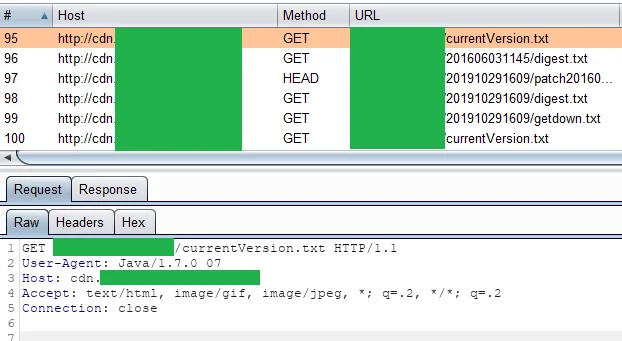
Before downloading the actual files, getdown downloads a file named digest.txt containing the hashes of the incoming update files. In this case the hash was MD5 (newer versions use SHA-256), but it did not matter, because the digest file was also downloaded over HTTP and could be replaced. The author built a fake Python HTTP server, created a digest and a backdoored jar (a Swing application that only displays a JFrame, at https://github.com/parsiya/EvilSwing).
Swapping the update file. Sometimes the update file is written to a path a standard user can write to and then executed, usually by a Windows service. The usual suspects are paths under %ProgramData% (usually C:\ProgramData), paths under %APPDATA%, and predictable paths under %TEMP%. Applications defend against this by checking the signature (sometimes the hash) of the binary, or by changing the DACL of the storage path. As an attacker you may be able to exploit a time-of-check to time-of-use (TOCTOU) race and replace the binary after the check but before execution.
Backblaze CVE-2020-8290, again by Jason Geffner, is the example: the updater, a Windows service, created %ProgramData%\Backblaze\bzdata\bzupdates if the path did not exist. The DACL of the directory did not give standard users write access, but the updater did not check whether the directory already existed and would store the updater there without changing its permissions. A local attacker could create the directory first, then replace the updater after download and before execution. Winning such races is often done with OpLocks, easily set with the SetOpLock utility from Google Project Zero's symboliclink-testing-tools suite by James Forshaw.
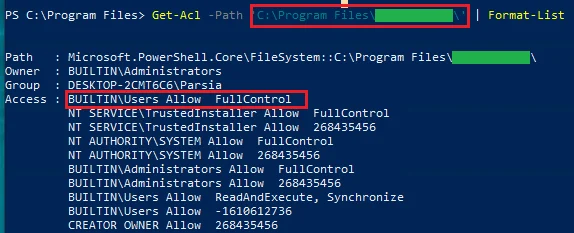
The author's undisclosed bug #2, reported on April 23rd, 2020, was in the same application as bug #1. The installer changed the DACL of the entire application directory under C:\Program Files\app\, and the new DACL gave write access to standard users.
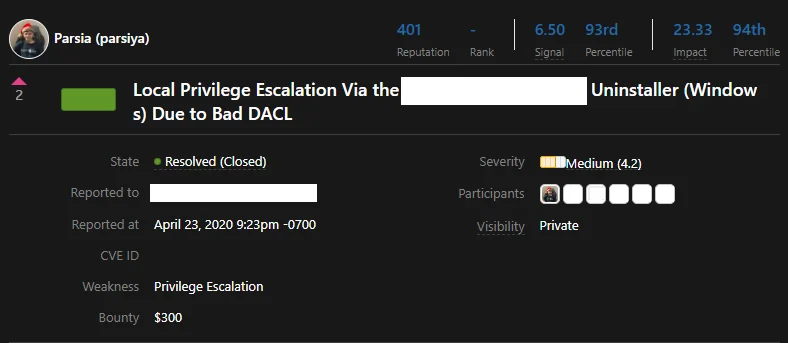
The likely reason was seamless updates from userland without a Windows service or UAC prompts; applications that want that kind of update are usually stored under %APPDATA% (VS Code is given as an example). The author modified the uninstaller, which always ran elevated: a local attacker could swap the binary with a backdoored executable and then wait for, or convince, an admin to run the uninstaller elevated. The report notes this bug was eventually closed on April 13th, 2021, when the application was retired, and some money was paid.
The named pipe
The target application uses a Windows service for updates, and the service talks to the userland application over a named pipe. The protocol is JSON-based, and the pipe is named george.
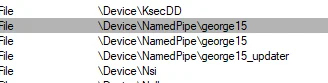
Everyone can open the pipe and talk to the updater service. The author is explicit that this is not a vulnerability by itself, and warns against reporting pipe permissions indiscriminately.
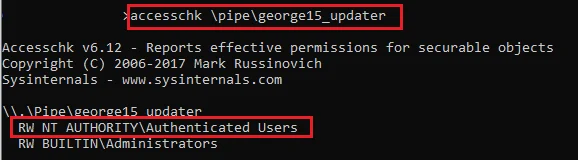
Using a Go client built on github.com/microsoft/go-winio, the author could send specific messages to check for an update, download it, and run it. The limitation was that the service could only be told to perform an action, not how to do it: the download URL, the download location and the file to execute could not be specified.
The storage path
Watching the process with procmon showed where the update lands. The author did not need OpLocks because the download and execution events could be triggered individually: the installer could be told to just download the update and nothing else, which gave ample time to swap the binary.
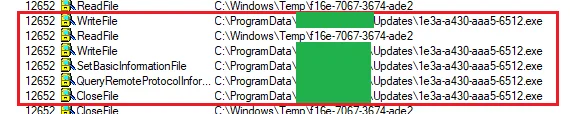
The update is downloaded to C:\ProgramData\[redacted]\Updates\GUID.exe. Standard users have write access there by default, and this application was no exception:
The obvious next move is the Backblaze #2 trick: overwrite the downloaded file. The author did exactly that, but the installer did not execute the file.
Exploitation
Step 1: Find the signature check
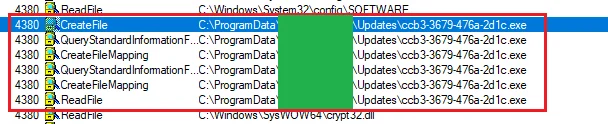
Looking at procmon, the author located the events where the file is accessed.
Procmon can show the call stack of each event, and all the highlighted events had a similar stack.
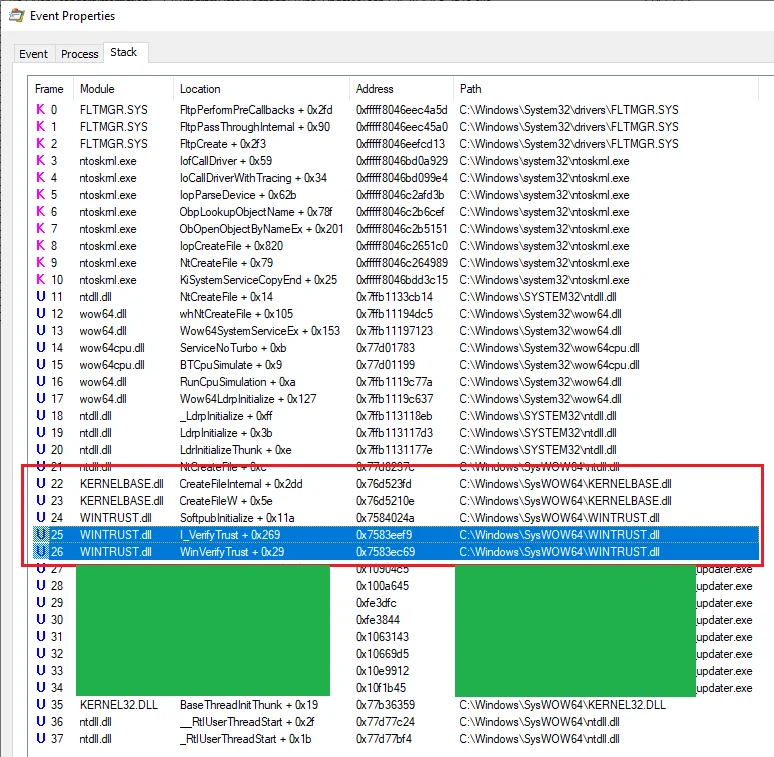
Note the WinVerifyTrust calls, usually made to check the signature of a file. The first idea was to pass any signed file: there are signed Windows binaries that can be used to run arbitrary commands (the LOLBAS project is linked), often used by red teams to evade detection. Swapping the file with a signed binary such as taskmgr.exe did not work. The updater seemed to be looking for a specific signature, not just any valid one.
Step 2: Inspect the arguments
The author hooked WinVerifyTrust in API Monitor and ran the original updater to see the arguments.
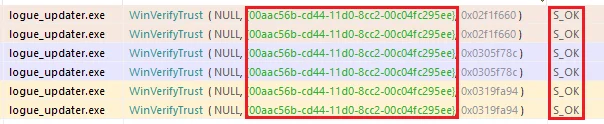
According to the WinVerifyTrust MSDN page, the GUID 00aac56b-cd44-11d0-8cc2-00c04fc295ee is [redacted], the typical authenticode check, so the certificate is being checked. For the original updater the return value is S_OK or 0, meaning a valid signature.
Step 3: Understand the check in IDA
The executable was dropped into IDA and searched for WinVerifyTrust. After some analysis the author landed at a location with two calls to WinVerifyTrust around a call to sub_100550. Dynamic analysis showed the subroutine checks the Common Name (CN) of the certificate against vendor, so the updater wants a binary signed by the vendor.
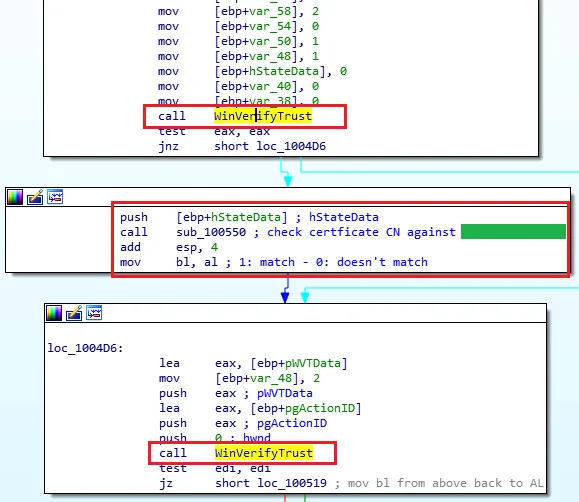
Each file gets three checks:
- Signature check.
- Check if CN is
vendor. - Signature check (again).
The two authenticode checks are most likely there to prevent TOCTOU race conditions.
Step 4: Find a signed binary that runs arbitrary code
At this point the author was back to square one: a binary signed by the vendor that also allows arbitrary code to run. Modifying the binary does not work because it invalidates the signature. The realisation is that such a binary already exists: the original app is an Electron app, and its executable is signed by the vendor.
A typical Electron app on Windows comes with a bunch of executables. Since the actual app cannot be shown, the report uses Discord as an example. Almost everything in the app directory is part of the Electron framework, not application code.
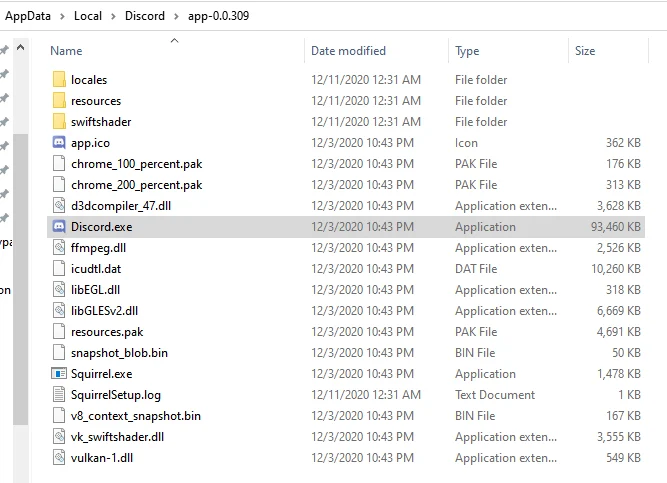
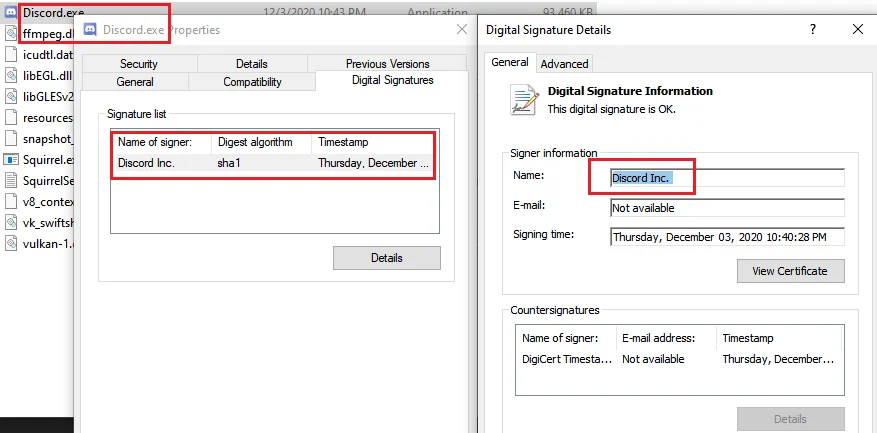
The executable is Discord.exe, signed by Discord Inc.; in the target application it was signed by vendor.
The actual code of an Electron application usually lives in resources\app.asar. The asar container is unsigned: it is just data, and the format does not support signing. It can be modified, and the signed executable will run the modified code.
Step 5: Build the backdoored payload
For the proof of concept the author created a backdoored Electron application at https://github.com/parsiya/evil-electron/. All it does is spawn a command prompt using preload.js:
// Spawn a command prompt.
require('child_process').exec('start cmd.exe');
The built app.asar is at https://github.com/parsiya/evil-electron/tree/master/release.
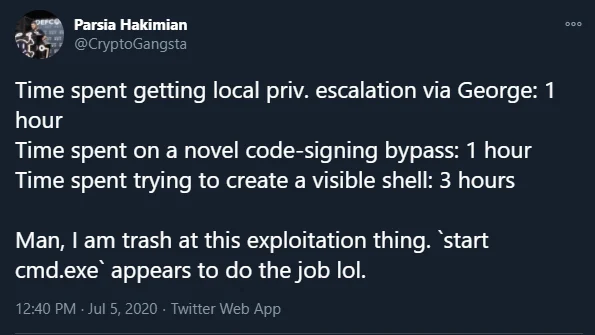
Backdooring an Electron app is not new. After writing the blog, the author found a January 2019 post by Pavel Tsakalidis, Basic Electron Framework Exploitation (the original is gone after an acquisition; the report links a Wayback Machine copy). The page title says How To Backdoor Any Electron Application, apparently the original title. Most of that post is about backdooring resources\electron.asar, which is not present in many modern Electron applications, but the concept holds: asar files can be modified and backdoored. That post is more of a red team persistence trick than signature evasion, which is what is wanted here.
Step 6: Reproduce
The recap of the chain:
- The updater service downloads the update and stores it in
C:\ProgramData\[redacted]\GUID.exe. - Standard users have write access to this path.
- The updater service checks the signature of the file before executing it.
- The file must have a valid signature and be signed by
vendor. - The bundled Electron app is signed by
vendorand can be backdoored.
The steps to reproduce:
- Tell the service to download the update (via the named pipe).
- Copy everything inside
C:\Program Files (x86)\vendor\electron-app\toC:\ProgramData\[redacted]\Updates(where the update is downloaded). - Delete the downloaded installer but copy its filename (
GUID.exe). - Rename
electron-app.exeto the name of the downloaded installer (GUID.exe). - Replace the
resources\app.asarfile in the destination with the backdoored file. - Tell the Windows service to run the installer.
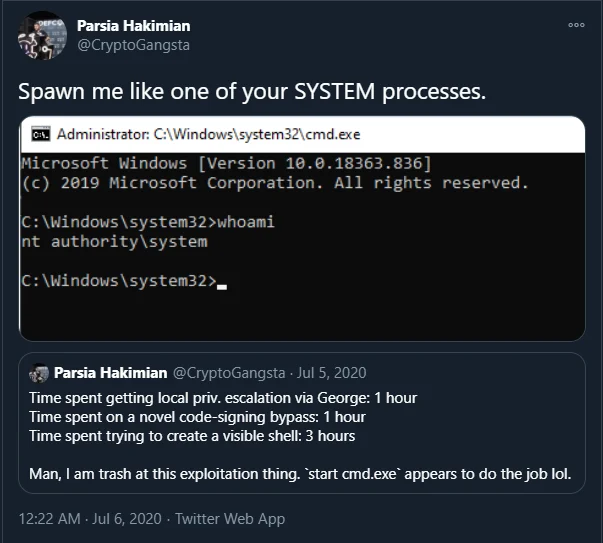
- Command prompt spawned as SYSTEM.
Root cause
The design mistake is the combination of two things. First, the update binary is stored in a directory where standard users have write access (C:\ProgramData\[redacted]\Updates), so a local attacker can replace it. Second, the only defence against that replacement is a signature check, and the check verifies that the file is signed by the vendor rather than that it is the specific expected update. Because the application's own Electron executable is signed by the vendor and its unsigned resources\app.asar can be swapped, an attacker can present a vendor-signed binary that runs arbitrary code.
The double WinVerifyTrust call around the CN check is likely there to close the TOCTOU window. The race was not the way in here. The weakness is that the trust decision is about the signer, not about the content.
Impact
A local attacker running as a standard user can get code execution as SYSTEM on the machine, by talking to the updater service over the named pipe, waiting for the download, replacing the downloaded installer with a backdoored copy of the vendor-signed Electron application, and asking the service to run it. The conditions are that the attacker has a standard user account, can reach the pipe (everyone can open it), and can write to the update directory (which standard users can).
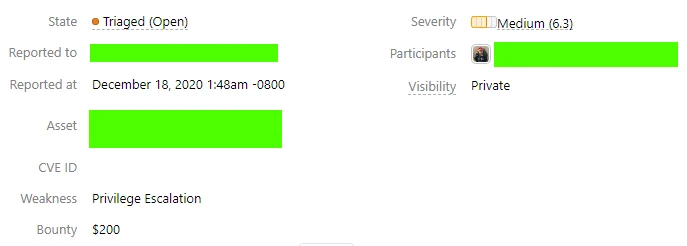
The author received 200 USD for the bug, noting that financially it was not worth the time spent, but that a new trick was learned.
Fix
The report does not describe a fix applied by the vendor. What it does describe is the defence the application attempted (signature plus CN check) and why it failed. The lesson implied by the chain is that checking who signed a file is not enough when a signed file can be made to run attacker-controlled code; the check needs to be tied to the specific expected update, and the storage path should not be writable by standard users.
Variants to test
- Writable update directory plus signer-only check. Look for update binaries dropped under
%ProgramData%,%APPDATA%or predictable%TEMP%paths, and check withaccesschkwhether standard users have write access. A positive result is a directory whereBUILTIN\Usershas write or full control and the service later executes a file from it. - Electron or similar bundled runtimes. If the updater accepts any binary signed by the vendor, check whether the application ships a signed launcher whose code or resources live in an unsigned container (asar or equivalent). A positive result is a signed executable that runs modified content from a writable location.
- Named pipe reachability. Enumerate the service's pipes and check who can open them. A positive result is a pipe that a standard user can open and that exposes actions such as download and execute, even if the parameters cannot be controlled.
- Split download and execute actions. If the service lets you trigger download and execution separately, the TOCTOU race may not be needed at all. A positive result is a window between the two events in which the file can be replaced.
- Double signature checks. When you see two
WinVerifyTrustcalls around a CN check, assume the race is closed and look for a signed binary that runs arbitrary code instead.
What happened, in plain words
A Windows desktop application had an automatic update feature. Like most updaters, it ran with more power than the person using the computer: it could write into protected folders and start programs with the highest level of permission on the machine. The author of this report found a way to make that updater run his own code instead of the real update, and so go from being an ordinary user to being the most powerful account on the machine.
The trick is worth understanding even if you have never touched security. The updater did check that the file it was about to run was signed by the software maker. That check sounds solid. But the application itself was built with a framework called Electron, and an Electron application is a signed launcher plus a bundle of unsigned data files. The author replaced the unsigned data with his own, kept the signed launcher, and the signature check passed happily. The signed launcher then ran his code.
This article walks through the whole story from zero: what privilege escalation means, how update mechanisms are attacked in general, how the author found this particular flaw, and how the final chain works. Every tool and term is explained the first time it appears.
The ladder of privilege
On a computer, not every account can do everything. Think of a building: visitors can walk in the lobby, employees can open the office doors, and only the building manager has the key to the plant room. Security people describe this as levels of privilege, and the report uses a simple ladder:
- Remote attacker
- Local attacker running as a standard user
- Local admin/SYSTEM
- A remote attacker is someone who is not sitting at the machine but can reach it over a network, for example through the internet.
- A local attacker running as a standard user is someone with a normal account on the machine. They can run programs, open their own files, browse the web, but they cannot install software for everyone or change system settings.
- Local admin is an administrator account, and SYSTEM is a special Windows account that the operating system itself uses for its own services. SYSTEM is even more powerful than a normal administrator in day-to-day terms: it is the account under which many background services run.
Moving from one rung to the next is called a privilege escalation. The report deliberately ignores machines that are part of a corporate domain, because those have extra attack surfaces of their own that would complicate the story.
There is a quote in the report that captures the mindset:
Code injection doesn't become a security hole until you have elevation of privilege.
In plain words: being able to run your own code inside someone else's program is only interesting if it lets you climb the ladder. If you are already an administrator, running code as an administrator changes nothing.
Why updates are a good target
An update mechanism exists to replace files on disk with newer versions. On Windows, application files usually live under C:\Program Files or C:\Program Files (x86). Ordinary users cannot write there: that is deliberate, so that a user cannot tamper with installed software. To update those files, the updater therefore has to run with administrator rights (the report says "run as elevated") or as SYSTEM, typically started by a Windows service or a scheduled task.
- A Windows service is a program that runs in the background, usually from the moment the computer starts, without anyone logging in. Services commonly run as SYSTEM.
- A scheduled task is a job Windows runs at a set time or on a set event, and it can also be configured to run with high privileges.
- Elevated means a program has been granted administrator rights, usually after a prompt (the User Account Control, or UAC, prompt) that asks the user to confirm.
So the updater is a small, powerful program that downloads files from the internet and then runs them. If an attacker can influence which file it runs, the attacker's code inherits that power. That is the whole idea behind this class of bug.
The report describes two broad ways this goes wrong.
Spoofing the server
If the updater downloads its update from a server, and an attacker can pretend to be that server, the attacker can hand over a malicious update. This is called spoofing the server, and the interception in the middle is called a man-in-the-middle attack, or MitM: the attacker sits between the victim's computer and the real server, relaying (or replacing) the traffic.
Normally this is hard because of TLS, the encryption used by HTTPS websites. TLS does two jobs: it encrypts the conversation so nobody in the middle can read it, and it uses certificates to prove the server is really who it claims to be. A certificate is like a passport for a server, issued (signed) by an authority that browsers trust. If the certificate checks are done properly, a MitM attacker cannot impersonate the server without the browser or program noticing.
The report notes that server spoofing is often out of scope for bug bounty programs that include desktop applications, and that TLS usually prevents it, unless the program's own certificate checking can be messed with.
The Nintendo example
The report skims a Nintendo bug bounty report:
In that case the signature verification on the Nintendo 3DS console was bypassed, which let an attacker sit between the console and the internet. For game consoles this is a realistic attack surface, because the goal of many console hackers is to get full control (root) of the device. Two follow-up reports take advantage of the same vector and inject data into the console's transmissions to achieve remote code execution:
Remote code execution means the attacker can make the device run their own code over the network, without physical access.
The Backblaze example, CVE-2020-8289
A desktop example comes from Jason Geffner, described in the report as the author's former boss at Electronic Arts:
In that application, certificate checks were disabled whenever the update URL contained certain strings, such as api/clientversion.xml. An attacker who could intercept the connection could therefore bypass the certificate check, because the update URL contained that string, and send their own tainted update binary to be executed as SYSTEM.
A CVE is a public identifier for a known vulnerability, like a catalogue number, so people can refer to the same bug unambiguously.
The author's own undisclosed bug #1: updates over HTTP
This bug was reported on HackerOne on April 24th, 2020, and at the time of writing was still open, with no bounty awarded.
A Java application used a library called getdown to download its updates over plain HTTP. HTTP is the unencrypted version of the web protocol: no TLS, no certificate, nothing stopping someone in the middle from reading or changing the traffic. With HTTP, the author could MitM the connection without any issues.
The screenshot shows the update being downloaded over HTTP.
Before downloading the actual update files, getdown downloads a small file named digest.txt. This file contains the hashes of the incoming update files. A hash is a short fingerprint computed from a file's contents: change one byte of the file and the fingerprint changes completely. The updater uses the digest to check that the downloaded files are intact and genuine. In this case the hash was MD5 (newer versions use SHA-256), but that did not really matter, because the digest file itself was also downloaded over HTTP and could be replaced. Checking a fingerprint that the attacker also controls is like a bouncer who asks the intruder to confirm their own identity.
The author built a fake Python HTTP server to act as the spoofed server, created his own digest and a backdoored jar. A jar is a Java archive, the packaged form of a Java application. His jar was a Swing application that only displayed a window (a JFrame), and the code is at:
Swapping the update file
The second pattern does not need a fake server at all. Sometimes the updater writes the downloaded file to a location that an ordinary user can write to, and then runs it, usually from a Windows service. The usual suspects for such a location are:
- Paths under
%ProgramData%(usuallyC:\ProgramData). - Paths under
%APPDATA%. - Predictable paths under
%TEMP%.
%ProgramData%, %APPDATA% and %TEMP% are environment variables: shortcuts Windows uses for standard folders. %ProgramData% is a shared folder for application data, %APPDATA% is the per-user application data folder, and %TEMP% is where temporary files go. These folders are often writable by ordinary users, which is exactly why they are interesting.
If the updater drops a file in one of these places and then runs it, an attacker can overwrite the file with their own program and wait for the service to run it. That is a privilege escalation: the attacker's program runs with the service's power.
Applications defend against this in two ways: they check the signature of the binary (sometimes the hash), or they change the permissions of the folder where it is stored so users cannot modify it. The binary is executed only if the check passes.
- Signature: a cryptographic stamp on a file that proves who produced it and that it has not been altered since. On Windows, this is called an Authenticode signature. If you change even one byte of a signed file, the signature no longer matches.
- DACL: a Discretionary Access Control List, the list attached to a file or folder that says which users and groups may read, write or execute it. When the report says a folder's DACL was changed, it means the permissions on that folder were changed.
As an attacker, you might also exploit a Time Of Check to Time Of Use vulnerability, or TOCTOU. The name describes it exactly: the program checks something at one moment (is this file safe?) and uses it at a later moment (run it). If the attacker can swap the file in between, the check was performed on a different file than the one that gets executed. It is a race condition: the attacker is racing the program.
The Backblaze example, CVE-2020-8290
Another bug by Jason Geffner in Backblaze:
The updater, a Windows service, created a directory to store the update binary at %ProgramData%\Backblaze\bzdata\bzupdates if the path did not exist. The DACL of that directory did not give standard users write access. But the updater did not check whether the directory already existed, and would store the updater there without changing its permissions. So a local attacker could create the directory first, and then replace the updater after download but before execution.
In a typical bug like this, the attacker is racing the service that executes the downloaded file. The report says the way to win these races is often through OpLocks. An opportunistic lock is a Windows file-locking mechanism: a program can ask Windows to lock a file, and Windows will then hold off other programs that try to open it. Attackers use this to pause the service at the right moment. The report points to the SetOpLock utility in Google Project Zero's symboliclink-testing-tools suite by James Forshaw:
The author's own undisclosed bug #2: the installer changed the program directory permissions
This second bug was reported on April 23rd, 2020, and at the time was still open with no bounty. The report later adds an update: on April 13th, 2021, the bug was finally closed, the application was retired, and the author got some money.
It was a bug in the same application as undisclosed bug #1. The installer changed the DACL of the entire application directory under C:\Program Files\app\. The new DACL gave write access to standard users.
The screenshot shows that standard users have full control on the application directory.
The author thinks the reason was seamless updates from userland, without needing a Windows service or UAC prompts. Applications that want that kind of update are usually stored under %APPDATA% instead, with VS Code given as an example. "Userland" simply means ordinary user space, as opposed to the privileged system side.
The author modified the uninstaller, which always ran elevated. A local attacker could swap the binary with a backdoored executable and then wait for, or convince, an administrator to run the uninstaller elevated. The attacker's program would then run with administrator rights.
The main dish
With the general background covered, the report turns to the actual bug. The author sat on it for six months because he was lazy, then reported it recently. At the time of writing it was still in review, and the author doubted it would be disclosed.
The named pipe
The application uses a Windows service to do updates. The service talks to the userland part of the application using a named pipe. A named pipe is a channel that two programs on the same machine use to exchange messages, like a speaking tube between two rooms: one program writes into it, the other reads from it. Each pipe has a name, and programs that know the name can connect.
The pipe in this application has a JSON-based protocol. JSON is a simple text format for structured data, made of names and values in curly braces, easy for both humans and programs to read. A protocol here just means the agreed format of the messages: what to send to ask for something, and what comes back.
The pipe is named george.
The screenshot shows the pipe named George.
Everyone can open the pipe and talk to the updater service. The author is explicit that this is not a vulnerability by itself, and warns against reporting pipe permissions indiscriminately.
The screenshot is captioned "George likes everyone", meaning the pipe is open to all users.
The author used a Go client built with github.com/microsoft/go-winio to talk to the pipe. Go is a programming language, and go-winio is a library that makes it easy to work with Windows named pipes from Go. By sending specific messages to the service, the author could check for an update, download it, and then run it. The limitation was that the service could only be told to perform an action, not how to do it: the download URL, where to download the file, and which file to execute could not be specified.
The storage path
To watch what an update process does on Windows, the report recommends Process Monitor, or procmon, a free Microsoft tool that records every file, registry and network operation a program performs. It is described as probably the author's favourite tool. You start the updater and watch where the file is downloaded and executed.
The author did not need OpLocks, because the download and execution events could be triggered individually. In other words, the installer could be told to just download the update and nothing else, which gave ample time to swap the binary. This is a much easier position than racing: instead of trying to win a race, the attacker simply asks for the two halves of the process separately.
The screenshot shows the downloaded file.
The update is downloaded to C:\ProgramData\[redacted]\Updates\GUID.exe. A GUID is a globally unique identifier, a long random-looking string that Windows uses to give things unique names. Standard users have write access to this path by default, and this application was no exception. The author checked with accesschk, a small command-line tool from Microsoft's Sysinternals suite that shows the permissions on a file, folder or other object:
Line by line:
$ accesschk c:\ProgramData\[redacted]runs the tool against that folder. The$is just the command prompt symbol.c:\ProgramData\[redacted]\Updatesis the folder being reported on.RW BUILTIN\Usersmeans the built-in group of ordinary users has Read and Write access. The arrow marks this as the important line: the attacker, as an ordinary user, can write here.RW NT AUTHORITY\SYSTEMmeans the SYSTEM account also has read and write access.RW BUILTIN\Administratorsmeans the administrators group does too.
The obvious next move is the Backblaze #2 trick: overwrite the downloaded file. The author did exactly that, but the installer did not execute the file. Something was checking it first.
Exploitation
Step 1: find the signature check
Looking at procmon, the author located the events where the file is accessed.
The screenshot shows a file access event in procmon.
Procmon has a very useful feature where you can see the call stack of each event. A call stack is the list of function calls that led to the current operation: function A called function B, which called function C, and so on. It is like a receipt showing every step that led to the action. All the highlighted events had a similar stack.
The screenshot shows the call stack in procmon.
Note the WinVerifyTrust calls. WinVerifyTrust is a Windows function that programs call to check the signature of a file. At first, the author thought he needed to pass any signed file. There are signed Windows binaries that can be used to run arbitrary commands, a list kept by the LOLBAS project:
These are legitimate Windows programs that happen to be able to launch other programs, and red teams (security testers who simulate attackers) often use them to evade detection. The author's first try was swapping the file with a signed binary such as taskmgr.exe, the Windows Task Manager. It did not work. The updater seemed to be looking for a specific signature, not just any valid one.
Step 2: inspect the arguments
The author hooked WinVerifyTrust in API Monitor and ran the original updater to see the arguments. API Monitor is a tool that lets you watch calls a program makes to Windows functions and see what values it passes in and gets back. "Hooking" here means intercepting those calls so they can be observed.
The screenshot shows WinVerifyTrust in API Monitor.
According to the WinVerifyTrust documentation page:
the GUID 00aac56b-cd44-11d0-8cc2-00c04fc295ee is [redacted], which is the typical Authenticode check. In other words, it is checking the certificate. For the original updater, the return value of the calls is S_OK or 0, which means the file has a valid signature.
A GUID here is just a fixed identifier that tells the function which kind of check to perform. S_OK is the standard Windows success code.
Step 3: understand the check in IDA
The executable was dropped into IDA, a program for static analysis: examining a compiled program without running it, reading its instructions the way you might read a recipe. The author searched for WinVerifyTrust and, after some analysis, landed at a location with two calls to WinVerifyTrust around a call to sub_100550. The name sub_100550 is just how IDA labels a function it has no name for.
Dynamic analysis (watching the program while it runs) showed that the subroutine checks the Common Name (CN) of the certificate against vendor. The CN is a field inside a certificate that identifies who it was issued to, like the name line on a passport. So the updater wants a binary signed by the vendor, not merely any signed binary.
The screenshot shows the signature checks in IDA.
Each file gets three checks:
- Signature check.
- Check if CN is
vendor. - Signature check (again).
The two Authenticode checks are most likely there to prevent TOCTOU race conditions: checking again right before use makes it much harder to swap the file in between.
Step 4: find a signed binary that runs arbitrary code
At this point the author was back to square one. He needed a binary signed by the vendor that also allowed arbitrary code to run. Modifying a signed binary does not work, because any change invalidates the signature.
The realisation is that such a binary already exists: the original app is an Electron app, and its executable is signed by the vendor.
Electron is a framework for building desktop applications using web technology (HTML, JavaScript and CSS). It bundles a browser engine (Chromium) and a runtime (Node.js) into one package, so the same code can run on Windows, macOS and Linux. Well-known applications built with it include Discord, Slack and VS Code.
A typical Electron app on Windows comes with a bunch of executables. Since the actual app cannot be shown, the report uses Discord as an example. Almost everything in the app directory is part of the Electron framework, not application code.
The screenshot shows Discord's application directory.
The executable is Discord.exe, signed by Discord Inc.. In the target application, it was signed by vendor.
The screenshot shows the signature on the Discord executable.
The actual code of an Electron application usually lives in resources\app.asar. The asar format is an archive, a single file that packs many files together, like a zip file. It is unsigned: it is just data, and the format does not support signing. It can be modified, and the signed executable will run the modified code. The signature on the launcher says nothing about the contents of the archive it loads.
Step 5: build the backdoored payload
For the proof of concept, the author created a backdoored Electron application:
All it does is spawn a command prompt using preload.js. In Electron, preload.js is a script that runs before the application's main page loads, with access to the system, which makes it a convenient place to put code.
// Spawn a command prompt.
require('child_process').exec('start cmd.exe');
Line by line:
// Spawn a command prompt.is a comment, ignored by the computer; it explains what the next line does.require('child_process')loads a built-in Node.js module calledchild_process, whose job is to start other programs..exec('start cmd.exe')runs the Windows commandstart cmd.exe, which opens a Command Prompt window.
So the whole payload is one line: open a command prompt. If this runs as SYSTEM, the command prompt is a SYSTEM command prompt, and anything typed into it runs with SYSTEM power.
The built app.asar file is at:
The screenshot is captioned "It took me a while to figure out the payload".
Backdooring an Electron app is not really new. After writing the blog, the author found a January 2019 post by Pavel Tsakalidis, Basic Electron Framework Exploitation. The original is gone after an acquisition, so the report links a Wayback Machine copy:
The page title says How To Backdoor Any Electron Application, which appears to have been the original title. Most of that post is about backdooring resources\electron.asar, which is not present in many modern Electron applications, but the concept holds: asar files can be modified and backdoored. That post is more of a red team persistence trick than signature evasion, which is what is wanted here. Persistence means keeping access on a machine across reboots; signature evasion means getting past a signature check.
Step 6: reproduce
The recap of the chain:
- The updater service downloads the update and stores it in
C:\ProgramData\[redacted]\GUID.exe. - Standard users have write access to this path.
- The updater service checks the signature of the file before executing it.
- The file must have a valid signature and be signed by
vendor. - The bundled Electron app is signed by
vendorand can be backdoored.
The steps to reproduce:
- Tell the service to download the update (via the named pipe).
- Copy everything inside
C:\Program Files (x86)\vendor\electron-app\toC:\ProgramData\[redacted]\Updates(where the update is downloaded). - Delete the downloaded installer but copy its filename (
GUID.exe). - Rename
electron-app.exeto the name of the downloaded installer (GUID.exe). - Replace the
resources\app.asarfile in the destination with the backdoored file. - Tell the Windows service to run the installer.
- Command prompt spawned as SYSTEM.
The screenshot shows a command prompt running as SYSTEM.
Why each step: step 1 gets a genuine, correctly named file into the writable folder, so the service has something to check. Step 2 brings in the vendor-signed Electron application, which will pass the signature and CN checks. Step 3 removes the real installer but keeps its name, because the service expects to run a file with that name. Step 4 gives the signed launcher that expected name. Step 5 swaps the unsigned archive inside it for the backdoored one, which does not affect the signature on the launcher. Step 6 asks the service to run the file, and the service does so with its own high privileges. Step 7 is the result.
Root cause
The design mistake is the combination of two things. First, the update binary is stored in a directory where standard users have write access (C:\ProgramData\[redacted]\Updates), so a local attacker can replace it. Second, the only defence against that replacement is a signature check, and the check verifies that the file is signed by the vendor rather than that it is the specific expected update. Because the application's own Electron executable is signed by the vendor and its unsigned resources\app.asar can be swapped, an attacker can present a vendor-signed binary that runs arbitrary code.
The double WinVerifyTrust call around the CN check is likely there to close the TOCTOU window. The race was not the way in here. The weakness is that the trust decision is about the signer, not about the content.
Impact
A local attacker running as a standard user can get code execution as SYSTEM on the machine, by talking to the updater service over the named pipe, waiting for the download, replacing the downloaded installer with a backdoored copy of the vendor-signed Electron application, and asking the service to run it. The conditions are that the attacker has a standard user account, can reach the pipe (everyone can open it), and can write to the update directory (which standard users can).
The author received 200 USD for the bug, noting that financially it was not worth the time spent, but that a new trick was learned.
The screenshot shows the bounty.
Fix
The report does not describe a fix applied by the vendor. What it does describe is the defence the application attempted (signature plus CN check) and why it failed. The lesson implied by the chain is that checking who signed a file is not enough when a signed file can be made to run attacker-controlled code; the check needs to be tied to the specific expected update, and the storage path should not be writable by standard users.
Variants to test
- Writable update directory plus signer-only check. Look for update binaries dropped under
%ProgramData%,%APPDATA%or predictable%TEMP%paths, and check withaccesschkwhether standard users have write access. A positive result is a directory whereBUILTIN\Usershas write or full control and the service later executes a file from it. - Electron or similar bundled runtimes. If the updater accepts any binary signed by the vendor, check whether the application ships a signed launcher whose code or resources live in an unsigned container (asar or equivalent). A positive result is a signed executable that runs modified content from a writable location.
- Named pipe reachability. Enumerate the service's pipes and check who can open them. A positive result is a pipe that a standard user can open and that exposes actions such as download and execute, even if the parameters cannot be controlled.
- Split download and execute actions. If the service lets you trigger download and execution separately, the TOCTOU race may not be needed at all. A positive result is a window between the two events in which the file can be replaced.
- Double signature checks. When you see two
WinVerifyTrustcalls around a CN check, assume the race is closed and look for a signed binary that runs arbitrary code instead.
Glossary
- Privilege escalation: moving from a lower level of permission on a computer to a higher one, for example from an ordinary user to SYSTEM.
- Remote attacker: someone attacking a machine over a network rather than sitting at it.
- Standard user: an ordinary account that cannot install software for everyone or change system settings.
- Local admin: an administrator account on the machine.
- SYSTEM: the most powerful Windows account, used by the operating system and many background services.
- Windows service: a background program that usually starts with the computer and often runs as SYSTEM.
- Scheduled task: a job Windows runs at a set time or event, which can run with high privileges.
- Elevated: a program that has been granted administrator rights, usually after a UAC prompt.
- UAC: User Account Control, the Windows prompt that asks you to confirm when a program wants administrator rights.
- Spoofing the server: pretending to be the server a program downloads from, so the program receives attacker-controlled data.
- MitM (man-in-the-middle): an attacker positioned between two parties, able to read or change their traffic.
- TLS: the encryption used by HTTPS, which also proves the server's identity with certificates.
- Certificate: a signed digital document that proves the identity of a server or the author of a file.
- Remote code execution: making a device run the attacker's code over a network.
- CVE: a public catalogue number for a known vulnerability.
- HTTP: the unencrypted version of the web protocol, with no TLS protection.
- getdown: a Java library for downloading application updates.
- Hash: a short fingerprint computed from a file's contents; any change to the file changes the fingerprint.
- MD5 / SHA-256: two algorithms for computing hashes; SHA-256 is newer and stronger.
- Jar: a Java archive, the packaged form of a Java application.
- Swing: a Java library for building graphical user interfaces.
- JFrame: a basic window in Java Swing.
- %ProgramData%, %APPDATA%, %TEMP%: Windows environment variables pointing to shared application data, per-user application data, and temporary files.
- Signature (Authenticode): a cryptographic stamp proving who produced a file and that it has not been altered.
- DACL: the list attached to a file or folder saying which users and groups may read, write or execute it.
- TOCTOU (time of check to time of use): a flaw where a program checks something at one moment and uses it at another, letting an attacker swap it in between.
- Race condition: a situation where the attacker and the program act at the same time, and the attacker tries to act first.
- OpLock (opportunistic lock): a Windows file-locking mechanism attackers use to pause a program at the right moment.
- Named pipe: a named channel two programs on the same machine use to exchange messages.
- JSON: a simple text format for structured data, made of names and values.
- Protocol: the agreed format of messages between two programs.
- Go: a programming language;
go-winiois a library for working with Windows named pipes from Go. - Process Monitor (procmon): a Microsoft tool that records every file, registry and network operation a program performs.
- Call stack: the list of function calls that led to the current operation.
- WinVerifyTrust: the Windows function programs call to check a file's signature.
- LOLBAS: a public list of legitimate Windows binaries that can be abused to run other programs.
- Red team: security testers who simulate real attackers.
- API Monitor: a tool that shows the Windows function calls a program makes and the values it passes.
- Hooking: intercepting a program's function calls so they can be observed or changed.
- GUID: a long, unique identifier used to name things unambiguously.
- S_OK: the standard Windows success code.
- IDA: a program for static analysis of compiled executables.
- Static analysis: examining a program without running it.
- Dynamic analysis: watching a program while it runs.
- Common Name (CN): the field in a certificate that names who it was issued to.
- Electron: a framework for building desktop applications with web technology, bundling a browser engine and a runtime.
- asar: an archive format used by Electron to pack an application's files into one unsigned file.
- preload.js: an Electron script that runs before the application's page loads, with access to the system.
- Persistence: keeping access to a machine across reboots.
- Signature evasion: getting past a signature check.
- accesschk: a Sysinternals command-line tool that shows the permissions on a file, folder or object.
- Sysinternals: a set of free Windows system tools published by Microsoft.


