A Real World Example Of Classic Remote Command Execution (RCE)
The Firebase web application had insecure Firestore rules, allowing an attacker who found API keys in a JavaScript file to register a new user and read and write collections. The author also lists other issues such as IDOR, forced browsing, data exposure, header injection, XSS, session and local storage problems, and rate limiting.
 Published on bhashit.in
Hello All. This is my first blog post with the new domain 😀 This post is all about how I was able to takeover the entire firebase database (Firestore) and could perform all the actions an attacker should not.
The full write-up lives on its author's site
It belongs to its author, so we link to it rather than copy it. The other two tabs are our own rewrites, checked against it.
Context
This is a write-up of a penetration test against a client's web application whose entire stack ran on Firebase: the web front end, the database (Firestore), analytics and crash reporting were all managed on Firebase itself. Because Google manages the platform, the author notes that finding technical problems in the platform itself is close to impossible; what can be found are misconfiguration and privilege-based issues in how the application uses it.
The post exists because most Firebase security material is aimed at mobile applications, while this engagement was a web target. The goal that emerged was to take over the entire Firestore database and perform actions an attacker should not be able to perform.
Setup
The team working the engagement could not intercept the target web application with a proxy and were stuck. The author stepped in to analyse the application.
On the authorisation side, the testers had only a single-user role, so there were no privilege-based issues to chase, though horizontal issues remained possible. As a prerequisite, the author asked for read access to the Firebase console to see what was going on at the back end.
The main tool used was firepwn, created by @0x_shaq, configured locally.
Finding it
The first check was the classic Firebase REST path, appending /.json to the database URL. On this target it returned an error. A successful attack against an exposed database looks like this:

Source: atos.net
An error instead means the issue is already fixed or the path does not exist. The response the author shows for that case is:
{ "error" : "Permission denied" }
With the direct database path closed, the next step was to look for anything sensitive in JavaScript. That search turned up interesting strings in a JavaScript file.
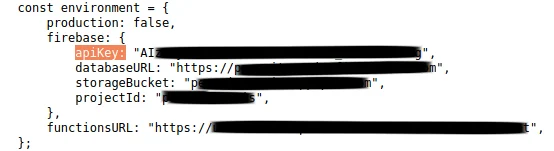
API Keys
The file contained the Firebase API key and critical endpoints.
Exploitation
Step 1: Register a user with firepwn
With the Firebase API key and endpoints in hand, the author configured firepwn locally and used it to register a user on the Firebase console. The application itself had no registration functionality, so this account existed only at the Firebase level.
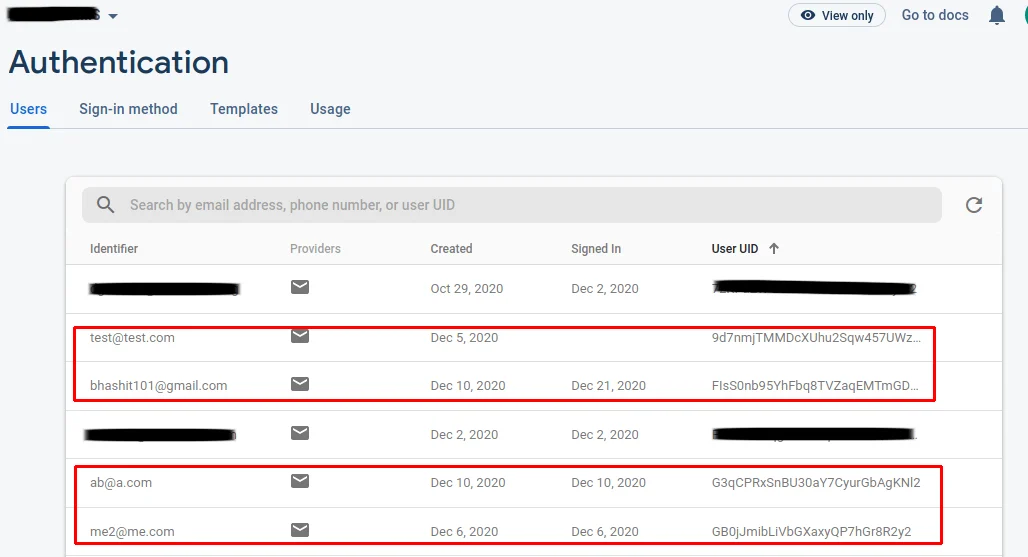
Step 2: Confirm access to the data
Registration alone is not the finding; the point is what the new account could then do. The author provides further evidence of the successful attack: writing a new collection and reading an existing one.
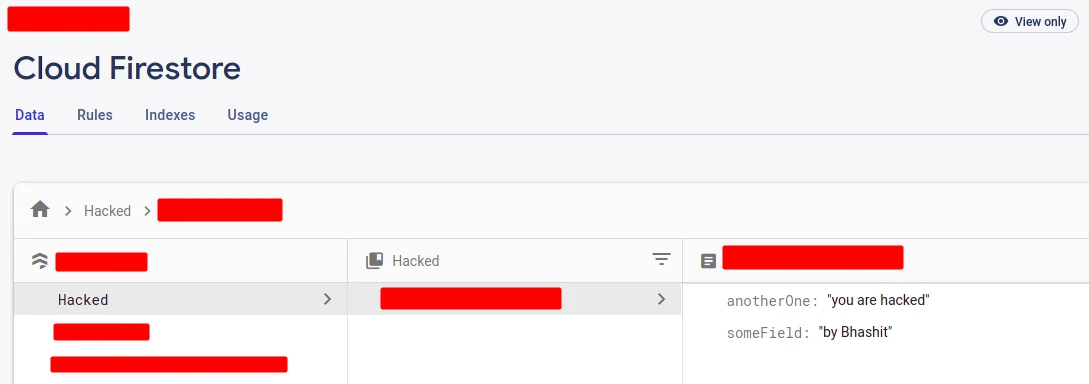
Write a new collection
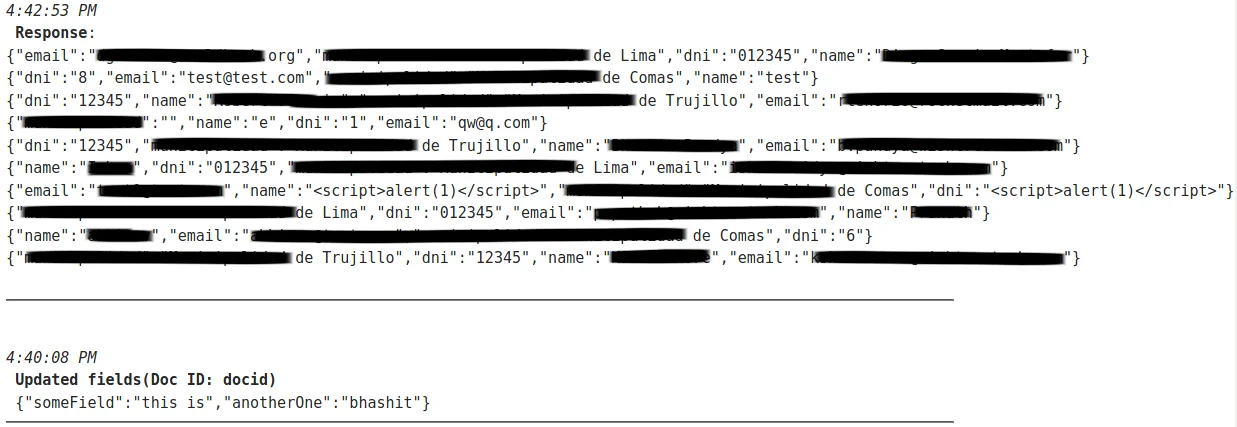
Read Existing Collection
Being able to create a collection and read existing ones with a self-registered account is what the author describes as taking over the entire Firestore database.
Step 3: Other issues found
Beyond the Firebase misconfiguration, the engagement surfaced the following vulnerabilities in the application:
- Insecure Direct Object Referencing
- Forced Browsing
- Data Exposure
- Header Injection
- XSS (It worked!!)
- Session-based issues
- Local Storage issues
- Rate limiting, etc.
Root cause
The report does not show the Firestore security rules, so the exact rule mistake is not stated. The application's own UI had no registration feature, but that is a front-end restriction only: the Firebase API key found in the JavaScript file is enough to call the authentication endpoints directly, so the missing UI did not act as a control. Likewise, the /.json path returning Permission denied only shows that one access route was closed; it did not mean the project was safe.
Impact
With a self-registered account, the author could read existing collections and write new ones in the Firestore database, which the author describes as taking over the entire database. The testers had only a single-user role, so the report frames the exposure in terms of horizontal rather than privilege-based issues. The report also lists other findings: IDOR, forced browsing, data exposure, header injection, XSS, session and local storage issues, and rate limiting. The report does not quantify how much data was exposed or name the affected users.
Fix
The report does not describe what the client changed. Based on the behaviour shown, the fixes would be to tighten the Firestore security rules so that reads and writes are scoped to the authenticated owner of each document, and to control who can create accounts in the project rather than leaving registration open at the API level. The /.json denial shows that at least one legacy access path was already closed.
Variants to test
- Append
/.jsonto the database URL. A response containing data rather than{ "error" : "Permission denied" }indicates an open database. - Grep the JavaScript bundles for Firebase configuration values (API key, project identifiers, endpoints). Finding them is expected; the test is whether they still work against the live project.
- Use firepwn or the Firebase Authentication REST API with the extracted API key to try registering an account, especially where the application has no sign-up screen. A successful registration returns an account that the UI never offered.
- With that account, attempt to read an existing collection and write a new one. Success on either confirms the rules are not scoping access to the legitimate user.
- Check the other items from this engagement on the same target: object references that can be swapped (IDOR), paths reachable by guessing (forced browsing), sensitive data in responses, header injection, reflected or stored XSS, session handling, data left in local storage, and missing rate limits.
What happened, in plain words
A security tester was asked to look at a client's web application. The whole application was built on Firebase, a Google service that provides a database, user login, analytics and crash reporting as a package. The tester found that the application's JavaScript files contained a Firebase API key and some endpoint addresses. With those, they used a tool called firepwn to create a user account directly in the Firebase project, even though the application itself had no sign-up screen. That new account could then read existing data collections and create new ones in the Firestore database. In other words, the tester could take over the entire database. The report also lists other problems found during the same test, such as insecure direct object references, forced browsing, data exposure, header injection, cross-site scripting (XSS), session issues, local storage issues and missing rate limits.
This article explains the whole story for someone who has never done security testing before. It covers the steps in the same order as the original write-up and explains each concept from scratch.
Background: what is Firebase?
Firebase is a set of services from Google that helps developers build applications without running their own servers. It includes:
- Firestore: a database that stores data in documents grouped into collections. Think of it as a set of folders (collections) that contain sheets of paper (documents). Each sheet has fields with values.
- Firebase Authentication: a service that handles user accounts and sign-in.
- Analytics and crash reporting: services that record how the app is used and when it crashes.
Because Google manages the servers, the tester cannot find bugs in Firebase itself. The problems come from how the application is configured to use Firebase, especially the security rules that decide who can read or write which data.
Most articles about Firebase security focus on mobile apps. This engagement was a web application, so the tester had to adapt.
The challenge
The team working on the engagement could not intercept the target web application with a proxy. A proxy is a tool that sits between your browser and the website and lets you see and change the requests and responses. If you cannot intercept, you cannot easily inspect or modify the traffic. The tester stepped in to analyse the application.
On the authorisation side, the testers had only a single-user role. That means they had one level of access, so there were no privilege-based issues to chase (no way to go from a normal user to an administrator). However, horizontal issues were still possible: that means accessing another user's data at the same privilege level.
As a prerequisite, the tester asked for read access to the Firebase console. The console is the web interface where the project owner manages the Firebase project. Read access let the tester see what was going on at the back end.
Finding it
The first check was the classic Firebase REST path. Firebase databases can allow access by appending /.json to the database URL. JSON is a text format for structured data, like a simplified version of a spreadsheet.
On this target, that path returned an error. A successful attack against an exposed database looks like this:
Source: atos.net
An error instead means the issue is already fixed or the path does not exist. The response the author shows for that case is:
{ "error" : "Permission denied" }
This is a JSON object with a single key error and the value Permission denied. It tells you that the server understood the request but refused to give you the data. So the direct database path was closed.
With that route closed, the next step was to look for anything sensitive in JavaScript. JavaScript files are the code that runs in your browser to make the web page interactive. They are downloaded by the browser and can be read by anyone. Developers sometimes leave configuration values in them, such as API keys and endpoint addresses. The tester searched the JavaScript and found interesting strings.
API Keys
The file contained the Firebase API key and critical endpoints. An API key is a long string that identifies a project to a service. It is not a password; it is more like a name badge that says "I belong to this project". The endpoints are the web addresses that the application uses to communicate with Firebase.
Exploitation
Step 1: Register a user with firepwn
With the Firebase API key and endpoints in hand, the tester configured firepwn locally. Firepwn is a tool created by @0x_shaq that is designed to test Firebase projects. The tester used it to register a user on the Firebase console. The application itself had no registration functionality, so this account existed only at the Firebase level, not in the application's own user interface.
Registration alone is not the finding; the point is what the new account could then do. The tester provides further evidence of the successful attack: writing a new collection and reading an existing one.
Write a new collection
Read Existing Collection
Being able to create a collection and read existing ones with a self-registered account is what the author describes as taking over the entire Firestore database.
Step 2: Other issues found
Beyond the Firebase misconfiguration, the engagement surfaced the following vulnerabilities in the application:
- Insecure Direct Object Referencing (IDOR): when an application uses a user-supplied value (like a document ID) to access a resource without checking that the user is allowed to access it. For example, changing
/user/123to/user/124to see another user's data. - Forced Browsing: accessing pages or files that are not linked in the application but exist on the server, by guessing their URLs.
- Data Exposure: sensitive information (like personal data or internal details) being returned in responses where it should not be.
- Header Injection: manipulating HTTP headers to inject malicious content or behaviour.
- XSS (Cross-Site Scripting): injecting malicious scripts into web pages viewed by other users. The report notes "It worked!!", meaning the tester successfully exploited it.
- Session-based issues: problems with how the application manages user sessions (like session fixation or session hijacking).
- Local Storage issues: sensitive data stored in the browser's local storage, which can be accessed by scripts or other users on the same machine.
- Rate limiting: missing or insufficient limits on how many requests can be made, allowing brute-force attacks or abuse.
Root cause
The report does not show the Firestore security rules, so the exact rule mistake is not stated. The application's own UI had no registration feature, but that is a front-end restriction only: the Firebase API key found in the JavaScript file is enough to call the authentication endpoints directly, so the missing UI did not act as a control. Likewise, the /.json path returning Permission denied only shows that one access route was closed; it did not mean the project was safe.
Impact
With a self-registered account, the tester could read existing collections and write new ones in the Firestore database, which the author describes as taking over the entire database. The testers had only a single-user role, so the report frames the exposure in terms of horizontal rather than privilege-based issues. The report also lists other findings: IDOR, forced browsing, data exposure, header injection, XSS, session and local storage issues, and rate limiting. The report does not quantify how much data was exposed or name the affected users.
Fix
The report does not describe what the client changed. Based on the behaviour shown, the fixes would be to tighten the Firestore security rules so that reads and writes are scoped to the authenticated owner of each document, and to control who can create accounts in the project rather than leaving registration open at the API level. The /.json denial shows that at least one legacy access path was already closed.
Variants to test
- Append
/.jsonto the database URL. A response containing data rather than{ "error" : "Permission denied" }indicates an open database. - Grep the JavaScript bundles for Firebase configuration values (API key, project identifiers, endpoints). Finding them is expected; the test is whether they still work against the live project.
- Use firepwn or the Firebase Authentication REST API with the extracted API key to try registering an account, especially where the application has no sign-up screen. A successful registration returns an account that the UI never offered.
- With that account, attempt to read an existing collection and write a new one. Success on either confirms the rules are not scoping access to the legitimate user.
- Check the other items from this engagement on the same target: object references that can be swapped (IDOR), paths reachable by guessing (forced browsing), sensitive data in responses, header injection, reflected or stored XSS, session handling, data left in local storage, and missing rate limits.
Glossary
- API: Application Programming Interface; a set of rules that lets one piece of software talk to another. Think of it as a waiter taking your order to the kitchen.
- API key: a long string that identifies a project to a service; like a name badge, not a password.
- Authentication: the process of verifying who a user is.
- Authorisation: the process of deciding what an authenticated user is allowed to do.
- Collection: in Firestore, a group of documents, similar to a folder.
- Document: in Firestore, a single record with fields and values, similar to a sheet of paper.
- Endpoint: a web address that an application uses to communicate with a service.
- Firebase: a set of Google services for building apps, including database, authentication, analytics and crash reporting.
- Firebase console: the web interface for managing a Firebase project.
- Firestore: Firebase's database that stores data in documents and collections.
- firepwn: a tool for testing Firebase projects, created by @0x_shaq.
- Header injection: a vulnerability where an attacker can insert malicious content into HTTP headers.
- Horizontal issues: security problems that allow a user to access another user's data at the same privilege level.
- IDOR (Insecure Direct Object Reference): when an application uses a user-supplied value to access a resource without checking if the user is allowed to access it.
- JSON: a text format for structured data, like a simplified spreadsheet.
- Local storage: a place in the browser where websites can store data persistently.
- Privilege-based issues: security problems that allow a user to gain higher privileges than they should have.
- Proxy: a tool that sits between your browser and a website, letting you see and change requests and responses.
- Rate limiting: limiting how many requests can be made in a given time period.
- REST: a style for building APIs that uses standard HTTP methods like GET and POST.
- Security rules: in Firebase, rules that define who can read or write which data.
- Session: a period of interaction between a user and an application, often tracked with a session ID.
- XSS (Cross-Site Scripting): a vulnerability that allows an attacker to inject scripts into web pages viewed by other users.



