A Simple IDOR to Account Takeover
The password reset endpoint accepted an email address in the request body, allowing an attacker to change the password of any account by substituting the victim's email. This led to full account takeover, including potential admin access.
 Published on medium.com
So assuming the program name to be example.com since it was a private program. Initially I wasn’t able to find any issue on the main domain and later gave up after getting 3 duplicates since it was a 3 years old Private program and I got the invite around October 2019.
The full write-up lives on its author's site
It belongs to its author, so we link to it rather than copy it. The other two tabs are our own rewrites, checked against it.
Context
The target was a private bug bounty program, which the author refers to as example.com because the program was private. The program was three years old at the time of the report, and the author had received an invitation around October 2019. The vulnerable feature was the password reset flow on a subdomain, specifically the internal reset password submission endpoint used after a user chooses a new password.
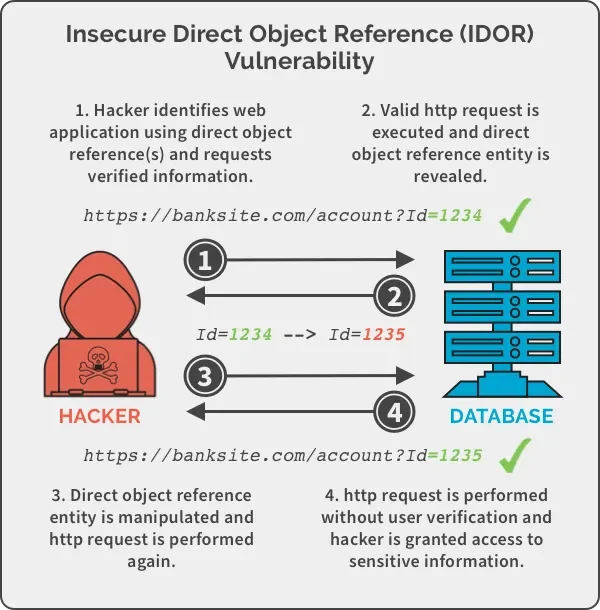
IDOR, as the author frames it, is an access control issue: the application uses user-supplied input to access objects directly without validating that the request comes from the intended user. The author also notes that IDOR relates to horizontal privilege escalation (exploiting other users in the application user pool) and vertical privilege escalation (exploiting an admin user).

Setup
The author had an account on the program and tested the login page, the registration page and the forgot password page. The work was done with Burp, since the edited request was forwarded in Burp and the result was observed in the browser. The report does not list tool versions. The report does not spell out the preconditions; the request carried the author's own session cookies and the victim's email was substituted in the body.
Finding it
After three duplicates on the main domain, the author moved to subdomains in the program scope that had no known vulnerabilities. Within two hours the author found four vulnerabilities, of which this account takeover was one.
While testing the forgot password page, the author noticed that when a user changes the password to a new one, the request body contains the email parameter alongside the new password and confirm new password parameters. The author wondered why not change the email to someone else's address. The author changed the email to someone else's email address and obtained full account access to the altered email's account.
Exploitation
Step 1: Capture the original reset request
The author submitted the reset password form for their own account and captured the request:
POST /login/internalResetPasswordSubmit?Toketoken=random_char&m=1234&nid=random_char HTTP/1.1Host: subdomain.example.comCookie: all_required_cookies{"email":"[redacted]","password":"new_passwd","confirmPassword":"new_passwd"}
The request goes to /login/internalResetPasswordSubmit on the subdomain, with a token, an m parameter and an nid parameter in the query string, the session cookies in the Cookie header, and a JSON body carrying the email, the new password and the confirmation.
Step 2: Change the email to the victim's address
The author edited only the email field in the body:
POST /login/internalResetPasswordSubmit?Toketoken=random_char&m=1234&nid=random_char HTTP/1.1Host: subdomain.example.comCookie: all_required_cookies{"email":"[redacted]","password":"new_passwd","confirmPassword":"new_passwd"}
Step 3: Forward and observe
After forwarding the edited request in Burp, the password was changed for the victim's account, and the browser was logged directly into the victim's account.
Step 4: Report and reproduce on request
The author reported the issue at 12:30 am IST on 28th January. The team replied in the morning that they could not replicate it and asked the author to take over a test account they had created. The author was in college when the comments arrived, so the reproduction was done in the college lab after setting up the tools and prerequisites on a college computer. The author reproduced the same behaviour, changed the password of the test account created by the Bugcrowd Team, edited the profile with their username as proof of concept, and sent the report.
Within five minutes the report was triaged and the priority was set to P1.
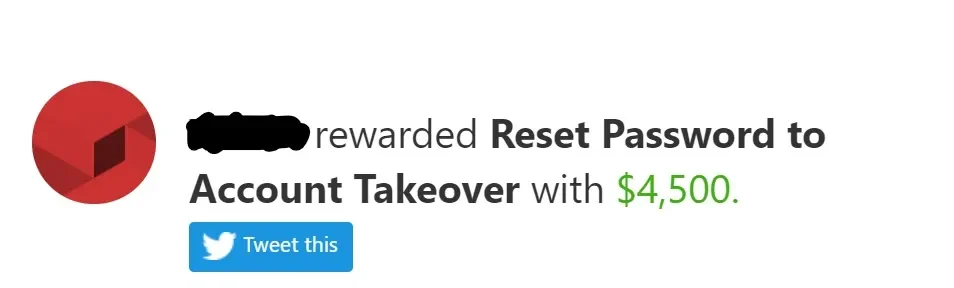
The next day the company allotted the bounty for the submission.
Root cause
The reset password submission trusts the email address supplied in the request body to decide which account's password is changed. The report does not explain the server-side cause; the observed behaviour is that changing the email field changed the password of the altered account. The report does not describe the server-side code, so the exact validation gap is likely a missing check that the email in the body matches the account identified by the token or session.
Impact
An attacker with a valid reset flow can change the password of any account whose email address they know, and is logged straight into that account. The author notes that the impact can be increased by changing an admin's account password, which would give full access to the admin account.
Fix
The fix should be to derive the account from the reset token or the authenticated session and ignore any email supplied in the body, or to reject the request when the body email does not match the account bound to the token.
Variants to test
- On other reset and change password endpoints, replace the email, username or user id in the body with another account's value and forward the request. A positive result is the response confirming a password change for the other account, or the browser landing in that account.
- Change hidden fields or query parameters that identify the account, such as
nidormin this request, and see whether the reset follows the new identifier. A positive result is a reset applied to a different account than the one the token was issued for. - Reuse a reset token issued for your own account with another account's email in the body. A positive result is the token being accepted for the other account.
- Test the same substitution on profile edit and email change endpoints. A positive result is a change applied to another user's profile or email address.
What happened, in plain words
A security researcher was testing a private bug bounty program, which is a scheme where a company invites selected researchers to look for security problems in its systems and pays for the ones they find. The researcher calls the program example.com because it was private and the real name cannot be shared. The program was three years old, and the researcher had received an invitation around October 2019.
The problem was in the password reset feature on one of the company's subdomains. A subdomain is a smaller site that belongs to the main site: if the main site is example.com, a subdomain might be shop.example.com or login.example.com. The password reset feature is the one you use when you have forgotten your password: you enter your email address, the site sends you a link, and you choose a new password.
When the researcher chose a new password, the browser sent a request to the server that contained the email address of the account being reset. Changing that email address to a different person's address changed that person's password. By changing it to a different person's email address, the researcher could change that person's password and was logged straight into their account. This is called an IDOR, short for Insecure Direct Object Reference: the application lets you point at an object (here, an account) using a value you supply, and it never checks that the object is really yours.
The image above is a diagram used by the author to introduce IDOR. The author explains the idea like this: IDOR means you get access to something that is not intended to be accessible to you, or you do not have the right privileges to carry out an action on the web application. Technically it is an access control issue: the application uses user-supplied input to access objects directly, without any validation check to see whether the request is made from its intended user or not. IDOR can be further related to horizontal privilege escalation, which means exploiting other users in the application's user pool, and vertical privilege escalation, which means exploiting an admin user.
A useful everyday comparison: imagine a hotel where you tell the receptionist your room number and they hand you the key, without checking that the room is actually booked in your name. The room number is the object reference, and the missing check is the vulnerability. Here the room number is an email address.
The second image is another illustration the author uses to introduce the concept before describing the actual attack.
The setup
The researcher had an account on the program. Before finding the bug, the researcher tested the login page, the registration page and the forgot password page. The work was done with Burp, short for Burp Suite, a tool that sits between your browser and the server and lets you see and edit every request before it is sent. The edited request was forwarded in Burp, and the result was observed in the browser. The report does not list tool versions.
The report does not spell out the preconditions; the request carried the author's own session cookies and the victim's email was substituted in the body. A session is the period during which the site remembers who you are, usually by giving your browser a cookie, which is a small piece of data the browser stores and sends back with every request. The report does not describe any other precondition.
Finding it
After three duplicates on the main domain, the researcher moved to subdomains in the program scope that had no known vulnerabilities. A duplicate is a report of a bug that someone else has already reported, so it earns nothing. The program scope is the list of systems the company allows researchers to test. Within two hours the researcher found four vulnerabilities, and this account takeover was one of them.
While testing the forgot password page, the researcher noticed something odd. When a user changes the password to a new one, the request body contains the email parameter alongside the new password and confirm new password parameters. The request body is the part of an HTTP request that carries the data the browser is sending to the server, as opposed to the URL and the headers. An HTTP request is simply a message your browser sends to a server asking it to do something; the server replies with a response.
The author wondered why not change the email to someone else's address. The client is your browser, which means the value is under the user's control and can be edited before it reaches the server. The researcher changed the email to someone else's email address and obtained full account access to the altered email's account.
Exploitation
Step 1: Capture the original reset request
The researcher submitted the reset password form for their own account and captured the request:
POST /login/internalResetPasswordSubmit?Toketoken=random_char&m=1234&nid=random_char HTTP/1.1Host: subdomain.example.comCookie: all_required_cookies{"email":"[redacted]","password":"new_passwd","confirmPassword":"new_passwd"}
Line by line, in plain words:
POST /login/internalResetPasswordSubmit?...is the request line.POSTis the method, meaning the browser is sending data to the server rather than just asking for a page./login/internalResetPasswordSubmitis the path of the feature on the server that handles the final step of the reset. Everything after the?is the query string, a set of values attached to the URL.Toketoken=random_charis one of those query string values. The report does not explain what it is; the name suggests a token, which is a value the server issues to identify a particular flow or session.random_charis a placeholder for a random string.m=1234is another query string value.nid=random_charis a third query string value.HTTP/1.1states the version of the HTTP protocol being used.Host: subdomain.example.comtells the server which site the request is for. One server can host many sites, so the host name is how the request is routed to the right one.Cookie: all_required_cookiesis the header that carries the cookies. Cookies are the small pieces of data the site gave the browser earlier, and they are how the server recognises the session.all_required_cookiesis a placeholder for whatever cookies the site needed.{"email":"[redacted]","password":"new_passwd","confirmPassword":"new_passwd"}is the body, written in JSON, a common text format for structured data. It has three fields: the email of the account, the new password, and the same new password again for confirmation.[redacted]stands for the researcher's own account, andnew_passwdstands for the chosen password.
The reason for capturing this request is that you cannot tamper with what you cannot see. Burp lets you pause the request before it leaves your machine, so you can read every part of it and decide what to change.
Step 2: Change the email to the victim's address
The researcher edited only the email field in the body:
POST /login/internalResetPasswordSubmit?Toketoken=random_char&m=1234&nid=random_char HTTP/1.1Host: subdomain.example.comCookie: all_required_cookies{"email":"[redacted]","password":"new_passwd","confirmPassword":"new_passwd"}
Everything is identical to the original request except the value of email, which is now [redacted], a placeholder for the victim's address. The token, m and nid in the query string were left untouched, and so were the cookies. The point of changing only one thing is that if the result changes, you know exactly which value caused it.
Step 3: Forward and observe
After forwarding the edited request in Burp, the password was changed for the victim's account, and the browser was logged directly into the victim's account. Forwarding means letting the request continue on to the server after you have edited it.
Step 4: Report and reproduce on request
The researcher reported the issue at 12:30 am IST on 28th January. IST is Indian Standard Time. The team replied in the morning that they could not replicate it and asked the researcher to take over a test account they had created. Replicate means to reproduce the same result on their side.
The researcher was in college when the comments arrived, so the reproduction was done in the college lab after setting up the tools and prerequisites on a college computer. The researcher reproduced the same behaviour, changed the password of the test account created by the Bugcrowd Team, edited the profile with their username as proof of concept, and sent the report. Bugcrowd is a bug bounty platform, a company that runs these programmes on behalf of clients. A proof of concept is evidence that the bug is real, here the changed profile showing the researcher's username inside the test account.
Within five minutes the report was triaged and the priority was set to P1. Triaged means the company accepted the report as valid and moved it into its workflow. P1 is the highest priority level in the platform's scale, meaning the issue is serious and needs urgent attention.
The screenshot above shows the bounty allotted for the submission. The next day the company allotted the bounty for the submission, which is the payment made for a valid report.
Root cause
The reset password submission trusts the email address supplied in the request body to decide which account's password is changed.
In everyday terms: the server asked "which account should I change?" and accepted the answer from the person making the request, instead of working it out from the proof of identity it had already issued.
Impact
An attacker with a valid reset flow can change the password of any account whose email address they know, and is logged straight into that account. The author notes that the impact can be increased by changing an admin's account password, which would give full access to the admin account.
Fix
The fix should be to derive the account from the reset token or the authenticated session and ignore any email supplied in the body, or to reject the request when the body email does not match the account bound to the token.
Variants to test
- On other reset and change password endpoints, replace the email, username or user id in the body with another account's value and forward the request. A positive result is the response confirming a password change for the other account, or the browser landing in that account.
- Change hidden fields or query parameters that identify the account, such as
nidormin this request, and see whether the reset follows the new identifier. A positive result is a reset applied to a different account than the one the token was issued for. - Reuse a reset token issued for your own account with another account's email in the body. A positive result is the token being accepted for the other account.
- Test the same substitution on profile edit and email change endpoints. A positive result is a change applied to another user's profile or email address.
Glossary
- Access control: the part of an application that decides who is allowed to do what.
- Account takeover: gaining control of another person's account, usually by changing their password or session.
- Admin: a user with elevated rights to manage the application and its other users.
- API: a way for one piece of software to talk to another; here, the server endpoints that the browser's requests reach.
- Body: the part of an HTTP request that carries the data being sent, separate from the URL and the headers.
- Bug bounty program: a scheme where a company invites researchers to find security problems and pays for valid reports.
- Bugcrowd: a platform that runs bug bounty programmes on behalf of client companies.
- Burp (Burp Suite): a tool that sits between the browser and the server so requests can be inspected and edited.
- Bounty: the payment a company makes for a valid security report.
- Client: the software making the request, normally your browser; values it supplies are under the user's control.
- Cookie: a small piece of data a site stores in your browser and receives back with each request, often used to recognise your session.
- Duplicate: a report of a bug that has already been reported by someone else.
- Endpoint: a specific address on a server that handles a particular action, such as
/login/internalResetPasswordSubmit. - Header: a line in an HTTP request or response carrying metadata, such as the host name or the cookies.
- Horizontal privilege escalation: using your own level of access to reach another ordinary user's data or account.
- Host: the header that tells the server which site the request is for.
- HTTP: the protocol browsers and servers use to exchange requests and responses.
- IDOR (Insecure Direct Object Reference): a flaw where the application lets you name an object directly, such as an account, and does not check that the object belongs to you.
- IST: Indian Standard Time.
- JSON: a common text format for structured data, made of names and values in curly braces.
- Method: the word at the start of an HTTP request line, such as
POST, saying what kind of action is wanted. - P1: the highest priority level on the platform's scale, meaning the issue is serious and needs urgent attention.
- Parameter: a named value in a request, either in the query string or in the body.
- Path: the part of a URL identifying the feature on the server, such as
/login/internalResetPasswordSubmit. - POST: an HTTP method used when the browser sends data to the server.
- Private program: a bug bounty programme open only to invited researchers.
- Proof of concept: evidence that a bug is real, such as a changed profile showing the researcher's username.
- Query string: the part of a URL after the
?, made of name and value pairs. - Replicate: to reproduce the same result on your own side.
- Request: a message your browser sends to a server asking it to do something.
- Response: the message the server sends back.
- Scope: the list of systems a programme allows researchers to test.
- Session: the period during which a site remembers who you are, usually via a cookie.
- Subdomain: a smaller site belonging to a main site, such as
subdomain.example.comunderexample.com. - Token: a value the server issues to identify a particular flow or session.
- Triaged: accepted as valid and moved into the company's workflow.
- Vertical privilege escalation: using your access to reach a higher-privileged account, such as an admin's.



