A Sub-User Could Delete a Company in Munshi
An invited sub-user could delete a company they had access to because the deletion endpoint only checked company access, not owner status or the dedicated delete permission. An attacker with a legitimate sub-user account could permanently remove a company and its associated data.

medium.com
Published on medium.com
Cybersecurity
The full write-up lives on its author's site
It belongs to its author, so we link to it rather than copy it. The other two tabs are our own rewrites, checked against it.
Context
Munshi is a product by Petpooja. The assessment covered the company deletion workflow: the feature that removes a company record from the application. A company record is not an isolated object. It sits at the centre of a tenant's business data and can be associated with invoices, Tally configurations, chat sessions, embeddings and other operational records.
The application has a role system that already includes a dedicated company_delete permission. The expectation is that only the company owner, or a user explicitly trusted with that responsibility, can remove the company.
Setup
The testing was done against a staging environment. The researcher used an authenticated session belonging to an invited sub-user who had access to the company but did not have owner-level authority. The report does not list tooling, product versions or the exact role assigned to the sub-user beyond the fact that the account could access the company and was not its owner.
The precondition for the test was therefore simple: a valid session for a user who has been invited into a company, and the identifier of that company.
Finding it
The researcher identified an authorization issue in the company deletion workflow. The affected endpoint was:
DELETE /api/companies/{company_id}
The deletion workflow checked whether the authenticated user could access the requested company. It did not separately establish that the user was the company owner or had been granted permission to delete it. The company_delete permission existed in the role system, but the deletion workflow did not enforce it before proceeding.
In practice, company membership became the only meaningful gate for a much more sensitive operation. This was not an authentication bypass: the user was signed in and had legitimate access to the company. The problem was that the application treated access to a company as sufficient authority to carry out a destructive action against it.
Exploitation
Step 1: Send the delete request from the sub-user session
To validate the issue, the deletion request was made from an authenticated session that had access to the company but did not have owner-level authority. The request targets the company by its identifier:
DELETE /api/companies/{company_id}
The server returned HTTP 200 with {"success": true}.
Step 2: Confirm the company is gone
A subsequent request to retrieve the same company returned 404, indicating that the company was no longer available through the application.

Figure 1 shows the redacted request and response from the authenticated company-deletion test. The request method, endpoint path, success response and follow-up not-found result are retained.
Step 3: Check the database state
The result was also checked against the database state. The report records that the tested staging environment used a soft-delete marker, rather than immediately removing the company document. That confirms the application had changed the company's state even though the request came from a user who should not have been allowed to delete it.
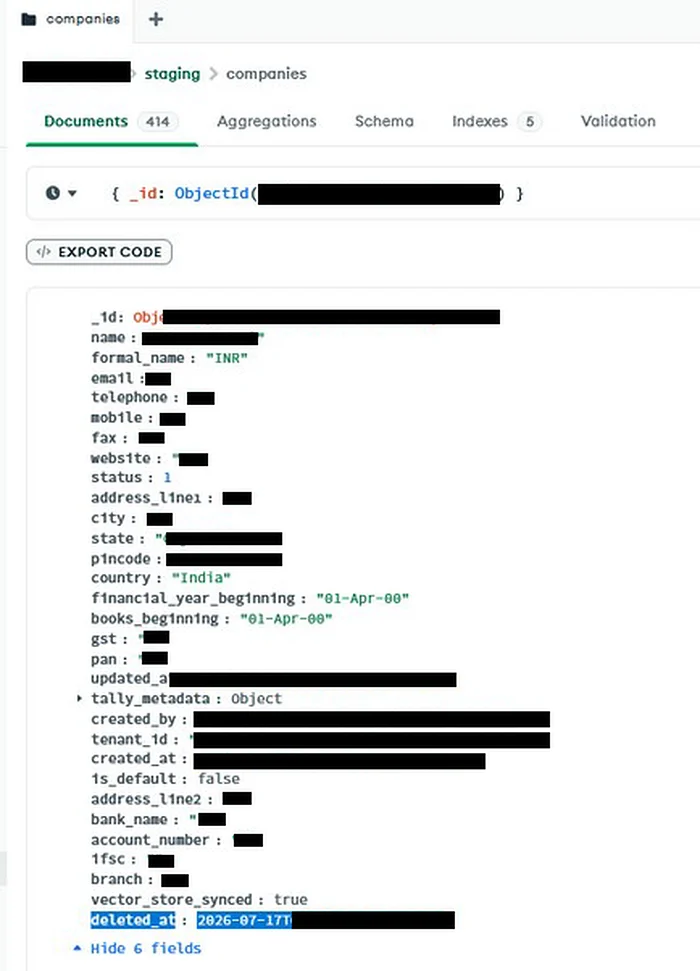
Figure 2 shows the database record with the deletion marker. Company and tenant identifiers are redacted.
Root cause
The mistake is a missing authorization check on a destructive operation. The deletion workflow answered the question "Can this user access the company?" but never asked whether the user had authority to perform the deletion. The company_delete permission was defined in the role system but was not enforced in the deletion path, so membership alone was enough.
The access boundary existed, but the required authorization boundary for a destructive action did not. A check that answers "Can this user access the company?" is not enough for an operation that removes the company.
Impact
An invited sub-user could delete a company they could access, without being its owner and without an explicit delete permission. The action did not require owner approval.
A company record sits at the centre of a tenant's business data and can be associated with invoices, Tally configurations, chat sessions, embeddings and other operational records. Deleting the company without validating those dependencies can leave related resources in an inconsistent state or create orphaned references. The assessment identified the absence of dependency validation as an additional risk in the deletion flow. These are potential downstream effects; the report does not claim that every linked record was orphaned during the test.
There was also a deletion-model consistency concern. The assessment confirmed that the deletion functionality performed a hard delete rather than a soft delete, permanently removing the targeted record instead of retaining it in a recoverable state. This could result in irreversible data loss and impact data integrity. The report also raises a deletion-model consistency concern: staging and repository behaviour should agree on whether deletion is recoverable or permanent.
The finding was classified as High severity in the assessment report, with primary CWE-862 (Missing Authorization).
Fix
The report states that the issue was fixed. The remediation status is recorded as Fixed, and the CVE ID is listed as to be assigned.
The protection that should apply is that company deletion is limited to the owner or to users who have been explicitly granted deletion authority. The same decision needs to be applied consistently wherever a company can be removed, and the application should handle linked business records in a controlled way. Staging and repository behaviour should also agree on whether deletion is recoverable or permanent.
Variants to test
- Other destructive endpoints on the same resource. Look for endpoints that update, archive, transfer or remove a company or its sub-resources, and call them from a sub-user session. A positive result is a
200response and a visible state change for an action the role system gates behind a permission the sub-user does not hold. - Permission enforcement gaps across the role system. Enumerate permissions such as
company_deleteand check whether each is enforced on the endpoint it protects, not just defined. A positive result is a permission that exists in the role model but is never checked server-side. - Access checks reused for write operations. Identify endpoints where the only check is membership or access to the parent object, then attempt a write or delete. A positive result is a successful destructive action from an account that can merely view the object.
- Dependency handling on delete. Delete a parent object that has linked records and inspect the linked records afterwards. A positive result is orphaned references or inconsistent state, which indicates the deletion flow does not validate dependencies.
- Soft delete versus hard delete consistency. Compare the deletion behaviour between staging and production, or between the application and the database. A positive result is a hard delete where a recoverable soft delete was expected, or the reverse.
What happened, in plain words
Munshi is a product made by Petpooja. It is a web application that businesses use to manage their company records and the data that hangs off them, such as invoices, Tally configurations, chat sessions and embeddings. A company record is not an isolated object: it sits at the centre of a tenant's business data. A tenant here is the separate space inside the application that a company's data belongs to.
Munshi has a role system. A role is a named bundle of permissions, and a permission is a single allowed action, such as "may delete a company". The role system already included a dedicated company_delete permission. The expectation is that only the company owner, or a user explicitly trusted with that responsibility, can remove the company.
The researcher found an authorization issue in the company deletion workflow, which is the feature that removes a company record from the application. An invited sub-user who had access to a company could delete that company without being its owner and without having a specific permission to perform the deletion. A sub-user here is a user who has been invited into a company and has access to it.
This was not an authentication bypass. Authentication is the process of proving who you are when you sign in; an authentication bypass would mean getting in without valid credentials. Here the user was signed in and had legitimate access to the company. The problem was that the application treated access to a company as sufficient authority to carry out a destructive action against it. Authorization is the separate question of what a signed-in user is allowed to do, and that question was answered too loosely.
That distinction matters. Being invited into a company should allow a user to perform the tasks granted to their role. It should not automatically give them the ability to remove the company itself. A simple comparison: a hotel key card opens your own room, but it should not also open the safe in the manager's office just because both are inside the same building.
Access to the company was enough
The affected endpoint was:
DELETE /api/companies/{company_id}
An endpoint is a specific address inside a web application that accepts a particular kind of request. An API is the set of these addresses that a program (rather than a human clicking buttons) talks to; the browser page you see is usually just a front end that sends requests to the API behind it. DELETE is the HTTP method, the verb that tells the server what kind of action is wanted; here it means "remove this thing". /api/companies/{company_id} is the path, the part of the address that names the resource. {company_id} is a placeholder for the identifier of the specific company, a unique label the application uses to tell one company from another.
The deletion workflow checked whether the authenticated user could access the requested company. It did not separately establish that the user was the company owner or had been granted permission to delete it.
The application already had a dedicated company_delete permission in its role system, but the deletion workflow did not enforce that permission before proceeding. Enforcing a permission means actually looking it up and refusing the request when it is absent. In practice, company membership became the only meaningful gate for a much more sensitive operation.
This meant an invited sub-user could reach the deletion action through their own authenticated session, even though company deletion should have remained restricted to the owner or a user explicitly trusted with that responsibility. A session is the server's memory of "this browser is signed in as this user"; it is usually kept alive by a cookie or a token, which is a small piece of data the browser stores and sends back with each request so the server can recognise you. The sub-user's session was genuine; only the permission check was missing.
The delete request was accepted
To validate the issue, the deletion request was made from an authenticated session that had access to the company but did not have owner-level authority. The request targets the company by its identifier:
DELETE /api/companies/{company_id}
Line by line: DELETE says the action is removal. /api/companies/ says the target is the companies collection in the API. {company_id} says which single company is being removed. Nothing in the request itself proves the sender is the owner; that decision has to be made by the server, and that is exactly where the check was missing.
The server returned HTTP 200 with {"success": true}. HTTP status codes are the server's short answer to every request: 200 means "done, it worked". The body {"success": true} is a small JSON message, JSON being a plain text format for structured data, confirming the operation succeeded.
A subsequent request to retrieve the same company returned 404, indicating that the company was no longer available through the application. 404 is the standard code for "not found". Asking for the company again and getting "not found" indicates the company was no longer available through the application.
Figure 1 shows the redacted request and response from the authenticated company-deletion test. The request method, endpoint path, success response and follow-up not-found result are retained. Redacted means sensitive values such as identifiers have been blanked out before publication.
The result was also checked against the database state. A database is the application's permanent store of records. The report records that the tested staging environment used a soft-delete marker, rather than immediately removing the company document. A staging environment is a copy of the application used for testing, kept separate from the live service. A soft delete means marking a record as deleted while leaving the data in place, so it could in principle be recovered; a hard delete means actually erasing it. A marker is simply a field set to a value that says "this is deleted".
Figure 2 shows the database record with the deletion marker. Company and tenant identifiers are redacted. That confirms the application had changed the company's state even though the request came from a user who should not have been allowed to delete it.
The impact goes beyond one company record
A company record is not an isolated object. It sits at the centre of a tenant's business data and can be associated with invoices, Tally configurations, chat sessions, embeddings and other operational records. Embeddings here are stored representations of text used by the application's features; the point is that they are separate records linked to the company.
Deleting the company without validating those dependencies can leave related resources in an inconsistent state or create orphaned references. A dependency is another record that relies on this one; an orphaned reference is a link pointing at something that no longer exists, like a phone contact saved under a number that has been disconnected. The assessment identified the absence of dependency validation as an additional risk in the deletion flow. These are potential downstream effects; the report does not claim that every linked record was orphaned during the test.
There was also a deletion-model consistency concern. The assessment confirmed that the deletion functionality performed a hard delete rather than a soft delete, permanently removing the targeted record instead of retaining it in a recoverable state. This could result in irreversible data loss and impact data integrity. The report also raises a deletion-model consistency concern: staging and repository behaviour should agree on whether deletion is recoverable or permanent.
This was an authorization failure, not a login bypass
The user did not need to steal another account or bypass the sign-in process. They were an invited user with valid access to the company.
The failure happened when the application decided what that access allowed them to do. A check that answers "Can this user access the company?" is not enough for an operation that removes the company. The application must also decide whether that user has authority to perform the deletion.
This is the core of the finding: the access boundary existed, but the required authorization boundary for a destructive action did not. Think of a building where your badge opens the front door and your own floor, but the server room needs a second, separate approval. The front door check is real and working; it is simply the wrong check for the server room.
What should be protected
Company deletion should be limited to the owner or to users who have been explicitly granted deletion authority. The same decision needs to be applied consistently wherever a company can be removed, and the application should handle linked business records in a controlled way. Staging and repository behaviour should also agree on whether deletion is recoverable or permanent. Repository here means the codebase that defines how deletion is implemented.
Vulnerability reference
| Field | Value |
|---|---|
| Vulnerability | Missing Authorization in Company Deletion |
| Product | Munshi by Petpooja |
| Affected endpoint | DELETE /api/companies/{company_id} |
| Primary CWE | CWE-862, Missing Authorization |
| Severity | High, as classified in the assessment report |
| Date | 7 July 2026 |
| Remediation status | Fixed |
| CVE ID | To be assigned |
CWE-862 is a catalogue entry for a class of weakness: the application does not check whether the user is allowed to do the thing they are asking for. A CWE is a standard name for a type of software weakness, so different reports about the same mistake can be grouped together. A CVE is a public identifier for one specific vulnerability in one specific product; it is listed as to be assigned, meaning it had not been issued at the time of writing. Severity is a rough rating of how much damage the issue could cause, and this one was classified as High in the assessment report.
Closing thoughts
This finding started with a user who was legitimately invited into a company. The application correctly recognised that the user could access the company, but it failed to distinguish that access from permission to delete it.
A company-level delete operation can affect far more than a single database record. It can interrupt business operations and put invoices, integrations, conversations and other associated data at risk. Destructive actions need a stronger authorization boundary than ordinary access to the same resource.
Researcher: Vyom Nagpal
Glossary
- API: the set of addresses inside an application that programs use to send requests and get data back, as opposed to the pages a person clicks.
- Authentication: proving who you are, usually by signing in.
- Authorization: deciding what a signed-in user is allowed to do.
- Authentication bypass: getting in without valid credentials; the report stresses this did not happen here.
- Endpoint: one specific address in an application that accepts a particular kind of request.
- HTTP method: the verb in a request, such as
DELETE, that says what kind of action is wanted. - Path: the part of an address that names the resource, such as
/api/companies/{company_id}. - Identifier: a unique label used to refer to one specific record, such as one company.
- Session: the server's memory that a particular browser is signed in as a particular user.
- Cookie / token: a small piece of data the browser stores and sends with requests so the server can recognise the session.
- HTTP status code: the server's short numeric answer, such as
200for success or404for not found. - JSON: a plain text format for structured data, such as
{"success": true}. - Redacted: sensitive values blanked out before publication.
- Database: the application's permanent store of records.
- Staging environment: a copy of the application used for testing, separate from the live service.
- Soft delete: marking a record as deleted while leaving the data in place, so it could be recovered.
- Hard delete: actually erasing the record, so it cannot be recovered.
- Marker: a field set to a value that records a state, such as "deleted".
- Tenant: one customer's own separate space inside a multi-customer application.
- Role: a named bundle of permissions given to a user.
- Permission: a single allowed action, such as
company_delete. - Enforce a permission: actually check the permission on the server and refuse the request when it is missing.
- Sub-user: a user invited into a company by its owner and given a limited role.
- Dependency: another record that relies on this one.
- Orphaned reference: a link pointing at a record that no longer exists.
- Data integrity: the property that stored data stays consistent and correct.
- CWE-862: the standard catalogue name for the weakness "Missing Authorization".
- CVE: a public identifier for one specific vulnerability in one specific product.
- Severity: a rough rating of how much damage an issue could cause.
- Repository: the codebase that defines how the application is implemented.

