A tale of a full Business Takeover — Red Team Diaries
During a red team engagement against a retail business, the tester gained physical access to a guest LAN port, performed MITM and password spraying using credentials from data breaches, and found shared local admin passwords. This led to local admin access on multiple workstations, read/write access to shared drives, and discovery of a master password file, enabling access to 95% of business-sensitive data.
Dhanesh Dodia - HeyDanny Follow
 Published on infosecwriteups.com
This story is going to be about a Red Team engagement conducted on a big fashion brand that is owned and ran by a small family in India. The parent company owned a lot of business divisions such as Jewellery, Cloths, Food and Supermarket stores.
The full write-up lives on its author's site
It belongs to its author, so we link to it rather than copy it. The other two tabs are our own rewrites, checked against it.
Context
This is a red team engagement against a large fashion brand in India, owned and run by a small family. The parent company held several business divisions: jewellery, clothing, food and supermarket stores. The stated scope was to find any potential way to steal customers' PII, other business sensitive information, or to see whether business downtime could be caused.
The author's own summary of the engagement:
Collected clear-text credentials from data-breaches > Walked in as a regular customer > Checked out the premise > Created a fake WiFi phishing access point > Identified all areas where LAN ports were available > Started MITM + Scanned internal network > Performed password spray leveraging the credentials I collected and **BOOM !!! >**Identified multiple local admin account were using a same password > Added local admin backdoor account on multiple endpoints for persistence > Performed password spray and BOOM !!! found READ & WRITEaccess on multiple workstation shares> Found a MASTERpassword file that contained keys for the kingdom > Rest is History
Setup
No tool versions, account names or specific payloads are given in the report. The preconditions it describes are:
- Passive reconnaissance on the store before visiting, to understand the premise and identify entry and exit areas.
- Collection of available credentials from data breaches, done in parallel with the passive recon.
- Physical access to a guest area in the brand's backend office, where the author connected a workstation to an available LAN port.
Finding it
The first observation was the absence of NAC authentication on the LAN port. Without it, plugging into the port placed the author's workstation directly on the main corporate network. From there the author ran MITM attacks and quick scans to map the assets in the client's network inventory.
The network was small, with only 2 subnets. It was also old school in design: no Domain was configured, and access to shared drives was managed through WORKGROUPS.
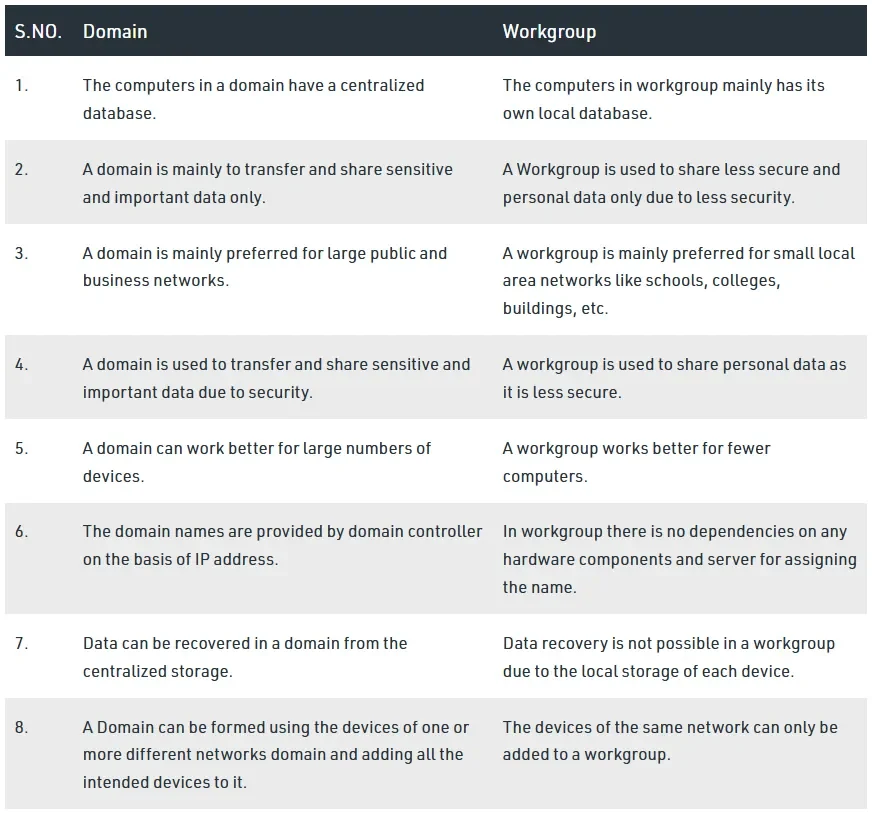
The image is captioned Difference between Domain and Workgroup and illustrates the architectural distinction the author is drawing attention to.
The MITM attack yielded knowledge of a few usernames, and the breached clear-text credentials gave the author knowledge of the users' password patterns. Those two pieces fed the next phase.
Exploitation
Step 1: Password spray against the network
Using the usernames learned from MITM and the password patterns from the breach data, the author performed password spray across the network. Multiple endpoints had a default local admin account configured with the same password. The author created backdoor users with local admin privileges on those endpoints for persistence.
Step 2: Obsolete systems and IoT
A couple of machines were running obsolete operating systems and were vulnerable to EternalBlue, but the author was not able to exploit it and take remote access.
The author also identified OT, IoT and other services in use. These devices sent sensor and actuator data in real time to a centralised monitoring system, which was used to monitor customers coming in and out of the store, billing counters, product details, alerts raised against anyone leaving the store without paying, and other alerts. The store was managed and business operations monitored this way. The notable point was that the major portals used to manage these IoT devices were running default passwords.
Step 3: Collection
With administrative access in hand, the author searched for files using keywords such as passwords, admin, credentials and confidential, and collected saved browser passwords.
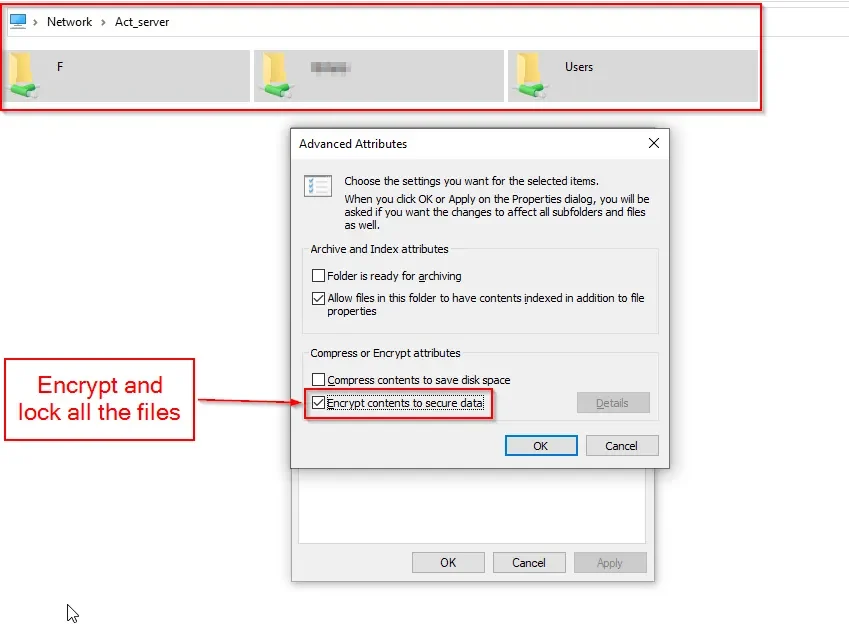
Because backdoor accounts had been created on multiple workstations, the author later obtained access to a shared WORKGROUP with full READ & WRITE access. At that stage it was possible to lock out the entire business data, including backups, and stop all business operations from working.
Step 4: The master password file
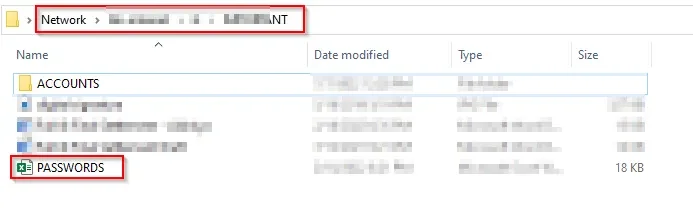
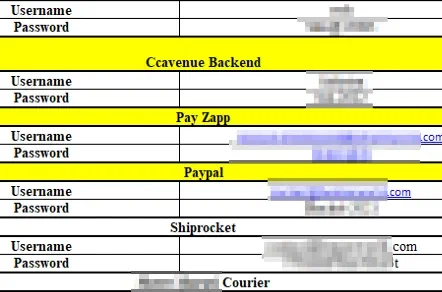
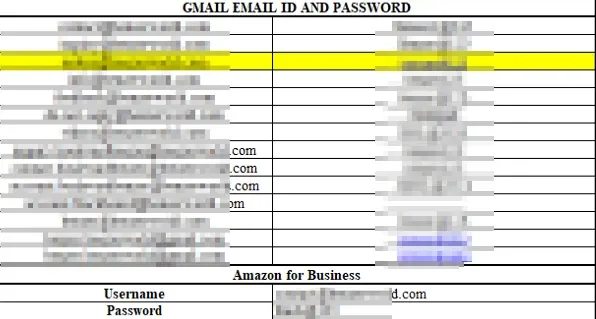
With access to multiple workstations, the author looked for business sensitive data, describing the approach as an "Uber style" data lookup. This led to a master password Excel file that contained the keys to the kingdom.
Step 5: What the access covered
The author's conclusion lists the positions reached:
- Local administrative access on multiple workstations.
- Administrative access on multiple IoT managing portals.
- RCE identified on multiple obsolete systems.
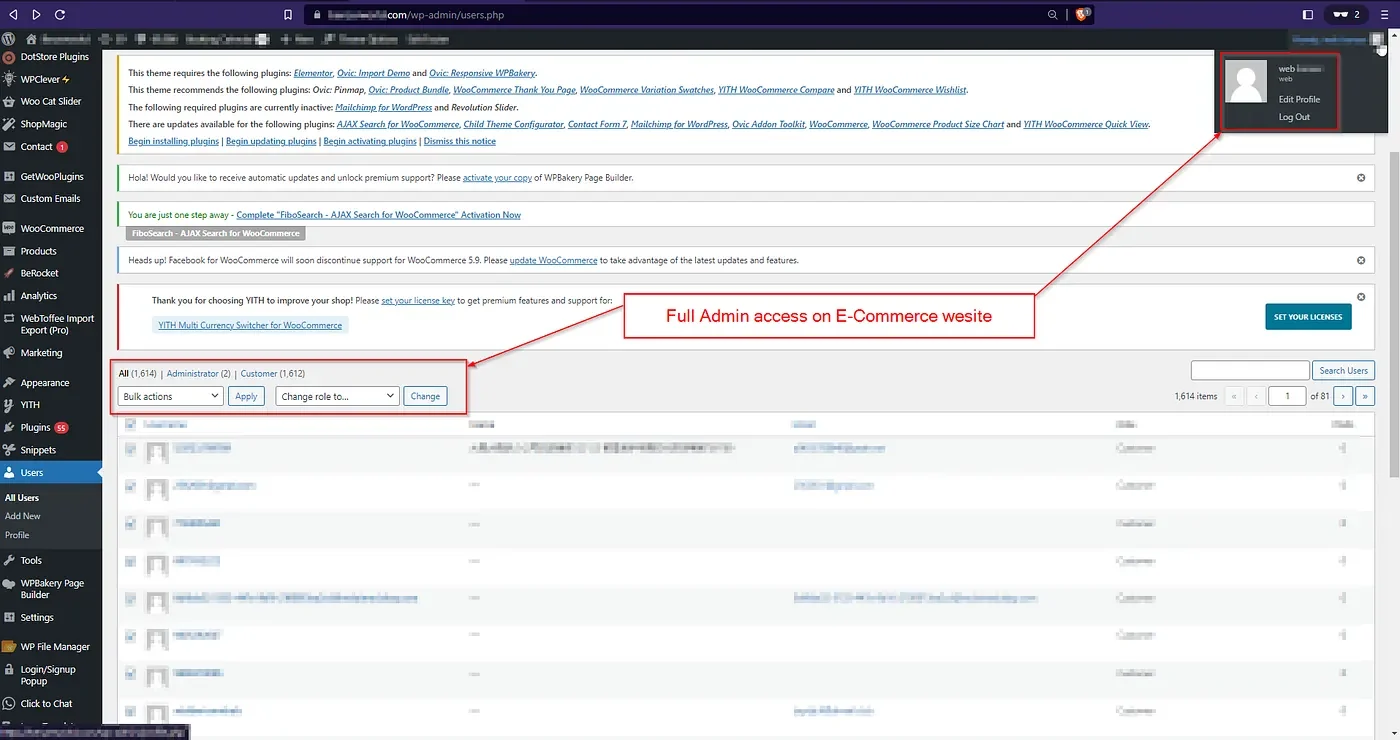
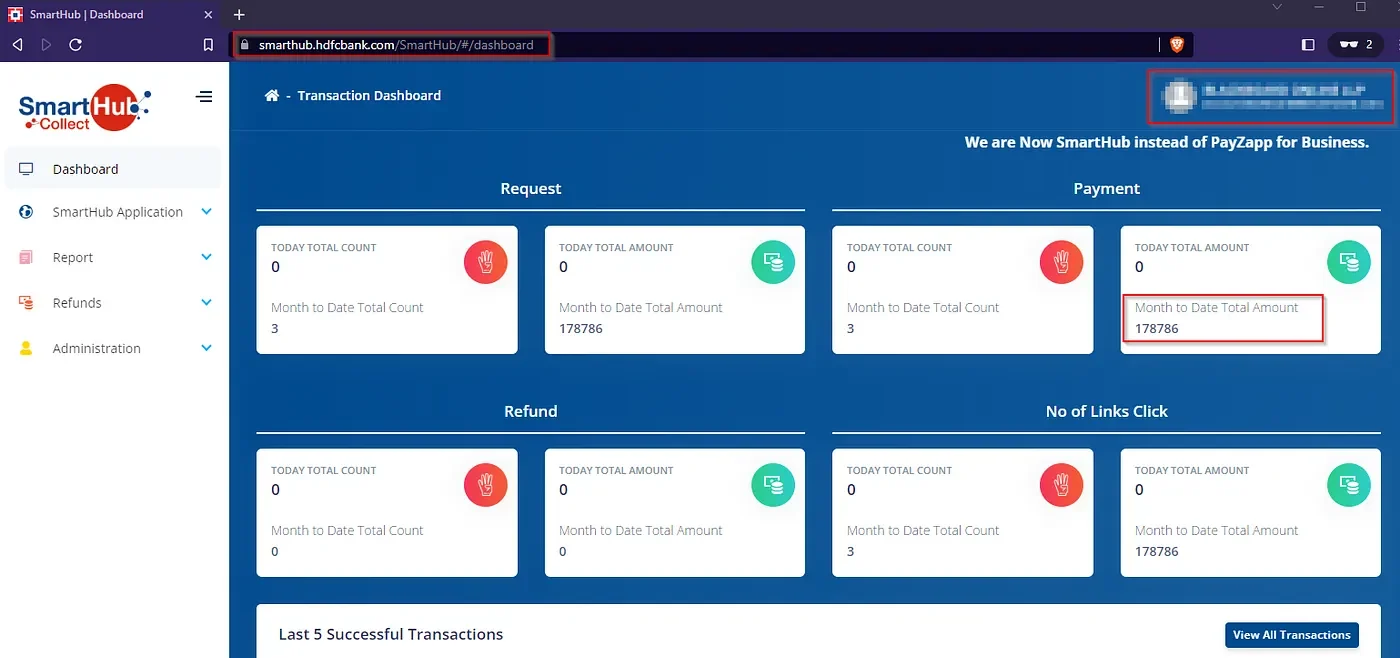
- Admin access to multiple internet facing digital assets, including an e-commerce website, a bank account, a supply chain portal, G-Suite Admin, and many more.
Step 6: Exfiltration
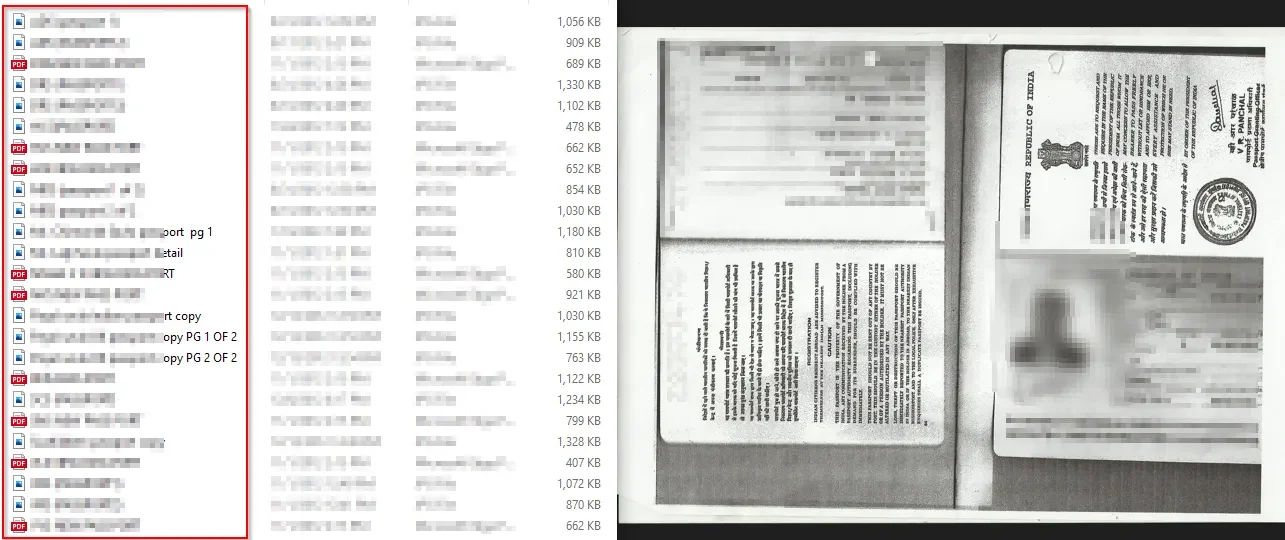
The author ended up with access to 95% of the business sensitive data with READ & WRITE access. The sensitive files discovered included purchase, sales, accounts, customers' PII, passwords, UPI transaction records and other sensitive files.
Root cause
The network architecture was old school, with no proper access control across the network. The absence of NAC on the LAN port he used meant a visitor could join the corporate network directly. The network was old school: no Domain was configured, and shared drive access was managed through WORKGROUPS.
On the human side, the stakeholders and employees proved weak against basic security practice: default local admin passwords reused across endpoints, default passwords on IoT management portals, and password patterns predictable from breach data. The company also had no good EDR, AV or SIEM tool to monitor the sensitive endpoints where all the business data resides.
Impact
Under the conditions described, an attacker with physical access to the guest area and a LAN port could reach the corporate network, escalate to local admin on multiple workstations, and obtain READ & WRITE access to a shared WORKGROUP holding business data and backups. The author states it was possible to lock out the entire business data, including backups, and stop all business operations. Access extended to 95% of business sensitive data, including customers' PII, passwords, UPI transaction records, purchase, sales and accounts files, and to admin access on internet facing assets such as the e-commerce website, a bank account, a supply chain portal and G-Suite Admin. RCE was identified on multiple obsolete systems, though the author notes EternalBlue could not be exploited on the vulnerable machines.
Fix
The report does not describe specific remediations that were applied. It states that a lot of changes in terms of people, process and technology were recommended to improve the security posture. The report states that a lot of changes in terms of people, process and technology were recommended to improve the security posture.
Variants to test
- Guest-area LAN ports without NAC. Plug a workstation into a publicly reachable port in a reception or guest office and check whether it lands on the corporate network.
- Default local admin passwords. Spray a small set of common default local admin passwords across workstations.
- IoT management portals with default credentials. Try vendor default logins on the portals that manage sensors, cameras and billing systems.
- WORKGROUP shares with broad permissions. Enumerate shared drives on a workgroup network and test read and write access.
- Password patterns from breach data. Derive likely password patterns from clear-text credentials in public breaches and spray them against the organisation's usernames.
- Keyword searches for credential stores. Search accessible file shares for filenames containing passwords, admin, credentials or confidential, and check for saved browser password stores on compromised workstations.
What happened, in plain words
A security tester was hired to attack a large fashion brand in India. The brand is owned and run by a small family, and the parent company also runs jewellery, clothing, food and supermarket stores. The job was to find out whether someone could steal customers' personal information (PII, short for personally identifiable information), get hold of other private business data, or shut the business down for a while.
He started by reading about the store from the outside, then visited it as an ordinary customer and was given access to a guest area in the back office, where he plugged his laptop into a LAN port and reached the internal network. Once inside he guessed passwords, created his own hidden administrator accounts, found a spreadsheet full of master passwords, and ended up with read and write access to almost everything the business owned.
This article walks through the same story step by step, explaining every technical idea from scratch. If you can use a browser and a computer, you can follow it.
A few words you will meet constantly, explained once here so the rest reads smoothly:
- Network: two or more computers connected so they can talk to each other. Your home WiFi is a small network; a company office has a bigger one.
- LAN port: the rectangular socket in a wall or on a router where you plug in a network cable. Plugging a laptop into one is how you join a wired network.
- Server: a computer whose job is to provide something to other computers, such as files, a website or email.
- Workstation: an ordinary employee's desktop or laptop computer.
- Credentials: the pair of a username and a password that proves who you are. Like the key to your front door: the username says which door, the password is the key.
- PII: personal information that identifies a real person, such as a name, address, phone number or bank details.
The tester's own summary
Before the detailed story, the author gives a one-paragraph summary of the whole engagement. It is worth reading slowly because every line becomes a section below:
Collected clear-text credentials from data-breaches > Walked in as a regular customer > Checked out the premise > Created a fake WiFi phishing access point > Identified all areas where LAN ports were available > Started MITM + Scanned internal network > Performed password spray leveraging the credentials I collected and **BOOM !!! >**Identified multiple local admin account were using a same password > Added local admin backdoor account on multiple endpoints for persistence > Performed password spray and BOOM !!! found READ & WRITEaccess on multiple workstation shares> Found a MASTERpassword file that contained keys for the kingdom > Rest is History
In plain words, line by line:
- Collected clear-text credentials from data-breaches: a data breach is when a company's database of user accounts leaks onto the internet. Clear-text means the passwords were stored as readable text, not scrambled. The tester gathered these leaked username and password pairs because people reuse passwords.
- Walked in as a regular customer: he physically visited the store, looking like any shopper.
- Checked out the premise: he looked around the building to see how it was laid out and where the entrances and exits were.
- Created a fake WiFi phishing access point: a phishing access point is a WiFi network that looks legitimate but is run by the attacker. Anyone who connects to it sends their traffic through the attacker's machine. Think of a fake taxi rank sign that sends you to a car that is not a real taxi.
- Identified all areas where LAN ports were available: he found the wall sockets where a cable could be plugged in.
- Started MITM + Scanned internal network: MITM stands for man in the middle, an attack where the attacker sits between two parties and can watch or alter what they say to each other. Scanning means probing the network to discover which machines exist and what they do.
- Performed password spray: password spraying is trying one or a few common passwords against many accounts, instead of trying many passwords against one account. It avoids locking accounts out and catches people who use weak, shared passwords.
- Identified multiple local admin account were using a same password: a local admin account is an account on a single computer that has full control over that computer. Several machines used the same password for it, so one guess opened many doors.
- Added local admin backdoor account on multiple endpoints for persistence: a backdoor account is an account the attacker creates for himself so he can come back later. Persistence means making sure access survives even if the original weakness is fixed. An endpoint is any device at the edge of the network, such as a workstation.
- Found READ & WRITE access on multiple workstation shares: a share (or shared drive) is a folder on a server that several people can open over the network. Read access means you can look at the files; write access means you can change or delete them.
- Found a MASTER password file that contained keys for the kingdom: a single document listing the passwords for many systems, which unlocks everything.
Before the visit: preparation
The report does not give tool versions, account names or specific attack payloads. What it does describe are the three things the tester set up before and during the visit:
- Passive reconnaissance on the store before going there. Reconnaissance means gathering information. Passive means doing it without touching the target's systems directly, for example by reading public information. The goal was to understand the building layout and identify where people enter and leave.
- Collecting credentials from data breaches, at the same time. Breach data is publicly traded among attackers. Because people reuse passwords across sites, a password leaked from one website often still works on a company account.
- Getting physical access to a guest area in the brand's back office, where he connected his own workstation to an available LAN port. This is the pivotal step: a visitor with a laptop and a cable was able to join the company's own network.
Why do this preparation first? Because walking into a building blind wastes the visit. Knowing the layout, having a list of likely usernames and passwords, and knowing where a network socket might be turns a random walk-in into a planned attack.
Getting onto the network
The first thing the tester noticed was that the LAN port had no NAC authentication. NAC stands for Network Access Control. It is the digital equivalent of a receptionist who checks your badge before letting you through the door: when you plug a device into a network port, NAC asks the device to prove it is authorised before granting access. On the port he used, there was no NAC check.
Because there was no NAC, plugging his laptop into the port put the tester directly on the main corporate network. He did not have to break a password or bypass a firewall at that point; the wall socket did the work for him.
From there he did two things:
- Ran MITM attacks. Sitting on the same network as employees, he could position himself between machines and observe traffic. This is how he learned a few usernames.
- Ran quick scans to map the assets in the client's network inventory. A scan sends small probes to a range of network addresses and notes which ones answer, which is like walking down a corridor knocking on doors to see which rooms are occupied. The result is an inventory: a list of the machines present.
What he found was a small network, with only 2 subnets. A subnet is a slice of a network, a group of addresses that belong together, like one floor of an office building. Two subnets means the whole company network was small enough to understand quickly.
The network was also old school in design: no Domain was configured, and access to shared drives was managed through WORKGROUPS.
The image is captioned Difference between Domain and Workgroup and illustrates the architectural distinction the author is drawing attention to.
To understand why this matters, here is the difference in everyday terms:
- A Domain is like a company with a central HR department that issues every employee a single ID badge. One central system (a domain controller) checks who you are and what you may open. Change an employee's rights in one place and it applies everywhere.
- A Workgroup is like a shared house where every flat has its own lock and its own list of who gets a key. Each computer keeps its own list of usernames and passwords. There is no central authority, so permissions are scattered and easy to get wrong.
In a Workgroup each computer keeps its own list of usernames and passwords, with no central authority.
The MITM attack gave him a few usernames. The breached clear-text credentials gave him knowledge of the users' password patterns, meaning the habits people follow when choosing passwords (for example a name plus a year, or a season plus a number). Those two pieces fed the next phase.
Attacking phase
Step 1: Password spray against the network
With usernames from the MITM and password patterns from the breach data, the tester performed a password spray across the network. Password spraying works like this: instead of guessing many passwords for one account (which triggers lockouts), you try one or two likely passwords against many accounts. It is like trying the same common door code on every door in a hotel rather than trying a thousand codes on one door.
The result: multiple endpoints had a default local admin account configured with the same password. A default password is the one a device or software ships with, which many owners never change. A local admin account has full control of that one machine. Because the same password was reused, one successful guess opened many machines.
On those machines the tester created backdoor users with local admin privileges. In other words, he added his own account, with full control, so he could return later even if the original weakness was fixed. This is persistence.
Step 2: Obsolete systems and IoT
A couple of machines were running obsolete operating systems, meaning software so old that the vendor no longer fixes its security holes. They were vulnerable to the famous exploit EternalBlue. An exploit is a piece of code that takes advantage of a specific bug to do something the attacker should not be able to do. EternalBlue is a well-known exploit that abuses a flaw in an old file-sharing service in Microsoft Windows. The tester was not able to exploit it and take remote access, so this particular door stayed shut.
He also identified OT, IoT and other services in use. Two more terms:
- IoT stands for Internet of Things: everyday devices with a network connection, such as sensors, cameras and smart meters.
- OT stands for Operational Technology: the computers and devices that run physical equipment, such as factory machines or store systems.
These devices sent sensor and actuator data in real time to a centralised monitoring system. A sensor measures something (a door opening, a person passing); an actuator makes something happen (a lock clicking, an alarm sounding). The central system was used to monitor customers coming in and out of the store, billing counters, product details, alerts raised against anyone leaving the store without paying, and other alerts. In other words, the store's daily operations ran on this system.
The notable point: the major portals used to manage these IoT devices were running default passwords. A portal here means a web page used to administer the devices. Anyone who knew the factory password could log in and control the store's sensors and alarms.
Step 3: Collection
With administrative access in hand, the tester searched for files using keywords such as passwords, admin, credentials and confidential. This is like rifling through a filing cabinet looking for folders with promising labels. He also collected saved browser passwords. Browsers can remember logins for you; on a compromised machine, those saved logins can be read out, giving the attacker every account the employee had saved.
Because backdoor accounts had been created on multiple workstations, the tester later obtained access to a shared WORKGROUP with full READ & WRITE access. Read access lets you open and copy files; write access lets you change, move or delete them. At that stage it was possible to lock out the entire business data, including backups, and stop all business operations from working. Backups are copies kept so data can be restored after loss; if the attacker can write to the backups too, there is no clean copy left to restore from.
Step 4: The master password file
With access to multiple workstations, the tester looked for business sensitive data, describing the approach as an "Uber style" data lookup. The author describes the approach as an "Uber style" data lookup. The idea is simple: once inside, search broadly for the words that matter.
This led to a master password Excel file that contained the keys to the kingdom. A single spreadsheet listing the passwords for many systems is the attacker's dream: it turns many separate locked doors into one open door.
Step 5: What the access covered
The author's conclusion lists the positions reached:
- Local administrative access on multiple workstations.
- Administrative access on multiple IoT managing portals.
- RCE identified on multiple obsolete systems. RCE stands for Remote Code Execution: the ability to make a machine run code of your choosing from somewhere else on the network. It is one of the most serious kinds of weakness because it usually means full control of the machine.
- Admin access to multiple internet facing digital assets, including an e-commerce website, a bank account, a supply chain portal, G-Suite Admin, and many more. Internet facing means reachable from the public internet, not just from inside the office. A supply chain portal is a website used to manage orders and deliveries with suppliers. G-Suite Admin is the administration console for a company's Google Workspace accounts (email, documents and so on).
Step 6: Exfiltration
Exfiltration means copying data out of a system without permission. The tester ended up with access to 95% of the business sensitive data with READ & WRITE access. The sensitive files discovered included purchase, sales, accounts, customers' PII, passwords, UPI transaction records and other sensitive files. UPI stands for Unified Payments Interface, a popular instant payment system in India, so UPI transaction records are payment histories.
Root cause
A root cause is the underlying reason a problem exists, as opposed to the symptom. Here the report identifies several:
- Old school network architecture with no proper access control across the network. Access control means deciding who may reach what. Without it, one foothold spreads everywhere.
- No NAC on the LAN port in the guest area. A physical visitor could join the corporate network directly, with no badge check at the digital door.
- No Domain, with shared drive access managed through WORKGROUPS. There was no centralised authentication boundary to contain the compromise, so each machine and each share had to be defended separately, and were not.
- Weak human practice. Default local admin passwords were reused across endpoints, IoT management portals kept default passwords, and password patterns were predictable from breach data.
- No good EDR, AV or SIEM tool to monitor sensitive endpoints. Three terms: AV (antivirus) looks for known malicious software on a device; EDR (endpoint detection and response) watches devices for suspicious behaviour and can respond; SIEM (security information and event management) collects logs from many systems in one place so someone can spot attacks. Without these, nobody was watching the machines where all the business data lives.
Impact
Impact means the harm that could result. Under the conditions described, an attacker with physical access to the guest area and a LAN port could reach the corporate network, escalate to local admin on multiple workstations, and obtain READ & WRITE access to a shared WORKGROUP holding business data and backups. The author states it was possible to lock out the entire business data, including backups, and stop all business operations. Access extended to 95% of business sensitive data, including customers' PII, passwords, UPI transaction records, purchase, sales and accounts files, and to admin access on internet facing assets such as the e-commerce website, a bank account, a supply chain portal and G-Suite Admin. RCE was identified on multiple obsolete systems, though the author notes EternalBlue could not be exploited on the vulnerable machines.
Fix
The report does not describe specific remediations that were applied. It states that a lot of changes in terms of people, process and technology were recommended to improve the security posture. Security posture is the overall strength of an organisation's defences. The report states that a lot of changes in terms of people, process and technology were recommended to improve the security posture.
Variants to test
These are the same weaknesses expressed as checks a tester could repeat elsewhere. Each one lists what a positive result looks like, so you know when you have found something real.
- Guest-area LAN ports without NAC. Plug a workstation into a publicly reachable port in a reception or guest office and check whether it lands on the corporate network.
- Default local admin passwords. Spray a small set of common default local admin passwords across workstations.
- IoT management portals with default credentials. Try vendor default logins on the portals that manage sensors, cameras and billing systems.
- WORKGROUP shares with broad permissions. Enumerate shared drives on a workgroup network and test read and write access.
- Password patterns from breach data. Derive likely password patterns from clear-text credentials in public breaches and spray them against the organisation's usernames.
- Keyword searches for credential stores. Search accessible file shares for filenames containing passwords, admin, credentials or confidential, and check for saved browser password stores on compromised workstations.
Glossary
- Actuator: a device that makes something happen physically, such as a lock or an alarm, as opposed to a sensor that measures.
- AV (antivirus): software that looks for known malicious programs on a device.
- Backdoor account: an account an attacker creates for himself so he can log in again later.
- Backup: a copy of data kept so it can be restored if the original is lost or damaged.
- Clear-text: stored or sent in readable form, not scrambled or hashed.
- Credentials: a username and password pair that proves who you are.
- Data breach: an incident where a company's private data, often user accounts, leaks out.
- Default password: the password a device or program ships with, which many owners never change.
- Domain: a centrally managed network where one system checks every user's identity and permissions.
- EDR (endpoint detection and response): software that watches devices for suspicious behaviour and can respond to it.
- Endpoint: any device at the edge of a network, such as a workstation or laptop.
- EternalBlue: a well-known exploit that abuses a flaw in an old Windows file-sharing service.
- Exfiltration: copying data out of a system without permission.
- Exploit: code that takes advantage of a specific bug to do something the attacker should not be able to do.
- G-Suite Admin: the administration console for a company's Google Workspace accounts.
- Internet facing: reachable from the public internet, not only from inside the office.
- IoT (Internet of Things): everyday devices with a network connection, such as sensors and cameras.
- LAN port: the socket where a network cable is plugged in to join a wired network.
- Local admin account: an account on a single computer with full control over that computer.
- MITM (man in the middle): an attack where the attacker sits between two parties and can watch or alter their traffic.
- NAC (Network Access Control): a check that a device is authorised before it is allowed onto a network port.
- OT (Operational Technology): the computers and devices that run physical equipment.
- Passive reconnaissance: gathering information about a target without touching its systems directly.
- Password spray: trying one or a few common passwords against many accounts, rather than many passwords against one account.
- Persistence: making attacker access survive fixes or reboots.
- Phishing access point: a fake WiFi network that looks legitimate but is run by the attacker.
- PII (personally identifiable information): data that identifies a real person, such as a name, address or bank details.
- Portal: a web page used to administer a system or devices.
- RCE (Remote Code Execution): the ability to make a machine run code of your choosing from elsewhere on the network.
- Read access: permission to open and copy files.
- Reconnaissance: gathering information about a target.
- Scan: probing a range of network addresses to discover which machines exist and what they do.
- Sensor: a device that measures something, such as a door opening or a person passing.
- Server: a computer that provides something to other computers, such as files or a website.
- Share (shared drive): a folder on a server that several people can open over the network.
- SIEM (security information and event management): a system that collects logs from many systems in one place so attacks can be spotted.
- Subnet: a slice of a network, a group of addresses that belong together.
- Supply chain portal: a website used to manage orders and deliveries with suppliers.
- UPI (Unified Payments Interface): a popular instant payment system in India.
- Workgroup: a network where each computer keeps its own list of users and permissions, with no central authority.
- Write access: permission to change, move or delete files.

