A $$$ worth of cookies!
A reflected DOM-based XSS existed because a user-controlled returnPath parameter was placed into the href attribute of a link without sanitisation. An attacker could craft a link that executes JavaScript in the victim's browser when the page renders.
 Published on medium.com
Hey everyone! This is Haroon Hameed and I’m here to share about my recent finding on Synack Red Team about Reflected DOM-based XSS.
The full write-up lives on its author's site
It belongs to its author, so we link to it rather than copy it. The other two tabs are our own rewrites, checked against it.
Context
This write-up covers a reflected DOM-based XSS found on a QR-based target during a Synack Red Team engagement. The researcher, working with Hannan Haseeb, focused on the main domain, referred to in the report as https://redacted.com, and deliberately skipped subdomain enumeration to concentrate on the main application.
The feature involved is a car viewer component in a React application. The component renders car details, a toolbar with actions such as print and bookmark, and a "back to search" button. The destination of that back button is taken from a returnPath parameter, and that is where the problem sits.
Setup
The report does not describe any accounts, roles, tooling versions or special preconditions. The work was done against the main domain only, with the goal of reading JavaScript files served by the application. The finding was submitted through Synack's Quality Rule programme and was awarded 3/3 stars and a bounty, the amount of which is not disclosed.
Finding it
The starting point was a review of the application's JavaScript. Two files stood out. The first contained a function that builds the car viewer component:
code: function(e) { var a = e.car, t = e.articleUuid, i = e.returnPath, u = e.moreInfoData, m = e.currentUser, o = m.canPrint, d = void 0 === o || o, E = m.canBookmark, b = void 0 === E || E, f = a.uuid, h = i ? "Search Results" : "Car"; return l.createElement("div", null, l.createElement("div", { className: "viewer-header" }, l.createElement("div", { className: "car-form-container" }, l.createElement("div", { className: "article-toolbar-container" }, l.createElement("div", { className: "page-width article-toolbar" }, l.createElement(l.Suspense, { fallback: l.createElement("div", null) }, l.createElement(s, a)), l.createElement("ul", { className: "back-to-search-ul" }, l.createElement("li", { className: "back-to-search-results" }, l.createElement("a", { className: "button", href: i || "/car/" + f + "/search" },
In this function, i is assigned from e.returnPath, and later used as the href of an anchor element. If that value is not sanitised, the researcher reasoned, a DOM-based XSS is possible: an attacker who controls the value can have code executed in the page.
The second file provided the source and the sink that complete the picture.
Source:
document.addEventListener("DOMContentLoaded", (function() { var e = document.getElementById("search-application-container") , t = JSON.parse(e.getAttribute("state")) || window.initialState; a.render(r.createElement(rr, t), e)
On DOMContentLoaded, the code reads the element with the id search-application-container, parses its state attribute as JSON, and passes the result to a React component which is rendered into that element. The state therefore comes from an attribute in the page, and the returnPath value travels inside it.
Sink:
l.createElement("a", { className: "button", href: i || "/car/" + f + "/search" }
Here l.createElement builds an a tag and sets its href to the user-controllable returnPath value. The researcher's conclusion was that user-supplied input from returnPath is executed in the DOM at this sink.
Exploitation
Step 1: Confirm the sink accepts a scheme
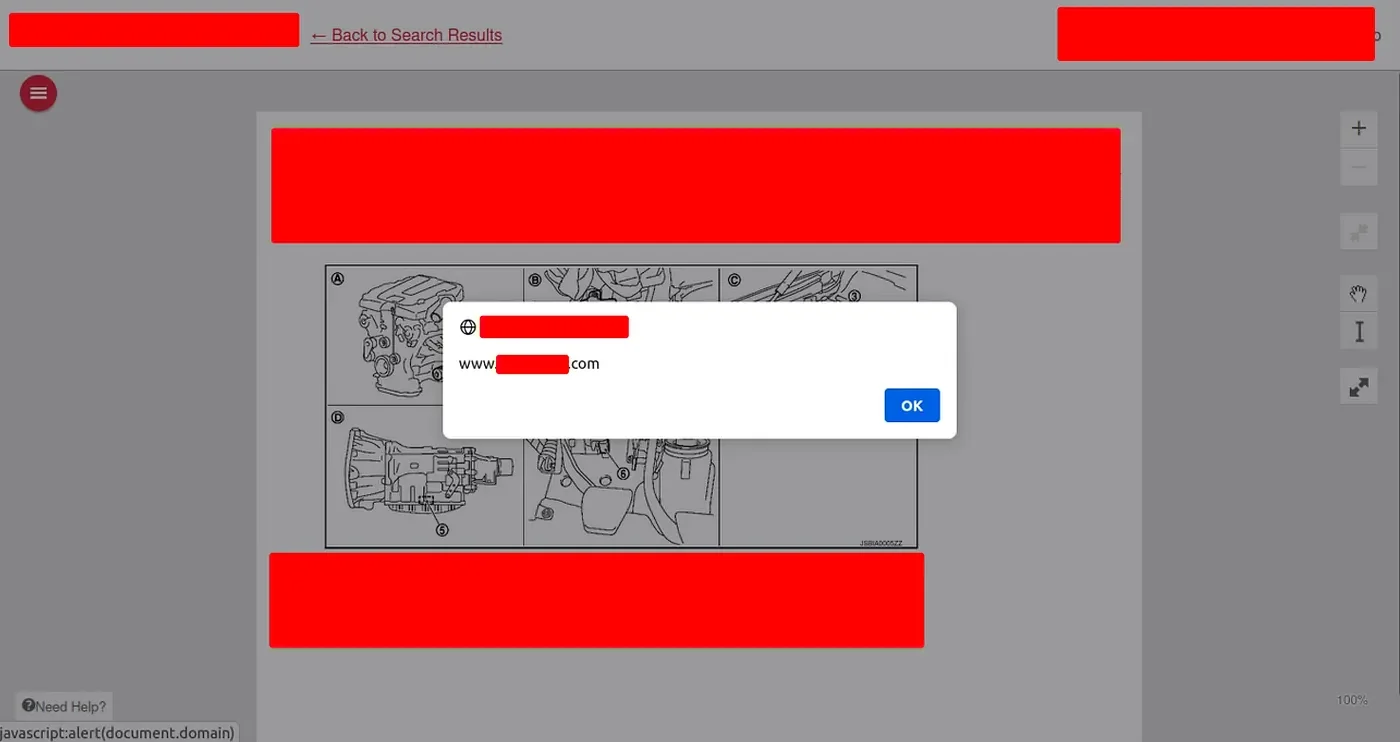
With the source and sink identified, the researcher used the following payload:
javascript:alert(document.domain)
Placed in the returnPath value, this becomes the href of the back button. The payload was placed in the returnPath value, which becomes the href of the back button.
Root cause
The mistake is that the returnPath value is taken from the page state and written straight into the href attribute of an anchor element through l.createElement, with no validation of the URL scheme or destination. React escapes text content, but a URL placed in href is still a URL, and a javascript: URL is a valid one as far as the browser is concerned. The value reaches the sink through the JSON in the state attribute of search-application-container, which is parsed on DOMContentLoaded and rendered by the component, so the payload is reflected into the DOM rather than into server-rendered HTML.
Impact
An attacker who can get a victim to load a page carrying a crafted returnPath value can have JavaScript run in the victim's browser in the context of the application's domain, as demonstrated by alert(document.domain). What that script could then do depends on the application's cookies and session handling, which the report does not describe.
Fix
The appropriate fix is to validate returnPath before using it as an href: accept only relative paths or URLs with an expected scheme and host, and reject anything else, in particular javascript: and other script-capable schemes. This validation should happen where the value is consumed, not only where it is produced.
Variants to test
- Look for parameters that end up in
hreforsrcattributes built by client-side rendering code, such asreturnPath,redirect,nextorurl. A positive result is ajavascript:value that executes when the element is clicked or loaded. - Inspect the JSON held in
stateattributes of container elements and trace which fields are rendered into URL-bearing attributes. A positive result is any field that reaches anhrefwithout scheme validation. - Try scheme variations that bypass naive filters, such as mixed case or whitespace inside the scheme. A positive result is execution despite the filter.
- Check other attributes built from the same state object, such as
srcon images or scripts. A positive result is script execution or an unexpected resource load from an attacker-controlled URL.
What happened, in plain words
A security researcher called Haroon Hameed, working together with his brother Hannan Haseeb, found a bug in a web application during a bug bounty programme run by a company called Synack (their "Synack Red Team"). A bug bounty programme is a deal in which a company invites independent testers to look for security problems in its systems and pays them for reporting what they find, instead of punishing them. The target in this case was described as "QR-based".
The bug is called a reflected DOM-based XSS. That is a long name, so let us unpack it:
- XSS stands for Cross-Site Scripting. It means getting a website to run JavaScript code that the website's authors did not write. JavaScript is the programming language that runs inside your browser and makes pages interactive. If an attacker can slip their own JavaScript into a page you are viewing, that code runs with the same trust the site has in itself: it can read what the page can read and do what the page can do.
- DOM stands for Document Object Model. It is the browser's in-memory model of the page: every heading, link, image and button is an object in that model, and JavaScript can read and change those objects. A "DOM-based" bug means the dangerous step happens entirely inside the browser, in that model, rather than on the server.
- Reflected means the attacker's input is bounced back into the page: the value the attacker supplies is taken and placed somewhere in the page that the browser then acts on.
The feature involved is a car viewer in a React application. React is a popular JavaScript library for building user interfaces; instead of writing HTML by hand, developers describe the page in JavaScript and React builds it. The car viewer shows details of a car, a toolbar with actions such as print and bookmark, and a "back to search" button. The destination of that back button is taken from a value called returnPath, which the page accepts as input. That is where the problem sits: the page trusts that value and puts it straight into a link.
Because the link's destination is attacker-controlled, an attacker can make the "back to search" button point at a piece of JavaScript instead of a normal web address. If a victim clicks it, the browser would run that JavaScript as if the site itself had written it. The researcher demonstrated this with a simple pop-up showing the site's domain name, which proves code is running in the site's context.
The report was submitted through Synack's Quality Rule programme, which rates the quality of reports, and it was awarded 3 out of 3 stars plus a bounty. The amount of the bounty is not disclosed.
The setup
The researcher focused on the main domain of the application, written in the report as https://redacted.com. A domain is the part of a web address that identifies the site, like the street address of a building; redacted.com here stands in for the real name, which has been removed. Subdomains are prefixes such as shop.example.com or login.example.com that belong to the same site. The researcher deliberately skipped looking at subdomains and stayed on the main application, so that the time went into one place rather than being spread thin.
The plan was to read the JavaScript files the application serves to visitors. Every modern website sends JavaScript files to your browser, and those files are public: anyone can open them with the browser's developer tools or simply download them. Reading them is a legitimate and very common first step in testing, because the code often reveals how the site handles input, which parameters it accepts, and where that input ends up.
Finding it
The starting point was a review of those JavaScript files. Two of them stood out. The first contained a function that builds the car viewer component:
code: function(e) { var a = e.car, t = e.articleUuid, i = e.returnPath, u = e.moreInfoData, m = e.currentUser, o = m.canPrint, d = void 0 === o || o, E = m.canBookmark, b = void 0 === E || E, f = a.uuid, h = i ? "Search Results" : "Car"; return l.createElement("div", null, l.createElement("div", { className: "viewer-header" }, l.createElement("div", { className: "car-form-container" }, l.createElement("div", { className: "article-toolbar-container" }, l.createElement("div", { className: "page-width article-toolbar" }, l.createElement(l.Suspense, { fallback: l.createElement("div", null) }, l.createElement(s, a)), l.createElement("ul", { className: "back-to-search-ul" }, l.createElement("li", { className: "back-to-search-results" }, l.createElement("a", { className: "button", href: i || "/car/" + f + "/search" },
Line by line, in plain words:
function(e) {starts a function that receives one argument,e, which is a bundle of data about the car being displayed.var a = e.car,takes thecarfield out of that bundle and stores it in a short variable nameda.t = e.articleUuid,stores an identifier calledarticleUuidint. A UUID is a long random-looking string used to identify something uniquely, like a serial number.i = e.returnPath,stores thereturnPathvalue ini. This is the value that will later become a link destination, so remember it.u = e.moreInfoData,stores some extra information inu.m = e.currentUser,stores information about the logged-in user inm.o = m.canPrint,reads whether the current user is allowed to print.d = void 0 === o || o,setsdto true unless printing was explicitly switched off.void 0is just a long way of writingundefined, meaning "no value".E = m.canBookmark,reads whether the user is allowed to bookmark.b = void 0 === E || E,does the same defaulting trick for bookmarking.f = a.uuid,stores the car's own identifier inf.h = i ? "Search Results" : "Car";picks a label: ifreturnPathhas a value, the label is "Search Results", otherwise "Car".- The long
return l.createElement(...)chain builds the page.l.createElementis React's way of creating an element: the first argument is the tag name, the second is a set of attributes, and the rest are the element's children. Sol.createElement("div", null, ...)creates adivwith no attributes and some children inside it. - The nested calls build a header, a form container, a toolbar container, a toolbar, and a list with the class
back-to-search-ul. - The important part is near the end:
l.createElement("a", { className: "button", href: i || "/car/" + f + "/search" },creates an anchor element, which is the HTML tag for a link. Its visible styling isbutton, and its destination,href, is set toiifihas a value, or otherwise to a default path built from the car's identifier.
So i, which came from e.returnPath, ends up as the href of a link. href is the attribute that tells the browser where a link goes when clicked. If that value is not checked, the researcher reasoned, a DOM-based XSS is possible: whoever controls the value controls where the link points, and a link can point at JavaScript.
The second file provided the source and the sink that complete the picture. Two more terms:
- A source is where untrusted input enters the page. Think of it as the tap where water comes in.
- A sink is a place where that input is used in a way that can be dangerous. Think of it as the drain: what goes in at the tap comes out here, and if it is dirty, this is where the damage shows.
Source:
document.addEventListener("DOMContentLoaded", (function() { var e = document.getElementById("search-application-container") , t = JSON.parse(e.getAttribute("state")) || window.initialState; a.render(r.createElement(rr, t), e)
Line by line:
document.addEventListener("DOMContentLoaded", (function() {tells the browser: when the page has finished loading its HTML (that is theDOMContentLoadedevent), run the function that follows.documentis the browser's handle on the page.var e = document.getElementById("search-application-container")finds the element on the page whose id issearch-application-container. An id is a unique name given to one element so code can find it., t = JSON.parse(e.getAttribute("state")) || window.initialState;reads an attribute calledstatefrom that element and parses it. JSON is a text format for structured data, like a very strict shopping list:{"name": "value"}.JSON.parseturns that text into a real JavaScript object. If parsing gives nothing useful, the code falls back towindow.initialState, a value the page set up earlier.a.render(r.createElement(rr, t), e)builds a React component calledrrwith that data and renders it inside the element. Rendering means turning the description into actual visible page content.
So the page state, including the returnPath value, arrives as text inside an attribute in the page, is turned into data, and is handed to the component that draws the car viewer.
Sink:
l.createElement("a", { className: "button", href: i || "/car/" + f + "/search" }
Line by line:
l.createElement("a", {asks React to create a link element.className: "button",gives it the styling classbuttonso it looks like a button.href: i || "/car/" + f + "/search"sets the destination toi, thereturnPathvalue, or to a default path ifiis empty.
Here l.createElement builds an a tag and sets its href to the user-controllable returnPath value. The researcher's conclusion was that user-supplied input from returnPath is executed in the DOM at this sink.
Exploitation
Step 1: Confirm the sink accepts a scheme
With the source and sink identified, the researcher used the following payload:
javascript:alert(document.domain)
A payload is the piece of input an attacker crafts to trigger a bug. This one uses a URL scheme. A scheme is the first part of a web address, before the colon: https in https://example.com, mailto in mailto:[redacted]. Browsers also understand a scheme called javascript:, which means "run the text after the colon as JavaScript". alert(...) is a built-in browser function that shows a pop-up box with a message. document.domain is the current page's domain name. So the payload means: run a pop-up that displays the site's domain.
Placed in the returnPath value, this becomes the href of the back button. The payload was placed in the returnPath value, which becomes the href of the back button. "In the context of the page" means the code runs as though the site itself had written it, with the site's identity, rather than as a stranger.
Root cause
The mistake is that the returnPath value is taken from the page state and written straight into the href attribute of an anchor element through l.createElement, with no validation of the URL scheme or destination. Validation means checking a value against rules before using it, the way a bouncer checks ID at a door. React escapes text content, meaning it neutralises characters that would otherwise be read as HTML, but a URL placed in href is still a URL, and a javascript: URL is a valid one as far as the browser is concerned. The value reaches the sink through the JSON in the state attribute of search-application-container, which is parsed on DOMContentLoaded and rendered by the component, so the payload is reflected into the DOM rather than into server-rendered HTML. Server-rendered HTML is the page as the server sends it; here the dangerous step happens later, in the browser, after the page has loaded.
Impact
An attacker who can get a victim to load a page carrying a crafted returnPath value can have JavaScript run in the victim's browser in the context of the application's domain, as demonstrated by alert(document.domain). What that script could then do depends on the application's cookies and session handling, which the report does not describe. A cookie is a small piece of data a site stores in your browser so it can recognise you on later requests; a session is the logged-in state that cookie usually represents, like a wristband at an event that proves you paid to get in. If script runs with the site's identity, it may be able to act as the logged-in user, which is why XSS matters.
Fix
The report does not state what change, if any, was made. The appropriate fix is to validate returnPath before using it as an href: accept only relative paths or URLs with an expected scheme and host, and reject anything else, in particular javascript: and other script-capable schemes. A relative path is one that stays on the same site, like /car/123/search, rather than pointing somewhere else entirely. This validation should happen where the value is consumed, not only where it is produced, because the place that builds the link is the last line of defence.
Variants to test
- Look for parameters that end up in
hreforsrcattributes built by client-side rendering code, such asreturnPath,redirect,nextorurl.srcis the attribute that tells the browser where to load an image or script from. A positive result is ajavascript:value that executes when the element is clicked or loaded. - Inspect the JSON held in
stateattributes of container elements and trace which fields are rendered into URL-bearing attributes. A positive result is any field that reaches anhrefwithout scheme validation. - Try scheme variations that bypass naive filters, such as mixed case or whitespace inside the scheme. A naive filter is a check that only looks for the exact lowercase word
javascript:and can be fooled by spelling it differently. A positive result is execution despite the filter. - Check other attributes built from the same state object, such as
srcon images or scripts. A positive result is script execution or an unexpected resource load from an attacker-controlled URL.
Glossary
- Bug bounty programme: a scheme where a company pays independent testers for reporting security problems in its systems.
- Synack Red Team: the group of independent testers through which this engagement was run.
- Quality Rule programme: Synack's programme for rating the quality of submitted reports, in this case 3 out of 3 stars.
- Bounty: the payment a company gives for a valid security report; the amount here is not disclosed.
- QR-based target: an application reached by scanning a QR code.
- Domain: the part of a web address that identifies the site, such as
example.com. - Subdomain: a prefix on a domain, such as
shop.example.com, that belongs to the same site. - JavaScript: the programming language that runs in the browser and makes pages interactive.
- React: a JavaScript library for building user interfaces by describing them in code.
- Component: a reusable piece of a user interface, such as the car viewer, built and rendered by React.
- DOM (Document Object Model): the browser's in-memory model of the page, which JavaScript can read and change.
- XSS (Cross-Site Scripting): getting a website to run JavaScript that its authors did not write.
- DOM-based XSS: an XSS where the dangerous step happens entirely in the browser's DOM rather than on the server.
- Reflected XSS: an XSS where the attacker's input is bounced back into the page and acted on.
- Source: the place where untrusted input enters the page.
- Sink: the place where untrusted input is used in a way that can be dangerous.
- Parameter: a named value passed into a page or function, such as
returnPath. returnPath: the value that decides where the "back to search" button points.href: the attribute of a link that says where it goes when clicked.src: the attribute that says where an image or script is loaded from.- Anchor element (
atag): the HTML tag for a link. l.createElement: React's function for creating an element, taking a tag name, attributes and children.DOMContentLoaded: the browser event fired when the page's HTML has finished loading.getElementById: a browser function that finds an element by its unique id.- Attribute: a named setting on an HTML element, such as
href,srcorstate. - JSON: a text format for structured data, parsed into real objects with
JSON.parse. JSON.parse: the function that turns JSON text into a JavaScript object.window.initialState: a fallback value the page sets up for its state.- Render: to turn a component description into visible page content.
- UUID: a long random-looking string used to identify something uniquely.
- Payload: the crafted input an attacker uses to trigger a bug.
- Scheme: the first part of a web address before the colon, such as
httpsorjavascript. javascript:scheme: a URL scheme that tells the browser to run the text after the colon as JavaScript.alert: a browser function that shows a pop-up box with a message.document.domain: the current page's domain name.- Validation: checking a value against rules before using it.
- Escaping: neutralising characters in text so they are not read as HTML.
- Relative path: a link that stays on the same site, such as
/car/123/search. - Cookie: a small piece of data a site stores in your browser to recognise you later.
- Session: the logged-in state a cookie usually represents.
- Naive filter: a check that only matches one exact spelling and can be bypassed by variations such as mixed case or whitespace.



