Winning QR with DOMBased XSS
A JavaScript function read a URL parameter and passed it to a redirect sink, allowing a javascript: URL to run in the page. An attacker could craft a link that executes script in the victim's browser on the main domain.
 Published on medium.com
This blog post describes how I am able to execute DOM-Based XSS on Synack Red Team program and able to win QR aka Quality Rule.
The full write-up lives on its author's site
It belongs to its author, so we link to it rather than copy it. The other two tabs are our own rewrites, checked against it.
Context
This write-up covers a DOM-based cross-site scripting (XSS) finding on a Synack Red Team program. The researcher, Haroon Hameed, worked with Hannan Haseeb, and the report was submitted through Synack's Quality Rule (QR) programme, where it earned 3/3 stars and a bounty of $775.00. The target is referred to only as redacted.com; the report does not name the product or the specific feature beyond a login flow.
The sink sits in the login logic, where the front-end assigns a value to $window.location.href.
Setup
The report does not describe any accounts, roles, tooling versions or special preconditions. The testing was done against the main domain only:
https://redacted.com
The researcher explicitly did not perform subdomain enumeration and focused on the main domain, looking for JavaScript files.
Finding it
While reviewing JavaScript files on the main domain, the researcher found a function that reads a named parameter from the URL:
function getParameterByName(name, url) { if (!url) url = window.location.href; name = name.replace(/[\[\]]/g, "\\$&"); var regex = new RegExp("[?&]" + name + "(=([^&#]*)|&|#|$)"), results = regex.exec(url); if (!results) return null; if (!results[2]) return null; return decodeURIComponent(results[2].replace(/\+/g, " "))
This function, referred to in the report as getParamByName, takes two arguments. The first is name, a string naming the parameter to fetch from the URL; in this case the parameter is target=. The second is a URL such as document.URL or document.location. The function builds a regular expression from the parameter name, executes it against the URL, and returns the decoded value of the matching parameter.
A function that reads from the URL is a source. The researcher identified the following source in this application:
window.location.href
The corresponding sink was found in the login logic:
else{cmsService.getClientConfig().then(function(result){if(angular.isDefined(result)){uaService.createAndSetDemographics(result)}$window.location.href=vm.credentials.redirect||"/"})
Assigning a javascript: value to $window.location.href makes it execute as JavaScript.
Exploitation
Step 1: Confirm the code path that reaches the sink
The researcher then looked at the surrounding login function to work out which branch has to be taken for the sink to run. The relevant excerpt is:
$location.path("/") } else { if (result.token) { window.localStorage.wptoken = result.token } if (result.status == "ACTIONREQUIRED_2FA_SETUP" && result.token) { twoFactorAuthService.requireAuthSetup("login") } else if (result.status == "ACTIONREQUIRED_2FA_VERIFICATION" && result.token) { twoFactorAuthService.requireAuthVerification("login") } else if (result.success != "true" && result.status.length > 0) { vm.submitted = false; vm.onError(result.status) } else { cmsService.getClientConfig().then(function(result) { if (angular.isDefined(result)) { uaService.createAndSetDemographics(result) } $window.location.href = vm.credentials.redirect || "/" })
The report states that in this case the last statement is true and causes the execution of JavaScript. In other words, the final else branch, which assigns vm.credentials.redirect (falling back to /) to $window.location.href, is the path that is reached.
Step 2: Send the payload in the target parameter
With the source and sink connected, the researcher used the following payload:
javascript:alert(document.domain)
The payload used was javascript:alert(document.domain).
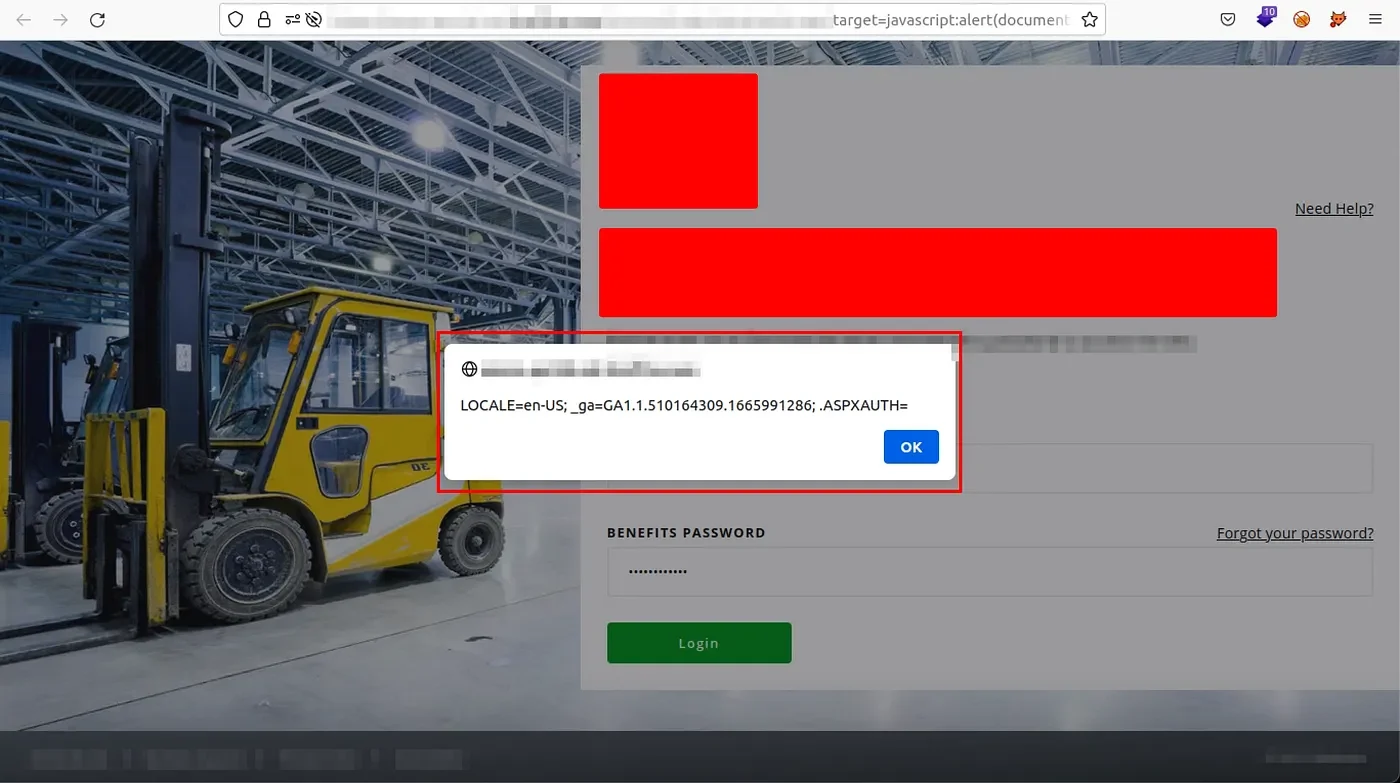
The screenshot is captioned 'Execution of Payload'.
Step 3: Report and outcome
The finding was submitted to Synack as part of the Quality Rule programme. The report was rated 3/3 stars and the researcher was awarded $775.00.
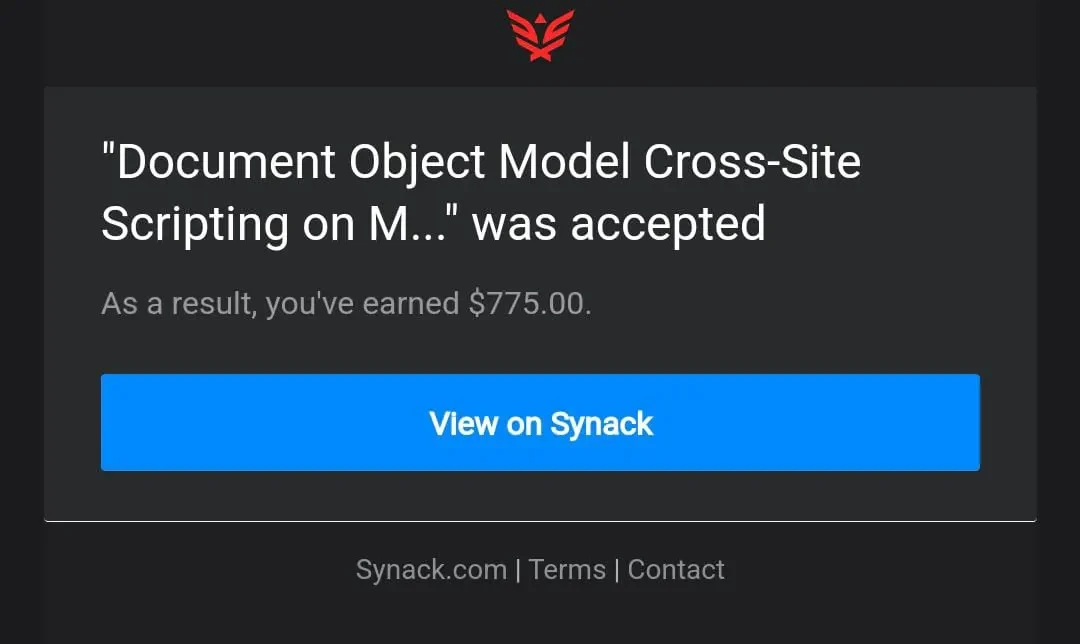
The second image accompanies the description of the Quality Rule submission and the award.
Root cause
The application reads a user-supplied value from the URL through getParameterByName (the target parameter) and later passes a value into $window.location.href in the login flow.
Impact
The payload javascript:alert(document.domain) was executed in the DOM.
Fix
Based on the code shown, the assignment to $window.location.href should only accept values that are known-safe relative paths or URLs on an allow-list, and any javascript: (and similar) scheme should be rejected before the assignment.
Variants to test
- Grep JavaScript bundles for
getParameterByName-style helpers and trace every parameter they read to a sink such aslocation.href,location.assign,location.replace,innerHTMLordocument.write. A positive result is a parameter whose value reaches the sink and executes, for example an alert showingdocument.domain. - Look for redirect parameters (
redirect,return,next,target,url) used in login and logout flows. A positive result is ajavascript:value that runs when the redirect is followed. - Check whether the same parameter is reflected into the DOM through Angular or another framework's bindings. A positive result is script execution without a server-side round trip.
- Test the parameter with different encodings and schemes to see whether any filtering exists. A positive result is execution despite the filter, or a clear error showing where the value is blocked.
- Review other JavaScript files on the same domain for similar source-to-sink patterns, since the report found this one by reading the front-end code rather than by fuzzing.
What happened, in plain words
A security researcher found a bug in a website's login page. The bug let user-supplied input from the URL reach a dangerous function in the page's JavaScript. This kind of bug is called DOM-based cross-site scripting, or DOM XSS for short.
The researcher found it by reading the website's JavaScript files, not by running an automated scanner. The finding was submitted on a Synack Red Team Quality Rule program, and it earned 3/3 stars and a bounty of $775.00. The researcher is Haroon Hameed, working with Hannan Haseeb.
The report refers to the target only as redacted.com. It does not name the product or the exact feature beyond the login flow.
Background: who is writing and why
The author describes himself as a cyber security enthusiast with skills in web application and API penetration testing, working as a bug bounty hunter on Synack Red Team (SRT), Bugcrowd and Zerocopter from Shahkot, Punjab, Pakistan. A bug bounty hunter is someone who looks for security flaws in companies' systems and reports them, usually for a reward. Synack Red Team is a group of researchers who test on behalf of Synack's customers.
The goal of the post is to show how the author found and exploited a DOM-based XSS on a Synack Red Team programme and won QR, which stands for Quality Rule. Quality Rule is a Synack scheme that scores the quality of a submitted report. The author says the bug was simple to exploit but took a while to figure out, and promises to keep the explanation as simple as possible.
Understanding the DOM
Before any of the bug makes sense, you need to know what the DOM is. When you open a web page, your browser receives a file full of text: HTML for the structure, CSS for the look, JavaScript for the behaviour. The browser does not keep that text as one long string. It reads it and builds an internal model of the page: a tree of elements, where each element and each attribute sits in its place, nested inside its parent. That model is the Document Object Model, or DOM.
A useful everyday comparison: think of a printed recipe. The paper with the text on it is the HTML file. The cook's mental picture of the dish, with the steps in order and the ingredients grouped, is the DOM. The cook can change the mental picture while cooking (add salt, skip a step) without reprinting the paper. In the same way, JavaScript can change the DOM while the page is open, and the page updates immediately without a trip back to the server.
This matters for security because the DOM is where a whole class of bugs lives. If a script takes something a user controls and writes it into the DOM in a way that the browser treats as code, the attacker's text becomes part of the page.
DOM-based XSS: sources and sinks
The author explains DOM-based XSS using two terms: source and sink. The explanation uses a lab from PortSwigger's Web Academy, which the author notes contains more information and practice labs; he warns this is a minor spoiler for one of them.
Source. A source is any JavaScript property or function that accepts input from somewhere on the page. The simplest example is location.search, which is the part of the URL after the question mark. If you open https://example.com/page?name=alice, then location.search is ?name=alice. Anything in the URL can be set by whoever sends the link, so a source is a place where attacker-controlled text can enter the page.
Common sources listed in the report:
document.URLdocument.documentURIdocument.URLUnencodeddocument.baseURIlocation.searchdocument.cookiedocument.referrer
A cookie is a small piece of data a website stores in your browser and sends back on later requests, often used to remember that you are logged in. document.cookie lets JavaScript read it. document.referrer is the address of the page you came from.
Sink. A sink is a JavaScript function or property that can cause harm if attacker-controlled data reaches it. In plain terms, if a function puts input back on the screen as output without checking it, it is a sink. The report's example is innerHTML, a property that replaces the contents of an HTML element with whatever string you give it; if that string contains HTML or script, the browser will treat it as such.
Common sinks listed in the report:
document.write()document.writeln()document.domainelement.innerHTMLelement.outerHTMLelement.insertAdjacentHTMLelement.onevent
A DOM-based XSS happens when a source feeds a sink without a safe check in between. The attacker does not need the server to reflect anything back; the whole thing happens in the victim's browser, in the page's own code.
Vulnerability analysis: reading the JavaScript
The author focused on the main domain only:
https://redacted.com
He explicitly did not do subdomain enumeration. Subdomain enumeration means listing all the subdomains of a domain (like mail.example.com or shop.example.com) to find more places to test. Skipping it keeps the scope small. Instead, he started looking for interesting JavaScript files, because the front-end code is where a DOM bug has to live.
He found one such file containing this function:
function getParameterByName(name, url) { if (!url) url = window.location.href; name = name.replace(/[\[\]]/g, "\\$&"); var regex = new RegExp("[?&]" + name + "(=([^&#]*)|&|#|$)"), results = regex.exec(url); if (!results) return null; if (!results[2]) return null; return decodeURIComponent(results[2].replace(/\+/g, " "))
Line by line, in plain words:
function getParameterByName(name, url) {declares a function that takes two inputs:name, the name of the URL parameter to look for, andurl, the address to search in.if (!url) url = window.location.href;says: if no URL was passed in, use the address of the page currently open in the browser.window.location.hrefis the full current URL.name = name.replace(/[\[\]]/g, "\\$&");escapes square brackets in the parameter name so they are treated as literal characters when building a pattern later. This is a small safety step for the pattern itself.var regex = new RegExp("[?&]" + name + "(=([^&#]*)|&|#|$)"),builds a search pattern. It looks for the parameter name preceded by?or&, followed by=and then any characters that are not&or#, or by the end of the string. In other words, it finds?target=somethingor&target=somethinginside a URL.results = regex.exec(url);runs that pattern against the URL and stores the match.if (!results) return null;if nothing matched, return nothing.if (!results[2]) return null;if the parameter was present but had no value, return nothing.return decodeURIComponent(results[2].replace(/\+/g, " "))takes the captured value, turns+into a space, and decodes any percent-encoded characters (like%20for a space) so the caller gets the readable value.
The report calls this function getParamByName. It takes two arguments: name, a string naming the parameter to fetch, which in this case is target=, and a URL such as document.URL or document.location. The function builds a regular expression from the name, runs it against the URL, and returns the decoded value.
A function that reads from the URL is a source. The author identified this source in the application:
window.location.href
window.location.href is the full address of the current page. Because the address comes from whoever sent the link, it is attacker-controllable.
The matching sink was in the login logic:
else{cmsService.getClientConfig().then(function(result){if(angular.isDefined(result)){uaService.createAndSetDemographics(result)}$window.location.href=vm.credentials.redirect||"/"})
Line by line:
else{starts the branch that runs when the earlier conditions in the login function were not met.cmsService.getClientConfig().then(function(result){asks a service for some configuration and says: when the answer arrives, run the following function with that answer.cmsServiceis a service in the application's code; the report does not describe what it does beyond this call.if(angular.isDefined(result)){uaService.createAndSetDemographics(result)}if the configuration came back, pass it to another service. Angular is a JavaScript framework for building web pages;angular.isDefinedis a helper that checks a value is not undefined.$window.location.href=vm.credentials.redirect||"/"sets the browser's address tovm.credentials.redirect, or to/if that value is empty.$windowis Angular's wrapper around the browser'swindowobject. This is the sink: whatever string ends up here becomes the next address the browser navigates to.
Assigning attacker-controlled input to $window.location.href is what makes the value execute as JavaScript when it carries a javascript: scheme. A scheme is the part before the colon in a URL, like https: or mailto:. The javascript: scheme tells the browser that what follows is code to run, not a page to load.
Exploitation
Step 1: Confirm the code path that reaches the sink
The author then read the surrounding login function to work out which branch has to be taken for the sink to run. The relevant excerpt is:
$location.path("/") } else { if (result.token) { window.localStorage.wptoken = result.token } if (result.status == "ACTIONREQUIRED_2FA_SETUP" && result.token) { twoFactorAuthService.requireAuthSetup("login") } else if (result.status == "ACTIONREQUIRED_2FA_VERIFICATION" && result.token) { twoFactorAuthService.requireAuthVerification("login") } else if (result.success != "true" && result.status.length > 0) { vm.submitted = false; vm.onError(result.status) } else { cmsService.getClientConfig().then(function(result) { if (angular.isDefined(result)) { uaService.createAndSetDemographics(result) } $window.location.href = vm.credentials.redirect || "/" })
Line by line:
$location.path("/")sends the browser to the site's root path. This is the end of an earlier branch, not the one we care about.} else {starts the branch for the case where the earlier condition was false.if (result.token) { window.localStorage.wptoken = result.token }if the login response contains a token, store it in the browser's local storage under the namewptoken. A token here is a short string the server gives the client after login, used to prove who you are on later requests. Local storage is a small storage area in the browser that persists between visits.if (result.status == "ACTIONREQUIRED_2FA_SETUP" && result.token) { twoFactorAuthService.requireAuthSetup("login") }if the server says the user must set up two-factor authentication, call the service that handles that. Two-factor authentication means logging in with something in addition to a password, such as a code from a phone.else if (result.status == "ACTIONREQUIRED_2FA_VERIFICATION" && result.token) { twoFactorAuthService.requireAuthVerification("login") }the same idea, but for verifying an existing second factor.else if (result.success != "true" && result.status.length > 0) { vm.submitted = false; vm.onError(result.status) }if the login did not succeed and the server sent a status message, mark the form as not submitted and show the error.else { cmsService.getClientConfig().then(function(result) { ... $window.location.href = vm.credentials.redirect || "/" })the final branch: the login succeeded, so fetch the configuration and then send the browser to the redirect target, or to/if there is none.
The report states that in this case the last statement is true and causes the execution of JavaScript. In other words, the final else branch, which assigns vm.credentials.redirect (falling back to /) to $window.location.href, is the path that is reached.
Why does this matter? Reading the branches tells you which path reaches the sink; the report states the last statement is true in this case.
Step 2: Send the payload in the target parameter
With the source and sink connected, the author used this payload:
javascript:alert(document.domain)
Line by line:
javascript:is the scheme. It tells the browser that the rest of the string is JavaScript to run, not a page to fetch.alert(is a built-in browser function that opens a small pop-up box with a message.document.domainis the domain of the current page.)closes the call.
The payload used was javascript:alert(document.domain). An origin is the combination of scheme, host and port, such as https://redacted.com:443; code that runs in one origin can read that origin's data.
The screenshot is captioned 'Execution of Payload'.
Step 3: Report and outcome
The finding was submitted to Synack as part of the Quality Rule programme. The report was rated 3/3 stars and the author was awarded $775.00.
The second image accompanies the description of the Quality Rule submission and the award.
Root cause
The application reads a user-supplied value from the URL through getParameterByName (the target parameter) and later passes a value into $window.location.href in the login flow.
An allow-list is a list of values that are permitted, with everything else rejected. The opposite, a deny-list, blocks known-bad values; deny-lists are easier to bypass because there is always another way to write the bad thing.
Impact
The payload javascript:alert(document.domain) was executed in the DOM.
In general terms, code running in a site's origin can read what the page can read and act as the logged-in user. That is why DOM XSS is taken seriously even when the demonstration is only an alert box.
Fix
Based on the code shown, the assignment to $window.location.href should only accept values that are known-safe relative paths or URLs on an allow-list, and any javascript: (and similar) scheme should be rejected before the assignment.
Variants to test
- Grep JavaScript bundles for
getParameterByName-style helpers and trace every parameter they read to a sink such aslocation.href,location.assign,location.replace,innerHTMLordocument.write. A positive result is a parameter whose value reaches the sink and executes, for example an alert showingdocument.domain. - Look for redirect parameters (
redirect,return,next,target,url) used in login and logout flows. A positive result is ajavascript:value that runs when the redirect is followed. - Check whether the same parameter is reflected into the DOM through Angular or another framework's bindings. A positive result is script execution without a server-side round trip.
- Test the parameter with different encodings and schemes to see whether any filtering exists. A positive result is execution despite the filter, or a clear error showing where the value is blocked.
- Review other JavaScript files on the same domain for similar source-to-sink patterns, since the report found this one by reading the front-end code rather than by fuzzing.
Closing advice from the author
Whenever you test an application for such issues, always check JavaScript files and understand how the application handles user-supplied inputs. The author ends with a quote: "Sometimes, HACKING is Just someone spending more time on something than anyone else might reasonably expect", and adds that it is always good to look into things that seem pointless.
Glossary
- API: a defined way for one piece of software to ask another for data or actions, like a menu of requests a program accepts.
- Attribute: a setting on an HTML element, such as
hrefon a link. - Bug bounty: a programme that pays people for reporting security flaws responsibly.
- Bugcrowd: a platform that runs bug bounty programmes for companies.
- Cookie: a small piece of data a site stores in your browser and sends back on later requests, often to keep you logged in.
- CSS: the language that describes how a web page looks.
- Deny-list: a list of values that are blocked, with everything else allowed.
- DOM (Document Object Model): the browser's tree-shaped model of a page, which JavaScript can read and change.
- DOM-based XSS: a cross-site scripting bug where attacker input from the page's own environment (such as the URL) reaches a dangerous function in the browser, without the server being involved.
- Element: one item in the DOM tree, such as a paragraph or a link.
- Encoding (percent-encoding): writing special characters in a URL as
%followed by two hex digits, so they survive transport. - Allow-list: a list of values that are permitted, with everything else rejected.
- HTML: the language that describes the structure of a web page.
- innerHTML: a property that replaces an element's contents with a string, interpreting it as HTML.
- JavaScript: the programming language that runs in the browser and makes pages interactive.
javascript:scheme: a URL prefix that tells the browser the rest of the string is code to run.- Local storage: a small storage area in the browser that keeps data between visits.
- Origin: the combination of scheme, host and port that defines a security boundary in the browser.
- Parameter (URL parameter): a name and value pair after the
?in a URL, like?target=value. - Payload: the piece of input an attacker sends to trigger a bug.
- Penetration testing: authorised testing of a system to find security weaknesses.
- Quality Rule (QR): Synack's scheme for scoring the quality of a submitted report.
- Regular expression: a pattern for matching text.
- Scheme: the part of a URL before the colon, such as
https:orjavascript:. - Sink: a function or property that can cause harm if attacker-controlled data reaches it.
- Source: a place in the page where attacker-controllable input enters, such as the URL.
- Subdomain enumeration: listing the subdomains of a domain to find more systems to test.
- Synack Red Team (SRT): a group of vetted researchers who test on behalf of Synack's customers.
- Token: a short string issued after login that proves who you are on later requests.
- Two-factor authentication (2FA): logging in with something in addition to a password, such as a code from a phone.
- Zerocopter: a platform that runs bug bounty programmes for companies.



