DOM-Based XSS for fun and profit $$$! | Bug Bounty POC
A JavaScript function read a URL parameter and passed it to window.open, so a crafted link could run script in the page. An attacker could execute JavaScript in the victim's browser and read the page's domain and cookies.
 Published on medium.com
Hey everyone! This is Haroon Hameed and I’m here to share about our recent finding on Synack Red Team about DOM-based XSS.
The full write-up lives on its author's site
It belongs to its author, so we link to it rather than copy it. The other two tabs are our own rewrites, checked against it.
Context
This write-up covers a DOM-based XSS finding that Haroon Hameed and Hannan Haseeb reported through the Synack Red Team. The target was a QR-based target on that platform, and the researchers focused on the main domain, https://redacted.com. They deliberately skipped subdomain enumeration and went straight after JavaScript files, which is where the interesting logic usually lives.
Two JavaScript files turned out to be interesting. The feature involved is region selection: an unauthenticated visitor can pick a region, the choice is saved server-side and in a cookie, and the page can then send the user onward to a URL supplied in the url query parameter. That last part sends the visitor onward to a URL supplied in the url query parameter.
Setup
The report does not describe any accounts, roles, tooling or versions. The relevant precondition is simply that the flow is reachable by an unauthenticated user: the endpoint is under /Unauthenticated/, and the vulnerable code path runs when a visitor clicks Save Region in the region selection modal.
Finding it
The researchers were reading JavaScript files rather than probing endpoints. In one of the two interesting files they found the saveRegion function, which handles the region selection modal:
function saveRegion(regionId, forceReload) {//Save selection customer_RegionId = regionId; $.ajax({ type: 'POST', url: "/Unauthenticated/SaveRegion", data: { regionId: regionId }, success: function (response) { setCookie('RegionId', regionId, 1); $('#select-region-modal').modal('hide'); var url = getParameterByName('url'); if (url != null && url != '') { createCookie('UAPathway', 'Start', 1); setTimeout(function () { window.open(url, '_self'); }, 1000);
Walking through it: when an unauthenticated user clicks Save Region, the code sends an Ajax request (an HTTP request made through the XMLHttpRequest object to exchange data asynchronously with the server, allowing page updates without a full reload) with the POST method to the /Unauthenticated/SaveRegion endpoint. On success it stores the selected regionId (the parameter passed into the function) in a cookie, hides the modal, and then reads the url parameter. If that parameter is present and non-empty, it sets a UAPathway cookie to the value Start and, after a one second timeout, calls window.open(url, '_self').
The value of url comes from the page's own URL through a helper, getParameterByName:
function getParameterByName(name, url = window.location.href) { name = name.replace(/[\[\]]/g, '\\$&'); var regex = new RegExp('[?&]' + name + '(=([^&#]*)|&|#|$)'), results = regex.exec(url); if (!results) return null; if (!results[2]) return ''; return decodeURIComponent(results[2].replace(/\+/g, ' '));}
This function pulls a named parameter out of the current URL, decodes it with decodeURIComponent, and returns it as a plain string. Nothing in it validates the scheme or the content of the value. The string it returns is handed straight to window.open(url, '_self'), which is the sink. Because the source is attacker-controllable (the query string) and the sink navigates the current window to whatever it is given, a javascript: URL in the url parameter is executed in the origin of the page.
Exploitation
Step 1: Confirm the source and the sink
The researchers traced the data flow: user-supplied input is taken from the url parameter by getParameterByName and executed in the DOM at the window.open sink. That is the whole vulnerability, and it needs no server-side interaction beyond the page loading.
Step 2: Deliver the payload
They used the following JavaScript payloads:
javascript:alert(document.domain)javascript:alert(document.cookie)
Each payload is placed in the url parameter of the page that hosts the region modal. When the victim clicks Save Region, the Ajax POST to /Unauthenticated/SaveRegion succeeds, the modal closes, the UAPathway cookie is set, and after the one second delay window.open navigates to the javascript: URI. The script then runs in the page's origin, which is why document.domain and document.cookie are readable from it.
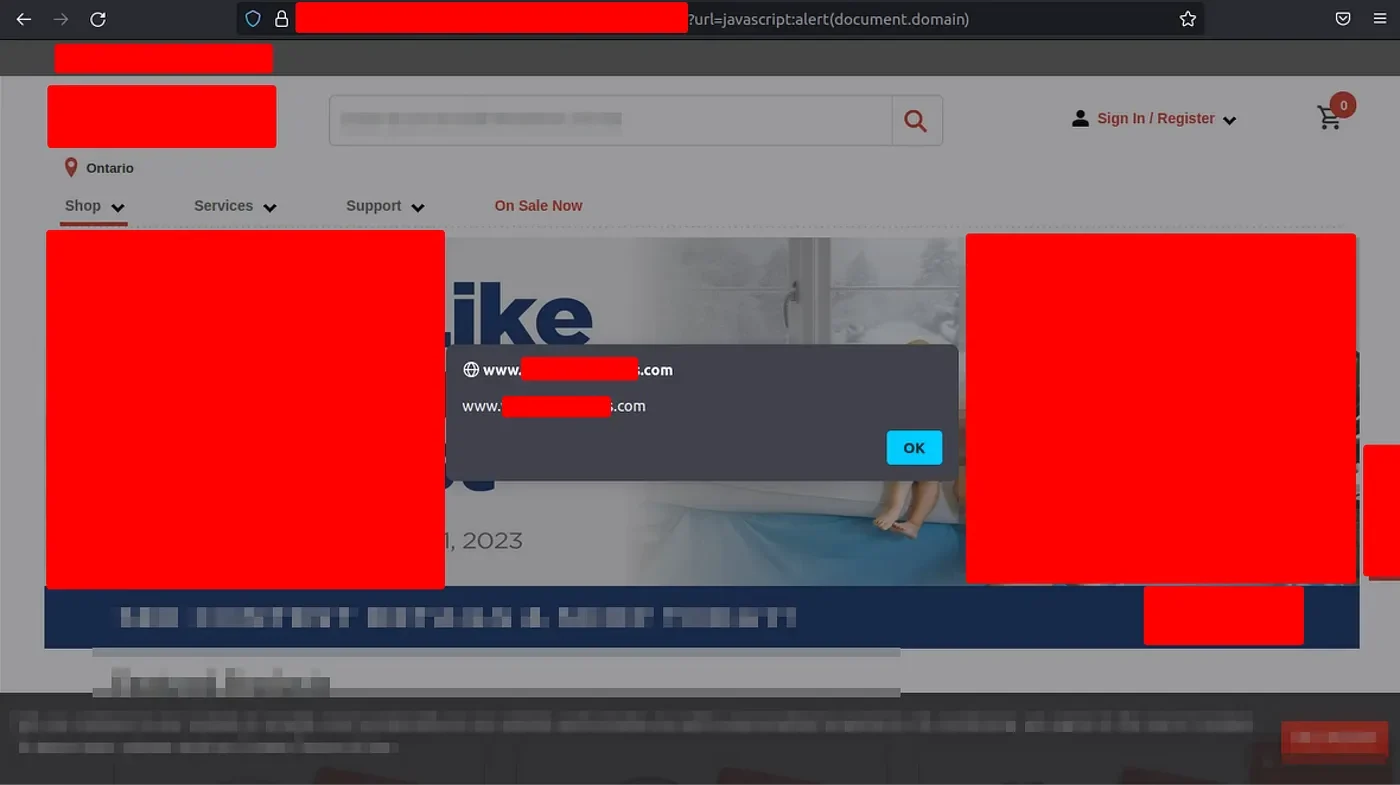
The screenshot is captioned JavaScript Payload Execution.
Step 3: Report
The report was submitted to Synack's Quality Rule program on the Synack Red Team and was awarded 3/3 stars and a bounty.
Root cause
The url parameter value reaches window.open without any validation of its content. getParameterByName returns the raw, URL-decoded value of the url parameter, and window.open(url, '_self') accepts any URI, including javascript:. A navigation to a javascript: URI runs the code in the context of the current document, so the attacker's script inherits the origin of the target page.
The existing code does check that url is not null and not empty, but that is a presence check, not a validation check. It does nothing about the scheme or the destination. The one second setTimeout only delays execution; it does not constrain it.
Impact
An attacker who can get a victim to open a crafted link and then click Save Region can run arbitrary JavaScript in the origin of the affected page. The payloads target document.domain and document.cookie, so cookies readable by JavaScript are exposed. The flow is unauthenticated, which widens the set of users who can be targeted, but it does require the interaction of clicking the button, and the payload only fires after the Ajax call succeeds and the timeout elapses.
Fix
The report does not state what was changed. The fix that addresses the root cause is to validate the url value before passing it to window.open: accept only expected schemes (for example https:), reject javascript: and other script-capable schemes, and preferably restrict navigation to an allowlist of known destinations. Treating the parameter as a path rather than a full URI, or resolving it against a fixed base, would also remove the ability to supply a scheme at all.
Variants to test
- Look for other
window.open,location.href,location.assignandlocation.replacesinks fed by URL parameters. A positive result is ajavascript:value in the parameter producing script execution in the page origin. - Check redirect-after-action flows, such as post-login or post-selection redirects, where a
url,next,returnorredirectparameter is read client-side. A positive result is the same scheme injection reaching the navigation sink. - Test whether the parameter is decoded before use. Values that are percent-encoded once and decoded by the helper, as
decodeURIComponentdoes here, can slip past naive filters; a positive result is execution after a single or double encoding. - Try the same parameter in flows that require a click to trigger, since the payload here only fires after the Ajax success handler runs. A positive result is execution without any server-side validation of the destination.
- Review other JavaScript files for helpers that extract query parameters and pass them to DOM sinks. A positive result is any helper that returns the raw value with no scheme or content validation.
What happened, in plain words
Two security researchers, Haroon Hameed and Hannan Haseeb, were testing a website as part of a bug bounty programme on a platform called Synack Red Team. A bug bounty programme is a scheme where a company invites outside testers to look for security problems in its systems and pays them for reporting what they find. The target in this case was described as a QR-based target. A QR code is the square barcode you scan with a phone camera, and a QR-based target is a service that sits behind such a code, for example a page a phone opens after scanning.
They found a bug called DOM-based XSS. XSS stands for cross-site scripting: a class of bug where an attacker manages to get their own JavaScript code to run inside someone else's web page, as if the site itself had written that code. JavaScript is the programming language that web pages run inside your browser to make them interactive. DOM stands for Document Object Model, which is the browser's in-memory model of the page: the elements, their text, and the scripts that can read and change them. DOM-based means the problem lives entirely in the page's own JavaScript running in the browser, rather than in the server's response. The researchers could craft a link that, once a victim opened it and clicked one button, ran the researchers' JavaScript in the victim's browser in the context of the real site.
They reported it through Synack's Quality Rule programme, received 3/3 stars for report quality, and were paid a bounty. A bounty is the money a programme pays for a valid report.

The target and the approach
The researchers focused on the main domain, https://redacted.com. They deliberately did not do subdomain enumeration. A subdomain is a name in front of the main domain, like shop.example.com next to example.com, and enumeration means systematically listing all of them to find forgotten or weaker systems. Skipping that step was a choice.
Instead they went looking for JavaScript files. Modern websites load separate .js files that contain the logic of the page, and reading them is often more revealing than poking at URLs, because the code shows exactly what the page does with the values a visitor supplies. They found two interesting JavaScript files. In one of them was a function called saveRegion.
The feature: choosing a region
The feature involved is region selection. A visitor who is not logged in, called an unauthenticated user, can pick a region from a modal. A modal is the pop-up panel that appears over the page and asks you to make a choice. When the visitor picks a region and confirms, the choice is saved on the server and also in a cookie. A cookie is a small piece of text the browser stores for a website and sends back with later requests, commonly used to remember things like a chosen region or a login session. After saving, the page can send the visitor onward to a destination URL that was supplied in the page's address in a parameter called url. A URL parameter (also called a query parameter) is the part of a web address after the ? sign, made of name and value pairs, like ?url=something.
That onward step sends the visitor to a destination URL supplied in the url parameter. The report does not describe any accounts, roles, tools or software versions, and none are needed to follow the finding. The only precondition is that the flow is reachable without logging in: the endpoint sits under /Unauthenticated/, and the vulnerable code runs when a visitor clicks Save Region in the region selection modal.
Finding it: reading the JavaScript
The researchers were reading JavaScript files rather than probing endpoints. An endpoint is a specific address on a server that accepts requests, such as a page or an action. In one of the two interesting files they found the saveRegion function, which handles the region selection modal:
function saveRegion(regionId, forceReload) {//Save selection customer_RegionId = regionId; $.ajax({ type: 'POST', url: "/Unauthenticated/SaveRegion", data: { regionId: regionId }, success: function (response) { setCookie('RegionId', regionId, 1); $('#select-region-modal').modal('hide'); var url = getParameterByName('url'); if (url != null && url != '') { createCookie('UAPathway', 'Start', 1); setTimeout(function () { window.open(url, '_self'); }, 1000);
Line by line, in plain words:
function saveRegion(regionId, forceReload) {declares a function, a named block of code that can be called later. It receives two inputs:regionId, which region the visitor chose, andforceReload, a flag the report does not otherwise discuss.customer_RegionId = regionId;copies the chosen region into a variable, a named storage slot in the script.$.ajax({starts an Ajax request. Ajax is a way for a page to talk to its server in the background, without reloading the whole page. The$is the jQuery library, a common helper for writing JavaScript.type: 'POST',says the request uses the POST method. HTTP methods are the verbs of web requests: GET asks for something, POST sends data to be processed.url: "/Unauthenticated/SaveRegion",is the endpoint the request goes to. The name says it is reachable without logging in.data: { regionId: regionId }is the data sent along with the request: the chosen region.success: function (response) {begins the code that runs only if the server answers successfully.setCookie('RegionId', regionId, 1);stores the chosen region in a cookie namedRegionId.$('#select-region-modal').modal('hide');hides the modal panel.var url = getParameterByName('url');reads theurlparameter out of the page's own address, using a helper function explained below.if (url != null && url != '') {checks that the parameter exists and is not empty. This is only a presence check: it asks whether something was supplied, not whether it is safe.createCookie('UAPathway', 'Start', 1);sets another cookie,UAPathway, to the valueStart.setTimeout(function () {schedules the next line to run after a delay.window.open(url, '_self');opens the supplied URL in the same window, replacing the current page.window.openis a browser function for opening a URL;_selfmeans use the current tab rather than a new one.}, 1000);closes the scheduled function and sets the delay to 1000 milliseconds, one second.
So when an unauthenticated user clicks Save Region, the page sends an Ajax request with the POST method to /Unauthenticated/SaveRegion. On success it saves the chosen regionId in a cookie, hides the modal, reads the url parameter, and if that parameter is present and non-empty it sets the UAPathway cookie to Start and, after one second, sends the browser to whatever URL was in the parameter.
Where the value comes from
The url value is taken from the page's own address by a helper called getParameterByName:
function getParameterByName(name, url = window.location.href) { name = name.replace(/[\[\]]/g, '\\$&'); var regex = new RegExp('[?&]' + name + '(=([^&#]*)|&|#|$)'), results = regex.exec(url); if (!results) return null; if (!results[2]) return ''; return decodeURIComponent(results[2].replace(/\+/g, ' '));}
Line by line:
function getParameterByName(name, url = window.location.href) {declares a function that takes the parameter name to look for, and optionally a URL. If no URL is given, it useswindow.location.href, which is the address currently shown in the browser's address bar.name = name.replace(/[\[\]]/g, '\\$&');escapes square brackets in the name so they are treated as literal characters rather than as special pattern syntax.var regex = new RegExp('[?&]' + name + '(=([^&#]*)|&|#|$)'),builds a search pattern. A regular expression, or regex, is a way of describing text patterns so a program can find matches. This one looks for the parameter name after a?or&, followed by=and then everything up to the next&or#, or the end of the address.results = regex.exec(url);runs the pattern against the address and stores the match.if (!results) return null;if nothing matched, the parameter is absent, so it returns null, meaning no value.if (!results[2]) return '';if the name was present but had no value, it returns an empty string.return decodeURIComponent(results[2].replace(/\+/g, ' '));takes the matched value, turns+signs into spaces, and decodes percent-encoding. Percent-encoding is how special characters travel safely inside a URL: for example a space becomes%20.decodeURIComponentturns those codes back into the original characters.
The important point is that this function returns the value as a plain string. It does not check what kind of address it is, or whether the value is a normal web address at all. That string is then handed straight to window.open(url, '_self'), which is the sink. A sink is the place in the code where a value finally gets used in a way that matters, here a navigation. The source is the place the value comes from, here the query string of the page's address, which anyone can control by sending a crafted link. When a value flows from a source an attacker controls into a sink that acts on it without checks, you have a vulnerability.
Why this is dangerous
Browsers accept more than ordinary web addresses in a navigation. One special kind is the javascript: URI, which tells the browser to run the text after the colon as JavaScript instead of loading a page. Because window.open is asked to navigate the current window to whatever string it is given, a javascript: value in the url parameter is executed in the origin of the page. The origin is the combination of scheme, host and port that defines which site a page belongs to, and it is the boundary that decides what one page may read. Code running in the page's origin can therefore read what the page itself can read, including document.domain (the page's own domain) and document.cookie (the cookies the page is allowed to see).
Exploitation
Step 1: Confirm the source and the sink
The researchers traced the data flow: user-supplied input is taken from the url parameter by getParameterByName and executed in the DOM at the window.open sink. That is the whole vulnerability, and it needs no server-side interaction beyond the page loading.
Step 2: Deliver the payload
They used the following JavaScript payloads:
javascript:alert(document.domain)javascript:alert(document.cookie)
A payload is the piece of input an attacker supplies to trigger the bug. Here each payload is placed in the url parameter of the page that hosts the region modal. alert(...) is a browser function that shows a small pop-up box with the given text, which makes it easy to prove that code ran. document.domain is the page's domain and document.cookie is the page's cookies, so the two payloads demonstrate that injected code can read both.
When the victim clicks Save Region, the Ajax POST to /Unauthenticated/SaveRegion succeeds, the modal closes, the UAPathway cookie is set, and after the one second delay window.open navigates to the javascript: URI. The script then runs in the page's origin, which is why document.domain and document.cookie are readable from it.
The screenshot is captioned JavaScript Payload Execution.
Step 3: Report
The report was submitted to Synack's Quality Rule programme on the Synack Red Team and was awarded 3/3 stars and a bounty.
Root cause
The url parameter value reaches window.open without any validation of its content. The scheme is the first part of a URL, the bit before the colon, such as https or javascript. getParameterByName returns the raw, URL-decoded value of the url parameter, and window.open(url, '_self') accepts any URI, including javascript:. A navigation to a javascript: URI runs the code in the context of the current document, so the attacker's script inherits the origin of the target page.
The existing code does check that url is not null and not empty, but that is a presence check, not a validation check. It does nothing about the scheme or the destination. The one second setTimeout only delays execution; it does not constrain it.
Impact
An attacker who can get a victim to open a crafted link and then click Save Region can run arbitrary JavaScript in the origin of the affected page. The payloads target document.domain and document.cookie, so cookies readable by JavaScript are exposed. Session material means the cookies or tokens that identify a logged-in user; a token is a value the browser presents to prove who it is. The flow is unauthenticated, which widens the set of users who can be targeted, but it does require the interaction of clicking the button, and the payload only fires after the Ajax call succeeds and the timeout elapses.
Fix
The report does not state what was changed. The fix that addresses the root cause is to validate the url value before passing it to window.open: accept only expected schemes (for example https:), reject javascript: and other script-capable schemes, and preferably restrict navigation to an allowlist of known destinations. An allowlist is a list of values that are permitted, with everything else refused. Treating the parameter as a path rather than a full URI, or resolving it against a fixed base, would also remove the ability to supply a scheme at all.
Variants to test
- Look for other
window.open,location.href,location.assignandlocation.replacesinks fed by URL parameters. These are all ways JavaScript can send the browser somewhere. A positive result is ajavascript:value in the parameter producing script execution in the page origin. - Check redirect-after-action flows, such as post-login or post-selection redirects, where a
url,next,returnorredirectparameter is read client-side. A positive result is the same scheme injection reaching the navigation sink. - Test whether the parameter is decoded before use. Values that are percent-encoded once and decoded by the helper, as
decodeURIComponentdoes here, can slip past naive filters; a positive result is execution after a single or double encoding. - Try the same parameter in flows that require a click to trigger, since the payload here only fires after the Ajax success handler runs. A positive result is execution without any server-side validation of the destination.
- Review other JavaScript files for helpers that extract query parameters and pass them to DOM sinks. A positive result is any helper that returns the raw value with no scheme or content validation.
Glossary
- Ajax: a way for a web page to exchange data with its server in the background, without reloading the whole page.
- Allowlist: a list of values that are explicitly permitted, with everything else refused.
- Bounty: money paid by a bug bounty programme for a valid security report.
- Bug bounty programme: a scheme where a company invites outside testers to find and report security problems in exchange for rewards.
- Cookie: a small piece of text a website asks the browser to store and send back with later requests, often used to remember choices or a login session.
- Cross-site scripting (XSS): a bug class where an attacker's JavaScript ends up running inside another site's page, as if the site had written it.
- DOM (Document Object Model): the browser's in-memory model of a page, which scripts can read and change.
- DOM-based XSS: XSS where the flaw is in the page's own JavaScript in the browser, rather than in the server's response.
- Endpoint: a specific address on a server that accepts requests, such as a page or an action.
- Function: a named block of code that can be called to perform a task, optionally with inputs.
- HTTP method: the verb of a web request, such as GET (ask for something) or POST (send data to be processed).
- JavaScript: the programming language web pages run in the browser to make themselves interactive.
javascript:URI: a special kind of address that tells the browser to run the text after the colon as JavaScript instead of loading a page.- jQuery: a widely used JavaScript library that provides shortcuts for common tasks such as Ajax requests.
- Modal: a panel that appears over the page and asks the user to make a choice.
- Origin: the combination of scheme, host and port that defines which site a page belongs to and what it may read.
- Parameter (query parameter): a name and value pair in a URL after the
?sign, like?url=something. - Payload: the input an attacker supplies to trigger a vulnerability.
- Percent-encoding: how special characters are written safely inside a URL, for example a space as
%20. - POST: an HTTP method used to send data to the server for processing.
- QR code: a square barcode scanned with a phone camera that usually opens a link or service.
- Regular expression (regex): a way of describing text patterns so a program can find matches.
- Scheme: the first part of a URL, before the colon, such as
httpsorjavascript. - Sink: the place in code where a value is finally used in a way that matters, such as a navigation.
- Source: the place a value comes from, such as the query string of the page's address.
- Subdomain: a name in front of a main domain, like
shop.example.comnext toexample.com. - Subdomain enumeration: systematically listing a domain's subdomains to find systems to test.
- Synack Red Team: the bug bounty platform on which this target and report were handled.
- Token: a value a browser presents to prove who it is, often part of a login session.
- Unauthenticated: reachable without logging in.
- URL: a web address.
- Variable: a named storage slot in a program.
window.open: a browser function that opens a URL, optionally in the current tab or a new one.



