Access Control Violation - Sensitive Data Exposure
A jobs directory on a web application allowed directory listing, exposing files from private jobs. An attacker could view sensitive data from other users' private jobs, including contact information.
 Published on machevalia.blog
Bug BountyWrite Ups
The full write-up lives on its author's site
It belongs to its author, so we link to it rather than copy it. The other two tabs are our own rewrites, checked against it.
Context
The target was a web application that let users upload files to run jobs on scientific data. Each user who uploaded files could log in to save a job to their profile, and could mark a job as private so that their scientific data would not be exposed to the public. The application interface enforced those privacy controls correctly: a private job showed as submitted and completed, but its results and input data were not visible through the interface.
Behind the interface, uploaded job files were written to a jobs directory that was publicly reachable and had directory listing enabled. The author had previously reached a PHP web shell through that same jobs directory, described in a separate article on remote code execution in a .tgz file upload. The lesson carried over: anywhere in the application that accepted a file, regardless of format, the file ultimately landed in the jobs directory.
Setup
The work was done as a bug bounty submission against the program behind this application. No specific tooling, versions or account roles beyond a normal user account with the ability to submit jobs are described. The precondition that matters is that the jobs directory was publicly reachable with directory listing enabled, and that the application's own access controls were applied only at the interface layer, not to the files on disk.
Finding it
While probing this part of the application for remote code execution, the author uploaded a few files and was unsuccessful: the application reformatted any file provided without executing any of it. During that work, a private job belonging to another user appeared in the jobs directory listing, sitting between two public jobs the author had submitted. Sorting the directory by date modified made the ordering obvious:
/Jobs
./Job_156498793245 - 1/1/2022 01:22:56 <-- My public job
./Job_158754653125 - 1/1/2022 01:21:43 <-- Their private job
./Job_158343450454 - 1/1/2022 01:20:21 <-- My other public job
That was the anomaly. The interface said the job was private and hid its results and input data, yet the job's files were sitting in a world-readable directory next to the author's own. The privacy flag was a property of the application record, not of the stored files.
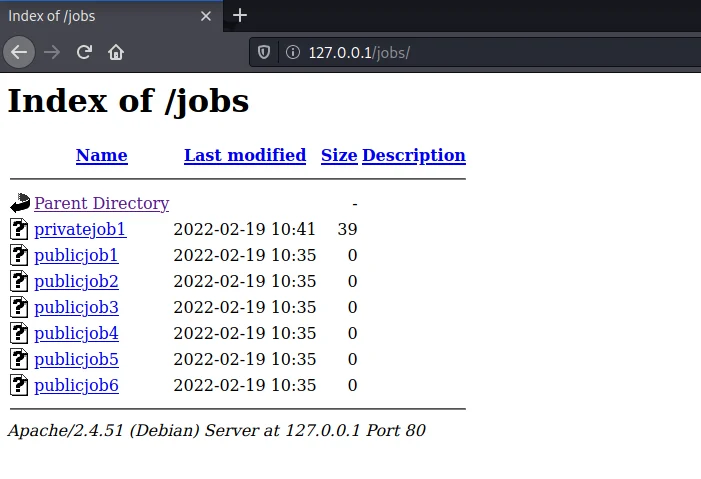
The screenshot shows the directory listing that exposed the job files.
Exploitation
Step 1: Confirm the interface blocks the private job
Through the web interface the job appeared as submitted and completed, but neither the results nor the input data could be viewed. The application-level control was working as intended.
Step 2: Locate the private job in the jobs directory
Because every uploaded file landed in the same jobs directory, the author sorted the listing by date modified. The private job from another user fell between two of the author's own public jobs, as shown in the listing above. The job number was visible in the directory name even though the interface would not disclose the job.
Step 3: Read the private job's data
The author opened the data in the job sandwiched between their own jobs. All of that user's job information was readable, including contact information, the fact that the job was supposed to be private and protected, and much more. The author opened the data in that job and could read all of the user's job information.
Root cause
The application stored uploaded job files in a single publicly served directory and relied on the interface to enforce the private flag. The files themselves carried no access control, so anyone who could enumerate the directory could read them. Directory listing turned that into a trivial enumeration: job identifiers and timestamps were disclosed directly, and the private job could be picked out by sorting on modification time.
Allowing directory listings is generally not a serious issue on its own, as the author notes, but here it removed the obscurity that would otherwise have made the private files hard to find. The existing defence, the private flag checked by the application, did not extend to the filesystem, which is why it did not stop the disclosure.
Impact
Any user who marked a job private still had its files exposed to anyone who could reach the jobs directory. The exposed data included contact information, the fact that the job was meant to be private and protected, and much more. The exposure depended on the jobs directory being publicly reachable with listing enabled; the interface controls themselves held.
Fix
The author advised the program to prevent directory listing on the jobs directory. On Apache, the recommendation was to create a .htaccess file in the related application directory and to add the following lines to httpd.conf (sometimes apache2.conf), or to replace the existing lines with them:
<Directory /{YOUR DIRECTORY}>
Options FollowSymLinks
</Directory>
Removing the Indexes and MultiViews statements disables the directory listing feature safely on an Apache web server. The report shows an example httpd.conf before and after the change, and the resulting directory listing. The httpd.conf before the change:
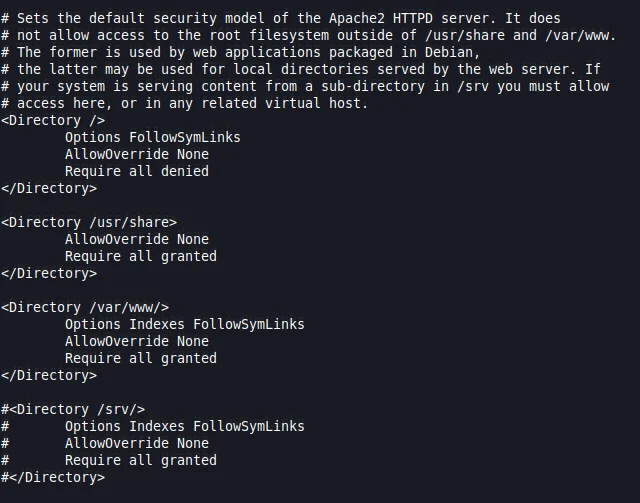
With that configuration the jobs directory could be listed:
The file after the configuration changes:
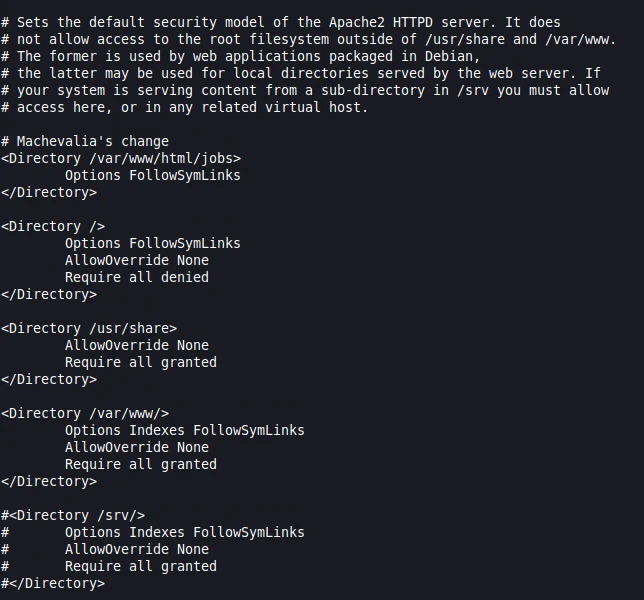
And the result:
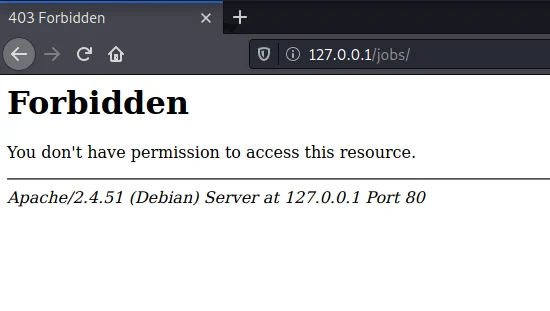
The program fixed the issue quickly, and the author was awarded $444.50 for the submission.
Variants to test
- Upload features with a private or unlisted option. Submit a file, mark it private, then look for the stored file under predictable paths or in a shared upload directory. A positive result is the private file being retrievable by direct URL or through a listing while the interface hides it.
- Directory listing on shared storage. Request the upload, jobs or export directory directly. A positive result is an index of files with names and timestamps, especially where names embed user or job identifiers.
- Sorting by modification time. Where a listing is available, sort by date to spot other users' entries interleaved with your own. A positive result is an entry you did not create appearing between your submissions.
- Access control applied only in the UI. Compare what the interface hides with what the file path returns. A positive result is a resource the interface refuses to show but the server serves without an authorisation check.
- Apache option hardening. Check whether
IndexesorMultiViewsremain enabled on directories that hold user content. A positive result is a browsable directory after the fix is supposed to be in place.
What happened, in plain words
A website let people upload files so that the site would run calculations on scientific data for them. Each person who uploaded files could log in and save their work to their profile, and could tick a box to mark the work as private, so that their scientific data would not be shown to the public. The website's own screens respected that choice: when a job was private, the site showed that it had been submitted and completed, but it would not show the results or the input data.
Behind those screens, however, every uploaded file was simply dropped into one folder on the web server called the jobs directory. That folder was exposed to the public, and it had a feature switched on called directory listing, which makes the server show a plain list of every file in the folder, like opening a drawer and seeing all the papers inside rather than just the one you asked for. The author had already reached a PHP web shell (a small program uploaded to a server that lets an attacker run commands on it) through that same folder in an earlier piece of work. The lesson carried over: anywhere in the application that accepted a file, whatever its format, the file ended up in the jobs directory.
Because of that, a private job belonging to another user could be seen and read by the author after opening the folder. The privacy tick was a label on the application's record of the job, not a lock on the file itself. The author reported it, the program fixed it quickly, and the author was paid $444.50.
Background you need first
A few ideas come up again and again below, so here they are from zero.
- Web application: a program you use through your browser. You click buttons and fill in forms, and the browser sends your actions to a server, which does the work and sends back a page. Think of a restaurant: the menu and the waiter are the interface, the kitchen is the server.
- Server: the computer somewhere else that stores the website's files and runs its code. When your browser asks for something, the server decides what to send back.
- Directory (folder): a container for files on a computer, just like a folder in a filing cabinet. A web server can be configured to serve files out of particular directories to anyone who asks.
- Directory listing: when a web server is asked for a directory rather than a specific file, it can either refuse or reply with an automatically generated page listing every file in that directory, with names and often dates. It is like a shop that, instead of saying "which item do you want?", hands you the full inventory.
- Apache: a very common piece of software that web servers use to answer browser requests. It is configured by text files, the main one usually called
httpd.conf(sometimesapache2.conf). .htaccessfile: a small configuration file you can place inside a directory on an Apache server to change how that directory behaves, without editing the main server configuration.- Access control: the rules that decide who is allowed to see or do what. In this story there were two layers of access control: the one in the website's screens (which worked) and the one on the files on disk (which did not exist).
- Bug bounty: a scheme where a company invites outside people to look for security problems in its systems and pays them for valid reports. The author was taking part in one.
- Remote code execution: a serious class of bug where an attacker manages to make the server run code of their choosing. The author was probing for this, unsuccessfully, in the part of the application described here.
- PHP web shell: a small PHP script uploaded to a server that, when opened in a browser, lets someone run commands on that server. PHP is a programming language commonly used for websites.
- Sensitive data exposure: a class of problem where information that should be kept private (personal details, private files, secrets) can be read by people who should not see it. That is the category this report falls into.
The setup
The work was done as a bug bounty submission against the program behind this application. The report does not describe specific tools, software versions or account roles beyond a normal user account that could submit jobs. What matters is the precondition: the jobs directory was publicly reachable with directory listing switched on, and the application's own access controls were applied only at the interface layer, not to the files on disk.
In plain terms: the website's screens were careful, but the cupboard behind them was open.
Finding it
While probing this part of the application for remote code execution, the author uploaded a few files and was unsuccessful: the application reformatted any file provided without executing any of it. In other words, the site took the uploaded file, changed it into its own format, and never ran it, so the trick of getting the server to run attacker code did not work here.
During that work, a private job belonging to another user appeared in the jobs directory listing, sitting between two public jobs the author had submitted. Sorting the directory by date modified made the ordering obvious:
/Jobs
./Job_156498793245 - 1/1/2022 01:22:56 <-- My public job
./Job_158754653125 - 1/1/2022 01:21:43 <-- Their private job
./Job_158343450454 - 1/1/2022 01:20:21 <-- My other public job
Line by line, this is what the listing shows:
/Jobsis the directory being listed. The server has handed back its contents instead of a single file../Job_156498793245 - 1/1/2022 01:22:56 <-- My public jobis one entry: a job folder whose name contains a long number (the job identifier) and a date and time. The comment marks it as one of the author's own public jobs../Job_158754653125 - 1/1/2022 01:21:43 <-- Their private jobis the entry in the middle: another user's job, with its own identifier and timestamp. The comment marks it as the private job../Job_158343450454 - 1/1/2022 01:20:21 <-- My other public jobis the author's second public job.
The dates run in order, and the private job sits between the author's two jobs. That ordering is what made the anomaly stand out: the private job was sandwiched between the author's own two jobs.
That was the anomaly. The interface said the job was private and hid its results and input data, yet the job's files were sitting in a world-readable directory next to the author's own. The privacy flag was a property of the application record, not of the stored files.
The screenshot shows the directory listing that exposed the job files: a plain index of job folders, the kind of page a browser shows when a server has directory listing enabled.
Exploitation
Step 1: Confirm the interface blocks the private job
Through the web interface the job appeared as submitted and completed, but neither the results nor the input data could be viewed. The application-level control was working as intended. This step matters because it rules out the boring explanation: the site was not simply showing the private job to everyone. The problem had to be somewhere else, and the next step looks at the files on disk rather than the screens.
Step 2: Locate the private job in the jobs directory
Because every uploaded file landed in the same jobs directory, the author sorted the listing by date modified. The private job from another user fell between two of the author's own public jobs, as shown in the listing above. The job number was visible in the directory name even though the interface would not disclose the job. In other words, the folder name itself leaked the identifier of a job the website would not show this user.
Step 3: Read the private job's data
The author opened the data in the job sandwiched between their own jobs. All of that user's job information was readable, including contact information, the fact that the job was supposed to be private and protected, and much more. The author opened the data in that job and could read all of the user's job information. There was no password prompt, no permission check, nothing: the file was simply there to be downloaded, like a document left on a public table.
Why it worked
The application stored uploaded job files in a single publicly served directory and relied on the interface to enforce the private flag. The files themselves carried no access control, so anyone who could enumerate the directory could read them. Directory listing turned that into a trivial enumeration: job identifiers and timestamps were disclosed directly, and the private job could be picked out by sorting on modification time.
Allowing directory listings is generally not a serious issue on its own, as the author notes, but here it removed the obscurity that would otherwise have made the private files hard to find. The existing defence, the private flag checked by the application, did not extend to the filesystem, which is why it did not stop the disclosure.
A useful comparison: a hotel that checks your key card at the front desk but leaves every room door unlocked. The check at the desk is real, but it protects nothing once you are inside the corridor.
What was at risk
Any user who marked a job private still had its files exposed to anyone who could reach the jobs directory. The exposed data included contact information, the fact that the job was meant to be private and protected, and much more. The exposure depended on the jobs directory being publicly reachable with listing enabled; the interface controls themselves held.
The fix
The author advised the program to prevent directory listing on the jobs directory. On Apache, the recommendation was to create a .htaccess file in the related application directory and to add the following lines to httpd.conf (sometimes apache2.conf), or to replace the existing lines with them:
<Directory /{YOUR DIRECTORY}>
Options FollowSymLinks
</Directory>
Line by line:
<Directory /{YOUR DIRECTORY}>opens a block of settings that apply to one particular directory on the server.{YOUR DIRECTORY}is a placeholder for the real path, for example the jobs directory.Options FollowSymLinkssays which optional features are allowed in that directory.FollowSymLinkslets the server follow shortcuts (symbolic links) to other files. Crucially, the list does not includeIndexesorMultiViews, so those features are off.</Directory>closes the block.
Removing the Indexes and MultiViews statements disables the directory listing feature safely on an Apache web server. Indexes is the setting that produces the automatic file list; MultiViews is a related content-negotiation feature that can also expose files in ways you did not intend. With both gone, asking for the directory no longer returns an inventory.
The report shows an example httpd.conf before and after the change, and the resulting directory listing. The httpd.conf before the change:
This screenshot shows the author's Apache configuration file as it was before the change, with the directory listing feature still enabled.
With that configuration the jobs directory could be listed:
This screenshot shows the result: the jobs directory can be browsed, and its files are listed for anyone to see.
The file after the configuration changes:
This screenshot shows the same configuration file after the change, with the listing feature removed.
And the result:
This screenshot shows the result after the configuration changes.
The program fixed the issue quickly, and the author was awarded $444.50 for the submission.
Things worth testing yourself
These are the same checks the author's experience suggests, written for someone starting out. Each one is a question you can ask of a site you are authorised to test.
- Upload features with a private or unlisted option. Submit a file, mark it private, then look for the stored file under predictable paths or in a shared upload directory. A positive result is the private file being retrievable by direct URL or through a listing while the interface hides it.
- Directory listing on shared storage. Request the upload, jobs or export directory directly. A positive result is an index of files with names and timestamps, especially where names embed user or job identifiers.
- Sorting by modification time. Where a listing is available, sort by date to spot other users' entries interleaved with your own. A positive result is an entry you did not create appearing between your submissions.
- Access control applied only in the UI. Compare what the interface hides with what the file path returns. A positive result is a resource the interface refuses to show but the server serves without an authorisation check.
- Apache option hardening. Check whether
IndexesorMultiViewsremain enabled on directories that hold user content. A positive result is a browsable directory after the fix is supposed to be in place.
Glossary
- Access control: the rules that decide who may see or do what on a system.
- Apache: common web server software that answers browser requests and is configured through text files.
apache2.conf: an alternative name for Apache's main configuration file on some systems.- Bug bounty: a programme where a company pays outside researchers for valid security reports.
- Directory: a folder on a computer that holds files.
- Directory listing: an automatically generated page that shows every file in a directory when the directory itself is requested.
.htaccess: a per-directory Apache configuration file used to change how that directory behaves.httpd.conf: Apache's main configuration file.Indexes: an Apache option that, when enabled, produces the automatic directory listing.MultiViews: an Apache option for content negotiation that can expose files in unintended ways.FollowSymLinks: an Apache option that lets the server follow symbolic links (shortcuts) to other files.- Interface (UI): the screens and controls you use in a browser to interact with an application.
- Job: in this application, a piece of work a user submits, consisting of uploaded files to be processed on scientific data.
- Jobs directory: the folder on the server where all uploaded job files were stored.
- PHP: a programming language commonly used to build websites.
- PHP web shell: a small PHP script uploaded to a server that lets someone run commands on it through a browser.
- Private flag: the setting a user ticks to mark a job as private so its data is not shown publicly.
- Remote code execution: a serious bug where an attacker gets the server to run code of their choosing.
- Sensitive data exposure: a class of problem where information meant to be private can be read by people who should not see it.
- Server: the remote computer that stores a website's files and runs its code.
- Web application: a program you use through your browser, with the work done on a server.





