Remote Code Execution in .tgz File Upload
The application accepted .tgz archives and unpacked them, but its filtering only checked the first file extension and expected file names, so a file named with a double extension (e.g., .pdf.php) passed validation. An attacker could upload a PHP web shell that was then placed in an accessible job folder, leading to remote code execution.
 Published on machevalia.blog
Bug BountyWrite Ups
The full write-up lives on its author's site
It belongs to its author, so we link to it rather than copy it. The other two tabs are our own rewrites, checked against it.
Context
This is a write-up of a remote code execution (RCE) found through a file upload feature that expected a .tgz archive. The target is not named in the report, and the researcher notes that no screenshots could be included because the payload changes happened inside the .tgz archive and images of the resulting files would reveal too much about the target.
The application on the server was expecting a .tgz archive containing specifically formatted information on atoms and molecules, in formats the researcher had never heard of. The researcher guessed that the server unpacked the archive and looked at the files inside before returning an error.
Setup
There are no details in the report about accounts, roles, tooling versions or preconditions beyond the upload form itself. The researcher worked with a .tgz archive, unpacking and repacking it locally, and after the successful upload had access to the job folder created by the application.
Finding it
The researcher starts from the common pattern: RCE after a file upload usually comes from either a lack of filtering of the file types that can be uploaded, or an error in that filtering process for the web form where the file is being uploaded. Many applications filter by extension and by MIME type, the latter seen in web forms as content-type. Past bypasses the researcher had used include appending ;.php to the expected file extension and changing the content type from the expected file type, such as from application/x-php to image/jpeg.
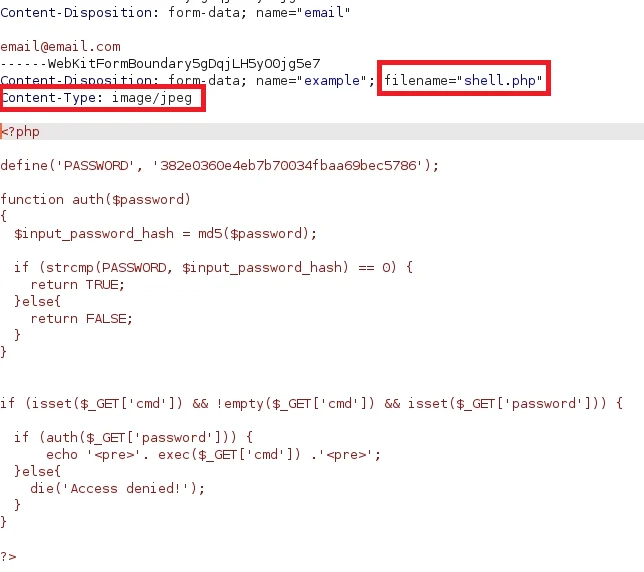
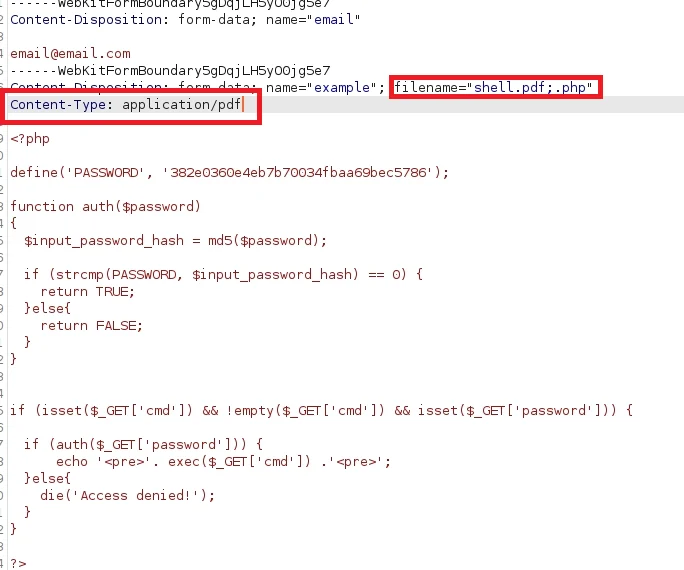
Examples of altered MIME types and appending file extensions
For this specific RCE, the server expected a .tgz file. A few of the researcher's favourite file extension and MIME type changes were attempted without success.
What stood out was how long it took to get the error back in these initial test cases. The server was not doing a simple check on extensions or MIME type. The researcher guessed that, since it was expecting a .tgz archive, it was unpacking the archive and looking inside it before throwing the error.
Exploitation
Step 1: A web shell inside a .tgz
Acting on the hypothesis that the archive was being unpacked and inspected, the researcher created a .tgz archive with a PHP web shell inside it. The result was the same: no dice. The report does not show the archive contents or the exact error.
Step 2: Learning what the target expected
The next move was to find out exactly what the target expected to be uploaded. The application was expecting a .tgz archive with specifically formatted information on atoms and molecules, in formats the researcher had never heard of. Rather than learn the format, the researcher obtained someone else's properly formatted archive, noting that most universities and many research laboratories share everything.
Step 3: Adding a web shell to a valid archive
With properly formatted files inside a .tgz archive in hand, the researcher unzipped the archive, added a web shell, repacked it, and sent it to the server. This time the archive was unpacked and the uploaded files were visible in the job's folder, with the exception of the web shell. The conclusion was that the application dropped any files it did not need for processing.
Step 4: Replacing an expected file
Back to the drawing board. The researcher unpacked the archive once more and replaced one of the expected files with a web shell using the same name but the .php file extension. This time the server threw the upload error again after a short wait. That told the researcher what the application was filtering on: it expected 4 specifically named files in the archive, along with specific extensions.

Step 5: Double extension on an expected name
Knowing that the application expected files with certain names and extensions, and that it would drop any additional files somewhere along the way, the researcher combined the techniques. The archive was unpacked again, a PHP web shell was added named as expected, and it was given two extensions. As the report puts it, the change would look like this:
The reasoning: the application's logic would see the first extension and the expected name and approve the file for processing, while the server would ignore the first extension and only pay attention to the .php extension.
It worked. The application accepted the archive, processed the job, and posted the web shell to a job folder the researcher had access to. At that point the researcher ran some simple commands to prove access, then removed the web shell. The report does not include the commands or their output.
Root cause
The application expected 4 specifically named files in the archive along with specific extensions, and a file with two extensions satisfied that check. A name such as FileName123.pdf.php satisfied the check on the expected name and first extension, while the server paid attention only to the .php extension, so the web shell was posted to a job folder the researcher could access. The report describes this as an insecure parsing of the .tgz archive: the application inspected the archive contents, but its approval decision and the server's handling of the resulting file disagreed about which extension mattered.
Impact
An attacker who can upload a .tgz archive to this feature, and who can reach the job folder where the processed files are posted, can get a PHP web shell placed there and run commands through it. In this case the researcher proved access by running simple commands and then removed the shell. The report does not state what privileges the web shell ran with or which data was reachable.
Fix
The target patched the vulnerability by restricting access to the resulting jobs folder and the files within it. The researcher is explicit that this is a compensating control: it prevents an attacker from accessing the malicious file, but it does not fix the filtering logic or prevent an attacker from uploading malicious content to be parsed. It may still be possible to get some sort of malicious action to occur on the server should the application parsing the uploaded files be vulnerable to something. The recommendation is that organisations correct the logic in their application where possible, rather than relying on a compensating control.
Variants to test
- Double extension on an expected filename. Take a file the application requires by name and extension and append a server-executable extension, as in
FileName123.pdf.php. A positive result is the archive being accepted and the file appearing in a location you can request, with the server executing it rather than serving it as a document. - Archive contents inspection. Upload an archive containing an extra file the application does not need. If the extra file is silently dropped but the job still runs, the server is unpacking and filtering by expected names, which tells you which names to target in the next attempt.
- Timing as a signal. Compare response times for rejected uploads. A delay before the error suggests the server is unpacking and inspecting the archive rather than checking only the extension or MIME type of the upload itself.
- MIME type and extension tricks from other uploads. Try appending
;.phpto the expected extension and changing the content type from the expected type, such as fromapplication/x-phptoimage/jpeg. A positive result is the upload passing the form's check and the file being stored with an executable extension. - Reuse of a legitimate sample. Obtain a properly formatted archive for the feature and modify it rather than building one from scratch. If the modified archive is processed, the format validation is not the barrier and the file-level filtering is the thing to defeat.
What happened, in plain words
A security researcher found a way to make a website run their own code on its server. The website had a feature where you upload a file, and that file had to be a .tgz archive. A .tgz archive is a single file that holds other files inside it, a bit like a cardboard box with several items packed in it. The researcher guessed that the server opened the box and looked at what was inside before returning an error.
The researcher worked out that the server was checking the files inside the box by their names and their file extensions (the part after the dot, like .pdf). The check was not careful enough. By giving a file two extensions, such as FileName123.pdf.php, the researcher made the check see the harmless first extension while the server paid attention only to the .php extension, and the web shell was posted to a job folder the researcher could access. That gave the researcher a web shell, a small program that lets someone run commands on a server through their browser.
The researcher proved the access by running some simple commands, then removed the shell. The researcher was awarded $3100, and the target has since restricted access to the folder where processed files were posted. The researcher points out that this restriction does not fix the underlying filtering mistake.
Background: what a file upload feature is
Almost every website with user accounts has some way to send a file to the server: a profile photo, a CV, a spreadsheet. The browser has a form with a file picker, and when you press submit, the browser sends the file to the server. The server then decides what to do with it: store it, show it back to you, or process it.
Because the server is receiving something a stranger chose, it has to be careful. If it simply stores and later runs whatever arrives, an attacker can send a program instead of a photo. That is the heart of this story.
Two words come up constantly in upload security:
- Extension: the letters after the last dot in a filename, such as
.jpgor.php. It is a label, not a guarantee of what is inside. You can rename any file to end in.jpg. - MIME type (also called content type): a label the browser attaches to the file when sending it, saying what kind of file it believes it is. For a photo it might say
image/jpeg; for a PHP script it might sayapplication/x-php. Like the extension, it is a claim, and a claim can be false.
A PHP web shell is a short script written in the PHP programming language. When a web server runs it, the script lets the person who uploaded it send commands to the server and see the results, usually through the browser. It is called a shell because it gives you a command prompt on someone else's machine.
Remote code execution (RCE) means an attacker can make a server run code the attacker wrote. It is one of the most serious outcomes in security, because from there an attacker can often read files, change data, or move to other systems.
The setup
The report does not describe accounts, roles, tool versions or any precondition beyond the upload form itself. The researcher worked with a .tgz archive, unpacking and repacking it on their own computer, and after the successful upload had access to the job folder the application created.
A job folder here means a folder on the server where the results of a processing job are placed, and which the person who submitted the job can open. Think of a dry cleaner: you hand over a jacket, they process it, and you collect it from a numbered rack. The job folder is that rack.
Finding it
The researcher starts from a well-known pattern. When an upload leads to RCE, it is usually because of one of two things:
- The application does not filter which file types can be uploaded at all.
- The application does filter, but the filtering has a mistake.
Many applications filter by extension and by MIME type. In the past, the researcher had got past such filters in two ways: by appending ;.php to the expected file extension, and by changing the content type from the expected file type, for example from application/x-php to image/jpeg.
Examples of altered MIME types and appending file extensions
The two images show examples of those altered MIME types and of appending file extensions, the tricks described just above.
For this particular target, the server expected a .tgz file. The researcher tried a few of their favourite extension and MIME type changes, and none worked.
What stood out was how long the error took to come back in those first tests. A quick rejection would suggest the server only glanced at the label on the outside of the parcel. The researcher guessed that the slow rejection meant the server opened the parcel and looked at the contents before saying no. The researcher guessed that, because the server expected a .tgz archive, it was unpacking the archive and inspecting what was inside before returning the error.
Exploitation
Step 1: A web shell inside a .tgz
Acting on the guess that the archive was being opened and inspected, the researcher built a .tgz archive containing a PHP web shell and uploaded it. The result was the same: no dice. The report does not show the archive contents or the exact error message.
Why this step: if the server only checked the outer file, a shell hidden inside the archive might slip through. It did not, which supported the idea that the contents were being examined.
Step 2: Learning what the target expected
The next move was to find out exactly what the target wanted uploaded. The application expected a .tgz archive containing specifically formatted information about atoms and molecules, in formats the researcher had never heard of.
Rather than learn the format, the researcher obtained someone else's properly formatted archive. The report notes that most universities and many research laboratories share everything, so a valid sample was available. This is like needing a correctly filled-in tax form: instead of learning every rule, you find a completed example and adapt it.
Step 3: Adding a web shell to a valid archive
With properly formatted files inside a .tgz archive in hand, the researcher unzipped the archive, added a web shell, repacked it, and sent it to the server. This time the archive was unpacked and the uploaded files appeared in the job's folder, except for the web shell. The conclusion was that the application dropped any files it did not need for processing.
Why this step: it confirmed the server really was opening the archive and keeping some of the contents. It also showed that extra files were being thrown away, which meant a shell had to be disguised as one of the files the application wanted.
Step 4: Replacing an expected file
Back to the drawing board. The researcher unpacked the archive again and replaced one of the expected files with a web shell that had the same name but the .php extension. This time the server returned the upload error again after a short wait. That told the researcher what the application was filtering on: it expected 4 specifically named files in the archive, along with specific extensions.
A short reaction GIF, used here to mark the moment the researcher realised what the filter was checking.
Why this step: swapping a required file for a shell tests whether the check is on the name, the extension, or both. The error showed that the application expected 4 specifically named files with specific extensions.
Step 5: Double extension on an expected name
Knowing that the application expected files with certain names and extensions, and that it dropped any extra files along the way, the researcher combined the techniques. The archive was unpacked again, a PHP web shell was added with a name the application expected, and it was given two extensions. As the report puts it, the change would look like this:
Line by line:
FileName123.pdfis the original file the application expects: a name it recognises and a harmless-looking extension.->means "changed into".FileName123.pdf.phpis the new name. It keeps the expected name and the expected.pdfextension at the front, and adds.phpat the end.
The reasoning: the application's logic would see the first extension and the expected name and approve the file for processing, while the server would ignore the first extension and pay attention only to the .php extension. The application's logic saw the first extension and expected name, while the server paid attention only to the .php extension.
It worked. The application accepted the archive, processed the job, and posted the web shell to a job folder the researcher had access to. At that point the researcher ran some simple commands to prove access, then removed the web shell. The report does not include the commands or their output.
Root cause
The filtering logic checked the files inside the unpacked archive by expected name and extension, but it did not consider a file carrying more than one extension. A name such as FileName123.pdf.php satisfied the check on the expected name and first extension, while the server paid attention only to the .php extension, and the web shell was posted to a job folder the researcher could access.
The report calls this insecure parsing of the .tgz archive: the application inspected the archive contents, but its approval decision and the server's handling of the resulting file disagreed about which extension mattered.
Impact
An attacker who can upload a .tgz archive to this feature, and who can reach the job folder where processed files are posted, can get a PHP web shell placed there and run commands through it. In this case the researcher proved access by running simple commands and then removed the shell.
Fix
The target patched the vulnerability by restricting access to the resulting jobs folder and the files within it. The researcher is explicit that this is a compensating control: it stops an attacker from reaching the malicious file, but it does not fix the filtering logic or prevent an attacker from uploading malicious content to be parsed. It may still be possible to get some sort of malicious action to occur on the server should the application parsing the uploaded files be vulnerable to something. The recommendation is that organisations correct the logic in their application where possible, rather than relying on a compensating control.
A compensating control is like locking the door to a room instead of fixing the hole in the wall: it helps, but the hole is still there.
Variants to test
- Double extension on an expected filename. Take a file the application requires by name and extension and append a server-executable extension, as in
FileName123.pdf.php. A positive result is the archive being accepted and the file appearing in a location you can request, with the server executing it rather than serving it as a document. - Archive contents inspection. Upload an archive containing an extra file the application does not need. If the extra file is silently dropped but the job still runs, the server is unpacking and filtering by expected names, which tells you which names to target in the next attempt.
- Timing as a signal. Compare response times for rejected uploads. A delay before the error suggests the server is unpacking and inspecting the archive rather than checking only the extension or MIME type of the upload itself.
- MIME type and extension tricks from other uploads. Try appending
;.phpto the expected extension and changing the content type from the expected type, such as fromapplication/x-phptoimage/jpeg. A positive result is the upload passing the form's check and the file being stored with an executable extension. - Reuse of a legitimate sample. Obtain a properly formatted archive for the feature and modify it rather than building one from scratch. If the modified archive is processed, the format validation is not the barrier and the file-level filtering is the thing to defeat.
Glossary
- Archive: a single file that contains other files inside it, like a box packed with items.
- Bounty: a payment a company makes to a researcher who reports a security problem to it.
- Compensating control: a fix that reduces the harm of a problem without removing the problem itself.
- Content type: see MIME type.
- Extension: the letters after the last dot in a filename, such as
.jpgor.php; a label, not proof of what the file contains. - Filtering: the checks an application performs to decide whether an upload is allowed.
- Job folder: a folder on the server where the results of a processing job are placed for the person who submitted it.
- MIME type: a label attached to a file saying what kind of file it is, such as
image/jpeg; a claim that can be false. - PHP: a programming language commonly used to build websites and the scripts they run.
- Remote code execution (RCE): a situation where an attacker can make a server run code the attacker wrote.
- Shell / web shell: a small program that lets someone run commands on a server, often through a browser.
.tgz: a common archive format, a compressed box holding other files.- Unpack / repack: opening an archive to get the files out, and building a new archive from files.
- Web server: the program that answers browser requests and decides how to serve files.



