[Account Takeover] Don’t Send a Message to anyone Before Reading This [External Audit]
The application trusted client-side login status and exposed the sender's user ID and email in message responses. An attacker could manipulate the login response to gain access to any account after receiving a message from the victim.
 Published on infosecwriteups.com
The security of a web application relies heavily on the strength and effectiveness of its authentication and authorization mechanisms. If these are not carefully designed, implemented, and maintained, the application can become vulnerable to a range of different attacks.
The full write-up lives on its author's site
It belongs to its author, so we link to it rather than copy it. The other two tabs are our own rewrites, checked against it.
Context
The target is a web application that the author refers to as "redacted.com" to protect its privacy. The feature at the centre of the write-up is authentication: the login flow, the session state that the front end reads after login, and the messaging feature that lets one user send a message to another. The author frames the work as a penetration test and describes the outcome as a critical account takeover reachable through response manipulation, with one precondition: the victim has to send a message to the attacker.

Setup
The report does not describe the accounts, roles, tools or versions used beyond two things: the author inspected the response to a valid login request, and later used a match and replace function (the kind of rule found in an intercepting proxy) to rewrite responses in flight. The precondition for the full takeover is that the victim sends a message to the attacker, because the leak that supplies the identifier is triggered by that message.
Finding it
While testing, the author looked at the response to a valid login request. The response contained a user_id, which the author treats as sensitive information, but no cookies were set.
To test that idea, the author submitted incorrect credentials and then modified the response to match the one returned for correct credentials. Access was granted for a brief moment, and then the user was immediately logged out of the dashboard. That behaviour pointed to additional checks happening after the initial response, so the login response alone was not enough to hold a session.
Exploitation
Step 1: Find the endpoint that decides login state
Further investigation turned up an endpoint named user_login_status.php. Using the match and replace function, the author changed every instance of user_signed_out in the response to user_is_signed_in, mimicking a successful login. This got the author into their own account, but the takeover still needed a user_id.

user_login_status.php
Step 2: Leak the victim's user_id and email through a message
In the redacted system, when a user sends a message to another user, the application issues a get_message request to retrieve the message. The response to that request contains the message content, and also sender_id and sender_email. The sender_id is in fact the user_id. So a message from the victim hands the attacker the victim's identifier and email address.
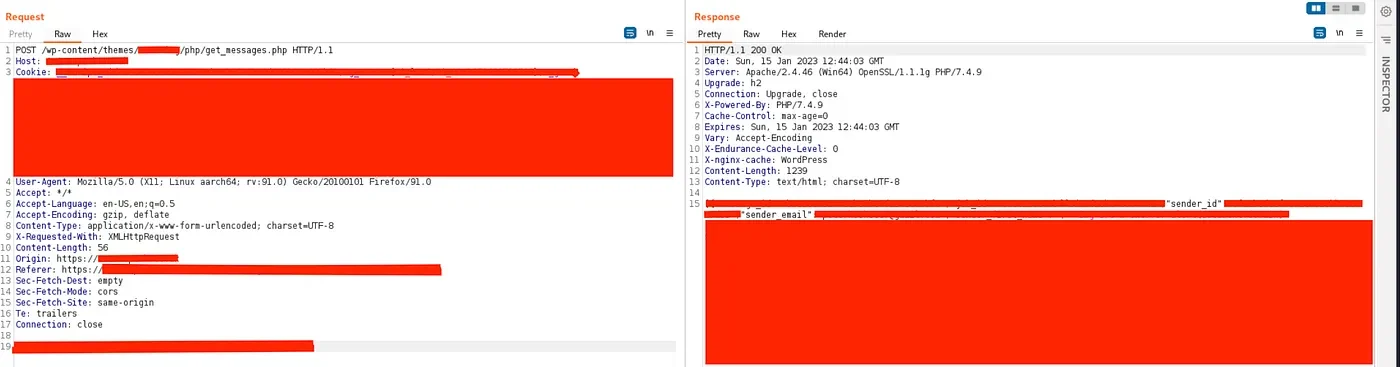
Leaking user_id and email address
Step 3: Turn the leak into a login
With the sender_email in hand, the author went to the login page and used that email with a random password. The response was then intercepted and rewritten from:
{"user_profile":{"sign_in_status":"invalid_password"}}
to:
{"user_profile":{"sign_in_status":"login_success","user_id":"<user_id_string>"}}
The first object reports a failed password check. The second reports a successful login and supplies the user_id taken from the message leak. With that substitution the author gained full access to the victim's account, completing the takeover.
Root cause
The application accepted a rewritten login status response, which allowed the author to appear signed in. The login response carries a user_id but sets no cookie, and the user_login_status.php response is what tells the client whether the user is signed in. Using a match and replace rule, the author changed the response to mimic a successful login. The brief access followed by an immediate logout led the author to believe the application was performing additional checks.
The second half of the flaw is excessive data in the get_message response: it returns sender_id and sender_email alongside the message content, and sender_id is the user_id. That turns an ordinary message into a disclosure of the identifier the login response expects. Rewriting invalid_password into login_success with a user_id gave the author full access to the victim's account. The report does not show the server-side code, so the exact validation logic is not stated;
Impact
The author bypassed authentication and gained full access to the user's account, provided the victim sends a message so that sender_id and sender_email are disclosed. The author describes this as a severe threat to the application's security and as a complete takeover once the identifier is known.
Fix
The report recommends improving the design and implementation of the authentication and authorisation mechanisms. Concretely, it says the application should ensure that responses to requests do not contain sensitive information such as user IDs or email addresses, validate responses properly to prevent tampering, and implement multi-factor authentication and session management to reduce the risk of account takeover.
Variants to test
- Look for login responses that return an identifier but set no session cookie, then rewrite the failure response into a success response with that identifier. A positive result is a dashboard that stays loaded rather than logging you out immediately.
- Enumerate status endpoints such as
user_login_status.phpand try match and replace rules that flip signed-out strings to signed-in strings. A positive result is access to authenticated pages without valid credentials. - Inspect message retrieval responses for fields such as
sender_idandsender_email. A positive result is an identifier that matches the value the login response expects. - Combine a leaked identifier with a random password on the login page and rewrite the response to
login_successwith that identifier. A positive result is full access to the victim's account.
What happened, in plain words
A security researcher was testing a website (which they call "redacted.com" to protect its identity) and found a way to log in as any other user without knowing their password. The trick relies on two mistakes in how the site checks who you are. First, the site accepted a rewritten status message as proof that the user was logged in. Using a match and replace rule, the author changed the message to mimic a successful login. Second, when you send a message to someone, the site's reply includes the sender's internal user ID and email address. That ID is exactly what the site expects to see when it confirms a login. So if the victim sends the attacker a message, the attacker learns the victim's ID and email, and can then fake a successful login response to take over the account. The researcher demonstrated this step by step.
Background: the pieces involved
Before diving into the steps, let's clarify a few terms that appear throughout. If you already know them, feel free to skip ahead.
- Authentication is the process of proving who you are, usually with a username and password. Authorisation is what you are allowed to do once you're logged in. If authentication is broken, an attacker can pretend to be someone else.
- A cookie is a small piece of data that a website stores in your browser and sends back with every request. It's like a wristband at an event: once you have it, you can re-enter without showing your ticket again. Cookies are often used to remember that you're logged in.
- An API (Application Programming Interface) is a way for programs to talk to each other. When you use a website, your browser sends requests to the server's API and gets responses back, often in a format called JSON (JavaScript Object Notation), which looks like
{"key":"value"}. Think of it as a structured message. - A response is what the server sends back after a request. It can contain data, status codes, and sometimes cookies.
- Intercepting a response means catching it between the server and your browser, so you can read or change it before your browser sees it. Security testers use tools called proxies (like Burp Suite or OWASP ZAP) to do this. A match and replace rule is a feature in these tools that automatically finds a piece of text in a response and swaps it for something else.
- Account takeover is when an attacker gains full control of someone else's account, often to steal data or perform actions as that user.
- Response manipulation is the attack technique of altering a server's response to change the application's behaviour, for example to bypass a login check.
The setup
The researcher was performing a penetration test, which is an authorised simulated attack to find security weaknesses. The target was a web application with a login system and a messaging feature that lets users send messages to each other. The researcher used an intercepting proxy to inspect and modify HTTP traffic. The report doesn't mention specific tools, versions, or account details beyond that.
Finding the first clue
While testing, the researcher looked at the response to a valid login request. They noticed two things: the response contained a user_id (a unique identifier for the user), which they considered sensitive, and no cookies were set. Normally, after a successful login, a server sets a session cookie so the browser can prove it's logged in on subsequent requests. The response contained a user_id but no cookies were set.
To test this, the researcher submitted incorrect credentials (wrong username or password) and then used the proxy to modify the response to match the one from a correct login. The result: they were briefly granted access, but then immediately logged out of the dashboard. This indicated that the application performed additional checks after the initial response, so simply faking the login response wasn't enough to maintain a session.
Step 1: Find the endpoint that decides login state
Further investigation revealed an endpoint named user_login_status.php. An endpoint is a specific URL that the application uses to perform a function, like checking login status. The researcher used the match and replace function to change every occurrence of user_signed_out to user_is_signed_in in the response from that endpoint. This made the application believe the user was signed in, even though they weren't. This allowed the researcher to access their own account, but to take over someone else's account, they still needed that person's user_id.
user_login_status.php
Step 2: Leak the victim's user_id and email through a message
In the redacted system, when a user sends a message to another user, the application makes a get_message request to retrieve the message. The response to that request includes not only the message content but also the sender_id and sender_email. Crucially, the sender_id is the same as the user_id. So if the victim sends a message to the attacker, the attacker can intercept the response and obtain the victim's user_id and email address.
Leaking user_id and email address
Step 3: Turn the leak into a login
With the victim's email address in hand, the researcher went to the login page and entered that email with a random password. The login attempt would naturally fail, but the researcher intercepted the response and rewrote it from:
{"user_profile":{"sign_in_status":"invalid_password"}}
to:
{"user_profile":{"sign_in_status":"login_success","user_id":"<user_id_string>"}}
Let's break down these two JSON objects. The first one is the server's response when the password is wrong: it says the sign-in status is invalid_password. The second is the forged response: it changes the status to login_success and adds a user_id field containing the victim's ID (represented as <user_id_string>). By making this substitution, the researcher tricked the application into thinking the login succeeded, and with the correct user_id, they gained full access to the victim's account. This completed the account takeover.
Why it worked
The application accepted a rewritten login status response, which allowed the author to appear signed in. The login response includes a user_id but sets no cookie, and the user_login_status.php response is what tells the client whether the user is signed in. Using a match and replace rule, the author changed the response to mimic a successful login. The brief access followed by an immediate logout led the author to believe the application was performing additional checks.
The second part of the flaw is excessive data in the get_message response: it returns sender_id and sender_email alongside the message content, and sender_id is the user_id. That turns an ordinary message into a disclosure of the identifier the login response expects. Rewriting invalid_password into login_success with a user_id gave the author full access to the victim's account. The report does not show the server-side code, so the exact validation logic is not stated;
Impact
The author bypassed authentication and gained full access to the user's account, provided the victim sends a message so that sender_id and sender_email are disclosed. The author describes this as a severe threat to the application's security and as a complete takeover once the identifier is known.
How to fix it
The report recommends improving the design and implementation of the authentication and authorisation mechanisms. Concretely, it says the application should ensure that responses to requests do not contain sensitive information such as user IDs or email addresses, validate responses properly to prevent tampering, and implement multi-factor authentication and session management to reduce the risk of account takeover. The report does not say which of these were actually applied.
Variants to test
If you're testing a similar application, here are some variations to try:
- Look for login responses that return an identifier but set no session cookie, then rewrite the failure response into a success response with that identifier. A positive result is a dashboard that stays loaded rather than logging you out immediately.
- Enumerate status endpoints such as
user_login_status.phpand try match and replace rules that flip signed-out strings to signed-in strings. A positive result is access to authenticated pages without valid credentials. - Inspect message retrieval responses for fields such as
sender_idandsender_email. A positive result is an identifier that matches the value the login response expects. - Combine a leaked identifier with a random password on the login page and rewrite the response to
login_successwith that identifier. A positive result is full access to the victim's account.
Glossary
- Authentication: The process of verifying a user's identity, typically with a username and password.
- Authorisation: The process of determining what actions a user is allowed to perform.
- Cookie: A small piece of data stored by a website in a user's browser, often used to maintain session state.
- API (Application Programming Interface): A set of rules that allows different software applications to communicate with each other.
- JSON (JavaScript Object Notation): A lightweight data-interchange format that is easy for humans to read and write, and easy for machines to parse and generate.
- Response: The data sent back by a server after receiving a request.
- Intercepting: Capturing and possibly modifying data in transit between a client and a server.
- Proxy: A tool that sits between a client and a server, allowing inspection and modification of traffic.
- Match and replace: A feature in intercepting proxies that automatically replaces specified text in requests or responses.
- Account takeover: A type of attack where an attacker gains unauthorised access to a user's account.
- Response manipulation: The act of altering a server's response to change the behaviour of an application.
- Penetration test: An authorised simulated cyberattack on a computer system, performed to evaluate the system's security.
- Endpoint: A specific URL or URI where an API or web service can be accessed.
- User ID: A unique identifier assigned to a user account.
- Session: A period of interaction between a user and a system, often maintained via cookies or tokens.
- Session cookie: A cookie that contains a session identifier, used to maintain a user's logged-in state.
- Multi-factor authentication (MFA): An authentication method that requires two or more independent credentials to verify a user's identity.



