STRIPE Live Key Exposed:: Bounty: $1000
A Stripe live secret key was exposed on a subdomain that redirected to Google OAuth, and the key could be used to access sensitive Stripe account data including balance, customers, charges, and files.
 Published on infosecwriteups.com
I have found a sensitive stripe live token leaking on a private program.[let’s say redacted.com]
The full write-up lives on its author's site
It belongs to its author, so we link to it rather than copy it. The other two tabs are our own rewrites, checked against it.
Context
This is a write-up of a private-programme finding on a host referred to only as redacted.com. The target was a subdomain, admin.redacted.com, that serves an administrative interface. When loaded in a browser, that page redirects the visitor to Google OAuth, so the visible result of a normal request is a redirect to the identity provider rather than the page itself.
The issue is an information disclosure: a Stripe live secret key (sk_live_...) was present in the response body of that admin subdomain. Because it is a live key, it carries the same privileges as the account it belongs to, and the Stripe API can be queried with it directly.
Setup
The tooling used was:
- Subfinder and Amass for subdomain enumeration.
- httprobe to filter the subdomains that were live.
curlto fetch the raw response of the interesting host.- The Keyhacks reference and the Stripe API documentation to work out which API calls the key would authorise.
No versions are given for any of the tools.
Finding it
Subdomain enumeration produced a list, and httprobe reduced it to the live hosts. One of them, admin.redacted.com, behaved unusually: it redirected the user or admin to Google OAuth. A browser follows that redirect and executes the JavaScript on the resulting page, so the browser view only shows the OAuth flow.
That behaviour is what made the host worth a second look. Fetching the same URL with curl returned the plain original output of the response, nothing else. In that raw output the Stripe live token was visible.
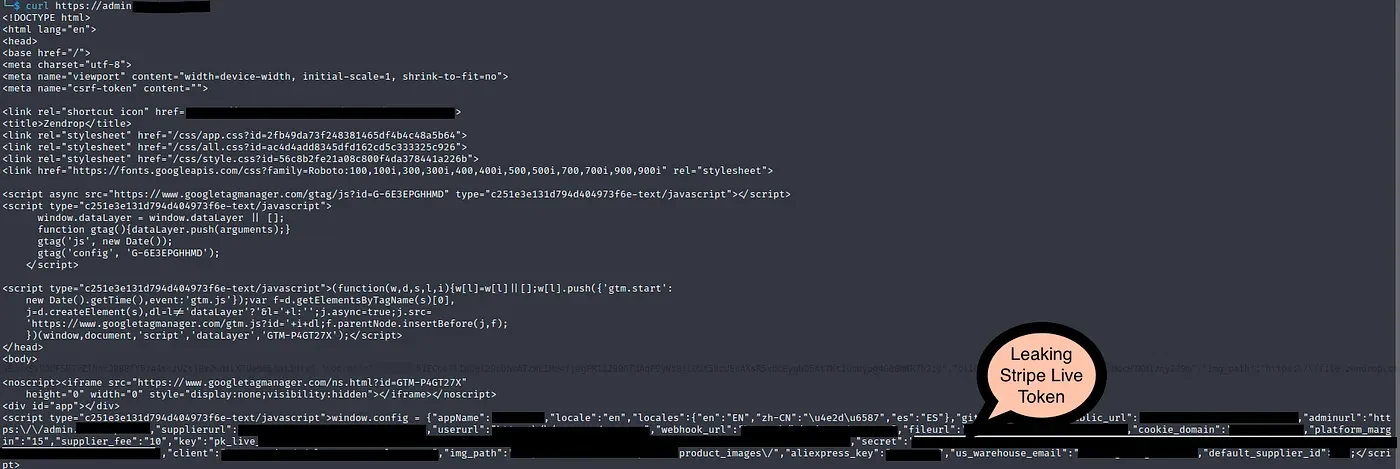
The screenshot shows the leaking Stripe live token in the response.
At this point the key was in hand, but its validity still had to be checked.
Exploitation
Step 1: Confirm the key works
The researcher consulted Keyhacks and the Stripe API documentation to find the endpoints a secret key can call, then queried them with curl, passing the key as the basic-auth username. The balance endpoint retrieves the current balance of the Stripe account.
This retrieves the current balance of the Stripe account. A valid response confirms the key is active.
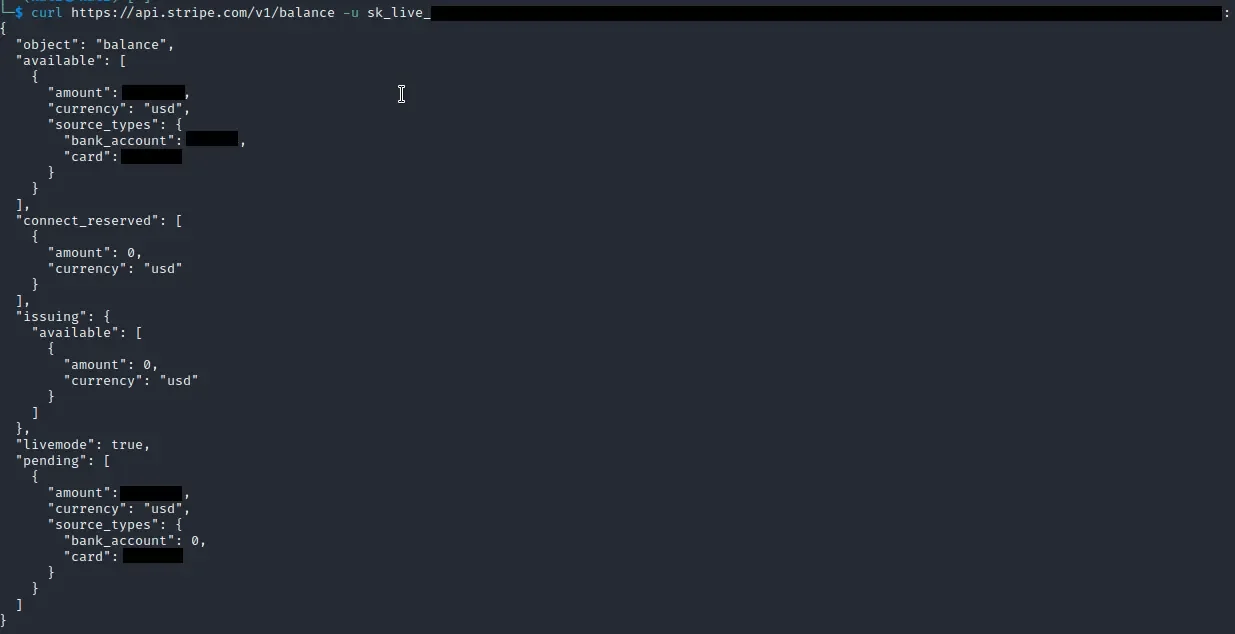
The screenshot shows the balance returned for the Stripe account.
Step 2: Enumerate customers
The customers endpoint returns the account's customer records and the payments tracked against them. According to the report this includes the customer's name, email address, the IP address used, and more.
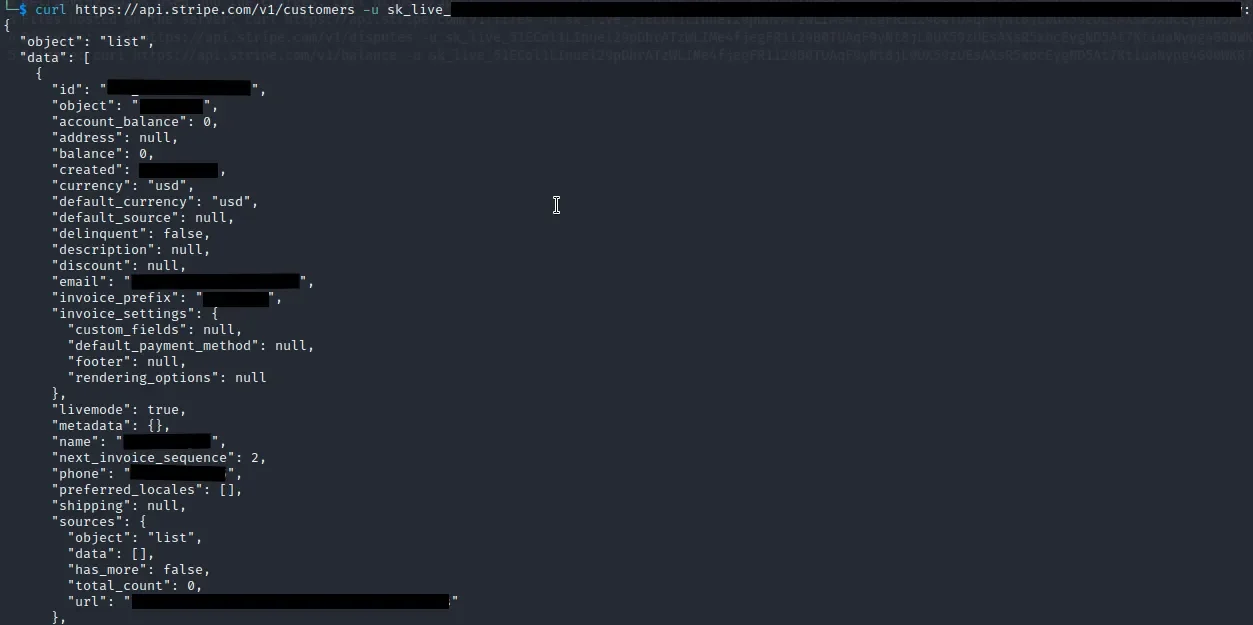
The screenshot shows multiple customers' data together with upcoming payments.
Step 3: Read charges and card data
The charges endpoint returns charges and card information. Stripe only returns the last four digits of a card number, so the exposure is partial card data rather than full PANs.
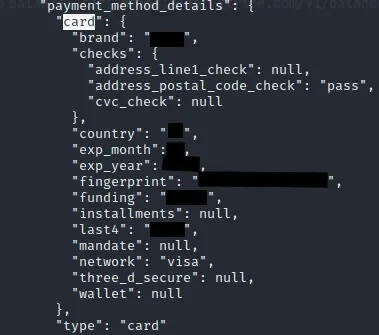
The screenshot shows card details as returned by the charges endpoint.
Step 4: List uploaded files
The files endpoint returns files uploaded by the admin. The report notes that these generally include invoices, disputes, events, balances, bank accounts, tokens, charges and more.
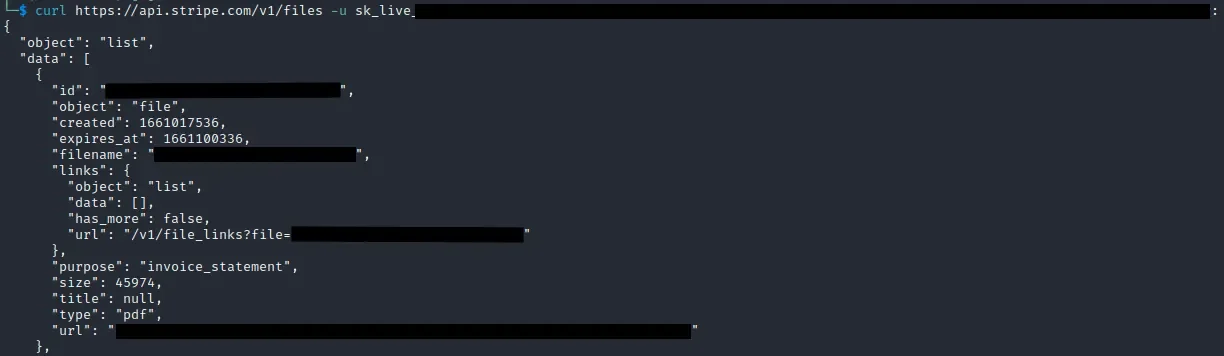
The screenshot shows the files retrieved through the API.
Root cause
The live secret key was embedded in the response body served by admin.redacted.com. The OAuth redirect in front of the page did not protect it: a plain HTTP client receives the underlying response, key included. Any secret shipped to the client in a response body is readable by anyone who can request that URL, regardless of what the browser does with it afterwards. The report does not describe how the key came to be in the response.
Impact
With a valid live secret key, an attacker can read the account's balance, customer records (including names, email addresses and IP addresses), charges with the last four digits of cards, and uploaded files such as invoices, disputes, bank accounts and tokens. The report frames the impact as sensitive information disclosure affecting the company and its end users. The report does not describe any write operations against the Stripe account.
Fix
The report states that the issue was fixed, without describing the change. The necessary fix is to remove the live secret key from anything the server returns to the client. Secret keys belong on the server side only.
Timeline
| Event | Date |
|---|---|
| Reported | 21st August |
| Rewarded and fixed | 30th August |
Variants to test
- Fetch admin and login subdomains with
curlinstead of a browser. A positive result is a response body containing credentials, API keys or internal configuration that the browser-rendered page hides behind a redirect or client-side script. - Compare the browser view with the raw response on any host that redirects to an identity provider. A positive result is content in the raw body that never appears after the redirect.
- Grep JavaScript bundles and HTML for key prefixes such as
sk_live_,pk_live_,AKIAand similar. A positive result is a live key that authenticates against the corresponding API. - Validate any Stripe key found with the balance endpoint before reporting. A positive result is a successful balance response, which proves the key is live rather than a placeholder.
- Once a key is confirmed, enumerate the read endpoints the report used (balance, customers, charges, files) to establish the scope of exposure for the report.
What happened, in plain words
A security researcher was looking at a company's website (the report calls it redacted.com because the real name is private). One of the company's web pages was admin.redacted.com. When you open that page in a normal browser, it immediately sends you to Google to sign in. That is called a redirect, and it is like a receptionist who, the moment you walk in, points you down the corridor to the sign-in desk. You never get to see the room behind them.
The researcher did not use a browser to look at that page. They used a command-line tool called curl, which asks a web server for a page and shows you exactly what comes back, with no redirect-following and no page drawing. In that raw answer, the page contained a Stripe live secret key. Stripe is a payment company that businesses use to take card payments online. A secret key is a long password-like string that lets software talk to your Stripe account. A live key is the real one, connected to real money and real customers, not a test key.
With that key, the researcher could ask Stripe's API (a way for programs to talk to Stripe directly) for the account's balance, its customers, its charges and card details, and the files the admin had uploaded. The company fixed the problem. This article walks through the same steps for someone who has never done security testing before.
Background: the words you need first
Before the steps, a few ideas come up again and again. Each one is explained from scratch.
What a subdomain is
A domain is a website's main name, like example.com. A subdomain is a name stuck on the front, like admin.example.com or shop.example.com. Companies use subdomains to split different services onto different addresses: one for the public shop, one for staff tools, one for email, and so on. Finding subdomains is often the first move in security testing, because forgotten or internal ones are sometimes less carefully protected than the main site.
What an API is
An API (Application Programming Interface) is a way for one program to ask another program for something, without a human clicking around a website. A useful comparison is a restaurant. The menu is the API: it lists what you can ask for and how to ask. The kitchen is the service behind it. You do not walk into the kitchen yourself; you order from the menu and food comes back. Stripe's API is its menu of requests: "give me the balance", "give me the customers", "give me the charges". Each request has an address (a URL) and returns data.
What a token or key is
A token or key is a secret string that proves who you are when you talk to an API, much like a membership card at a gym. Show the card and you get in; no card, no entry. A Stripe secret key starts with sk_live_ when it is a live key (real money) and sk_test_ when it is a test key (pretend money). Because the key is effectively a password for the whole account, anyone who finds it can act as the account owner within whatever the key is allowed to do.
What information disclosure means
Information disclosure is a security weakness where something that should have stayed private is handed out to whoever asks. It is not a break-in in the dramatic sense; it is more like a filing cabinet left open in a public corridor. The data was not stolen by force, it was simply readable. In this case, the private thing was a live Stripe secret key sitting in a web page's response.
What a redirect and client-side JavaScript are
When a web server wants your browser to go somewhere else, it sends a redirect: a short instruction saying "go to this other address instead". Your browser obeys automatically. JavaScript is the programming language that runs inside web pages; it can also change the page or send the browser elsewhere. The report notes that your browser can execute JavaScript, which can change the document, and in this case it redirects to Google OAuth. OAuth is a sign-in system where you log in with an existing account (here, Google) instead of a password made just for that site. The important point: the redirect and the JavaScript happen in the browser. A tool that does not run a browser never sees them happen.
Step 1: Finding the subdomain
The researcher started by collecting all the subdomains of the target. The tools used were Subfinder and Amass, both programs that gather subdomain names from public sources and other clues. The report gives no versions for any of the tools.
Once you have a big list of names, many of them will be dead or not responding. So the next tool, httprobe, checks each name and keeps only the ones that are actually live, meaning a web server answers at that address. Think of it as calling every number on a list and crossing out the ones that do not ring.
One of the live results was admin.redacted.com. The name suggests an administration interface, a page for staff rather than the public. When opened in a browser, it redirected the user or admin to Google OAuth. That is unusual enough to be worth a closer look: a page that refuses to show you anything until you sign in might still be saying something to anyone who asks without a browser.
Step 2: Looking at the raw response with curl
This is the key move of the whole report. Instead of a browser, the researcher used curl against admin.redacted.com to get the plain original output and nothing else. curl is a command-line tool that sends a request to a web address and prints the response body as text. It does not draw a page and it does not run JavaScript. So where a browser would be bounced to Google, curl just shows what the server sent first.
In that raw output, the Stripe live token was visible.
The screenshot shows the leaking Stripe live token in the response.
Why this step matters: the redirect was acting like a curtain. Anyone using a browser saw only the Google sign-in. But the curtain was drawn by the browser, not by the server. The server was still sending the page content, key included, to anyone who asked. A plain HTTP client like curl asks and receives, and the key is right there in the text.
At this point the researcher had a key, but did not yet know whether it was real and working. A key can be expired, revoked, or a placeholder. The next step is to test it.
Step 3: Checking whether the key works
To find out what a Stripe secret key can do, the researcher looked at two references: Keyhacks, a public collection of commands for testing whether various kinds of leaked keys are valid, and the official Stripe API documentation. From those, they picked API addresses to query with curl.
The first request asks Stripe for the account balance:
Line by line, in plain words:
curlis the program being run.https://api.stripe.com/v1/balanceis the address being asked.api.stripe.comis Stripe's API server,/v1/balanceis the specific request meaning "tell me the current balance".-u sk_live_<Secret-Key>:tellscurlto send a username and password for authentication. The part before the colon is the username, and here the username is the secret key itself. The part after the colon is the password, which is left empty. This is how Stripe expects a secret key to be presented: as the username in basic authentication.<Secret-Key>is a placeholder for the real key; the angle brackets are not typed literally.
Why this request first: the balance is a simple, harmless read. If the key is valid, Stripe answers with the account's balance. If the key is invalid, Stripe refuses. So a successful answer is proof that the key is live, which is exactly what you need before reporting it.
The screenshot shows the balance returned for the Stripe account.
Step 4: Reading the customer list
With the key confirmed, the researcher moved on to the customer records:
Wait, that is the charges request; the customers request is the one below. The customers endpoint returns the account's customer records and the payments tracked against them. According to the report, this includes the customer's name, email address, the IP address used, and more. An IP address is the numeric label a device uses on a network, roughly like a postal address for a computer, and it can hint at where a person connected from.
Line by line:
curlruns the request.https://api.stripe.com/v1/customersis the address meaning "list the customers".-u sk_live_<Secret-Key>:again presents the secret key as the username, with an empty password.
Why this step: the balance only shows money totals. The customers request shows who the customers are and what they have paid, which turns a vague "the key works" into a concrete picture of what data is exposed. That picture is what makes a report persuasive.
The screenshot shows multiple customers' data together with upcoming payments.
Step 5: Reading charges and card details
The charges endpoint returns charges and card information:
Line by line:
curlruns the request.https://api.stripe.com/v1/chargesis the address meaning "list the charges".-u sk_live_<Secret-Key>:presents the key as the username, empty password.
Why this step: charges are the actual card payments. The report notes that Stripe only gives you the last four digits of a card number, so what is exposed is partial card data, not the full card number. That distinction matters: it limits the damage, but the last four digits plus other details can still be sensitive.
The screenshot shows card details as returned by the charges endpoint.
Step 6: Listing uploaded files
The files endpoint returns files uploaded by the admin:
Line by line:
curlruns the request.https://api.stripe.com/v1/filesis the address meaning "list the files".
Why this step: the report says these files generally include invoices, disputes, events, balances, bank accounts, tokens and more. Invoices and bank account details are business records; tokens are themselves secrets. So this request shows how far the exposure reaches beyond customer names.
The screenshot shows the files retrieved through the API.
Why this happened
The live secret key was embedded in the response body served by admin.redacted.com. The Google OAuth redirect in front of the page did not protect it. The redirect is a browser behaviour: the server sends the page, and the browser then follows the instruction to go to Google. A plain HTTP client that does not follow or render the redirect receives the underlying response, key included.
The general lesson is that any secret sent to the client in a response body is readable by anyone who can request that URL, no matter what the browser does with it afterwards. The report does not describe how the key came to be in the response.
What the impact was
With a valid live secret key, an attacker can read the account's balance, customer records (including names, email addresses and IP addresses), charges with the last four digits of cards, and uploaded files such as invoices, disputes, bank accounts and tokens. The report frames the impact as sensitive information disclosure affecting the company and its end users. The report does not describe any write operations against the Stripe account.
How it was fixed
The report states that the issue was fixed, without describing the change. The necessary fix is to remove the live secret key from anything the server returns to the client. Rotating means replacing it with a new key and invalidating the old one, like changing a lock after losing the key. Secret keys belong on the server side only.
Timeline and reward
| Event | Date |
|---|---|
| Reported | 21st August |
| Rewarded and fixed | 30th August |
Things to try yourself
These are the same checks the report suggests, written for someone starting out. Each one has a clear sign of success.
- Fetch admin and login subdomains with
curlinstead of a browser. A positive result is a response body containing credentials, API keys or internal configuration that the browser-rendered page hides behind a redirect or client-side script. - Compare the browser view with the raw response on any host that redirects to an identity provider. A positive result is content in the raw body that never appears after the redirect.
- Search JavaScript bundles and HTML for key prefixes such as
sk_live_,pk_live_,AKIAand similar. A positive result is a live key that authenticates against the corresponding API. - Validate any Stripe key found with the balance endpoint before reporting. A positive result is a successful balance response, which proves the key is live rather than a placeholder.
- Once a key is confirmed, enumerate the read endpoints the report used (balance, customers, charges, files) to establish the scope of exposure for the report.
Glossary
- API: a way for one program to ask another program for data or actions, like a menu of requests a service accepts.
- API key: a secret string that identifies and authorises a program when it talks to an API.
- Basic authentication: a way of sending a username and password with a request, here used to send the Stripe secret key as the username.
- Bounty: a reward paid by a company to someone who reports a security problem responsibly.
- Browser: the program you use to view web pages, which follows redirects and runs JavaScript.
- Client: the program making a request, such as a browser or
curl. - Client-side: happening in the client (the browser) rather than on the server.
- curl: a command-line tool that sends web requests and prints the raw response.
- Domain: a website's main name, such as
example.com. - Endpoint: a specific address in an API that performs one job, such as
/v1/balance. - httprobe: a tool that checks which subdomains are live and responding.
- Information disclosure: a weakness where private data is handed out to anyone who asks.
- IP address: the numeric label a device uses on a network, roughly a computer's postal address.
- JavaScript: the programming language that runs inside web pages and can change the page or redirect the browser.
- Keyhacks: a public collection of commands for testing whether leaked keys of various services are valid.
- Live key: a real Stripe key connected to real money and customers, starting with
sk_live_. - OAuth: a sign-in system where you log in with an existing account, such as Google, instead of a site-specific password.
- Redirect: an instruction from a server telling the browser to go to a different address.
- Response body: the actual content a server sends back for a request.
- Rotate (a key): replace a secret with a new one and invalidate the old one.
- Secret key: a private key that grants access to an account's API, meant to stay on the server.
- Stripe: a payment company whose API lets businesses manage payments, customers and files.
- Subdomain: a name in front of a domain, such as
admin.example.com, used to split services onto separate addresses. - Subfinder / Amass: tools that gather subdomain names for a target.
- Token: a secret string used to prove identity or permission, similar to a key.
- Write operation: an API action that changes data, such as moving money or editing a record, as opposed to only reading it.




