Account Takeover Worth of $2500
An endpoint that adds an email to a demo user in an organisation could be manipulated by inserting a path traversal sequence to target another user's ID, bypassing an access check. An attacker could change another user's email address to one they control, leading to account takeover.
 Published on gonzxph.medium.com
In this writeup I will share on how I earned $2500 for a simple IDOR bypass leads to Account Takeover.
The full write-up lives on its author's site
It belongs to its author, so we link to it rather than copy it. The other two tabs are our own rewrites, checked against it.
Context
redacted.com is a product where you can create an Organization and add members to it. The program's name is withheld in line with its disclosure policy, so the write-up refers to it as redacted.com throughout. The feature of interest is member management: adding people to an Organization.
There are two ways to add a member:
- Invite them using their email address.
- Add a member with only a name and no email. This is called a Demo user. After you add a Demo user, you can edit it and add an email address, which turns it into an actual user.
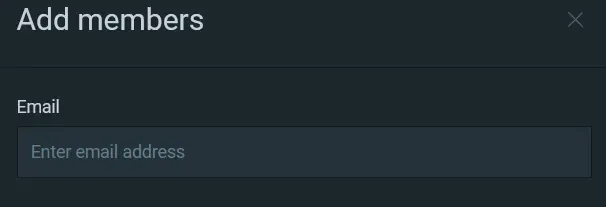
Adding member using email address
Adding member by providing name (Demo User)
The second path is the interesting one: it produces a user record with an identifier, and a separate request later attaches an email address to that record.
Setup
The researcher was working alone against a single program during a one-month break after graduating from Senior High School, using Burp Suite to inspect traffic. The report describes the researcher creating an Organization and adding members, but does not state which role or permission is required. No special role, tooling or configuration beyond that is described.
Finding it
After creating a Demo user, the researcher added an email address to make it an actual user in the Organization, then went back through the Burp Suite request history. The request that carried the email address looked like this:
The important parts are the path and the body. The path carries two identifiers: <organizationID>, the Organization the request is scoped to, and <DemoUserID>, the user whose email is being set. The JSON body carries the new address. The Token header carries the caller's authorisation token.
The identifier in the path is a user ID. That raised the obvious question: what happens if <DemoUserID> is replaced with the UserID of another member inside the same Organization? If the server trusts the path and does not check that the caller is allowed to modify that particular user, the request would rewrite someone else's email address.
Exploitation
Step 1: Confirm the naive substitution is blocked
Swapping <DemoUserID> for another member's UserID in the same Organization produced:
HTTP/2 403 ForbiddenDate: Tue, 15 Nov 2022 14:44:25 GMTContent-Type: application/jsonContent-Length: 76Pragma: no-cacheVary: OriginVary: Access-Control-Request-MethodVary: Access-Control-Request-HeadersX-Content-Type-Options: nosniff{ "message":"You don't have access to this.",}
So there is an authorisation check, and it rejects a direct reference to another user. The check is not absent; it is just being applied to something the attacker can influence.
Step 2: Find a path that satisfies the check and still reaches the target
After hours of searching for a bypass, the researcher found one. The working request was:
The path now contains two identifiers: the attacker's own <DemoUserID>, followed by /../, followed by the victim's <UserID>. The path contains the attacker's own <DemoUserID>, then /../, then the victim's <UserID>, and the request succeeded. The body still supplies the attacker-controlled address.
Step 3: Observe the result
The response was:
HTTP/2 200 OKDate: Tue, 15 Nov 2022 14:43:32 GMTContent-Type: application/jsonContent-Length: 2Vary: Access-Control-Request-MethodVary: Access-Control-Request-HeadersX-Content-Type-Options: nosniff{}
A 200 OK with an empty JSON object. The email address associated with the victim's <UserID> was changed to the email address controlled by the attacker. The email address associated with the victim's <UserID> was changed to the attacker-controlled address.
Root cause
The request path carries two identifiers, and the server treats them inconsistently. The authorisation check and the resource lookup resolve the path differently: the check is satisfied by the attacker's own Demo user ID appearing in the path, while the lookup normalises the .. segment and lands on the victim's user ID. This is a path traversal used to bypass an access control check, which is why the write-up classifies it as an IDOR bypass leading to account takeover. The exact implementation is not shown, so the split between the checking component and the resolving component is likely rather than confirmed.
The existing defence, the 403 Forbidden on a direct substitution, only works when the path contains a single, unambiguous identifier. It does not survive a path that can be normalised into a different resource after the check has passed.
Impact
An attacker who can create an Organization and add members can change the email address of another member of that Organization whose UserID they know. Because the email address is the account's identity, the attacker then controls the address associated with that account, which is the account takeover. The report does not describe any further steps after the email change, and it does not state how the victim's UserID is obtained.
Fix
The report does not say what the program changed. The fix that follows from the root cause is to resolve and normalise the path once, before any authorisation decision, and to authorise against the resolved resource rather than against a raw path segment. Rejecting paths that contain .. segments, and binding the email change to the authenticated user's own record rather than to an identifier taken from the URL, would both close this specific bypass.
Variants to test
- Dot-segment bypass on other user-scoped endpoints. Take any endpoint of the form
/org/<orgID>/resource/<userID>/where a direct swap returns403, and insert your own ID followed by/../and the victim's ID. A positive result is a200where the direct swap gave403, with the effect applied to the victim's record. - Encoded dot segments. Try
%2e%2e/,%2e%2e%2fand mixed encodings in place of../. A positive result is the same200and side effect, showing the normalisation happens after decoding. - Duplicate identifiers. Send the path with both your ID and the victim's ID in different positions, for example
/addEmail/<victimID>/../<yourID>/, and see which one the check and the lookup each use. A positive result is a change applied to the victim while the check sees your ID. - Trailing and leading slashes. Add extra slashes around the dot segment, such as
//../or/..//, to probe how the router collapses separators. A positive result is a200with the victim's record modified. - Same pattern on other verbs. Repeat the bypass on
PUT,PATCHandDELETEvariants of member management endpoints. A positive result is a state change on another member's record that the direct request refuses.
Timeline
The vulnerability was discovered around 10 p.m. and a report was filed immediately. The next morning the researcher received a response from the team.
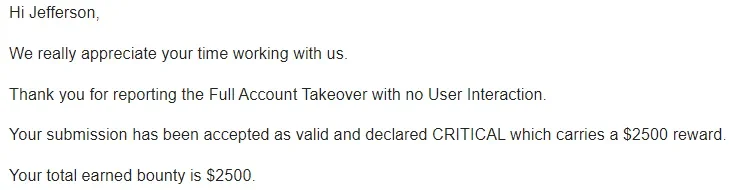
Bounty time
The bounty was $2500.
What happened, in plain words
A security researcher found a way to take over other people's accounts on a website, using nothing more than a normal user account and a small trick in a web address. The site let you create an "Organization" and add people to it. When you added a person, the site sent a request to its server that said, in effect, "set the email address of user number X to this address". The researcher noticed that the user number was sitting right there in the request, and wondered what would happen if he put someone else's number there instead of his own. The site said no. But after some experimenting, he found a way to write the address so that the site's permission check looked at his own user number and said yes, while the part of the site that actually does the work ended up changing someone else's email address. Because an email address is how you log in and recover an account, changing it means you can take the account over. He reported it the same night and was paid $2500.
Who is writing, and what this is about
The author introduces himself as Jefferson Gonzales, known as Gonz, an 18 year old first year college student and part time security researcher from the Philippines, acknowledged by Nokia, the UN, the BBC and more than 20 companies. He had a one month break after graduating from Senior High School and used the free time to hunt on a single program.
The program's name cannot be disclosed, so the write-up calls it redacted.com, in line with the program's disclosure policy. The write-up is about how he earned $2500 from a simple IDOR bypass that leads to account takeover.
A few terms before we start, because everything below depends on them:
- A server is the computer somewhere else that runs the website. Your browser asks it for pages and sends it data.
- A request is one message your browser sends to the server, for example "please add this email address to this user". A response is the server's reply, for example "done" or "you are not allowed".
- An API is the part of a website that accepts these requests and answers with data rather than with a web page. Think of a restaurant: the dining room is the website you see, and the kitchen door where orders are handed in is the API. You do not have to eat in the dining room to send an order through that door.
- A token is a short piece of text that proves who you are, a bit like the wristband you get at an event. You show it with every request, and the server uses it to decide whether you are logged in and who you are. It is a secret: anyone who has your token can act as you.
- An ID is a number or code that identifies a particular thing, such as a user or an Organization. It is not a password; it is just a label, and labels can often be seen or guessed.
- IDOR stands for Insecure Direct Object Reference. It means the site lets you name an object (a user, an invoice, a file) directly in a request, and does not properly check that the object is yours to touch. The everyday comparison: a cloakroom that hands out coat number 17 to whoever asks for number 17, without checking that the person asking owns that coat.
- Account takeover means getting control of someone else's account, usually by changing something that lets you log in as them, such as their email address or password.
The feature being attacked
On redacted.com you can create an Organization and add members to it. There are two ways to add a member:
- Invite them using their email address.
- Add a member with only a name and no email. This is called a Demo user. After you add a Demo user, you can edit it and add an email address, which turns it into an actual user.
Adding member using email address
Adding member by providing name (Demo User)
The second path is the interesting one. It creates a user record with an identifier, and a separate request later attaches an email address to that record. In other words, the site first makes an empty placeholder person, and then, in a second step, gives that person an email address. That second step is a request of its own, and requests can be looked at, and changed.
How the researcher looked at the traffic
The researcher worked alone against a single program, using a tool called Burp Suite. Burp Suite sits between your browser and the server and records every request and response, so you can read them afterwards and replay or edit them. Think of it as a notebook that automatically writes down every order you send to the kitchen, and lets you send the same order again with changes.
The report describes the researcher creating an Organization and adding members, but does not state which role or permission is required. No special role, tool or configuration beyond that is described.
Finding it
After creating a Demo user, the researcher added an email address to make it an actual user in the Organization. Then he went back through the Burp Suite request history and looked at the request that carried the email address:
Line by line, in plain words:
POST /<organizationID>/addEmail/<DemoUserID>/ HTTP/2is the first line of the request.POSTis the method, the verb that says "I am sending data and asking you to change something". The rest is the path, the address of the thing being changed. It contains two placeholders:<organizationID>, which Organization this concerns, and<DemoUserID>, which user's email is being set.HTTP/2is the version of the language the browser and server speak.Host: redacted.comtells the server which site the request is for. One server can host many sites, so it needs to know which one you mean.User-Agent: ...says which browser and operating system sent the request. Here it is Firefox 106 on 64 bit Windows.Accept: application/jsonsays the browser would like the answer in JSON, a simple text format for data.Accept-Language: ensays the browser prefers English.Accept-Encoding: gzip, deflatesays the browser can accept the answer compressed, to save bandwidth.Content-Type: application/jsonsays the data being sent in the body is in JSON format.Token: 123abcis the authorisation token, the wristband described above. The server uses it to know who is calling. In this write-up the value is a placeholder, not a real token.Content-Length: 40says how many bytes long the body is, so the server knows where the body ends.Origin: https://redacted.comandReferer: https://redacted.comtell the server which page the request came from. Browsers add these automatically.- The body,
{ "email":"[redacted]" }, is the actual data: the new email address to set. The address here is a placeholder for an address the attacker controls.
The important parts are the path and the body. The path carries two identifiers: <organizationID>, the Organization the request is scoped to, and <DemoUserID>, the user whose email is being set. The JSON body carries the new address. The Token header carries the caller's authorisation token.
The identifier in the path is a user ID. That raised the obvious question: what happens if <DemoUserID> is replaced with the UserID of another member inside the same Organization? If the server trusts the path and does not check that the caller is allowed to modify that particular user, the request would rewrite someone else's email address. This is the IDOR idea in practice: the request names the object directly, and the only thing standing between you and someone else's object is whether the server checks.
Exploitation
Step 1: Confirm the naive substitution is blocked
First, the researcher did the simplest thing: he swapped <DemoUserID> for another member's UserID in the same Organization, and sent the request. The answer was:
HTTP/2 403 ForbiddenDate: Tue, 15 Nov 2022 14:44:25 GMTContent-Type: application/jsonContent-Length: 76Pragma: no-cacheVary: OriginVary: Access-Control-Request-MethodVary: Access-Control-Request-HeadersX-Content-Type-Options: nosniff{ "message":"You don't have access to this.",}
Line by line:
HTTP/2 403 Forbiddenis the status line.403is the standard code for "I understood you, but you are not allowed to do this".Date: Tue, 15 Nov 2022 14:44:25 GMTis when the server answered.Content-Type: application/jsonsays the answer body is JSON.Content-Length: 76says the body is 76 bytes long.Pragma: no-cacheand theVarylines are caching instructions: they tell caches not to reuse this answer for a different request.X-Content-Type-Options: nosnifftells the browser not to guess the content type, a small safety measure.- The body,
{ "message":"You don't have access to this.", }, is the server's explanation: access denied.
So there is an authorisation check, and it rejects a direct reference to another user. The check is not absent; it is just being applied to something the attacker can influence. This step matters because it tells you what the defence is. Before you can bypass a lock, you have to see the lock.
Step 2: Find a path that satisfies the check and still reaches the target
After hours of searching for a bypass, the researcher found one. The working request was:
Line by line, focusing on what changed:
- The method,
POST, is the same: still a request to change something. - The path is now
/<organizationID>/addEmail/<DemoUserID>/../<UserID>/. It contains two identifiers: the attacker's own<DemoUserID>, followed by/../, followed by the victim's<UserID>. - Everything else, the
Host,User-Agent,Acceptheaders, theToken,Content-Length,OriginandReferer, is unchanged from the first request. - The body is unchanged too:
{ "email":"[redacted]" }, the attacker-controlled address.
What is /../? In a web address, .. means "go up one level", the same as in a file path on your computer. If you are in the folder photos/holiday and you write ../, you are back in photos. Servers often tidy up addresses containing .. before using them, a process called normalisation, so that /addEmail/<DemoUserID>/../<UserID>/ becomes /addEmail/<UserID>/.
The bypass request put the attacker's own <DemoUserID>, then /../, then the victim's <UserID> in the path, and it succeeded. Whatever component performs the authorisation check sees the attacker's own Demo user in the path and is satisfied, because the attacker is allowed to edit their own Demo user. The component that actually resolves the resource normalises the .. segment, walks up a level, and ends up operating on the victim's user record. The body still supplies the attacker-controlled address. This is a path traversal used to get past an access control check, which is why the write-up calls it an IDOR bypass leading to account takeover.
Step 3: Observe the result
The response was:
HTTP/2 200 OKDate: Tue, 15 Nov 2022 14:43:32 GMTContent-Type: application/jsonContent-Length: 2Vary: Access-Control-Request-MethodVary: Access-Control-Request-HeadersX-Content-Type-Options: nosniff{}
Line by line:
HTTP/2 200 OKis the status line.200is the standard code for "it worked".Date: Tue, 15 Nov 2022 14:43:32 GMTis when the server answered.Content-Length: 2says the body is two bytes long, which is exactly the size of an empty JSON object.- The
Varylines andX-Content-Type-Options: nosniffare the same caching and safety headers as before. - The body,
{}, is an empty JSON object: no error message, just "done".
A 200 OK with an empty JSON object. The email address associated with the victim's <UserID> was changed to the email address controlled by the attacker. The email address associated with the victim's <UserID> was changed to the attacker-controlled address. The everyday comparison: the cloakroom accepted your own coat number at the door, then walked to the shelf and handed you someone else's coat.
Root cause
The request path carries two identifiers, and the server treats them inconsistently. The authorisation check and the resource lookup resolve the path differently: the check is satisfied by the attacker's own Demo user ID appearing in the path, while the lookup normalises the .. segment and lands on the victim's user ID. This is a path traversal used to bypass an access control check, which is why the write-up classifies it as an IDOR bypass leading to account takeover. The exact implementation is not shown, so the split between the checking component and the resolving component is likely rather than confirmed.
The existing defence, the 403 Forbidden on a direct substitution, only works when the path contains a single, unambiguous identifier. It does not survive a path that can be normalised into a different resource after the check has passed.
Impact
An attacker who can create an Organization and add members can change the email address of another member of that Organization whose UserID they know. Because the email address is the account's identity, the attacker then controls the address associated with that account, which is the account takeover. The report does not describe any further steps after the email change, and it does not state how the victim's UserID is obtained.
Fix
The report does not say what the program changed. The fix that follows from the root cause is to resolve and normalise the path once, before any authorisation decision, and to authorise against the resolved resource rather than against a raw path segment. Rejecting paths that contain .. segments, and binding the email change to the authenticated user's own record rather than to an identifier taken from the URL, would both close this specific bypass.
Variants to test
These are follow-up checks that generalise from the finding. Each one is a way of asking the same question: does the site check the address it was given, or the address it ends up using?
- Dot-segment bypass on other user-scoped endpoints. Take any endpoint of the form
/org/<orgID>/resource/<userID>/where a direct swap returns403, and insert your own ID followed by/../and the victim's ID. A positive result is a200where the direct swap gave403, with the effect applied to the victim's record. - Encoded dot segments. Try
%2e%2e/,%2e%2e%2fand mixed encodings in place of../. A positive result is the same200and side effect, showing the normalisation happens after decoding. - Duplicate identifiers. Send the path with both your ID and the victim's ID in different positions, for example
/addEmail/<victimID>/../<yourID>/, and see which one the check and the lookup each use. A positive result is a change applied to the victim while the check sees your ID. - Trailing and leading slashes. Add extra slashes around the dot segment, such as
//../or/..//, to probe how the router collapses separators. A positive result is a200with the victim's record modified. - Same pattern on other verbs. Repeat the bypass on
PUT,PATCHandDELETEvariants of member management endpoints. A positive result is a state change on another member's record that the direct request refuses.
Timeline
The vulnerability was discovered around 10 p.m. and a report was filed immediately. The next morning the researcher received a response from the team.
Bounty time
The bounty was $2500.
Glossary
- Account takeover: gaining control of someone else's account, usually by changing a login detail such as the email address or password.
- API: the part of a website that accepts requests and returns data rather than web pages; the kitchen door where orders are handed in.
- Authorisation: the decision about whether the person making a request is allowed to do it.
- Body: the part of a request or response that carries the actual data, as opposed to the address and headers.
- Burp Suite: a tool that sits between the browser and the server, records requests and responses, and lets you replay and edit them.
- Content-Type: a header that says what format the body is in, for example JSON.
- Demo user: on redacted.com, a member added with only a name and no email address, which can later be edited to add an email.
- Dot segment (
..): in a web address, a segment meaning "go up one level", the same as in a file path. - Header: a line of extra information attached to a request or response, such as the token or the browser name.
- HTTP: the language browsers and servers use to exchange requests and responses.
- ID: a number or code that identifies a particular thing, such as a user or an Organization.
- IDOR (Insecure Direct Object Reference): a flaw where the site lets you name an object directly in a request and does not properly check that it is yours to touch.
- JSON: a simple text format for data, made of names and values in curly braces.
- Normalisation: tidying up an address before using it, for example turning
a/../bintob. - Organization: on redacted.com, a group of members that an owner or administrator manages.
- Path: the part of a web address after the site name, which says which resource the request concerns.
- Path traversal: using
..segments in a path to reach a resource other than the one the path appears to name. - Request: one message sent from the browser to the server.
- Response: the server's reply to a request.
- Status code: the three digit number at the start of a response, such as
200for success or403for forbidden. - Token: a short piece of secret text that proves who you are, sent with each request.
- User-Agent: a header that says which browser and operating system sent the request.
- UserID: the identifier of a particular user account.
- Vulnerability: a weakness in a site that lets someone make it behave in a way its owners did not intend.