Account Takeover worth of $5
The site did not check whether an email address was already registered when a user signed up with email and password, even if that email had been used to register via Google OAuth. An attacker could register the victim's email with a password and gain access to the victim's account.
 Published on gonzxph.medium.com
In this write-up I will tell you how I found an Account Takeover vulnerability and received a $5amazon voucher, without wasting your time let’s get started.
The full write-up lives on its author's site
It belongs to its author, so we link to it rather than copy it. The other two tabs are our own rewrites, checked against it.
Context
redacted.com is a web application that lets users sign in and sign up through several OAuth providers: Google, Facebook and GitHub. Alongside those social logins, the site also offers the ordinary email and password registration flow at https://redacted.com/register. The researcher's usual first move on any target is to test the login and signup features, and this engagement was no different.
The bug that follows sits in the interaction between the two registration paths: the email and password form, and the Google OAuth signup. The site failed to check whether an email address was already registered when that address had originally been used through Google OAuth.
Setup
No special tooling is described. The work was done through the browser against the public registration page:
- A victim account created on
https://redacted.com/registerusing Google OAuth. - An attacker account created on the same page using email and password, with the victim's email address.
Both accounts are ordinary user accounts. The only precondition is that the victim registered through Google OAuth rather than through the email and password form.
Finding it
The first approach was the classic one: try to register an email address that already exists, in the hope of overwriting the password of the existing account. The researcher worked through a series of variations on the email field, each time observing the response.
- A plain signup with the existing email failed.
- Appending
%00to the email produced "Invalid email ID". - Appending a space after the email produced "Email is already registered".
- Prepending a space before the email redirected to the dashboard, but the existing account's password and other information were not changed, so this had no impact.
- Changing the case of the email still produced "Email is already registered".
None of these tricks worked. The researcher then explored other functionality and noticed that a user can sign up using Google OAuth. Registering an account through Google OAuth redirected to the dashboard after signup.
That raised the question the whole report turns on: what happens if the email address of a user who registered through Google OAuth is used in the email and password registration form? The answer was that redacted.com does not check whether the email address is already registered when that address was created through Google OAuth.
Exploitation
Step 1: Victim registers with Google OAuth
As the victim, create an account on https://redacted.com/register using Google OAuth. The account is then associated with the victim's email address through the OAuth path.
Step 2: Attacker registers the same email with a password
As the attacker, create an account on https://redacted.com/register using email and password, entering the victim's email address, the one used when the victim registered through Google OAuth.
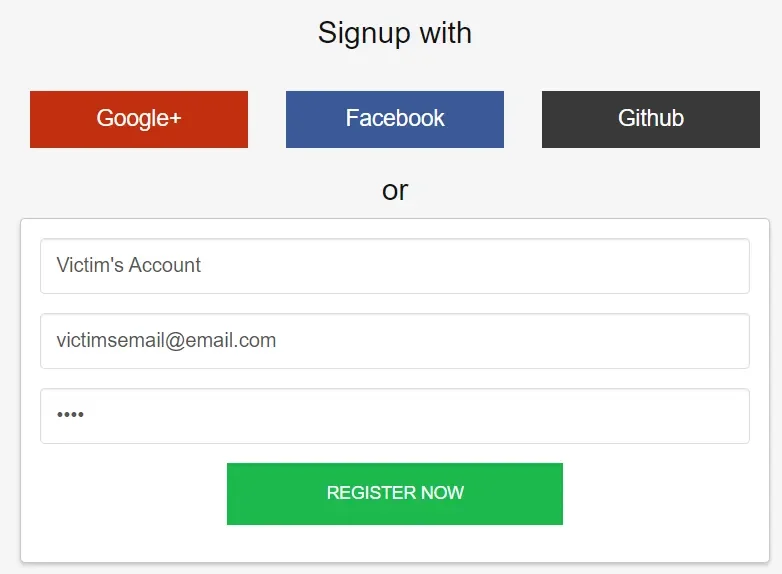
After submitting, the attacker is redirected to the dashboard of the victim's account. No further requests, parameters or headers are shown in the report.
Root cause
The registration logic does not check whether an email address is already registered when that address was created through Google OAuth. The email and password path therefore accepts an address that already belongs to an OAuth-created account, and the attacker ends up inside that account.
The report does not describe the code, so the precise reason the OAuth-created address was not matched is not stated. The gap is specific to accounts created through Google OAuth, which the check did not cover.
Impact
An attacker can take over any account on redacted.com that was registered using Google OAuth, provided the attacker knows the victim's email address. The attacker registers that address through the email and password form and is redirected to the victim's dashboard. The report frames this as an Account Takeover affecting any user who registered through Google OAuth.
The researcher received a $5 Amazon voucher for the finding.
Fix
The report does not say what was changed.
Variants to test
- Other OAuth providers on the same target. The report notes that redacted.com also supports Facebook and GitHub OAuth. Register a victim through each provider, then try the same email through the email and password form. A positive result is a redirect into the victim's dashboard.
- Whitespace and encoding tricks on the email field. The researcher tried
%00appended to the email, a space after it, a space before it, and case changes. On another target, try each of these against an existing email and watch for a redirect to the dashboard rather than an error. A positive result is a successful signup that lands in an existing account, or a change to that account's password or details. - Mixed registration paths generally. Wherever a site offers both social login and a local password form, register with one path and attempt the other with the same address. A positive result is that the second path accepts the address and logs the attacker into the first account.
What happened, in plain words
A website let people create accounts in two ways: by signing in with Google (called OAuth) or by filling in an email address and a password. The site forgot to check whether an email address was already used when someone signed up with Google. So an attacker could take the victim's email address, go to the normal signup form, enter that email with a new password, and end up logged in as the victim. The researcher who found this got a $5 Amazon voucher.
The target and the two ways to sign up
redacted.com is a website where you can create an account. It offers several "social login" options: you can sign in with Google, Facebook or GitHub. It also has the classic form where you type an email address and a password.
OAuth (Open Authorization) is a way for a website to let you log in using another company's account, like Google. Instead of giving redacted.com your Google password, Google confirms who you are and redacted.com creates an account linked to your Google email. It is like showing your passport at a hotel: the hotel trusts the passport office, not you directly.
The researcher's habit is to start with the login and signup pages, because these are often where mistakes hide.
Trying to reuse an existing email
The first idea was simple: if you try to sign up with an email that already exists, maybe the site will let you overwrite the password of the existing account. The researcher tried several variations of the email field and watched what the site said.
- A plain signup with the existing email failed.
- Adding
%00after the email gave "Invalid email ID". - Adding a space after the email gave "Email is already registered".
- Adding a space before the email redirected to the dashboard, but the existing account's password and details did not change, so there was no real impact.
- Changing the email to upper or lower case still gave "Email is already registered".
The first screenshot shows the plain signup attempt with an existing email, which failed.
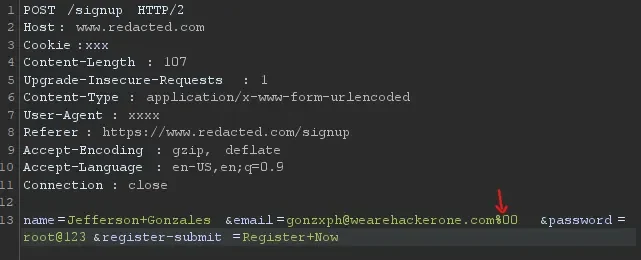
The second screenshot shows the %00 attempt and the "Invalid email ID" message.
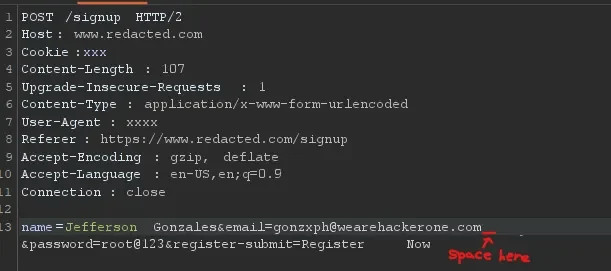
The third screenshot shows the space-after-email attempt and the "Email is already registered" message.
The fourth screenshot shows the space-before-email attempt, which redirected to the dashboard but did not change the existing account.
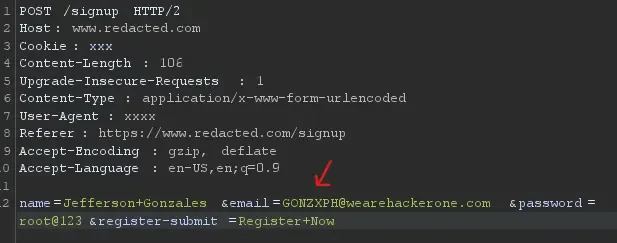
The fifth screenshot shows the upper and lower case attempt, which still gave "Email is already registered".
None of these tricks worked. The researcher then looked at other parts of the site and noticed that you can sign up using Google OAuth. Registering with Google OAuth redirected to the dashboard after signup.
That led to the key question: what happens if you take the email address of someone who signed up with Google OAuth and use it in the normal email and password signup form? The answer was that redacted.com does not check whether that email is already registered when it was created through Google OAuth.
Step by step: how to reproduce it
Step 1: The victim signs up with Google OAuth
As the victim, go to https://redacted.com/register and create an account using Google OAuth. The account is now linked to the victim's email address through the OAuth path.
Step 2: The attacker signs up with the same email and a password
As the attacker, go to https://redacted.com/register and create an account using email and password, entering the victim's email address (the one used when the victim signed up with Google OAuth).
After submitting, the attacker is redirected to the dashboard of the victim's account. The report does not show any further requests, parameters or headers.
Why it works
The registration logic does not check whether an email address is already registered when that address was created through Google OAuth. So the email and password path accepts an address that already belongs to an OAuth-created account, and the attacker ends up inside that account.
The report does not describe the code, so the precise reason the OAuth-created address was not matched is not stated. The gap is specific to accounts created through Google OAuth, which the check did not cover.
Impact
An attacker can take over any account on redacted.com that was registered using Google OAuth, provided the attacker knows the victim's email address. The attacker registers that address through the email and password form and is redirected to the victim's dashboard. The report frames this as an Account Takeover affecting any user who registered through Google OAuth.
The researcher received a $5 Amazon voucher for the finding.
Fix
Variants to test
- Other OAuth providers on the same target. The report notes that redacted.com also supports Facebook and GitHub OAuth. Register a victim through each provider, then try the same email through the email and password form. A positive result is a redirect into the victim's dashboard.
- Whitespace and encoding tricks on the email field. The researcher tried
%00appended to the email, a space after it, a space before it, and case changes. On another target, try each of these against an existing email and watch for a redirect to the dashboard rather than an error. A positive result is a successful signup that lands in an existing account, or a change to that account's password or details. - Mixed registration paths generally. Wherever a site offers both social login and a local password form, register with one path and attempt the other with the same address. A positive result is that the second path accepts the address and logs the attacker into the first account.
Glossary
- OAuth: a way for a website to let you log in using another company's account (like Google) without sharing your password with that website.
- Account Takeover: when an attacker gains control of someone else's account.
- Email and password registration: the classic signup form where you type an email address and choose a password.
- Dashboard: the main page you see after logging in, showing your account information.
- Payload: a piece of data or code sent to a system to test or exploit it, like
%00or a space in an email field. %00: a URL-encoded null byte, a special character that some systems treat as the end of a string.- Duplicate-email check: a check that prevents signing up with an email address that is already registered.
- Redirect: when a website sends your browser to a different page automatically.
- Voucher: a coupon or code worth a certain amount, here a $5 Amazon voucher.