My Experience on Hacking the Dutch Government
A reflected cross-site scripting flaw existed in a photographer search parameter, and a separate login page accepted a javascript: value in its return URL, turning an open redirect into script execution. A third site lacked CSRF protection on profile and password change, letting an attacker change another user's password.
 Published on gonzx.medium.com
Hello, fellow Bug Hunters! It’s me again Jefferson Gonzales, and in this article, I’ll tell you about how I got my dream Dutch Government SWAG, and without wasting your time let’s get started.
The full write-up lives on its author's site
It belongs to its author, so we link to it rather than copy it. The other two tabs are our own rewrites, checked against it.
Context
This is an account of three separate findings made against Dutch Government websites over a few months in 2021, driven by a simple goal: earning the Dutch Government swag t-shirt that other hunters had been posting on Twitter and LinkedIn. The three targets were unrelated applications, and each finding is a different class of bug: reflected XSS, open redirect escalated to XSS, and CSRF escalated to account takeover.
The first target was a species search application at www.nederlandsesoorten.nl, specifically the picture search page under linnaeus_ng. The feature of interest is the photographer filter, which is meant to narrow search results by the name of the person who took a photograph.
The second target was terminologie.nictiz.nl, a subdomain of nictiz.nl, with a login page under /art-decor/login. The login page accepts a returnToUrl parameter, which normally tells the application where to send the user after a successful login.
The third target was repository.scp.nl, an application with both login and registration, where a logged-in user can update their profile name and change their password.
Setup
The researcher worked from a list of Dutch Government domains found on GitHub:
https://raw.githubusercontent.com/mil1200/NCSC-NL/[redacted]/NCSC-NL-subdomains.txt
All of those domains were checked manually over two weeks, and the only results were static websites with no bugs. The first real target was number 1043 on that list.
For the second round of hunting, a newer list was used, the government website register published as an ODS spreadsheet:
https://www.communicatierijk.nl/binaries/communicatierijk/documenten/publicaties/2016/05/26/websiteregister/websiteregister-rijksoverheid-2022-01-27.ods
Tools used across the three findings:
- Waybackurls, run in Termux, to collect historical URLs and hidden parameters.
- Sublist3r, to enumerate subdomains of
nictiz.nl. - Burp Suite's CSRF Generator, to build the CSRF proof of concept.
For the second target, default credentials were tried against the login form:
admin:admin
admin:admin123
demo:demo
The demo:demo pair worked and landed in a dashboard. That dashboard had no editing or modifying functions; a demo user could do no more than an unauthenticated visitor. The demo account was still enough to exercise the login flow and the returnToUrl handling.
For the third target, an account was registered and then used to log in, and a second account was used to test the CSRF proof of concept.
Finding it
Reflected XSS in the photographer parameter
On the first target, Waybackurls was run to collect hidden parameters. When the scan finished, one parameter stood out because its value was reflected on the page.
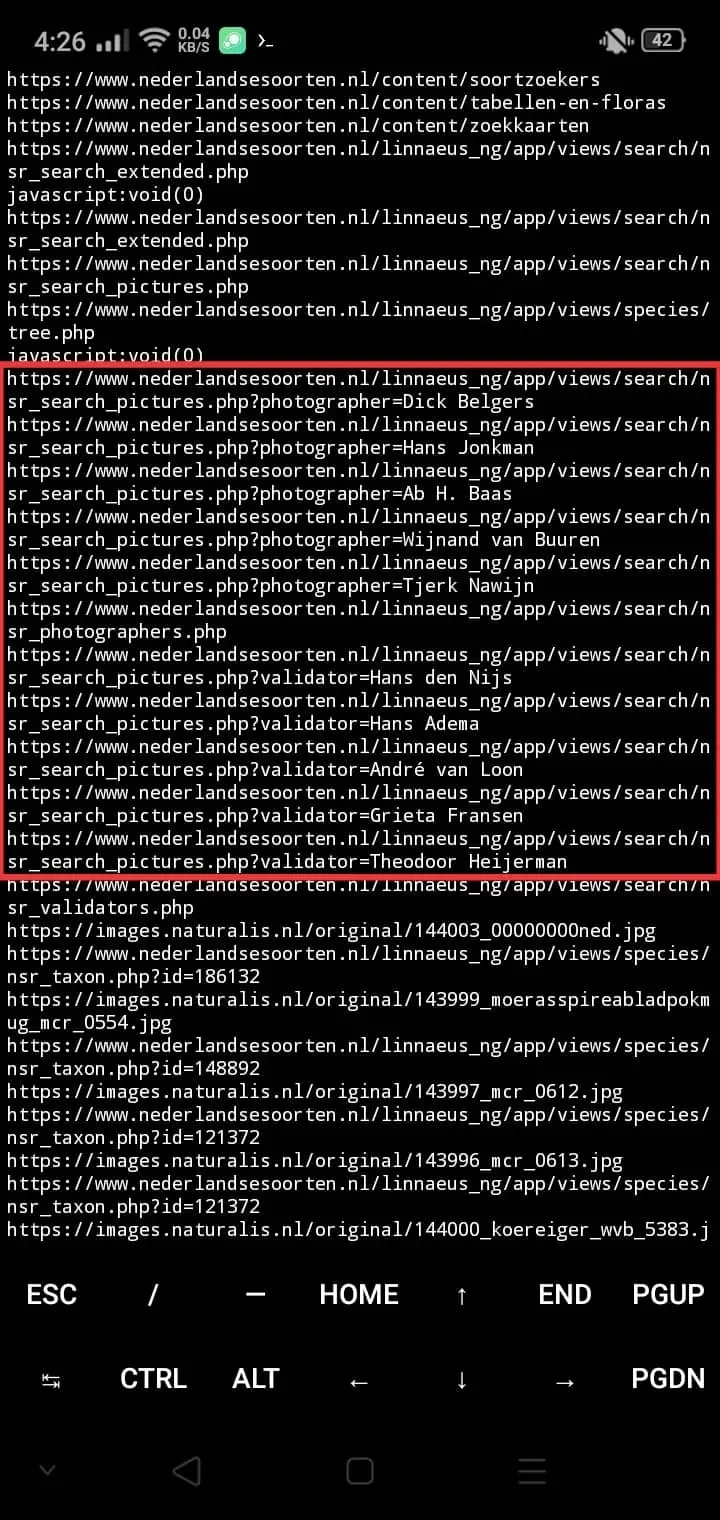
The screenshot is captioned 'Waybackurl resuls in Termux'.
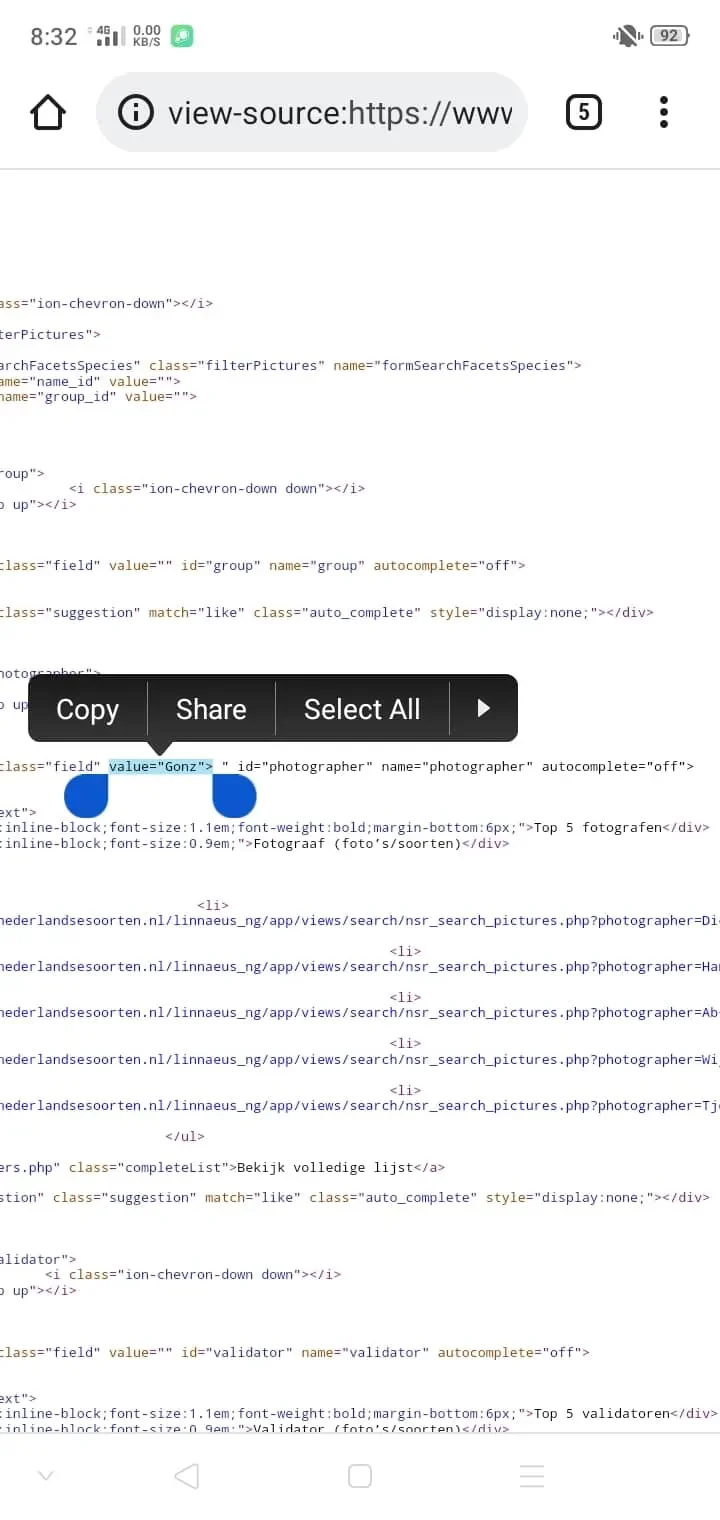
The value of ?photographer= was reflected on the page. To test whether XSS was possible, the value Gonz"> was added to ?photographer=, and it came back reflected without the symbols being sanitised.
Open redirect on the NICTIZ login
The main nictiz.nl domain had no interesting endpoints, so Sublist3r was run against it. That produced terminologie.nictiz.nl, which was interesting because it had a login but no signup or register function.
After logging in with demo:demo, an open redirect was found in the returnToUrl parameter:
https://terminologie.nictiz.nl/art-decor/login?returnToUrl=//google.com
The researcher wanted to escalate the open redirect so it would be qualified under the programme's vulnerability disclosure rules.
Missing CSRF token on profile and password changes
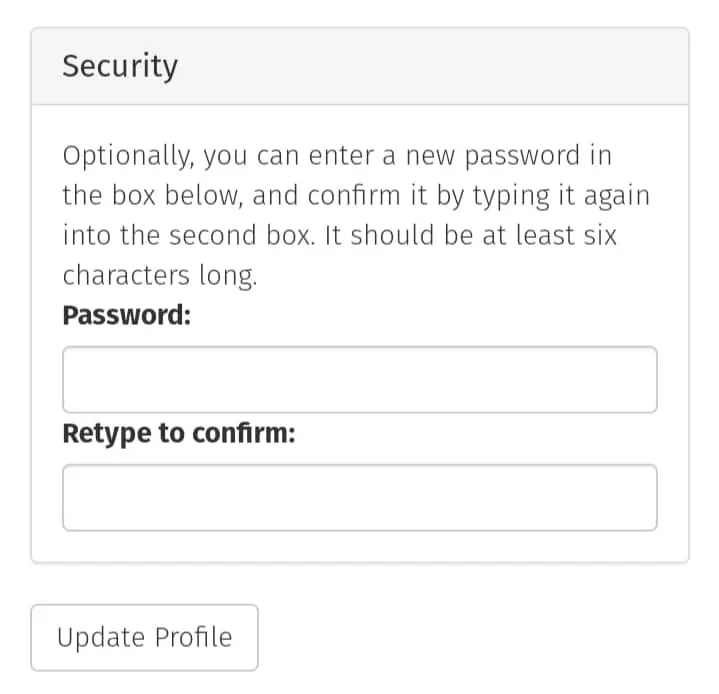
On repository.scp.nl, after registering and logging in, updating the account name revealed that no CSRF token was implemented. That meant another user's name could be modified through a CSRF attack, but on its own that is not critical, since only the name can be changed.
Looking through the remaining features turned up the change password function, which allows a password change without entering the old password.
Exploitation
Step 1: Confirm reflection and build the XSS payload
The Gonz"> probe came back reflected without the symbols being sanitised. The final payload was:
https://www.nederlandsesoorten.nl/linnaeus_ng/app/views/search/nsr_search_pictures.php?photographer="><script>alert(document.cookie)</script>
The "> and the <script> block were the payload that the report shows reflected without sanitising.
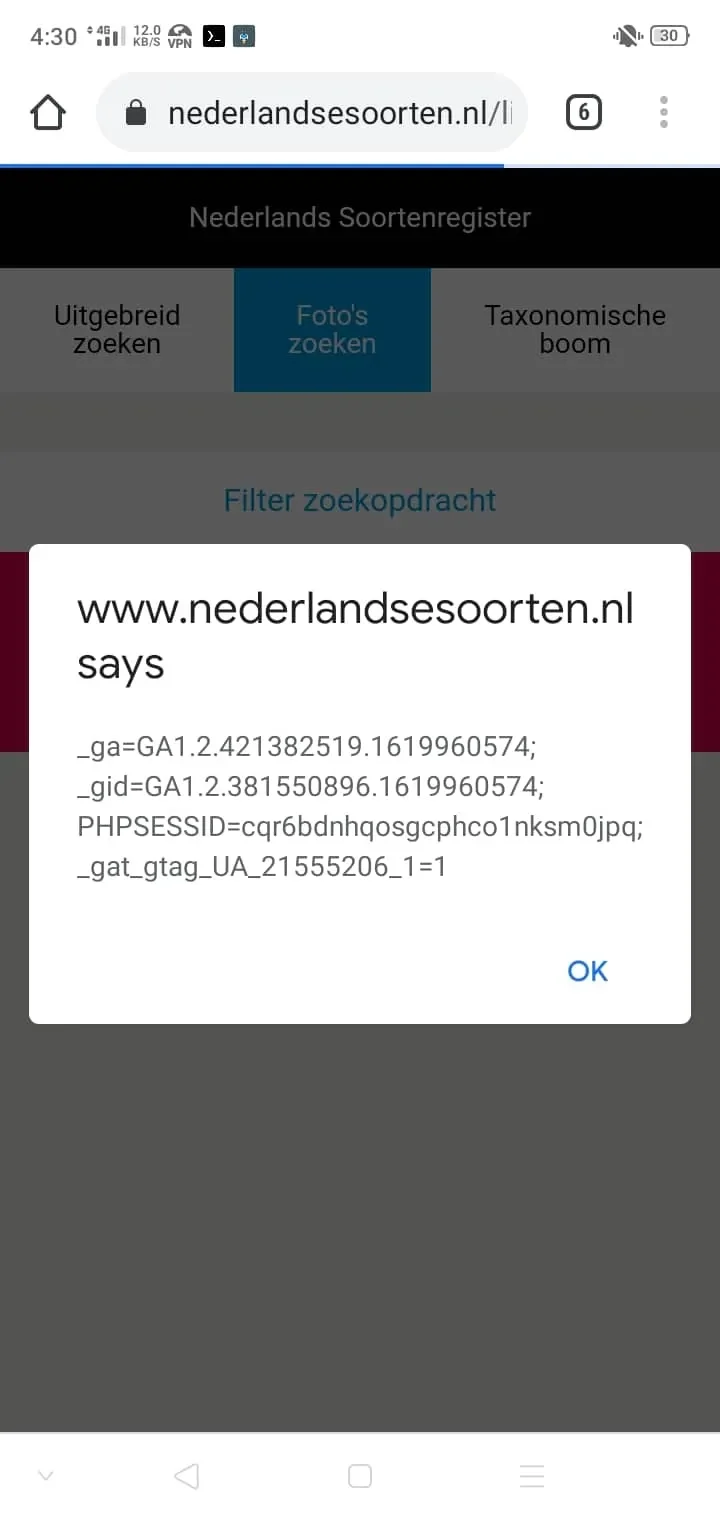
The screenshot shows the final payload in the URL.
Step 2: Escalate the open redirect to XSS
The open redirect was confirmed with //google.com as the returnToUrl value. To escalate, the javascript: scheme was used as the payload:
javascript:alert(1)
With that value in place, clicking the link below and logging in with the demo credential executes the XSS:
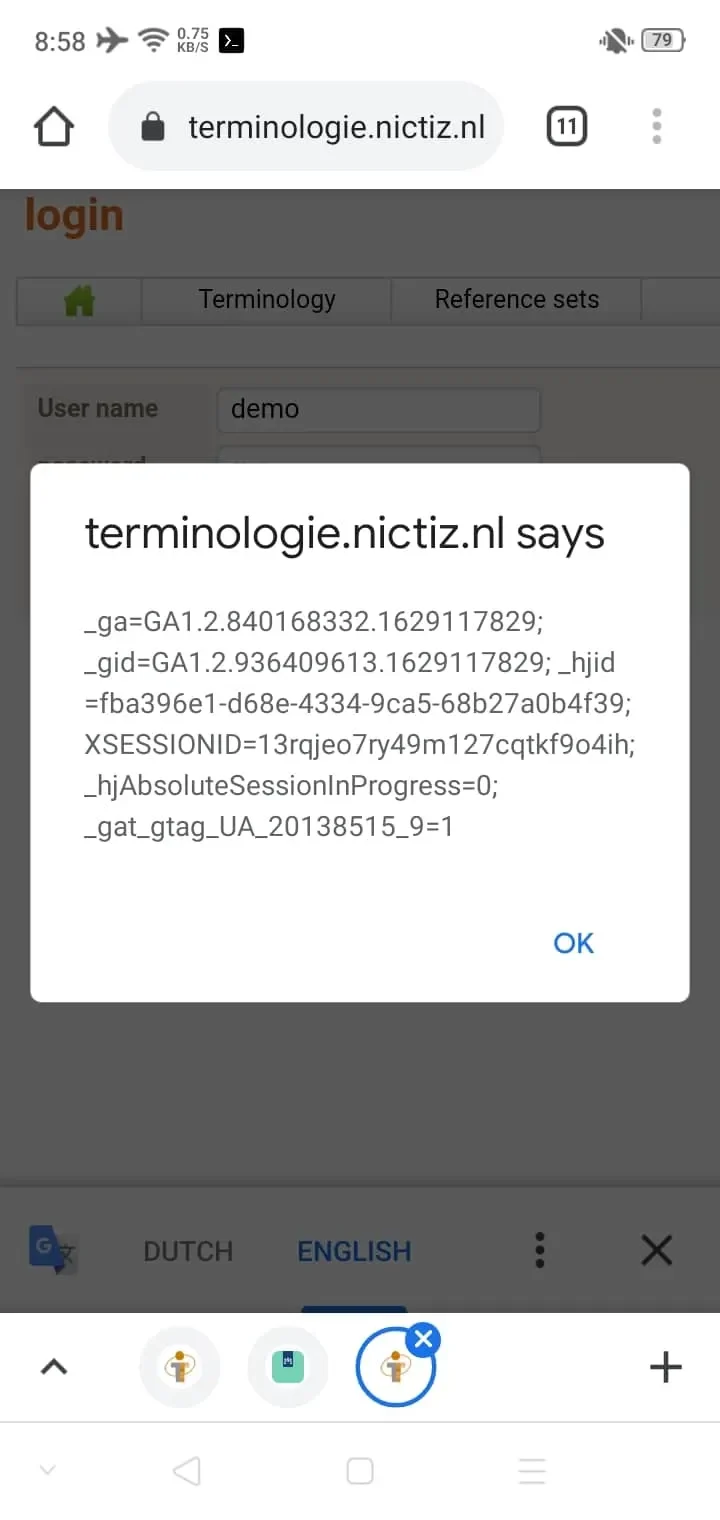
https://terminologie.nictiz.nl/art-decor/login?returnToUrl=javascript:alert(document.cookie)
The application takes returnToUrl and uses it as the destination after login. Because a javascript: URL is accepted, the redirect does not navigate to a new page but executes script in the origin of terminologie.nictiz.nl. The login step is required: the redirect only fires after a successful authentication.
Step 3: Build the CSRF proof of concept for account takeover
With no CSRF token on the profile update and no old password required on the password change, the two were combined. A CSRF POC was generated with Burp Suite's CSRF Generator and tested against the second account. It successfully changed the password on that second account.
Root cause
For the first finding, the photographer parameter is written into the page without encoding. The probe Gonz"> came back unchanged, which means the characters that matter for breaking out of the HTML context were not being escaped. Likely the value is concatenated into the markup directly rather than passed through an output encoding function.
For the second finding, returnToUrl is used as a redirect target without validating the scheme or restricting the destination to the same origin. The report shows a //google.com value and a javascript: value used in returnToUrl. The redirect is only reached after login, so the victim has to authenticate for the payload to fire.
For the third finding, the profile update and the password change both lack a CSRF token, and the password change does not require the current password. Without a token, the application cannot tell a request generated by the user's own browser from one forged by another site. Without the old password check, a forged request is enough on its own to set a new password.
Impact
On the species search site, the reflected XSS runs in the origin of www.nederlandsesoorten.nl for anyone who opens the crafted URL. The payload shown reads document.cookie, so the impact depends on what the application stores in cookies and whether they are reachable from script.
On terminologie.nictiz.nl, the open redirect alone lets an attacker send a logged-in user to an arbitrary destination. Escalated to javascript:, it runs script in the NICTIZ origin after the victim logs in with the demo credential. The login step is a precondition, so the victim has to be persuaded to authenticate through the crafted link.
On repository.scp.nl, the CSRF lets an attacker change another user's profile name, and, more seriously, change that user's password without knowing the old one. The CSRF changed the password on the second account without the old password.
Fix
The report says the researcher hunted again while waiting for the fix on the first finding. The correct fix is to encode the photographer value on output so that quotes and angle brackets cannot break out of the HTML context.
For the second finding, returnToUrl should be validated against an allowlist of same-origin paths, and schemes such as javascript: and protocol-relative destinations should be rejected.
For the third finding, both the profile update and the password change should require a CSRF token, and the password change should require the current password. The report does not describe the fix that was applied.
Variants to test
- Run Waybackurls against a target and look for parameters that are reflected. A positive result is a parameter whose value comes back in the response, which you can then probe with
">to see whether the characters are encoded. - Test login and logout endpoints that take a return or redirect parameter. A positive result is a
//external.examplevalue that redirects off-site, or ajavascript:value that executes after login. - Register an account and update the profile name, then replay the request without the CSRF token. A positive result is a successful update with no token in the request.
- Look for password change forms that do not ask for the current password, then build a CSRF POC with Burp Suite's CSRF Generator and test it against a second account. A positive result is the second account's password being changed.
- Enumerate subdomains with Sublist3r and look for login pages without a registration function, since those often have default credentials. A positive result is a login with a default pair such as
demo:demo.
Timeline
The three reports and their resolution dates:
| Bug | Submitted | Resolved |
|---|---|---|
| 1st (XSS) | May 3, 2021 | September 16, 2021 |
| 2nd (open redirect to XSS) | August 15, 2021 | September 21, 2021 |
| 3rd (CSRF to account takeover) | August 17, 2021 | October 1, 2021 |
After a month the swag had still not arrived, so it was collected from the local post office in person.
What happened, in plain words
A security researcher wanted one thing: the Dutch Government swag t-shirt that other hunters had been posting on Twitter and LinkedIn, printed with the line "I hacked the Dutch government and all I got was this lousy t-shirt". Over a few months in 2021 he found three separate bugs on three unrelated Dutch Government websites. Each one is a different kind of mistake, and each one is worth understanding on its own:
- A search page that repeated whatever you typed back to you without cleaning it up, which let him run his own code in a visitor's browser (reflected XSS).
- A login page that would send you wherever you asked after you logged in, including to a special kind of link that runs code instead of opening a page (open redirect escalated to XSS).
- A website where changing your password did not ask for your old password and did not check that the request really came from you, so another website could quietly change it for you (CSRF escalated to account takeover).
Before the details, a few words that come up constantly.
A browser is the program you use to visit websites. When you load a page, the server sends back HTML, the language that describes what is on the page: text, links, images, and small programs written in JavaScript that the browser runs. A parameter is the part of a web address after a question mark, like ?photographer=, which carries a value to the server. A cookie is a small piece of data a website asks your browser to store and send back on every later request, often used to remember that you are logged in. A token is a random value a website puts into a form so it can tell a genuine request from a forged one. XSS (cross-site scripting) means getting your own JavaScript to run inside someone else's website. CSRF (cross-site request forgery) means tricking a logged-in user's browser into sending a request the user did not intend. An open redirect means a site will send you to any address you name. Account takeover means someone else ends up in control of your account.
Getting a list of targets
The starting point was a list of Dutch Government domains found on GitHub:
https://raw.githubusercontent.com/mil1200/NCSC-NL/[redacted]/NCSC-NL-subdomains.txt
This is a plain text file hosted on GitHub, a site where people share code and files. Each line is a web address belonging to the Dutch Government. The researcher opened each one by hand over two weeks. Every site he tried turned out to be a static website: a site that only serves fixed pages and does not accept input or run any logic on the server. There is nothing to break on a static site, so he kept going until he found one that was not static. That target was number 1043 on the list.
For the second round of hunting he used a newer list, the government website register published as an ODS spreadsheet (a spreadsheet file format):
https://www.communicatierijk.nl/binaries/communicatierijk/documenten/publicaties/2016/05/26/websiteregister/websiteregister-rijksoverheid-2022-01-27.ods
He downloaded it, opened it, and picked a new target from it.
Three tools did most of the work:
- Waybackurls, run in Termux, to collect historical URLs and hidden parameters. Termux is a terminal app for Android phones; a terminal is a text window where you type commands instead of clicking. Waybackurls asks the Internet Archive, a service that has saved copies of web pages for years, for every address it has ever recorded for a site. Old addresses often contain parameters that the current site still accepts but no longer links to, which makes them good places to look.
- Sublist3r, to enumerate subdomains of
nictiz.nl. A subdomain is a name in front of the main domain, liketerminologie.nictiz.nlversusnictiz.nl. Organisations often run separate applications on subdomains, and those are sometimes less carefully tested than the main site. - Burp Suite's CSRF Generator, to build the CSRF proof of concept. Burp Suite is a program that sits between your browser and a website so you can see and edit every request; the CSRF Generator is one of its helpers that writes a small web page for you.
Finding it
Reflected XSS in the photographer parameter
On the first target, www.nederlandsesoorten.nl, a species search application, the interesting page was the picture search under linnaeus_ng. The feature of interest is the photographer filter, which is meant to narrow search results by the name of the person who took a photograph. You type a name, the site shows you pictures taken by that person.
Waybackurls was run to collect hidden parameters. When the scan finished, one parameter stood out because its value was reflected on the page. Reflected means the site takes what you typed and prints it straight back into the page it sends you.
The screenshot is captioned 'Waybackurl resuls in Termux'.
To test whether XSS was possible, the value Gonz"> was added to ?photographer=, and it came back reflected without the symbols being sanitised. Sanitising (or encoding) means replacing characters that have a special meaning in HTML with harmless stand-ins, so that a quote stays a quote and cannot end an attribute early. The " is a double quote and the > closes an HTML tag. If those two characters come back unchanged, the site is letting the visitor's input change the structure of the page, not just its text.
Open redirect on the NICTIZ login
The main nictiz.nl domain had no interesting endpoints, so Sublist3r was run against it. That produced terminologie.nictiz.nl, which was interesting because it had a login but no signup or register function. The site had a login but no signup or register function.
Default credentials were tried against the login form:
admin:admin
admin:admin123
demo:demo
Each line is a username and password pair separated by a colon. The demo:demo pair worked and landed in a dashboard. That dashboard had no editing or modifying functions; a demo user could do no more than an unauthenticated visitor. The demo account was still enough to exercise the login flow and the returnToUrl handling.
After logging in with demo:demo, an open redirect was found in the returnToUrl parameter:
https://terminologie.nictiz.nl/art-decor/login?returnToUrl=//google.com
returnToUrl normally tells the application where to send the user after a successful login, so you land back on the page you were trying to reach. Here the site accepted //google.com, an address that starts with two slashes and therefore points at another site entirely. The researcher wanted to escalate the open redirect so it would be qualified under the programme's vulnerability disclosure rules.
Missing CSRF token on profile and password changes
The third target was repository.scp.nl, an application with both login and registration. An account was registered and then used to log in, and a second account was used later to test the CSRF proof of concept.
After registering and logging in, updating the account name revealed that no CSRF token was implemented. That meant another user's name could be modified through a CSRF attack, but on its own that is not critical, since only the name can be changed.
Looking through the remaining features turned up the change password function, which allows a password change without entering the old password.
Exploitation
Step 1: Confirm reflection and build the XSS payload
The Gonz"> probe came back reflected without the symbols being sanitised. The final payload was:
https://www.nederlandsesoorten.nl/linnaeus_ng/app/views/search/nsr_search_pictures.php?photographer="><script>alert(document.cookie)</script>
Line by line:
https://www.nederlandsesoorten.nl/linnaeus_ng/app/views/search/nsr_search_pictures.phpis the picture search page.?photographer=starts the parameter that the page uses to filter by photographer name.">closes whatever attribute or tag the value sits inside, so the browser stops treating the rest as ordinary text.<script>opens a JavaScript block, and</script>closes it. Everything between them is code the browser will run.alert(document.cookie)pops up a box showing the page's cookies.document.cookieis how JavaScript reads the cookies that belong to the current page.
The screenshot shows the final payload in the URL.
Step 2: Escalate the open redirect to XSS
The open redirect was confirmed with //google.com as the returnToUrl value. To escalate, the javascript: scheme was used as the payload:
javascript:alert(1)
A scheme is the part of an address before the colon that says what kind of address it is: https: means a web page, mailto: means an email address, and javascript: means a piece of code to run. Browsers understand javascript: links, so a site that blindly redirects to whatever it is given can be made to run code instead of opening a page.
With that value in place, clicking the link below and logging in with the demo credential executes the XSS:
https://terminologie.nictiz.nl/art-decor/login?returnToUrl=javascript:alert(document.cookie)
Line by line:
https://terminologie.nictiz.nl/art-decor/loginis the login page.?returnToUrl=is the parameter that says where to go after login.javascript:alert(document.cookie)is the destination. Instead of a web address, it is a command to show the page's cookies in a pop-up.
The application takes returnToUrl and uses it as the destination after login. Because a javascript: URL is accepted, the redirect does not navigate to a new page but executes script in the origin of terminologie.nictiz.nl. The origin is the combination of scheme, host and port that a browser uses to decide which site a page belongs to; script running in an origin can read that origin's cookies. The login step is required: the redirect only fires after a successful authentication.
Step 3: Build the CSRF proof of concept for account takeover
With no CSRF token on the profile update and no old password required on the password change, the two were combined. A CSRF POC was generated with Burp Suite's CSRF Generator and tested against the second account. It successfully changed the password on that second account.
A proof of concept (POC) is a small, harmless demonstration that a bug is real. Here it is a small page generated by Burp Suite's CSRF Generator and tested on a second account. The victim does not click anything on the target site; their browser simply carries the request along with the cookies that prove they are logged in.
Root cause
For the first finding, the photographer parameter is written into the page without encoding. The probe Gonz"> came back unchanged, which means the characters that matter for breaking out of the HTML context were not being escaped. Likely the value is concatenated into the markup directly rather than passed through an output encoding function.
For the second finding, returnToUrl is used as a redirect target without validating the scheme or restricting the destination to the same origin. The report shows a //google.com value and a javascript: value used in returnToUrl. The redirect is only reached after login, so the victim has to authenticate for the payload to fire.
For the third finding, the profile update and the password change both lack a CSRF token, and the password change does not require the current password. Without a token, the application cannot tell a request generated by the user's own browser from one forged by another site. Without the old password check, a forged request is enough on its own to set a new password.
Impact
On the species search site, the reflected XSS runs in the origin of www.nederlandsesoorten.nl for anyone who opens the crafted URL. The payload shown reads document.cookie, so the impact depends on what the application stores in cookies and whether they are reachable from script.
On terminologie.nictiz.nl, the open redirect alone lets an attacker send a logged-in user to an arbitrary destination. Escalated to javascript:, it runs script in the NICTIZ origin after the victim logs in with the demo credential. The login step is a precondition, so the victim has to be persuaded to authenticate through the crafted link.
On repository.scp.nl, the CSRF lets an attacker change another user's profile name, and, more seriously, change that user's password without knowing the old one. The CSRF changed the password on the second account without the old password.
Fix
The report says the researcher hunted again while waiting for the fix on the first finding. The correct fix is to encode the photographer value on output so that quotes and angle brackets cannot break out of the HTML context.
For the second finding, returnToUrl should be validated against an allowlist of same-origin paths, and schemes such as javascript: and protocol-relative destinations should be rejected.
For the third finding, both the profile update and the password change should require a CSRF token, and the password change should require the current password. The report does not describe the fix that was applied.
Variants to test
- Run Waybackurls against a target and look for parameters that are reflected. A positive result is a parameter whose value comes back in the response, which you can then probe with
">to see whether the characters are encoded. - Test login and logout endpoints that take a return or redirect parameter. A positive result is a
//external.examplevalue that redirects off-site, or ajavascript:value that executes after login. - Register an account and update the profile name, then replay the request without the CSRF token. A positive result is a successful update with no token in the request.
- Look for password change forms that do not ask for the current password, then build a CSRF POC with Burp Suite's CSRF Generator and test it against a second account. A positive result is the second account's password being changed.
- Enumerate subdomains with Sublist3r and look for login pages without a registration function, since those often have default credentials. A positive result is a login with a default pair such as
demo:demo.
Timeline
The three reports and their resolution dates:
| Bug | Submitted | Resolved |
|---|---|---|
| 1st (XSS) | May 3, 2021 | September 16, 2021 |
| 2nd (open redirect to XSS) | August 15, 2021 | September 21, 2021 |
| 3rd (CSRF to account takeover) | August 17, 2021 | October 1, 2021 |
After a month the swag had still not arrived, so it was collected from the local post office in person.
Glossary
- Browser: the program you use to visit websites, which downloads pages and runs their JavaScript.
- HTML: the language that describes what is on a web page, including text, links, images and script blocks.
- JavaScript: the programming language that browsers run inside web pages.
- Parameter: the part of a web address after a question mark that carries a value to the server, like
?photographer=. - Cookie: a small piece of data a website asks your browser to store and send back on later requests, often used to remember that you are logged in.
- Token: a random value placed in a form so the site can tell a genuine request from a forged one.
- XSS (cross-site scripting): getting your own JavaScript to run inside someone else's website.
- Reflected: a site printing back whatever you typed, without storing it.
- Sanitising (encoding): replacing characters with special meaning in HTML with harmless stand-ins so they cannot change the page structure.
- CSRF (cross-site request forgery): tricking a logged-in user's browser into sending a request the user did not intend.
- Open redirect: a site that will send you to any address you name.
- Account takeover: someone else ending up in control of your account.
- Static website: a site that only serves fixed pages and does not accept input or run logic on the server.
- Terminal: a text window where you type commands instead of clicking.
- Subdomain: a name in front of the main domain, like
terminologie.nictiz.nlversusnictiz.nl. - Scheme: the part of an address before the colon that says what kind of address it is, such as
https:orjavascript:. - Origin: the combination of scheme, host and port that a browser uses to decide which site a page belongs to.
- Proof of concept (POC): a small, harmless demonstration that a bug is real.
- Endpoint: a specific address on a site that accepts requests and does something with them.
- Default credentials: a username and password pair shipped with an application, often for testing, that was never removed.