Add new user with Admin permission and takeover the organization
A low-privileged user could create new accounts in any organisation by guessing an admin API endpoint and supplying a client identifier, and could also set the new account's role to admin. This allowed the attacker to take over the organisation.
 Published on medium.com
Recently i joined a private program and i asked them for two testing accounts ( Admin — user ) Next day i received an invite to redacted.com and they told me they can’t provide an account with admin permission , i’m only allowed to test with a low user account.
The full write-up lives on its author's site
It belongs to its author, so we link to it rather than copy it. The other two tabs are our own rewrites, checked against it.
Context
The target is a private-program web application, referred to here as redacted.com. The researcher had access only to a low-privileged user account. That account could view pages and had a single file upload function that accepted PDF files only. There was no API documentation, so the shape of the administrative API had to be inferred.
The feature at the centre of the report is the user management API. The researcher's working assumption was that an application with admin users must expose admin endpoints, and that the most common such endpoint is the one that discloses user information. Candidate paths were:
/api/v2/member/
/api/v2/members/
/api/v2/users/
/api/v2/user/
Setup
The researcher joined a private program and asked for two testing accounts, one admin and one user. The program replied that it could not provide an admin account and that testing was allowed only with a low user account. No API documentation was available. The main tool was Burp Suite, used to capture an existing API request, replay it against guessed endpoints, and later to brute force a parameter with Burp Intruder.
Finding it
After logging in, the low user account offered nothing interesting beyond the PDF-only upload. To test authorisation without an admin account, the researcher needed to discover admin endpoints by guessing. The starting point was any API request captured in Burp Suite, which could then be edited to point at the guessed paths.
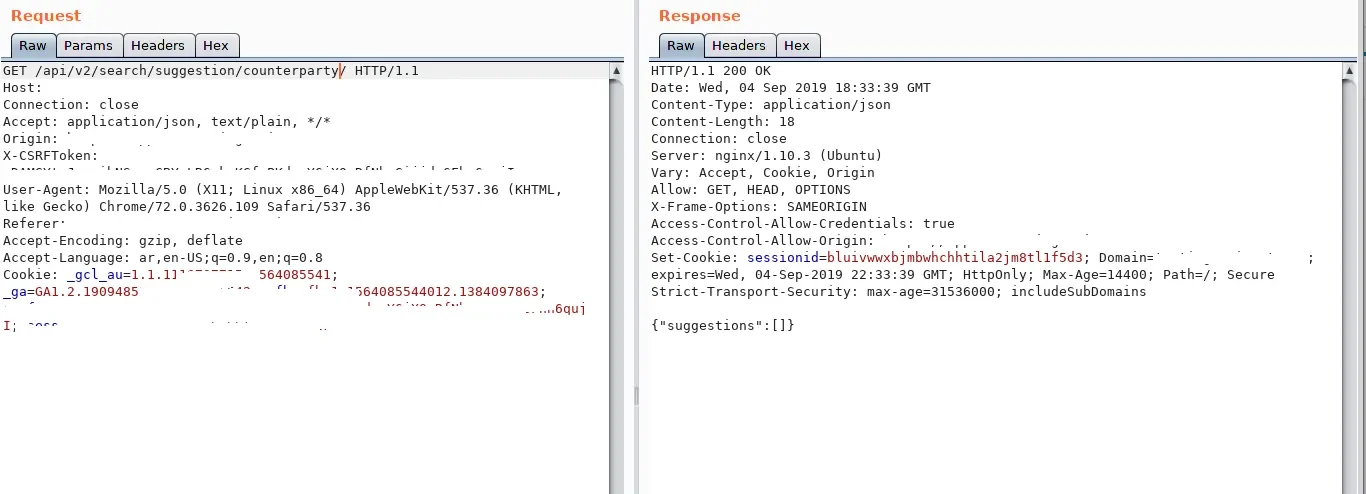
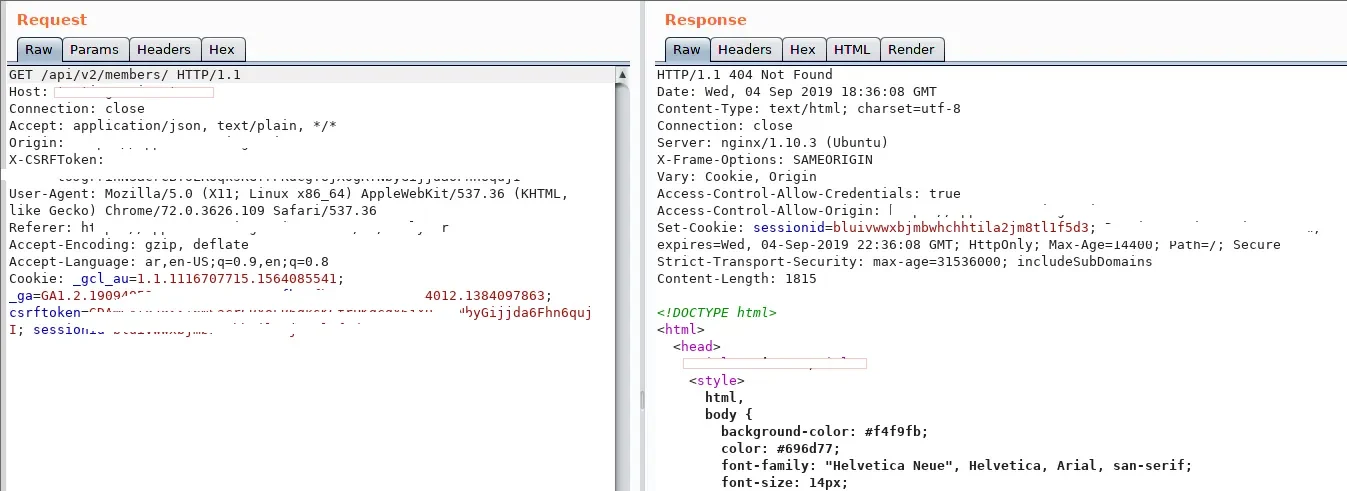
The captured request was changed from /api/v2/search/suggestion/counterparty/ to /api/v2/members/, which returned 404.
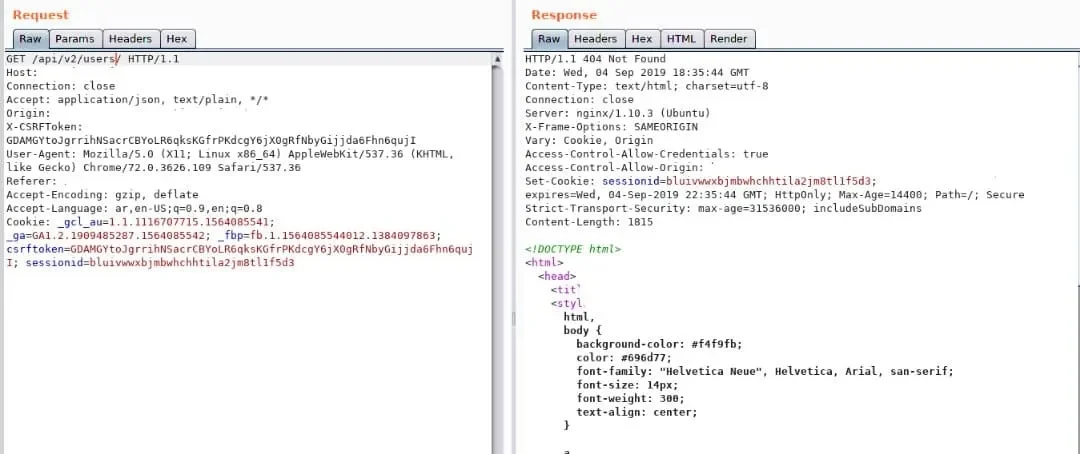
api/v2/users also returned 404.
api/v2/user returned 405.
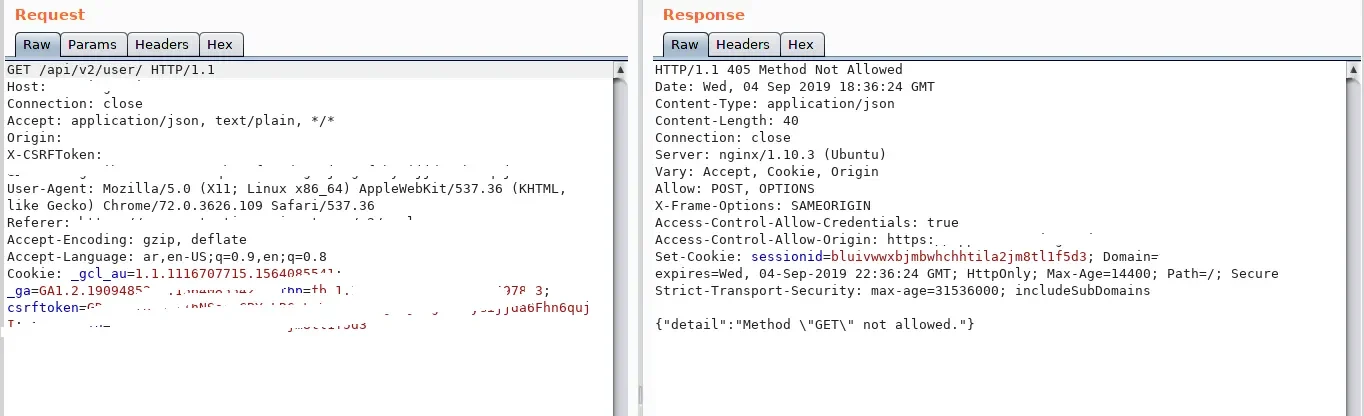
The difference mattered: a GET to a non-existing endpoint gives 404, while an existing endpoint answered with 405, meaning the method is not allowed. That told the researcher the path existed and that a different HTTP method was expected.
Exploitation
Step 1: change the method
The request method was changed from GET to POST.
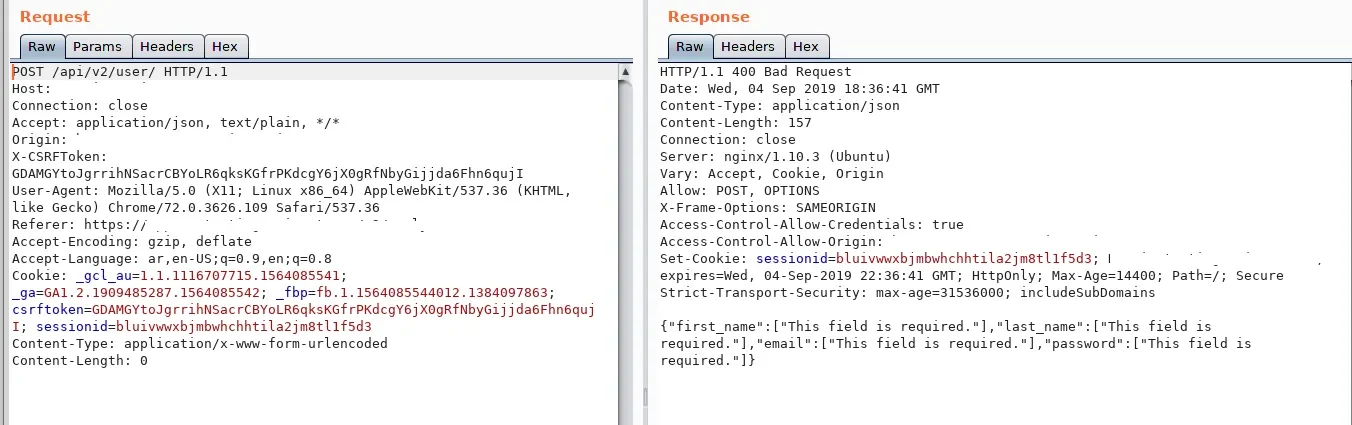
The server responded that some parameters were missing from the request body.
Step 2: send JSON
Because this is an API, the body is expected in JSON. The content type was changed to JSON and the missing parameters were inserted.
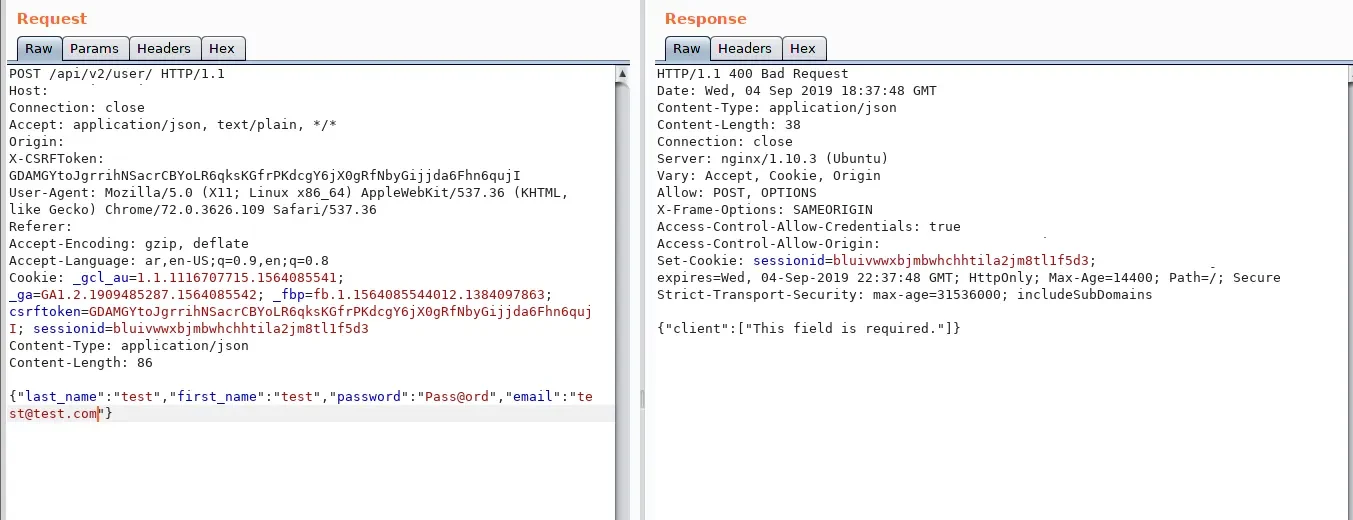
Step 3: satisfy the client parameter
Another missing parameter, client, appeared. The researcher first assumed it controlled user permission, entered a test value, and received an error.
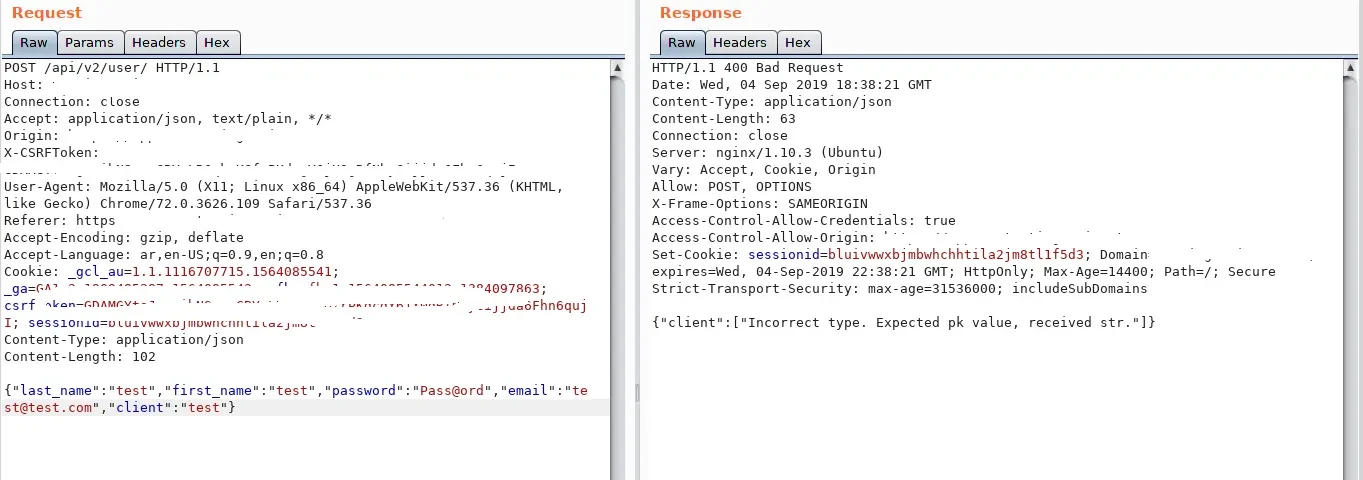
Changing the value from a string to an integer worked.
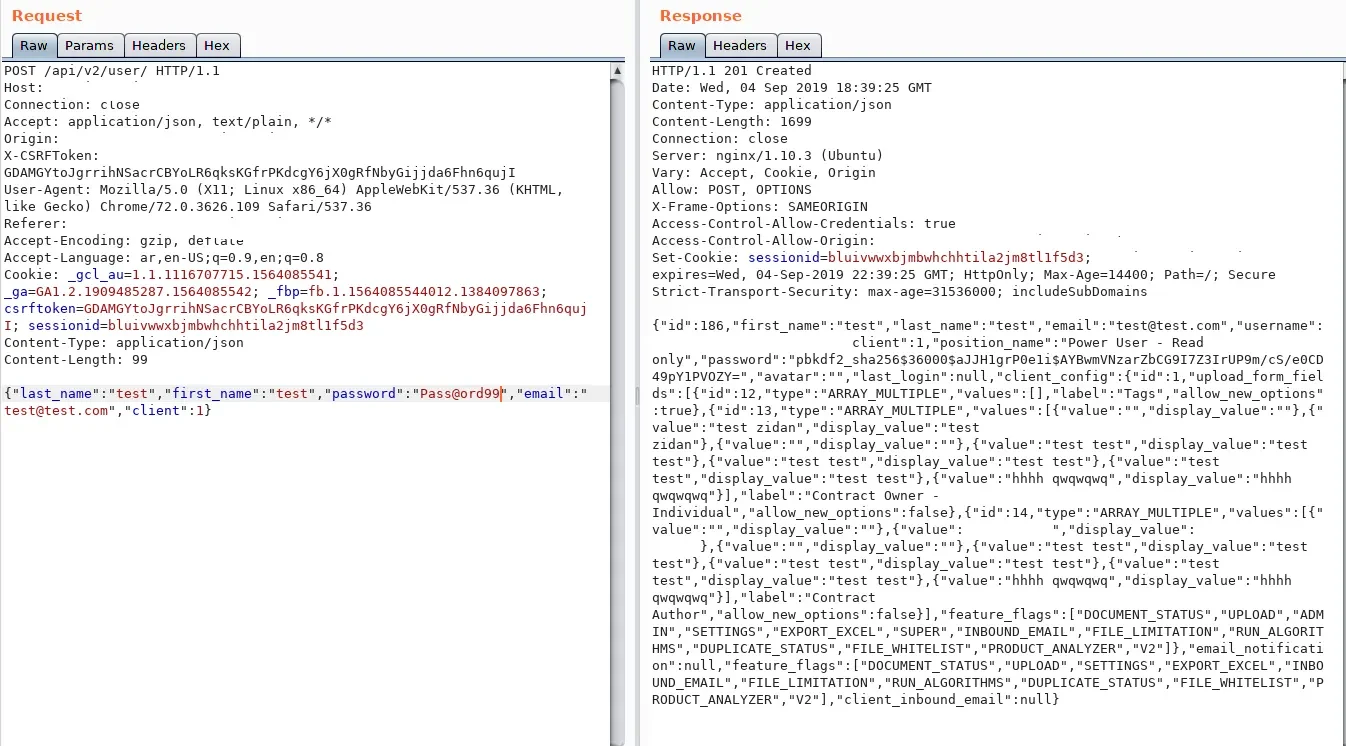
The user was created. The researcher opened another browser and tried to reset the password for the new account, but no reset email arrived.
Step 4: brute force the client value
After some time the researcher found that the client parameter controls where the user is created. The request was sent to Burp Intruder, configured to brute force the client parameter from 1 to 100.
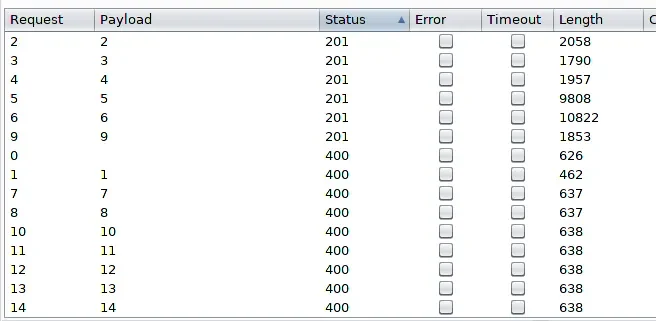
The request succeeded for some of the tested IDs. With a working value, a password reset request to the new account produced the reset email after about one minute, and the researcher logged in to the application.
Step 5: add the role parameter
Rather than submit immediately, the researcher asked whether a new user could be added with admin permission, perhaps through a parameter that controls user permission. A single new parameter was added to the request, role with the value admin ("role"="admin"). The request succeeded, and logging in with the new account showed admin permission on the organisation.
Root cause
The user creation endpoint accepted a role parameter from the request body and applied it without checking that the caller was authorised to assign that role. The client parameter likewise let the caller choose the organisation in which the user was created, and the endpoint did not tie it to the caller's own organisation. The only barrier encountered was input validation on the type of client (an integer was required), not an authorisation check. The 405 response on /api/v2/user showed that path existed; the report does not describe any server-side control that would have stopped the role assignment.
Impact
A low-privileged user could create new accounts, choose the organisation they belong to via the client parameter, and assign the admin role, resulting in admin permission over the organisation. The researcher describes this as taking over the organisation. The report does not state how many organisations or users were affected, nor whether the program confirmed a bounty or remediation.
Fix
Based on the behaviour shown, the endpoint should verify that the caller is authorised to create users, that the client value matches an organisation the caller may manage, and that the requested role is one the caller is permitted to assign. Role and organisation should not be taken from client-supplied body parameters without an authorisation check.
Variants to test
- Guess user-listing paths such as
/api/v2/member/,/api/v2/members/,/api/v2/users/and/api/v2/user/and compare status codes. A 405 instead of 404 indicates the path exists and expects another method. - Replay the discovered endpoint with POST and a JSON body, adding fields one at a time when the server reports missing parameters. A successful creation with a low-privileged session is the positive result.
- Add a
rolefield with an elevated value such asadminto a user creation request. A positive result is a new account that logs in with admin permission. - Brute force organisation or tenant identifiers such as
clientover a numeric range with Burp Intruder. Success for identifiers outside the caller's own organisation shows missing tenant scoping. - After creating an account, request a password reset and complete login to confirm the account is usable end to end.
What happened, in plain words
A security researcher was invited to test a private bug bounty program. The company behind it runs a website, called redacted.com here, and gave the researcher permission to look for security problems in exchange for a report. The researcher asked for two test accounts, one with administrator rights and one ordinary user account. The company said no to the admin account: testing was allowed only with a low-privileged user account.
That is a common situation. Most of the interesting features of a website, the ones that can create, change or delete things, are reserved for administrators. If you only have a normal account, you cannot click your way to those features. But the website still has to talk to its own servers to do anything, and those conversations can sometimes be reached directly, even by a normal user. That is what this report is about: a normal user managed to create a brand new account, choose which organisation it belonged to, and give it administrator rights. In other words, the researcher created a new account with administrator rights on an organisation.
Before going further, a few words on the building blocks, because the whole story depends on them.
What is an API? Think of a restaurant. The dining room is the part of the website you see in your browser: pages, buttons, forms. The kitchen is the server where the real work happens. The API is the waiter: a fixed set of addresses (called endpoints) that the dining room uses to ask the kitchen for things, such as "give me the list of users" or "create a new user". Each endpoint is a URL, and each one expects a particular kind of request. When you click a button on a website, your browser usually sends one of these requests behind the scenes, and the page updates with the answer.
What is an HTTP method? Every request to a server carries a verb that says what you want to do. GET means "give me something". POST means "here is some data, create something with it". There are others, but these two matter here. A well-behaved API only accepts the verb it was designed for on each endpoint.
What is a status code? The server answers every request with a three-digit number. 200 means fine. 404 means "there is nothing at this address". 405 means "this address exists, but not for the verb you used". These numbers are the main clue in this report.
What is JSON? A simple text format for structured data, used by almost every modern API. It looks like a list of labels and values in curly brackets, for example {"name": "test"}. When a request carries data, it is usually JSON, and the request declares that with a header called Content-Type.
What is a header? Extra information sent alongside a request or a response, separate from the main content. Headers say things like what format the data is in, or who is making the request.
What is Burp Suite? A tool that sits between your browser and the website and lets you see, pause, edit and resend every request. It is the standard workbench for this kind of testing. One of its components, Burp Intruder, automatically repeats a request many times with one part changed each time, which is how you try a whole range of values quickly.
What is the vulnerability class? This is a broken authorisation problem, also called privilege escalation. Authorisation means the server checking whether you are allowed to do what you are asking. Broken authorisation means the server does the thing without checking, or checks the wrong thing. Privilege escalation means a low-level user ends up with high-level powers. The everyday comparison: a hotel key card that opens your own room, but also, if you hold it against the door of the penthouse, opens that too, because the lock only checks that the card is valid, not which room it belongs to.
Setting up
The researcher joined a private program and asked for two testing accounts, one admin and one user. The program replied that it could not provide an admin account and that testing was allowed only with a low user account. No API documentation was available, so the shape of the administrative part of the API had to be guessed.
After logging in, the low user account offered nothing interesting: it could view pages, and there was a single file upload function that accepted PDF files only. There was no admin account to test with and no documentation describing the admin endpoints. The researcher's working assumption was simple: if an application has admin users, it must have admin endpoints, and the most common such endpoint is the one that discloses user information. Candidate paths were:
/api/v2/member/
/api/v2/members/
/api/v2/users/
/api/v2/user/
Each line is a guessed web address on the site. The /api/ part marks it as an API address rather than a normal page, v2 is a version number, and the last word is the resource: member, members, users or user. The researcher tried singular and plural spellings because APIs are inconsistent about this, and a wrong guess costs nothing.
Finding it
To test authorisation without an admin account, the researcher needed to discover admin endpoints by guessing. The starting point was any API request captured in Burp Suite, which could then be edited to point at the guessed paths. The idea is to take a request the browser already makes legitimately, and change only the address, keeping everything else (including the proof of who you are) the same.
The screenshot shows the captured request in Burp Suite, the starting point for the guessing.
The captured request was changed from /api/v2/search/suggestion/counterparty/ to /api/v2/members/, which returned 404.
The screenshot shows the edited request and the 404 answer. In plain words: the server said there is nothing at /api/v2/members/.
api/v2/users also returned 404.
Same story for the plural users address: nothing there.
api/v2/user returned 405.
The screenshot shows the third guess, and this time the answer is different.
The difference mattered: a GET to a non-existing endpoint gives 404, while an existing endpoint answered with 405, meaning the method is not allowed. That told the researcher the path existed and that a different HTTP method was expected. This is the key trick of the whole report. A 404 is a locked door with no room behind it. A 405 is a room that exists, where the door says "not this way in". The server has just confirmed, to a normal user, that an administrative endpoint is there.
Exploitation
Step 1: change the method
The request method was changed from GET to POST.
The screenshot shows the request with POST instead of GET. The reasoning: the 405 said GET was not allowed, so the endpoint wants a different verb, and POST is the natural choice for creating something. The server responded that some parameters were missing from the request body. That is another useful signal: the endpoint is now talking to us, and it is telling us what it wants. The body is the part of the request that carries data, as opposed to the address and the headers.
Step 2: send JSON
Because this is an API, the body is expected in JSON. The content type was changed to JSON and the missing parameters were inserted.
The screenshot shows the request with a JSON body and the parameters the server asked for. The content type header tells the server how to read the body; without it, the server may refuse to parse the data at all. Adding the fields the server complained about, one round at a time, is like filling in a form where the clerk keeps pointing at the next empty box.
Step 3: satisfy the client parameter
Another missing parameter, client, appeared. The researcher first assumed it controlled user permission, entered a test value, and received an error.
The screenshot shows the error after a test value was supplied. The guess about what client meant was wrong, and the error showed the value itself was the problem.
Changing the value from a string to an integer worked.
The screenshot shows the successful request with a number instead of text. A string is text in quotes, like "abc"; an integer is a plain number, like 5. The server wanted a number, and once it got one, the user was created. The researcher opened another browser and tried to reset the password for the new account, but no reset email arrived. That was the next puzzle: the account existed, but it was not usable yet.
Step 4: brute force the client value
After some time the researcher found that the client parameter controls where the user is created, in other words which organisation the new account belongs to. The request was sent to Burp Intruder, configured to brute force the client parameter from 1 to 100.
The screenshot shows the Intruder results: the request succeeded for some of the tested IDs. Brute forcing here means trying every number in a range automatically, one request per number, and looking at which ones succeed. The numbers that worked are values the server accepted for the client parameter. With a working value, a password reset request to the new account produced the reset email after about one minute, and the researcher logged in to the application. The report does not explain why the first reset attempt produced no email.
Step 5: add the role parameter
Rather than submit immediately, the researcher asked whether a new user could be added with admin permission, perhaps through a parameter that controls user permission. A single new parameter was added to the request, role with the value admin ("role"="admin"). The request succeeded, and logging in with the new account showed admin permission on the organisation. The researcher describes this as taking over the organisation.
Why it worked
The user creation endpoint accepted a role parameter from the request body and applied it without checking that the caller was authorised to assign that role. The client parameter likewise let the caller choose the organisation in which the user was created, and the endpoint did not tie it to the caller's own organisation. The only barrier encountered was input validation on the type of client (an integer was required), not an authorisation check. The 405 response on /api/v2/user showed that path existed; the report does not describe any server-side control that would have stopped the role assignment.
In everyday terms: the hotel receptionist took the guest's word for which room they should get and what key level they should have, and never looked up whether that guest was allowed to ask.
Impact
A low-privileged user could create new accounts, choose the organisation they belong to via the client parameter, and assign the admin role, resulting in admin permission over the organisation.
Fix
Based on the behaviour shown, the endpoint should verify that the caller is authorised to create users, that the client value matches an organisation the caller may manage, and that the requested role is one the caller is permitted to assign. Role and organisation should not be taken from client-supplied body parameters without an authorisation check. The general principle: never trust the browser to say who you are or what you may do; the server must decide that from the logged-in session.
Variants to test
If you want to try this pattern on a target you are authorised to test, here is the same sequence as a checklist:
- Guess user-listing paths such as
/api/v2/member/,/api/v2/members/,/api/v2/users/and/api/v2/user/and compare status codes. A 405 instead of 404 indicates the path exists and expects another method. - Replay the discovered endpoint with POST and a JSON body, adding fields one at a time when the server reports missing parameters. A successful creation with a low-privileged session is the positive result.
- Add a
rolefield with an elevated value such asadminto a user creation request. A positive result is a new account that logs in with admin permission. - Brute force organisation or tenant identifiers such as
clientover a numeric range with Burp Intruder. Success for identifiers outside the caller's own organisation shows missing tenant scoping. - After creating an account, request a password reset and complete login to confirm the account is usable end to end.
Glossary
- API: the set of addresses a website's front end uses to ask its server to do things; the waiter between the dining room and the kitchen.
- Endpoint: one specific address in an API, such as
/api/v2/user, that performs one job. - HTTP method (verb): the word in a request saying what you want, such as
GET(fetch) orPOST(create). - Status code: the three-digit number a server answers with, such as 200 (fine), 404 (not found) or 405 (method not allowed).
- 404: the server has nothing at that address.
- 405: the address exists but does not accept the method used; a strong hint that the endpoint is real.
- GET: the method for fetching something.
- POST: the method for sending data to create or change something.
- Request body: the part of a request that carries data, separate from the address and headers.
- Header: extra information attached to a request or response, such as the data format.
- Content-Type: the header that says what format the body is in, for example JSON.
- JSON: a text format for structured data, made of labels and values in curly brackets.
- String: a piece of text, usually written in quotes.
- Integer: a whole number, written without quotes.
- Parameter: a named value sent with a request, such as
clientorrole. - Burp Suite: a tool that intercepts, inspects, edits and resends the traffic between your browser and a website.
- Burp Intruder: the part of Burp Suite that repeats a request automatically with one value changed each time.
- Brute force: trying every value in a range systematically until one works.
- Authorisation: the server checking whether the logged-in user is allowed to perform the requested action.
- Broken authorisation: a flaw where the server performs an action without properly checking that the user is allowed to do it.
- Privilege escalation: a low-privileged user gaining higher privileges, such as administrator rights.
- Role: the level of permission attached to an account, such as user or admin.
- Tenant / organisation: a separate customer space on a shared platform; the
clientparameter selects one. - Tenant scoping: tying every action to the caller's own organisation so they cannot act on another one.
- Password reset flow: the process of requesting an email link to set a new password, used here to confirm a newly created account is usable.
- Private program: a bug bounty program that only invited researchers may test.

