Admin account takeover via weird Password Reset Functionality
The password reset endpoint did not require a valid token, only that the email had requested a reset. An attacker could request a reset for the victim's email, then submit a new password with the victim's email to take over the account.
 Published on 0xmahmoudjo0.medium.com
Hello all, I hope you’re fine! Our story today is a funny ATO I recently found it, so I decided to share it with you.
The full write-up lives on its author's site
It belongs to its author, so we link to it rather than copy it. The other two tabs are our own rewrites, checked against it.
Context
The target was a subdomain, referred to here as sub.redacted.com, that talks to an API subdomain, api.redacted.com. The feature under review is the forgotten-password flow. According to the report it works like this:
- You go to
/forgetPassand type an email address. - If the email exists, the site sends a reset email; if it does not, it returns an error.
- The backend sends a third-party link containing a unique token that redirects you to
https://sub.redacted.com/verify/<UNIQUE-HASH>, where you type a new password.
The write-up is by Mahmoud Youssef (@0xmahmoudjo0) and was published on 2 July 2022. It describes an account takeover that the author calls "a funny ATO".
Setup
The researcher later used an intruder to replay the reset request against a list of employee email addresses collected from GitHub and LinkedIn. Two identities are involved throughout: the attacker's own email and the victim's email. The attacker needs to reach /forgetPass and the reset endpoints, know the victim's email address, and have that address exist on the site.
Finding it
The researcher started at /forgetPass, requested a password reset link and inspected the request.
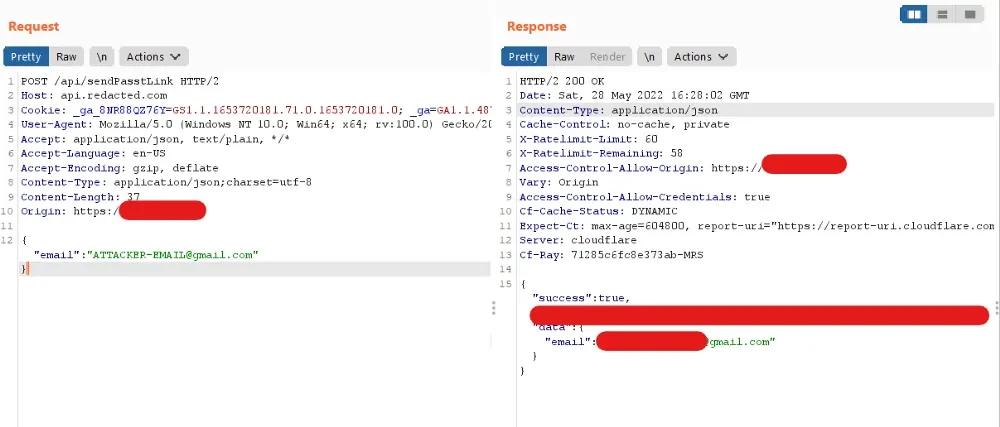
Nothing in that request looked suspicious, so the next thing to examine was the third-party reset link.
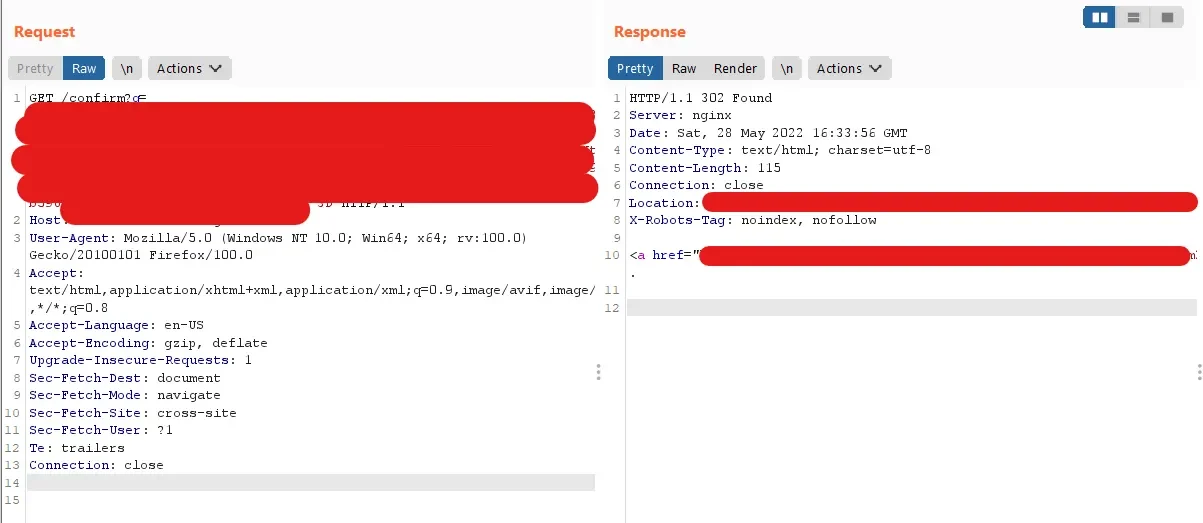
Clicking the link in the inbox leads to https://sub.redacted.com/verify/<UNIQUE-HASH>. Behind the scenes, when the browser is redirected to that URL, a request verifies the hash with api.redacted.com, and the response is the email address whose password was requested.
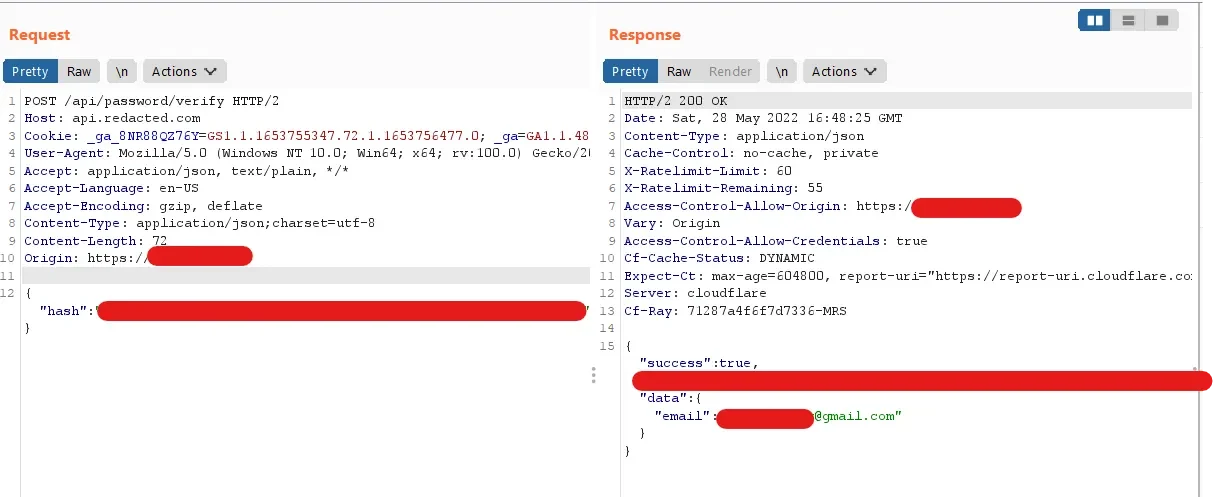
Playing with the token produced nothing. The next request in the flow is the one that actually resets the password, and it takes three parameters: password, password_confirmation and email.
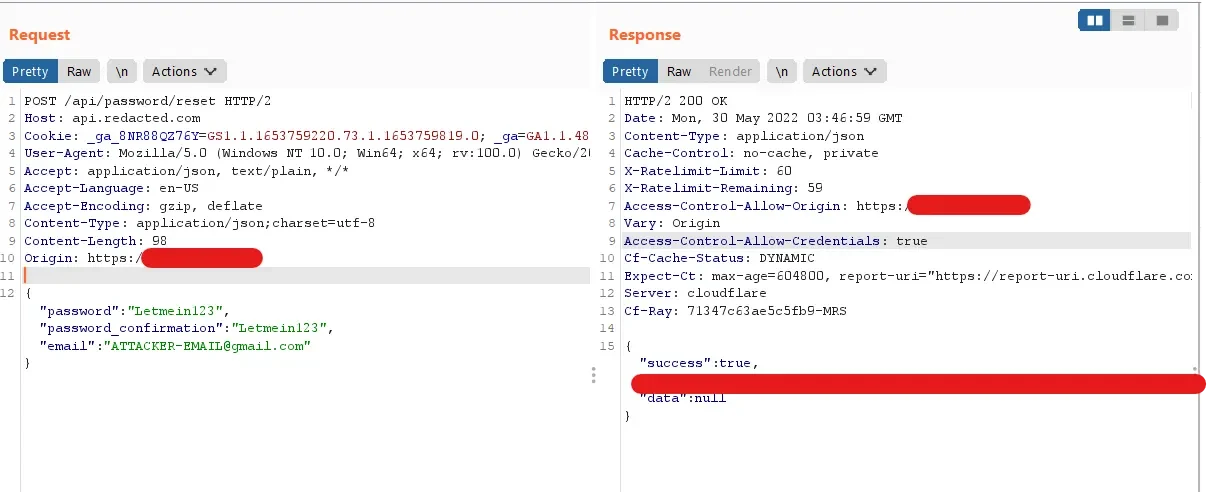
Substituting another email, in this case the victim's, returned 400 bad request.
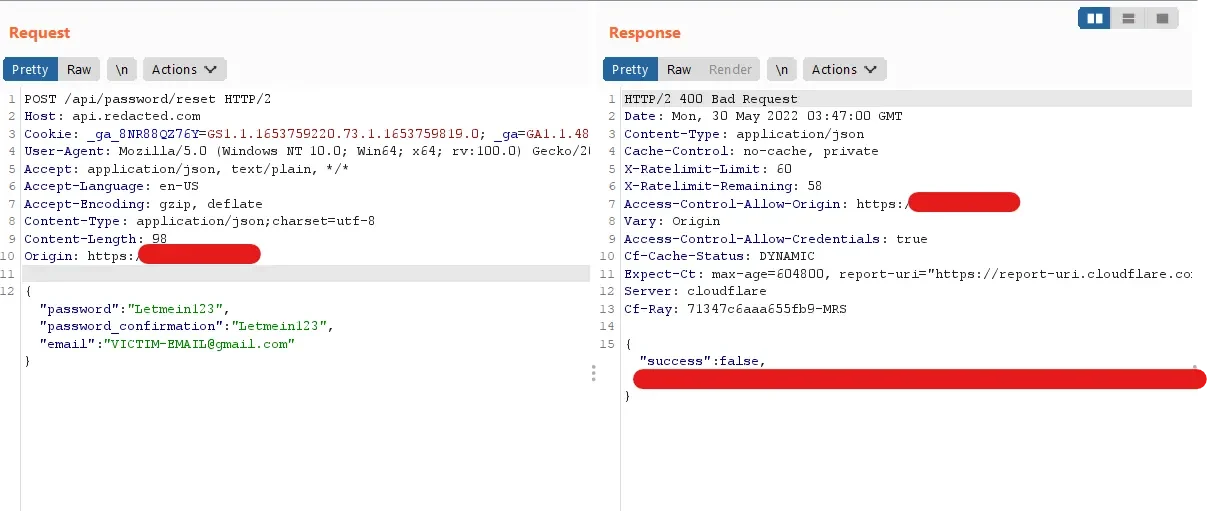
Three observations came out of that picture:
- The token verification happens in a separate request.
- The request that changes the password requires no token or anything else proving ownership of the account.
- The
400 bad requeston the victim's email was unexpected.
Known techniques tried at this point did not work. The next day the researcher came back to understand the reset logic, because something felt missed, and noticed odd behaviour: the same request that had returned 200 OK the first time
returned 400 Bad request when sent again, which is the same response obtained by putting the victim's email in.
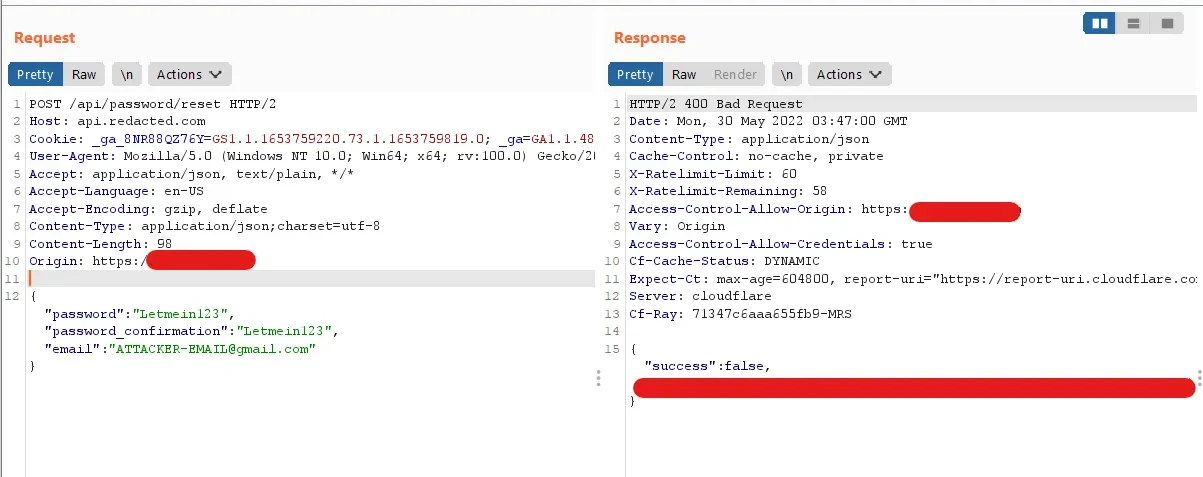
That led to a theory of the site logic. Because no token is required when resetting the password, and because a 400 Bad request comes back both when another email is supplied and when the same email is supplied a second time after a successful 200 OK, the site appears to check only whether the email in the reset request has requested a password reset, regardless of the token or verified hash.
Exploitation
Step 1: register both emails as having requested a reset
Send a password reset link to the attacker's email and to the victim's email. All token verification is then ignored, because it is not used to validate identity. The only thing needed is for the site to know that the victim will reset their password; the remaining steps are handled by the attacker.
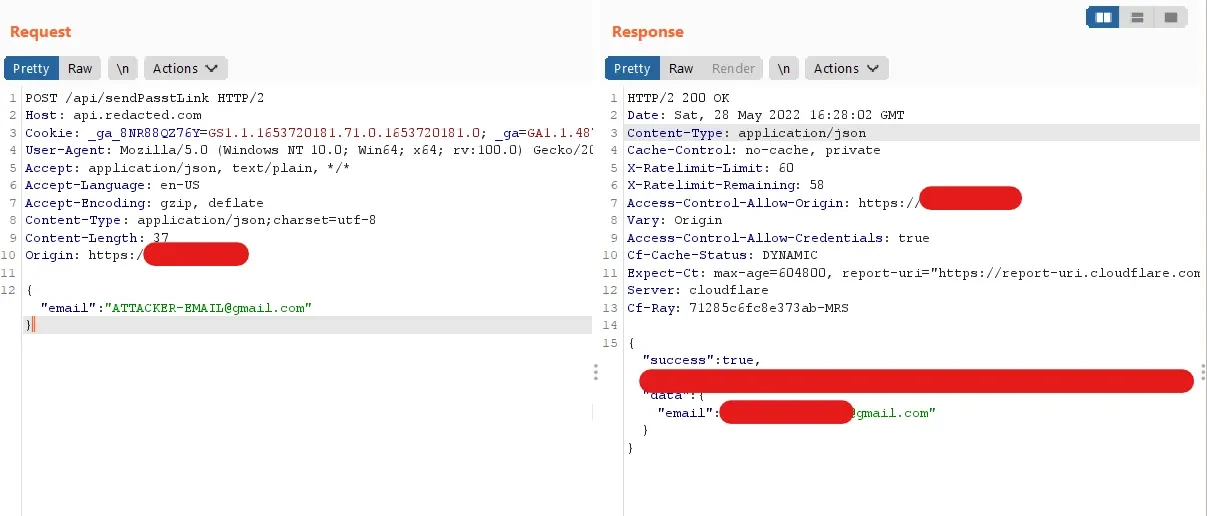
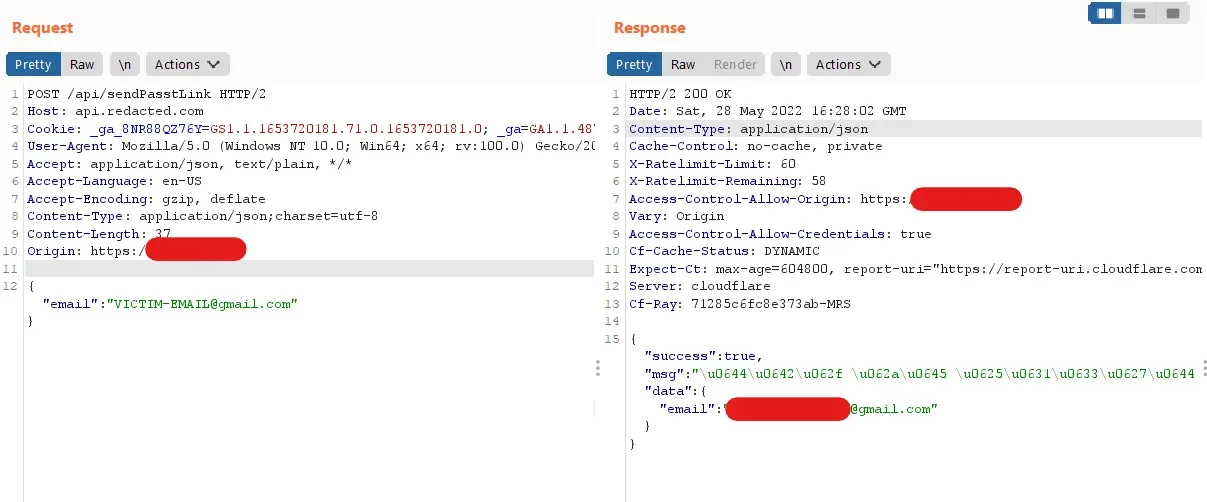
At this point the site knows that [redacted] will reset their password.
Step 2: reset the password with the victim's email
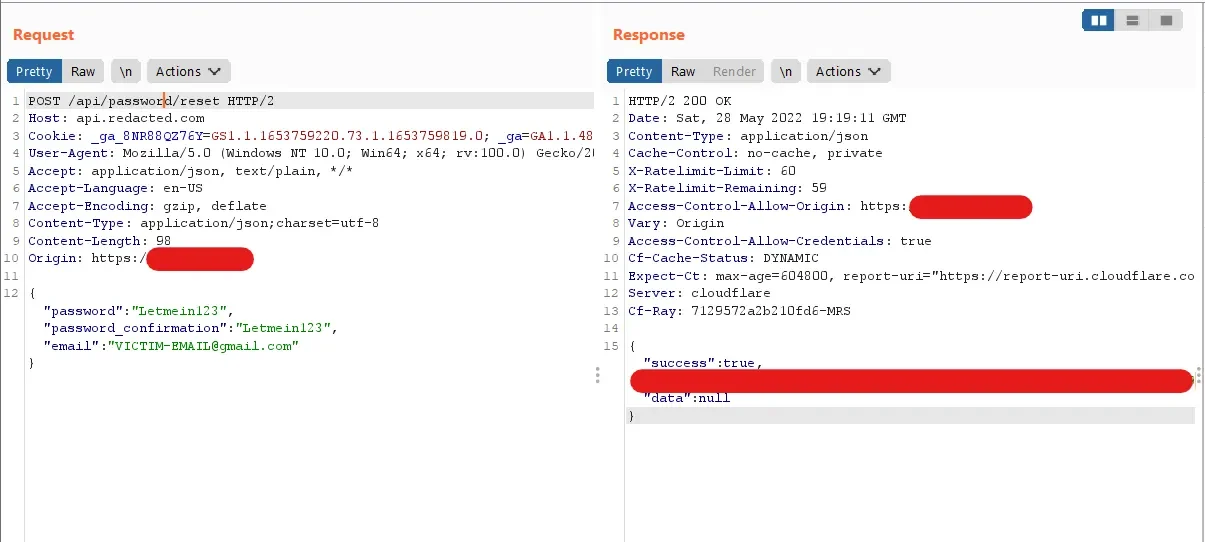
Continue the regular process to reset the password. When the site sends password, password_confirmation and email, replace the attacker's email with the victim's email. The report shows the successful result.
Step 3: log in
Go to the login panel, enter the victim's email and the password that was just set. The researcher was in.
Root cause
The reset endpoint trusts the email parameter on its own. The token is verified in a separate request, and the password-change request does not carry or check any token, so the only state the backend consults is whether that email has an outstanding reset request. Requesting a reset for the victim's address is enough to satisfy that check, and the attacker then supplies the new password. The 400 responses were the clue: the endpoint rejects an email that has not asked for a reset, and rejects a repeat after a successful 200 OK, which the researcher read as a check on the email rather than on the token. The report does not show the server-side code, so the exact implementation is likely as described rather than confirmed.
Impact
An attacker who knows a victim's email address can set that account's password and log in as the victim, provided the victim's address exists on the site. The researcher demonstrated this on a normal account and then checked a list of employee emails collected from GitHub and LinkedIn by replaying the reset request through an intruder to see which of them existed as admin on the site.
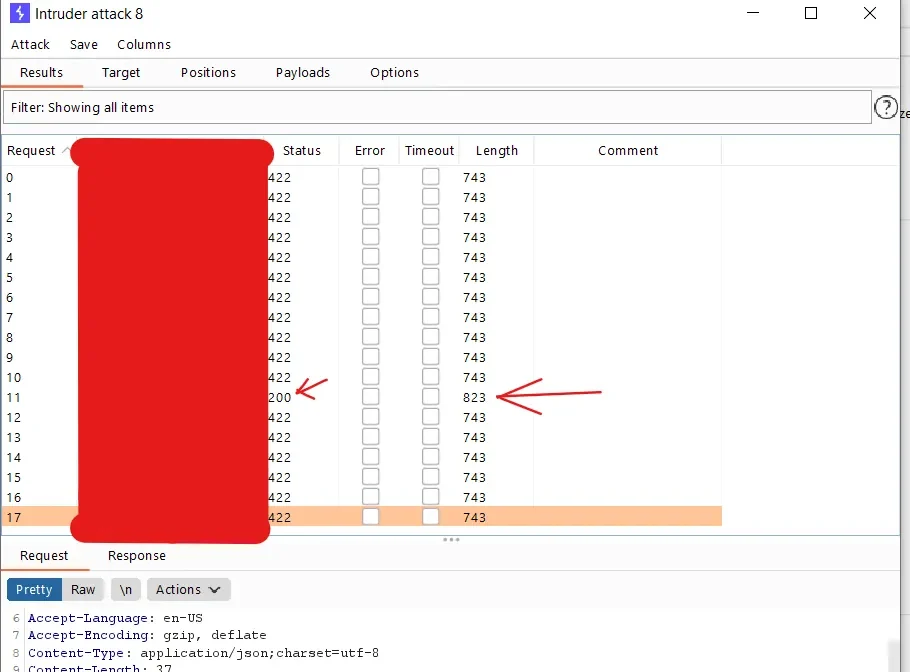
One address on the list existed. The researcher did not go further and reset the employee's password; the security team was simply informed that one employee account could be taken over and that it might carry high-privilege access to the site. The report gives no bounty figure, severity rating or CVSS score.
Fix
The report does not state what was changed. The design flaw suggests a fix: the password-change request should require the reset token and bind it to the email being changed.
Variants to test
- Split verification: whenever a reset flow verifies a token in one request and sets the password in another, try calling the password-change endpoint directly with only
email,passwordandpassword_confirmation. A200 OKfor the target address after only requesting a reset for it is the positive result. - Email-only state: request a reset for your own account, then change the
emailparameter to a target address. A response other than an error, or a subsequent successful login as the target, confirms the flaw. - Replay behaviour: send the same successful reset request twice. A
400on the second attempt, matching the response for an address that never requested a reset, suggests the check is a one-shot flag on the email rather than on the token. - Enumeration through the reset request: replay the reset request against a list of known addresses and note which ones return a different status, as the researcher did with employee emails to find an admin account.
What happened, in plain words
A website had a "forgot my password" feature. You type your email address, the site emails you a link, you click the link, and you type a new password. That is how it is supposed to work, and it is how most sites do it.
On this site, the person who wrote the report found that the step where you actually set the new password did not check the link at all. It only checked one thing: has this email address recently asked for a password reset? If the answer was yes, the site would accept a new password for that address from anyone. So the researcher asked the site to send a reset email to the victim's address (the victim never had to click anything), then sent the "set new password" request with the victim's email in it, and the site accepted it. The researcher could then log in as the victim.
The researcher then did the same thing against a list of employee email addresses gathered from GitHub and LinkedIn, and found one that belonged to an administrator. They stopped there and told the security team rather than actually taking over the account.
The write-up is by Mahmoud Youssef (@0xmahmoudjo0) and was published on 2 July 2022. The author calls it "a funny ATO", where ATO means account takeover: getting into someone else's account without their permission.
The pieces you need to know first
Before walking through the steps, here are the ideas the report relies on. None of them require any security background.
A subdomain. A website's address can have a prefix. If the main site is redacted.com, then sub.redacted.com is a subdomain of it, a bit like a named room inside a building. The report calls the site under test sub.redacted.com.
An API. An API is a second service that the website's pages talk to behind the scenes to fetch or change data. Think of a restaurant: the page you see is the dining room, and the API is the kitchen. You never walk into the kitchen yourself, but the waiter (the page) carries your order there. Here the API lives at api.redacted.com.
A request and a response. When your browser does something on a site, it sends a request to the server: "please give me this page" or "please save this new password". The server sends back a response, which includes a status code. Two codes matter in this story:
200 OKmeans "done, that worked".400 Bad requestmeans "I do not like what you sent me, I am refusing".
An intercepting proxy. A tool that sits between your browser and the website. Instead of the request going straight out, it stops in the tool first, so you can read it, change it, and then send it on. It is like intercepting a letter at the post office, reading it, editing it, and putting it back in the envelope. The researcher intercepted requests and used an intruder to replay them.
An intruder-style tool. A feature in the same kind of tool that takes one request and automatically sends it many times, each time with one part swapped out, for example a different email address from a list. It is how you test a hundred addresses without typing a hundred times.
A token (or hash). A long random-looking string that a site generates for one specific purpose, here to prove that whoever is setting the password is the person who received the email. It is like a cloakroom ticket: the number on the ticket matches the coat, and without the ticket you should not get the coat back. In this report the token appears in the URL as <UNIQUE-HASH>.
Account takeover (ATO). Exactly what it sounds like: an attacker ends up in control of someone else's account. The class of weakness here is a broken password reset, which falls under authentication bypass: getting past the login check without knowing the password.
How the feature was supposed to work
The report first describes the normal flow, so you can see what was expected:
- You go to
/forgetPassand type an email address. - If the email exists, the site sends a reset email; if it does not, it returns an error.
- The backend sends a third-party link containing a unique token that redirects you to
https://sub.redacted.com/verify/<UNIQUE-HASH>, where you type a new password.
Step 2 is worth pausing on. The site tells you whether an email exists, which is itself a small information leak, but it is not the bug here. Step 3 is the important one: the link contains a token, and the idea is that only someone who can read the victim's inbox can follow that link.
Looking at the first request
The researcher started at /forgetPass, asked for a reset link, and inspected the request that the page sent.
Nothing in that request looked suspicious. That is a normal result: the first request in a flow often looks fine, because the interesting part is what happens later. So the next thing to examine was the third-party reset link.
Clicking the link in the inbox leads to https://sub.redacted.com/verify/<UNIQUE-HASH>. Behind the scenes, when the browser is redirected to that URL, a request verifies the hash with api.redacted.com, and the response is the email address whose password was requested.
In plain words: the page at /verify/... does not itself decide whether the token is good. It asks the API "is this token valid?", and the API answers with the email address the token belongs to. That separation matters later, because it means the check happens in one request and the password change happens in another.
Playing with the token produced nothing. Changing the token did not get anywhere.
The request that actually changes the password
The next request in the flow is the one that actually resets the password, and it takes three parameters: password, password_confirmation and email.
A parameter is just a named field in a request, like a box on a form. Here the form has three boxes: the new password, the same password again (to catch typos), and the email address of the account. Notice what is missing: there is no box for the token. The request that changes the password never mentions the token at all.
Substituting another email, in this case the victim's, returned 400 bad request.
At first glance that looks like good news: the site refused. But the researcher looked more carefully and drew three observations from that picture:
- The token verification happens in a separate request.
- The request that changes the password requires no token or anything else proving ownership of the account.
- The
400 bad requeston the victim's email was unexpected.
That third point is the interesting one. A 400 specifically for the victim's address suggests the site is checking something about that address, and the researcher wanted to know what.
Known techniques tried at this point did not work. This is a normal part of the job: you try the obvious things, they fail, and you go away and think.
The clue: the same request twice
The next day the researcher came back to understand the reset logic, because something felt missed, and noticed odd behaviour. The same request that had returned 200 OK the first time
returned 400 Bad request when sent again, which is the same response obtained by putting the victim's email in.
This is the moment the whole thing clicks. Sending the identical request twice gave two different answers. The first time it worked; the second time it was refused, with exactly the same refusal as the victim's email got. So the site is not refusing the victim's email because it is the victim's. It is refusing it for the same reason it refuses a repeat: that email has not asked for a reset.
That led to a theory of the site logic. Because no token is required when resetting the password, and because a 400 Bad request comes back both when another email is supplied and when the same email is supplied a second time after a successful 200 OK, the site appears to check only whether the email in the reset request has requested a password reset, regardless of the token or verified hash.
In everyday terms: imagine a cloakroom where the attendant does not look at your ticket at all. They just check a list of names of people who said they would come back for a coat. If your name is on the list, you get a coat. So all you have to do is add the victim's name to the list, and then ask for their coat.
Exploitation
Step 1: register both emails as having requested a reset
Send a password reset link to the attacker's email and to the victim's email. All token verification is then ignored, because it is not used to validate identity. The only thing needed is for the site to know that the victim will reset their password; the remaining steps are handled by the attacker.
At this point the site knows that [redacted] will reset their password. The victim has not clicked anything, has not opened the email, and does not know any of this is happening. The attacker only needed to type the victim's address into the forgot-password form.
Step 2: reset the password with the victim's email
Continue the regular process to reset the password. When the site sends password, password_confirmation and email, replace the attacker's email with the victim's email. The report shows the successful result.
So the attacker fills in a new password of their choosing, confirms it, and puts the victim's address in the email box. Because the victim's address is now on the "has asked for a reset" list, the site accepts it and sets that password on the victim's account.
Step 3: log in
Go to the login panel, enter the victim's email and the password that was just set. The researcher was in. No email was read, no link was clicked, no token was ever used.
Why it worked
The reset endpoint trusts the email parameter on its own. The token is verified in a separate request, and the password-change request does not carry or check any token, so the only state the backend consults is whether that email has an outstanding reset request. Requesting a reset for the victim's address is enough to satisfy that check, and the attacker then supplies the new password.
The 400 responses were the clue: the endpoint rejects an email that has not asked for a reset, and rejects a repeat once the reset has been consumed, which is consistent with a one-shot flag keyed on the email rather than on the token. A one-shot flag means a marker that is set once and cleared once used, like a single-use voucher. The report does not show the server-side code, so the exact implementation is likely as described rather than confirmed.
The general lesson: a check only counts if it is attached to the action it is supposed to protect. Verifying a token on one page and then changing the password on another page, with nothing linking the two, is like checking tickets at the door of a building and then leaving the safe room unlocked inside.
Taking over an admin account
When the researcher has a target to test, they collect as many employee email addresses as they can from GitHub and LinkedIn, and keep them for things like default-credential checks. Here the list had a second use: finding out which addresses belong to administrators.
They made a request to reset the password, then intercepted it and sent it to the intruder to see which account on the list exists as admin on the site.
One address on the list existed. The researcher did not go further and reset the employee's password; the security team was simply informed that one employee account could be taken over and that it might carry high-privilege access to the site. The report gives no bounty figure, severity rating or CVSS score.
This last part is worth understanding as a technique on its own. The researcher fired the reset request at a list of addresses to see which account on the list exists as admin on the site. That is called enumeration: using a feature's responses to work out what exists. The researcher used it to find an admin, but did not go further and reset the employee's password.
What the fix looks like
The report does not state what was changed. The design flaw suggests a fix: the password-change request should require the reset token and bind it to the email being changed.
In the cloakroom comparison: the attendant should look at the ticket, check that the ticket matches the coat, and take the ticket away once the coat is handed over.
Things to try on your own
These are the checks the report's findings suggest, written so you can follow them with a browser and an intercepting proxy:
- Split verification. Whenever a reset flow verifies a token in one request and sets the password in another, try calling the password-change endpoint directly with only
email,passwordandpassword_confirmation. A200 OKfor the target address after only requesting a reset for it is the positive result. - Email-only state. Request a reset for your own account, then change the
emailparameter to a target address. A response other than an error, or a subsequent successful login as the target, confirms the flaw. - Replay behaviour. Send the same successful reset request twice. A
400on the second attempt, matching the response for an address that never requested a reset, suggests the check is a one-shot flag on the email rather than on the token. - **
- Enumeration through the reset request. Replay the reset request against a list of known addresses and note which ones return a different status, as the researcher did with employee emails to find an admin account.
Only do this on sites you own or have explicit permission to test.
Glossary
- Account takeover (ATO): getting into someone else's account without their permission, usually by obtaining their credentials or bypassing the login check.
- API: a service that a website's pages talk to behind the scenes to read or change data, separate from the pages you see.
- Authentication bypass: getting past a login or identity check without knowing the correct password or holding the correct proof.
- Bug bounty programme: an arrangement where a company invites outside people to test its systems and report problems, often with a reward.
- Cookie: a small piece of data a site stores in your browser so it can recognise you on later requests, for example to keep you logged in.
- CVSS: a standard scoring system for rating the severity of a security flaw.
- Endpoint: a specific address on a server that accepts requests, such as
/forgetPassor/verify/<UNIQUE-HASH>. - Enumeration: using a feature's responses to work out which accounts, files or other items exist.
- Hash: here, a long random-looking string used as a token; more generally, a fixed-length value computed from data.
- Intercepting proxy: a tool placed between your browser and a website that lets you read, pause and modify requests and responses.
- Intruder: a feature of such a tool that automatically repeats one request many times with one part changed each time, for example a different email from a list.
- One-shot flag: a marker that is set once and cleared once used, so the associated action can only be completed a single time.
- Parameter: a named field in a request, like a box on a form, such as
emailorpassword. - Password reset flow: the series of steps a site uses to let you set a new password when you have forgotten the old one.
- Request: the message your browser sends to a server asking it to do something.
- Response: the message the server sends back, including a status code such as
200 OKor400 Bad request. - Status code: a number in a response saying how the request went;
200means success,400means the request was refused as invalid. - Subdomain: a named prefix on a domain, such as
subinsub.redacted.com, like a room inside a building. - Token: a long random string generated for one specific purpose, here to prove that whoever is setting the password received the reset email.
- URL: the address of a page or endpoint, such as
https://sub.redacted.com/verify/<UNIQUE-HASH>.



