How I Found multiple SQL Injection with FFUF and Sqlmap in a few minutes
The author found multiple SQL injection vulnerabilities in PHP endpoints by brute-forcing parameter names with FFUF and then exploiting them with sqlmap. An attacker could use these injections to extract database information.
 Published on 0xmahmoudjo0.medium.com
Hello all, hope you’re OK. Our journey today is about how I found multiple SQL Injection in a BugBounty program in just few minutes with a cool technique .
The full write-up lives on its author's site
It belongs to its author, so we link to it rather than copy it. The other two tabs are our own rewrites, checked against it.
Context
The target is a bug bounty program, referred to throughout as redacted.org. The report does not describe the product or the feature behind any of the affected scripts; what it shows is a set of PHP endpoints discovered from the web archive, several of which accept parameters that the researcher tested for SQL injection.. The researcher's goal was to find SQL injection in those endpoints quickly, using archived URLs as the source of both endpoint names and parameter names.
Setup
The tools used were:
- waybackurls, to pull archived URLs for the target.
uro, described in the report as a tool used to delete duplicate URLs.- Standard shell utilities:
grep,sed,sort,cut. - FFUF, for parameter brute forcing.
- Burp, to intercept a request and save it to a file.
- sqlmap, run against the saved request file.
No accounts, roles or credentials are mentioned.
Finding it
The researcher started from the web archive rather than from the live application. Pulling archived URLs produced a large number of endpoints, and the notable observation was the volume of PHP files. The reasoning was that one of those PHP files might be vulnerable to SQL injection, so the output was filtered down to PHP URLs first.
Exploitation
Step 1: collect and deduplicate archived PHP URLs
waybackurls https://redacted.org/ | uro | grep “.php” > php-files.txt
waybackurls lists archived URLs, uro removes duplicates, and grep keeps only lines containing .php, writing the result to php-files.txt.

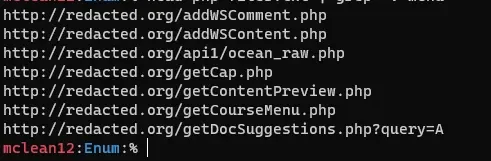
The file names in the output looked interesting, and the researcher judged that they could reveal parameter names.
Step 2: extract the text after get
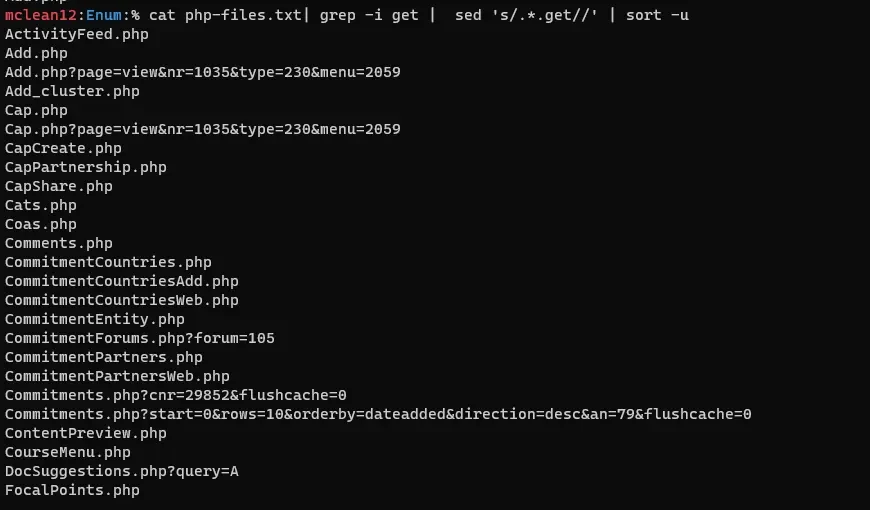
The next step keeps only lines containing the string get, strips everything before it, and deduplicates:
cat php-files.txt| grep -i get | sed ‘s/.*.get//’ | sort -u
Step 3: strip the .php suffix
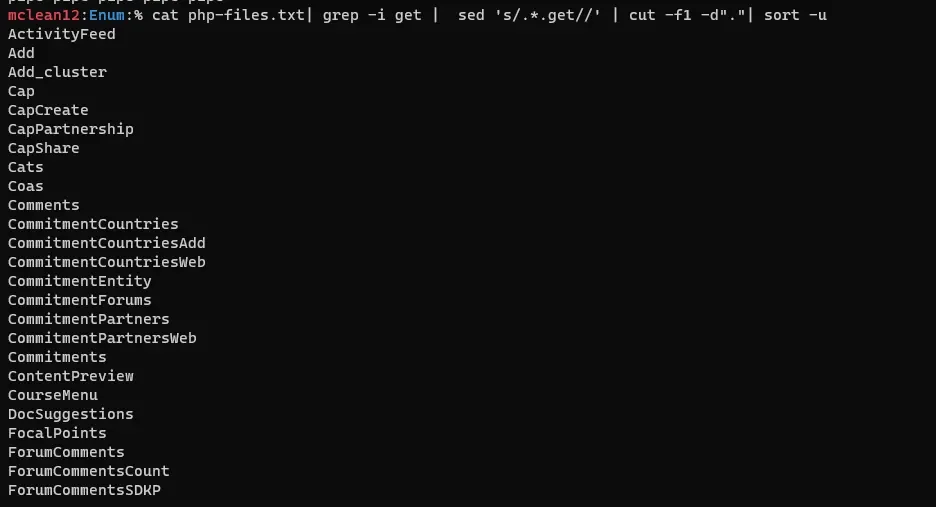
To turn the output into a clean list, the .php part is removed by cutting on the dot:
cut -f1 -d”.”
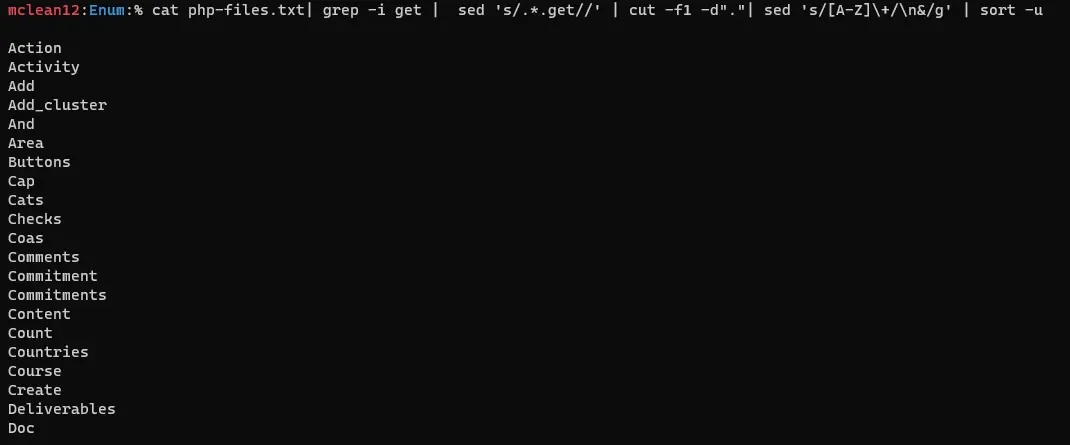
Step 4: split camelCase names
Every remaining string contained two words, and it was not clear which of them was the parameter. The researcher searched for a way to split them and found a Stack Overflow answer, then added:
sed ‘s/[A-Z]\+/\n&/g’
Step 5: build two parameter lists
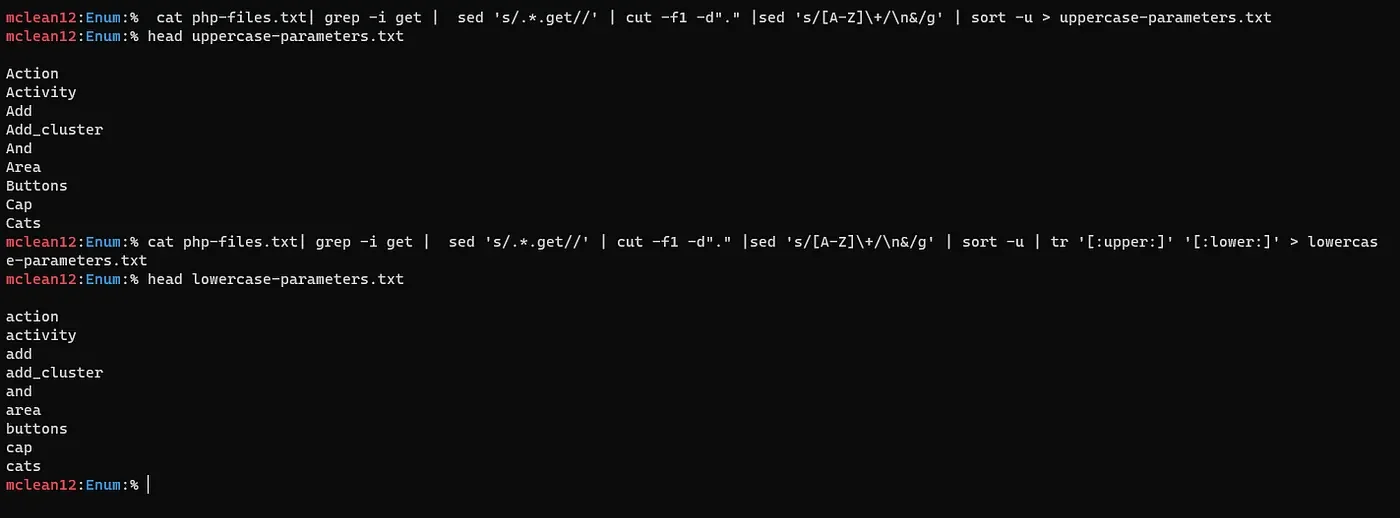
The uppercase fragments were kept as one list, and a lowercase version was produced as a second list. Both were to be tested, on the reasoning that most parameters are lowercase.
Step 6: brute force parameters with FFUF, GET first
The first attempt used GET against one of the discovered endpoints:
ffuf -w lowercase-parameters.txt -u "https://redacted.org/searchProgressCommitment.php?FUZZ=5"
This returned nothing.
Step 7: switch the request method to POST
The researcher then changed the method to POST and ran the same wordlist against the same endpoint:
ffuf -w lowercase-parameters.txt -X POST -d "FUZZ=5" -u "https://redacted.org/searchProgressCommitment.php"
This returned the parameters commitment and id.
Step 8: capture the request and run sqlmap
The request to the endpoint was intercepted with Burp, the method changed, the parameter added, and the request copied into a text file. sqlmap was then run against that file:
sqlmap -r req3.txt -p commitment --force-ssl --level 5 --risk 3 --dbms=”MYSQL” --hostname --current-user --current-db --dbs --tamper=between --no-cast
The options, as explained in the report:
--level 5 --> Level of tests to perform.--risk 3 --> Risk of tests to perform--dbms --> back-end DBMS value--no-cast --> to avoid use cast-alike statements during data fetching--tamper --> to evade filters and WAF’s"--hostname --current-user --current-db --dbs" --> to retrieve info about the database
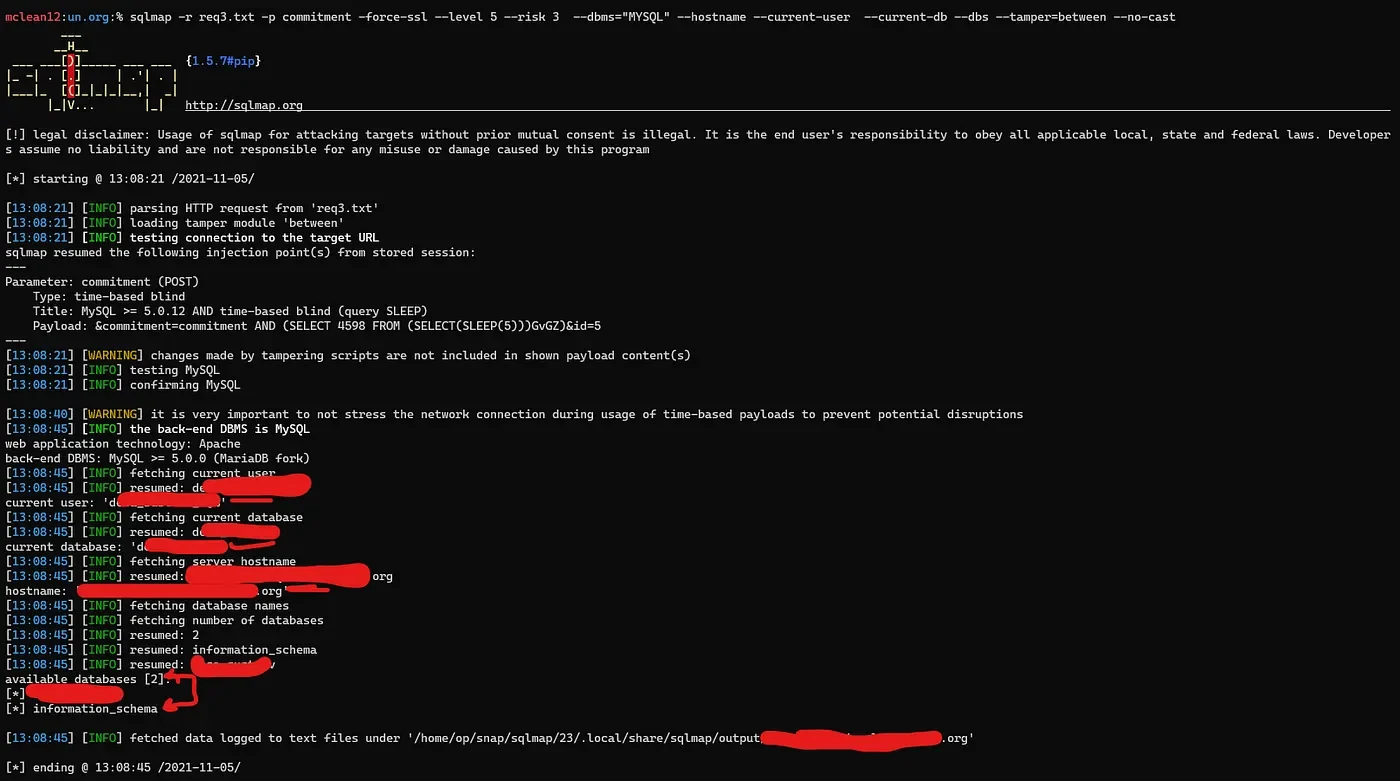
The result is shown under the label #1st SQLI.
Step 9: repeat on other endpoints
The same FFUF command, again with the POST method, was run against other endpoints. Three more endpoints accepted parameters from the list:
- Second SQL injection:
ws_delComment.phpwith the id parameter. - Third SQL injection:
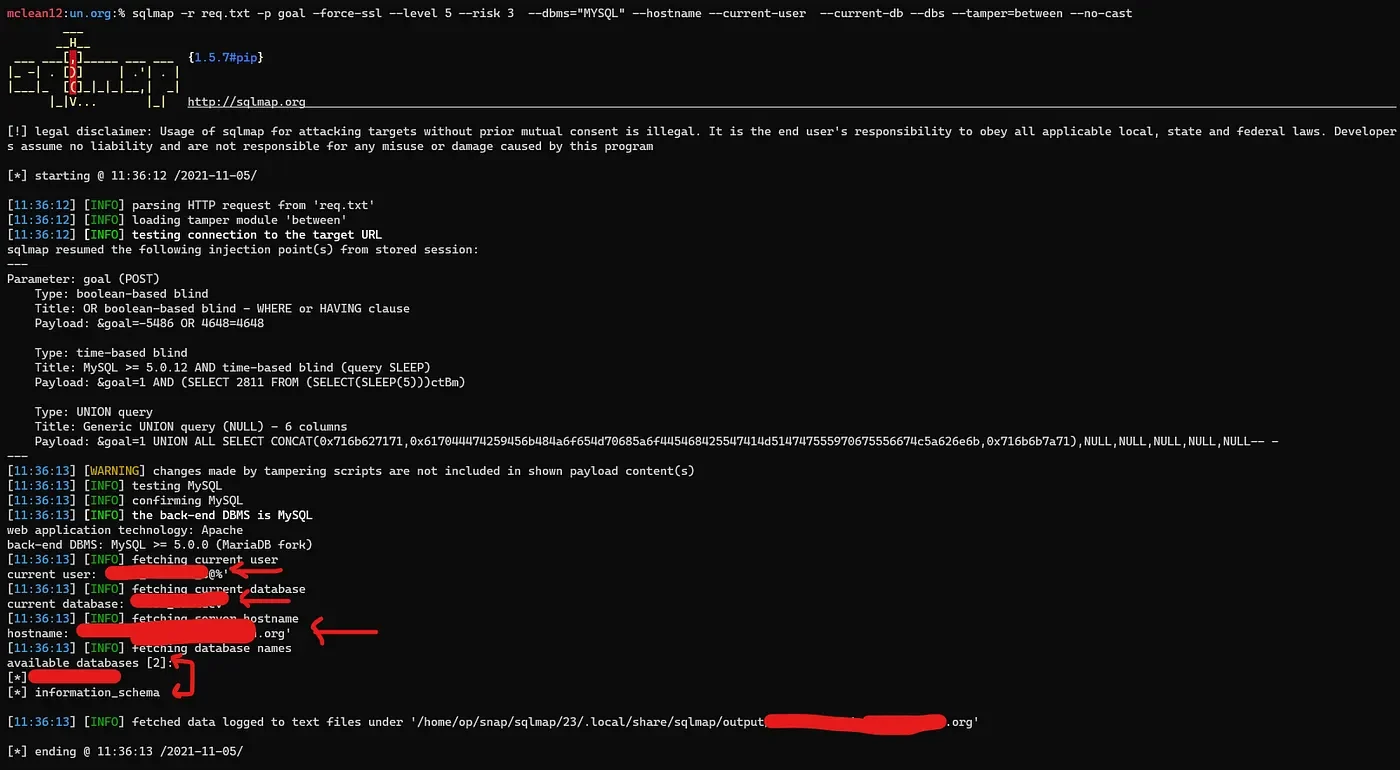
getTargets.phpwith the goal parameter. - Fourth:
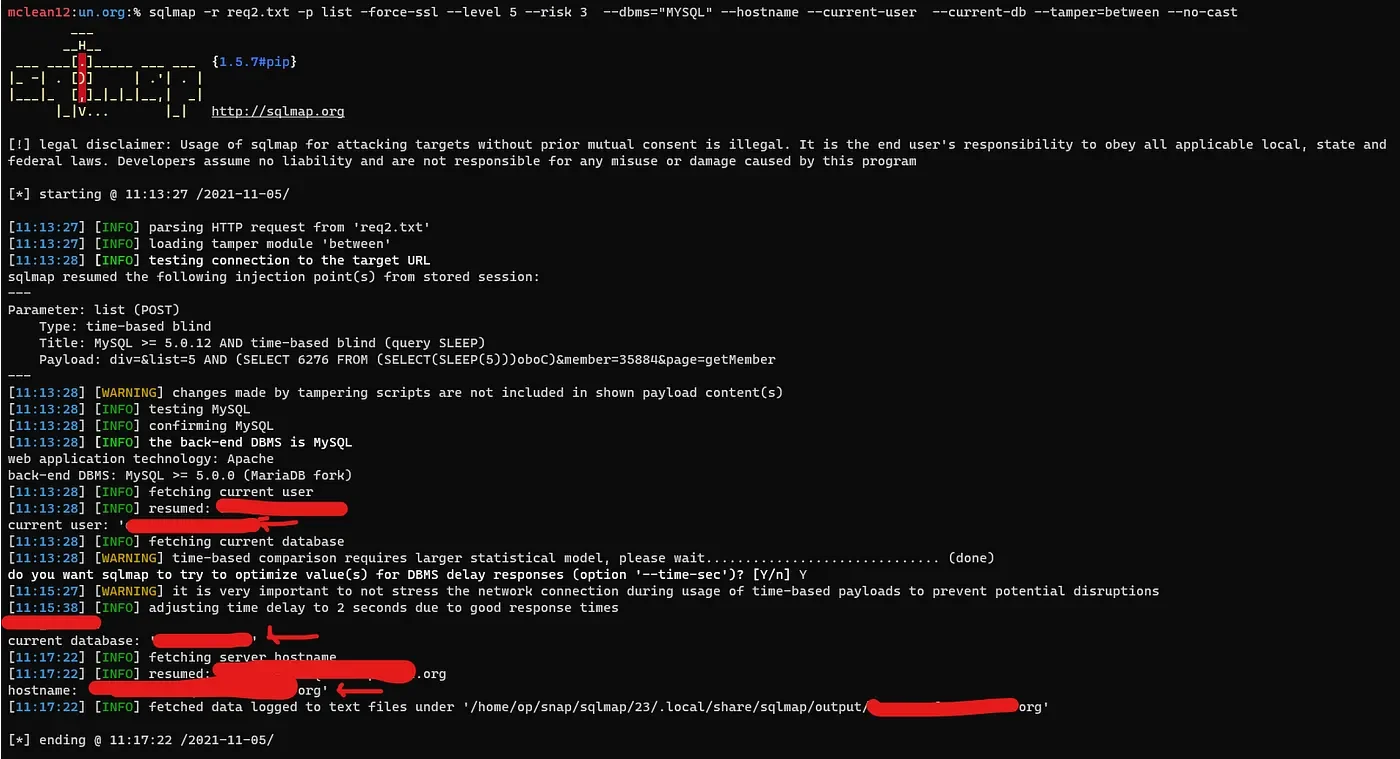
mailing_lists.phpwith the list parameter.
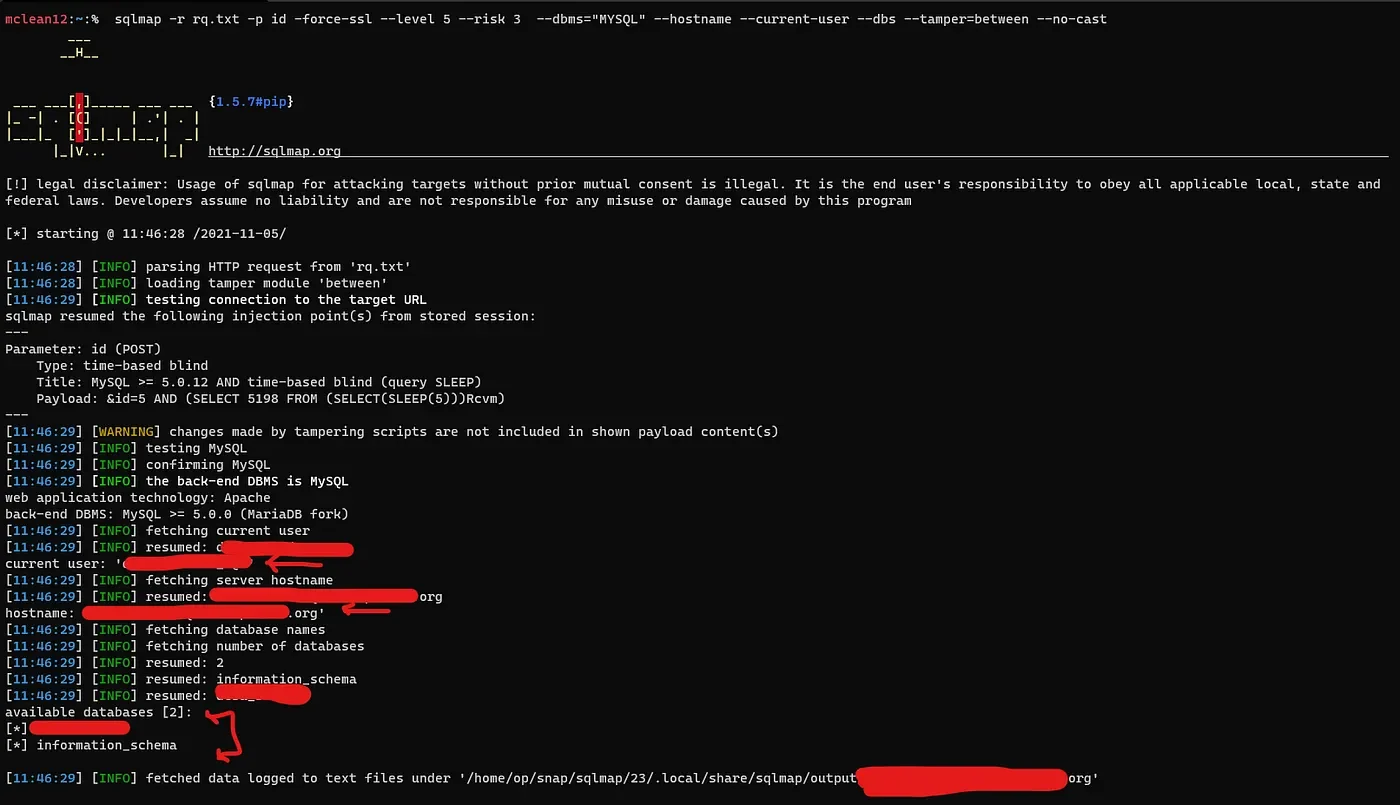
In total, four SQL injections were found.
Root cause
The report does not show or discuss the server-side code, so the exact mistake is not documented. What the behaviour implies is that user-supplied parameters on these PHP endpoints are incorporated into SQL queries without adequate handling.
Impact
The sqlmap invocation requested the hostname, current user, current database and the list of databases, which shows the researcher asked sqlmap to retrieve database information.. All four issues were reported to the security team, which approved them and was working to resolve them at the time of writing.
Fix
The general fix for this class of issue is to use parameterised queries or prepared statements for every query that incorporates user input, rather than building SQL strings by concatenation, and to apply input validation appropriate to each parameter's expected type.
Variants to test
The technique here is generic and can be repeated on other targets:
- Pull archived URLs with
waybackurlsand deduplicate withuro. A positive result is a large set of historical endpoints, including dynamic scripts that may no longer be linked from the live site. - Filter for server-side script extensions and inspect the file names. A positive result is names that embed parameter-like words, such as
searchProgressCommitment.php. - Extract the text after a common prefix such as
get, strip the extension, and split camelCase names into separate words. A positive result is a wordlist of plausible parameter names. - Run FFUF against each endpoint with the wordlist, trying both GET and POST. A positive result is a parameter that FFUF reports, as happened here only after switching to POST.
- Save the working request to a file and run sqlmap with
-r, specifying the parameter with-p. A positive result is confirmation of an injectable parameter and retrieval of database metadata. - Repeat the FFUF step across the other endpoints from the archive. A positive result is additional endpoints that accept parameters from the list, as with
ws_delComment.php,getTargets.phpandmailing_lists.php.
What happened, in plain words
A security researcher found four SQL injection bugs in a bug bounty program in a few minutes. He did not start by clicking around the live website. He started with the Wayback Machine, an archive that keeps old copies of web pages. From the archive he collected a long list of web addresses (URLs) that had once existed on the target, which he calls redacted.org. Many of those addresses ended in .php, which suggested they were PHP scripts on the server. He guessed that he might find SQL injection in one of those scripts. That carelessness is what SQL injection is.
He then used a series of command-line tools to turn the file names into a list of likely parameter names. A parameter is the part of a request that carries a value, like the q in a search box. He then used a tool called FFUF to try each guessed parameter name against one of the endpoints. At first he tried the normal GET method (the one your browser uses when you type an address) and got nothing. He switched to POST (the method used when you submit a form) and immediately found two working parameters. He saved the request to a file and ran sqlmap, a tool that automates SQL injection, against it. That confirmed the first injection. He repeated the same FFUF step on other endpoints and found three more. He reported all four to the security team, who approved them and started fixing them.
The rest of this article walks through each step slowly, explains every tool and term, and shows the exact commands he used. The commands are copied exactly as they appear in his write-up, including the quotation marks and any odd characters.
Background: what is SQL injection?
Almost every website with a login, a search box or a product list stores its data in a database. The website's code builds a query in a language called SQL and sends it to the database. For example, a search page might build a query like SELECT * FROM products WHERE name = 'user input'. If the code simply drops whatever the user typed into that string, an attacker can type something that changes the meaning of the query. Instead of a product name, they might type a quote and some extra SQL that tells the database to return every user's password, or to delete a table. That is SQL injection.
The defence is to use parameterised queries (also called prepared statements), where the database treats the user's input as data and never as code. The report does not show the server-side code, so we do not know exactly what mistake was made. What we do know is that the parameters on these PHP endpoints ended up inside SQL queries without adequate handling.
Background: what is a bug bounty program?
A bug bounty program is a deal between an organisation and independent researchers. The organisation says: if you find a security flaw in our systems and report it responsibly, we will reward you (sometimes with money, sometimes with recognition). The researcher in this write-up found four flaws and reported them. The report says the security team approved them and was working to fix them. It does not mention any bounty amount.
Background: the tools
Before we start, here is what each tool does, in plain words.
- waybackurls: a small program that asks the Wayback Machine for every URL it has ever archived for a given domain, and prints them one per line. The Wayback Machine is a project that has been saving copies of web pages for years. Old URLs are useful because they often point to pages that are no longer linked from the live site but are still running on the server.
- uro: a tool that removes duplicate URLs from a list. If the same address appears ten times, uro keeps one copy.
- grep: a standard command-line tool that searches text and prints only the lines that match a pattern.
- sed: a standard command-line tool that edits text using patterns. It can delete parts of a line, replace text, or insert newlines.
- sort: a standard command-line tool that sorts lines alphabetically.
- cut: a standard command-line tool that extracts a column from each line, for example everything before a dot.
- FFUF: a tool that sends many requests quickly, substituting a placeholder (usually
FUZZ) with each word from a list. It is often used to guess file names, directories or parameter names. - Burp: a tool that sits between your browser and the server, letting you see and change every request. The researcher used it to capture a request and save it to a file.
- sqlmap: a tool that automates the detection and exploitation of SQL injection. You give it a request (often saved from Burp) and it tries many payloads to see if the parameter is injectable.
- VPS: a virtual private server, a computer you rent in a data centre. The researcher went to his VPS to change the request method to POST.
No accounts or credentials are mentioned in the report.
Step 1: collect archived PHP URLs
The researcher began with the web archive, not the live site. He ran waybackurls against the target domain, piped the output through uro to remove duplicates, and used grep to keep only lines containing .php. The result went into a file called php-files.txt.
waybackurls https://redacted.org/ | uro | grep “.php” > php-files.txt
Line by line:
waybackurls https://redacted.org/asks the Wayback Machine for every archived URL under that domain and prints them.- The vertical bar
|is a pipe: it takes the output of the command on the left and feeds it as input to the command on the right. uroreads that list and removes duplicate lines.grep “.php”reads the deduplicated list and prints only the lines that contain the text.php. Note that the pattern is in curly quotes, which is how it appears in the write-up; in a real shell you would normally use straight quotes.> php-files.txtredirects the final output into a file namedphp-files.txtinstead of printing it on screen.
The image shows the command being run and the resulting list of URLs. The report notes that uro is a tool used to delete duplicate URLs.
The next image shows the contents of php-files.txt: a long list of PHP file URLs. The researcher observed that the file names looked interesting and thought they could reveal parameter names. That is the key insight: many PHP applications name their scripts after what they do, and the names often contain words that are also used as parameter names.
Step 2: extract the text after get
The next command keeps only lines that contain the string get (case-insensitive), deletes everything up to and including that get, and sorts the remaining lines uniquely.
cat php-files.txt| grep -i get | sed ‘s/.*.get//’ | sort -u
Line by line:
cat php-files.txtprints the contents of the file.| grep -i getfilters those lines, keeping only ones that containget. The-imakes the match case-insensitive, soGET,Getandgetall count.| sed ‘s/.*.get//’edits each remaining line. The expressions/.*.get//means: find the longest sequence of any characters (.*) followed by any single character (.) and then the literal textget, and replace that whole match with nothing. In effect, it deletes everything up to and including the lastgeton the line. The single quotes are curly in the write-up; in a shell you would use straight quotes.| sort -usorts the lines alphabetically and removes duplicates (-ustands for unique).
The image shows the output: a list of fragments that came after get in the file names. These fragments are candidate parameter names.
Step 3: strip the .php suffix
The fragments still had .php attached. To remove it, the researcher added a cut command that takes everything before the first dot.
cut -f1 -d”.”
Line by line:
cutextracts a field from each line.-f1means field number one.-d”.”sets the delimiter to a dot. The quotes are curly in the write-up; in a shell you would use straight quotes.
So for a line like commitment.php, cut -f1 -d”.” prints commitment. The researcher says he added this line to the previous command, so the full pipeline would be the previous command piped into this one.
The image shows the cleaned list of words, with the .php part removed.
Step 4: split camelCase names
Many of the remaining strings contained two words joined together, such as searchProgress. The researcher could not tell which part was the parameter, so he searched for a way to split them. He found a Stack Overflow answer and added this sed expression:
sed ‘s/[A-Z]\+/\n&/g’
Line by line:
sededits text.s/.../.../gis a substitution: find the pattern between the first two slashes and replace it with the text between the second and third slashes. Thegat the end means do it globally, on every match in the line, not just the first.[A-Z]\+matches one or more uppercase letters. In some versions of sed you need to escape the plus sign, which is why it appears as\+.\n&is the replacement.\ninserts a newline, and&means “the whole text that matched”. So each run of uppercase letters is replaced by a newline followed by those same uppercase letters.
The researcher notes that he did not know how to do this at first and had to search for it.
The image shows the result: the camelCase names are now split into separate lines.
Step 5: build two parameter lists
The split produced words that started with an uppercase letter. The researcher reasoned that most parameters are lowercase, so he kept the uppercase fragments as one list and made a lowercase copy as a second list. He planned to test both.
The image shows the two lists: one with uppercase words, one with lowercase words. These are the wordlists that FFUF will use.
Step 6: brute force parameters with FFUF, GET first
FFUF works by replacing the placeholder FUZZ in a URL or request with each word from a wordlist, sending the request, and showing you which responses look different. The researcher first tried the GET method against one of the endpoints he had found:
ffuf -w lowercase-parameters.txt -u "https://redacted.org/searchProgressCommitment.php?FUZZ=5"
Line by line:
ffufis the tool.-w lowercase-parameters.txttells it to use that file as the wordlist.-u "https://redacted.org/searchProgressCommitment.php?FUZZ=5"is the URL to request. The?starts the query string, andFUZZ=5is a parameter namedFUZZwith the value5. FFUF will replaceFUZZwith each word from the list, so it will send requests like...?commitment=5,...?id=5, and so on.
This returned nothing. The researcher says he got depressed after that.
Step 7: switch the request method to POST
Then an idea came: what if the endpoint expects POST instead of GET? GET puts parameters in the URL; POST puts them in the body of the request. Many forms use POST, and some scripts only read parameters from the POST body. He changed the command to use POST and to send the parameter in the body:
ffuf -w lowercase-parameters.txt -X POST -d "FUZZ=5" -u "https://redacted.org/searchProgressCommitment.php"
Line by line:
-X POSTtells FFUF to use the POST method instead of the default GET.-d "FUZZ=5"provides the body of the request. The body containsFUZZ=5, and FFUF replacesFUZZwith each word from the list, just as before.-u "https://redacted.org/searchProgressCommitment.php"is the URL, now without a query string because the parameter is in the body.
This time FFUF returned two parameters: commitment and id. That means FFUF reported those two names as parameters. The researcher now had two candidate parameters to test for SQL injection.
Step 8: capture the request and run sqlmap
To use sqlmap, the researcher needed a real request. He used Burp to intercept a request to the endpoint, changed the method to POST, added the parameter, and copied the whole request into a text file called req3.txt. Then he ran sqlmap against that file, telling it to test the commitment parameter:
sqlmap -r req3.txt -p commitment --force-ssl --level 5 --risk 3 --dbms=”MYSQL” --hostname --current-user --current-db --dbs --tamper=between --no-cast
Line by line:
sqlmapis the tool.-r req3.txttells sqlmap to read the HTTP request from that file. The file contains the full request: method, URL, headers, body, and so on.-p commitmenttells sqlmap to test only thecommitmentparameter. Without this, sqlmap would test every parameter it finds.--force-ssltells sqlmap to use HTTPS even if the request file says HTTP.--level 5sets the number of tests to perform. Higher levels mean more tests, including tests on headers and other less common injection points. Level 5 is the maximum.--risk 3sets the risk of the tests. Higher risk means tests that might cause problems on the server, such as time-based tests that make the database wait. Risk 3 is the maximum.--dbms=”MYSQL”tells sqlmap the back-end database is MySQL, so it can skip tests for other databases.--hostnameasks sqlmap to retrieve the database server's hostname.--current-userasks for the database user the application is connected as.--current-dbasks for the name of the current database.--dbsasks for a list of all databases.--tamper=betweenapplies a tamper script calledbetween. Tamper scripts modify the payloads to evade filters and web application firewalls (WAFs).--no-casttells sqlmap to avoid using cast-like statements when fetching data. The report explains this as avoiding cast-alike statements during data fetching.
The report also includes a plain-text explanation of some of these options, copied here exactly:
--level 5 --> Level of tests to perform.--risk 3 --> Risk of tests to perform--dbms --> back-end DBMS value--no-cast --> to avoid use cast-alike statements during data fetching--tamper --> to evade filters and WAF’s"--hostname --current-user --current-db --dbs" --> to retrieve info about the database
The image is labelled #1st SQLI. The researcher writes “AND I DID IT !!!!!!!”.
Step 9: repeat on other endpoints
The researcher then took other endpoints from his list and ran the same FFUF command, again with the POST method. He found three more endpoints that accepted parameters from his wordlist:
- Second SQL injection:
ws_delComment.phpwith the id parameter. - Third SQL injection:
getTargets.phpwith the goal parameter. - Fourth:
mailing_lists.phpwith the list parameter.
The image is labelled #2nd SQLI and shows the second injection on ws_delComment.php with the id parameter.
The image is labelled #3rd SQLI and shows the third injection on getTargets.php with the goal parameter.
The image is labelled #4th SQLI and shows the fourth injection on mailing_lists.php with the list parameter.
In total, four SQL injections were found. The researcher reported all of them to the security team, who approved them and were working to fix the issues.
Why this worked
The technique worked because of three things. First, the Wayback Machine gave him a list of old endpoints and file names. Second, the file names looked like they could help him find parameter names. Third, he tried both GET and POST; the first attempt failed, and the second succeeded. That is a reminder that a negative result from one method does not mean the endpoint is safe.
The general fix for SQL injection is to use parameterised queries or prepared statements for every query that includes user input, rather than building SQL strings by concatenation, and to validate input according to the expected type of each parameter.
Variants to test
The technique is generic and can be repeated on other targets. Here is the same process in plain steps:
- Pull archived URLs with
waybackurlsand deduplicate withuro. A positive result is a large set of historical endpoints, including dynamic scripts that may no longer be linked from the live site. - Filter for server-side script extensions and inspect the file names. A positive result is names that embed parameter-like words, such as
searchProgressCommitment.php. - Extract the text after a common prefix such as
get, strip the extension, and split camelCase names into separate words. A positive result is a wordlist of plausible parameter names. - Run FFUF against each endpoint with the wordlist, trying both GET and POST. A positive result is a parameter that FFUF reports, as happened here only after switching to POST.
- Save the working request to a file and run sqlmap with
-r, specifying the parameter with-p. A positive result is confirmation of an injectable parameter and retrieval of database metadata. - Repeat the FFUF step across the other endpoints from the archive. A positive result is additional endpoints that accept parameters from the list, as with
ws_delComment.php,getTargets.phpandmailing_lists.php.
Glossary
- API: Application Programming Interface; a way for one program to talk to another. In web terms, an endpoint that accepts requests and returns data, often in JSON or XML.
- Burp: A tool that intercepts and modifies HTTP requests between your browser and a server.
- camelCase: A naming style where words are joined without spaces and each word after the first starts with a capital letter, like
searchProgressCommitment. - cookie: A small piece of data a website stores in your browser, often used to keep you logged in.
- CVSS: Common Vulnerability Scoring System; a standard way to score the severity of a vulnerability.
- database: An organised collection of data stored so that a program can query it, for example a list of users or products.
- DBMS: Database Management System; the software that runs a database, such as MySQL.
- endpoint: A specific URL on a server that performs an action or returns data, for example
searchProgressCommitment.php. - FFUF: A fast web fuzzer that sends many requests with a placeholder replaced by words from a list.
- GET: The HTTP method used when your browser requests a page; parameters are sent in the URL.
- grep: A command-line tool that searches text and prints matching lines.
- HTTP: The protocol browsers and servers use to exchange requests and responses.
- injection: A class of vulnerability where untrusted input is interpreted as code by a downstream system, such as SQL injection.
- MySQL: A popular open-source database management system.
- parameter: A named value sent with a request, such as
id=5in a URL or form body. - payload: The specific input an attacker sends to exploit a vulnerability.
- PHP: A programming language commonly used to build dynamic websites.
- POST: The HTTP method used when submitting a form; parameters are sent in the request body.
- prepared statement: A way to run SQL where the query structure is fixed and user input is passed separately as data, preventing injection.
- request: A message from a client (browser or tool) to a server asking for a resource or action.
- response: The server's reply to a request.
- sed: A command-line tool for editing text using patterns.
- sort: A command-line tool that sorts lines of text.
- SQL: Structured Query Language; the language used to talk to relational databases.
- SQL injection: A vulnerability where user input is inserted into a SQL query without proper handling, allowing an attacker to change the query's meaning.
- tamper script: A sqlmap feature that modifies payloads to evade filters and WAFs.
- token: A piece of data used to authenticate a request, like a session cookie.
- URL: Uniform Resource Locator; a web address.
- VPS: Virtual Private Server; a rented computer in a data centre.
- WAF: Web Application Firewall; a filter that inspects HTTP traffic and blocks malicious requests.
- Wayback Machine: An archive that stores copies of web pages over time.
- waybackurls: A tool that fetches archived URLs for a domain from the Wayback Machine.
- wordlist: A file containing words to try, one per line, used by tools like FFUF.



