Alternative link
A GitLab instance was exposed on an origin server behind Cloudflare, and its public 'Explore' groups feature revealed usernames. One admin account used the weak password 'password', allowing the attacker to log in and view private projects.

medium.com
Published on medium.com
Password
The full write-up lives on its author's site
It belongs to its author, so we link to it rather than copy it. The other two tabs are our own rewrites, checked against it.
Context
This is a story about a broad-scope bug bounty program whose assets followed the pattern *.target.tld. Most of the publicly reachable subdomains sat behind Cloudflare and returned the familiar "Access Denied" page on HTTP and HTTPS. The chain that follows combines origin IP discovery, a GitLab instance found on one of those origin IPs, a publicly reachable GitLab "groups" listing, and finally a weak password on an administrator account.
The GitLab feature at the centre of it is the "Explore" area. GitLab normally lets you browse public groups and projects, and the report points to a GitLab issue titled "Disable 'explore' and 'help' in Gitlab" (issue 18165) as the reference for the behaviour. When the groups listing is reachable without authentication, visitors can see the members of a group, which hands them a list of usernames.
Setup
The researcher received an invitation to a program with several domains and a wide scope. The tools used across the journey were:
- Censys (
https://search.censys.io/) to look up the target's Autonomous System and the IP blocks assigned to the organisation. - DNSDumpster to validate whether an IP segment really belongs to the target and to spot other live hosts in it.
- The Chrome extension "Open Multiple URLs" to open many
http://andhttps://URLs at once. - Optionally aquatone (with the xlarge option) or httprobe for broader port checks on 8080, 8443 and similar.
No accounts were needed at the start.
Finding it
After enumerating subdomains of the in-scope targets, the researcher found that most publicly accessible assets were behind Cloudflare and answered with "Access Denied". That is the point where the Secjuice article "Finding The Real Origin IPs Hiding Behind CloudFlare or Tor" becomes relevant: if a company deploys a WAF but leaves the origin servers reachable, the protection (rate limiting, injection filtering, DDoS protection) can be bypassed by talking to the origin directly.
The reasoning is that a search engine built for security practitioners gives visibility that a normal search engine does not. Censys is described as a platform that helps practitioners discover, monitor and analyse devices reachable from the Internet, and the report notes that SecurityTrails lists at least eight other platforms with the same purpose.
Exploitation
Step 1: find the organisation's ASN in Censys
The target domain is entered into https://search.censys.io/ and the "Autonomous System" section is inspected. An Autonomous System Number is a numerical identifier for a connected group of one or more IP blocks assigned to an organisation, so this section can reveal the addresses specifically assigned to the target.
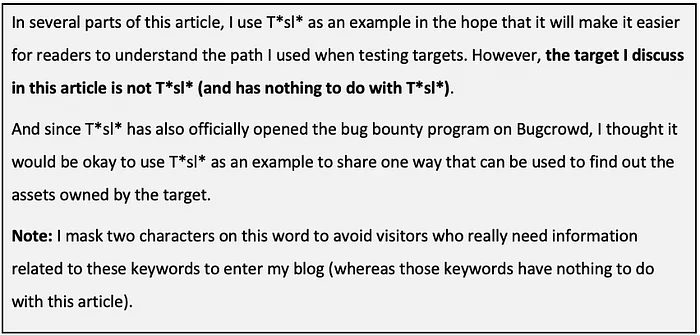
In the write-up the example organisation is written as T*sl* (T*sl*.com), used only to demonstrate the flow; the real target is a different organisation. The "Autonomous Systems" section shows output under that name.
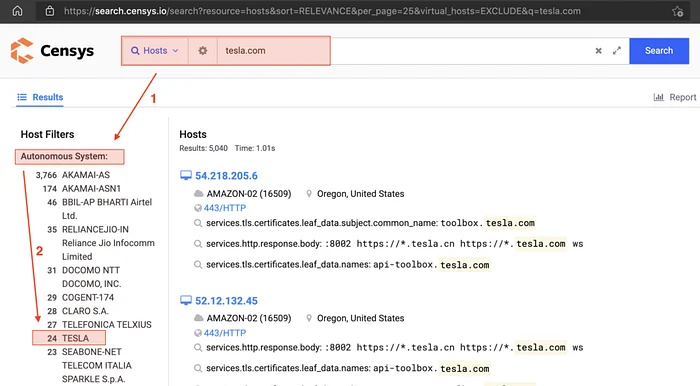
Step 2: open the organisation's IP blocks
Clicking the organisation name makes Censys display the block of IP addresses used by it.
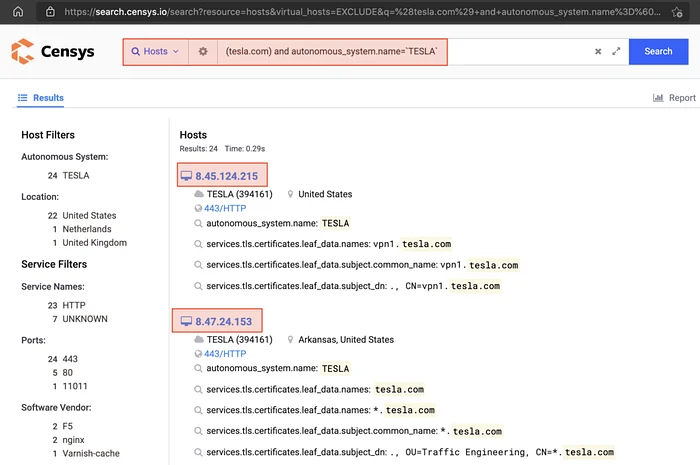
The second search shows 24 results, but the search can be widened by looking at the /24 subnet of every host identified. For example, the top two results are 8.**.124.215 and 8.**.24.153, which imply the segments 8.**.124.0/24 and 8.**.24.0/24. Two octets are masked in the write-up so that visitors searching for those numbers do not land on the blog.
Step 3: validate the segments in DNSDumpster
The candidate segments are taken to DNSDumpster. This confirms whether a segment really belongs to the target organisation and can reveal other live hosts in the same segment.
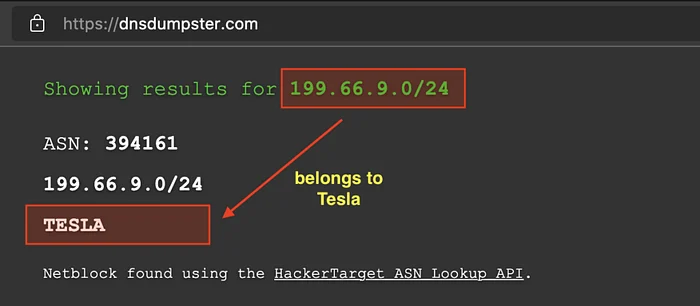
Several segments were tried one by one until one was found that contained a large number of IP addresses.
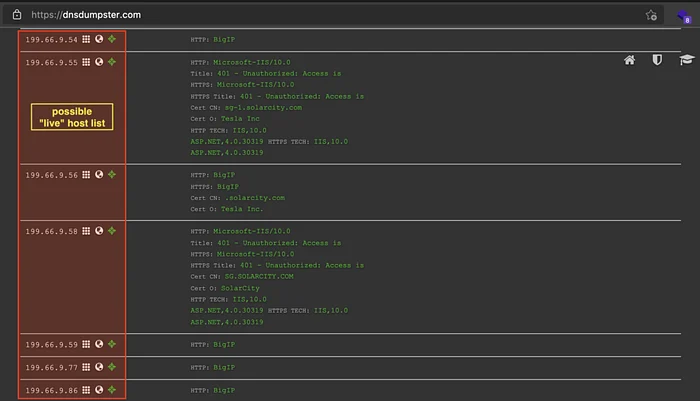
Step 4: look for open HTTP and HTTPS services
For a large company exposed to the Internet, the approach was to check whether HTTP and HTTPS ports were open on the hosts from DNSDumpster. The report contrasts this with an intranet engagement (direct access or VPN), where it would instead focus on three things: testing used accounts and passwords, testing for unpatched or outdated versions, and testing for configuration mistakes.
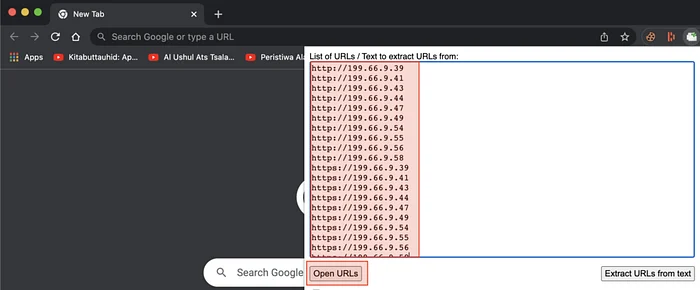
For the HTTP/HTTPS sweep, the options given are accessing the default ports 80 and 443, or checking other ports such as 8080 and 8443 with aquatone or httprobe. On this occasion the first check was ports 80 and 443 on the list from DNSDumpster, using the "Open Multiple URLs" extension: all IPs are pasted in with http or https prefixed, and clicking "Open URL" opens them all.
Step 5: find GitLab on an origin IP
Among the many IPs checked, one showed a GitLab Community Edition instance. Its certificate referred to one of the subdomains, and that subdomain returns "Access Denied" when accessed directly without going through the origin server IP.
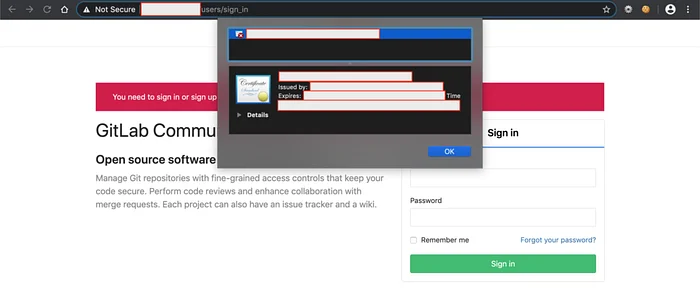
There was one peculiarity: accessing the subdomain with the full path, adding /user/sign_in so that it becomes subtarget.target.tld/user/sign_in, was not blocked by Cloudflare, while accessing subtarget.target.tld alone returned "Access Denied" again. Either way, the origin IP exposed what was inside.
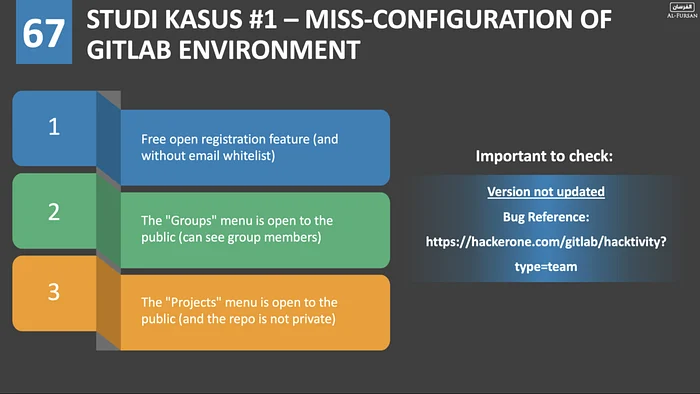
With GitLab identified, the report lists three common implementation mistakes to check:
- Free signup without an email whitelist, which lets an attacker register and view projects that are not private, including any sensitive material such as unprotected database connection strings.
- A "groups" menu reachable by the public without logging in, which discloses the usernames registered in GitLab.
- A "projects" menu also reachable without logging in, which can expose source code and any credentials left in it.
Beyond these, the report recommends checking GitLab itself for unpatched vulnerabilities, using the hacktivity page of the GitLab program on HackerOne as a comprehensive source.
Step 6: reach the public groups listing
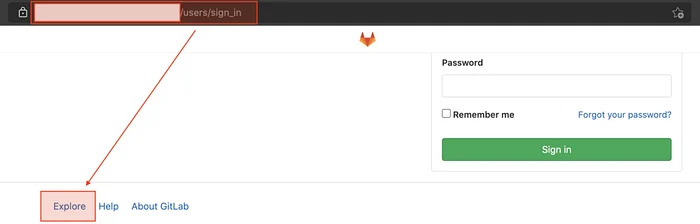
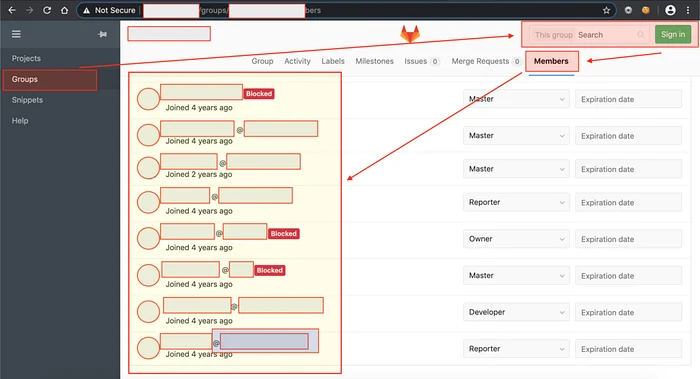
Of the three misconfigurations, the one found on the target was the publicly accessible "groups" menu. It is reached by visiting the "explore" menu, generally linked in the footer, or by going directly to the /explore endpoint, then selecting "groups" in the header menu.

After some analysis, one group turned out not to be protected, so visitors could see the list of its members.
Step 7: try weak passwords against the usernames
With part of the username list in hand, the next step was to try common weak passwords: password, Password, passw0rd, Passw0rd, p@ssw0rd and so on. The report also suggests looking for password patterns a company tends to use, through recon on GitHub, Trello or other collaboration platforms.
On the username at the very bottom of the list, the login succeeded with the password password. The account turned out to be an administrator, and it gave access to many private projects.
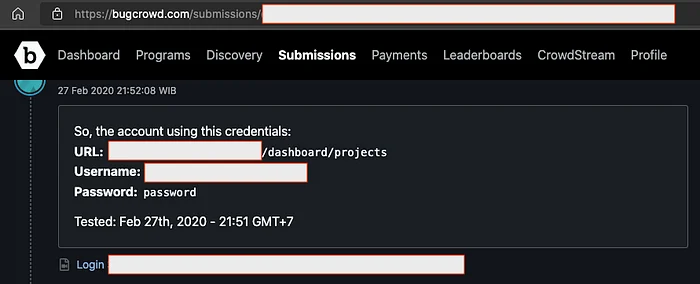
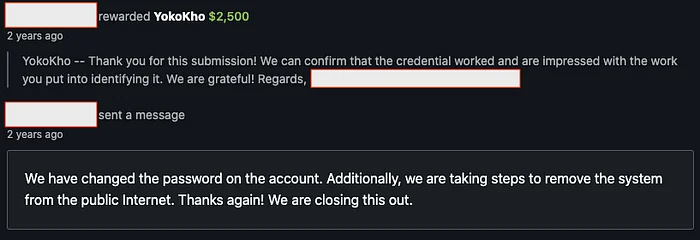
The result was hard to believe at first, so the password was re-tested; it was indeed password. The finding was reported immediately, and the program owner awarded a P1 bounty shortly afterwards.
Root cause
Two weaknesses combine here. First, the origin servers were reachable directly, so the Cloudflare perimeter could be bypassed; the report frames this as a misconfiguration in the implementation of the security perimeter. Second, the GitLab instance exposed the "Explore" groups listing to unauthenticated visitors, which disclosed usernames, and one of those accounts, an administrator, used password as its password.
Impact
An attacker who can reach the origin IP can interact with the application without the WAF's rate limits, injection filtering and DDoS protection. On this target, the public groups listing supplied usernames, and the weak administrator password gave access to many private projects. The report does not enumerate what those projects contained.
Fix
The report does not state which changes the program made.
Variants to test
- Look up the target's ASN in Censys and expand each host to its /24, then validate the segments in DNSDumpster. A positive result is a segment that DNSDumpster confirms belongs to the organisation and that contains live hosts.
- Open ports 80 and 443 on every host from DNSDumpster with "Open Multiple URLs". A positive result is an application responding directly from an origin IP, especially one whose certificate names an in-scope subdomain.
- Try the full sign-in path on a Cloudflare-protected subdomain, for example
/user/sign_in. A positive result is a page that loads where the bare hostname returns "Access Denied". - Visit
/exploreand then the groups listing without logging in. A positive result is a group whose member list is visible to visitors. - Take the disclosed usernames and try common weak passwords such as
password,Password,passw0rd,Passw0rdandp@ssw0rd. A positive result is a successful login, particularly to an administrative account. - Check the GitLab hacktivity page for known issues in the version in use. A positive result is a vulnerability the maintainer may not have patched.
What happened, in plain words
A security researcher was invited to a bug bounty program. A bug bounty program is a scheme where a company says: if you find a security problem in our systems and tell us about it responsibly, we will pay you a reward. The company in this story owned many websites whose names all ended in the same pattern, *.target.tld. The star means "anything", so this covers every subdomain such as shop.target.tld or mail.target.tld. That is a very wide scope, and the researcher was pleased because wide scopes are rare in programs that actually pay.
Most of those websites were hidden behind Cloudflare. Cloudflare is a service that sits between visitors and a company's real web servers. Visitors talk to Cloudflare, and Cloudflare passes the request on. It can block attacks, slow down floods of requests and hide the company's real servers. When the researcher visited most of the sites, they got an "Access Denied" page, which is Cloudflare refusing the request.
The story is a chain of small steps. First the researcher found the real servers hiding behind Cloudflare. Then, on one of those real servers, they found a GitLab installation. GitLab is a website where software teams store code and manage projects. That GitLab had a page anyone could open without logging in, and that page listed the members of a group, which gave away usernames. Finally, one of those accounts, which turned out to be an administrator, used the password password. The researcher reported it and was paid a P1 bounty. P1 is the highest priority level a program uses for a report.
The researcher wrote the story with two audiences in mind: people who only want the main points, and people who want the full journey. This article follows the full journey, in the same order, and explains every idea from scratch.
The short version
Before the detailed walkthrough, here is the whole chain in plain steps, as the researcher summarised it:
- Most of the target sites (
*.target.tld) were protected by Cloudflare and showed an "Access Denied" page. - The researcher found the origin server IP addresses, meaning the real servers behind Cloudflare, using Censys.io and the organisation's Autonomous System Number. An IP address is the number that identifies a computer on the internet, a bit like a postal address. The origin server is the machine that actually runs the website, as opposed to the protective layer in front of it.
- The researcher put the target IP segment, a /24, into DNSDumpster. A /24 is a block of 256 neighbouring addresses; DNSDumpster is a website that looks up which machines exist in a network.
- The researcher opened ports 80 and 443 on every IP that DNSDumpster returned. A port is a numbered door on a computer; port 80 is the standard door for ordinary web pages and port 443 for encrypted web pages. This quick review was done with a browser extension called "Open Multiple URLs", which opens many web addresses at once.
- One of the results was a subdomain,
sub.target.tld, running GitLab. - That GitLab had a misconfiguration: its "Explore" feature was reachable by visitors who were not logged in, and it let them see the list of users in a group.
- The researcher tried to log in to the accounts they had learned about, using weak passwords.
- One account, which turned out to be an administrator, used the password
password. - The report was triaged in one day and rewarded the next day.
The journey
Getting the invitation and hitting a wall
The researcher received an invitation to a program with several domains and a broad target, *.target.tld. At first this looked great, because not many programs that pay rewards offer such a wide scope. But after listing the subdomains of every in-scope target, the researcher found that most of the publicly reachable assets were protected by Cloudflare, and many web ports answered with the familiar "Access Denied" message.
At that point the researcher paused, then remembered an article published by Secjuice: "Finding The Real Origin IPs Hiding Behind CloudFlare or Tor". The idea in that article is simple. Cloudflare's protection only works while the real server's address stays secret. If a company sets up Cloudflare but accidentally leaves its real servers reachable from the internet, anyone who learns those addresses can talk to the servers directly and skip the protection entirely. The Secjuice article puts it this way:
"Hidden services and the effectiveness of CloudFlare or any similar service live from hiding the origin servers IP. Simple small mistakes can reveal the IP. This allows attacking a website that uses CloudFlare directly (bypassing the WAF, Rate Limits, DDoS Protection and much more)."
A WAF, or web application firewall, is the filtering layer that inspects requests and blocks malicious ones. Rate limits cap how many requests you can make in a period. DDoS protection absorbs floods of traffic meant to knock a site offline. All three depend on traffic passing through Cloudflare. Talk to the origin server directly and none of them apply.
2.1. A search engine for security testers
One tool for finding origin server IPs is Censys. Censys is a platform that helps information security practitioners discover, monitor and analyse devices that are reachable from the internet. Think of it as a search engine, but instead of indexing web pages it indexes machines and the services running on them. That gives a depth a normal search engine like Google cannot offer, which is why security testers and researchers use it.
Censys is not the only option. The researcher notes that SecurityTrails, in one of its articles, mentions at least eight other platforms used for the same purpose. The researcher also adds a modest note about themselves: "I'm just a general user (not a researcher, nor a good tester)."
2.2. Finding the origin server IP, the basic way
The researcher entered the target domain into Censys at https://search.censys.io/ and looked at the "Autonomous System" section.
An Autonomous System Number, or ASN, is a numerical identifier for a connected group of one or more blocks of IP addresses that have been assigned to an organisation. In everyday terms: a large organisation does not own one address, it owns whole ranges, and the ASN is the label under which those ranges are registered. If you can find the organisation's ASN, you can see the addresses that belong to it.
For the walkthrough, the example organisation is written as T*sl*, meaning T*sl*.com. The researcher is clear that the real target in the article is not this company; the name is only there to make the flow easy to follow. The domain is entered into Censys, and the "Autonomous Systems" section shows output under that name.
Next, you click the name of the target organisation, here T*sl*, and Censys displays the block of IP addresses used by that organisation.
That second search showed 24 results, but the search can be widened. For every host Censys identifies, you can look at its /24 subnet. A /24 is the group of 256 addresses that share the first three numbers; for example, the addresses from 8..124.0 to 8..124.255 form one /24. In the top two results the researcher saw 8.**.124.215 and 8.**.24.153, which imply the segments 8.**.124.0/24 and 8.**.24.0/24. Two numbers in each address are masked with asterisks in the write-up, so that people searching for those numbers do not end up on the blog; those searches have nothing to do with the article.
2.3. Checking whether the IP block really belongs to the target
With several candidate segments from Censys, the researcher took them to DNSDumpster. DNSDumpster is a web tool that shows which hosts exist in a domain or network range. Taking a segment there does two jobs. It confirms whether the segment really belongs to the target organisation, and it can reveal other live hosts in the same segment that you did not know about.
Several segments were tried one by one. Eventually one segment was found that contained quite a lot of IP addresses. The researcher repeats the reminder: T*sl* is only an example to demonstrate the flow, and the real target is a different organisation.
2.4. Looking for open HTTP and HTTPS services
When the target is a large company exposed to the public internet, the researcher takes a different approach from an internal network test. If you are testing from inside a company network, directly or over a VPN, you would first focus on three things: testing the accounts and passwords in use, testing for patches that have not been applied (outdated versions), and testing for configuration mistakes. A VPN is a private encrypted tunnel between networks or devices.
For a target on the public internet, the first question is simpler: which web services are even reachable? There are two ways to look:
- Access the default and common ports, 80 and 443.
- Do a broader check on other ports such as 8080 and 8443, using tools like aquatone (with the xlarge option) or httprobe. These tools take a list of hosts and tell you which ones answer on web ports.
On this occasion the researcher started with ports 80 and 443 on the list from DNSDumpster. To make that quick, they used a Google Chrome extension called "Open Multiple URLs". You paste a list of web addresses into it, click a button, and it opens them all as browser tabs.
Long story short, you take all the IPs that DNSDumpster found and add http or https in front of each one. That is what the list looks like:
Clicking "Open URL" makes the extension open every address in the list. Then you simply look through the tabs for anything interesting.
2.5. Finding GitLab on one of the IPs
After checking quite a lot of IPs, one stood out: an IP that showed a GitLab Community Edition instance. GitLab Community Edition is the free version of GitLab, the website software teams use to host code, track issues and manage projects. When the researcher checked the certificate, it referred to one of the subdomains. A certificate is the digital document a website presents to prove its identity and to enable the padlock and encryption in your browser; it contains the name the site is issued for. That subdomain shows "Access Denied" when accessed directly without going through the origin server IP.
There was one peculiarity. Accessing the subdomain with the full path, adding /user/sign_in so that it becomes subtarget.target.tld/user/sign_in, was not blocked by Cloudflare. Accessing subtarget.target.tld on its own returned "Access Denied" again. A path is the part of a web address after the domain name that points to a particular page; /user/sign_in is GitLab's login page. Whatever the cause of that quirk, the important result was that the origin IP let the researcher see what was inside.
Once GitLab was identified, the researcher recalled three common mistakes people make when they deploy GitLab:
- Free signup with no email whitelist. A whitelist is a list of allowed addresses; without one, anyone can register an account. A new account can then view projects that are not set to private, and those projects may contain sensitive material such as database connection strings, which are the credentials an application uses to talk to its database.
- A "groups" menu reachable by the public without logging in. A group in GitLab is a collection of users and projects, like a team folder. If the menu is public, an attacker learns the usernames registered in GitLab.
- A "projects" menu also reachable without logging in. That can expose source code, including any credentials left inside it.
Beyond those three, the researcher stresses the importance of checking GitLab itself for known vulnerabilities that the maintainer may not have patched. A good source for that is the hacktivity page of the GitLab program on HackerOne. HackerOne is a bug bounty platform, and hacktivity is its public list of disclosed reports, so you can read what others have found and fixed.
2.6. The misconfiguration: the public groups page
Of the three GitLab misconfigurations, the one found on this target was the publicly accessible "groups" menu. The researcher links to the GitLab issue "Disable 'explore' and 'help' in Gitlab" (issue 18165) as the reference for this behaviour.
To reach the menu, you visit the "explore" page, which is usually linked in the footer of the site, or you go directly to the /explore endpoint. An endpoint is simply a specific address on a website that does a specific job; /explore is the page GitLab uses for browsing public content. From there you select "groups" in the header menu.
The researcher notes that they do not have a screenshot of the explore menu on the target, but this is how it looks:
After some analysis, one group turned out not to be protected, so visitors could see the list of its members.
2.7. Trying weak passwords on the usernames found
At this point the researcher had part of the list of usernames. Having a username on a target means you are one step closer to logging in, because a login needs two things: who you are, and the secret that proves it.
The next step was to try various likely weak passwords: password, Password, passw0rd, Passw0rd, p@ssw0rd and so on.
The researcher also suggests a wider trick: look for password patterns a company tends to use, by searching collaboration platforms such as GitHub, Trello and similar. GitHub is where code is shared, and Trello is a tool for organising tasks on boards; people sometimes leave hints, examples or even real credentials in both. The researcher points to one of their earlier posts for the flow of collecting credentials, whether still valid or not, and then finding the pattern.
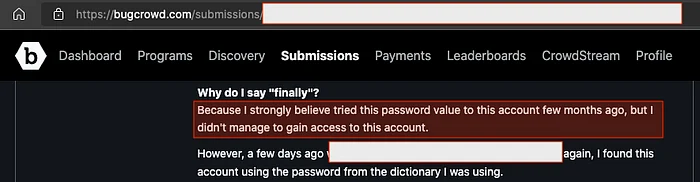
Then what happened? On the username at the very bottom of the list, the login succeeded with the password password. The account turned out to be an administrator, and it gave access to many private projects.
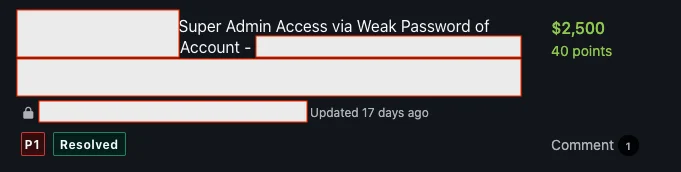
The researcher did not believe it at first and thought they had mixed up the password. After repeating the experiment, it turned out to be correct: the password really was password. The finding was reported immediately, and not long after, the program owner awarded a P1 bounty.
Lessons learned
The researcher closes with a short recap of what this journey teaches:
- A security issue does not live in just one thing. In reality you can take data from one asset and use it against another asset belonging to the same target.
- Go back to basics.
- Always try to find the origin server IP of the target, because the security perimeter may be misconfigured, as it was here.
- Recon does not only mean finding assets. It also means learning how the application works, what the target's development culture is like, and more. Recon is short for reconnaissance: the information-gathering phase before you try anything.
The researcher quotes NahamSec, who explained one definition of recon in simple words while replying to a tweet by Mongobug: "Recon shouldn't just be limited to finding assets and outdated stuff. It's also understanding the app and finding functionality that's not easily accessible. There needs to be a balance between recon and good ol hacking on the application in order to be successful".
Finally, some people think that getting a username is not very useful, and the sentence they use is: "there will be no effect (getting a username) if you can't login with a password." From a simplistic point of view that sounds true. But a tester has to look at it from a wider perspective. A username is one step closer to logging in. Once you have it, you can search collaboration platforms such as GitHub and Trello for the password patterns in use, and there is always the chance that a user relies on a default password or a default pattern provided by the company. The researcher notes that even Google once did not use a password to log in to one of its important applications.
There is also the real-world angle. Real attacks can involve social engineering, which is manipulating people into giving up information or access. Bug bounty and VDP programs usually put social engineering out of scope. A VDP, or vulnerability disclosure program, is a scheme for reporting vulnerabilities, often without a monetary reward. Outside those programs, in a real test, a username is one of the ingredients an attacker uses for social engineering.
The researcher adds one more piece of advice: if "how to get a username" is not accepted by the program you are in, do not throw the username away. Keep every valid username you find, because the chance remains that the owner will later change the password to a weak value, whether because they forgot the old one, because they believe nobody will know the username is registered, or for some other reason.
After all, a flow like this does not only apply to bug bounty or VDP work. In a formal security testing job it is useful too, especially if your client allows you to launch a social engineering attack.
References and credits
The researcher lists the sources and people behind the article:
- "Finding The Real Origin IPs Hiding Behind CloudFlare or Tor" by Secjuice.
- "Top 9 Internet Search Engines Used by Security Researchers" by SecurityTrails.
- "How to Seed the Censys ASM Platform" by Censys.
- DNSDumpster by HackerTarget.
- Aquatone by michenriksen.
- httprobe by Tomnomnom.
- Open Multiple URLs by tp.
- "Disable 'explore' and 'help' in Gitlab" (GitLab issue 18165).
- "Bypassing Google's authentication to access their Internal Admin panels".
- "From Recon to Optimizing RCE Results".
- Thanks to Tomi Ashari and Widyanto Ardy Prabowo.
Glossary
- Access Denied: the page a protective service such as Cloudflare shows when it refuses to pass a request through to the real server.
- Administrator: an account with the highest level of permission, able to see and change everything in the system.
- ASN (Autonomous System Number): a numerical identifier for a group of IP address ranges assigned to one organisation.
- Asset: any system, website or service that belongs to the target and is in scope for testing.
- Bug bounty program: a scheme where a company pays researchers who report security problems responsibly.
- Certificate: the digital document a website presents to prove its identity and enable encrypted connections; it names the site it was issued for.
- Censys: a search engine for security practitioners that indexes devices and services reachable from the internet.
- Cloudflare: a service that sits between visitors and a company's real servers, providing filtering, rate limits and flood protection.
- Configuration mistake (misconfiguration): a setting left in an unsafe state, such as a page that should require login but does not.
- Credentials: the pair of a username and a password, or any secret used to prove identity.
- Database connection string: the text an application uses to reach its database, usually containing a username and password.
- DDoS protection: defences that absorb floods of traffic intended to knock a service offline.
- DNSDumpster: a free web tool that maps which hosts exist in a domain or network range.
- Endpoint: a specific address on a website that performs a specific job, such as
/explore. - GitLab: a website where software teams store code, track work and manage projects and groups.
- GitLab Community Edition: the free version of GitLab.
- Group (GitLab): a collection of users and projects, like a team folder.
- HackerOne: a bug bounty platform where programs publish their scope and receive reports.
- Hacktivity: HackerOne's public list of disclosed reports.
- HTTP and HTTPS: the protocols browsers use to fetch web pages; HTTPS is the encrypted version.
- IP address: the number that identifies a computer on the internet, like a postal address.
- /24 subnet: a block of 256 neighbouring IP addresses that share the first three numbers.
- Origin server: the real machine that runs a website, as opposed to the protective layer in front of it.
- Out of scope: not allowed to be tested under the program's rules.
- P1: the highest priority level a program assigns to a report.
- Path: the part of a web address after the domain that points to a particular page, such as
/user/sign_in. - Port: a numbered door on a computer; 80 is the standard web port and 443 the standard encrypted web port.
- Private project: a GitLab project visible only to its members, not to the public.
- Rate limit: a cap on how many requests you may make in a period of time.
- Recon (reconnaissance): the information-gathering phase before testing, covering assets, how the application works and how the team builds it.
- Social engineering: manipulating people into giving up information or access.
- Subdomain: a name under a main domain, such as shop.target.tld under target.tld.
- Triaged: reviewed and accepted as valid by the program.
- Username: the name that identifies an account, one half of a login.
- VDP (vulnerability disclosure program): like a bug bounty program but without a monetary reward.
- VPN: a private encrypted tunnel into a company network.
- WAF (web application firewall): a filtering layer that inspects web requests and blocks malicious ones.
- Weak password: a password that is easy to guess, such as a common word or a simple variation of one.
- Whitelist: a list of things that are allowed, such as email addresses permitted to sign up.

