An Account Takeover Vulnerability Due to Response Manipulation.
 Published on avanishpathak46.medium.com
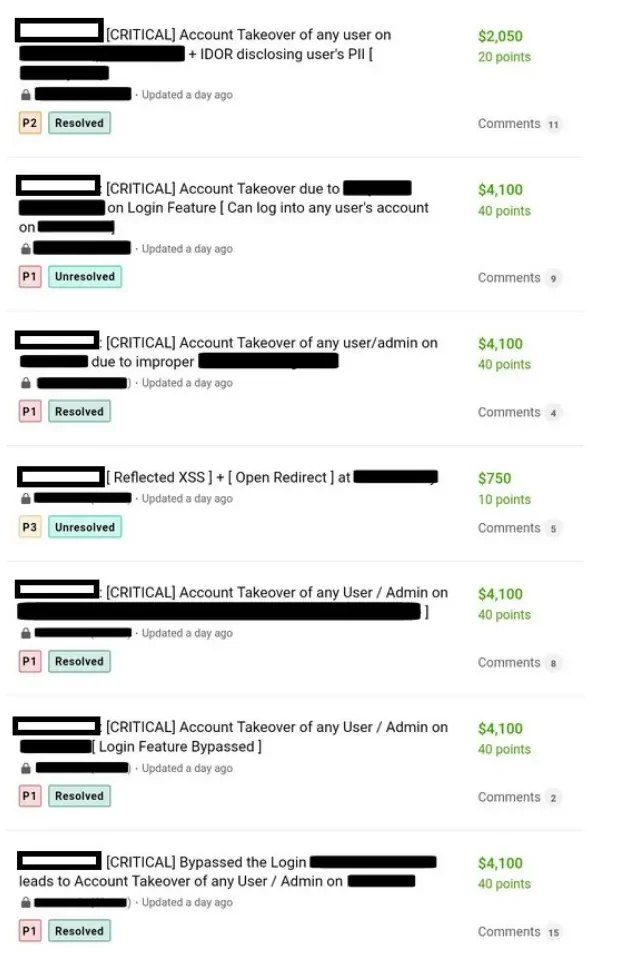
Hey Everyone, I hope everyone is healthy and staying safe amidst this COVID-19 pandemic. On the brighter side, the pandemic gave me enough time at my disposal that I spent mostly on up skilling myself and of course finding bugs! and it was a pretty exciting for me as I discovered multiple Account Takeover…
The full write-up lives on its author's site
It belongs to its author, so we link to it rather than copy it. The other two tabs are our own rewrites, checked against it.
Context
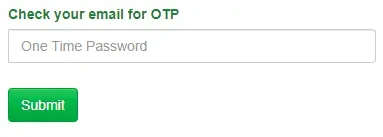
The target was a private bug bounty program. The researcher had already found several account takeover vulnerabilities on the same program, and this write-up covers one of them. The feature involved is the application's login flow. To authenticate a user, the back end sends a 4 digit code to the email address registered to the account. The user enters that code, and only then does the application verify the legitimacy of the user and grant access. The researcher's summary of the design is that only an authorised user with a valid code should be able to reach the account.
The login form lives at the following URL, with the host redacted in the report:
https://www.redacted.com/login
Setup
The work was done with Burp Suite as an intercepting proxy. The researcher used at least one test account with an email address they controlled, so they could receive the 4 digit codes and capture a genuine successful login. No versions, roles beyond "User/Admin" and no other tooling are described in the report.
Finding it
The first idea was to enter the victim's email address and brute-force the 4 digit code. That failed for two reasons. The application had a strict rate-limiting mechanism: after 10 wrong attempts it returned an HTTP 429 Too Many Requests response. The researcher also tried multiple settings that introduced time delays, without success. Separately, the authentication code was not leaked in the response, so there was nothing to read out of the error path.
The next step was to study the positive flow. The researcher entered the email address of one of their own test accounts, proxied the login through Burp Suite, and received the authentication code by email as expected. Entering the correct code logged them in, and they captured that request and dropped it into the Repeater tab for further investigation.
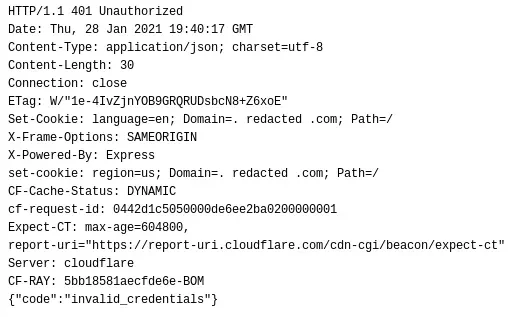
Looking at the negative path, entering a wrong authentication code produced a 401 Unauthorized response, as expected.

What drew attention was the body of that error response:
{"code":"invalid_credentials"}
The question the researcher asked was whether the response itself could be manipulated and replaced with the one captured from the successful attempt.
Exploitation
Step 1: capture a failed attempt
The researcher entered any random 4 digit code and captured the response for that login attempt in Burp Suite.
Step 2: rewrite the response
Two parts of the failed response were changed so that it resembled a successful attempt: the status line and the body.
HTTP/1.1 200 OK
{"verify":"true"}
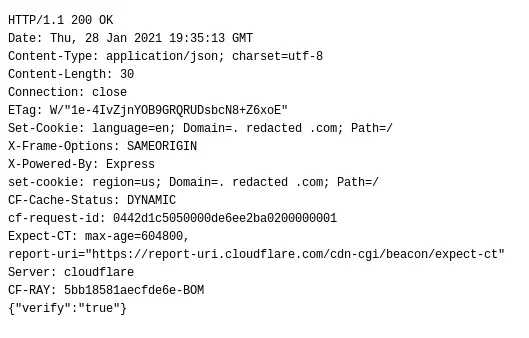
In full, the change was from HTTP/1.1 401 Unauthorized to HTTP/1.1 200 OK, and from {"code":"invalid_credentials"} to {"verify":"true"}.
Step 3: observe the result
It worked. With the manipulated response, the authentication feature was bypassed and the researcher was logged in to the account. The report says the bypass would get an attacker into any User/Admin account on the application.
The reason it worked is that a client-side JavaScript routine triggered a subsequent request based on the response it received. That follow-up request set new session cookies as an authenticated user. The server-side check had already failed, but the browser-side logic trusted the response it was given and asked for an authenticated session anyway.

Root cause
The authentication decision was effectively delegated to client-side JavaScript. The front end read the login response and, on seeing a success-shaped answer, issued a request that established an authenticated session. Nothing in that chain bound the session request to a server-side verification that the 4 digit code had actually been correct. Because the response is data the client controls, changing the status code and the body was enough to drive the client into the authenticated branch.
The rate limiting and the absence of the code in responses were real defences, but they only protected the code-guessing path. They did nothing against a client that simply declares the attempt successful. The report does not describe any server-side check that would have caught the forged response.
Impact
According to the report, an attacker who knows a victim's email address could log in to that user's account, including admin accounts, without the valid 4 digit code. The only precondition shown in the report is the ability to intercept and modify the login response, which the researcher did with Burp Suite. The report does not discuss whether the same manipulation is possible without a proxy, for example through a malicious client or a browser extension.
Fix
The report was triaged and fixed within 4 hours. The fix was a revamp of the entire login flow. The client-side JavaScript validation was removed, and the application no longer accepted any user-supplied value in the response. After the fix, manipulating the response produced an error message.
Variants to test
- Status code and body tampering on any multi-step login. Intercept the response to a failed OTP, 2FA or security-question step and change the status to 200 and the body to the success shape captured from a genuine attempt. A positive result is that the client proceeds to the next step or receives an authenticated session.
- Follow-up request replay. If the client fires a request after a successful response, capture that request from a real login and replay it after a failed attempt. A positive result is a Set-Cookie for an authenticated session without a valid code.
- Success flag in the body. Look for fields such as verify, success, authenticated or status in the login response and flip them. A positive result is that the UI and the session state both treat the login as complete.
- Client-side gating of privileged routes. After a failed login, navigate directly to authenticated pages or call authenticated APIs. A positive result is data or actions that should require a session.
- Rate-limit scope. Confirm whether the 10-attempt limit is per account, per IP or per session, and whether it can be sidestepped by changing identifiers. A positive result is that guessing continues past the limit.


What happened, in plain words
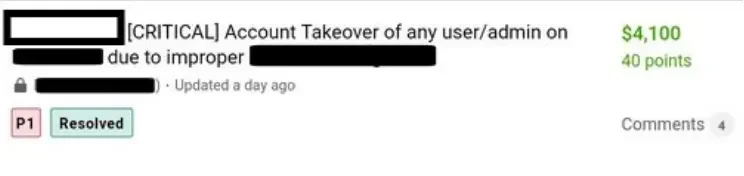
A security researcher found a way to log in to other people's accounts on a private bug bounty program without ever knowing their password or the secret code the site sends by email. The trick was not to guess the code, but to change the answer the website's server sent back to the browser after a failed login attempt. The browser believed the changed answer, decided the login had succeeded, and asked the server for a logged-in session. The researcher reported it, and the program fixed it within 4 hours.
This write-up walks through that finding from the beginning, assuming you have never done security testing before. You only need to know how to use a browser and a computer. Every technical term is explained the first time it appears, and there is a glossary at the end.
Background: what the site was and what it did
The target was a private bug bounty program. A bug bounty program is an arrangement where a company invites independent researchers to look for security problems in its systems and pays them for reporting them responsibly, instead of suing them. "Private" means only invited researchers can take part, and the details are not public. The researcher had already found several account takeover vulnerabilities on this same program, and this article covers one of them.
An account takeover vulnerability is a flaw that lets one person get into another person's account, as if they were that person. Once inside, the attacker can read private data, change settings, or do anything the real owner could do.
The feature involved is the site's login flow. A login flow is the sequence of screens and requests a user goes through to prove who they are. Here is how it worked:
- You type your email address into a login form.
- The site's back end (the server-side software that does the real work) sends a 4 digit code to that email address.
- You read the email, type the code into the site, and submit it.
- Only if the code is correct does the site let you in.
The researcher's summary of the design is that only an authorised user with a valid code should be able to reach the account. On paper that sounds solid: even if someone knows your email address, they cannot get in without the code that only you can read.
The login form lives at this address. The real host name has been replaced with "redacted" in the report:
https://www.redacted.com/login
Line by line:
https://is the secure version of the protocol browsers use to talk to websites. The "s" stands for secure: the traffic is encrypted so others on the network cannot read it.www.redacted.comis the site's host name. In the published report it is hidden so the real company is not exposed./loginis the path to the login page on that site.
The tools used
The work was done with Burp Suite. Burp Suite is a program that sits between your browser and a website and lets you see and edit every request and response that passes between them. Think of it like a postal worker who opens every letter you send and every reply you receive, shows you the contents, and lets you rewrite them before delivery. In security jargon, a tool that does this is called an intercepting proxy.
A request is a message your browser sends to a server, for example "please show me the login page" or "here is my code, let me in". A response is the server's reply, for example the page itself, or a short message saying whether the login worked.
The researcher also used at least one test account with an email address they controlled. That matters because the 4 digit code is sent by email: to capture a genuine successful login, you need to be able to read the code, which means you need access to the mailbox it is sent to. The report does not describe any other tooling, nor any software versions.
First idea: guess the code
The first thing the researcher tried was the obvious one. Enter the victim's email address, trigger the code, and then try every possible 4 digit code until one works. A 4 digit code has 10,000 possible values, so a computer can try them quickly.
This failed for two separate reasons.
First, the application had a strict rate-limiting mechanism. Rate limiting means the server counts how many attempts you make in a period and refuses to accept more once you pass a threshold. Here, after 10 wrong attempts the server returned an HTTP 429 Too Many Requests response. HTTP is the language browsers and servers use to exchange requests and responses, and every response carries a three digit status code that summarises what happened. 429 is the standard code for "you are sending too many requests, slow down". The researcher also tried multiple settings that introduced time delays between attempts, hoping to stay under the limit, but that did not help either.
Second, the authentication code was not leaked in the response. Sometimes a badly built site includes the expected code, or a hint about it, in the reply it sends back. Here it did not, so there was nothing to read out of the error path.
So guessing was blocked. The researcher's attitude was that failure is not an option, and moved on to a different angle.
Studying the successful login
The next step was to study the positive flow: what a real, successful login looks like from the network's point of view. To do that, the researcher entered the email address of one of their own test accounts, proxied the login through Burp Suite, and received the authentication code by email as expected.
Entering the correct code logged them in. They captured that request and dropped it into the Repeater tab. The Repeater tab is a part of Burp Suite that lets you take a captured request, send it again as many times as you like, and edit it between sends. It is like keeping a copy of a letter so you can re-send it with small changes and watch how the reply differs.
Then they looked at the negative path: what happens when the code is wrong. Entering a wrong authentication code produced a 401 Unauthorized response, as expected. 401 is the standard HTTP status code for "you are not authenticated", meaning the server does not accept that you are who you claim to be.
What drew attention was the body of that error response. The body is the main content of a response, as opposed to the status line and headers. Here it was a short piece of JSON:
{"code":"invalid_credentials"}
Line by line:
- The outer curly braces
{and}mark a JSON object. JSON is a simple text format for structured data, widely used by web applications to exchange information. Think of it as a very strict shopping list: names on the left, values on the right. "code"is the name of a field. The quotes are part of the format and are required around names.:separates the name from its value."invalid_credentials"is the value. It is a string, meaning a piece of text, and it says the credentials (the login details) were not valid.
The researcher asked a simple but powerful question: what if the response itself could be manipulated and replaced with the one captured from the successful attempt? In other words, instead of trying to make the server accept a wrong code, make the browser believe the server had accepted it.
Exploitation
Step 1: capture a failed attempt
The researcher entered any random 4 digit code and captured the response for that login attempt in Burp Suite. The point of this step is to have the failed response in hand, so it can be edited before it reaches the browser.
Step 2: rewrite the response
Two parts of the failed response were changed so that it resembled a successful attempt: the status line and the body.
The status line is the first line of an HTTP response. It contains the protocol version and the status code, for example HTTP/1.1 401 Unauthorized. Changing it to the following tells the browser the request succeeded:
HTTP/1.1 200 OK
Line by line:
HTTP/1.1is the version of the HTTP protocol being used.200is the standard status code for "OK", meaning the request was handled successfully.OKis the human-readable reason phrase that goes with 200. It is for people reading logs; the number is what matters to software.
The body was changed to this:
{"verify":"true"}
Line by line:
- The curly braces again mark a JSON object.
"verify"is the field name. It suggests a check or verification result."true"is the value, written as text rather than as the JSON booleantrue. Either way, client code reading it would see a success-shaped answer.
In full, the change was from HTTP/1.1 401 Unauthorized to HTTP/1.1 200 OK, and from {"code":"invalid_credentials"} to {"verify":"true"}.
Step 3: observe the result
It worked. With the manipulated response, the authentication feature was bypassed and the researcher was logged in to the account. The report says the bypass would get an attacker into any User/Admin account on the application. "Admin" means an administrator account, one with extra powers over the site, so the impact was not limited to ordinary users.
Why did this work? The reason is that a client-side JavaScript routine triggered a subsequent request based on the response it received. Let us unpack that.
JavaScript is the programming language that runs inside your browser and makes web pages interactive. Code that runs in the browser is called client-side, because the browser is the client, the party asking for things. Code that runs on the server is called server-side.
A subsequent request is a second request the browser sends after the first one, in reaction to the first reply. In this case, that follow-up request set new session cookies as an authenticated user. A cookie is a small piece of data a website asks your browser to store and send back with later requests, so the site can remember who you are between page loads. A session cookie is the specific cookie that identifies your logged-in session. A session is the period during which the site treats you as logged in.
So the sequence was: the server correctly rejected the wrong code, but the browser-side logic read the response, saw a success-shaped answer, and asked the server for an authenticated session anyway. The server-side check had already failed, yet the client trusted the response it was given.
Root cause
The root cause is where the decision was made. The authentication decision was effectively delegated to client-side JavaScript. The front end (the part of the application that runs in your browser) read the login response and, on seeing a success-shaped answer, issued a request that established an authenticated session. Nothing in that chain bound the session request to a server-side verification that the 4 digit code had actually been correct.
Because the response is data the client controls, changing the status code and the body was enough to drive the client into the authenticated branch. This is the general lesson: never let the browser be the only judge of whether a security check passed. The browser runs on the attacker's machine, so the attacker can change what it sees and what it sends.
The rate limiting and the absence of the code in responses were real defences, but they only protected the code-guessing path. They did nothing against a client that simply declares the attempt successful. The report does not describe any server-side check that would have caught the forged response.
Impact
According to the report, an attacker who knows a victim's email address could log in to that user's account, including admin accounts, without the valid 4 digit code. The only precondition shown in the report is the ability to intercept and modify the login response, which the researcher did with Burp Suite. The report does not discuss whether the same manipulation is possible without a proxy, for example through a malicious client or a browser extension.
Fix
The report was triaged and fixed within 4 hours. Triaged means the program's team reviewed the report, confirmed it was a real issue, and accepted it for fixing. The fix was a revamp of the entire login flow. The client-side JavaScript validation was removed, and the application no longer accepted any user-supplied value in the response. After the fix, manipulating the response produced an error message.
Variants to test
If you want to look for similar problems yourself, here are five directions the same idea can take. Each one describes what to do and what a positive result looks like.
- Status code and body tampering on any multi-step login. Intercept the response to a failed OTP, 2FA or security-question step and change the status to 200 and the body to the success shape captured from a genuine attempt. OTP means one-time password, a code valid for a single use. 2FA means two-factor authentication, a second proof of identity beyond a password. A positive result is that the client proceeds to the next step or receives an authenticated session.
- Follow-up request replay. If the client fires a request after a successful response, capture that request from a real login and replay it after a failed attempt. A positive result is a Set-Cookie for an authenticated session without a valid code. Set-Cookie is the response header a server uses to tell the browser to store a cookie.
- Success flag in the body. Look for fields such as verify, success, authenticated or status in the login response and flip them. A positive result is that the UI and the session state both treat the login as complete. UI means user interface, the part of the page you see and click.
- Client-side gating of privileged routes. After a failed login, navigate directly to authenticated pages or call authenticated APIs. An API is an interface a program exposes so other software can ask it for data or actions, usually returning JSON rather than a web page. A positive result is data or actions that should require a session.
- Rate-limit scope. Confirm whether the 10-attempt limit is per account, per IP or per session, and whether it can be sidestepped by changing identifiers. IP means internet protocol address, the numeric address a device uses on a network. A positive result is that guessing continues past the limit.
Glossary
- Account takeover: a vulnerability that lets one person get into another person's account as if they were that person.
- Admin: an administrator account, one with extra powers over a site.
- API: an interface a program exposes so other software can ask it for data or actions, usually returning JSON rather than a web page.
- Authentication: the process of proving who you are, for example with a password or a code.
- Authorised: officially allowed to do something.
- Back end: the server-side software that does the real work behind a website.
- Body: the main content of an HTTP response, as opposed to the status line and headers.
- Brute-force: trying every possible value of a secret until one works.
- Bug bounty program: an arrangement where a company invites independent researchers to look for security problems and pays them for reporting them responsibly.
- Burp Suite: a program that sits between your browser and a website and lets you see and edit every request and response.
- Client: the party asking for things, usually your browser.
- Client-side: code that runs in the browser rather than on the server.
- Cookie: a small piece of data a website asks your browser to store and send back with later requests, so the site can remember who you are.
- Credentials: login details, such as an email address and a code or password.
- CSRF: cross-site request forgery, a class of attack where a site is tricked into accepting a request the user did not intend. Not used in this report, but related to session handling.
- Front end: the part of an application that runs in your browser.
- HTTP: the language browsers and servers use to exchange requests and responses.
- HTTP 200 OK: the standard status code meaning the request was handled successfully.
- HTTP 401 Unauthorized: the standard status code meaning the server does not accept that you are who you claim to be.
- HTTP 429 Too Many Requests: the standard status code meaning you are sending too many requests and should slow down.
- Intercepting proxy: a tool that sits between your browser and a website and lets you see and edit the traffic.
- IP address: the numeric address a device uses on a network.
- JavaScript: the programming language that runs inside your browser and makes web pages interactive.
- JSON: a simple text format for structured data, widely used by web applications to exchange information.
- OTP: one-time password, a code valid for a single use.
- Private program: a bug bounty program open only to invited researchers, with details not made public.
- Rate limiting: counting how many attempts a client makes in a period and refusing to accept more once a threshold is passed.
- Repeater tab: a part of Burp Suite that lets you take a captured request, send it again as many times as you like, and edit it between sends.
- Request: a message your browser sends to a server.
- Response: the server's reply to a request.
- Root cause: the underlying reason a vulnerability exists, as opposed to its symptoms.
- Server: the computer and software that store a site's data and answer requests.
- Server-side: code that runs on the server rather than in the browser.
- Session: the period during which a site treats you as logged in.
- Session cookie: the specific cookie that identifies your logged-in session.
- Set-Cookie: the response header a server uses to tell the browser to store a cookie.
- Status code: a three digit number in an HTTP response that summarises what happened.
- Status line: the first line of an HTTP response, containing the protocol version and the status code.
- String: a piece of text in a programming language or data format.
- Subsequent request: a second request the browser sends after the first one, in reaction to the first reply.
- Test account: an account the researcher controls, used to observe normal behaviour safely.
- Triaged: reviewed by the program's team, confirmed as a real issue, and accepted for fixing.
- 2FA: two-factor authentication, a second proof of identity beyond a password.
- UI: user interface, the part of a page you see and click.
- Vulnerability: a weakness in software that an attacker can use to do something harmful.



