An Interesting Account Takeover Vulnerability
The login endpoint accepted an email address and a one-time code but did not check that the code had been issued for that email. An attacker could request a code for their own address, then submit it with any victim's email to log in as that user.
 Published on avanishpathak46.medium.com
In this article, we will see how I was successfully able to manipulate the authentication process of an application, allowing me to bypass the login feature and takeover any users account.
The full write-up lives on its author's site
It belongs to its author, so we link to it rather than copy it. The other two tabs are our own rewrites, checked against it.
Context
This write-up describes an account takeover found on a private bug bounty program. The application had a login flow built around a one-time password: the user entered a 4 digit OTP that was sent to their registered email address as part of the authentication flow. The researcher, Avanish Pathak, was able to manipulate that flow so that a correct OTP issued to his own email address could be paired with any other user's email address, giving him access to that account.

An account takeover vulnerability, as the report defines it, lets an attacker gain unauthorised and full control of a victim's account without needing any credentials, by exploiting an authentication flaw in the application.

Setup
The report does not describe the tooling used, the number of accounts involved, or any version details. The attacker needs a correct OTP sent to an email address they control, so that they receive a genuine code from the application. The target is a login endpoint that accepts an email address and a 4 digit code.
Finding it
The first idea was the obvious one for a 4 digit OTP: brute force it and log in to the victim's account. The researcher also checked whether the OTP leaked in the response, something he had come across in a previous account takeover finding.
Neither worked. The application returned HTTP 429 Too Many Requests after 10 wrong attempts, so a rate limiting mechanism was in place, and no OTP appeared in the response.

Exploitation
Step 1: Inspect the request sent with a correct OTP
Looking more closely at the authentication flow, the researcher observed that when a correct OTP is entered, the POST request issued at /login/signin looks somewhat like this:
{“ email ”:“****[redacted]****”,“code”:XXXX } CORRECT OTP
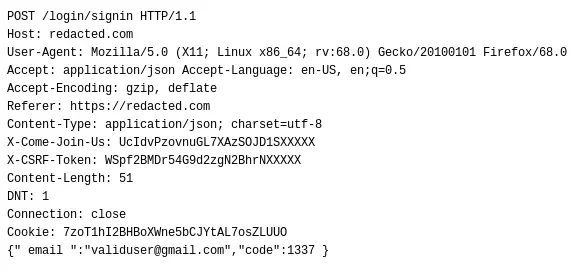
The POST request carries two parameters: the email address of the user, and the OTP sent to that email address. Supplying both correctly logs the user into their account.
Step 2: Swap the email parameter
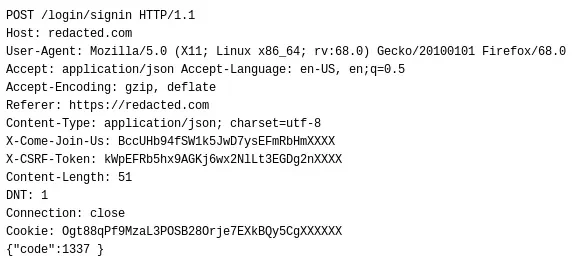
The researcher captured the /login/signin request and changed the email parameter to the email address of an existing, higher privileged user, while keeping a correct OTP that had been sent to the attacker's own email address. The combination looked somewhat like this:
{“ email ”:“****[redacted]****”,“code”:XXXX } CORRECT OTP

With this request he was able to log into any valid user's account in the application. The report describes this as a case of loose coupling of the email with the OTP.
Step 3: Report
The vulnerability was reported immediately. It was triaged and fixed within 24 hours.
Root cause
The application validated only the OTP itself on the back end. There was no check on the valid issuer's email, so a valid OTP combined with any changed email address would log the attacker into the account registered with that email address.
Impact
An attacker could log into any valid user's account in the application, including higher privileged users such as the administrator address used in the example, and have complete access over it. The report does not state the size of the user base or the specific privileges of the accounts reached beyond the example of a higher privileged user.
Fix
The fix removed the Email parameter from the /login/signin request and added a check that validated the OTP sent to the user trying to log in.
Variants to test
- Email swap on OTP verification. Capture the verification request, replace the email or user identifier with another account's, and keep your own valid code. A positive result is a session or token for the other account.
- Identifier swap on password reset. The same loose coupling often appears when a reset code is checked without binding it to the account it was issued for. A positive result is a reset flow completing for an address you do not control.
- Code reuse across accounts. Request a code for your own account, then submit it with a different identifier. A positive result is authentication as the second account.
- Rate limit bypass around the OTP check. The report shows 429 after 10 wrong attempts on one flow; try distributing attempts across sessions or identifiers to see whether the limit is per account or per request source. A positive result is more than 10 guesses being accepted.
- OTP leakage in responses. Check whether the code appears in any response body or header, as the researcher had seen in a previous finding. A positive result is the code itself returned to the client.
What happened, in plain words
A security researcher found a way to log into anyone's account on a private bug bounty program without knowing their password. The application let people log in by sending a short 4 digit code to their email address. The researcher discovered that the application checked whether the code was correct, but never checked which email address the code had been sent to. So he could ask for a code to his own email, then send that code together with somebody else's email address, and the application would log him in as that other person.
This kind of bug is called an account takeover. It means an attacker gets full control of a victim's account without needing any credentials (no password, no code of the victim's own). The report defines it as a vulnerability that allows an attacker to gain unauthorised and full control of the victim's account by exploiting an authentication flaw in the application.
Before going further, a few words about the pieces involved, because the rest of the article depends on them.
- Application: the website or app the users log into. In this case it belonged to a private bug bounty program, which is open only to selected researchers.
- Authentication: the process of proving who you are when you log in. A password is the most familiar form; a code sent to your email is another.
- OTP (one-time password): a short code that is valid for one login and then expires. It is like a temporary key handed to you at the door: it opens the door once, and only for the person it was handed to.
- API request: when you click a button in a browser, the browser sends a small message to the server behind the application, asking it to do something. That message is an API request. Think of it as an order slip: it lists what you want (for example, "log this user in") and the details needed to do it (the email address and the code).
- Parameter: one of the named details on that order slip. In this story there are two:
emailandcode. - Endpoint: the address on the server where a particular request is sent. Here it is
/login/signin, the place that handles login attempts. - HTTP status code: a three digit number the server sends back to say how the request went.
200means fine,404means not found, and429means "too many requests, slow down". - Rate limiting: a rule that stops someone from trying something over and over. It is like a shop assistant who refuses to answer after you have asked the same question ten times in a row.
- Brute force: trying every possible value until one works. With a 4 digit code there are only 10,000 possibilities, so a computer can try them quickly if nothing stops it.
- Session or token: after a successful login, the server usually gives the browser a small piece of data that proves "this person is already logged in". The browser sends it back with every later request. It works like a wristband at an event: once you have it, staff let you in without asking for your ID again.
- Back end: the part of the application that runs on the server, out of sight of the user. It is where the real checks should happen, because anything the browser does can be changed by the user.
The login flow
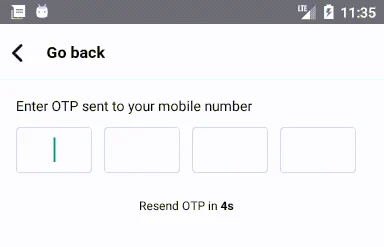
The application had a login with OTP functionality. A user typed their email address, the application sent a 4 digit code to that address, and the user typed the code back to log in.
First attempts: brute force and leakage
Because the code was only 4 digits, the first idea was the obvious one: brute force it. If the application let you try codes without limit, you could simply try all 10,000 combinations and one of them would be the victim's code. This is the first thing most people think of when they see a short code.
The researcher also checked whether the OTP was leaked in the response, something he had come across in a previous account takeover finding. In plain words: sometimes the server, when asked to send a code, accidentally includes the code itself in the reply it sends back to the browser. If that happens, you do not need to guess anything, because the answer is handed to you.
Neither approach worked. The application returned HTTP 429 Too Many Requests after 10 wrong attempts, which means a rate limiting mechanism was in place. And no OTP appeared in the response.
So the short code was protected by a limit on guesses, and the code was not being handed back in the reply. Both of the easy routes were closed.
Looking at the request that a correct code produces
Instead of guessing, the researcher decided to dig deeper into the authentication flow and look closely at what the browser actually sends when the code is correct. This is a common and useful habit: stop attacking the input and start reading the conversation between browser and server.
He observed that when you enter a correct OTP, the POST request issued at /login/signin looked somewhat like this:
{“ email ”:“****[redacted]****”,“code”:XXXX } CORRECT OTP
Line by line, in plain words:
{ ... }is a JSON object, a way of writing a set of named values. Think of it as a form with labelled fields."email":"****[redacted]****"is the first field: the email address of the user who is logging in. The asterisks are the researcher's way of hiding the real address in the write-up."code":XXXXis the second field: the 4 digit OTP that was sent to that email address.XXXXstands in for the actual digits.CORRECT OTPis a note saying that this example is what the request looks like when the code is right.- The request is a POST, which is the HTTP method used when the browser is sending data to the server to change something, as opposed to simply asking for a page.
So the POST request carried two parameters: the email address of the user, and the OTP sent to that email address. Supplying both correctly logs the user into their account. That is the intended behaviour, and on its own it looks perfectly reasonable.
The trick: swap the email, keep your own code
The researcher captured the /login/signin request and changed the email parameter to the email address of an existing, higher privileged user, while keeping a correct OTP that had been sent to his own email address. The combination looked somewhat like this:
{“ email ”:“****[redacted]****”,“code”:XXXX } CORRECT OTP
Line by line, in plain words:
"email":"****[redacted]****"is now somebody else's address, in the example a higher privileged user such as an administrator. The asterisks again hide the real address."code":XXXXis still the code that arrived in the researcher's own inbox. It is a genuine code, issued by the application, just not for this email address.CORRECT OTPagain marks that the code is valid.
Why was this step taken? Because the first request showed that the server receives the email and the code as two separate fields. If the server checks the code but forgets to check that the code belongs to the email in the same request, then the two fields can be mixed and matched. That is exactly what happened.
With this request the researcher was able to log into any valid user's account in the application. The report describes this as a case of loose coupling of the email with the OTP. A useful everyday comparison is a cloakroom ticket. The attendant checks that you are holding a real ticket, but never checks that the ticket matches the coat you are asking for. Anyone with any valid ticket can walk off with any coat.
Reporting and the fix
The vulnerability was reported immediately. It was triaged and fixed within 24 hours. Triaged means the program's team reviewed the report, confirmed it was a real issue, and accepted it.
The fix removed the Email parameter from the /login/signin request and added a check that validated the OTP sent to the user trying to log in.
In plain words: the Email parameter was removed from the request and a check was added that validated the OTP sent to the user trying to log in. The cloakroom attendant now looks at the coat number on the ticket instead of just checking that the ticket is real.
Why it worked
The application validated only the OTP itself on the back end. There was no check on the valid issuer's email, so a valid OTP combined with any changed email address would log the attacker into the account registered with that email address.
This is an important lesson: a control that stops guessing does nothing against a request that contains a real, valid code.
What an attacker could do
An attacker could log into any valid user's account in the application, including higher privileged users such as the administrator address used in the example, and have complete access over it. The report does not state the size of the user base or the specific privileges of the accounts reached beyond the example of a higher privileged user.
Similar things to test
If you ever find yourself looking at a login or reset flow, these are the same idea applied in slightly different places. Each one is a way of asking: does the server check that this code belongs to this account?
- Email swap on OTP verification. Capture the verification request, replace the email or user identifier with another account's, and keep your own valid code. A positive result is a session or token for the other account.
- Identifier swap on password reset. The same loose coupling often appears when a reset code is checked without binding it to the account it was issued for. A positive result is a reset flow completing for an address you do not control.
- Code reuse across accounts. Request a code for your own account, then submit it with a different identifier. A positive result is authentication as the second account.
- Rate limit bypass around the OTP check. The report shows 429 after 10 wrong attempts on one flow; try distributing attempts across sessions or identifiers to see whether the limit is per account or per request source. A positive result is more than 10 guesses being accepted.
- OTP leakage in responses. Check whether the code appears in any response body or header, as the researcher had seen in a previous finding. A positive result is the code itself returned to the client.
Glossary
- Account takeover: a vulnerability that lets an attacker gain unauthorised and full control of a victim's account without needing the victim's credentials.
- API request: the message a browser or app sends to a server asking it to perform an action, carrying the details needed for that action.
- Application: the website or app being tested, made of a front end in the browser and a back end on the server.
- Authentication: the process of proving who you are when logging in.
- Back end: the server-side part of an application, where checks should be enforced because the browser side can be changed by the user.
- Brute force: trying every possible value until one works, practical for short codes if nothing limits the number of attempts.
- Bug bounty program: an arrangement where an organisation invites researchers to test its systems and rewards reports of real vulnerabilities. A private program is open only to selected researchers.
- Endpoint: the specific address on a server that handles a particular kind of request, such as
/login/signin. - HTTP 429 Too Many Requests: a status code meaning the server is refusing further requests because too many have been made in a short time.
- JSON: a text format for writing named values in pairs, used to send data between browser and server.
- Loose coupling: a situation where two pieces of data that should be tied together, such as a code and the email it was sent to, are checked separately and can be mixed with other values.
- OTP (one-time password): a short code valid for a single login, usually sent by email or text message.
- Parameter: a named field in a request, such as
emailorcode. - POST request: an HTTP method used when the browser sends data to the server to change something, such as submitting a login form.
- Rate limiting: a control that blocks or slows repeated attempts, for example returning 429 after a set number of failures.
- Response: the reply the server sends back to the browser after a request.
- Session or token: data issued after a successful login that the browser sends back on later requests to prove the user is already authenticated.
- Triaged: reviewed and confirmed as a valid issue by the receiving program's team.