Are you sure this is a trusted email?
The invoice emailing feature allowed the sender to control the 'mail_from' parameter, so an attacker could send emails that appeared to come from the website's own trusted address. By also copying the site's password-reset email template and registering a username that looked like a payment subdomain, the attacker could phish users into entering credentials and card details into a web form that sent the data back to the attacker.
 Published on medium.com
This is my first writeup about a security vulnerability that I have recently found in a private bug bounty program.
The full write-up lives on its author's site
It belongs to its author, so we link to it rather than copy it. The other two tabs are our own rewrites, checked against it.
Context
The target was a popular accountant software in a private bug bounty program. The feature at the centre of the report is invoice sending: a user creates an invoice on the website and sends it to an external email address. The website's emailing system sends the invoice email using the customer email address, so the message appears to come from that address rather than from the platform.
The same platform also lets users create email templates for invoices and build web forms on their account to survey customers. Both features became part of the attack chain.
Setup
The researcher sent the invoice to a test email address of his own. No special tooling is described. The relevant software versions appear in the mail headers the researcher compared: PHPMailer 6.0.3 for the email sent through the vulnerable endpoint, and PHPMailer 5.2.21 for the platform's own password reset email.
Finding it
Sending an invoice to his own test address produced something unexpected: the platform's mail system used the customer email address to send the invoice email on behalf of that address. The researcher had not seen this behaviour before and decided to look closely at the feature.
The HTTP request for sending an invoice looked like this:
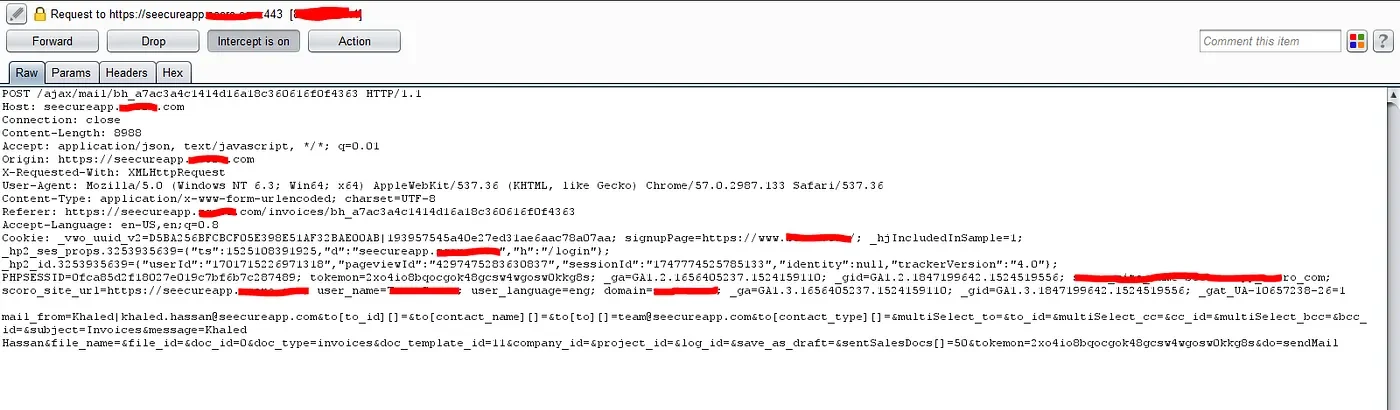
In that request the mail_from parameter is under the attacker's control. The researcher changed it to the address the website uses to email its own customers, [redacted], and changed his account name to match, Team reacted. After a few seconds he found the resulting message in his inbox.

The email had been sent on behalf of the website system itself. To work out why, he compared two messages: one he had sent to himself through the vulnerability from [redacted], and one the platform's emailing system had sent when he requested a password reset.
Details of the email he sent to himself using the vulnerability:
From: Team reacted <[redacted]> Using PHPMailer 6.0.3 (https://github.com/PHPMailer/PHPMailer)To: [redacted]: Just a messageSPF: PASS with IP [redacted] Learn moreDKIM:'PASS' with domain zonevs.eu Learn more``
Details of the email the website system sent when he requested a password reset:
From: Team reacted <[redacted]> Using PHPMailer 5.2.21 (https://github.com/PHPMailer/PHPMailer)To: khaled <[redacted]>Subject: Password resetSPF: PASS with IP [redacted] Learn moreDKIM: 'PASS' with domain zonevs.eu Learn more
There is no difference between the two examples. From this the researcher concluded that the SMTP server behind the vulnerable endpoint is the same server the website uses to email its customers.
Exploitation
Step 1: control the envelope sender
By modifying the mail_from parameter in the invoice sending request, the researcher made the platform send mail with an arbitrary sender address. Setting it to the platform's own customer-facing address, and matching his account name to it, produced a message that appeared to come from the platform itself.
Step 2: copy the platform's own email template
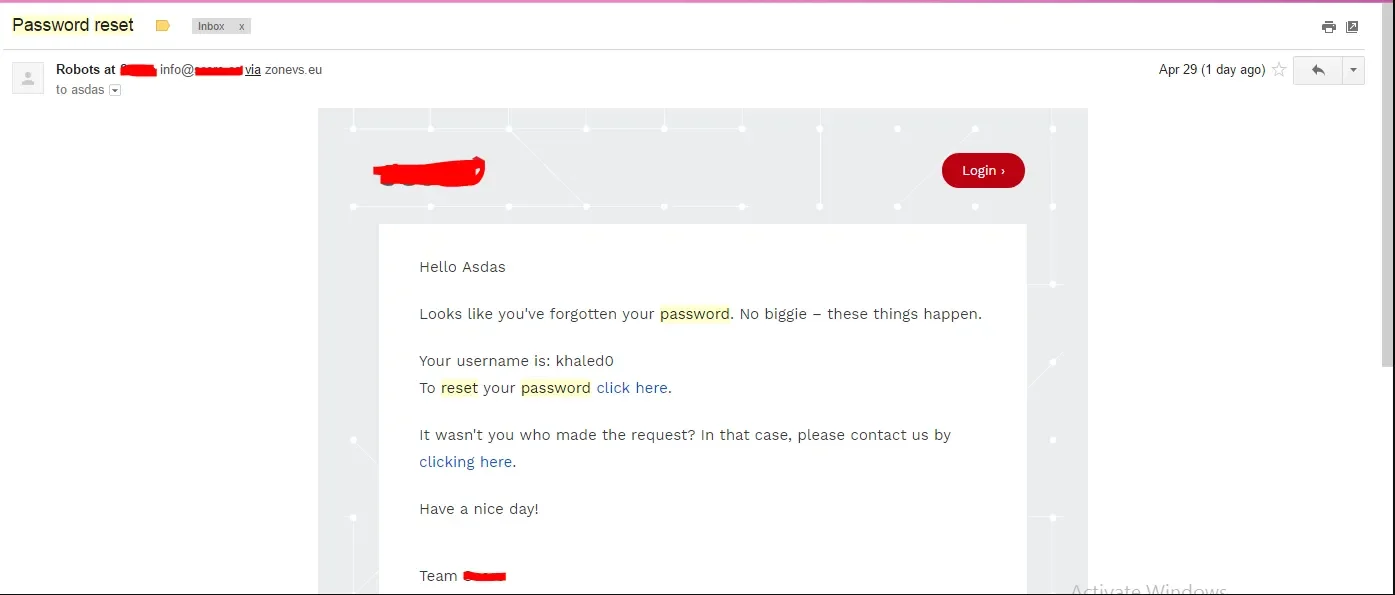
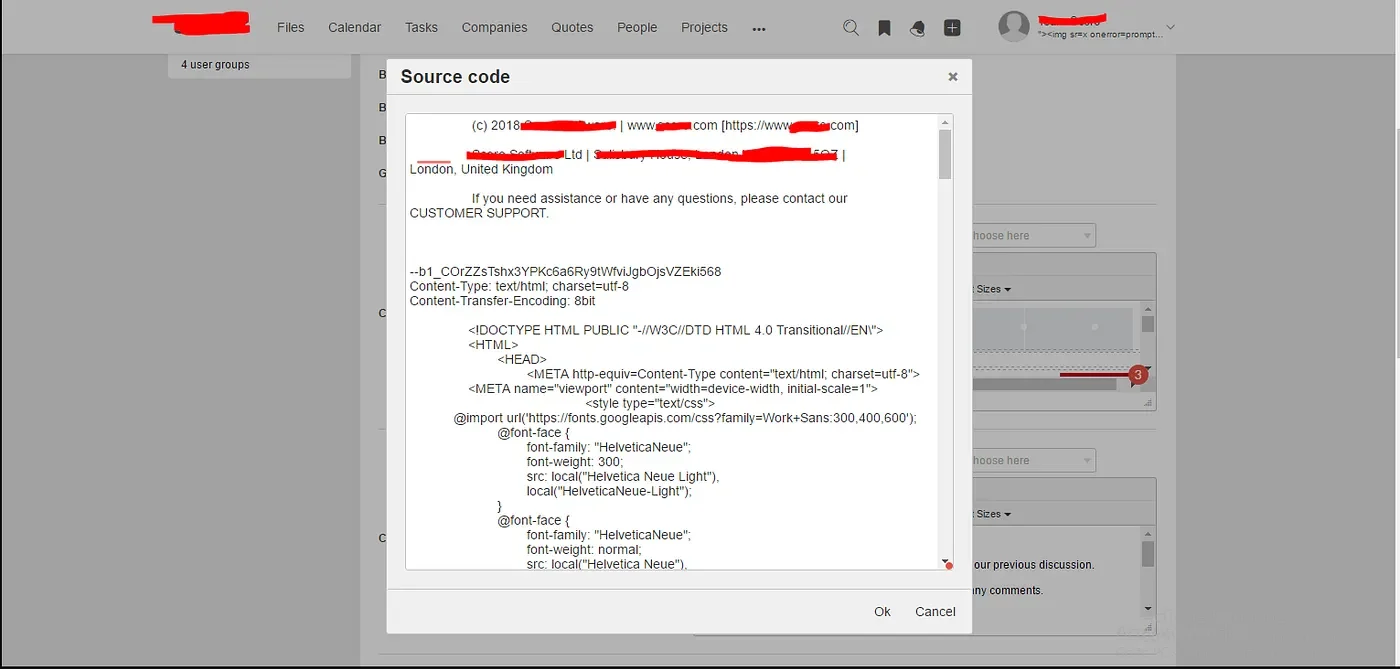
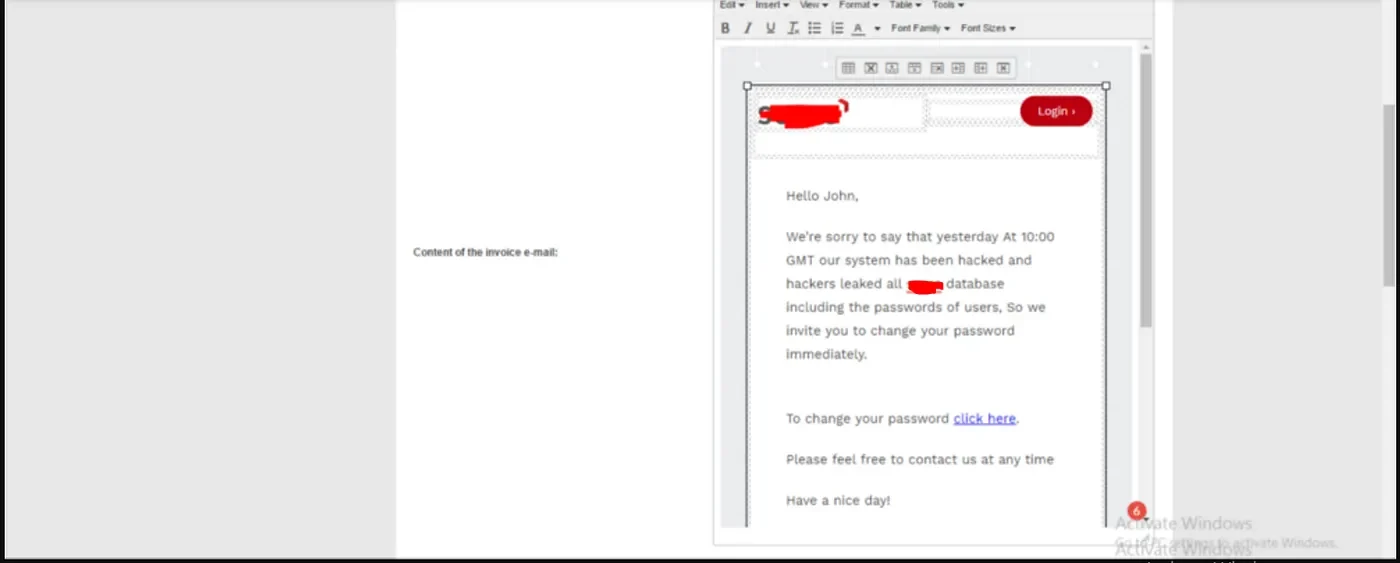
The researcher opened one of the emails the website had sent him during a password reset and copied its HTML code. The platform allows users to create email templates used when sending invoices, so he put the copied HTML into an invoice email template.
Original email:
Adding the source code of their email:
Email template after he put it in as the invoice email:
Step 3: make the link in the template convincing
The template contains a "Click here" button. The researcher had previously reported a subdomain takeover to the program and it had been fixed, so he could not use that issue here. Instead he used the account naming scheme: accounts are registered as seecureapp.website.com, so he registered an account with the username payments.reacted.com to convince the user that this is the payment page.
Step 4: collect credentials through web forms
The website also allows users to create a web form on their account to survey customers. The researcher created a web form in the payments account.
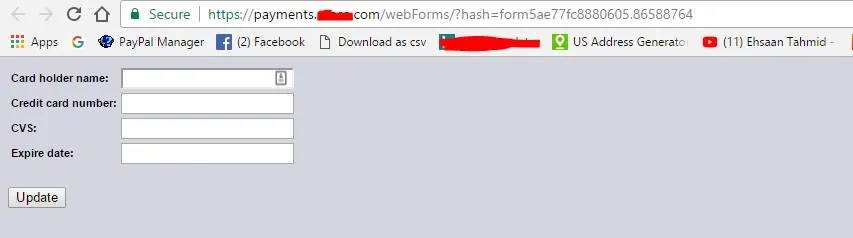
Another exploit:
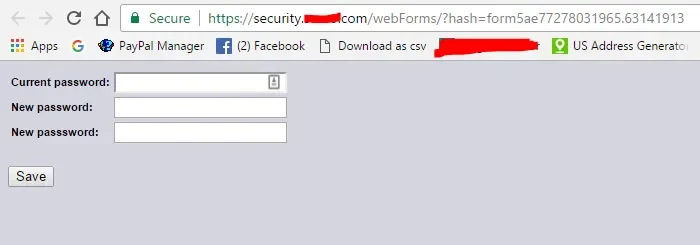
With this, he could ask website users to enter their passwords and credit cards, and the answers would be sent to him as web form responses.
Root cause
The invoice sending endpoint accepts a mail_from value supplied by the user and passes it to the mail system, so the sender address of the outgoing message is attacker-controlled. Because the vulnerable endpoint uses the same SMTP server as the platform's own transactional email, the forged sender address is consistent with the platform's legitimate mail. The researcher's header comparison shows SPF passing with the same IP and DKIM passing for the same domain in both messages, and he concluded there was no difference between the two examples. The report does not describe any server-side validation of mail_from.
Impact
An attacker with an account can send email that appears to come from the platform's own address, using the platform's real template, to arbitrary recipients. Combined with the account naming scheme and the web form feature, the attacker can direct victims to a page that looks like a payment page and collect their passwords and credit card details, with the answers delivered to the attacker as web form responses. The report does not state which users were affected beyond website users generally, nor any limits on volume.
Fix
A change that would address the root cause is to stop accepting a user-supplied mail_from and to send invoice mail from an address the platform controls, or to restrict the value to addresses the account is authorised to use.
Variants to test
- Look for any request parameter that sets the envelope sender or From address on outbound mail, such as
mail_from,from,senderorreply_to. A positive result is a message arriving at your test inbox with the sender you chose. - Compare the headers of a message you caused to be sent with those of a platform-generated message such as a password reset. Matching SPF and DKIM results for the platform's domain indicate the same sending infrastructure is being reused.
- Check whether user-created email templates accept raw HTML. A positive result is your template rendering the platform's own markup in the delivered message.
- Check the account naming scheme for user-controlled subdomain-like names. A positive result is an account name that reads as a plausible payment or login host.
- Check whether web forms can be created and whether their responses are delivered to the account owner. A positive result is a form that collects arbitrary fields and returns the answers to you.
Lessons the researcher drew: when testing a website that sends email on behalf of a user's address, test this attack, since he reports it succeeded on every website where he tried it; and abuse website features where you can, because the issue was not very exploitable until those features were used in the attack.
Timeline: report submitted 30-4-2018, triaged 30-4-2018, $900 bounty awarded 7-5-2018.
What happened, in plain words
A security researcher found a way to make a popular accounting website send emails that looked like they came from the website itself, not from him. He could control the sender address of invoice emails. By copying the website's own password reset email and using other features, he could ask users to enter their passwords and credit card details. He reported it through a private bug bounty program and was paid $900.
This write-up explains the whole story step by step, for someone who has never done security testing before. You only need to know how to use a browser and a computer.
Background: what is a bug bounty program?
A bug bounty program is a deal between a company and security researchers. The company says: if you find a security problem in our software and tell us privately, we will pay you a reward (the bounty). The company gets to fix the problem before bad people find it, and the researcher gets money and recognition. This particular program was private, meaning you had to be invited or approved to take part.
The target was a popular accountant software. Accountant software helps businesses manage invoices, payments, customers and similar tasks.
The feature at the centre: sending invoices
An invoice is a bill: a document that says "you owe me this much money for these products or services". The website lets a user create an invoice and send it by email to an external address, for example a customer's email address.
When you send an email, two addresses matter:
- The From address is what the recipient sees in their email program: "this message is from X".
- The envelope sender (sometimes called the return path or
mail_from) is the address the mail system uses behind the scenes. It is a bit like the return address on a paper envelope: if the letter cannot be delivered, it is sent back there. Most recipients never see it.
Normally, a website that sends email on your behalf uses its own address as the sender, so recipients see something like "Acme Billing <[redacted]>". Here, the website's emailing system used the customer's email address to send the invoice email on behalf of that address. That means the message appeared to come from the customer, not from the platform. The researcher had not seen this behaviour before, so he decided to look closely at the feature.
Step 1: noticing the strange behaviour
The researcher created an invoice on the website and sent it to his own test email address. A test email address is simply an email account you control and use only for experiments, so you can see exactly what arrives without bothering anyone else.
When the invoice arrived, he noticed that the website's emailing system used the customer email address to send the invoice email on behalf of that address. That was odd to him because he had not seen this function before. So he took a deep look at the feature.
To do that, he looked at the HTTP request that the website sends when you click "send invoice".
What is an HTTP request?
When you use a website, your browser and the website's server talk to each other using HTTP (HyperText Transfer Protocol). Every action, such as loading a page, logging in or sending an invoice, is a request from your browser to the server, and a response from the server back to your browser. A request contains:
- a method (like GET to fetch something, or POST to submit data),
- a URL (the address of the thing you are talking to),
- headers (extra information, like what browser you use or whether you are logged in),
- and sometimes a body (the data you are submitting, such as form fields).
You can see these requests in your browser's developer tools, usually by pressing F12 and opening the Network tab. You do not need special software.
The HTTP request for sending an invoice looked something like this:
The image shows the request as the researcher captured it. The important part is a parameter called mail_from. A parameter is a named piece of data sent with a request, like a field in a form: the name is mail_from and the value is whatever address is put there. In this request, the value of mail_from is under the control of the person sending the request, meaning the attacker can put any email address he likes in it.
That is the first clue: if you can choose the sender address, you may be able to send email that appears to come from someone else.
Step 2: trying the platform's own address
The researcher changed the mail_from parameter to the email address that the website uses to email its own customers, which is [redacted]. He also changed his account name to match: Team reacted. The account name is what recipients see next to the address in the From line, so making it match the address makes the message look more genuine.
After a few seconds of sending the request, he found the resulting message in his inbox.
He was shocked by the result: the email had been sent on behalf of the website system itself. In other words, the message looked like it came from the company, not from him.
Step 3: working out why it happened
To understand the cause, he compared two emails:
- One he had sent to himself using the vulnerability, from
[redacted]. - One the website's emailing system had sent when he requested a password reset.
A password reset email is the message a website sends when you click "forgot password". It is a good example of a legitimate, platform-generated email.
He looked at the headers of both messages. Email headers are the hidden technical information at the top of an email: who sent it, to whom, the subject, and the results of checks that mail servers perform. Two of those checks are worth explaining:
- SPF (Sender Policy Framework) is a DNS record that lists which servers are allowed to send email for a domain. When a message arrives, the receiving server checks whether the sending server is on that list. The result is PASS or FAIL.
- DKIM (DomainKeys Identified Mail) is a cryptographic signature added to an email by the sending server. The receiving server checks the signature against a public key published in DNS. If it matches, the message really was signed by that domain and was not altered on the way.
DNS, by the way, is the internet's address book: it translates names like example.com into the technical addresses computers use.
Here are the details of the email he sent to himself using the vulnerability:
From: Team reacted <[redacted]> Using PHPMailer 6.0.3 (https://github.com/PHPMailer/PHPMailer)To: [redacted]: Just a messageSPF: PASS with IP [redacted] Learn moreDKIM:'PASS' with domain zonevs.eu Learn more``
Line by line, in plain words:
From: Team reacted <[redacted]>is the visible sender: the name he chose and the address he put inmail_from.Using PHPMailer 6.0.3 (https://github.com/PHPMailer/PHPMailer)tells us the software that generated the email. PHPMailer is a widely used library for sending email from PHP, a programming language common on websites. The version is 6.0.3.To: [redacted]is the recipient, his own test address.Subject: Just a messageis the subject line.SPF: PASS with IP [redacted] Learn moremeans the sending server's IP address passed the SPF check for the domain. An IP address is the numeric address of a computer on the internet.DKIM:'PASS' with domain zonevs.eu Learn moremeans the DKIM signature check passed for the domainzonevs.eu.
And here are the details of the email the website system sent when he requested a password reset:
From: Team reacted <[redacted]> Using PHPMailer 5.2.21 (https://github.com/PHPMailer/PHPMailer)To: khaled <[redacted]>Subject: Password resetSPF: PASS with IP [redacted] Learn moreDKIM: 'PASS' with domain zonevs.eu Learn more
Line by line:
From: Team reacted <[redacted]>is the visible sender. Notice it is the same name and address as in the first email.Using PHPMailer 5.2.21 (https://github.com/PHPMailer/PHPMailer)shows a different version of the same email library, 5.2.21.To: khaled <[redacted]>is the recipient of the password reset.Subject: Password resetis the subject line.SPF: PASS with IP [redacted] Learn moreis the same SPF result and the same IP address as in the first email.DKIM: 'PASS' with domain zonevs.eu Learn moreis the same DKIM result and the same domain as in the first email.
As the researcher says, there is no difference between the two examples. From this he concluded that the SMTP server behind the vulnerable endpoint is the same server the website uses to email its customers.
SMTP (Simple Mail Transfer Protocol) is the standard way computers send email to each other. An SMTP server is the machine that actually delivers the message. In this case the invoice endpoint and the password reset system appeared to use the same SMTP server, and both messages carried the same SPF and DKIM results. The checks pass because the message really is being sent by the platform's own infrastructure; the problem is that the platform lets a user choose the sender address.
How he exploited it
Step 1: control the envelope sender
By modifying the mail_from parameter in the invoice sending request, the researcher made the platform send mail with an arbitrary sender address. Setting it to the platform's own customer-facing address, and matching his account name to it, produced a message that appeared to come from the platform itself.
Why this matters: if a message appears to come from the company, recipients are much more likely to trust it and click links or follow instructions inside it.
Step 2: copy the platform's own email template
The researcher wanted to make the attack more convincing. He opened one of the emails the website had sent him during a password reset and copied its HTML code.
HTML is the language used to build web pages and formatted emails. It describes what text appears, in what colour, with which images and links. Copying the HTML of a legitimate email means you can reproduce its exact look.
The website allows users to create email templates that are used when sending invoices. An email template is a reusable message with placeholders, so you do not have to write the same email every time. He put the copied HTML into an invoice email template.
Original email:
Adding the source code of their email:
Email template after he put it in as the invoice email:
So the invoice email he sent used the HTML of the platform's own email template.
Step 3: make the link in the template convincing
The template contains a "Click here" button. A button in an email is usually a link: when the recipient clicks it, their browser opens a web address chosen by whoever made the email.
The researcher had previously reported a subdomain takeover to the program and it had been fixed, so he could not use that issue here. A subdomain is a name that sits under a main domain, like payments.example.com under example.com. A subdomain takeover happens when a subdomain points to a service that no longer exists, and someone else can claim that service and control what the subdomain shows. Since that was fixed, he needed another trick.
He used the account naming scheme. When you register an account at the website, accounts are registered like seecureapp.website.com. So he registered an account with the username payments.reacted.com. The idea was to convince the user that this is the payment page: the link in the email would lead to a page whose address looks plausible.
Step 4: collect credentials through web forms
The website also allows users to create a web form on their account to survey customers. A web form is a page with fields to fill in, like name, email or a message, and a submit button. The answers are usually stored and shown to the account owner.
The researcher created a web form in the payments account.
Another exploit:
With this, he could ask website users to enter their passwords and credit cards, and the answers would be sent to him as web form responses. In other words, the victim fills in a form that looks like a normal payment or login page, clicks submit, and the information goes straight to the attacker.
Root cause
The invoice sending endpoint accepts a mail_from value supplied by the user and passes it to the mail system, so the sender address of the outgoing message is attacker-controlled. Because the vulnerable endpoint uses the same SMTP server as the platform's own transactional email, the forged sender address is consistent with the platform's legitimate mail. The header comparison shows SPF passing with the same IP and DKIM passing for the same domain in both messages, and the researcher concluded there was no difference between the two examples. The report does not describe any server-side validation of mail_from.
Server-side validation means the website's server checks the data you send before using it. Here, it seems the server did not check whether the mail_from address was one the user was allowed to use.
Impact
An attacker with an account can send email that appears to come from the platform's own address, using the platform's real template, to arbitrary recipients. Combined with the account naming scheme and the web form feature, the attacker can direct victims to a page that looks like a payment page and collect their passwords and credit card details, with the answers delivered to the attacker as web form responses. The report does not state which users were affected beyond website users generally, nor any limits on volume.
Fix
A change that would address the root cause is to stop accepting a user-supplied mail_from and to send invoice mail from an address the platform controls, or to restrict the value to addresses the account is authorised to use.
Variants to test
If you want to look for similar problems, here are some checks to try:
- Look for any request parameter that sets the envelope sender or From address on outbound mail, such as
mail_from,from,senderorreply_to. A positive result is a message arriving at your test inbox with the sender you chose. - Compare the headers of a message you caused to be sent with those of a platform-generated message such as a password reset. Matching SPF and DKIM results for the platform's domain indicate the same sending infrastructure is being reused.
- Check whether user-created email templates accept raw HTML. A positive result is your template rendering the platform's own markup in the delivered message.
- Check the account naming scheme for user-controlled subdomain-like names. A positive result is an account name that reads as a plausible payment or login host.
- Check whether web forms can be created and whether their responses are delivered to the account owner. A positive result is a form that collects arbitrary fields and returns the answers to you.
Lessons the researcher drew: when testing a website that sends email on behalf of a user's address, test this attack, since he reports it succeeded on every website where he tried it; and abuse website features where you can, because the issue was not very exploitable until those features were used in the attack.
Timeline
| Event | Date |
|---|---|
| Report submitted | 30-4-2018 |
| Report triaged | 30-4-2018 |
| $900 bounty awarded | 7-5-2018 |
"Triaged" means the program's team reviewed the report and confirmed it was a real issue worth working on.
Glossary
- Bug bounty program: an arrangement where a company pays researchers for privately reporting security problems.
- Private program: a bug bounty program you can only join if invited or approved.
- Invoice: a bill sent to a customer listing products or services and the amount owed.
- From address: the sender address that the recipient sees in their email program.
- Envelope sender /
mail_from: the hidden return address used by mail systems, which is where undeliverable mail is sent back. - HTTP request: a message from a browser to a server asking for something or submitting data.
- Parameter: a named piece of data sent with a request, like a form field.
- Header (HTTP): extra information sent with a request or response, such as login state or browser type.
- Email header: the hidden technical information at the top of an email, including sender, recipient and authentication results.
- SPF: a DNS record listing which servers may send email for a domain; receiving servers check it and report PASS or FAIL.
- DKIM: a cryptographic signature on an email that lets the receiver verify the sending domain and that the message was not altered.
- DNS: the internet's address book, translating names like
example.cominto numeric addresses. - IP address: the numeric address of a computer on the internet.
- SMTP: the standard protocol for sending email between servers.
- SMTP server: the machine that actually delivers email.
- PHPMailer: a software library, written in PHP, used by websites to send email.
- PHP: a programming language commonly used to build websites.
- HTML: the language used to describe the structure and look of web pages and formatted emails.
- Email template: a reusable email with placeholders, so the same design can be sent many times.
- Subdomain: a name under a main domain, like
payments.example.comunderexample.com. - Subdomain takeover: a situation where a subdomain points to an unused service that someone else can claim and control.
- Web form: a page with fields to fill in and a submit button, whose answers are sent to the site.
- Server-side validation: checks a website's server performs on data before using it.
- Triaged: reviewed and confirmed as a valid issue by the program's team.
- Bounty: the money paid to a researcher for a valid report.




