How I got paid premium plan for free on many popular websites
 Published on medium.com
I’m going to talk again about a common vulnerability that affects many applications, as not a lot of us can notice it, so I hope you like this writeup.
The full write-up lives on its author's site
It belongs to its author, so we link to it rather than copy it. The other two tabs are our own rewrites, checked against it.
Context
Many popular web applications offer a free premium or education plan to students. The report looks at how those plans are verified and at one automatic verification flow that could be bypassed. The target is a private program the researcher had been invited to, and the write-up refers to it only as redacted.com. The product lets a user register an account, create a workspace or company profile, and invite other people to collaborate on designs.
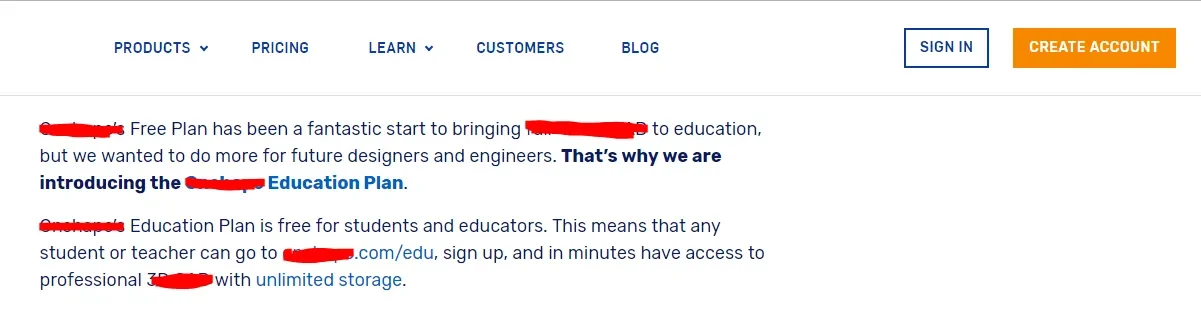
The education plan on this site was advertised in its support articles as a gold premium plan available free to any student, described in the report as worth $1500 per month.
The report describes two common ways sites process student applications:
- Manual review. The student submits a university ID by email and a team member reviews it before enabling the plan. The report names Slack and GitHub as examples of this approach.
- Automatic verification. The student registers with an email address on a university domain, such as
[redacted], and once the email is verified the education plan is enabled directly. Only addresses ending in theedudomain are accepted.
The second approach is the focus of the write-up.
Setup
The researcher used two accounts: a main account that owned a company profile, and a test account registered with an address on an edu domain ([redacted] in the report). The test account was invited to the company as a collaborator. No special tools are described; the work was done with the browser and by sending requests to the application's API.
The precondition for the attack is that the site verifies student status automatically from the email domain and that the same site has a workspace invitation feature whose signup link does not require a separate email confirmation.
Finding it
Reading the support articles of the private program, the researcher found the claim that any student can get the gold premium plan for free. Following the education signup page, the site only accepted addresses on an edu domain, and after signing up it sent a confirmation link to the email address. Without that confirmation the account could not be used. Trying to access the account without confirming the email did not work.
The feature that made the bypass possible is the workspace invitation. When an account owner invites someone to a company, the invited person receives a signup link of this form:
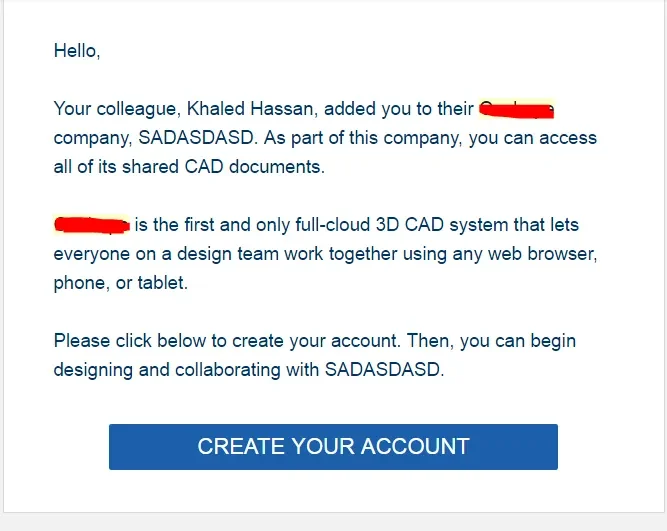
The important property, noted in the report, is that an account created through this invitation link does not need to confirm its email address, because the invitation link is treated as confirmation. Opening the link showed the invited email address reflected on the signup page.
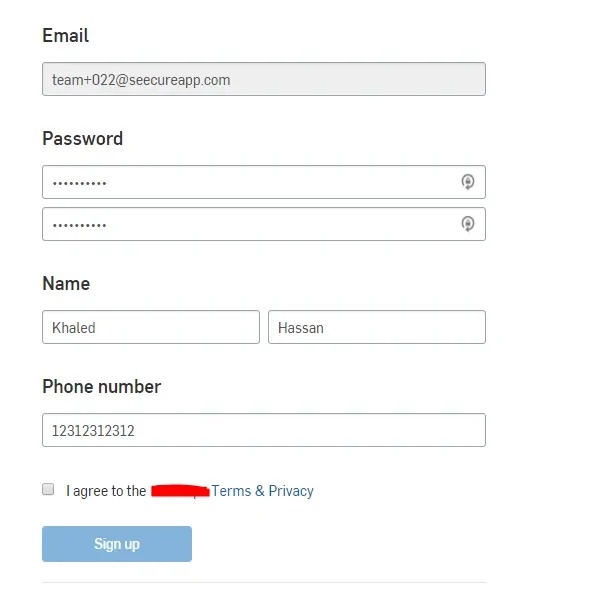
That raised two questions: on what basis is the email address printed on the page, and what happens if the invitation token in the id parameter is replaced with the ID of another user? The researcher suspected an email disclosure issue and went looking for the account ID of the invited test account.
Exploitation
Step 1: invite the education address to the company
The researcher invited the random edu address ([redacted]) to the company profile owned by the main account. This produced the invitation link shown above.
Step 2: list the company users to obtain the EntryID
To find the ID of the invited account, the researcher sent a request to the company users endpoint:
GET/api/companies/9129600280152c09ef1dd588/users HTTP/1.1
Host: redacted.com
Connection: close
Content-Length: 244
Accept: application/json, text/plain, */*
Origin: https://redacted.com
X-XSRF-TOKEN: 3dytjyp1UHElYXBnHPrQKQ==
Accept-Language: en_US
User-Agent: Mozilla/5.0 (Windows NT 6.3; Win64; x64) AppleWebKit/537.36 (KHTML, like Gecko) Chrome/57.0.2987.133 Safari/537.36
Content-Type: application/json;charset=UTF-8
Cookie:
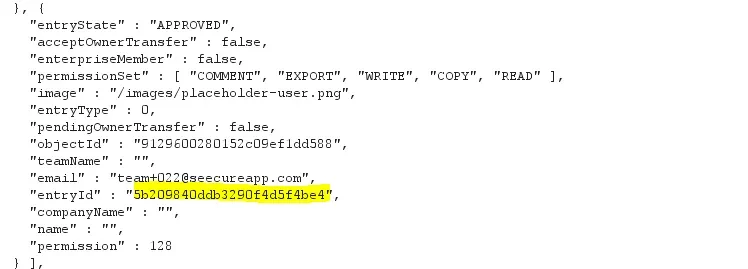
The request carries an X-XSRF-TOKEN header and asks the company endpoint for its user list in JSON. The response showed the EntryID parameter, which the report identifies as the ID of the invited user.
Step 3: replace the invitation token with the EntryID
The researcher replaced the invitation token in the signup URL with the EntryID of the invited test account, giving:
After opening it, the application still printed the email address of the invited account on the page. In the researcher's reading, that meant the EntryID was accepted as a valid invitation token.
Step 4: register through the forged invitation link
The test account was then registered using the EntryID value in place of the invitation token. Because signup through an invitation link does not require email confirmation, the education account was created and treated as verified without any access to the mailbox. The education plan was then activated on the [redacted] account, giving the premium plan for free.
In the researcher's summary, the email verification of education accounts was bypassed by replacing invitation tokens with the EntryID parameter value.
Root cause
The invitation signup flow takes the value in the id parameter, reflects the invited email on the signup page and does not require a separate email confirmation. The lookup accepted the invited user's EntryID in place of the invitation token, so the page still treated it as a valid invitation. Because the invitation flow skips email confirmation by design, accepting a user ID there also skips the confirmation that the education plan depends on. The report does not show the server-side code, so the exact lookup logic is likely as described rather than confirmed.
The education signup page enforced the edu domain and sent a confirmation link, but the invitation path did not require confirmation.
Impact
An attacker who owns a company profile and can invite an address on an edu domain can obtain the premium education plan without being a student and without controlling the mailbox. The report frames the value as $1500 per month per account. The researcher also suspected that placing a user ID in the invitation URL might disclose an email address. The attack requires the ability to create a company and invite users, and knowledge of the target account's EntryID.
Fix
After the report, the site changed student application processing from the automatic method to the manual method, in which applications are reviewed by the team. The report does not describe any change to the invitation flow itself.
Variants to test
- Swap the invitation token in a signup link for a user ID obtained from a members or users API endpoint. A positive result is the signup page rendering the invited address and allowing registration without email confirmation.
- Compare the token format expected by the invitation endpoint with the IDs returned by other endpoints. A positive result is any other identifier type accepted in the same parameter.
- Test whether invitation links skip email confirmation on other products, then check whether any privileged plan or role depends on that confirmation. A positive result is a plan or role enabled on an account whose mailbox was never verified.
- Check whether the invitation page reflects the invited address for arbitrary identifiers. A positive result is email disclosure for accounts the requester did not invite.
What happened, in plain words
Many websites give students a free or discounted premium plan. To decide who is a student, some of them look at the email address you sign up with: if it ends in a university-style domain such as edu, they treat you as a student and switch on the paid plan automatically. The researcher found a way to get that paid plan on one such site without being a student and without ever being able to read the mailbox of the university-style address used. The trick was not a password guess or a clever script. It was a logic flaw: the site had a second way to create an account, the workspace invitation link, and that second way trusted a value it should not have trusted. By putting a user ID where an invitation code was expected, the researcher made the site believe the email address had already been confirmed, and the education plan was switched on.
The site is referred to only as redacted.com. It is a private program the researcher had been invited to, and the product lets people register an account, create a workspace or company profile, and invite other people to collaborate on designs.
A few words before we start, because they come back constantly.
- An account is your personal login on a website: an email address plus a password, and everything the site remembers about you.
- A workspace or company profile is a shared area inside the site where several accounts work together. Think of it as a shared folder in a cloud drive: you own it, and you decide who else can open it.
- An invitation is the message the site sends when the owner of a workspace asks someone else to join. It usually contains a link. Clicking the link takes you to a signup page that already knows which email address was invited.
- A token is a long random-looking string that acts as a key. If you hold the right token, the site lets you do the thing the token is for. A cinema ticket is a fair comparison: the ticket itself is not your identity, but showing it gets you into the room, and a forged ticket that the door accepts is just as good as a real one.
- An API (Application Programming Interface) is the part of a website that answers requests from programs rather than drawing pages for humans. When your browser loads a page you see buttons and text; when a program talks to the API it sends a request and gets back structured data, usually in a format called JSON, which is just text organised as labelled fields. Think of the visible website as the shop counter and the API as the stockroom door: same shop, different entrance, and the stockroom door expects you to ask in a specific format.
- A cookie is a small piece of text your browser stores for a site and sends back with every request. It is how the site recognises you between page loads, so it is effectively your logged-in session. If someone else has your cookie, they are you, as far as the site is concerned.
- A header is a line of extra information attached to a request, such as what browser you use or what format you would like the answer in. Headers are like the label on a parcel: the contents are the request, the label tells the receiving end how to handle it.
- Email verification is the step where the site sends a link to your address and you have to click it before the account becomes usable. It proves you can read that mailbox.
- A logic flaw is a bug where every individual piece of the site works as programmed, but the pieces fit together in a way that lets someone do something the designer did not intend. Nothing crashes; the rules are simply followed in an order that produces the wrong outcome. A self-checkout till that lets you scan a cheap item and put an expensive one in the bag is a logic flaw: the scanner works, the bagging area works, the total is just wrong.
How student plans are usually checked
The report starts with a piece of research that costs nothing: reading. Support articles, product pages, blogs and engineering blogs describe how a site works, and that description is often enough to spot where the rules are soft. While reading the support articles of the private program, the researcher found a claim that any student can get the gold premium plan for free, described in the report as worth $1500 per month.
The screenshot shows that support article, where the free gold premium plan for students is advertised.
The report then splits the ways sites handle student applications into two groups.
- Manual review. You email a photo of your university ID to the support address, a person looks at it, and if it seems genuine they switch the plan on for your account. The report names Slack and GitHub as examples of sites that work this way. This is slow but hard to fake, because a human is looking at evidence.
- Automatic verification. You register with an address on a university domain, such as
[redacted], and as soon as the address is verified the education plan is switched on. The site trusts the domain: only addresses ending ineduare accepted. This is fast and needs no staff, but everything now depends on the site being sure that you really control that mailbox.
The second method is what the rest of the write-up is about.
The setup
Two accounts were used. The first is the main account, which owns a company profile. The second is a test account registered with an address on an edu domain, written in the report as [redacted]. The test account was invited to the company as a collaborator. No special tools are mentioned: the work was done with a browser and by sending requests to the site's API.
Two conditions have to be true at the same time for the attack to work. The site must decide student status automatically from the email domain, and the same site must have a workspace invitation feature whose signup link does not ask for a separate email confirmation. Either one alone is harmless. Together they leave a gap.
Finding it
Following the education signup page, the site accepted only addresses on an edu domain, and after signing up it sent a confirmation link to the email address. Without clicking that link the account could not be used. The researcher tried to reach the account without confirming the email, and it did not work. So far the site behaved correctly.
The feature that made the bypass possible is the workspace invitation. When the owner of a company invites someone, the invited person receives a signup link of this form:
The screenshot shows the invitation that arrived after the test account was invited to the company, with the signup link in it.
Read the link from left to right. https://redacted.com is the site. /signup/invite is the page that creates an account from an invitation. Then comes a question mark, and after it id=4d0940077e1443a78c29da51. Everything after the question mark is a parameter: a named value passed to the page. The name here is id, and the value is the long string. That string is the invitation token. It is what tells the site which invitation this is, and therefore which email address was invited.
The important property, noted in the report, is that an account created through this invitation link does not need to confirm its email address, because the invitation link itself is treated as the confirmation. The reasoning behind that design is easy to follow: the owner typed the address and the site emailed the link to it, so whoever clicks the link must have read that mailbox. That reasoning holds only if the link can reach nobody except the invited person.
Opening the link showed the invited email address already filled in on the signup page.
The screenshot shows the signup page opened from the invitation link, with the invited email address reflected on it.
That raised two questions. On what basis is the email address printed on the page? And what happens if the invitation token in the id parameter is replaced with the ID of another user? The researcher suspected an email disclosure issue, meaning a way to make the site reveal someone's address, and went looking for the account ID of the invited test account.
Exploitation
Step 1: invite the education address to the company
The researcher invited the random edu address, [redacted], to the company profile owned by the main account. This produced the invitation link shown above. The point of this step is to create a real invitation for an address whose mailbox nobody involved can read. That invitation is the raw material for everything that follows.
Step 2: list the company users to obtain the EntryID
To find the ID of the invited account, the researcher sent a request to the company users endpoint. An endpoint is simply a specific address on the server that answers a specific kind of request; the company users endpoint answers with the list of people in a company.
GET/api/companies/9129600280152c09ef1dd588/users HTTP/1.1
Host: redacted.com
Connection: close
Content-Length: 244
Accept: application/json, text/plain, */*
Origin: https://redacted.com
X-XSRF-TOKEN: 3dytjyp1UHElYXBnHPrQKQ==
Accept-Language: en_US
User-Agent: Mozilla/5.0 (Windows NT 6.3; Win64; x64) AppleWebKit/537.36 (KHTML, like Gecko) Chrome/57.0.2987.133 Safari/537.36
Content-Type: application/json;charset=UTF-8
Cookie:
Line by line, in plain words:
GET/api/companies/9129600280152c09ef1dd588/users HTTP/1.1is the request itself.GETmeans "give me something, I am not changing anything". The path points at the users of one particular company, identified by the long string in the middle.HTTP/1.1is the version of the language being spoken.Host: redacted.comsays which site the request is for. One server can host many sites, so the request has to name the one it wants.Connection: closeasks the server to close the connection after answering, rather than keeping it open for more requests.Content-Length: 244states how many bytes of body follow the headers. This request has no visible body, so the value is simply carried over from the tool that produced the request.Accept: application/json, text/plain, */*tells the server which answer formats are acceptable, with JSON first.Origin: https://redacted.comstates which site the request is coming from. Browsers add this automatically, and servers use it to decide whether a request from another site should be allowed.X-XSRF-TOKEN: 3dytjyp1UHElYXBnHPrQKQ==is a custom header carrying an anti-forgery token. Sites use these to make sure a request really came from their own pages and not from a malicious page open in another tab. TheX-prefix is a convention for custom headers.Accept-Language: en_USsays the requester prefers English.User-Agent: Mozilla/5.0 ... Chrome/57.0.2987.133 Safari/537.36identifies the browser and version. Servers often use it to decide what to send back.Content-Type: application/json;charset=UTF-8says the body, if any, is JSON text encoded in UTF-8.Cookie:is where the session cookie would go. It is empty in the report, so the actual session value is not shown.
The request carries an X-XSRF-TOKEN header and asks the company endpoint for its user list in JSON. The response showed the EntryID parameter, which the report identifies as the ID of the invited user.
The screenshot shows the response from that request, with the EntryID field visible among the company members.
Why this step matters: the invitation link contains a token, and the researcher needed a different kind of identifier, the user's own ID, to test the idea. The company users endpoint returned that ID to the researcher's own account. The researcher was entitled to see it. The question was what else the site would accept it for.
Step 3: replace the invitation token with the EntryID
The researcher replaced the invitation token in the signup URL with the EntryID of the invited test account, giving:
Compare this with the original link. The page is the same, the parameter name id is the same, and only the value changed: the invitation token has been swapped for the user ID. The space after https:// is present in the report as written.
After opening it, the application still printed the email address of the invited account on the page. In the researcher's reading, that meant the EntryID was accepted as a valid invitation token. That is the moment the logic flaw shows itself: the page was supposed to look up an invitation by its token, and it was happy to look up a user by their ID instead, then treat the result as an invitation.
Step 4: register through the forged invitation link
The test account was then registered using the EntryID value in place of the invitation token. Because signup through an invitation link does not require email confirmation, the education account was created and treated as verified without any access to the mailbox. The education plan was then activated on the [redacted] account, giving the premium plan for free.
The screenshot shows the account created through the forged invitation link, with the education plan active.
In the researcher's summary, the email verification of education accounts was bypassed by replacing invitation tokens with the EntryID parameter value.
Here is the whole chain again as the researcher listed it:
-
Invite a random email address,
[redacted], to the company profile you own. -
From the same account, send a
GETrequest to the company users endpoint to get the ID of the[redacted]account. -
Paste that
EntryIDinto the invitation URL:Text https://redacted.com/signup/invite?id=4d0940077e1443a78c29da51 -
Create the account through that URL. Because the invitation flow treats the link as proof of the mailbox, the account is verified, the education plan is switched on, and the premium plan worth $1500 per month is obtained for free.
Why it worked
The invitation signup flow takes the value in the id parameter, reflects the invited email on the signup page and does not require a separate email confirmation. The lookup accepted the invited user's EntryID in place of the invitation token, so the page still treated it as a valid invitation. Because the invitation flow skips email confirmation by design, accepting a user ID there also skips the confirmation that the education plan depends on. The report does not show the server-side code, so the exact lookup logic is likely as described rather than confirmed.
The education signup page enforced the edu domain and sent a confirmation link, and both of those worked. But the invitation path was a separate entry point that did not require confirmation. A lock on the front door is no use if the side door has no lock at all.
What an attacker could get
An attacker who owns a company profile and can invite an address on an edu domain can obtain the premium education plan without being a student and without controlling the mailbox. The report frames the value as $1500 per month per account. The researcher also suspected that placing a user ID in the invitation URL might disclose an email address. The attack requires the ability to create a company and invite users, and knowledge of the target account's EntryID.
How it was fixed
After the report, the site changed student application processing from the automatic method to the manual method, in which applications are reviewed by the team. The report does not describe any change to the invitation flow itself.
Things worth trying on other sites
- Swap the invitation token in a signup link for a user ID obtained from a members or users API endpoint. A positive result is the signup page rendering the invited address and allowing registration without email confirmation.
- Compare the token format expected by the invitation endpoint with the IDs returned by other endpoints. A positive result is any other identifier type accepted in the same parameter.
- Test whether invitation links skip email confirmation on other products, then check whether any privileged plan or role depends on that confirmation. A positive result is a plan or role enabled on an account whose mailbox was never verified.
- Check whether the invitation page reflects the invited address for arbitrary identifiers. A positive result is email disclosure for accounts the requester did not invite.
Glossary
- Account: your personal login on a website, made of an email address, a password and everything the site remembers about you.
- API (Application Programming Interface): the part of a website that answers requests from programs rather than drawing pages for people, usually returning structured data.
- Automatic verification: a check a site performs by itself, here deciding student status from the email domain, with no human reviewing evidence.
- Company profile / workspace: a shared area inside a site that one account owns and can invite other accounts into.
- Cookie: a small piece of text a browser stores for a site and sends back with every request, used to recognise your logged-in session.
- Education plan: a free or discounted premium plan a site offers to students.
- Email verification: the step where a site sends a link to your address and you must click it before the account becomes usable, proving you can read that mailbox.
- Endpoint: a specific address on a server that answers a specific kind of request.
- EntryID: the field in the company users response that holds the ID of a user, as named in the report.
- GET: the kind of request that asks for something without changing anything on the server.
- Header: a line of extra information attached to a request or response, such as the browser type or the accepted answer format.
- HTTP: the language browsers and servers use to exchange requests and responses.
- Invitation: the message a site sends when a workspace owner asks someone to join, usually containing a signup link.
- JSON: a text format for structured data, organised as labelled fields and values.
- Logic flaw: a bug where each part of the site works as programmed but the parts fit together in a way that allows something the designer did not intend.
- Manual review: a check performed by a person, here a team member looking at a submitted university ID before enabling a plan.
- Parameter: a named value passed to a page or endpoint, appearing after the question mark in a URL as
name=value. - Session: the site's memory of you being logged in, carried between requests by a cookie.
- Token: a long random-looking string that acts as a key, letting whoever holds it do the thing it is for.
- User-Agent: a header identifying the browser and version making a request.
- X-XSRF-TOKEN: a custom header carrying an anti-forgery token, used to confirm a request came from the site's own pages.




