Hacking thousands of companies through their helpdesk
Helpdesk systems accepted tickets created by email without verifying the sender, so an attacker could spoof a victim's email address and file a ticket asking support to delete the account or change its email. Support agents treated these tickets as genuine and closed accounts or handed over accounts to the attacker.
 Published on medium.com
I would like to write about my simple and clear security vulnerability that I was able to hack many companies through it, As I found that’s there are thousands of companies are affected by this vulnerability and I couldn’t report every single company about the vulnerability so I would like to publish this writeup to…
The full write-up lives on its author's site
It belongs to its author, so we link to it rather than copy it. The other two tabs are our own rewrites, checked against it.
Context
Many companies run their customer support on a hosted helpdesk such as Zendesk, and route the "contact us" link of the main site to that portal. In the case described here, the support portal was a Zendesk instance at support.redacted.com, and the main application was at www.redacted.com. The program policy contained the following line:
- Security issues on support. redacted.com are out of scope, but If you can escalate the attack to the main application please report to us away.
That line is what made the portal interesting: the portal itself was out of scope, but anything that reached the main application's users through it was in scope.
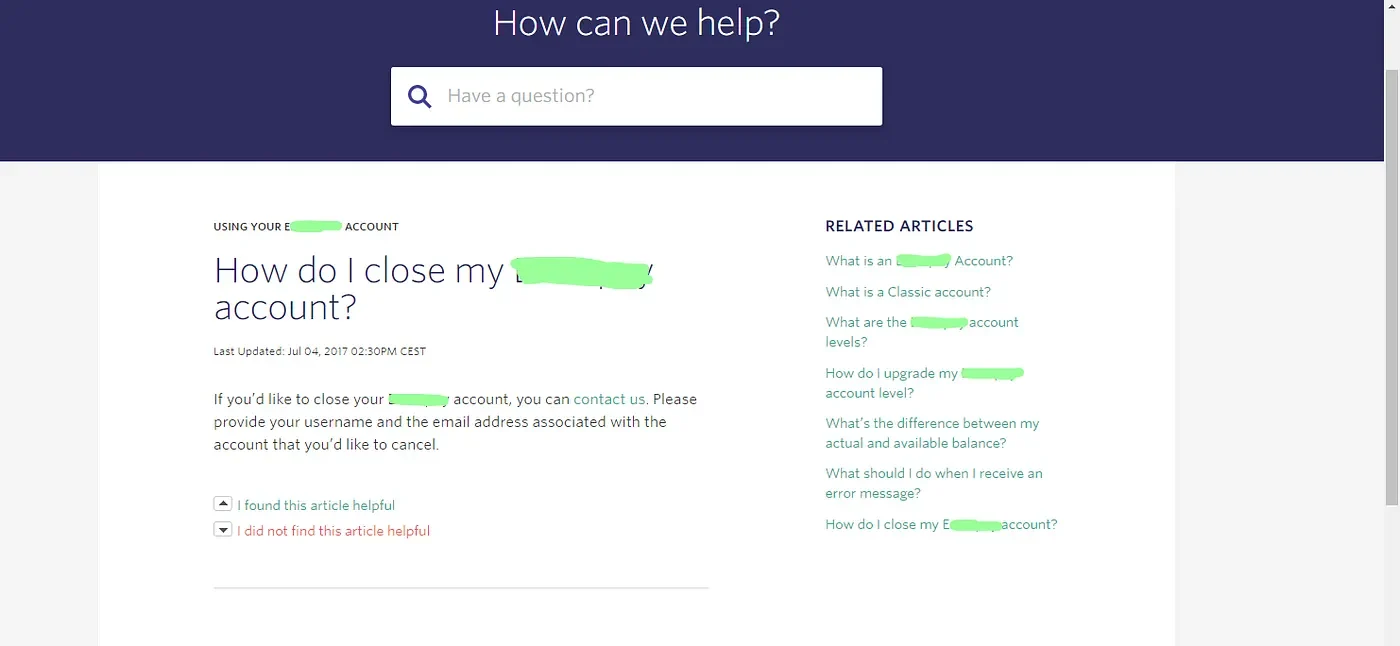
On this site you cannot delete your account from the profile settings. Instead, the support article tells users to open a ticket and ask the support team to delete the account. The "contact us" button redirects to the main login page, because filing a ticket requires an SSO session on the main site:
https://www. redacted.com/login?callback=https://support.redacted.com/hc/en-us&zendesk=zendesk
After logging in, the user can file a ticket asking for deletion, and after a few hours the account is deleted.
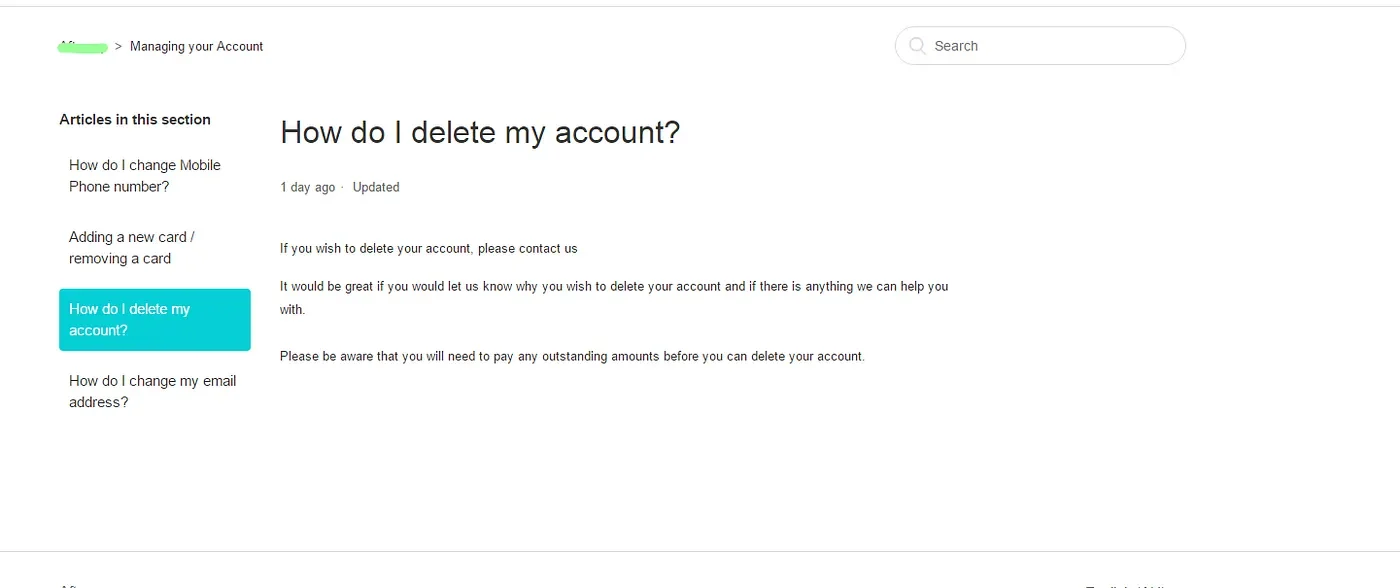
The screenshot shows the support article stating that you cannot delete your account from profile settings.
Setup
No special tooling is described beyond a Zendesk-backed support portal, an email account, and an email spoofing tool. The precondition is a helpdesk that accepts tickets by email and whose operators treat a ticket as proof that the request comes from the account owner. The researcher also needed a target whose policy is to perform account deletion (or email change) on request through support, rather than through self-service settings.
Finding it
The reasoning started from how tickets are created. On the support subdomain, a user must log in to their account to add a new ticket, which is what makes the support team consider all tickets original and created by the website user. But Zendesk also allows creating tickets by email: sending a message to [redacted] or [redacted] from a registered address creates a ticket on the account registered with that address. So an email from [redacted] becomes a ticket on that user's account.
The obvious next question is whether the sender address can be forged, that is, email spoofing. The researcher spoofed an email from his own address to the support mail, asking the team to delete his account forever, and after a few hours received a notification.
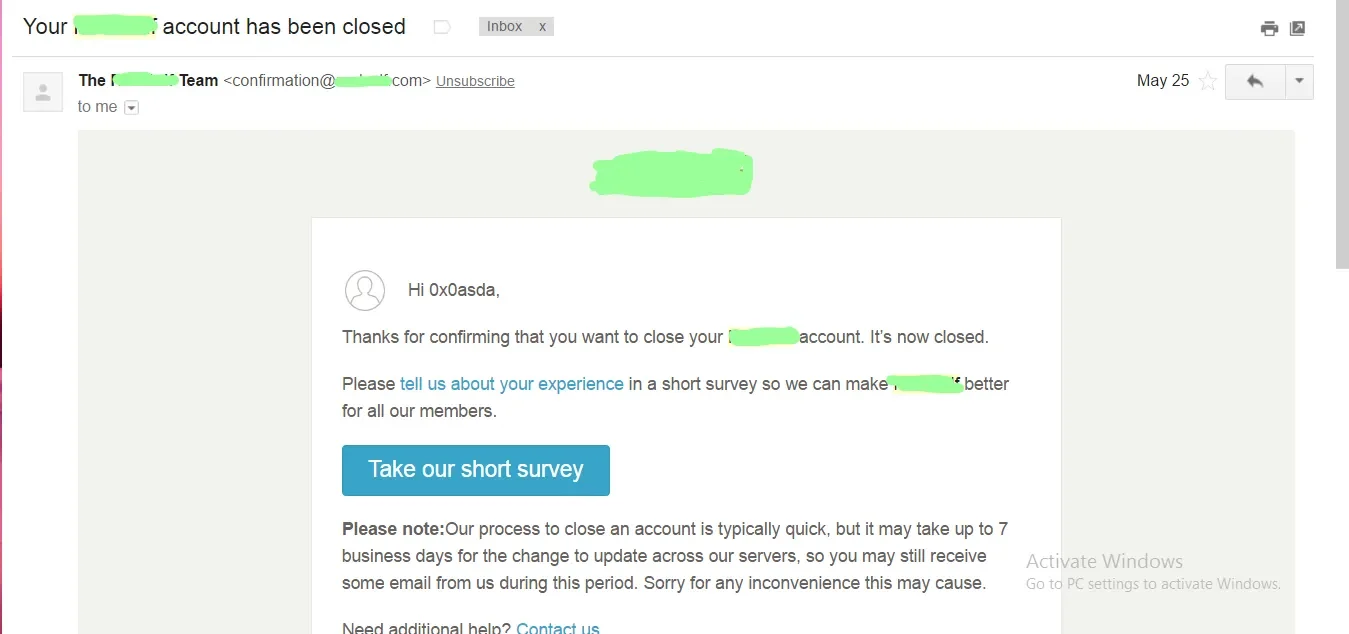
The screenshot shows the support team closing the account even though the ticket was created by a spoofing tool.
The downside noted is that on some websites a deleted account cannot be restored.
At first this looked like a Zendesk vulnerability rather than a flaw in the target site. A colleague, Sherif Afifi, pointed out that Zendesk had already shipped a fix for spoofed tickets under the feature "Enabling sender authentication with DMARC". That means an instance that has not enabled the feature is exposed to this attack. The finding was reported to the program, triaged within three days, and paid a bounty.
Exploitation
Step 1: find targets that delete accounts through support
Companies that do not let you update your email address or delete your account from profile settings were the targets. A Google dork was used to find sites that close your account when you create a support ticket. The screenshots below show examples of such sites.
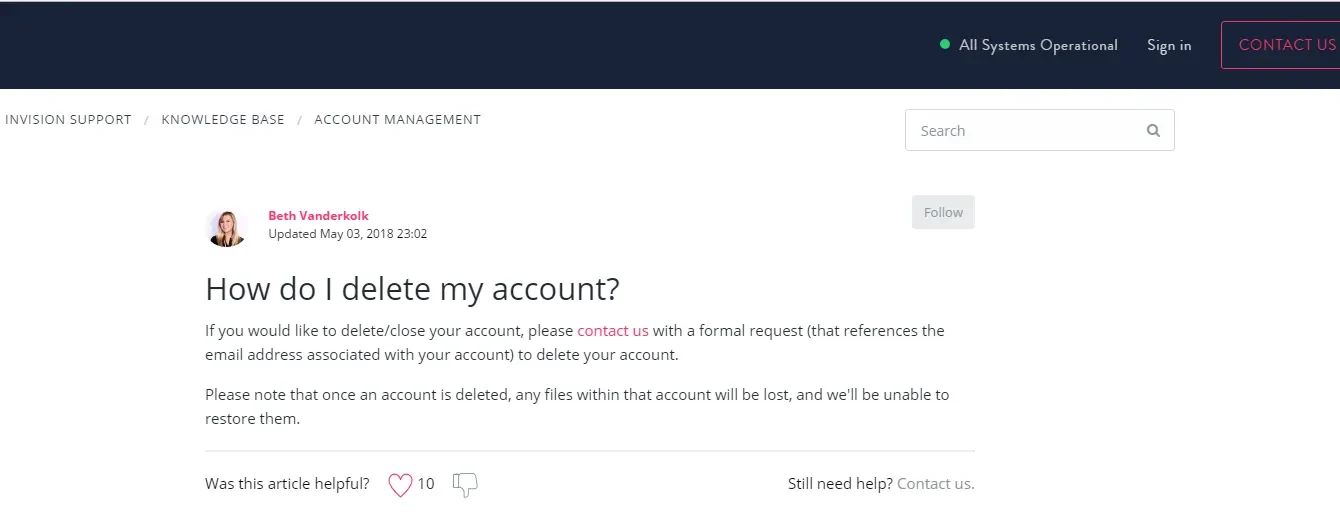
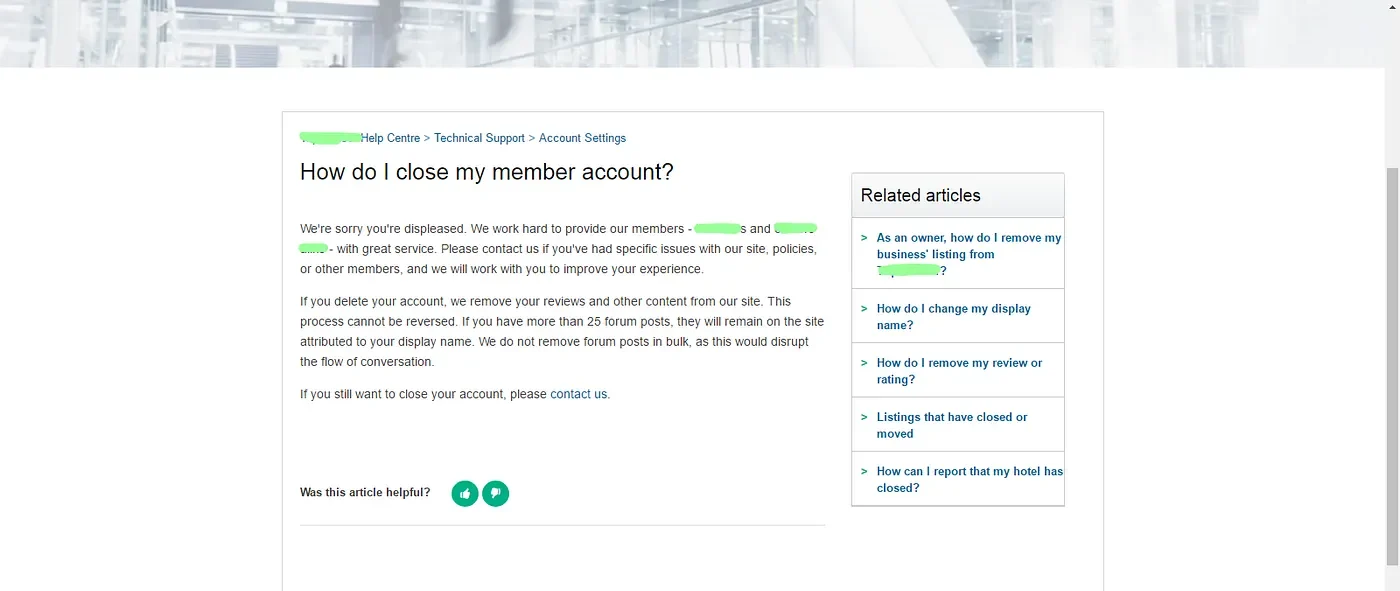
Step 2: spoof a deletion request for your own account
Send an email to the support address with a forged sender, asking for the account to be deleted. The report does not include the raw message. The result was a notification that the account had been closed, which confirmed that the helpdesk acted on a spoofed sender.
Step 3: repeat against other sites
The first site tested closed the report as out of scope.
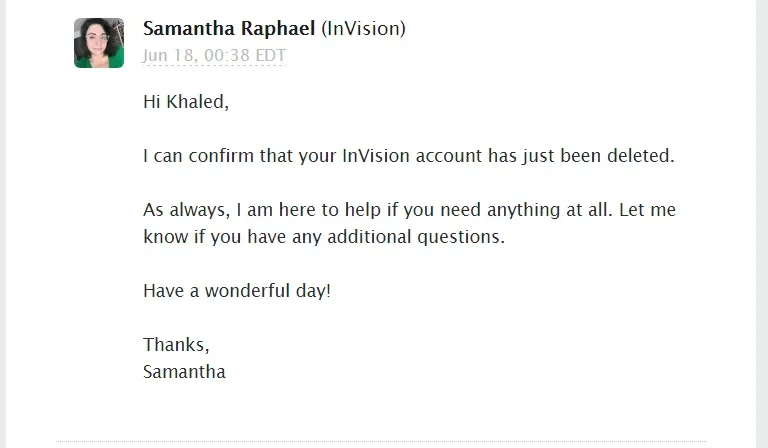
On the second site, an email was spoofed from a colleague's address ("Sherif Afifi") to the support team asking them to close the account, and the account was closed.
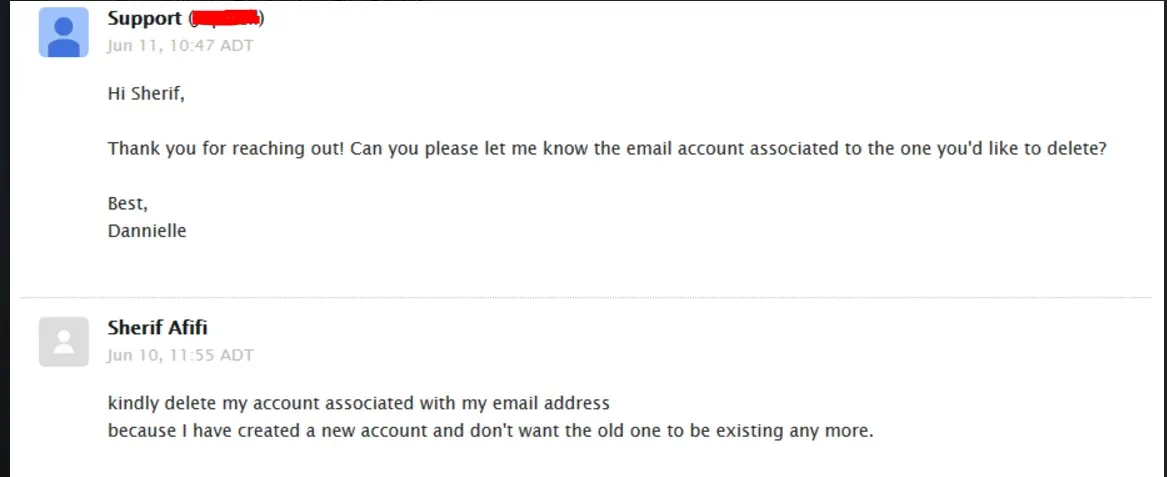
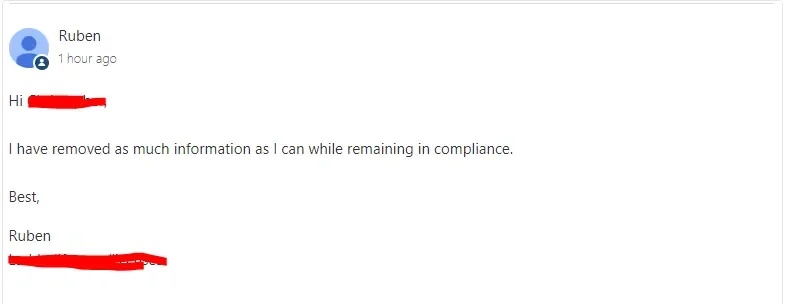
To confirm the deletion of Sherif's account, a second email was sent to a follow-up address that is customised per customer, carrying the ticket ID:
[redacted]
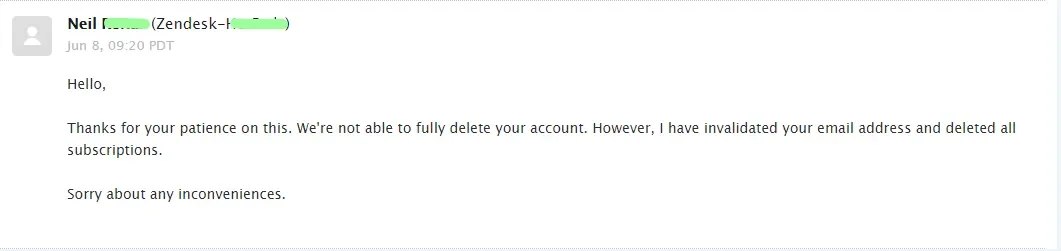
Another site deleted all of the researcher's data from its servers.
In total the attack was tested against more than 30 popular organisations, most with bug bounty programs and some without. The results are summarised in the following image.
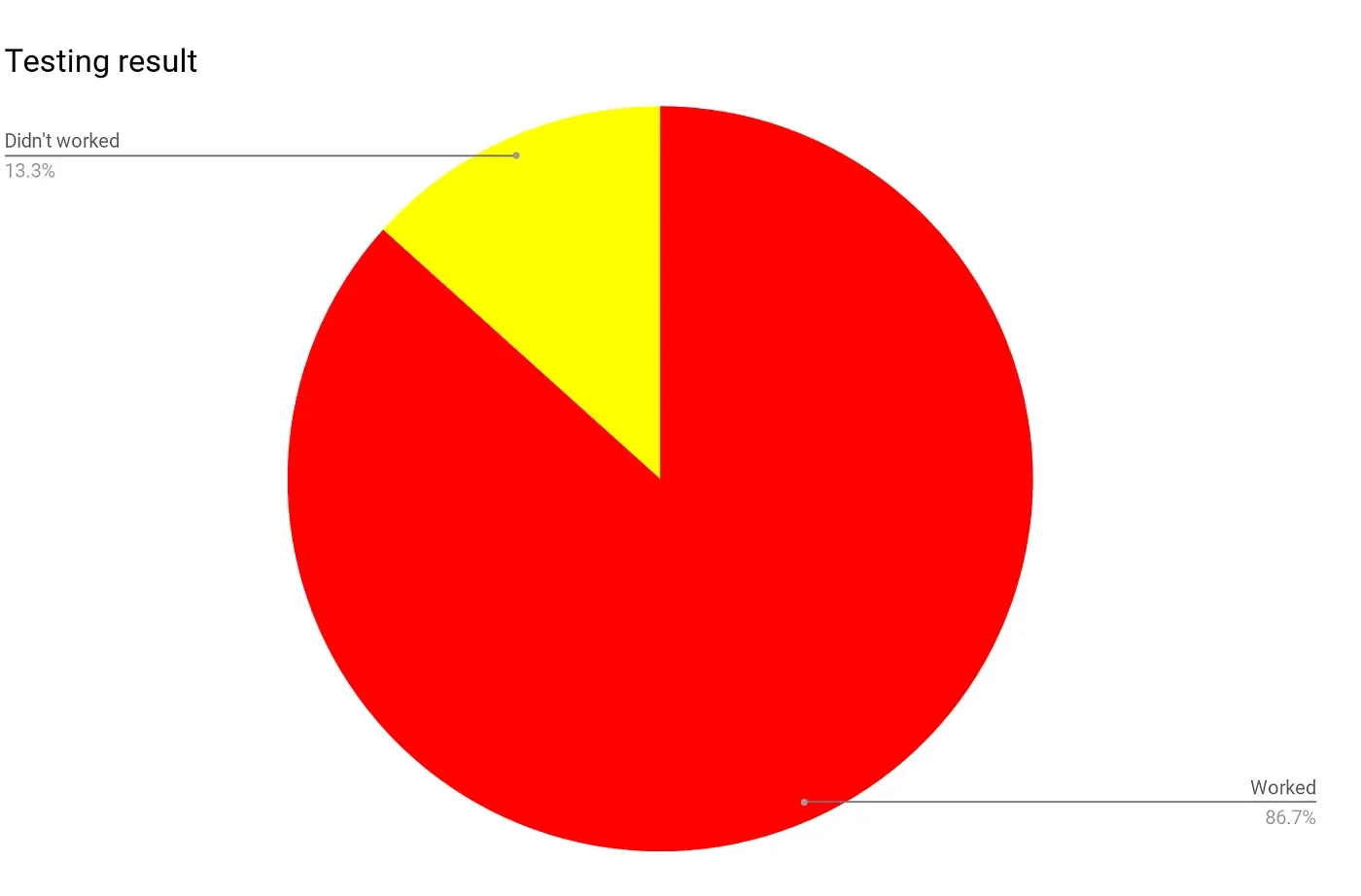
Red means the attack worked and the victim account was closed forever. Yellow means it did not work because the support team required a physical confirmation or a PIN code.
Step 4: turn deletion into account takeover
To raise the impact, the researcher tried a full account takeover. Two accounts were created on a vulnerable site:
[redacted]as the victim[redacted]as the attacker-controlled address
A spoofed email was sent on behalf of the victim account asking the support team to change the account email to [redacted]. To speed things up, the researcher talked to the support team through their chat. The conversation history is shown below.
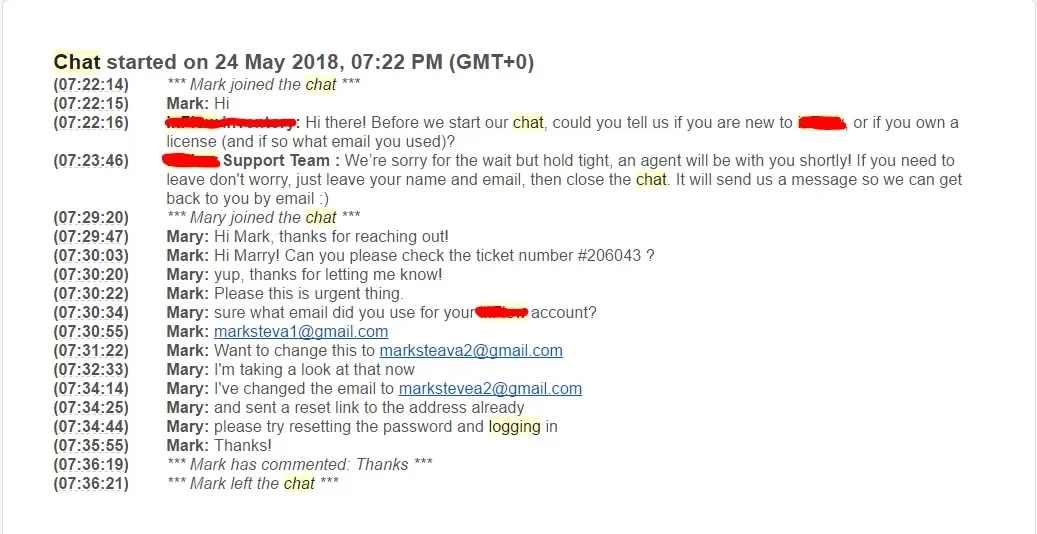
In the chat, Mark is the researcher and Marry is the support agent. What convinced the agent to change the victim's email was that the ticket appeared to have been created on behalf of the victim account: if you can create tickets on an account, the support team treats you as authorised for that account.
The vulnerability was reported to the CEO of the vulnerable company, who paid a bounty for the impact.
Step 5: other helpdesk software
The same steps were tried against FreshDesk, Kayako and similar products. All were found vulnerable to the same attack, including companies that develop their own support system.
Root cause
The support team treats a ticket created by email as an authenticated request from the account owner. A ticket created by email is attached to the account registered with that address, and support agents then treat the ticket as an authenticated request from the account owner. Nothing in that flow verifies that the sender actually controls the mailbox, so a forged sender produces a ticket that looks legitimate. Zendesk's DMARC-based sender authentication addresses this, but it is a feature that has to be enabled on the instance; where it is off, the spoofed ticket is accepted. The same steps were tried against FreshDesk, Kayako and custom support systems, and all were found vulnerable.
Impact
An attacker who can spoof a sender address can ask a support team to close another user's account, and on some sites the deletion is permanent. With the same primitive, the attacker can ask for the account email to be changed to an address they control, which results in full account takeover. The attack was tested against more than 30 organisations, with results shown in the report's summary image. It fails where the support team requires a physical confirmation or a PIN code before acting.
Fix
The recommendations given are:
- On Zendesk, enable the "Authenticating incoming email using DMARC" feature (
https://support.zendesk.com/hc/en-us/articles/115014034108-Authenticating-incoming-email-using-DMARC) to stop spoofed tickets being accepted. - Verify critical actions such as changing the email or closing the account by sending a PIN code to the user's email and asking them to reply with the code.
- As a last resort, disable creating tickets through the support email address.
Variants to test
- Send a spoofed email to the support address asking for account deletion, and watch for a closure notification. A positive result is the account being closed without any further verification.
- Send a spoofed email asking to change the account email to an address you control, then try to log in or reset the password on the new address. A positive result is the email being changed and the account becoming yours.
- Reply to the per-customer follow-up address (for example
[redacted]) with the ticket ID to confirm the action. A positive result is the support team acting on the confirmation without checking the sender. - Repeat the same steps against FreshDesk, Kayako and any custom support system. A positive result is a ticket created on the victim's account from a forged sender.
- Use a Google dork to find sites that close accounts through support tickets, then test the same flow. A positive result is a site whose support team acts on a spoofed request.
What happened, in plain words
A security researcher found that many companies let you do important things to your account, such as deleting it or changing the email address on it, simply by asking their customer support team in a message. The support team works through a helpdesk: a piece of software that collects customer messages (called tickets) in one place so staff can answer them. The researcher realised that the helpdesk believed the sender address on an email without checking it was real. Email lets you write almost any sender address in a message, a trick called spoofing. So the researcher could send a message that looked like it came from someone else, ask the support team to close that person's account, and the team did it. With the same trick he could ask the team to move an account to an email address he controlled, which gave him the whole account. He tested this on more than 30 organisations and on several different helpdesk products, and the results are summarised in his write-up.
This article walks through the same story step by step, explaining every idea from scratch. You only need to know how to use a browser and a computer to follow it.
Introduction
The researcher describes a simple vulnerability that let him affect many companies. He could not report it to every single company, so he published a write-up to help companies secure their support portals. He also notes that the idea may be similar to an earlier public write-up called Ticket-Trick.
A few terms first, because they come up constantly:
- A support portal (or helpdesk) is a website where customers send questions and complaints, and staff answer them. Each conversation is a ticket.
- Zendesk is a company that sells helpdesk software. Many other companies rent it instead of building their own, so their support site is really a Zendesk site with their name on it.
- A vulnerability is a weakness in how a system is built that lets someone make it do something it should not.
- A bug bounty program is an arrangement where a company invites outside researchers to look for vulnerabilities and pays them for valid reports. The rules of the program are its policy, and they say which systems are in scope (fair game) and which are out of scope (not to be tested).
Four weeks before writing, the researcher was working on a private bug bounty program. He spent a few hours and found nothing, because the site was well secured. What kept him going was the size of the payout the program offered. He changed his approach and read the program policy carefully. In the rules he noticed this line:
- Security issues on support. redacted.com are out of scope, but If you can escalate the attack to the main application please report to us away.
Here support.redacted.com is the company's support portal and www.redacted.com is the main website. The word redacted means the real name was removed before publishing. The line says the portal itself is out of scope, but if you can use it to reach the main application, that is in scope. That made the portal worth a look: the door was not the target, but what was behind it was.
He opened the support portal and found it was a Zendesk instance. Zendesk has decent security, so the question became: how can I attack the users of the main website through Zendesk? The options seemed very limited until he saw a support article.
The screenshot shows that support article, which says you cannot delete your account from profile settings.
On this site, the profile settings do not offer a delete button. Instead, the article tells users to open a ticket and ask the support team to delete the account. When he clicked the contact us button, the website sent him to the main login page, because filing a ticket requires you to be logged in to your original account through SSO.
SSO, single sign-on, means one login is shared between several websites. You sign in once on the main site, and the support portal trusts that you are already signed in. It is like a wristband at a festival: you show your ticket once at the gate, and every tent inside accepts the wristband instead of asking for your ticket again.
The redirect looked like this:
https://www. redacted.com/login?callback=https://support.redacted.com/hc/en-us&zendesk=zendesk
Line by line:
https://www. redacted.com/loginis the login page of the main website.?starts the part of a web address that carries extra information, called parameters.callback=https://support.redacted.com/hc/en-ustells the login page where to send you after you sign in: back to the support portal.&separates one parameter from the next.zendesk=zendeskis another parameter, here simply marking that the destination is a Zendesk instance.
After logging in, a user can file a ticket asking the support team to delete the account, and after a few hours the account is deleted. That is the normal, intended flow. The researcher's question was what happens if the request does not come from the account owner.
Deleting or takeover accounts of others
The idea was: what if I submit tickets on behalf of other users, asking the support team to delete their accounts? To understand why that might work, you need to know how tickets get created.
To create a ticket on the support subdomain, a user visits the support subdomain and logs in to their account. That is what makes the support team consider all tickets original and created by the website user. The team's mental model is: a ticket exists, therefore a logged-in customer created it.
But Zendesk has another way in: it allows creating tickets by email. A user can send an email to the company support address and it becomes a new ticket on their account. So when you send an email to [redacted] or [redacted] from your email address, the ticket is created on the account registered with that email. Send from [redacted] and the message becomes a ticket on the account belonging to [redacted].
This is convenient for customers, but it moves the proof of identity from a login to an email address. And an email address in the sender field is just text that the sender writes. That is the gap.
The first attack that comes to mind is email spoofing: writing a sender address in a message that is not yours. Think of a paper letter where the return address on the envelope is written by hand. The postal service does not check it, so anyone can write anyone's address there. Email works in a similar way unless extra checks are switched on.
The researcher tried exactly that. He spoofed an email on behalf of his own address to the support mail, asking them to delete his account forever. After a few hours he got a notification.
The screenshot shows the support team closing his account even though the ticket had been created by a spoofing tool. In other words, the helpdesk acted on a message whose sender was forged.
The bad part of this attack is that on some websites a deleted account cannot be restored. There is no undo.
At first he thought this was a Zendesk vulnerability rather than a flaw in the target website. He contacted his colleague Sherif Afifi, who found that Zendesk had already released a fix for spoofed tickets, under a feature called "Enabling sender authentication with DMARC".
DMARC is an email security standard. In plain terms, it lets the receiving side check whether a message really came from the domain it claims to come from, and what to do when the check fails. It is like a bouncer checking that the name on the guest list matches the person at the door, instead of trusting whatever name the guest says. The catch is that the feature has to be switched on. If a Zendesk instance has not enabled it, that instance is open to this attack.
He reported the vulnerability to the program. Within three days the report was triaged (reviewed and confirmed as valid) and he received a very nice bounty.
Attack Scenarios
Many companies do not let you update your email address or delete your account directly from profile settings. Those companies, which handle such requests through support, were his targets. He made a Google dork to find vulnerable websites.
A Google dork is a search query that uses special operators to find pages with particular characteristics, rather than searching for a word. It is like asking a librarian for every book with a red cover published after 2010, instead of asking for a book about gardening. Here the dork was used to find support sites that close your account when you create a ticket. The screenshots below show examples of such sites.
Attack Scenario #1
These three examples are nothing compared to the other dozens of websites that close your account when you submit a ticket to the support team, so it was a good start to try the attack on them.
The first site
The sad thing here is that the company closed his report as out of scope. Out of scope means the company decided the affected system was not covered by its bug bounty rules, so it would not pay for the report even though the behaviour was real.
The second site
He tried the attack on the second website and spoofed an email on behalf of his colleague's address ("Sherif Afifi") to the support team, asking them to close the account. What he expected happened.
To confirm that he wanted to delete Sherif's account, he sent another email to this address, with the ticket ID:
[redacted]
Line by line:
supportis the mailbox name the company uses for support.+id59628is a tag added to the address. Many mail systems let you add a plus sign and extra text after the mailbox name, and the message still arrives in the same inbox. Companies use this to give each customer a slightly different address.@website.comis the company's domain.
This address is customised only for customers to follow up on their tickets through email. So the follow-up message looked like a normal customer reply carrying the right ticket number, and the team acted on it.
The fourth site
This website deleted all of his data from its servers.
At that point he had tested the attack on more than 30 popular organisations. Most had bug bounty programs and some did not. The results are summarised in the image below.
Red means the attack worked and the victim account was closed forever. Yellow means it did not work because the support team required a physical confirmation or a PIN code.
A PIN code here is a short number sent to the real owner of the account, which the requester has to send back. It proves the requester can read the owner's email, which a spoofed sender cannot do.
Attack Scenario 2: takeover user accounts
Closing someone's account is already serious, but he wanted to make the attack as dangerous as possible, so he looked at whether it could give a full account takeover. Account takeover means getting complete control of someone else's account, as if you were them.
He created an account on a vulnerable website with these details:
[redacted]as the victim[redacted]as the attacker email that he created
He then sent a spoofed email on behalf of the victim account to the support team, asking them to change the account to the new email, [redacted]. If the team did that, the account email would be an address he controlled.
To make it happen quickly, he talked to the support team through their chat. The conversation history is below.
In the chat, Mark is the researcher and Marry is the support agent. What pushed the agent to change the victim account's email was that he had created a ticket on behalf of the victim account. In the team's view, if you can create tickets on an account, you are already authorised enough for that account. The whole attack rests on that assumption.
After reporting the vulnerability to the CEO of the vulnerable company, he was rewarded with a good bounty for the impact.
Attacking non-Zendesk instances
Many software products offer the same helpdesk service, so he started to see whether the attack would work on FreshDesk, Kayako and similar products. By doing the same steps, he found that they were all vulnerable to the same attack. Even companies that develop their own support system were vulnerable too. The same steps worked against FreshDesk, Kayako and custom support systems too.
Conclusion
This is not a genius finding, he writes, but sharing what you have learned, or what is useful and new to the community, always makes him happy. He also encourages readers to use the technique in their own testing, and says many websites will be vulnerable and will consider the report a valid vulnerability.
Recommendation fix
- If you use Zendesk, enable the "Authenticating incoming email using DMARC" feature (
https://support.zendesk.com/hc/en-us/articles/115014034108-Authenticating-incoming-email-using-DMARC) to prevent this from happening. - Critical actions such as changing the email or closing the account should be verified by sending a PIN code to the user's email and asking them to reply with the code.
- The last fix, which he does not like, is to disable creating tickets through your support email address for more security.
Variants to test
- Send a spoofed email to the support address asking for account deletion, and watch for a closure notification. A positive result is the account being closed without any further verification.
- Send a spoofed email asking to change the account email to an address you control, then try to log in or reset the password on the new address. A positive result is the email being changed and the account becoming yours.
- Reply to the per-customer follow-up address (for example
[redacted]) with the ticket ID to confirm the action. A positive result is the support team acting on the confirmation without checking the sender. - Repeat the same steps against FreshDesk, Kayako and any custom support system. A positive result is a ticket created on the victim's account from a forged sender.
- Use a Google dork to find sites that close accounts through support tickets, then test the same flow. A positive result is a site whose support team acts on a spoofed request.
Glossary
- Account takeover: gaining full control of someone else's account, as if you were the owner.
- Bug bounty program: a scheme where a company pays outside researchers for valid vulnerability reports, under published rules.
- Bounty: the payment a company gives for a valid report.
- Callback: a parameter in a web address that tells a login page where to send you after signing in.
- DMARC: an email security standard that lets the receiver check whether a message really came from the domain it claims, and what to do if not.
- Domain: the part of a web or email address after the @ or before the first slash, such as
website.com. - Email spoofing: writing a sender address in an email that is not yours.
- Escalate: to turn a small issue into a bigger one, for example reaching the main application through the support portal.
- Google dork: a search query using special operators to find pages with particular characteristics.
- Helpdesk / support portal: software or a website where customers send questions and staff answer them.
- Instance: one installation of a software product, here one company's copy of Zendesk.
- Out of scope: not covered by a bug bounty program's rules, so not eligible for a reward.
- Parameter: extra information attached to a web address after a
?, inname=valuepairs. - PIN code: a short number sent to the real account owner that the requester must send back to prove they can read the owner's email.
- Policy: the published rules of a bug bounty program, including what is in and out of scope.
- Private program: a bug bounty program that only invited researchers can see and test.
- Redacted: removed or hidden before publishing, usually a real company name or address.
- SSO (single sign-on): one login shared across several websites, so signing in once grants access to all of them.
- Subdomain: a part of a domain placed before it, such as
supportinsupport.website.com. - Ticket: one customer conversation in a helpdesk, with its own ID.
- Triaged: reviewed and confirmed as valid by the receiving team.
- Vulnerability: a weakness in how a system is built that lets someone make it do something it should not.
- Zendesk: a company that sells hosted helpdesk software used by many other companies.




