Assumed Breach Assessment Case Study: Uncovering WeSecureApp’s Approach
The assessment found unauthenticated access to internal dashboards and hardcoded credentials in backups, which exposed AWS keys and allowed the team to access S3 data and assume a high-privilege AWS account. The team could have performed administrative actions such as creating or terminating instances and accessing logs.
 Published on wesecureapp-smm.medium.com
This blog post focuses on the Assumed Breach Assessment approach with an assessment case study performed by the WSA team. But first,
The full write-up lives on its author's site
It belongs to its author, so we link to it rather than copy it. The other two tabs are our own rewrites, checked against it.
Context
This is a case study of an assumed breach assessment carried out by the WeSecureApp (WSA) team against a client. An assumed breach assessment starts from the premise that the threat actor already holds a particular level of access, and asks what that actor could achieve with it. The report lists the kinds of access a client may hand over:
- Internal network through a jump server
- VPN connection to the internal network
- On-site system access
- Access to machines from different segments of the network
Typical goals agreed with the client include reaching PCI-DSS-related sensitive data, obtaining keys and credentials, command execution on internal apps, lateral movement into cloud infrastructure, and unauthenticated access or password resets. In this engagement the only access granted was a VPN connection, and the ultimate goal was lateral movement into the client's cloud infrastructure.
Setup
The team was given an OpenVPN connection and a Google account, [redacted], and was asked to operate as an internal employee. The plan was:
- Enumerate all routes passing through the VPN to establish the attack surface.
- Perform live host discovery and network enumeration on each IP range.
- Obtain a foothold or sensitive information that would allow lateral movement into the cloud infrastructure.
Tools used across the engagement were AngryIP Scanner for live host discovery, Nmap for service enumeration, Dnsenum for DNS brute forcing, the AWS CLI, and PACU, an AWS post-exploitation toolkit.
Finding it
Once connected to the OpenVPN connection, the team landed inside the client network and found several internal IP ranges routed through the VPN. AngryIP Scanner was used to identify live IPs in those ranges, and Nmap enumeration then revealed a variety of services running on the subnets. Manual testing of those services produced the first critical findings.
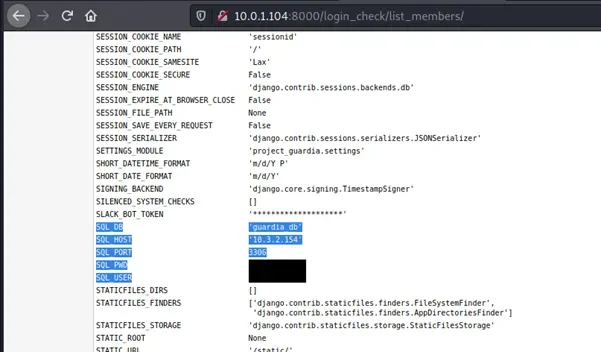
- Several service dashboards were reachable without authentication: Aerospike, Prometheus, Kibana, Cerebro, Sonar and neo4j.
- Multiple service dashboards, RabbitMQ among them, were running with default credentials enabled.
- A Grafana instance was misconfigured to allow users to create accounts on the instance itself. The team registered with the email address they had been given,
[redacted], logged in successfully, and could view sensitive statistics about the company's infrastructure, including the AWS Billing dashboard and EBS usage.
To widen the attack surface the team ran DNS brute forcing with Dnsenum to look for internal subdomains of company.com. This did not turn up an application that could be used to get a foothold on the network.
Exploitation
Step 1: Unauthenticated Zeppelin notebook leaks AWS keys
The team found Zeppelin, an online notebook service, running without any authentication. It held two notebooks. One of them contained code snippets with sensitive details: S3 buckets, access keys and secret keys.
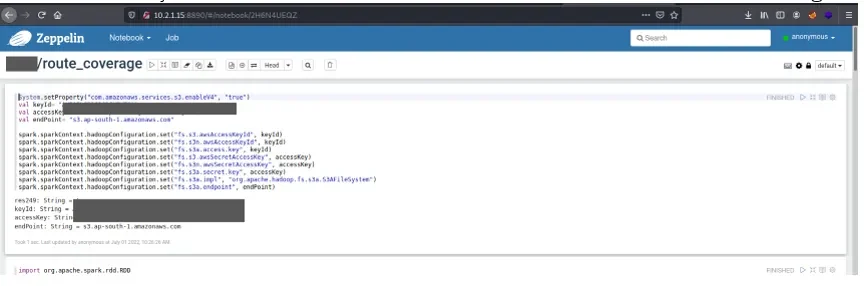
Step 2: Dumping S3 buckets with the leaked keys
The secret keys gave access to the S3 bucket, and the team dumped a large amount of data from the buckets. Exploring multiple buckets showed that the AWS keys belonged to the user "research team" and granted access to sensitive information, including the latest GitLab backups, old HR data and financial data.
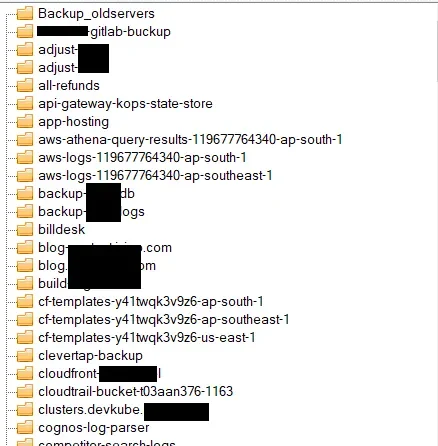
Step 3: Hardcoded FTP credentials in a GitLab backup
The app-config.properties file inside the GitLab backup contained hardcoded TSRTC FTP credentials. The team tried them against an FTP server running on one of the IPs that was publicly accessible, and logged in successfully. The server held data belonging to TSRTC. The team stopped there rather than exploiting the service further. Multiple other hardcoded credentials were also found in the backup files.
Step 4: Instance creation and termination with the research team account
Further enumeration showed that the AWS account belonged to the "Research Team" and that the user had permission to create and terminate instances. The team created a T2 Micro instance from this account and tried terminating it.
Step 5: Credentials in the SQL DB backup
The SQL DB backup contained hardcoded credentials for various internal MySQL database instances. Many of those databases were not reachable over the OpenVPN connection provided by the client, so the validity of those credentials could not be tested. The backup also yielded embedded QA/Test credentials for third-party integrations including Spicejet, Razorpay and juspay.
Step 6: Clear-text keys in the SQL DB file, enumerated with PACU
The SQL DB file itself contained an access key and secret key for one account in clear text. The team used these keys from their local machine with the AWS CLI and found them valid; they belonged to the systems user. To enumerate the rights of the account, the team used PACU.
Step 7: From systems user to co-founder console access
Enumeration showed the owner of the account was the Co-Founder of the company, which suggested a high-privilege user. The team used the PACU module named console, which uses the GetFederationToken privilege in AWS to fetch a temporary federation URL that can be used to access the console of that user. The user had been misconfigured and the GetFederationToken policy was assigned to the account.
The account had admin privileges on the AWS environment. With those, the team could have:
- Creating/Deleting ec2 instances.
- Deleting S3 buckets.
- Terminating existing running ec2 instances.
- Adding our SSH Keys to KMS and attaching them to EC2 instances leading us to gain RCE on any instance.
- Viewing and modifying guard duty logs, CloudTrail logs and traffic rules, VPC groups and perform actions on many such critical services in use.
- Get access to KMS Service.
- Create new users and generate new access keys.
Step 8: GCP management console with over-permissive permissions
The team also gained access to the GCP Management Console with overly permissive permissions enabled. Enumeration of permissions showed that [redacted] had persistent access to the company's GCP platform. There was not much data stored at the GCP level, but the permissions were still a flash point for an internal threat actor, who could create services and perform GCP operations. The user had the right to create projects and apply for an OAuth consent form.
In this scenario the team dumped the email addresses of 1600 users in the company.com organisation. Because GCP use was very limited in the company's infrastructure, the team could not move laterally within GCP.
Root cause
The engagement exposed multiple vulnerabilities rather than a single bug:
- Internal service dashboards (Aerospike, Prometheus, Kibana, Cerebro, Sonar, neo4j, Zeppelin) were exposed without authentication, and RabbitMQ ran with default credentials.
- Grafana allowed self-registration, so the provided Google account was enough to obtain a session and read infrastructure statistics.
- Secrets were stored in clear text in places reachable from the internal network: AWS access and secret keys in a Zeppelin notebook and in a SQL DB file, and FTP, MySQL and third-party integration credentials in GitLab and SQL backups.
- AWS IAM was over-permissive: the research team user could create and terminate instances, and the systems user, owned by the Co-Founder, had admin privileges and the
GetFederationTokenpolicy assigned, which allowed console access to be obtained. - The provided Google account had persistent, over-permissive access to GCP, including the right to create projects and apply for an OAuth consent form.
Impact
Starting from VPN access alone, the team reached large volumes of sensitive data: GitLab backups, old HR data and financial data in S3; TSRTC data on a publicly accessible FTP server; and email addresses of 1600 users in the company.com organisation. With admin privileges on the AWS environment, the account could have been used to create or delete EC2 instances, delete S3 buckets, terminate running instances, add SSH keys to KMS and attach them to EC2 instances for RCE, view and modify GuardDuty and CloudTrail logs and traffic rules and VPC groups, access KMS, and create new users and access keys. The GCP permissions allowed creating services and projects and applying for an OAuth consent form, though the limited GCP footprint prevented lateral movement there. Some MySQL credentials from the SQL DB backup could not be validated because those databases were not reachable over the VPN.
Fix
The report gives the following recommendations:
- Enable proper authentication mechanisms for all web-based services, particularly those containing sensitive data.
- Disable debug mode in all Django instances and ensure sensitive information is not leaked through it.
- Enable proper access controls and restrict access to sensitive data, including dashboard credentials and AWS keys.
- Enable proper encryption for sensitive information and ensure it is properly stored and secured.
- Ensure AWS credentials are not hardcoded in GitLab backup files or any other locations.
- Regularly review and monitor the permissions granted to AWS users.
- Regularly perform security assessments to identify and remediate potential vulnerabilities.
Variants to test
- Unauthenticated internal dashboards. Probe Aerospike, Prometheus, Kibana, Cerebro, Sonar, neo4j, Zeppelin and similar tools on internal ranges. A positive result is a dashboard or notebook listing that loads without credentials and exposes configuration, queries or secrets.
- Default credentials on message brokers and admin panels. Try vendor defaults against RabbitMQ and comparable services. A positive result is a successful login to the management interface.
- Self-registration on monitoring tools. Attempt to create an account on Grafana and similar instances using an email address you control. A positive result is a working session that shows infrastructure statistics such as billing or storage dashboards.
- Secrets in notebooks and backups. Search Zeppelin notebooks,
app-config.propertiesfiles and SQL DB backups for access keys, secret keys and connection strings. A positive result is a key that the AWS CLI accepts, or credentials that log in to a reachable service. - IAM privilege enumeration. With any valid key, use PACU or the AWS CLI to list attached policies and permissions. A positive result is permissions beyond the role's purpose, such as instance creation and termination, or
GetFederationTokenon a high-privilege account. - Console access via federation. Where
GetFederationTokenis granted, use the PACUconsolemodule to obtain a temporary federation URL. A positive result is console access to the account, especially one owned by a privileged user. - Cloud identity over-permission. Enumerate the permissions of the identity you were given in GCP and other clouds. A positive result is the ability to create projects, apply for OAuth consent forms, or otherwise act beyond the intended scope.
What happened, in plain words
A security company called WeSecureApp was hired by a client to answer one question: if someone already had a way into the company's private network, how much damage could they do? This kind of job is called an assumed breach assessment. The name says it all: instead of trying to break in from the outside, everyone pretends the break-in has already happened, and the testers start from inside.
Think of it like a fire drill. Nobody actually sets the building on fire. The fire brigade is given a key, walks in through the front door, and then checks how far the smoke would spread, which doors are locked, and where the fire exits are. Here, the "key" was a VPN connection, and the "building" was the client's internal network and cloud accounts.
The testers were also given a company Google account, [redacted], and told to behave like an ordinary employee. From that modest starting point they found unlocked dashboards, passwords written in plain text inside backup files, and cloud keys that gave them the ability to create and destroy servers. By the end they could have taken over large parts of the company's cloud setup. The point of the exercise was to find all of this before a real attacker did.
What an assumed breach assessment is
An assumed breach assessment is a security test that starts from the premise that the attacker already holds a particular level of access. The question is not "can they get in?" but "now that they are in, what can they reach?"
The report lists the kinds of access a client may hand over to the testers:
- Internal network through a jump server
- VPN connection to the internal network
- On-site system access
- Access to machines from different segments of the network
A jump server is a computer that sits at the edge of a private network and is used as a stepping stone to reach the machines inside. A VPN (virtual private network) is a secure tunnel: your computer connects to the company's network over the internet and then behaves as if it were plugged in at the office. "Different segments of the network" means the network is divided into zones, like floors in a building, and each zone holds different systems.
Typical goals agreed with the client include:
- Getting access to PCI-DSS-related sensitive data.
- Getting access to sensitive data which may include keys, credentials, etc.
- Command execution on internal apps
- Lateral movement to cloud infra.
- Unauthenticated access or password resets
A few of those need explaining. PCI-DSS is a set of rules for companies that handle payment card data, so "PCI-DSS-related sensitive data" means card numbers and similar. Credentials are the username and password (or key) that prove who you are. Command execution means being able to run your own instructions on someone else's computer, which is usually the moment an attacker gains real control. Lateral movement means hopping from one system to another, the way a burglar moves from room to room once inside. Unauthenticated access means getting in without proving who you are at all.
In this engagement the only access granted was a VPN connection, and the ultimate goal was lateral movement into the client's cloud infrastructure.
Setting up
The team was given an OpenVPN connection and a Google account, [redacted], and was asked to operate as an internal employee. OpenVPN is one popular piece of software for building those secure tunnels. The Google account was the kind of account any employee would have, which matters later: it turned out to be enough to register on an internal dashboard.
The plan was:
- Enumerate all routes passing through the VPN to establish the attack surface.
- Perform live host discovery and network enumeration on each IP range.
- Obtain a foothold or sensitive information that would allow lateral movement into the cloud infrastructure.
Enumerating routes means listing the paths the VPN tunnel offers into the company network, so the testers know which addresses they can even reach. Live host discovery means finding which computers are switched on and answering. Network enumeration means asking each of those computers what services it offers. The attack surface is the total set of things an attacker could try to interact with. A foothold is a first small bit of access that can be built on.
An IP address is the number that identifies a computer on a network, a bit like a postal address. An IP range is a block of those addresses, for example all addresses starting with the same few numbers.
The tools used across the engagement were:
- AngryIP Scanner, a simple program that pings a range of addresses and reports which ones answer.
- Nmap, a scanner that asks each live machine which services (web server, database, file server and so on) it is running.
- Dnsenum, a tool that guesses internal subdomain names to see which ones exist.
- AWS CLI, Amazon's command-line tool for controlling cloud resources.
- PACU, an AWS post-exploitation toolkit, meaning a collection of ready-made attacks for once you already hold cloud keys.
Finding a way in
Once connected to the OpenVPN connection, the team landed inside the client network and found several internal IP ranges routed through the VPN. AngryIP Scanner was used to identify live IPs in those ranges, and Nmap enumeration then revealed a variety of services running on the subnets. Manual testing of those services produced the first critical findings.
A subnet is a slice of an IP range, the way a street is a slice of a city. "Manual testing" means a human opened each service in a browser or with a tool and looked at what came back, rather than relying only on automated scanners.
- Several service dashboards were reachable without authentication: Aerospike, Prometheus, Kibana, Cerebro, Sonar and neo4j.
- Multiple service dashboards, RabbitMQ among them, were running with default credentials enabled.
- A Grafana instance was misconfigured to allow users to create accounts on the instance itself. The team registered with the email address they had been given,
[redacted], logged in successfully, and could view sensitive statistics about the company's infrastructure, including the AWS Billing dashboard and EBS usage.
A dashboard is a web page that shows the state of a system: graphs, tables, settings. These particular tools are common in engineering teams. Aerospike is a database. Prometheus collects measurements (metrics) from servers. Kibana is a search and charting front end, usually for logs. Cerebro is an administration page for Elasticsearch, a search database. Sonar is a code quality tool. neo4j is a graph database. RabbitMQ is a message queue, software that passes messages between programs. Grafana draws graphs from monitoring data.
"Without authentication" means the page simply loaded, with no login prompt. "Default credentials" means the software shipped with a well-known username and password (often admin/admin) and nobody changed them, so anyone who knows the product can log in. Self-registration means the login page has a "create account" button, so anyone who can reach the page can make themselves a user. EBS is Amazon's virtual disk storage for cloud servers, and the AWS Billing dashboard shows what the company is spending.
To widen the attack surface the team ran DNS brute forcing with Dnsenum to look for internal subdomains of company.com. This did not turn up an application that could be used to get a foothold on the network.
DNS is the internet's phone book: it turns a name like company.com into an IP address. A subdomain is a name in front of the main one, such as wiki.company.com or intranet.company.com. DNS brute forcing means trying a long list of likely subdomain names to see which ones exist. It is like ringing every doorbell on a street to find out who is home. In this case it found nothing useful, so the team went back to the services they had already discovered.
Exploitation
Step 1: Unauthenticated Zeppelin notebook leaks AWS keys
The team found Zeppelin, an online notebook service, running without any authentication. It held two notebooks. One of them contained code snippets with sensitive details: S3 buckets, access keys and secret keys.
Zeppelin is a web application where people write and run snippets of code in a notebook, a bit like a shared document that can also execute what is written in it. Because it was open to anyone on the network, anyone could read those notebooks.
S3 is Amazon's cloud file storage: a "bucket" is a folder in the cloud. An access key and secret key are the username and password equivalent for a program talking to Amazon's cloud. They are long strings of characters. Whoever holds them can act as that user, without any browser login.
Why this step mattered: the team did not need to guess anything. The keys were sitting in a readable notebook, so the next step was simply to try them.
Step 2: Dumping S3 buckets with the leaked keys
The secret keys gave access to the S3 bucket, and the team dumped a large amount of data from the buckets. Exploring multiple buckets showed that the AWS keys belonged to the user "research team" and granted access to sensitive information, including the latest GitLab backups, old HR data and financial data.
Dumping means copying everything out. GitLab is a service where developers keep and share source code; a backup is a copy kept in case the original is lost, and it usually contains everything, including configuration files and passwords. HR data is information about employees, such as salaries and personal records.
Why this step mattered: the keys were not just valid, they belonged to a team whose job involved research, and that team had been given far more access than research needs.
Step 3: Hardcoded FTP credentials in a GitLab backup
The app-config.properties file inside the GitLab backup contained hardcoded TSRTC FTP credentials. The team tried them against an FTP server running on one of the IPs that was publicly accessible, and logged in successfully. The server held data belonging to TSRTC. The team stopped there rather than exploiting the service further. Multiple other hardcoded credentials were also found in the backup files.
A properties file is a plain text settings file used by many programs; app-config.properties is a common name for one. Hardcoded means the value was typed directly into the file by a developer instead of being stored somewhere safe, so anyone who reads the file learns the secret. FTP (file transfer protocol) is an old way of sending files between computers, and it normally asks for a username and password. TSRTC is the name of the organisation whose data was on that server.
Why this step mattered: a backup is supposed to help you recover, but here it became a treasure map. The team logged in to confirm the credentials worked, then stopped, because the goal was to show the risk, not to cause harm.
Step 4: Instance creation and termination with the research team account
Further enumeration showed that the AWS account belonged to the "Research Team" and that the user had permission to create and terminate instances. The team created a T2 Micro instance from this account and tried terminating it.
An instance is a virtual server in the cloud: a computer that exists only as software and can be switched on or off in minutes. T2 Micro is one of the smallest, cheapest instance sizes Amazon offers. Terminating means deleting it permanently.
Why this step mattered: creating and deleting servers is a powerful ability. It proves the account is not limited to reading data; it can change the company's infrastructure.
Step 5: Credentials in the SQL DB backup
The SQL DB backup contained hardcoded credentials for various internal MySQL database instances. Many of those databases were not reachable over the OpenVPN connection provided by the client, so the validity of those credentials could not be tested. The backup also yielded embedded QA/Test credentials for third-party integrations including Spicejet, Razorpay and juspay.
SQL is the standard language for asking questions of a database, and an SQL DB backup is a copy of such a database saved to a file. MySQL is one popular database product. QA/Test credentials are the logins used while testing software before release, often weaker and less guarded than production ones. Third-party integrations are outside services the company connects to, here payment and travel services.
Why this step mattered: even credentials that cannot be tested are still a finding, because an attacker with a different network position might be able to use them. The team was honest about what it could and could not confirm.
Step 6: Clear-text keys in the SQL DB file, enumerated with PACU
The SQL DB file itself contained an access key and secret key for one account in clear text. The team used these keys from their local machine with the AWS CLI and found them valid; they belonged to the systems user. To enumerate the rights of the account, the team used PACU.
Clear text means not scrambled or encrypted in any way: anyone who opens the file can read it. The AWS CLI is a program you run in a terminal on your own computer to send commands to Amazon's cloud. Enumerating rights means asking the cloud service what this particular key is allowed to do.
Why this step mattered: a key is only as dangerous as its permissions. Before going further, the team needed to know what this one could reach.
Step 7: From systems user to co-founder console access
Enumeration showed the owner of the account was the Co-Founder of the company, which suggested a high-privilege user. The team used the PACU module named console, which uses the GetFederationToken privilege in AWS to fetch a temporary federation URL that can be used to access the console of that user. The user had been misconfigured and the GetFederationToken policy was assigned to the account.
A module is a ready-made piece of code inside a toolkit that performs one specific task. The console is the web page where a person manages their cloud account by clicking, rather than typing commands. Federation is a way for one system to vouch for a user to another; GetFederationToken is an AWS permission that hands out a temporary pass. A policy is a written rule saying what an account may and may not do. High privilege means the account can do a great deal.
Why this step mattered: the team did not crack any password. A permission had been granted that should not have been, and that permission was enough to obtain a temporary login link to a very powerful account.
The account had admin privileges on the AWS environment. With those, the team could have:
- Creating/Deleting ec2 instances.
- Deleting S3 buckets.
- Terminating existing running ec2 instances.
- Adding our SSH Keys to KMS and attaching them to EC2 instances leading us to gain RCE on any instance.
- Viewing and modifying guard duty logs, CloudTrail logs and traffic rules, VPC groups and perform actions on many such critical services in use.
- Get access to KMS Service.
- Create new users and generate new access keys.
Admin privileges means the account can do essentially anything in that cloud account. EC2 is Amazon's service for virtual servers. SSH keys are the cryptographic keys used to log in to a Linux server without a password. KMS is Amazon's key management service, which stores encryption keys. RCE (remote code execution) means running your own commands on a machine you are not sitting at. GuardDuty is Amazon's threat detection service, and CloudTrail records who did what in the account. VPC is a virtual private cloud, the network the cloud servers live in.
Why this list mattered: it shows the difference between reading data and controlling it. An attacker with these rights could delete evidence, lock out the real owners, and run code on servers at will.
Step 8: GCP management console with over-permissive permissions
The team also gained access to the GCP Management Console with overly permissive permissions enabled. Enumeration of permissions showed that [redacted] had persistent access to the company's GCP platform. There was not much data stored at the GCP level, but the permissions were still a flash point for an internal threat actor, who could create services and perform GCP operations. The user had the right to create projects and apply for an OAuth consent form.
GCP is Google Cloud Platform, Google's equivalent of Amazon's cloud. Persistent access means the access does not expire on its own. Over-permissive means the account was given more rights than its job needs. An OAuth consent form is the screen that asks a user to approve an app's access to their account; being able to apply for one means being able to set up an app that asks other people for permissions.
In this scenario the team dumped the email addresses of 1600 users in the company.com organisation. Because GCP use was very limited in the company's infrastructure, the team could not move laterally within GCP.
Why this step mattered: even where there is little data, an account that can create new services is a risk, because an attacker could build something new rather than steal something old.
Why it worked
The engagement exposed multiple vulnerabilities rather than a single bug:
- Internal service dashboards (Aerospike, Prometheus, Kibana, Cerebro, Sonar, neo4j, Zeppelin) were exposed without authentication, and RabbitMQ ran with default credentials.
- Grafana allowed self-registration, so the provided Google account was enough to obtain a session and read infrastructure statistics.
- Secrets were stored in clear text in places reachable from the internal network: AWS access and secret keys in a Zeppelin notebook and in a SQL DB file, and FTP, MySQL and third-party integration credentials in GitLab and SQL backups.
- AWS IAM was over-permissive: the research team user could create and terminate instances, and the systems user, owned by the Co-Founder, had admin privileges and the
GetFederationTokenpolicy assigned, which allowed console access to be obtained. - The provided Google account had persistent, over-permissive access to GCP, including the right to create projects and apply for an OAuth consent form.
IAM stands for identity and access management: the part of a cloud that decides who may do what. Hygiene here means the everyday housekeeping of security, such as changing default passwords and keeping secrets out of files.
What it meant for the client
Starting from VPN access alone, the team reached large volumes of sensitive data: GitLab backups, old HR data and financial data in S3; TSRTC data on a publicly accessible FTP server; and email addresses of 1600 users in the company.com organisation. With admin privileges on the AWS environment, the account could have been used to create or delete EC2 instances, delete S3 buckets, terminate running instances, add SSH keys to KMS and attach them to EC2 instances for RCE, view and modify GuardDuty and CloudTrail logs and traffic rules and VPC groups, access KMS, and create new users and access keys. The GCP permissions allowed creating services and projects and applying for an OAuth consent form, though the limited GCP footprint prevented lateral movement there. Some MySQL credentials from the SQL DB backup could not be validated because those databases were not reachable over the VPN.
How to fix it
The report gives the following recommendations:
- Enable proper authentication mechanisms for all web-based services, particularly those containing sensitive data.
- Disable debug mode in all Django instances and ensure sensitive information is not leaked through it.
- Enable proper access controls and restrict access to sensitive data, including dashboard credentials and AWS keys.
- Enable proper encryption for sensitive information and ensure it is properly stored and secured.
- Ensure AWS credentials are not hardcoded in GitLab backup files or any other locations.
- Regularly review and monitor the permissions granted to AWS users.
- Regularly perform security assessments to identify and remediate potential vulnerabilities.
Django is a popular framework for building websites in Python; its debug mode is a setting used while developing that shows detailed error pages, which can reveal internal details if left on in production. Encryption means scrambling data so that only someone with the right key can read it. Remediate means fix.
What to look for in your own environment
- Unauthenticated internal dashboards. Probe Aerospike, Prometheus, Kibana, Cerebro, Sonar, neo4j, Zeppelin and similar tools on internal ranges. A positive result is a dashboard or notebook listing that loads without credentials and exposes configuration, queries or secrets.
- Default credentials on message brokers and admin panels. Try vendor defaults against RabbitMQ and comparable services. A positive result is a successful login to the management interface.
- Self-registration on monitoring tools. Attempt to create an account on Grafana and similar instances using an email address you control. A positive result is a working session that shows infrastructure statistics such as billing or storage dashboards.
- Secrets in notebooks and backups. Search Zeppelin notebooks,
app-config.propertiesfiles and SQL DB backups for access keys, secret keys and connection strings. A positive result is a key that the AWS CLI accepts, or credentials that log in to a reachable service. - IAM privilege enumeration. With any valid key, use PACU or the AWS CLI to list attached policies and permissions. A positive result is permissions beyond the role's purpose, such as instance creation and termination, or
GetFederationTokenon a high-privilege account. - Console access via federation. Where
GetFederationTokenis granted, use the PACUconsolemodule to obtain a temporary federation URL. A positive result is console access to the account, especially one owned by a privileged user. - Cloud identity over-permission. Enumerate the permissions of the identity you were given in GCP and other clouds. A positive result is the ability to create projects, apply for OAuth consent forms, or otherwise act beyond the intended scope.
A connection string is the line of text a program uses to reach a database, usually including the address and the login. Attached policies are the rules currently linked to an account.
Glossary
- Access key / secret key: the pair of long strings a program uses to prove its identity to a cloud service, like a username and password for software.
- Admin privileges: permission to do essentially anything within a cloud account.
- AngryIP Scanner: a simple program that checks a range of IP addresses and reports which computers answer.
- Assumed breach assessment: a security test that starts from the premise that the attacker already has some access, and measures what they could reach from there.
- Attack surface: everything an attacker could try to interact with.
- Authentication: the process of proving who you are, usually with a username and password or a key.
- AWS: Amazon Web Services, Amazon's cloud platform.
- AWS CLI: Amazon's command-line tool for controlling cloud resources from a terminal.
- Backup: a copy of data kept in case the original is lost.
- Bucket: a folder in cloud file storage, here Amazon S3.
- Clear text: stored without any scrambling, so anyone who opens the file can read it.
- CloudTrail: Amazon's record of who did what in a cloud account.
- Command execution: running your own instructions on someone else's computer.
- Connection string: the line of text a program uses to reach a database, usually including its address and login.
- Console: the web page where a person manages a cloud account by clicking.
- Credentials: the username and password, or key, that prove who you are.
- Dashboard: a web page showing the state of a system through graphs, tables and settings.
- Debug mode: a development setting that shows detailed error pages, which can leak internal details if left on.
- Default credentials: the well-known username and password a product ships with, which should always be changed.
- Django: a popular framework for building websites in Python.
- DNS: the system that turns names like
company.cominto IP addresses. - DNS brute forcing: trying a long list of likely subdomain names to see which exist.
- Dnsenum: a tool that performs DNS brute forcing.
- Dumping: copying out everything from a system or storage location.
- EBS: Amazon's virtual disk storage for cloud servers.
- EC2: Amazon's service for virtual servers.
- Encryption: scrambling data so only someone with the right key can read it.
- Enumerate: to list systematically, whether routes, hosts, services or permissions.
- Federation: one system vouching for a user to another and handing out a temporary pass.
- Foothold: a first small bit of access that can be built on.
- FTP: an old protocol for sending files between computers, normally protected by a username and password.
- GCP: Google Cloud Platform, Google's cloud.
- GetFederationToken: an AWS permission that hands out a temporary pass, which can be abused to reach a console.
- GitLab: a service where developers keep and share source code.
- Grafana: software that draws graphs from monitoring data.
- GuardDuty: Amazon's threat detection service.
- Hardcoded: typed directly into a file by a developer instead of stored safely, so anyone reading the file learns the secret.
- High privilege: an account that can do a great deal.
- Host discovery: finding which computers on a network are switched on and answering.
- HR data: information about employees, such as salaries and personal records.
- IAM: identity and access management, the part of a cloud that decides who may do what.
- Instance: a virtual server in the cloud, a computer that exists only as software.
- IP address: the number that identifies a computer on a network.
- IP range: a block of IP addresses.
- Jump server: a computer at the edge of a private network used as a stepping stone to reach machines inside.
- Kibana: a search and charting front end, usually for logs.
- KMS: Amazon's key management service, which stores encryption keys.
- Lateral movement: hopping from one system to another once inside a network.
- Module: a ready-made piece of code inside a toolkit that performs one specific task.
- MySQL: a popular database product.
- neo4j: a graph database.
- Nmap: a scanner that asks each live machine which services it is running.
- OAuth consent form: the screen that asks a user to approve an app's access to their account.
- OpenVPN: software for building secure tunnels into a private network.
- Over-permissive: given more rights than the job needs.
- PACU: an AWS post-exploitation toolkit, a collection of ready-made attacks for when you already hold cloud keys.
- PCI-DSS: a set of rules for companies that handle payment card data.
- Persistent access: access that does not expire on its own.
- Policy: a written rule saying what an account may and may not do.
- Prometheus: software that collects measurements from servers.
- Properties file: a plain text settings file used by many programs.
- QA/Test credentials: logins used while testing software before release, often weaker and less guarded.
- RabbitMQ: a message queue, software that passes messages between programs.
- RCE: remote code execution, running your own commands on a machine you are not sitting at.
- Remediate: to fix.
- S3: Amazon's cloud file storage.
- Self-registration: a login page that lets anyone create an account.
- Sonar: a code quality tool.
- SQL: the standard language for asking questions of a database.
- SSH keys: cryptographic keys used to log in to a Linux server without a password.
- Subdomain: a name in front of a main domain, such as
wiki.company.com. - Subnet: a slice of an IP range.
- T2 Micro: one of the smallest, cheapest instance sizes Amazon offers.
- Terminating: deleting a cloud server permanently.
- Third-party integration: an outside service the company connects to.
- Unauthenticated access: getting in without proving who you are at all.
- VPN: a secure tunnel that makes your computer behave as if it were plugged in at the office.
- VPC: a virtual private cloud, the network cloud servers live in.
- Zeppelin: a web application where people write and run snippets of code in a notebook.