Monday, March 4, 2019
GitHub repository wikis can be configured to allow any GitHub user to edit them, and this setting often remains enabled when a repository is made public. An attacker could create or edit wiki pages to include malicious links or content, enabling social engineering or reputational damage.

Download github-wiki-auditor.py here
The full write-up lives on its author's site
It belongs to its author, so we link to it rather than copy it. The other two tabs are our own rewrites, checked against it.
Context
GitHub repositories can have an associated wiki, and that wiki can be configured so that anyone with a GitHub account is able to edit it. The author of this write-up was managing a bug bounty programme when several researchers submitted the same report: "World-editable GitHub Repository Wiki Pages". The initial reaction was scepticism, since wikis are collaborative by nature, so the issue was investigated to decide whether it was a genuine security problem.
The conclusion is that it is a security issue when the world-editable state is unintentional. The feature itself is normal GitHub behaviour: a repository owner can enable a wiki and choose who may edit it.
Setup
The work is a scanning exercise across many GitHub accounts rather than an attack against a single target. The preconditions described are:
- A GitHub account, since anyone with a GitHub account can edit a world-editable wiki.
- A list of GitHub accounts (organisations or users) to check, in a file passed to the script.
- Optionally a username and password for the script, and an output file.
The tool is github-wiki-auditor.py, published by the author at https://github.com/SmeegeSec/GitHub-Wiki-Auditor. No versions of GitHub, browsers or libraries are given.
Finding it
The starting observation is that all GitHub repositories have the ability to have associated wiki pages, and those pages may be world-editable by anyone with a GitHub account.
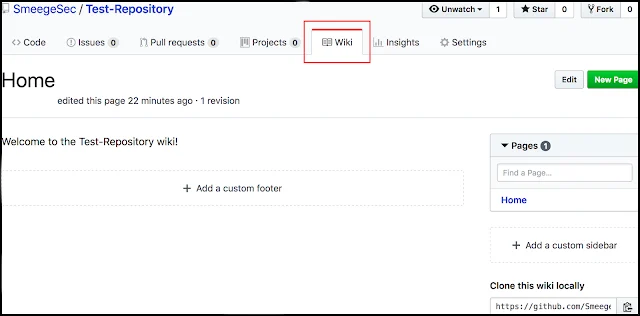
The image accompanies the description of world-editable wiki pages.
The author argues that most developers and engineers at large companies do not know that a setting controlling this exists, which leaves wiki pages that any GitHub account can modify. The usual cause identified is a repository being open sourced: an engineer changes a repository from private to public, and the enabled wiki setting stays as it was, so editing is no longer limited to collaborators or internal employees. A second point is that repository owners are not notified when their wiki pages change, and notifications cannot be configured for this, so changes are hard to notice.
Exploitation
Step 1: Confirm the wiki is enabled and editable
The script iterates over a list of GitHub accounts and, for each account, iterates through each repository. For each repository it checks whether the wiki is enabled and, if so, sends a request to create a new page. If the request succeeds, the user is notified and the next repository is checked.
The important property is that the script never actually modifies the wiki pages, because the ability to edit can be confirmed without doing so. The report does not show the request itself, only this description of its behaviour.
Step 2: Run the auditor
Usage:
github-wiki-auditor.py [-h] --accounts_file ACCOUNTS_FILE [--username USERNAME] [--password PASSWORD] [--output_file OUTPUT_FILE]
--accounts_file is required and supplies the accounts to scan. --username and --password are optional credentials. --output_file optionally writes results to a file. -h prints help.
Sample output:
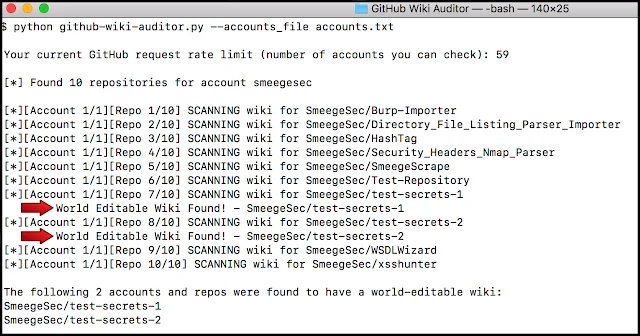
The image shows sample output from the script.
Step 3: Turn findings into reports
The author created a modified version of the script that generates a bounty report submission from the editable wikis it finds. A list of about 100 unique companies was collected from HackerOne and BugCrowd, their GitHub accounts were identified, and the accounts were scanned so that reports could be submitted for each.
Step 4: Submit and observe the response
About 10 separate reports were submitted initially. Most programme managers responded with annoyance, because the author was not the first person to submit the issue, or stated that it was not an actual risk. Two companies responded positively, and both ran their own programme rather than being on a bounty platform. The author's interpretation is that companies running their own programmes are targeted less often with common or low severity issues.
Step 5: Outcome
The author received a first bounty of $500 and a certificate from the other company.
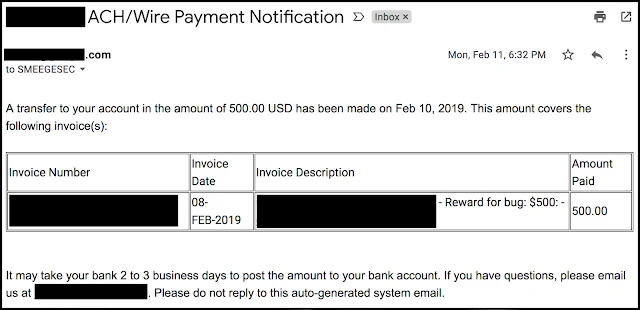
The image accompanies the account of the first bounty and the certificate.
Root cause
The design issue is that wiki edit permissions are a per-repository setting, and there is no account-level setting to manage wiki settings across all repositories. When a repository moves from private to public, the existing wiki configuration is carried over, so a wiki that was editable by collaborators becomes editable by every GitHub account. Owners have no notification when pages change, so the change in exposure and any subsequent edits go unnoticed.
Existing defences do not stop this: the enabled wiki setting persists when a repository becomes public, and the only control is the per-repository "Restrict editing to collaborators only" option. The report does not describe any server-side check that would prevent an unrelated GitHub user from editing once the wiki is world-editable.
Impact
Any GitHub user, without being a collaborator or having any association with the account, can create or edit wiki pages. Using markdown, they can add hyperlinks, images and more. The author judges it fairly easy to build a simple wiki page that social engineers people into installing malicious libraries or navigating to an attacker-owned page. A second impact is reputational damage: editing can be automated, letting a nefarious actor quickly add text and imagery that does not conform to the company's principles.
The impact depends on the world-editable state being unintentional; where a project deliberately allows public editing, the same behaviour is expected.
Fix
For large companies with many public repositories there does not appear to be an account-level setting that manages all repository wiki settings, so control has to be applied per repository with the "Restrict editing to collaborators only" setting (GitHub's "Changing access permissions for wikis" documentation).
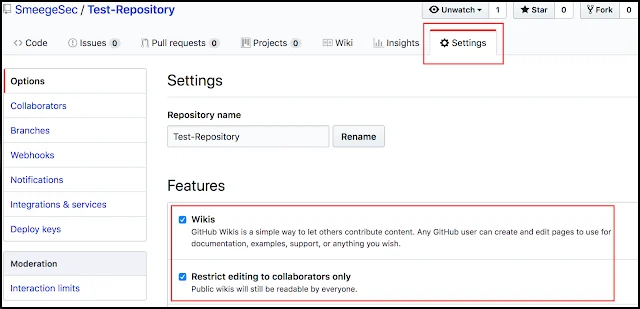
The image accompanies the discussion of the per-repository wiki setting.
Other solutions listed:
- Disable the wiki altogether if it is not needed.
- Educate engineers about the issue and the related wiki settings.
- Periodically audit the account's repositories with
github-wiki-auditor.py. - Create a plugin or service that notifies you when wiki pages change.
The author's opinion is that GitHub should allow certain plans, such as Enterprise customers, to control wiki pages at the account level.
Variants to test
- Scan other organisations that have recently open sourced repositories. A positive result is a repository whose wiki is enabled and where the create-page request succeeds for an account with no collaborator relationship.
- Check repositories migrated from private to public. A positive result is a wiki that remains editable by any GitHub account after the visibility change.
- Look for wikis with no recent owner activity. A positive result is an editable wiki whose pages have not been reviewed by the owner, consistent with the absence of change notifications.
- Test whether wiki edits can be scripted at scale across an account's repositories. A positive result is a batch of successful create-page requests from a single automated run.
- Check whether the same per-repository versus account-level gap exists for other repository features with their own permission settings. A positive result is a feature whose exposure is inherited silently when repository visibility changes.
What happened, in plain words
A security researcher noticed that several people were sending the same bug report to a bug bounty programme he was helping to run. The report was titled "World-editable GitHub Repository Wiki Pages". At first he was puzzled: a wiki is supposed to be something lots of people edit together, so what is the problem?
He looked into it and decided that the problem is real, but only in one situation. If a company deliberately lets anyone edit its wiki, that is normal. If a company does not realise that anyone can edit its wiki, that is a security issue, because strangers can put whatever they like on a page that carries the company's name.
The cause he found is simple. GitHub lets every repository have a wiki, and the wiki has a setting that decides who may edit it. When a repository is private, the wiki setting may limit editing to collaborators. When someone flips the repository from private to public, the wiki setting does not change, so the wiki that was limited to colleagues suddenly becomes editable by every GitHub account in the world. Owners are not told when their wiki pages change, so nobody notices.
To find affected companies quickly, he wrote a small program, github-wiki-auditor.py, that walks through a list of GitHub accounts and their repositories and checks, without changing anything, whether a stranger could create a wiki page. He then used a modified version to write reports automatically, scanned about 100 companies, sent about 10 reports, and eventually earned his first bounty of $500 plus a certificate from a second company.
Below is the whole story, step by step, with every concept explained from scratch.
Background: what GitHub, repositories and wikis are
If you have never used GitHub, here is the short version.
- GitHub is a website where people and companies keep software projects. It is also a social network of sorts: every project has a page, and anyone can create a free account.
- A repository (often shortened to "repo") is one project on GitHub. It holds the project's files and its history of changes. A repository can be private (only invited people can see it) or public (anyone on the internet can see it).
- A wiki is a set of pages that many people can edit, like a shared notebook. Wikipedia is the most famous example. GitHub gives every repository an optional wiki, meant for documentation: installation instructions, frequently asked questions, and so on.
- A collaborator is a GitHub user who has been given permission to work on a repository. Being a collaborator is like being on the staff of a shop: you can go behind the counter.
A wiki page is written in markdown, a simple way of formatting text with plain characters. For example, [text](address) makes a clickable link and  shows an image. Markdown is easy to learn, which is exactly why it matters here: anyone who can edit a wiki page can also add links and pictures to it.
The problem
The author starts from a plain observation: all GitHub repositories have the ability to have associated wiki pages, and those pages could potentially be world-editable, meaning anyone with a GitHub account can change them.
The image accompanies the description of world-editable wiki pages.
Why does this happen? The author says most developers and engineers at large companies do not know that a setting controlling this exists. So wikis end up open to any GitHub account.
Is that a security issue? The author's answer is yes, but only if allowing anyone to edit the wiki pages was unintentional. If a project genuinely wants the whole world to contribute to its documentation, the same behaviour is expected and harmless.
The usual cause he identified is a change of visibility. An engineer decides to open source a project and changes the repository from private to public. The wiki setting stays exactly as it was, so editing is no longer limited to collaborators or internal employees. Think of a meeting room whose door was set to "staff only" and then the whole building is opened to the public: the door setting was never revisited, so now anyone walking in can use the room.
A second point makes this hard to catch: repository owners are not notified when their wiki pages change, and notifications cannot be configured for this. So even after strangers start editing, the owner has no automatic signal that anything happened.
The impact
The impact is straightforward. Any GitHub user, even without being a collaborator or having any association with the account, can create or edit wiki pages. On those pages they can include hyperlinks, images and more, using markdown.
Why does that matter? Because a wiki page sits on the company's own project page, where visitors expect trustworthy information. The author says it would be fairly easy to create a simple wiki page that social engineers people into installing malicious libraries or navigating them to a malicious page owned by the attacker.
Social engineering means tricking people into doing something harmful by abusing their trust, rather than breaking in technically. A page on the official project site saying "install this library to fix the problem" is far more convincing than a random email, because it looks like it comes from the project itself.
A second impact is reputational damage. Editing can be automated, so a nefarious actor could quickly add text and imagery that does not conform to the company's principles. In other words, the company's own pages could be made to say things the company would never say.
The fix
For large companies with many public repositories, the author says there does not appear to be an account-level setting that manages all repository wiki settings at once. Control has to be applied one repository at a time, with the "Restrict editing to collaborators only" setting. He points to GitHub's documentation page "Changing access permissions for wikis".
The image accompanies the discussion of the per-repository wiki setting.
Other solutions he lists:
- Disable the wiki altogether if it is not needed.
- Educate engineers about the issue and the related wiki settings.
- Periodically audit the account's repositories with his script
github-wiki-auditor.py. - Create a plugin or service that notifies you when your wiki pages change.
His own opinion is that GitHub should allow certain plans, such as Enterprise customers, to control wiki pages at the account level, so that one switch covers every repository.
The script
The author wrote github-wiki-auditor.py, published at https://github.com/SmeegeSec/GitHub-Wiki-Auditor. It is a script, meaning a small program you run from a command line rather than a website you click through.
What it does, in his words: it iterates over a list of GitHub accounts and, for each account, iterates through each repository. For each repository it checks whether the wiki is enabled and, if so, sends a request to create a new page. If the request is successful, the user is notified and the next repository is checked.
A request here means a message the script sends to GitHub's servers, the same kind of message your browser sends when you click a button. The script sends a request to create a new page and watches the answer.
The key property is that the script never actually modifies the wiki pages, because the ability to edit can be confirmed without doing so. This matters for two reasons: nothing is damaged on the target's site, and the check stays polite. The report does not show the request itself, only this description of its behaviour.
Running the auditor
Usage:
github-wiki-auditor.py [-h] --accounts_file ACCOUNTS_FILE [--username USERNAME] [--password PASSWORD] [--output_file OUTPUT_FILE]
Line by line, in plain words:
github-wiki-auditor.pyis the name of the program you run.[-h]is optional and prints a help message explaining the options.--accounts_file ACCOUNTS_FILEis required. It names a file that contains the list of GitHub accounts to check. The square brackets around the other options mean they are optional; this one has none, so the script will not run without it.[--username USERNAME]and[--password PASSWORD]are optional credentials. A credential is simply a login: a name and a secret that prove who you are. The script accepts optional username and password values.[--output_file OUTPUT_FILE]optionally writes the results to a file, so you can keep them instead of reading them on screen.
Sample output:
The image shows sample output from the script.
Turning findings into reports
The author then created a modified version of the script that generates a bounty report submission from the editable wikis it finds. In other words, once the script knows which wikis are open, it can draft the text of a report for each one.
He collected a list of about 100 unique companies from HackerOne and BugCrowd and found their GitHub accounts. HackerOne and BugCrowd are bug bounty platforms: websites where companies publish rules for reporting security problems and offer rewards. A bug bounty programme is that arrangement: report a real problem, get paid, within the company's rules.
With the list in hand he could quickly scan multiple accounts and submit bounty reports for each.
Submitting and observing the response
He started by submitting about 10 separate reports. The feedback at first was not great. Most programme managers responded either with annoyance, because he was not the first person to submit this issue, or by stating that it was not an actual risk.
Two companies responded positively, and they had something in common: they ran their own programme and were not on a bounty platform. The author's interpretation is that companies running their own programmes are targeted less often with common or low severity issues. Severity is how serious a problem is judged to be; a low severity issue is a real but minor one.
The outcome
He received his first bounty of $500 and a certificate from the other company.
The image accompanies the account of the first bounty and the certificate.
At that point he had proven the capabilities of the script, received his first bounty, and called it a day.
Why it happens: the root cause
The design issue is that wiki edit permissions are a per-repository setting, and there is no account-level setting to manage wiki settings across all repositories. Permissions are the rules about who is allowed to do what.
When a repository moves from private to public, the existing wiki configuration is carried over, so a wiki that was editable by collaborators becomes editable by every GitHub account. Owners get no notification when pages change, so both the change in exposure and any later edits go unnoticed.
The existing defences do not stop this. The only control is the per-repository "Restrict editing to collaborators only" option. The report does not describe any server-side check that would prevent an unrelated GitHub user from editing once the wiki is world-editable.
Where else to look
The author's approach can be repeated in other places. These are the variations worth trying:
- Scan other organisations that have recently open sourced repositories. A positive result is a repository whose wiki is enabled and where the create-page request succeeds for an account with no collaborator relationship.
- Check repositories migrated from private to public. A positive result is a wiki that remains editable by any GitHub account after the visibility change.
- Look for wikis with no recent owner activity. A positive result is an editable wiki whose pages have not been reviewed by the owner, which fits with the absence of change notifications.
- Test whether wiki edits can be scripted at scale across an account's repositories. A positive result is a batch of successful create-page requests from a single automated run.
- Check whether the same per-repository versus account-level gap exists for other repository features with their own permission settings. A positive result is a feature whose exposure is inherited silently when repository visibility changes.
Glossary
- Bug bounty programme: an arrangement in which a company publishes rules for reporting security problems and pays rewards for valid reports.
- Bug bounty platform: a website such as HackerOne or BugCrowd where many companies' programmes are listed and reports are submitted.
- Bounty: the reward paid for a valid report; here, $500.
- Collaborator: a GitHub user who has been given permission to work on a repository.
- Command line: a text interface where you type the name of a program and its options instead of clicking buttons.
- Credential: a login, such as a username and password, that proves who you are.
- GitHub: a website for hosting software projects, with public and private repositories and optional wikis.
- Markdown: a simple way of formatting text with plain characters, used to write wiki pages, including links and images.
- Permission: a rule about who is allowed to do what with a resource.
- Private / public repository: a private repository is visible only to invited people; a public one is visible to anyone on the internet.
- Repository (repo): one project on GitHub, holding its files and history.
- Request: a message a program or browser sends to a server asking it to do something or return something.
- Script: a small program run from a command line to automate a task.
- Severity: how serious a security issue is judged to be.
- Social engineering: tricking people into harmful actions by abusing their trust rather than breaking in technically.
- Wiki: a set of pages that many people can edit, such as a project's documentation pages on GitHub.
- World-editable: open to editing by anyone with an account, not just collaborators or staff.



