Auth Bypass : A Story of LinkedIn's Sneaky Session Update Bypass

medium.com
Published on medium.com
Bug Bounty
The full write-up lives on its author's site
It belongs to its author, so we link to it rather than copy it. The other two tabs are our own rewrites, checked against it.
Context
LinkedIn, like GitHub, Facebook and some other large platforms, adds a second authentication layer on top of the usual username, password and 2FA login. This layer appears when a user tries to perform a sensitive action, and it puts the account into what the author calls Sudo mode: privileges are elevated either for a set period, for the completion of the action, or until the session token expires through logout or token rotation.
On the web, LinkedIn challenges the user in two ways, which the author identified from the response of a request that is initiated when you try to access the email settings:
challengeType : "Email Pin"challengeType : "SSP_BLOCKING_CHALLENGE"
The author guesses that SSP stands for "Sign-in Security Prompt". The SSP_BLOCKING_CHALLENGE only appears when the same account is signed in on the LinkedIn mobile app, and in that case it is assigned automatically as the value of the challengeType parameter.
The challenge works in two halves:
- The web browser prompts the user to check their mobile app and confirm by tapping "Yes".
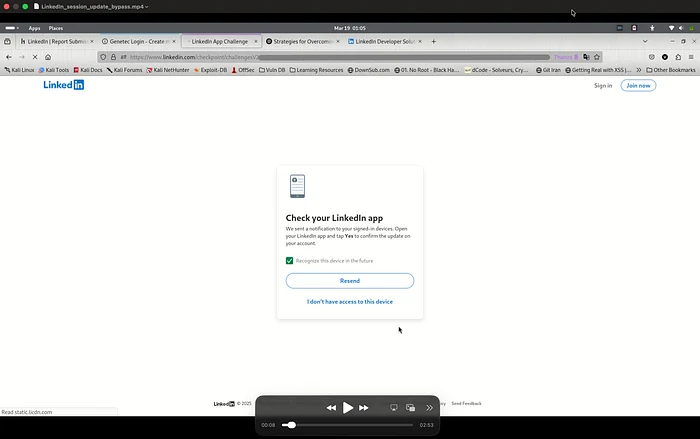
fig 1.1 LinkedIn SSP_BLOCKING_CHALLENGE page, web
- The mobile app prompts the user to confirm whether they are the one requesting access.
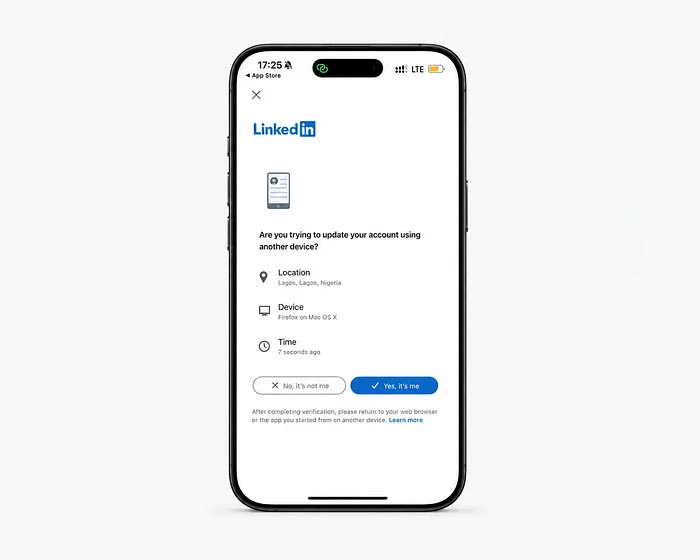
fig 1.2 LinkedIn SSP_BLOCKING_CHALLENGE page, mobile
Setup
The precondition for the whole attack is that the victim's account is signed in on the LinkedIn mobile app, because that is what makes LinkedIn select SSP_BLOCKING_CHALLENGE as the challenge type. The attacker works from a session on the victim's account and uses a proxy tool with request interception enabled. The author does not name the proxy or any versions.
Finding it
After testing the Email Pin challenge without success, the author moved to the other challenge type. The reasoning is that many hunters probably never encountered SSP_BLOCKING_CHALLENGE in the first place, because it only surfaces under the mobile-app condition above. It was not hidden, just conditional.
The vulnerability the author found is in LinkedIn's session update mechanism. It lets an attacker bypass session revalidation and perform sensitive account actions even when the victim explicitly denies the request.
Exploitation
Step 1: trigger the challenge
The attacker attempts to add a phone number or email address on the victim's session and is prompted with the page shown in fig 1.1.
Step 2: start intercepting
The attacker turns on request interception in the proxy tool so that incoming requests are captured.
Step 3: the victim denies
The victim receives the prompt on the signed-in mobile app (fig 1.2), reacts rationally and taps "No, it's not me".
Step 4: capture the request and its response
That denial sends a particular POST request, which the attacker intercepts. The attacker also intercepts the response to this request.
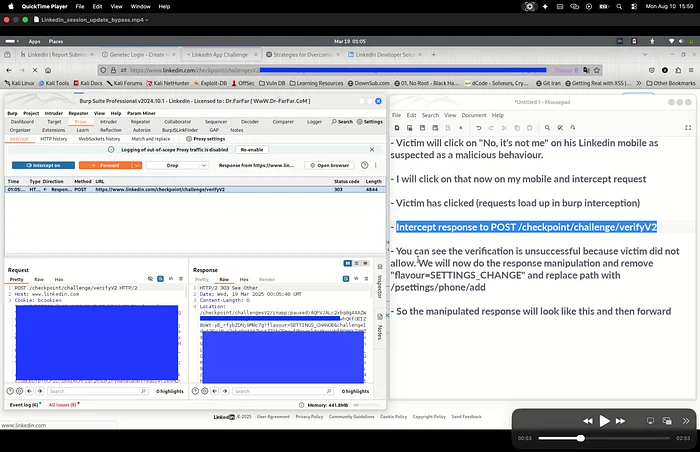
fig 1.3 Request interception
The response contains an endpoint in the Location header, and the path contains a directory named paused. That indicates the session update was unsuccessful and is now on hold because of the victim's action.
Step 5: rewrite the endpoint
The attacker modifies the endpoint from:
/checkpoint/challengesV2/inapp/paused/[redacted]?flavour=SETTINGS_CHANGE&challengeId=to/psettings/phone/add?challengeId=
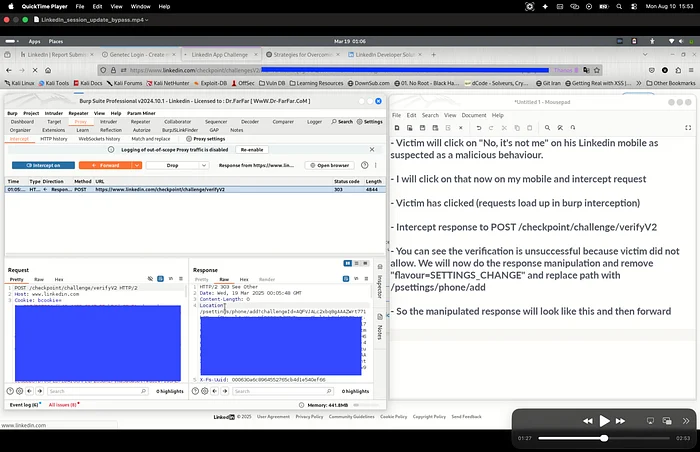
fig 1.4 Response modification
The original path sits under /checkpoint/challengesV2/inapp/paused/, with a long identifier, a flavour=SETTINGS_CHANGE parameter and a challengeId parameter. The rewritten value points at the settings phone-add path instead, carrying challengeId= along.
Step 6: forward and land in the privileged page
Forwarding the modified response elevates the attacker's privilege, and the browser navigates to the phone number page.
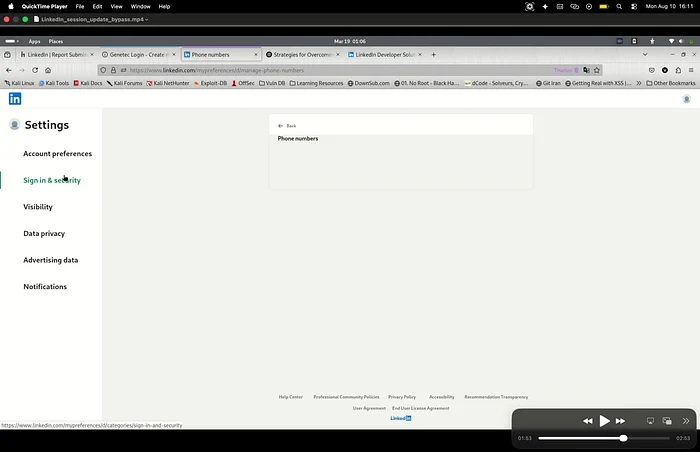
fig 1.5 Successful privilege elevation
From there the attacker can add arbitrary email addresses and phone numbers to achieve an account takeover, or perform other sensitive actions.
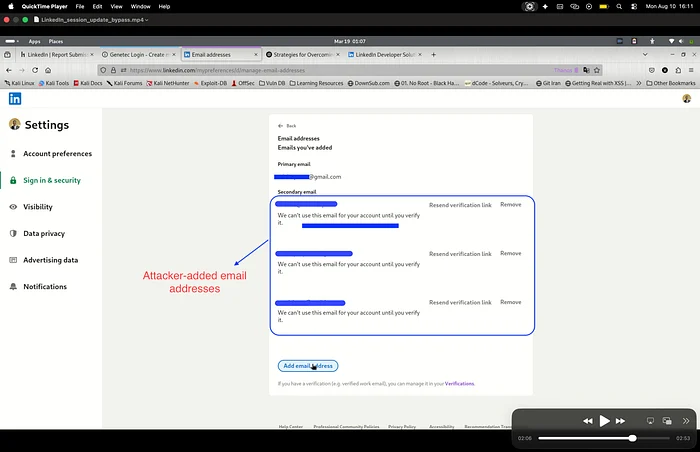
fig 1.6 Successful arbitrary email address addition
Root cause
The flaw is in the session update mechanism. The author frames it as a bypass of session revalidation, achieved by rewriting the endpoint in the Location header of the challenge response. When the victim denies the prompt, the response points to a path containing a directory named paused, indicating the session update is on hold. The attacker rewrites that endpoint to the settings phone-add path and forwards the response. The author frames this as a bypass of session revalidation. The report does not describe the server-side check that should have rejected the rewritten target, so the exact missing validation is not stated.
Impact
An attacker holding a session on the victim's account can elevate that session's privileges and reach sensitive settings even after the victim has explicitly refused the challenge. With that access the attacker can add arbitrary email addresses and phone numbers, which the author says is enough to achieve an account takeover, and can perform other sensitive actions. The attack requires the victim's account to be signed in on the LinkedIn mobile app. In the described flow, the victim's denial produces the intercepted request and response.
Fix
The report does not say what LinkedIn changed. The lesson the author draws is to give extra attention to the points where two different services or platforms connect, web and mobile in this case, for logic, authentication and authorisation checks, and to trace every request initiated by an action to see how each one fits into the engineering goal behind it.
- Other challenge types with a
Locationheader. Trigger any step-up challenge whose response redirects, then rewrite the path to a sensitive endpoint. A positive result is the browser landing on the sensitive page without completing the challenge. - Denial flows on other platforms. Where a mobile approval can be refused, intercept the resulting request and response and look for a paused or failed state expressed as a redirect. A positive result is a redirect target you can change to a privileged path.
- Cross-surface features. Anywhere web and mobile share a session state machine, map each request the action produces and check whether the client controls where the flow continues. A positive result is a server accepting a client-supplied next step that skips revalidation.
- Parameter tampering on the redirect. Change
flavour,challengeIdor the path segments in theLocationvalue and see which combinations are honoured. A positive result is any combination that reaches a settings page while the challenge remains paused.
What happened, in plain words
LinkedIn, like GitHub, Facebook and some other large platforms, adds a second security check on top of the normal login. Normally you log in with a username, a password and a 2FA code. 2FA means "two-factor authentication": a second proof that you are you, usually a short code from your phone. That gets you into your account. But some actions are more dangerous than others, for example changing the email address or phone number attached to the account. If someone else got into your account, those are exactly the actions they would use to lock you out and take it over. So LinkedIn asks you to prove yourself again, right before those sensitive actions.
The author calls this extra state Sudo mode. "Sudo" comes from Unix systems, where the sudo command lets a normal user run a command with administrator rights for a moment. Here it means the same idea: your session is temporarily upgraded so it can do sensitive things. The upgrade lasts either for a set period of time, or until the action is finished, or until the session token expires. A session token is the string your browser stores after you log in, and sends with every request so the server knows who you are. It is like a wristband at an event: show it and you get in without showing your ticket again. Logging out or "token rotation" (the server issuing a fresh token and invalidating the old one) ends the upgrade.
On the web, LinkedIn challenges the user in two ways. The author learned this by looking at the response of a request that is sent when you try to open the email settings. A request is a message your browser sends to a server asking for something; the response is the server's reply. The reply named a field called challengeType, which is simply a label telling the browser which kind of challenge to show:
challengeType : "Email Pin"challengeType : "SSP_BLOCKING_CHALLENGE"
The author guesses that SSP stands for "Sign-in Security Prompt". The SSP_BLOCKING_CHALLENGE only appears when the same account is also signed in on the LinkedIn mobile app. In that case LinkedIn automatically puts that value into the challengeType parameter. A parameter is a named value carried in a request or a URL, like a labelled box: the name is the label, the value is what is inside.
The challenge works in two halves:
- The web browser tells the user to check their mobile app and confirm by tapping "Yes".
fig 1.1 LinkedIn SSP_BLOCKING_CHALLENGE page, web
- The mobile app asks the user to confirm whether they are the one requesting access.
fig 1.2 LinkedIn SSP_BLOCKING_CHALLENGE page, mobile
So the idea is simple: the person at the keyboard on the web has to be confirmed by the person holding the phone. If the phone says no, the web session should not get the upgrade.
Setup
The whole attack depends on one precondition: the victim's account must be signed in on the LinkedIn mobile app. That is what makes LinkedIn pick SSP_BLOCKING_CHALLENGE as the challenge type in the first place. The report does not say which challenge is used when the mobile app is not signed in.
The attacker works from a session on the victim's account. In other words, the attacker already has the victim's logged-in session. The attacker also uses a proxy tool with request interception turned on. A proxy sits between your browser and the internet and can pause traffic. Request interception means the proxy holds each request (and each response) so you can read it, change it, and then let it continue. Think of a postal worker who is allowed to open every letter, rewrite it, and then deliver it. The author does not name the proxy or any versions.
Finding it
The author first tested the Email Pin challenge and got nowhere. So he moved to the other challenge type. His reasoning is that many hunters probably never encountered SSP_BLOCKING_CHALLENGE at all, because it only shows up under the mobile-app condition described above. It was not hidden, just conditional: it appears only when a particular situation is true.
The vulnerability he found is in LinkedIn's session update mechanism. That is the part of the system that decides what happens to your session after a challenge: does it get upgraded, does it stay as it was, does it get paused? The flaw lets an attacker bypass session revalidation. Revalidation means checking again that the session is still allowed to do what it is trying to do. With the bypass, the attacker can perform sensitive account actions even when the victim explicitly denies the request.
Exploitation
Step 1: trigger the challenge
The attacker tries to add a phone number or an email address on the victim's session. LinkedIn responds with the challenge page shown in fig 1.1. The point of this step is to get the challenge started, because the interesting traffic only exists once a challenge is in progress.
Step 2: start intercepting
The attacker turns on request interception in the proxy tool so that incoming requests are captured. The point is to be ready before the victim reacts, so nothing is missed.
Step 3: the victim denies
The victim receives the prompt on the signed-in mobile app (fig 1.2), reacts rationally and taps "No, it's not me". This is the honest response: the victim does not recognise the request, so the challenge should fail.
Step 4: capture the request and its response
That denial sends a particular POST request, which the attacker intercepts. POST is one of the methods a browser uses to send data to a server, as opposed to simply asking for a page. The attacker also intercepts the response to this request.
fig 1.3 Request interception
The response contains an endpoint in the Location header. A header is a labelled line of extra information attached to a request or response. The Location header is special: it tells the browser "go to this address instead". It is the mechanism behind a redirect, where the server answers not with a page but with an instruction to visit another address. The path in that address contains a directory named paused. That indicates the session update was unsuccessful and is now on hold because of the victim's action. In other words, the session update is on hold because of the victim's action.
Step 5: rewrite the endpoint
The attacker modifies the endpoint from:
/checkpoint/challengesV2/inapp/paused/[redacted]?flavour=SETTINGS_CHANGE&challengeId=to/psettings/phone/add?challengeId=
fig 1.4 Response modification
Line by line, in plain words:
/checkpoint/challengesV2/inapp/paused/is the path on LinkedIn's servers.checkpointsuggests a security checkpoint,challengesV2suggests the second version of the challenge system,inappsuggests the in-app (mobile) flow, andpausedis the state the challenge is in after the denial.[redacted]is a long identifier for this particular challenge. It is what ties the request to the specific prompt the victim saw.?starts the query string, the part of a URL that carries parameters.flavour=SETTINGS_CHANGEis a parameter saying what kind of challenge this is: a settings change.&separates one parameter from the next.challengeId=is another parameter, here with an empty value.to/psettings/phone/add?challengeId=is the rewritten part: the attacker has replaced the checkpoint path with the path for adding a phone number in settings, and carriedchallengeId=along with it.
The point of the rewrite is that the browser follows the address in the Location header, and the attacker sets it to the sensitive settings page.
Step 6: forward and land in the privileged page
Forwarding the modified response elevates the attacker's privilege, and the browser navigates to the phone number page.
fig 1.5 Successful privilege elevation
From there the attacker can add arbitrary email addresses and phone numbers to achieve an account takeover, or perform other sensitive actions. Account takeover means getting enough control of someone's account to keep it, typically by adding your own email address or phone number so you can reset the password later.
fig 1.6 Successful arbitrary email address addition
Root cause
The flaw is in the session update mechanism. The author frames it as a bypass of session revalidation, achieved by rewriting the endpoint in the Location header of the challenge response. When the victim denies the prompt, the response points to a path containing a directory named paused, indicating the session update is on hold. The attacker rewrites that endpoint to the settings phone-add path and forwards the response. The author frames this as a bypass of session revalidation. The report does not describe the server-side check that should have rejected the rewritten target, so the exact missing validation is not stated.
Impact
An attacker holding a session on the victim's account can elevate that session's privileges and reach sensitive settings even after the victim has explicitly refused the challenge. With that access the attacker can add arbitrary email addresses and phone numbers, which the author says is enough to achieve an account takeover, and can perform other sensitive actions. The attack requires the victim's account to be signed in on the LinkedIn mobile app. In the described flow, the victim's denial produces the intercepted request and response.
Fix
The lesson the author draws is to give extra attention to the points where two different services or platforms connect, web and mobile in this case, for logic, authentication and authorisation checks, and to trace every request initiated by an action to see how each one fits into the engineering goal behind it.
- Other challenge types with a
Locationheader. Trigger any step-up challenge whose response redirects, then rewrite the path to a sensitive endpoint. A positive result is the browser landing on the sensitive page without completing the challenge. - Denial flows on other platforms. Where a mobile approval can be refused, intercept the resulting request and response and look for a paused or failed state expressed as a redirect. A positive result is a redirect target you can change to a privileged path.
- Cross-surface features. Anywhere web and mobile share a session state machine, map each request the action produces and check whether the client controls where the flow continues. A positive result is a server accepting a client-supplied next step that skips revalidation.
- Parameter tampering on the redirect. Change
flavour,challengeIdor the path segments in theLocationvalue and see which combinations are honoured. A positive result is any combination that reaches a settings page while the challenge remains paused.
Glossary
- 2FA (two-factor authentication): a second proof of identity at login, usually a code from your phone, on top of username and password.
- Account takeover: gaining enough control of someone's account to keep it, often by adding your own email address or phone number.
- API: a way for one piece of software to talk to another, sending requests and receiving responses.
- Authentication: proving who you are.
- Authorisation: deciding what a proven identity is allowed to do.
- Bypass: getting past a check without satisfying it.
- Challenge: an extra check a site asks you to complete before allowing a sensitive action.
challengeType: the parameter that names which kind of challenge is being used.- Client: the program on your side, such as your browser or the mobile app.
- Cookie: a small piece of data a site stores in your browser, often used to remember your session.
- Endpoint: a specific address on a server that performs a specific function.
- Header: a labelled line of extra information attached to a request or response.
- Interception: pausing traffic in a proxy so you can read or change it before it continues.
Locationheader: the header that tells the browser to go to another address, the mechanism behind a redirect.- Parameter: a named value carried in a request or URL.
- POST: a request method used to send data to a server.
- Proxy tool: software that sits between your browser and the internet and can inspect and modify traffic.
- Redirect: a server answer that tells the browser to visit a different address.
- Request: a message your browser sends to a server asking for something.
- Response: the server's reply to a request.
- Revalidation: checking again that a session is still allowed to do what it is trying to do.
- Root cause: the underlying reason a vulnerability exists.
- Session: the state of being logged in, tied to a token your browser sends with each request.
- Session token: the string your browser stores after login and sends with each request so the server knows who you are.
- Sudo mode: a temporary upgrade of a session so it can perform sensitive actions.
- Token rotation: the server issuing a fresh token and invalidating the old one.
- Vulnerability: a weakness in software that can be abused to do something the designers did not intend.

