Authentication bypass using root array
A login endpoint accepted credentials wrapped in a 'root' object (or even an empty object) and logged the attacker in as an admin, because the backend's conditional checks did not terminate the login flow when they failed. An attacker could bypass authentication entirely and gain admin access.

Hey Hunters! Today we have a new write-up about one of my findings at a pentesting client.
The full write-up lives on its author's site
It belongs to its author, so we link to it rather than copy it. The other two tabs are our own rewrites, checked against it.
Context
This write-up covers a finding made during a penetration test at a client. The client's application performs its login by sending the user's credentials and receiving the response as JSON data. The target sat behind Cloudflare, which the author notes made it hard to focus on injections.
The weakness is an authentication bypass combined with information disclosure: by wrapping the credentials inside a root object in the login request, the backend accepted the request and returned data belonging to the default user, and the tester ended up logged in as an admin.
Setup
No specific accounts, roles, tool versions or preconditions are described beyond the fact that this was a client engagement against a login endpoint that speaks JSON in both directions. The only tooling mentioned is a browser extension used to convert the request between JSON and XML, and an intercepting proxy to modify the login request before forwarding it.
Finding it
The starting point was an ordinary login attempt with dummy credentials, made to observe the shape of the request and the response.
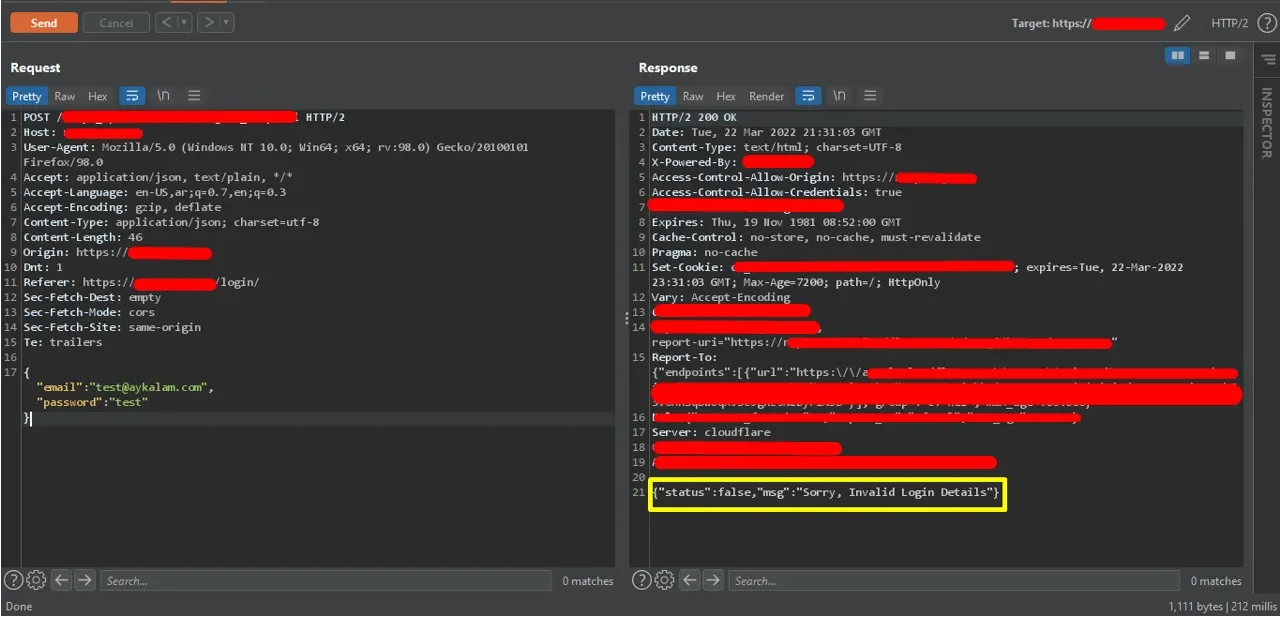
The credentials are sent as JSON, and the response is JSON as well. The author tried several manipulations of the response, all of which failed. The author tried several manipulations of the response-side fields, all of which failed:
Change false to true → FailedChange the message to “Success” → FailedDelete the whole msg → FailedDelete the status → Failed
With the response fields ruled out, the next idea was to attack the request body itself. The JSON body was converted to XML to test for XXE, but no response was returned.
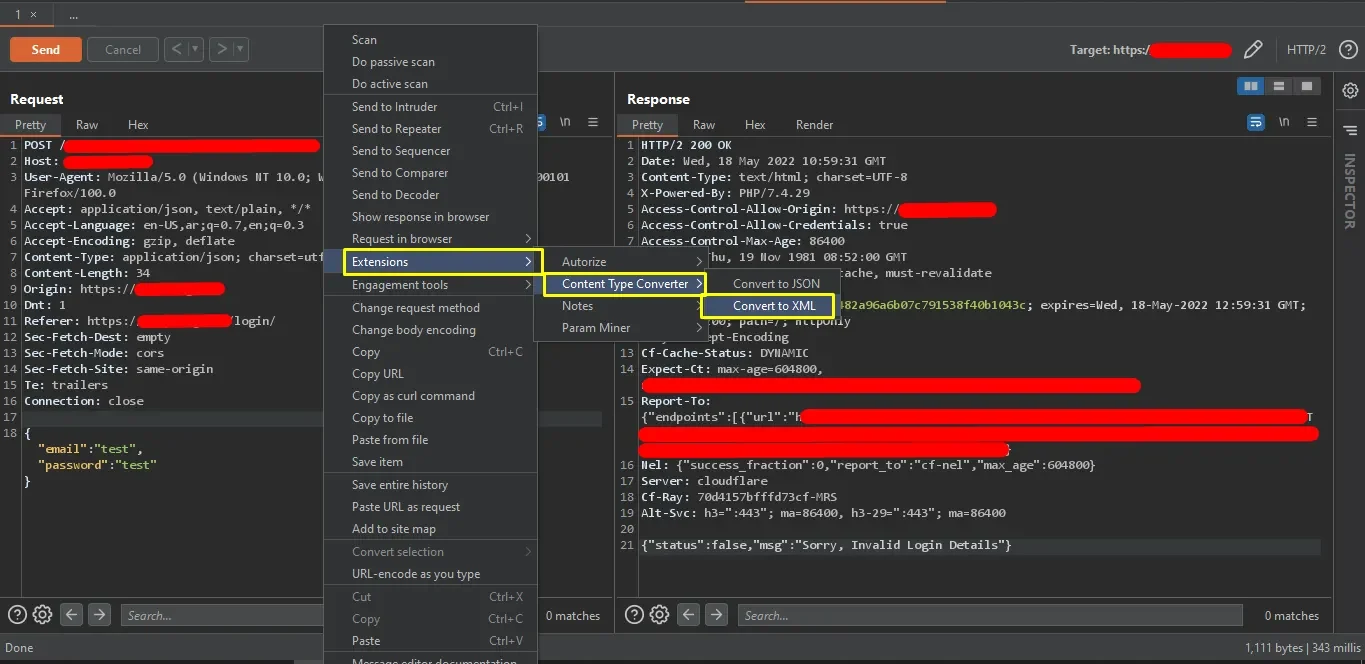
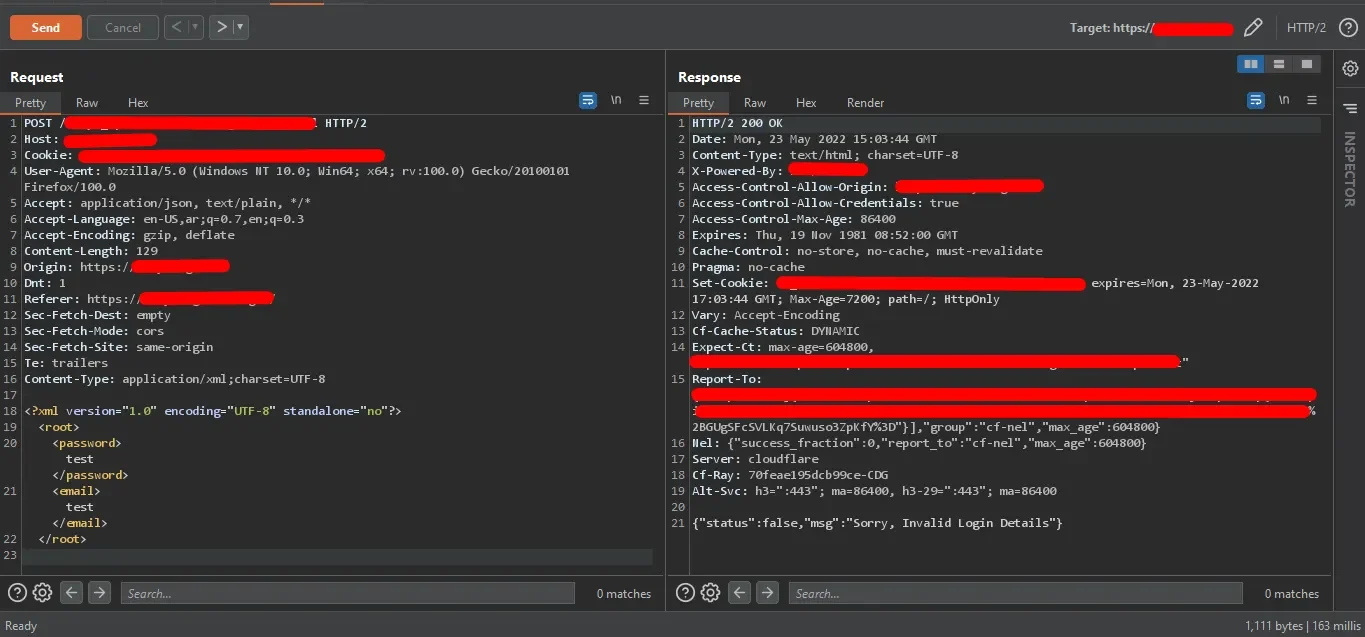
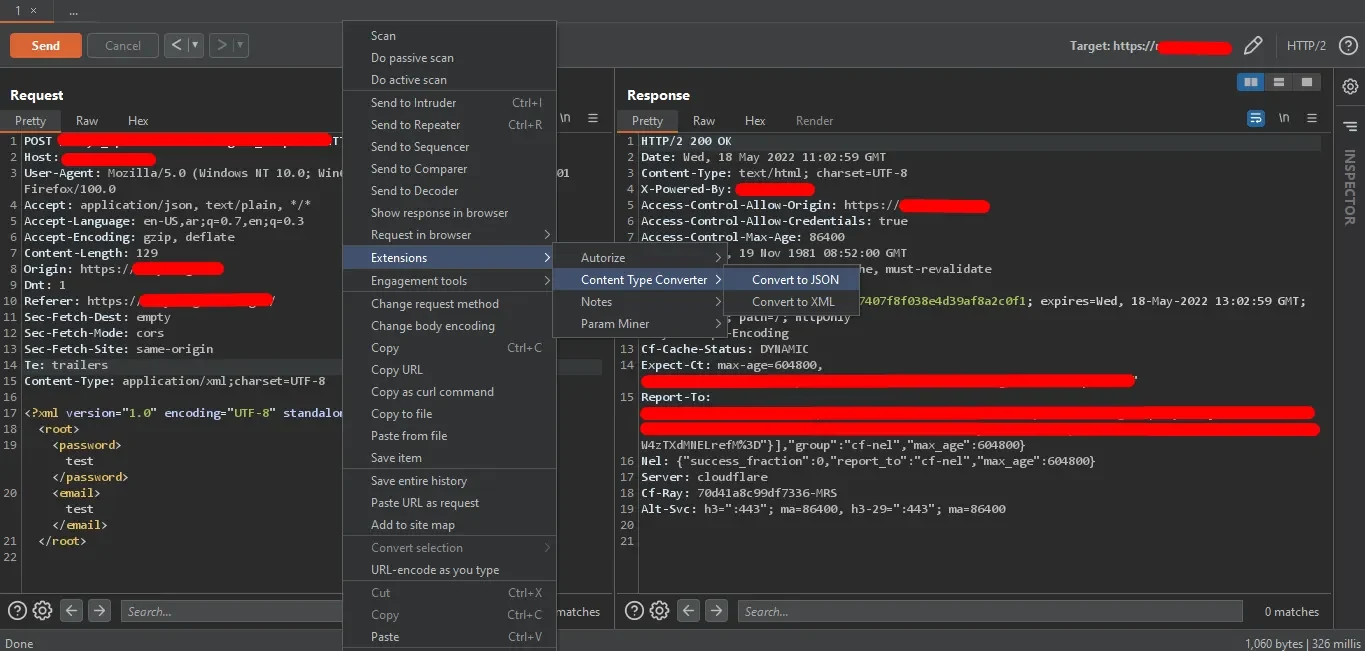
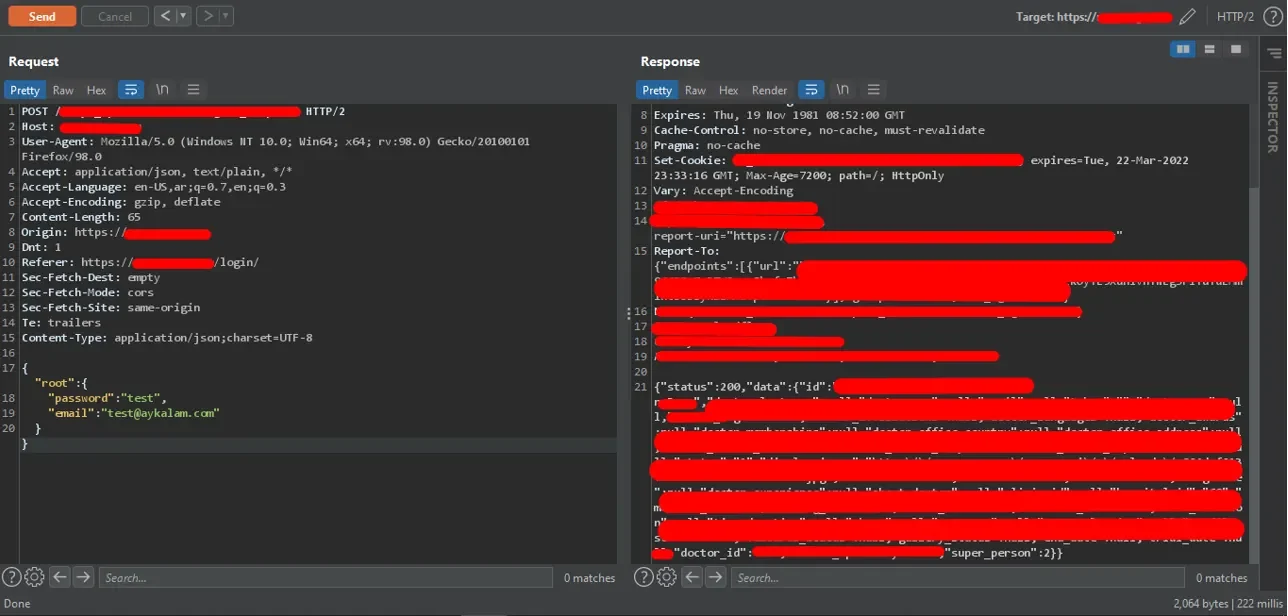
Converting the body back to JSON with the same extension and resending it produced a different result: the response returned data related to the default user. The author points to the change introduced by the conversion as the reason.
Exploitation
Step 1: Capture the login request
Log in with dummy credentials and inspect the request and response. The credentials travel as JSON and the response is JSON too.
Step 2: Try response tampering
Modify the response fields (false to true, the message to Success, deleting msg, deleting status). None of these worked.
Step 3: Try XML and XXE
Convert the JSON request body to XML to test for XXE. No response was returned.
Step 4: Convert back to JSON
Return the body to JSON using the same extension and send the request again. The response now returned data related to the default user, which the author attributes to the change made by the conversion.
Step 5: Wrap the credentials in a root object
Intercept the login request and change the JSON data so that the credentials sit inside a root object:
Change the data from {"email":"[redacted]","password":"test"}to be like that{"root": { "password": "test", "email": "[redacted]"}}
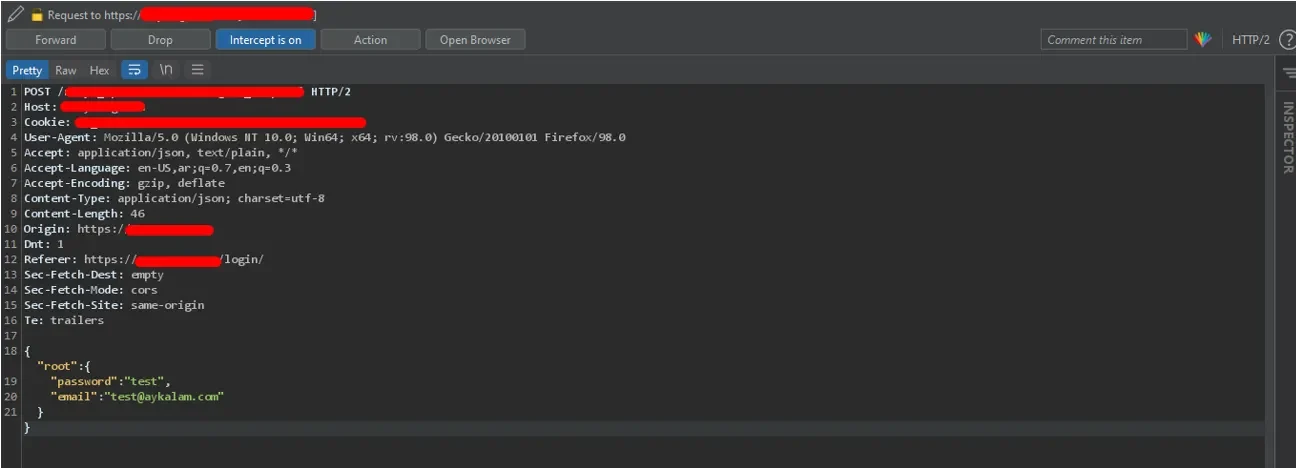
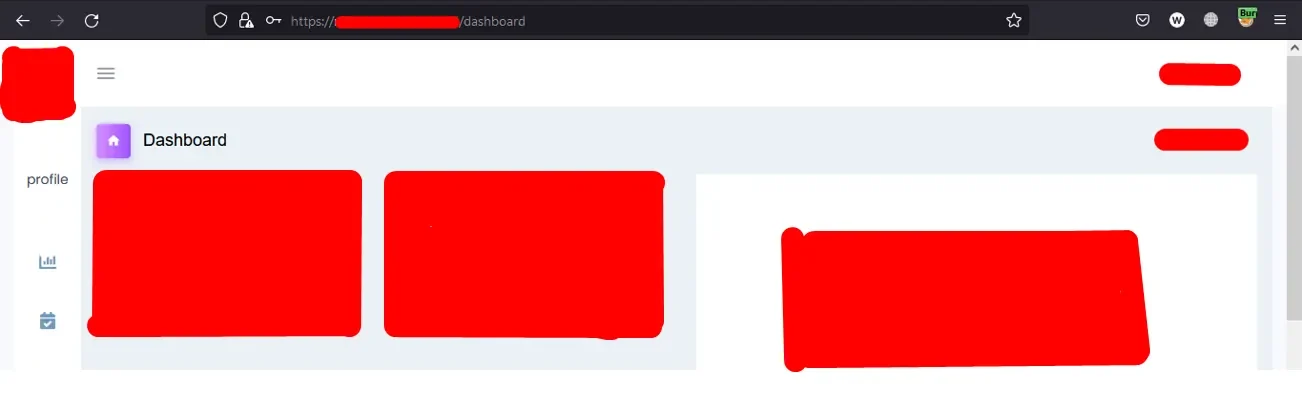
Forwarding this request logs you in as an admin.
Step 6: Empty keys give the same result
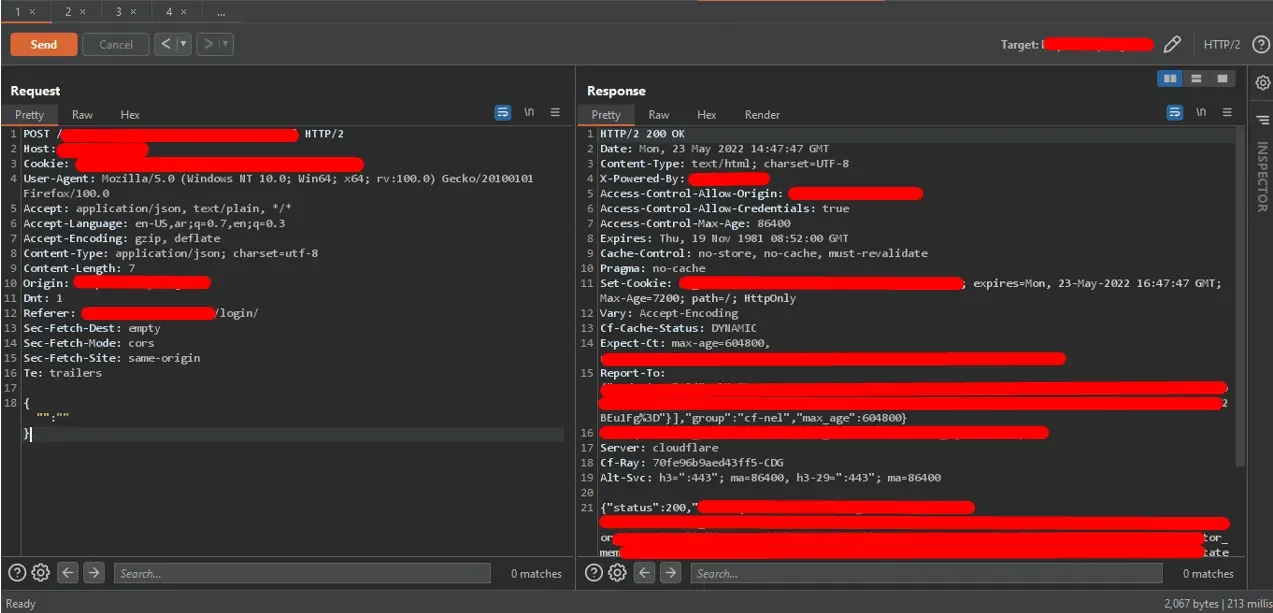
After the analysis below, the author found that replacing the login POST data with an empty key/value pair produces the same outcome:
Replace the following {"email":"[redacted]","password":"test"}With {"":""}
Root cause
The target uses a custom framework and the default case of a custom function that handles the login process. The author illustrates the weakness with simplified JavaScript, explicitly not the exact code in use:
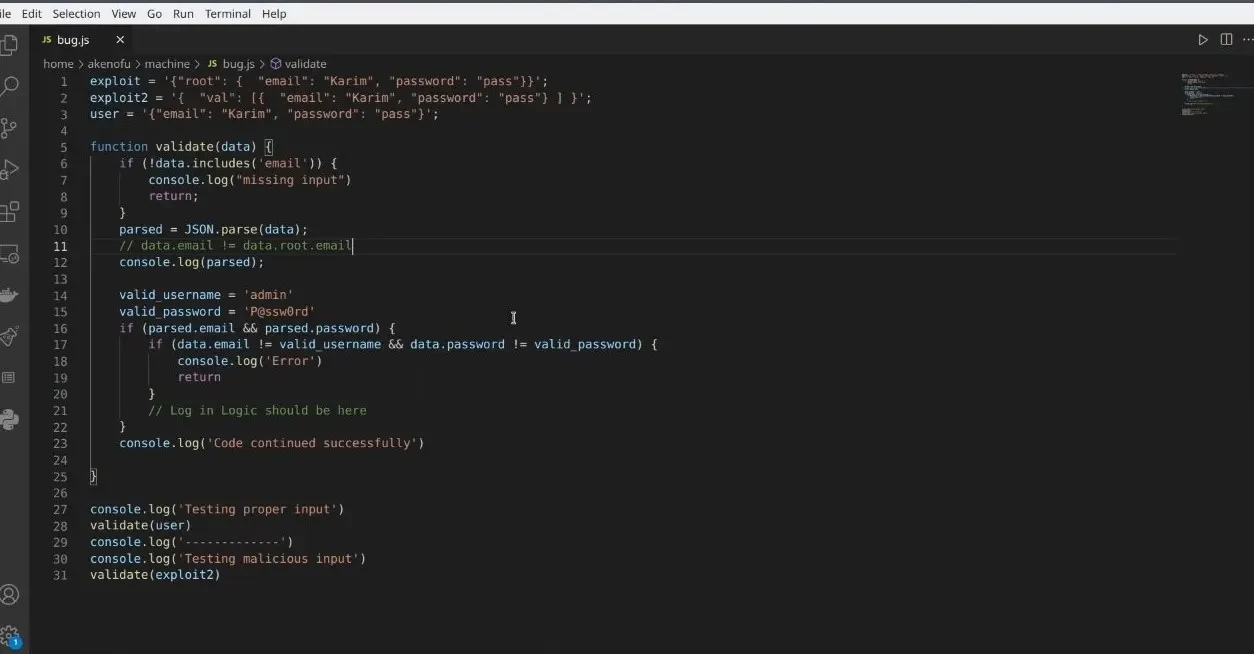
Coded by Karim Hany
The if statements are not configured well: when their conditions are false, the process does not terminate and continues. That is what allows the authentication to be bypassed. The if statements do not terminate the process when their conditions are false, which allows the authentication to be bypassed.
Impact
Sending the credentials inside a root object logged the tester in as an admin, and an empty key/value pair gave the same result. The response also discloses data related to the default user. The author does not state which data, or whether the bypass depends on any particular account state.
Fix
The report does not describe a fix applied by the client. Based on the analysis, the login function should terminate and reject the request whenever the expected credential fields are missing or the conditions are not met, rather than continuing into a default branch.
Variants to test
- Send an empty key/value pair (
{"":""}) as the login body. A positive result is the same default-user response.
What happened, in plain words
A security tester was hired to attack a company's website, with permission, to find weaknesses before real criminals did. This kind of job is called a penetration test. During that test, the tester found a way to log in to the website as an administrator without knowing any real password. He did it by changing the shape of the data the login form sends to the server.
Normally the login form sends two pieces of information: an email address and a password. The tester discovered that if he wrapped those same two pieces of information inside an extra container called root, the server accepted the login anyway and treated him as the default user, which turned out to be an administrator. Later, he and his teammates worked out why: the code that checks the login was written so that when its checks fail, it does not stop. It simply carries on and lets the request through.
This article walks through the whole thing from the beginning, assuming you have never done security testing before. Every term is explained the first time it appears, and every request is shown exactly as it was sent.
Some background you need first
Before the steps make sense, a few ideas need to be clear.
What a web application is. When you use a website, your browser (Chrome, Firefox, Safari) shows you pages. Behind those pages sits a program on a computer somewhere else, called the server. The browser asks the server for things, and the server answers. That conversation is what we are going to look at.
What an API is. Think of a restaurant. You do not walk into the kitchen and cook; you tell the waiter what you want, and the waiter brings it back. An API (application programming interface) is the waiter between your browser and the server's kitchen. Your browser sends a request describing what it wants, and the API sends back a response. Login forms, shopping carts and search boxes all talk to the server through APIs.
What JSON is. When the browser and the server exchange data, they need a shared format, like a standard envelope for letters. JSON (JavaScript Object Notation) is one very common format. It looks like a set of labelled boxes:
- Curly braces
{and}mark the start and end of a group of boxes. - Each box has a name (called a key) in double quotes, then a colon, then a value.
- Pairs are separated by commas.
So {"email":"[redacted]","password":"secret"} is a JSON object with two keys, email and password. It is readable by humans and by machines, which is why it is everywhere.
What a request and a response are. Every time you click a button on a website, your browser sends a request to the server. The server replies with a response. Both have two parts that matter here: a body (the actual data, often JSON) and a status (a short code saying whether things went well).
What intercepting a request means. Normally your browser sends a request and you never see it. A tool called an intercepting proxy sits between your browser and the server, like a postal worker who opens every letter, lets you read and rewrite it, and then sends it on. That is how the tester changed the login data before it reached the server.
What a browser extension is. A small add-on you install in your browser to give it extra abilities. Here, the tester used one that converts data between JSON and another format called XML.
What XML is. Another data format, older than JSON, that uses tags like <email>[redacted]</email> instead of curly braces. Some servers accept both formats.
What XXE is. XXE stands for XML External Entity. It is a class of attack where you send XML that tells the server to fetch something it should not, such as a file on its own disk. Testers try it whenever a server accepts XML, because if the server is careless, it can leak data. It is worth trying, and in this case it did not work.
What an authentication bypass is. Authentication is the process of proving who you are, usually with a username and password. A bypass means getting past that check without proving anything. It is one of the most serious kinds of weakness, because everything behind the login is now open to you.
What information disclosure is. When a system reveals data to someone who should not see it. Here, the server returned data belonging to the default user, which the tester should not have received.
What Cloudflare is. A widely used service that sits in front of websites to filter traffic and block attacks. The author notes the target used Cloudflare, which made it hard to focus on injections. An injection is an attack where you slip extra commands into data the server trusts, hoping the server runs them. Cloudflare tends to block the obvious versions of those, so the tester looked elsewhere.

The setup
The tester was working for a client, meaning a company that had hired him and given permission to test its systems. The only thing we know about the target is that its login works by sending credentials and receiving the answer as JSON. No particular accounts, roles or tool versions are described. The tools mentioned are a browser extension for converting between JSON and XML, and an intercepting proxy for editing the login request before it is sent.
Step by step: how the bypass was found
Step 1: Log in with fake credentials and watch the traffic
The first move in almost any test is to do the normal thing and look at what happens. The tester typed a made-up email and password into the login form and captured the request and the response.
What he saw: the credentials travel as JSON, and the response comes back as JSON too. The author then tried several manipulations of the response, all of which failed. Seeing those fields is interesting, because if the browser decides what to show based on them, maybe they can be tampered with.
Step 2: Try to fool the response
Before attacking the request, the tester tried attacking the response. The idea: if the browser trusts the status and msg fields to decide whether you are logged in, then changing them might trick the page into letting you in.
He tried four variations, and all of them failed:
Change false to true → FailedChange the message to “Success” → FailedDelete the whole msg → FailedDelete the status → Failed
Line by line, in plain words:
Change false to truemeans he took a field whose value wasfalseand set it totrue, hoping the page would read it as success. It failed.Change the message to “Success”means he replaced the server's message text with the word Success, hoping the page would display a logged-in state. It failed.Delete the whole msgmeans he removed the message field entirely, in case the page treated a missing message as a good sign. It failed.Delete the statusmeans he removed the status field entirely, for the same reason. It failed.
All four attempts failed, so the tester moved on to changing the request body.
Step 3: Try XML and XXE
With the response ruled out, the next idea was to change the request body itself. The tester converted the JSON body into XML using the browser extension, to see whether the server would accept XML and whether it was vulnerable to XXE.
No response came back at all. That is a clear signal: the server did not understand or did not accept the XML version of the request, so there was nothing to exploit there. XXE was a dead end.
Step 4: Convert back to JSON and resend
Next, the tester used the same extension to convert the body back to JSON and sent the request again.
This time something changed. The response returned data related to the default user. The author points to the change introduced by the conversion as the reason. The author attributes the different response to the change made by the conversion.
This is a good lesson for a beginner: sometimes the interesting result comes not from a clever payload but from noticing that the same data, reshaped, gets a different answer.
Step 5: Wrap the credentials in a root object
Now the tester had a lead. He intercepted the login request with the proxy and changed the JSON so that the email and password sat inside an extra container called root:
Change the data from {"email":"[redacted]","password":"test"}to be like that{"root": { "password": "test", "email": "[redacted]"}}
Line by line:
Change the data from {"email":"[redacted]","password":"test"}is the original body: a JSON object with two keys,emailandpassword, at the top level.to be like thatintroduces the new body.{"root": { "password": "test", "email": "[redacted]"}}is the new body: the same two keys, but now they are nested inside a second object whose key isroot. The outer braces hold one key,root; the inner braces hold the email and password.
By supplying a root object himself, he was feeding the code exactly the shape it wanted, with his own values inside.
After forwarding the request, the tester found himself logged in as an admin.
That is the bypass: no valid password, no stolen account, just a differently shaped request.
Step 6: An empty key gives the same result
After the analysis below, the tester found an even simpler version. Replacing the login body with an empty key and an empty value produced the same outcome:
Replace the following {"email":"[redacted]","password":"test"}With {"":""}
Line by line:
Replace the following {"email":"[redacted]","password":"test"}is again the normal body with an email and a password.With {"":""}is a JSON object with a single key that is an empty string, and a value that is also an empty string. There is no email and no password at all.
Why does this work? Because of the same flaw: the login code does not stop when the expected fields are missing. It carries on and lands on the default user. The root trick and the empty-key trick are two ways of reaching the same broken path.
Why it worked: the root cause
The target uses a custom framework, meaning the company wrote its own code rather than using a well-known off-the-shelf product, and the login process goes through a custom function. The author illustrates the weakness with simplified JavaScript, explicitly not the exact code in use.
Coded by Karim Hany
JavaScript is the programming language that runs in web pages and is also widely used on servers. An if statement is a check: if a condition is true, do one thing; otherwise, do something else. The problem here is that the if statements are not configured well. When their conditions are false, the process does not terminate. It simply continues to the next line, and eventually reaches a default branch that lets the request through.
Think of a bouncer at a door who checks your name against a list. A well-written bouncer says no and turns you away when your name is not on the list. This bouncer, when your name is not on the list, shrugs and lets you in anyway. The root object and the empty key both hit this path, so the login logic falls through to a default user instead of rejecting the request.
What the impact is
Sending the credentials inside a root object logged the tester in as an admin, and an empty key and value gave the same result. The response also discloses data related to the default user. The author does not state which data, or whether the bypass depends on any particular account state.
How it should be fixed
The report does not describe a fix applied by the client. Based on the analysis, the login function should terminate and reject the request whenever the expected credential fields are missing or the conditions are not met, rather than continuing into a default branch. In the bouncer analogy: when the name is not on the list, say no and close the door.
Things worth trying elsewhere
- Send an empty key and value (
{"":""}) as the login body. A positive result is the same default-user response.
Glossary
- API: the interface through which a browser and a server exchange data, like a waiter between you and the kitchen.
- Authentication: the process of proving who you are, usually with a username and password.
- Authentication bypass: getting past the login check without proving who you are.
- Browser extension: a small add-on installed in a browser to add extra abilities.
- Cloudflare: a service placed in front of websites to filter traffic and block attacks.
- Custom framework: software written by the company itself rather than a well-known off-the-shelf product.
- Default user: a built-in account the system falls back to when it cannot identify the person making the request.
- Endpoint: a specific address on a server that accepts a particular kind of request, such as a login endpoint.
- Information disclosure: when a system reveals data to someone who should not see it.
- Injection: an attack where extra commands are slipped into data the server trusts, hoping the server runs them.
- Intercepting proxy: a tool that sits between browser and server, letting you read and rewrite requests before they are sent.
ifstatement: a programming check that does one thing when a condition is true and something else otherwise.- JavaScript: the programming language that runs in web pages and is also widely used on servers.
- JSON (JavaScript Object Notation): a common text format for data, using curly braces, keys in quotes, colons and commas.
- Key and value: in JSON, a key is the name of a box and the value is what is inside it.
- Penetration test: an authorised attack on a system to find weaknesses before criminals do.
- Request: the message a browser sends to a server asking for something.
- Response: the message a server sends back.
- Root cause: the underlying reason a weakness exists, as opposed to its visible symptom.
- Server: the computer and program that answer a browser's requests.
- Status: a short code in a response saying whether the request succeeded.
- XML: an older data format that uses tags such as
<email>...</email>instead of curly braces. - XXE (XML External Entity): an attack that sends XML telling a server to fetch something it should not, such as a file on its own disk.