Authentication vs. Authorization: How a Misconfigured OAuth Chain Led to an Auth Bypass
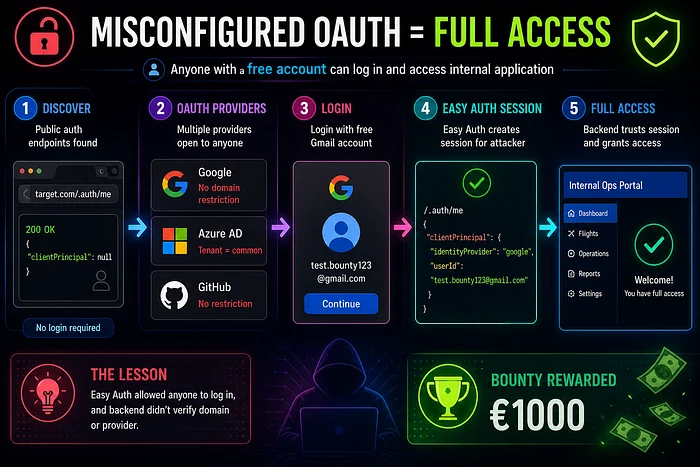
The Azure App Service Easy Auth configuration allowed anonymous access and accepted logins from any Microsoft tenant, any Google account and any GitHub account. Because the backend trusted the injected client principal header without checking the identity provider or email domain, an attacker with a free account could log in and be treated as an internal employee.

Hacking
The full write-up lives on its author's site
It belongs to its author, so we link to it rather than copy it. The other two tabs are our own rewrites, checked against it.
Context
The target was an internal enterprise aviation operations web application, hosted on Azure App Service and delivered as a React Single Page Application. The researcher refers to it as target.com. The root path returned a 200 OK with an essentially empty HTML body that only loads the SPA bundle:
<!doctype html><html lang="en"><head><meta charset="utf-8"/><meta name="viewport" content="width=device-width,initial-scale=1"/><title>Internal Ops Portal</title><script defer="defer" src="/static/js/main.abc123.js"></script><link href="/static/css/main.def456.css" rel="stylesheet"/></head><body><div id="root"></div></body></html>
All routing and business logic live client-side, and the backend API sits behind a reverse proxy. The application used Azure App Service Easy Auth, the built-in authentication and authorisation module, as its identity layer. Easy Auth normally gates access to the app, authenticates the user against one or more configured identity providers, and then passes the authenticated identity to the backend code in a header.
Setup
The work was done from the outside with standard recon tooling: subfinder for subdomain enumeration, piped into httpx to collect HTTP status codes, page titles and technology stacks. No credentials, roles or special access were needed at the start; the whole point of the finding is that a free consumer account was enough. A throwaway Google account, [redacted], was created to complete the OAuth flow.
Finding it
Most of the scope returned ordinary CMS installations, API gateways answering 401 Unauthorized, or redirect loops. The interesting subdomain returned a 200 OK with the blank SPA shell shown above. Probing common API paths such as /api/v1/users, /api/docs and /swagger-ui.html produced a 200 OK with text/html every time: the reverse proxy was swallowing unknown paths and serving the SPA wrapper, so the backend was effectively invisible to path brute force.
With the API unreachable that way, the next step was to understand the authentication architecture. Because the app was Azure-hosted, the researcher checked for Easy Auth by requesting its diagnostic endpoint:
curl -s -i -L -H “Accept: application/json” https://target.com/.auth/me
The server answered 200 OK with:
{"clientPrincipal": null}
That response is the first real signal. In a properly locked-down Easy Auth deployment, an unauthenticated request to /.auth/me returns 401 Unauthorized or redirects to a login provider. A 200 with a null principal means unauthenticatedClientAction is set to AllowAnonymous: anyone can load the SPA shell and reach the authentication endpoints without logging in. On its own that only makes the frontend public, so the next question was which identity providers were configured and whether any of them could be walked through.
Exploitation
Easy Auth exposes login routes at /.auth/login/<provider>. The researcher traced the OAuth redirects for each provider with curl, following redirects and printing the final URL.
Step 1: Inspect the Azure AD redirect
curl -s -L — max-redirs 5 -o /dev/null -w “%{url_effective}\n” https://target.com/.auth/login/aad
The final URL stopped at:
https://login.microsoftonline.com/common/oauth2/v2.0/authorize?client_id=d414ee2d-73e5-4e5b-bb16-03ef55fea597...
The important part is the /common/ tenant in the Azure AD authorisation endpoint. With common, Azure AD accepts an identity token from any Microsoft tenant: outlook.com, hotmail.com, personal MSA accounts, or any stranger's M365 tenant. The flow was not restricted to the corporate tenant.
Step 2: Inspect the Google redirect
curl -s -L — max-redirs 5 -o /dev/null -w “%{url_effective}\n” https://target.com/.auth/login/google
The redirect pointed to Google's OAuth flow. The authorisation URL contained scope=openid+profile+email but no hd (hosted domain) parameter. Google's hd parameter restricts which Workspace domain can complete consent; without it, any free @gmail.com account passes the check.
Step 3: Inspect the GitHub redirect
curl -s -L --max-redirs 5 -o /dev/null -w "%{url_effective}\n" https://target.com/.auth/login/github
GitHub was also configured as a provider. The report does not show where this redirect ended.
At this point the authentication layer was wide open: anyone with a free Google, GitHub or Microsoft account could complete an OAuth round-trip and obtain a valid Easy Auth session. The open question was whether the backend trusted that session blindly or validated the identity provider and email domain.
Step 4: Understand what Easy Auth passes to the backend
When Easy Auth authenticates a user, it injects a base64-encoded JSON Web Token into the X-MS-CLIENT-PRINCIPAL header before routing the request to the backend application code, and the backend uses that header to identify the user. If the backend developers assumed that any valid X-MS-CLIENT-PRINCIPAL header meant an internal employee, because they assumed only internal AAD could generate one, then the multi-provider misconfiguration was not just an auth misconfiguration but a full authentication bypass. The researcher also considered that the backend might enforce strict role-based access control that would block a session obtained this way.
Step 5: Complete the flow with a throwaway account
- Navigate to
https://target.com/.auth/login/google. - Complete the OAuth consent flow with the fresh throwaway Gmail account.
- Get redirected back to the application, fully logged in.
Checking /.auth/me again returned, instead of null, a fully populated clientPrincipal containing the Gmail address, with identityProvider listed as google. Easy Auth had minted a valid session for the throwaway account.
Step 6: Reach the internal dashboard
Navigating to the application's main dashboard loaded the SPA fully. The backend implicitly trusted the Easy Auth-injected X-MS-CLIENT-PRINCIPAL header to authorise access to internal operational features, without checking whether preferred_username ended in @corp.com or whether identityProvider was azureactivedirectory. The free Gmail account was therefore treated as an authenticated internal user, and enterprise SSO was bypassed entirely. The researcher gained full access to the internal aviation operations web application, exposing sensitive operational data.
Root cause
The failure is a confusion between authentication and authorisation, spread across two layers.
On the identity layer, the Easy Auth configuration was permissive in three ways at once: unauthenticatedClientAction was AllowAnonymous, the Azure AD provider used the /common/ tenant so any Microsoft tenant was accepted, and the Google provider omitted the hd parameter so any Gmail account was accepted. GitHub was enabled as well. Each of these alone widens the set of identities that can obtain a session.
On the application layer, the backend treated the presence of a valid X-MS-CLIENT-PRINCIPAL header as proof of internal employment. It did not validate the identity provider or the email domain of preferred_username. The Easy Auth session became the single source of truth for authorisation, ignoring who the user actually was. The developers likely enabled the extra social providers to make testing or third-party access easier and never restricted the tenant or hosted domains, and the assumption that only internal AAD could produce the header survived into production.
Impact
An unauthenticated attacker with any free Google, GitHub or Microsoft account could complete the OAuth flow and be treated as an authenticated internal user of the aviation operations application, with access to internal operational features and sensitive operational data. The report notes the researcher had full access to the internal application. The finding was triaged as High severity and paid a bounty of 1000 Euros.
Fix
The vendor patched the issue by restricting the AAD tenant, removing the Google and GitHub providers, and enforcing backend validation of the identity provider and email domain. In other words, the fix addressed both layers: the identity layer no longer accepts arbitrary tenants or consumer accounts, and the backend no longer treats a valid principal header as sufficient proof of internal identity.
Variants to test
/.auth/mereturning 200 with a null principal. On any Azure App Service target, request the endpoint unauthenticated. A 200 with{"clientPrincipal": null}means anonymous access to the SPA and auth endpoints is enabled; a 401 or a redirect to a provider is the locked-down behaviour.tenant=common(ororganizations, or a missing tenant) in the AAD redirect. Follow/.auth/login/aadand inspect the finallogin.microsoftonline.comURL. Acommontenant means any Microsoft account, including personal MSA, can complete the flow.- Missing
hdin the Google redirect. Follow/.auth/login/googleand check the authorisation URL. Ifscopeincludesopenidbut there is nohd=restriction, a free Gmail account should pass consent. - Extra providers left enabled. Enumerate
/.auth/login/<provider>for providers such asgithub,facebookandtwitter. Any provider that completes a round-trip with a consumer account is a candidate, provided the backend does not check the provider. - Backend trust in
X-MS-CLIENT-PRINCIPAL. After obtaining a session with a consumer account, request internal API paths and observe whether they return data rather than 401 or 403. A positive result is internal content served to a principal whoseidentityProvideris notazureactivedirectoryor whosepreferred_usernameis not on the corporate domain. - Domain check on
preferred_username. If the backend does validate, try identities whose email domain resembles the corporate one, and check whether the check is a suffix match, a substring match or an exact match. The report does not describe testing this.
The general lesson the researcher draws is that a successful login is not authorisation. If an open identity provider is found, complete the flow: the backend may implicitly trust the frontend's identity layer.

What happened, in plain words
A security researcher was looking for bugs in a large company's web presence. One of the company's websites was an internal tool used for aviation operations: a web app that staff use to do their daily work.
The researcher found that the login system on that site was set up too loosely. It accepted logins from ordinary personal accounts: a free Google account, a free GitHub account, or any Microsoft account, including a personal one. Worse, the part of the application behind the login screen did not check who had logged in. It only checked that someone had logged in. So a brand new Gmail account, created for the test, was treated as if it belonged to an employee, and the researcher could see the internal operations dashboard.
The issue was triaged as High severity, the company fixed it, and a bounty of 1000 Euros was paid. This article walks through the whole story slowly, explaining every term as it comes up, so that someone who has never done security work can follow it.
The two words in the title
Before anything else, two words that sound alike but mean very different things:
- Authentication is proving who you are. Showing your passport at a border is authentication.
- Authorisation is deciding what you are allowed to do once you are known. Your passport does not give you the right to enter every room in the country; a visa or a permit does that.
Most serious login bugs come from mixing these up. A website checks that you are someone, then forgets to check that you are the right someone. That is exactly what happened here.
The setting: a modern web app
The target was an internal enterprise aviation operations web application. In plain terms: a website that a company's staff use to run flight-related work. It was hosted on Azure App Service, which is Microsoft's cloud service for running websites, and it was built as a React Single Page Application, usually shortened to SPA.
An SPA works differently from an old-fashioned website. On an old website, every click asks the server for a new page, and the server builds that page and sends it back. In an SPA, the server sends one small page plus a big bundle of JavaScript (the programming language browsers run), and from then on the browser itself draws every screen. The server is only asked for raw data.
That raw data comes from an API: a set of web addresses on the server that return data rather than pretty pages. Think of the SPA as a restaurant's dining room and the API as the kitchen: customers never walk into the kitchen, they order through the waiters.
The researcher refers to the site as target.com to keep the real company private.
Phase 1: Looking around (recon)
Recon, short for reconnaissance, is the first stage of any security test: quietly mapping what exists before touching anything. The researcher used two standard tools:
subfinderfinds subdomains. A subdomain is a name in front of the main domain, likeshop.example.comnext toexample.com. Big companies have hundreds, and each one is a separate website that might be configured differently.httpxthen visits each discovered address and records simple facts: the HTTP status code (a three-digit number the server returns, where 200 means "here you go" and 401 means "you are not allowed"), the page title, and the technology used to build it.
Most of what came back was uninteresting: ordinary content-management systems (the software behind blogs and marketing sites), API gateways answering 401 Unauthorized, or redirect loops (addresses that bounce you endlessly from one to another). One subdomain stood out. When the researcher opened its root path, the server answered 200 OK with an almost empty page:
<!doctype html><html lang="en"><head><meta charset="utf-8"/><meta name="viewport" content="width=device-width,initial-scale=1"/><title>Internal Ops Portal</title><script defer="defer" src="/static/js/main.abc123.js"></script><link href="/static/css/main.def456.css" rel="stylesheet"/></head><body><div id="root"></div></body></html>
Line by line, in plain words:
<!doctype html>tells the browser this is a modern HTML page.<html lang="en">opens the page and says the language is English.<head>is the invisible section holding information about the page rather than content shown on it.<meta charset="utf-8"/>says which character encoding to use, so letters and symbols display correctly.<meta name="viewport" .../>tells phones and tablets to size the page to their screen.<title>Internal Ops Portal</title>is the text shown in the browser tab. The name itself is a hint: this is an internal operations portal.<script defer="defer" src="/static/js/main.abc123.js"></script>loads the JavaScript bundle that makes the app work.defermeans "download it now but run it after the page has been read". The odd-looking filename with random characters is typical of build tools; it changes with every release so browsers never show a stale copy.<link href="/static/css/main.def456.css" rel="stylesheet"/>loads the stylesheet that controls colours and layout.<body>is the visible part of the page, and inside it<div id="root"></div>is an empty box. The JavaScript bundle will fill that box with the whole interface.
So the page the server sends is essentially a blank canvas. Everything the user sees is drawn later by JavaScript in the browser. That is the defining trait of an SPA, and it makes testing harder: there is nothing interesting in the HTML to read.
The researcher then tried to find the API by guessing common addresses: /api/v1/users, /api/docs, /swagger-ui.html. These are conventional paths that many applications use for their data endpoints or their documentation. Every single request came back 200 OK with text/html, meaning the server returned the same blank page every time.
The reason is a reverse proxy: a piece of software that sits in front of the real application and forwards requests to it. This proxy was configured with a catch-all route: any address it did not recognise was answered with the SPA's HTML page instead of an error. The effect was that the researcher was "effectively blind to the backend": guessing addresses told him nothing, because every guess got the same answer.
Phase 2: Finding the login system
Since guessing addresses did not work, the next sensible step was to understand how the site handles logins. If you cannot get in through the front door by force, you study the lock.
The site was hosted on Azure, so the researcher checked for a specific Azure feature: Azure App Service Easy Auth. Easy Auth is a built-in module that Microsoft's hosting platform can switch on for you. Instead of writing your own login system, you let the platform handle it: it intercepts every request, checks whether the visitor is logged in, sends them to a login provider if not, and only then lets the request through to your application code. It is like a receptionist in a building lobby who checks badges before letting anyone past the lifts.
Easy Auth has a diagnostic address, /.auth/me, which answers the question "who does the server think I am right now?". The researcher requested it with curl:
curl -s -i -L -H “Accept: application/json” https://target.com/.auth/me
What each part does:
curlis a command-line tool for making web requests. It is a browser without a window.-smeans silent: do not print progress noise.-imeans include the response headers. Headers are the small labelled lines a server sends before the body, carrying metadata such as the content type or cookies.-Lmeans follow redirects. If the server says "go look over there", curl goes there automatically.-H “Accept: application/json”adds a request header telling the server "please answer in JSON". JSON is a simple text format for structured data, made of names and values in curly braces, like{"name": "value"}.- The address is the diagnostic endpoint itself.
The server replied 200 OK with:
{"clientPrincipal": null}
This tiny response is the first real clue. clientPrincipal is Easy Auth's name for "the logged-in user". null means "nobody". So the server was saying: "you are not logged in, and I am perfectly fine with that."
Why is that a finding? Because in a properly locked-down Easy Auth setup, asking /.auth/me without being logged in should give you 401 Unauthorized, or bounce you to a login page. Getting 200 OK with an empty user means a setting called unauthenticatedClientAction is set to AllowAnonymous: anonymous visitors are allowed through to the application and to the login endpoints.
On its own, this only means the front of the building is open to the public. The researcher still needed to know which login providers were configured, and whether any of them could be walked through by an outsider.
Phase 3: Following the login redirects
Easy Auth gives each configured login provider its own address, in the pattern /.auth/login/<provider>, where <provider> is the name of the company that handles the login, such as aad (Azure Active Directory, Microsoft's business login system), google or github.
When you visit one of these addresses, the server does not log you in itself. Instead it redirects you to the provider: it answers with a message saying "go to this other address instead". Your browser follows that automatically, you log in there, and you are sent back. This back-and-forth is called an OAuth flow. OAuth is a standard way for a website to let another company vouch for your identity, without the website ever seeing your password. It is like a club accepting a passport check done by a trusted embassy rather than doing its own background checks.
The researcher used curl to follow each provider's redirect chain and print only the final address it landed on. The flags used here:
-o /dev/nullthrows away the page content; only the address matters.-w “%{url_effective}\n”prints the final address after all redirects, followed by a newline.— max-redirs 5limits the chain to five hops so it cannot loop forever.
Step 1: The Microsoft login
curl -s -L — max-redirs 5 -o /dev/null -w “%{url_effective}\n” https://target.com/.auth/login/aad
The final address was:
https://login.microsoftonline.com/common/oauth2/v2.0/authorize?client_id=d414ee2d-73e5-4e5b-bb16-03ef55fea597...
This is a Microsoft login address. The part that matters is /common/. In Microsoft's system, a tenant is an organisation's own private area: a company's accounts live in its tenant, separate from everyone else's. The word common in that position means "any tenant at all". So Microsoft would happily vouch for an outlook.com address, a hotmail.com address, a personal Microsoft account, or an account from a completely unrelated company's Microsoft 365 subscription. The login was not restricted to the aviation company's own staff accounts.
Step 2: The Google login
curl -s -L — max-redirs 5 -o /dev/null -w “%{url_effective}\n” https://target.com/.auth/login/google
The redirect went to Google's OAuth flow. The address contained scope=openid+profile+email, which is the list of things the site is asking Google to share: an identifier for the user, their basic profile, and their email address. What was missing is the important part: there was no hd parameter. hd stands for hosted domain, and it is Google's way of saying "only accept accounts from this company's Google Workspace domain". Without it, any free @gmail.com account can complete the consent screen. Consent is the page where Google asks you to approve sharing your details with the requesting site.
Step 3: The GitHub login
curl -s -L --max-redirs 5 -o /dev/null -w "%{url_effective}\n" https://target.com/.auth/login/github
GitHub, the code-hosting site, was also set up as a login provider. The report does not show where this redirect ended.
At this point the picture was clear: the login layer was wide open. Anyone with a free Google, GitHub or Microsoft account could go through the OAuth round trip and come back with a valid Easy Auth session. A session is the server's memory of you: once you have logged in, the server gives your browser a marker so it recognises you on the next request instead of asking for your password again. That marker is usually a cookie, a small piece of data the browser stores and sends back automatically, or a token, a string that proves you are logged in.
The remaining question was the one that decides whether this is a minor misconfiguration or a serious breach: did the application behind the login screen trust that session blindly, or did it check which provider issued it and which email domain the user belonged to?
Phase 4: What the login layer tells the application
To answer that, you need to know how Easy Auth talks to the application behind it. When Easy Auth has authenticated a user, it does not ask the application to check anything. Instead it adds a header to the request before passing it on: X-MS-CLIENT-PRINCIPAL. The value of that header is a base64-encoded JSON Web Token.
Two terms there:
- Base64 is a way of writing arbitrary data using only plain letters, digits and a couple of symbols, so it can travel safely inside text such as a header. It is not encryption; anyone can decode it.
- A JSON Web Token, or JWT, is a compact text token that carries claims about a user, such as their email address and which login provider they used. Again, it is readable, not secret.
The application code reads that header to know who is making the request. Now consider what happens if the developers assumed: "only our own company's Microsoft login can produce this header, so if the header is there, the user is one of our employees." That assumption was true only while the only provider was the company's own tenant. Once Google, GitHub and the open Microsoft tenant were enabled, the header could be produced for anyone. The misconfiguration was no longer just a loose login setting; it was a full authentication bypass, meaning getting in without being entitled to.
The researcher also considered a second possibility: that the application might enforce strict role-based access control, a system where each user has a role and each role has permissions, which would block an outsider even with a valid session. That turned out not to be the case.
Phase 5: Proving it
There was only one way to find out whether the application trusted the header blindly: try it. The researcher created a completely fresh, throwaway Google account, [redacted], so that nothing personal was involved and the account could be discarded afterwards.
- Navigate to
https://target.com/.auth/login/google. - Complete the OAuth consent flow with the throwaway Gmail account.
- Get redirected back to the application, fully logged in.
Step 1 is simply opening the login address in a browser. Step 2 is the normal Google consent screen: you sign in to Google and approve sharing your details with the site. Step 3 is the return trip: Google sends the browser back to the application with proof of the login, and Easy Auth turns that proof into a session.
The researcher then checked /.auth/me again. Instead of null, it now returned a fully populated clientPrincipal containing the Gmail address, with identityProvider listed as google. In plain words: the login layer had issued a real, valid session to an account that had been created minutes earlier and had no connection to the company.
Finally, the researcher opened the application's main dashboard. The SPA loaded fully. The application behind it trusted the X-MS-CLIENT-PRINCIPAL header to decide who may use internal operational features, and it never checked two things: whether preferred_username (the username field in the token, normally the email address) ended in @corp.com, or whether identityProvider was azureactivedirectory. Because neither check existed, the free Gmail account was treated as an authenticated internal user.
That is the whole bug in one sentence: the company's single sign-on was bypassed entirely, and the researcher had full access to the internal aviation operations application, exposing sensitive operational data. Single sign-on, or SSO, is the setup where one company login gives access to many internal systems; bypassing it means skipping the one gate that was supposed to protect everything.
The researcher reported the issue through the bug bounty program. A bug bounty program is a scheme where a company invites outsiders to report security problems and pays for good ones. The report was triaged as High severity, meaning it was confirmed and ranked as serious. The vendor patched it quickly by restricting the Microsoft tenant, removing the Google and GitHub providers, and adding checks in the application for the identity provider and the email domain. The bounty was 1000 Euros.
Why it happened
The failure is a confusion between authentication and authorisation, spread across two layers.
On the login layer, three settings were permissive at once: anonymous visitors were allowed through (AllowAnonymous), the Microsoft login used the common tenant so any Microsoft account was accepted, and the Google login had no hd restriction so any Gmail account was accepted. GitHub was enabled as well. Each of these on its own widens the set of people who can obtain a session.
On the application layer, the presence of a valid X-MS-CLIENT-PRINCIPAL header was treated as proof of employment. The application did not check the identity provider or the email domain. The session became the single source of truth for authorisation, ignoring who the user actually was. The developers most likely enabled the extra social logins to make testing or third-party access easier, never restricted the tenant or the hosted domains, and the assumption that only the company's own Microsoft login could produce the header survived into production.
What could be reached
An unauthenticated attacker with any free Google, GitHub or Microsoft account could complete the login flow and be treated as an authenticated internal user of the aviation operations application, with access to internal operational features and sensitive operational data. The researcher notes having full access to the internal application.
How it was fixed
The vendor restricted the Microsoft tenant, removed the Google and GitHub providers, and enforced validation of the identity provider and email domain in the application. The fix addressed both layers: the login layer no longer accepts arbitrary tenants or consumer accounts, and the application no longer treats a valid principal header as sufficient proof of internal identity.
Things to try on other sites
These are the checks the researcher generalises from this case. They are written for someone testing with permission, such as inside a bug bounty scope.
/.auth/mereturning 200 with a null principal. On any Azure App Service target, request the endpoint without being logged in. A 200 with{"clientPrincipal": null}means anonymous access to the SPA and the login endpoints is enabled; a 401 or a redirect to a provider is the locked-down behaviour.tenant=common(ororganizations, or a missing tenant) in the Microsoft redirect. Follow/.auth/login/aadand inspect the finallogin.microsoftonline.comaddress. Acommontenant means any Microsoft account, including a personal one, can complete the flow.- Missing
hdin the Google redirect. Follow/.auth/login/googleand check the address. Ifscopeincludesopenidbut there is nohd=restriction, a free Gmail account should pass consent. - Extra providers left enabled. Try
/.auth/login/<provider>for providers such asgithub,facebookandtwitter. Any provider that completes a round trip with a consumer account is a candidate, provided the application does not check the provider. - Application trust in
X-MS-CLIENT-PRINCIPAL. After obtaining a session with a consumer account, request internal API paths and see whether they return data rather than 401 or 403. A positive result is internal content served to a user whoseidentityProvideris notazureactivedirectoryor whosepreferred_usernameis not on the corporate domain. - Domain check on
preferred_username. If the application does validate, try identities whose email domain resembles the corporate one, and check whether the check is a suffix match, a substring match or an exact match. The report does not describe testing this.
The general lesson is that a successful login is not authorisation. If you find an open identity provider, complete the flow: the application behind it may implicitly trust the login layer.
Glossary
- API: a set of web addresses on a server that return data rather than web pages, used by the application to fetch and save information.
- Authentication: proving who you are, for example by logging in.
- Authorisation: deciding what a known user is allowed to do.
- Authentication bypass: getting access without being entitled to it, by skipping or defeating the login check.
- Azure App Service: Microsoft's cloud service for hosting web applications.
- Azure App Service Easy Auth: a built-in Azure module that handles login for an app, checking users against configured identity providers before letting requests through.
- Azure Active Directory (AAD): Microsoft's business login system, now also called Entra ID.
- Base64: an encoding that turns arbitrary data into plain letters, digits and symbols so it can travel inside text; not encryption.
- Bug bounty program: a scheme where a company invites outsiders to report security problems and pays for valid ones.
- Catch-all route: a server rule that answers any unrecognised address with the same page instead of an error.
- Consent (OAuth consent screen): the page where a login provider asks you to approve sharing your details with the requesting site.
- Cookie: a small piece of data a browser stores for a site and sends back automatically with each request, often used to remember a login.
- curl: a command-line tool for making web requests, effectively a browser without a window.
- Header: a small labelled line sent with a web request or response carrying metadata, such as content type or identity information.
- Hosted domain (
hd): a Google parameter that restricts logins to a specific company Workspace domain. - HTTP status code: a three-digit number a server returns to describe the result, such as 200 (OK), 401 (not allowed) or 403 (forbidden).
- httpx: a tool that visits a list of addresses and records status codes, titles and technologies.
- Identity provider: a service that vouches for who a user is, such as Google, GitHub or Microsoft.
- JSON: a simple text format for structured data made of names and values in curly braces.
- JSON Web Token (JWT): a compact, readable text token carrying claims about a user, such as their email and login provider.
- OAuth: a standard flow where one website lets another company vouch for your identity without seeing your password.
- Recon (reconnaissance): the first stage of a security test, mapping what exists before touching anything.
- Redirect: a server response telling the browser to go to a different address instead.
- Reverse proxy: software in front of an application that receives requests and forwards them to the real application.
- Role-based access control: a system where each user has a role and each role has permissions.
- Root path: the main address of a site, the one with nothing after the domain name.
- Scope: in OAuth, the list of things a site is asking a provider to share about you.
- Session: the server's memory of a logged-in user, kept alive by a cookie or token.
- Single Page Application (SPA): a website that loads one page and a large JavaScript bundle, then draws every screen in the browser.
- Single sign-on (SSO): a setup where one company login gives access to many internal systems.
- Subdomain: a name in front of a main domain, such as
shop.example.comnext toexample.com. - subfinder: a tool that discovers subdomains for a domain.
- Tenant: an organisation's own private area in Microsoft's login system, holding its accounts separately from everyone else's.
- Token: a string that proves you are logged in, sent with requests instead of a password.
- Triaged: reviewed and confirmed by the receiving company, usually with a severity rating.
X-MS-CLIENT-PRINCIPAL: the header Easy Auth adds to requests, carrying a base64-encoded token describing the logged-in user.

