Authorization bypass due to cache misconfiguration
The server cached the GraphQL GetOrders response for a few seconds, so a normal user could retrieve another shop's order and customer data by sending the same request immediately after an admin loaded their orders page. The attacker only needed the publicly known shop_id.
 Published on rikeshbaniya.medium.com
This writeup is about one of my favorite findings as it was a very unexpected issue.
The full write-up lives on its author's site
It belongs to its author, so we link to it rather than copy it. The other two tabs are our own rewrites, checked against it.
Context
The target was an ecommerce site with two assets in scope: target.com, the user facing portal where customers buy items, and admin.target.com, the admin portal for sellers where they list items, track orders and view customer information. The interesting feature is the orders view on the admin portal. Visiting https://admin.target.com/orders triggers a GraphQL request that returns the order information for the seller's shop.
The write-up is about an authorisation bypass caused by a cache misconfiguration, and it was one of the author's favourite findings because the behaviour was unexpected.
Setup
The researcher was testing for IDORs and access control problems, and used Autorize for that. Autorize replays each request with a lower privilege session and flags the endpoint as "bypassed" when the lower privilege user is able to hit it.
The setup was a normal user cookie taken from target.com and placed into Autorize, while browsing admin.target.com to check whether a normal user can reach the admin endpoints. Burp Intruder and Repeater were used for the manual checks.
Finding it
Every time the researcher visited https://admin.target.com/orders, the following GraphQL request was made:
POST /graphqlHost: admin.target.com{"operationName":"GetOrders","variables":{"shop_id":"X"},"query":"query X"}
The response contained all the order information of the shop, which is expected behaviour for the shop's admin.
The strange part was that Autorize flagged the endpoint as "bypassed", meaning that even a normal user appeared able to make the request and access the order information of the shop.
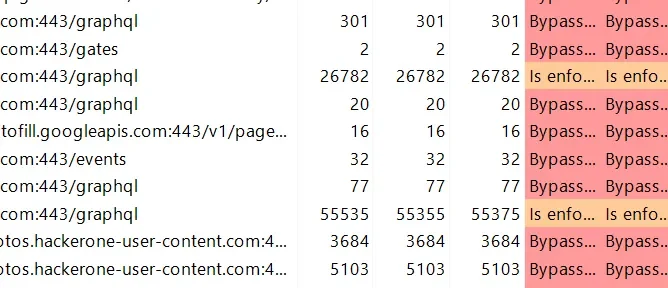
But when the same request was sent to Repeater and replayed with the user cookies, it returned an error.
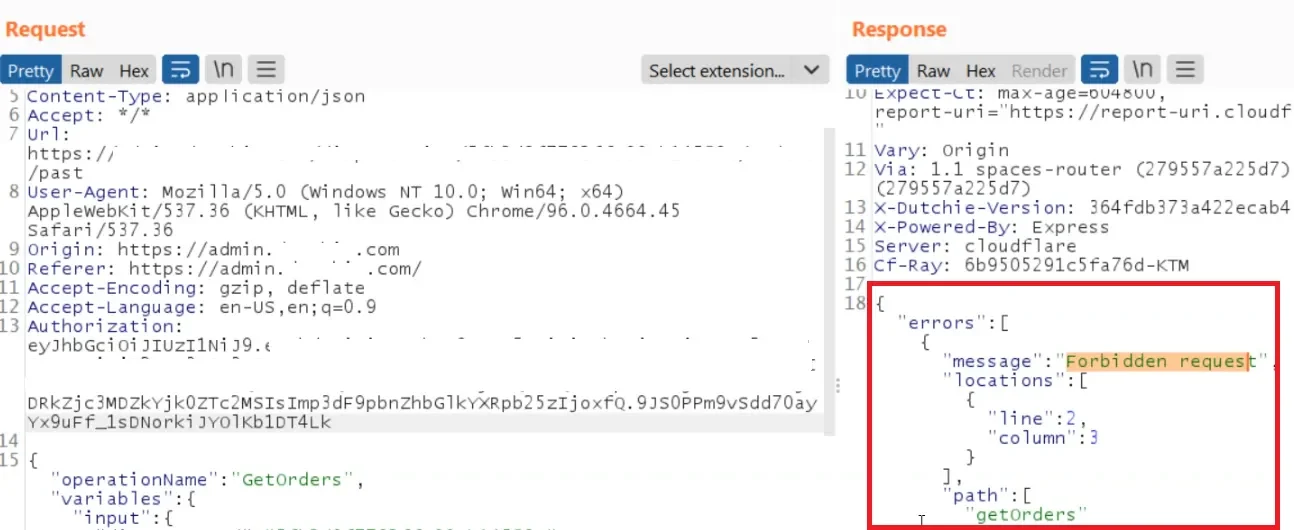
Autorize said bypassed, Repeater said forbidden. The researcher first assumed it was a glitch in Autorize and moved on. It kept happening for the entire week of testing: Autorize kept showing the GetOrders endpoint as bypassed, while Repeater returned 403 forbidden. At that point it was clear it was not an Autorize problem and something was being missed.
Then it clicked: the only difference between Autorize and Repeater was the time interval. Both used the same cookies and token, but Autorize made an immediate call to the admin endpoint, whereas sending the request from Repeater took some time.
Exploitation
Step 1: prime the cache with the admin token
To test the theory, a request to the GetOrders endpoint was made using the admin token:
POST /graphqlHost: admin.target.comAuth: Bearer admin{"operationName":"GetOrders","variables":{"shop_id":"X"},"query":"query X"}
This is the same GraphQL operation, sent with the admin token.
Step 2: immediately replay with the user token
The same request was then made immediately with the user token:
POST /graphqlHost: admin.target.comAuth: Bearer user{"operationName":"GetOrders","variables":{"shop_id":"X"},"query":"query X"}
To the researcher's surprise, the response contained all the order information of that shop, including customer details.
Step 3: confirm with Intruder and a real admin visit
For the proof of concept, Intruder was run making requests to the GetOrders endpoint with the user token. Initially it returned a 403 forbidden response because the access controls were in place.
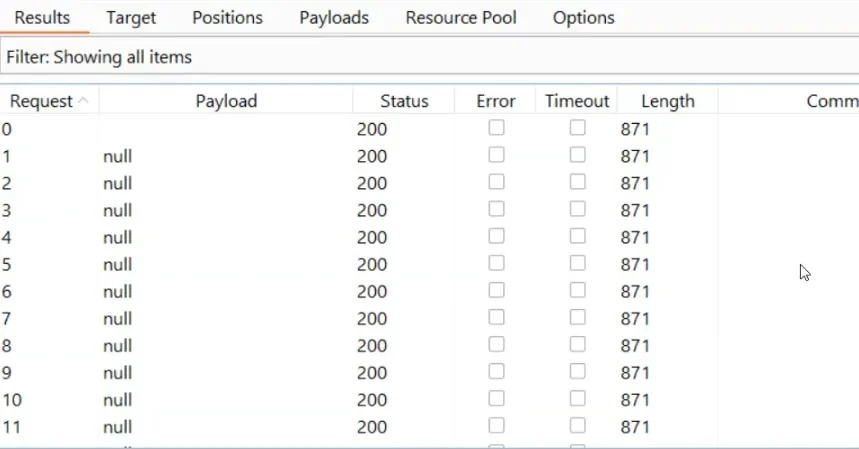
In the meantime, the researcher logged into admin.target.com as adminUser and normally visited admin.target.com/orders. The GraphQL request to GetOrders was made in the background on behalf of the admin, and its response was available to be cached for 3/4 seconds. The cached response was then fetched by the same Intruder tab that had been returning 403 a minute earlier.
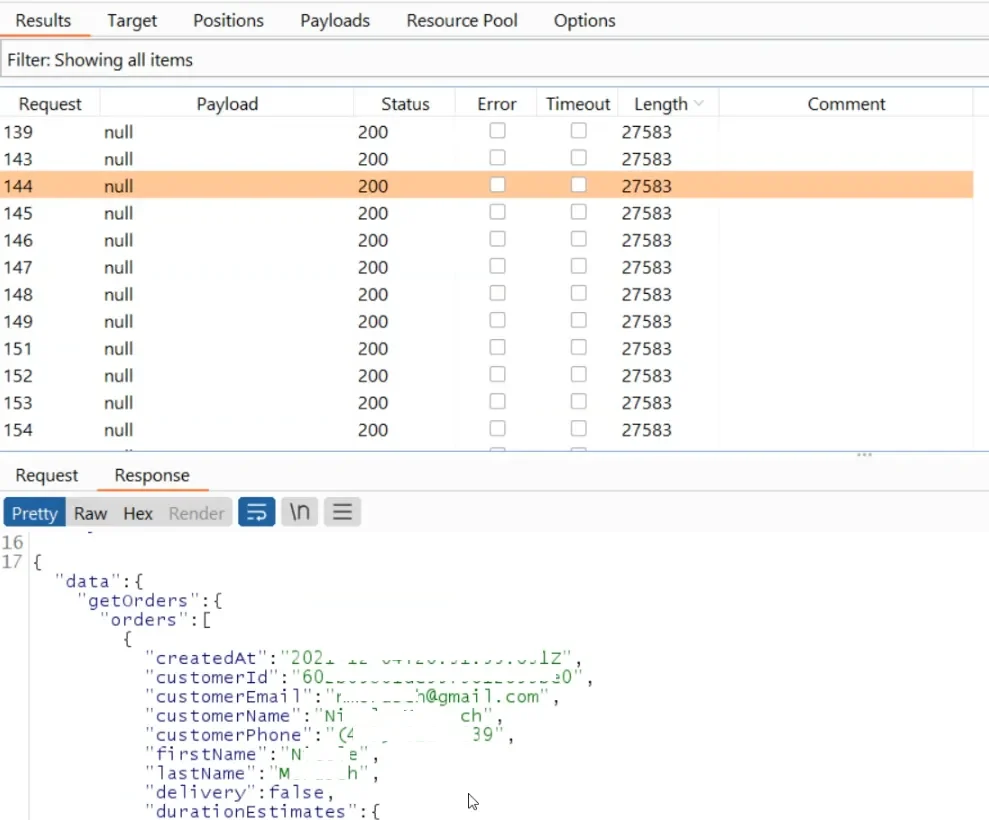
Root cause
The server was caching the GetOrders response for a very brief period of 3/4 seconds. The server was caching the GetOrders response for a very brief period of 3/4 seconds, so a response produced for the admin could be served to a request made with a user token.
This also explains the Autorize versus Repeater discrepancy: Autorize's immediate replay landed inside the caching window, while the manual Repeater request arrived after it had expired.
Impact
If an attacker makes the request at the same time as a normal shop admin is using the admin portal, the attacker can fetch all the order and customer information belonging to any shop using only the shop_id, which is a publicly accessible id. The window is short, 3/4 seconds, so the attack depends on timing against a live admin session.
Fix
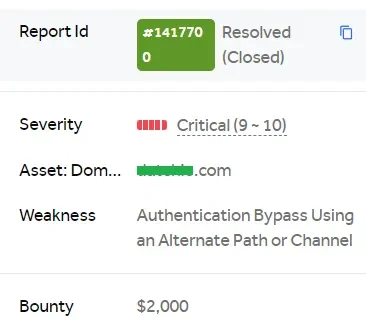
The issue was triaged as critical and resolved within hours. The report does not describe the specific change that was made.
Variants to test
- Authenticated GraphQL queries behind a cache. Replay an admin query immediately after a legitimate admin request with a low privilege token. A positive result is a
200with the admin's data instead of403. - Cache key ignores the session. Send the same operation with two different users back to back and compare responses. A positive result is identical data for both users.
- Short TTL windows. Use Intruder or a loop to send requests continuously while an admin browses. A positive result is an occasional
200among403responses. - Public identifiers as the only selector. Change
shop_idto another shop's public id while an admin of that shop is active. A positive result is another shop's order and customer data. - Other cached admin operations. Test other GraphQL operations on the admin portal the same way, since the same caching layer may apply to them.
A simple bash script that makes continuous requests to the GetOrders endpoint throughout the day is the approach the report suggests for exploitation, relying on the admin visiting their portal to populate the cache.
What happened, in plain words
A security researcher was testing an online shop. The shop had two websites: one for customers (target.com) and one for the people who run the shop, the sellers (admin.target.com). The seller's site lets them see orders and customer details. The researcher found that if a normal user sent a request to the seller's site at the exact moment a real seller was using it, the normal user could see order and customer information. This happened because the server briefly stored (cached) the seller's response for a few seconds and then handed it to anyone who asked, without checking who they were. The researcher reported it, and it was fixed within hours.
The two websites and what they do
An online shop often has two separate websites. One is for shoppers: you browse products, add them to a basket, and pay. The other is for the people who sell on the platform: they list products, see orders, and look at customer details. In this report the shopper site is target.com and the seller site is admin.target.com. Both were in scope, meaning the researcher was allowed to test them.
The interesting part is the orders page on the seller site. When a seller opens https://admin.target.com/orders, the page asks the server for the list of orders. That request is not a normal page load; it is a special kind of request called a GraphQL request. GraphQL is a way for a website to ask a server for exactly the data it needs, a bit like filling in a form that says "give me the orders for shop X, and only the fields I tick". The server replies with data, not with a web page.
What an API, a cookie and a token are
Before going further, three ideas come up constantly.
- API: a way for one piece of software to talk to another. When the orders page loads, your browser quietly sends a request to the server's API and gets data back. You do not see this happen.
- Cookie: a small piece of text your browser stores for a website and sends back with every request. It is how the site remembers who you are between page loads. Think of it as a wristband you get at an event: you show it at the door and you are let in without showing your ticket again.
- Token: similar to a cookie, but usually sent in a header (an extra line in the request) rather than automatically by the browser. A token is like a temporary pass card. In this report the token is sent as
Auth: Bearer ..., where the word afterBeareridentifies the user.
Both cookies and tokens are secrets. If someone else gets yours, they can act as you.
The tool the researcher used: Autorize
The researcher was looking for two kinds of mistakes:
- IDOR (Insecure Direct Object Reference): when a website lets you change an identifier in a request (like a number or a name) and see someone else's data. Imagine a hotel where your key card opens not only your room but also room 203 because the door only checks that the card is valid, not which room it belongs to.
- Access control bypass: when a user who should be blocked from something (for example, a normal shopper trying to open the seller's pages) is not blocked.
To find these, the researcher used a tool called Autorize. Autorize is a plugin for a web proxy (a tool that sits between your browser and the website and lets you see and change requests). Autorize works like this: you give it a low-privilege session (for example, a normal shopper's cookie). Then, as you browse the site with a high-privilege session (the seller), Autorize automatically repeats each request with the low-privilege session. If the low-privilege request succeeds, Autorize flags the endpoint as "bypassed". That means a normal user was able to reach something they should not.
The strange behaviour
The researcher set up Autorize with a normal shopper's cookie taken from target.com. Then they browsed admin.target.com as a seller to see whether a normal user could reach the seller's endpoints.
Every time the researcher visited https://admin.target.com/orders, the browser made this GraphQL request:
POST /graphqlHost: admin.target.com{"operationName":"GetOrders","variables":{"shop_id":"X"},"query":"query X"}
Line by line:
POST /graphqlmeans the request is sent to the path/graphqlon the server, using the POST method (used when you send data to the server).Host: admin.target.comtells the server which website the request is for. A single server can host many websites, so this line picks the right one.- The rest is a JSON object (a way of writing data as name/value pairs).
operationNameis the name of the operation, hereGetOrders.variablesholds the inputs, hereshop_idset toX.queryis the actual GraphQL query, shown asquery Xin the report.
The response contained all the order information for the researcher's shop. That is expected: the seller is allowed to see their own orders.
The surprise was that Autorize flagged this endpoint as "bypassed". In other words, Autorize claimed that a normal shopper could also make this request and see the shop's orders.
But when the researcher sent the same request manually using a tool called Repeater (another part of the proxy that lets you send a request again and again and inspect the response), using the shopper's cookie, it returned an error.
So Autorize said "bypassed" and Repeater said "forbidden". The researcher first thought Autorize was glitching and moved on. But it kept happening for a whole week: Autorize kept saying bypassed, Repeater kept returning 403 forbidden. A 403 means the server understood the request but refused to authorise it. At that point the researcher was sure it was not a tool bug and that something was being missed.
Then it clicked: the only difference between Autorize and Repeater was timing. Both used the same cookies and token. Autorize sent its replay immediately after the original request. The researcher, using Repeater by hand, took a few seconds longer.
Testing the timing theory
To test the idea, the researcher made a request to GetOrders using the seller's token:
POST /graphqlHost: admin.target.comAuth: Bearer admin{"operationName":"GetOrders","variables":{"shop_id":"X"},"query":"query X"}
This is the same GraphQL operation the seller's orders page sends, but with the seller's token in the Auth header. The Auth: Bearer admin line is the credential: it tells the server "I am the seller".
Then, immediately, the same request was made with the shopper's token:
POST /graphqlHost: admin.target.comAuth: Bearer user{"operationName":"GetOrders","variables":{"shop_id":"X"},"query":"query X"}
Here the only change is Auth: Bearer user, the shopper's credential. To the researcher's surprise, the response contained all the order information for that shop, including customer details.
What was actually happening
The server was caching the GetOrders response for a very short time, about 3 or 4 seconds. Caching means storing a copy of a response so that the next request can be served faster without doing the work again. Think of a barista who makes a coffee and leaves it on the counter for a few seconds; if the next customer orders the same thing, they get that coffee instead of a fresh one.
The server cached the response for a few seconds, so a request made with a shopper's token shortly after the seller's request received the seller's response.
This also explains the Autorize versus Repeater mystery: Autorize's immediate replay landed inside the 3-4 second window, while the manual Repeater request arrived after the window had expired.
Impact
If an attacker sends the request at the same moment a real seller is using the seller portal, the attacker can fetch all the order and customer information for any shop, using only the shop_id. The shop_id is a publicly accessible identifier, so the attacker does not need to guess it. The window is short (3-4 seconds), so the attack depends on timing against a live seller session.
Exploit
The report suggests a simple approach: create a bash script that makes continuous requests to the GetOrders endpoint throughout the day. Whenever a seller visits their portal, the order and customer information is cached for 3-4 seconds, allowing the attacker to fetch it and bypass all access control restrictions.
Proof of concept
The researcher ran Burp Intruder (a tool that sends many requests automatically) making requests to the GetOrders endpoint with the shopper's token. Initially it returned 403 forbidden because the access controls were in place.
In the meantime, the researcher logged into admin.target.com as a user called adminUser and visited admin.target.com/orders normally. The GraphQL request to GetOrders was made in the background on behalf of the seller, and its response was cached for 3-4 seconds. The cached response was then fetched by the same Intruder tab that had been returning 403 a minute earlier.
The issue was triaged as critical and resolved within hours.
Variants to test
- Authenticated GraphQL queries behind a cache. Replay an admin query immediately after a legitimate admin request with a low-privilege token. A positive result is a
200with the admin's data instead of403. - Cache key ignores the session. Send the same operation with two different users back to back and compare responses. A positive result is identical data for both users.
- Short TTL windows. Use Intruder or a loop to send requests continuously while an admin browses. A positive result is an occasional
200among403responses. - Public identifiers as the only selector. Change
shop_idto another shop's public id while an admin of that shop is active. A positive result is another shop's order and customer data. - Other cached admin operations. Test other GraphQL operations on the admin portal the same way, since the same caching layer may apply to them.
Glossary
- API: a way for software to talk to other software, often over the web, exchanging data rather than web pages.
- Access control: the rules that decide who is allowed to do what. A bypass is when those rules can be circumvented.
- Admin portal: the website used by sellers or staff to manage a shop, as opposed to the customer-facing site.
- Autorize: a tool that automatically replays requests with a lower-privilege session to detect access control problems.
- Bearer token: a credential sent in an HTTP header, where the word after
Beareridentifies the user. Anyone who has it can act as that user. - Burp Intruder: a tool that sends many HTTP requests automatically, often used to brute-force or fuzz parameters.
- Burp Repeater: a tool that lets you manually edit and resend an HTTP request and inspect the response.
- Cache: a temporary store of responses so that future requests can be served faster.
- Cache key: the identifier under which a cached response is stored. If it does not include the user, different users can receive the same cached response.
- Cookie: a small piece of data stored by the browser and sent with requests to identify a session.
- CVSS: a standard scoring system for the severity of security vulnerabilities.
- GraphQL: a query language for APIs that lets the client ask for exactly the data it needs.
- Header: an extra line in an HTTP request or response that carries metadata, such as the host or authentication.
- HTTP 403 Forbidden: a status code meaning the server understood the request but refused to authorise it.
- IDOR (Insecure Direct Object Reference): a vulnerability where changing an identifier in a request lets you access another user's data.
- JSON: a text format for structured data, using curly braces and name/value pairs.
- Operation name: in GraphQL, the name of the query or mutation being executed.
- Query: in GraphQL, a request to read data.
- Repeater: see Burp Repeater.
- Session: a period during which a user is logged in, identified by a cookie or token.
- Token: a credential, often a string, used to authenticate a user or request.
- TTL (Time To Live): how long a cached item is kept before it expires.
- Variables: in GraphQL, the inputs to a query, such as
shop_id.