Abusing auto mail responders to access internal workplaces
Figma's invitation emails set the inviter's address as the reply-to, so when an invite was sent to an auto-responder, the auto-reply containing the signup link was sent back to the inviter. This let an attacker obtain a signup link for any email address, including internal company addresses, and join or access internal workspaces.
 Published on rikeshbaniya.medium.com
When ever you send an email to a company address [email protected] , [email protected] you might have noticed you will be greeted with an auto reply.
The full write-up lives on its author's site
It belongs to its author, so we link to it rather than copy it. The other two tabs are our own rewrites, checked against it.
Context
Many companies run auto responders on addresses such as [redacted] or [redacted]. When you send an email to one of these addresses, you receive an automatic reply. That reply typically contains two parts: the automatic message from the mail server and the original message that was sent by the client. Because the original message is echoed back to the sender, the sender only sees their own content, so there is not much damage an attacker can do.
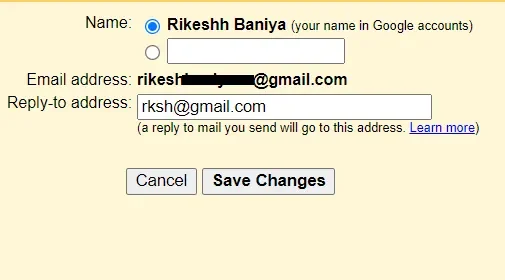
Or can they? Almost all mail services provide an option to specify a reply-to address. If you send an email from [redacted] with reply-to set to [redacted], the email's reply will be forwarded to [redacted] instead of [redacted].
Many SaaS organisations allow administrators to invite users to their organisation. One such website is Figma, a popular SaaS used by many companies. During testing, the researcher observed that if [redacted] sends an invite to [redacted], the invite link is sent in the following manner:
from: [redacted] [Figma ]
to: [redacted] [ Invitee]
reply-to: [redacted] [ Inviter]
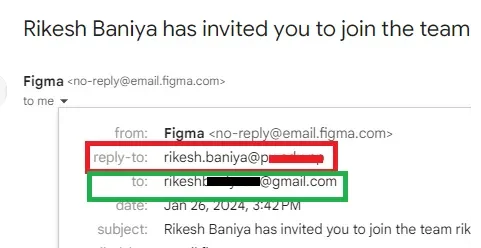
So the attacker-controlled email address is set as the reply-to address. The invite link sent by Figma is also a signup link to join the organisation.
Setup
The report illustrates the flow with [redacted] as the inviter and [redacted] as the invitee. The target was Figma's invite feature. No special tools or versions are mentioned. The precondition is that the attacker can send an invite to an auto responder address (for example, [redacted]) that will automatically reply to the email it receives. The auto-reply consists of two parts: a thank-you message and the original email that was received.
Finding it
The researcher noticed that when an email is sent to a company address, an auto reply is received. The email consists of two parts: the automatic message from the mail server and the original message that was sent by the client.
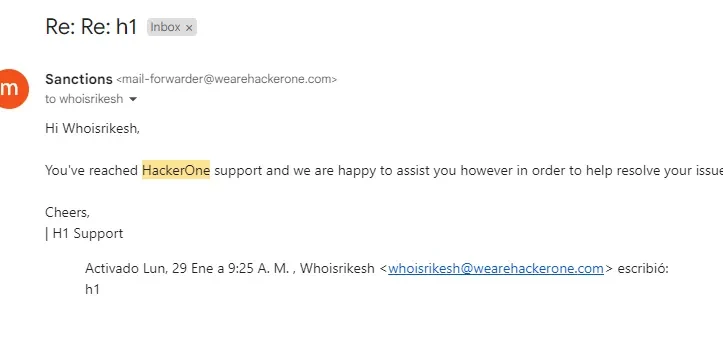
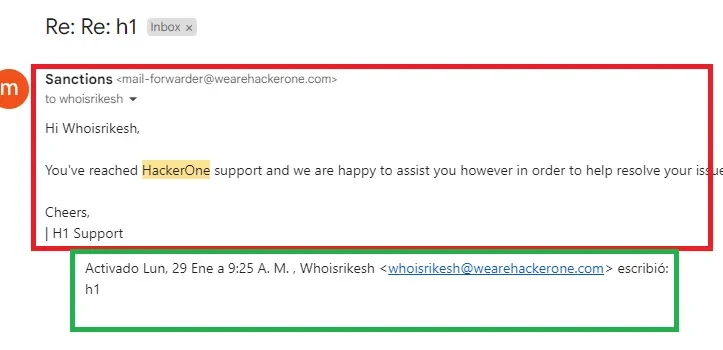
The email content is sent back to the sender, so there is not much damage. However, the reply-to feature allows an attacker to specify a different address. If the invitee is an auto responder, it replies to the reply-to address and includes the original email content. This means the auto responder sends the original email, including the invite link, back to the inviter's address.
Exploitation
Step 1: Identify the invite feature and the reply-to behaviour
The researcher observed that Figma sets the inviter's email address as the reply-to address in the invite email. The invite email is sent from [redacted] to the invitee, with reply-to set to the inviter's address.
Step 2: Chain with an auto responder
Assume that [redacted] is an auto responder address. It will auto reply to all the emails it receives. The auto-reply consists of two parts: a thank-you message and the original email that is received.
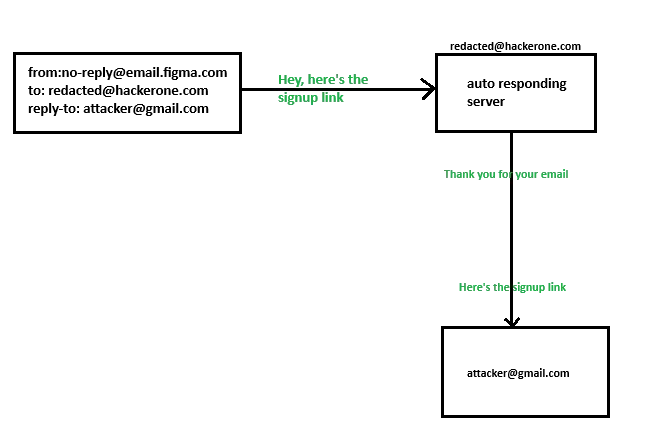
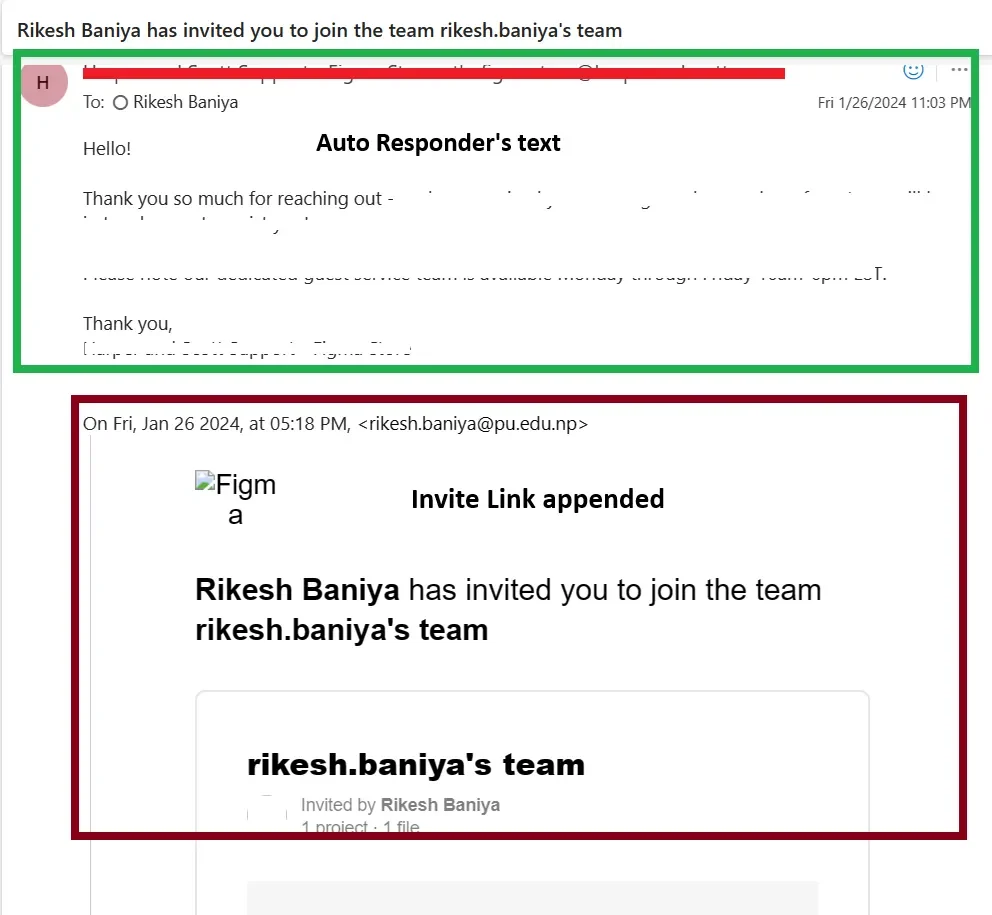
If [redacted] invites [redacted] to a Figma team, Figma first emails the signup link to [redacted]. The auto responder then replies to that email with a message saying "We have received your request" and appends the original email that it received, which contains the invite link. Because Figma set the inviter's address as the reply-to, the auto responder's reply is forwarded to the inviter, [redacted]. Thus the attacker receives the invite link.
Step 3: Exploit against Figma itself
Figma uses Zendesk to handle user support tickets. You can log in to Zendesk using your own Figma account. To exploit this, the researcher sent an invite to [redacted], which was an auto responder. The researcher got access to the signup link and created a verified Figma account using the Figma email address. Then, logging in to Zendesk with that Figma account gave access to internal tickets.
Root cause
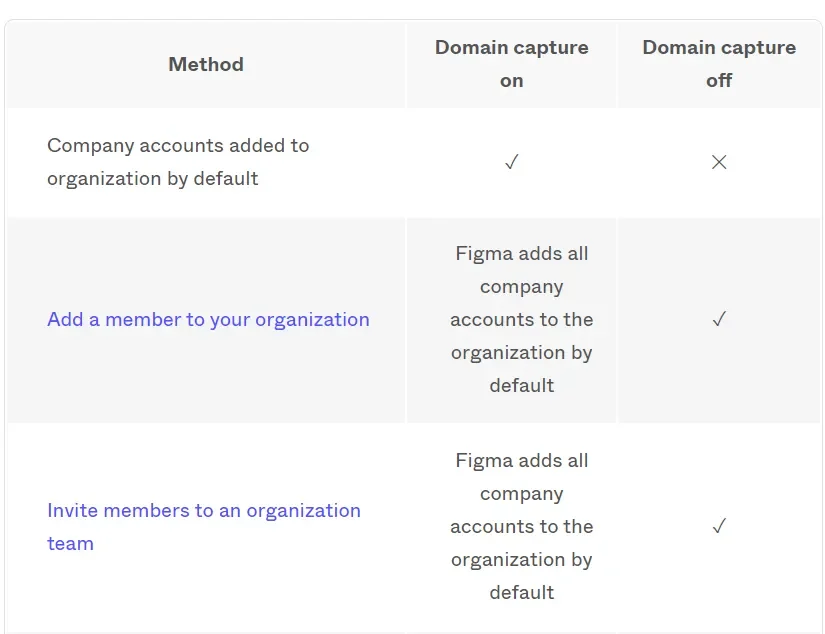
The root cause is that Figma set the inviter's email address as the reply-to address in the invite email. This allowed an attacker to control where replies to the invite email are sent. When the invitee is an auto responder, the auto responder replies to the reply-to address (the attacker) and includes the original email content, which contains the invite link. The attacker can then use the invite link to join the organisation. Figma's domain capture feature means that if you have a verified @target.com account, you can auto join the internal workplace in Figma. Figma does have an SSO login option, so SSO login based organisations were secure against this attack.
Impact
This allowed an attacker to claim any @target.com in Figma. Figma has a domain capture feature: if you have a verified @target.com account, you can auto join the internal workplace in Figma. The attacker could join internal workplaces, and access to internal tickets was demonstrated against Figma's own Zendesk. The attack requires that the target organisation has an auto responder that replies to emails and includes the original message. SSO login based organisations were secure against this attack.
Fix
The report does not state what fix was applied.
Variants to test
- Test other SaaS applications that send invite emails with a
reply-toset to the inviter's address. A positive result is that the invite email has areply-toheader containing the inviter's email address. - Test other auto responders that include the original email in their reply. A positive result is that the auto responder's reply contains the original email content, including any links or tokens.
- A positive result is that the email contains a sensitive link or token that can be extracted via an auto responder.
What happened, in plain words
Imagine you post a letter to a big company. A few minutes later, a polite robot at the company posts a letter back to you saying "thanks for writing, here is a copy of what you sent us". That is harmless, because the copy is just your own letter coming back.
Now imagine you can write a small note on the back of your envelope that says "if you need to reply, send it to this other address instead". That note is a real feature of email called reply-to. If you put someone else's address there, the robot's reply goes to that other person, not to you.
This report is about a researcher who combined those two ordinary things. He sent an invitation from Figma (a design tool many companies use) to an email address that belongs to a robot that always replies. Because Figma put the inviter's address in the reply-to field, the robot's reply, which contained the secret invitation link, was delivered straight back to the researcher. He could then use that link to create an account that looked like it belonged to the target company, and in Figma's own case, that gave him access to internal support tickets.
The pieces you need to know
Before walking through the steps, here are the everyday ideas the report relies on.
- Email address: the thing you type after the
@sign, like[redacted]. The part before the@is the mailbox, the part after is the domain (the company or service that runs the mailbox). - Auto responder: a robot mailbox. When you email it, it sends an automatic reply without a human reading anything. Support desks, help desks and ticketing systems often use one.
reply-toheader: a hidden field inside every email. It tells the receiving mail program "if you press reply, send the answer here". Most of the time it is the same as the sender's address, but the sender can set it to anything.- SaaS: "software as a service", a website you log into and use, like Figma, rather than software you install. Companies pay for a shared workspace and invite their colleagues in.
- Invite link: a special web address that, when opened, creates an account and joins you to a workspace. It is effectively a password in URL form: whoever has the link can use it.
- Domain capture: a Figma feature. If a company proves it owns a domain (say
target.com), then anyone who signs up with a verified@target.comemail address can be pulled automatically into that company's workspace. - SSO (single sign-on): a login method where the company's own login system decides who gets in, instead of Figma's own email and password. The report notes that organisations using SSO were not affected.
- Zendesk: a customer support ticketing product. Companies use it to receive and answer support emails. Figma uses it for its own support.
The starting observation: auto replies echo your message
When you send an email to a company address such as [redacted] or [redacted], you often get an automatic reply.
That reply is not just a canned "thanks". It usually has two parts:
- The automatic message from the mail server.
- The original message that was sent by the client.
The second part is the interesting one. The robot is quoting your own email back to you. On its own that is harmless: you already have your own email, so getting a copy back does not give you anything new. The researcher's question was whether that copy could be made to land somewhere else.
The reply-to feature
Almost all mail services let you specify a reply-to address. If you send an email from [redacted] with reply-to set to [redacted], then when the recipient presses reply, the answer goes to [redacted] instead of [redacted].
In plain words: the From line says who the message appears to come from, and the reply-to line says where the answer should go. They can be different, and the sender chooses both. That is the whole trick. If you can make a robot reply to an address you control, and the robot includes the original message in its reply, then the original message comes to you.
The invite feature in Figma
Many SaaS organisations let an administrator invite users to their organisation. Figma is one of them, and it is widely used by companies.
During testing, the researcher noticed that if [redacted] sends an invite to [redacted], the invite email looks like this:
from: [redacted] [Figma ]
to: [redacted] [ Invitee]
reply-to: [redacted] [ Inviter]
Line by line:
from: [redacted] [Figma ]is the sender. Theno-replypart is a hint that this mailbox does not accept incoming mail; it is only used for sending.to: [redacted] [ Invitee]is the person being invited.reply-to: [redacted] [ Inviter]is the person who sent the invite. Figma put the inviter's address here so that if the invitee presses reply, the answer goes to the human who invited them, not to theno-replyrobot.
That is a sensible design for a normal human invitee. But it means the inviter controls where replies go. The researcher also noted that the invite link Figma sends is not just a notification: it is a signup link that joins the recipient to the organisation. So the link is valuable, and anyone who gets it can use it.
Chaining the two together
Now put the two observations side by side. Suppose [redacted] is an auto responder address. It replies automatically to every email it receives, and its reply has two parts:
- a thank-you message ("thank you for your message")
- the original email that it received
So if [redacted] invites [redacted] to a Figma team, the following happens, in order:
- Figma sends the signup link by email to
[redacted]. - The auto responder at
[redacted]receives that email and replies automatically, saying "We have received your request" and appending the original email it received, which contains the invite link. - Because Figma set the inviter's address as the
reply-to, that automatic reply is delivered to[redacted], the inviter.
The attacker now has the invite link without ever having access to the invitee's mailbox. The researcher's reaction was, in his own words, "how cool is that".
Demonstrating the flow
The researcher then demonstrated the flow end to end.
And here is the email that arrived in the inviter's inbox, containing the invite link that the auto responder had echoed back.
Why this matters beyond one invite
A huge number of sites run auto responders that reply automatically to incoming email: [redacted], [redacted] and so on. If any of those robots echoes the original message back, and the original message contains a link that grants access, then the same chain works against that company.
In Figma's case, this allowed an attacker to claim any @target.com address. Figma has a domain capture feature: if you have a verified @target.com account, you can auto join the internal workplace in Figma. So with domain capture, a verified @target.com account can auto join the company's internal workplace.
One important limit: Figma does have an SSO login option, so organisations that log in through SSO were secure against this attack. The chain depends on Figma's own email based signup being the way in.
Exploiting it against Figma itself
Figma uses Zendesk to handle its own user support tickets, and you can log in to Zendesk using your own Figma account. That means a Figma account is a key to Figma's support system.
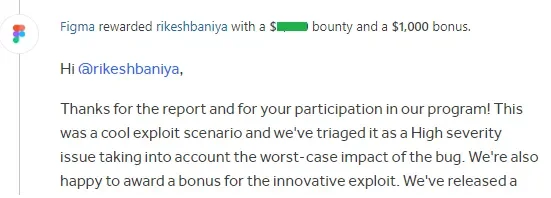
To exploit it, the researcher sent an invite to [redacted], which was an auto responder. He got access to the signup link and created a verified Figma account using the Figma email address. Then, logging in to Zendesk with that Figma account gave him access to internal tickets.
In his words, it was "a very cool chain of issues".
Why it worked
The root cause is that Figma set the inviter's email address as the reply-to address in the invite email. That gave the attacker control over where replies to the invite email were sent. When the invitee is an auto responder, the auto responder replies to the reply-to address (the attacker) and includes the original email content, which contains the invite link. The attacker can then use the invite link to join the organisation. Figma's domain capture feature means that if you have a verified @target.com account, you can auto join the internal workplace in Figma.
What the impact was
This allowed an attacker to claim any @target.com in Figma. The attacker could join internal workplaces and access internal tickets, as demonstrated against Figma's own Zendesk. The attack requires that the target organisation has an auto responder that replies to emails and includes the original message. SSO login based organisations were secure against this attack.
What the fix was
The report does not state what fix was applied.
Variants to test
- Test other SaaS applications that send invite emails with a
reply-toset to the inviter's address. A positive result is that the invite email has areply-toheader containing the inviter's email address. - Test other auto responders that include the original email in their reply. A positive result is that the auto responder's reply contains the original email content, including any links or tokens.
- A positive result is that the email contains a sensitive link or token that can be extracted via an auto responder.
Glossary
- Auto responder: a mailbox that replies automatically to every email it receives, without a human reading it.
- Domain: the part of an email address or web address after the
@orwww., such astarget.com. - Domain capture: a SaaS feature where a company proves it owns a domain, and anyone signing up with a verified address on that domain is pulled into the company's workspace.
Fromheader: the field in an email that says who the message appears to come from.- Invite link: a web address that, when opened, creates an account and joins the recipient to a workspace. It works like a password in URL form.
- Logic flaw: a weakness where each part of a system works as designed, but the combination produces an unintended result.
reply-toheader: a field in an email that says where a reply should be sent. It can differ from theFromaddress and is chosen by the sender.- SaaS: software as a service, a website you log into and use rather than software you install.
- SSO (single sign-on): a login method where the company's own login system decides who gets in, instead of the SaaS product's own email and password.
- Token: a short piece of text that acts like a temporary key, proving you are allowed to do something.
- Zendesk: a customer support ticketing product used by companies to receive and answer support emails.