Facebook Email/phone disclosure using Binary search
The password recovery endpoint accepted a JSON-wrapped array of emails and usernames in a parameter, and returned a summary count that revealed whether any supplied email belonged to the given username. An attacker could use binary search over batches of emails to discover a user's private email address.
 Published on medium.com
So in December I decided to hunt on Facebook, and chose to go with the Facebook Android App
The full write-up lives on its author's site
It belongs to its author, so we link to it rather than copy it. The other two tabs are our own rewrites, checked against it.
Context
In December the researcher decided to hunt on Facebook and chose the Facebook Android App as the target. The feature under examination was the app's password recovery flow: the flow a user goes through when they have forgotten their password and supply an email address or phone number to recover access to their account.
Setup
The work was done against the Facebook Android App and its password recovery flow. No special accounts, roles or tooling beyond the app itself and the ability to intercept and modify its requests are described. The precondition for the attack is simply that the recovery endpoint is reachable and accepts the parameters described below.
Finding it
While analysing the password recovery flow, the researcher noticed that a particular endpoint was being used.
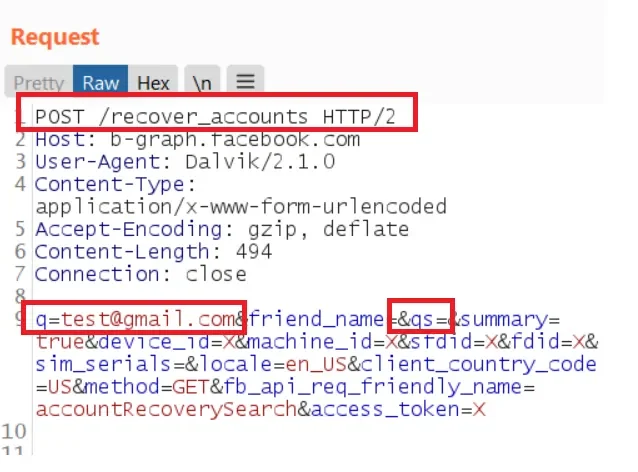
When a user enters their email or phone number, the email is supplied using the parameter q. The endpoint contained many more parameters than it required, which prompted the researcher to test what the extra parameters did.
One observation stood out: although the user's email is carried by q, the request also contains a qs parameter. In Facebook's naming convention, the character s behind a parameter means plural, for example invite_id becomes invite_ids and user_id becomes user_ids. Since plural parameters normally accept an array of data such as:
user_ids=["UserID1","UserID2"]
the researcher supplied data in the following manner:
qs=["[redacted]","[redacted]"]
This produced an error stating that the array keys were invalid. So qs was not a normal array: it had its own keys.
Exploitation
Step 1: Work out the shape of qs
After some fuzzing, the researcher found that qs takes a JSON-wrapped value with the keys email and phone, and the values of those keys are the emails or phone numbers supplied as an array. For example:
q=[redacted]
qs={"email":["[redacted]"],"phone":["981234567890"]}
Step 2: Observe the response
When an email is supplied to the forget password endpoint, the data belonging to the user is returned in the response in encrypted format. The response contains the encrypted userID, contact points and similar data.
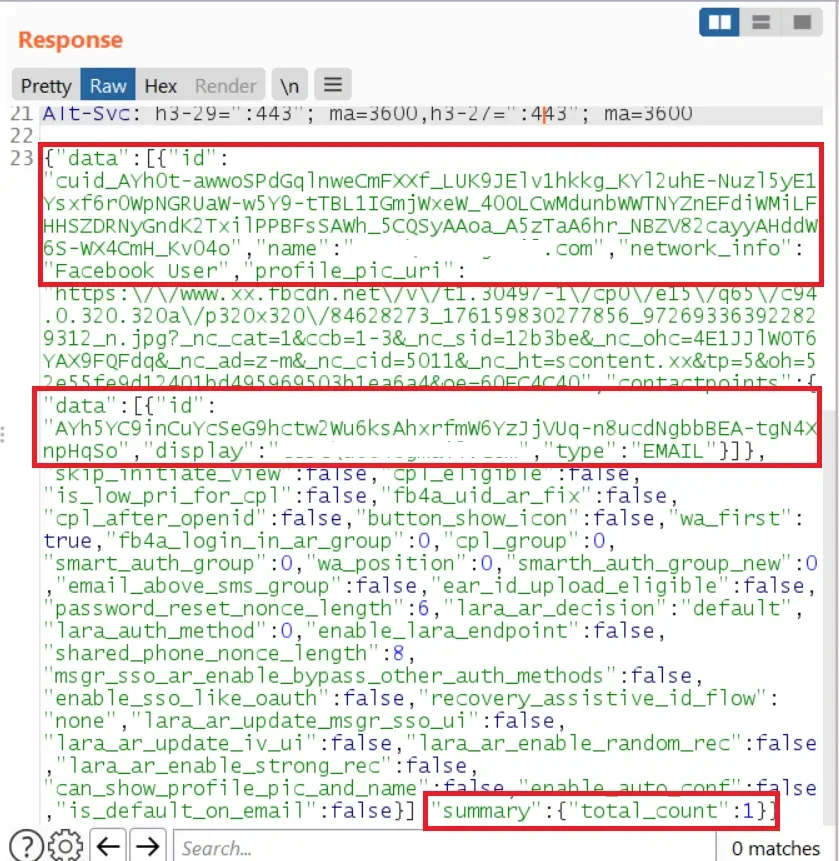
Alongside that data there was a summary value, initially set to 1. The researcher first assumed it was a Boolean, but it turned out to count something else.
When one email is supplied in qs:
qs={"email":["[redacted]"]}
the data of one user is obtained in the response, hence summary=1.
When two emails are supplied in qs:
qs={"email":["[redacted]","[redacted]"]}
the data of two users is obtained in the response, hence summary=2.
Step 3: The key behaviour
Now suppose the following is supplied:
qs={"email":["[redacted]","[redacted]"]}
and the data of only one user is obtained. That means both emails belong to the same user: both emails pointed to the same user, resulting in the response "summary":1.
This is a bruteforce scenario. Supplying the victim's username together with an email, if the email belongs to the victim, the response is summary:1:
qs={"email":["victimUserName","Email"]}
The researcher notes that a username can be supplied in the email parameter.
Step 4: Binary search to reduce the noise
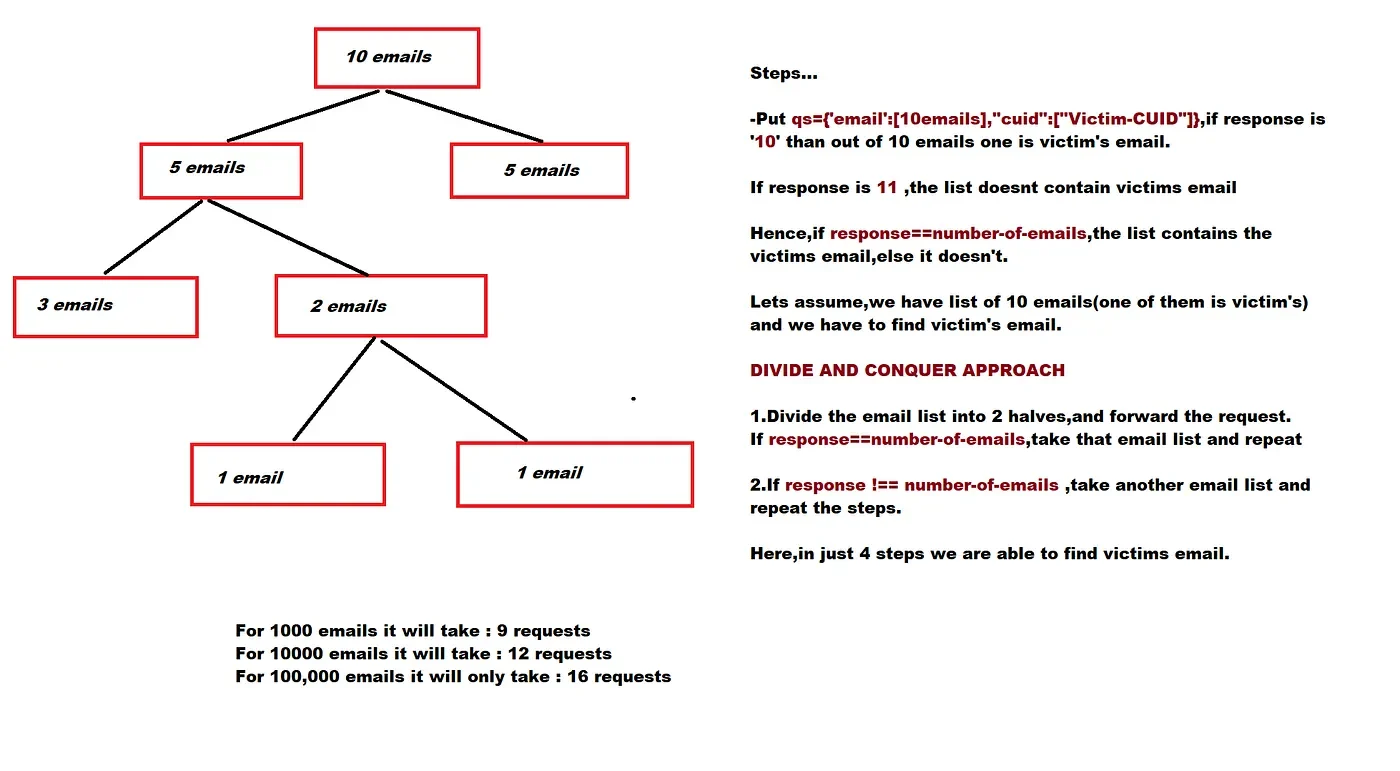
Bruteforce attacks are noisy. Using binary search made the attack much easier. The researcher points readers to a video explaining binary search.
Because the endpoint accepts an array of data, there was no need to submit only one username and one email: a single request could carry one username plus hundreds of emails. For example:
qs={"email":["victimUserName","[redacted]","[redacted]","[redacted]"]}
If any of the emails in the request belonged to victimUserName:
Summary=3
//Response of email1+email2+email3
Otherwise:
summary=4
//Response of vicitmUsername+email1+email2+email3
This made it easier to bruteforce and effectively identify any user's private email.
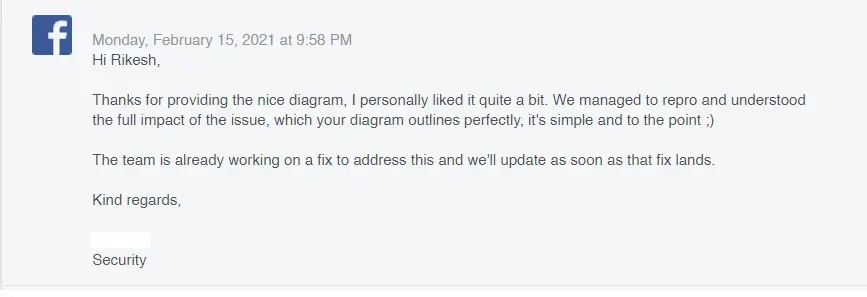
The researcher also received a positive response from the Facebook team.
Root cause
The recovery endpoint accepts a plural parameter qs that carries a JSON object with email and phone arrays, and it returns a summary count that reflects how many distinct users the supplied identifiers resolve to. Because a username can be supplied in the email parameter, an attacker can mix a known username with candidate emails in one request and read the count to learn whether any candidate belongs to that user. The count is effectively an oracle: it collapses the per-identifier results into a single number, which is exactly what a binary search needs. The report does not describe the server-side implementation, so the precise reason the count is exposed is not stated.
Impact
An attacker could identify a user's private email address by bruteforcing it through the recovery endpoint, using the summary count as the signal. The binary search technique reduced the number of requests needed and therefore the noise of the attack. The report does not state any further impact, such as account takeover, and does not describe any rate limiting or other conditions that would restrict the attack.
Fix
Variants to test
- Look for plural parameters (
qs,ids,emails) on recovery, registration and invitation endpoints and check whether they accept JSON-wrapped arrays with named keys. A positive result is an error that distinguishes a plain array from a keyed object, which tells you the parameter has its own schema. - Supply two identifiers you know belong to the same account and observe whether a count in the response stays at one. A positive result is a count that does not increase when the identifiers are aliases of the same user.
- Mix a known username with candidate emails in one request and compare the count with the number of identifiers supplied. A positive result is a count lower than the number of identifiers, which indicates a match.
- Apply binary search over a candidate list to narrow down the matching identifier. A positive result is convergence on a single email or phone number with far fewer requests than a linear bruteforce.
- Check whether usernames are accepted wherever an email is expected. A positive result is a request that succeeds with a username in the email field.
Timeline
| Stage | Date |
|---|---|
| Submitted | January 3 |
| Triaged | February 13 |
| Bounty $XXXX awarded | March 22 |
What happened, in plain words
A security researcher spent some time in December looking for bugs in Facebook. Instead of testing the website in a browser, he chose the Facebook Android app as his target. He focused on one specific feature: the password recovery flow, which is what you use when you have forgotten your password and ask Facebook to help you get back into your account by typing in your email address or phone number.
While watching what the app sent to Facebook's servers during that flow, he noticed an endpoint (a specific address on Facebook's servers that the app talks to) that accepted far more inputs than it seemed to need. One of those extra inputs, called qs, turned out to accept a list of email addresses and phone numbers. The server's reply included a number called summary, and that number quietly revealed how many different people the supplied addresses belonged to. By mixing a known username with a list of guessed email addresses in a single request, the researcher could tell whether any of the guesses belonged to that user. Because the endpoint accepted hundreds of addresses at once, he could use a technique called binary search to narrow down the real address with very few requests. That is how a private email address could be discovered.
This article walks through the whole story from zero. You do not need to know how to program. You only need to be comfortable using a browser and a computer.
Background: the pieces you need to know
Before the steps make sense, here are the ideas involved, explained as simply as possible.
What an app and a server are
When you use the Facebook Android app, the app on your phone is not doing all the work itself. It sends messages to Facebook's computers, called servers, and the servers send answers back. The app is like a customer in a restaurant; the server is the kitchen. The app asks for something, the kitchen prepares it and sends it back.
What an API and an endpoint are
An API (Application Programming Interface) is the set of rules for how the app and the server talk to each other. An endpoint is one specific address within that API, like one particular counter in a large office where you can hand in a form and get a reply. The password recovery flow uses one such endpoint: the app sends your email or phone number there, and the server replies with information about your account so the recovery can proceed.
What a parameter is
A parameter is a named piece of information sent along with a request. Think of a form with labelled boxes: one box might be labelled q and contain your email address, another might be labelled qs and contain a list of addresses. The server reads the labels to know what each value means.
What a request and a response are
A request is the message the app sends to the server. A response is the message the server sends back. In this story, the request carries the email address or phone number, and the response carries account data plus a number called summary.
What JSON is
JSON is a way of writing structured data as text, so that both the app and the server can read it. It uses curly braces {} for an object (a collection of labelled values) and square brackets [] for an array (an ordered list). For example, {"email":["[redacted]"]} is an object with one label, email, whose value is a list containing one address. You will see this notation throughout the report.
What encryption means here
The response from the server contained the user's data in encrypted form. Encryption scrambles information so that only someone with the right key can read it. The researcher could see that data was returned, but not read its contents directly. What mattered was not the scrambled data but the summary number sitting alongside it.
What a username is
A username is the short name that identifies an account, separate from the email address used to sign in. Facebook lets you have a username as well as one or more email addresses and phone numbers, and all of them can point to the same account.
What bruteforce means
A bruteforce attack is guessing. Instead of knowing the answer, you try many possibilities one after another until one works. If you were trying to guess a friend's phone number, you might try every combination. It works, but it is slow and noisy: each guess is a separate attempt, and a system that watches for suspicious behaviour will notice thousands of attempts.
What binary search means
Binary search is a much smarter way to guess. Imagine a friend has picked a number between 1 and 100 and will only tell you whether your guess is too high or too low. Instead of trying 1, then 2, then 3, you guess 50. If the answer is "too high", you know the number is between 1 and 49, so you guess 25. Each guess halves the remaining possibilities. In seven guesses you can find any number between 1 and 100. The same idea applies here: if the server tells you whether a match is in the first half or the second half of a list, you can find the matching address with very few requests instead of hundreds.
What information disclosure means
Information disclosure is a class of security bug where a system reveals something it should not. Here, the system revealed whether a guessed email address belonged to a particular user. On its own that sounds small, but it lets someone learn a private email address that the user never made public.
The setup
The researcher worked against the Facebook Android App and its password recovery flow. The report does not describe any special accounts, roles or tools. Intercepting means watching the messages the app sends and being able to change them before they reach the server, like opening a letter, editing it and sealing it again.
Finding it
While analysing the password recovery flow, the researcher noticed that a particular endpoint was being used.
When a user enters their email or phone number, the email is supplied using the parameter q. The endpoint contained many more parameters than it required, which prompted the researcher to test what the extra parameters did. This is a common habit in security testing: when something accepts more inputs than it seems to need, each extra input is a possible door that was not meant to be opened.
One observation stood out: although the user's email is carried by q, the request also contains a qs parameter. In Facebook's naming convention, the character s behind a parameter means plural, for example invite_id becomes invite_ids and user_id becomes user_ids. A plural parameter is like a box labelled "one or more" instead of "exactly one".
Since plural parameters normally accept an array of data such as:
user_ids=["UserID1","UserID2"]
This line is a guess at the format: the label user_ids followed by a list in square brackets containing two values. The researcher expected qs to work the same way, so he supplied data in the following manner:
qs=["[redacted]","[redacted]"]
Here the label qs is followed by a plain list of two email addresses, with no other labels inside. This produced an error stating that the array keys were invalid. So qs was not a normal array: it had its own keys. In other words, the server did not want a bare list; it wanted a list where each item had a name attached, like a form with labelled fields rather than a shopping list.
Exploitation
Step 1: Work out the shape of qs
After some fuzzing, the researcher found that qs takes a JSON-wrapped value with the keys email and phone, and the values of those keys are the emails or phone numbers supplied as an array. Fuzzing means trying many small variations of an input to see which one the server accepts, a bit like trying different keys on a lock until one turns.
For example:
q=[redacted]
qs={"email":["[redacted]"],"phone":["981234567890"]}
Line by line: q=[redacted] puts the email address in the single-value parameter. qs={"email":["[redacted]"],"phone":["981234567890"]} puts a JSON object in the plural parameter. Inside the curly braces there are two labels. The first, email, holds a list with one address. The second, phone, holds a list with one phone number. The server now knows which addresses and numbers to look up.
Step 2: Observe the response
When an email is supplied to the forget password endpoint, the data belonging to the user is returned in the response in encrypted format. The response contains the encrypted userID, contact points and similar data.
Alongside that data there was a summary value, initially set to 1. The researcher first assumed it was a Boolean, meaning a simple true or false value. But it turned out to count something else: the number of distinct users the supplied identifiers resolved to.
When one email is supplied in qs:
qs={"email":["[redacted]"]}
This line puts a single address in the email list. The data of one user is obtained in the response, hence summary=1.
When two emails are supplied in qs:
qs={"email":["[redacted]","[redacted]"]}
This line puts two addresses in the email list, separated by a comma. The data of two users is obtained in the response, hence summary=2. So the number counts how many different accounts the addresses belong to, not how many addresses were sent.
Step 3: The key behaviour
Now suppose the following is supplied:
qs={"email":["[redacted]","[redacted]"]}
This line puts two addresses in the list. If the data of only one user is obtained, that means both emails belong to the same user: both emails pointed to the same user, resulting in the response "summary":1. The count stayed at one even though two addresses were sent, which is the clue.
This is a bruteforce scenario. Supplying the victim's username together with an email, if the email belongs to the victim, the response is summary:1:
qs={"email":["victimUserName","Email"]}
This line puts a username and an email address in the same list. The researcher notes that a username can be supplied in the email parameter, which is unusual: the field is labelled email but accepts a username too. If the count comes back as one, the two entries are the same person, so the guessed email belongs to that username. If the count comes back as two, they are different people, so the guess is wrong.
Step 4: Binary search to reduce the noise
Bruteforce attacks are noisy. Every guess is a separate request, and hundreds of requests look suspicious. Using binary search made the attack much easier. The researcher points readers to a video explaining binary search.
Because the endpoint accepts an array of data, there was no need to submit only one username and one email: a single request could carry one username plus hundreds of emails. For example:
qs={"email":["victimUserName","[redacted]","[redacted]","[redacted]"]}
This line puts one username and three guessed addresses in the same list. The server looks them all up and returns a count. If any of the emails in the request belonged to victimUserName:
Summary=3
//Response of email1+email2+email3
Here the count is three. Four entries were sent, but one of them matched the username, so the four entries resolved to three distinct users. The comment notes that the response covers the three email addresses. Otherwise:
summary=4
//Response of vicitmUsername+email1+email2+email3
Here the count is four, the same as the number of entries sent, which means no email matched the username. The comment notes that the response covers all four entries separately. So the count tells you whether a match is somewhere in the list, without telling you which entry it is. That is exactly the signal binary search needs: split the list in half, send one half, and the count tells you which half contains the match. Repeat until one address remains.
This made it easier to bruteforce and effectively identify any user's private email.
The diagram illustrates the binary search: repeatedly halving the candidate list and using the count to decide which half to keep.
The researcher also received a positive response from the Facebook team.
Why it worked
The recovery endpoint accepts a plural parameter qs that carries a JSON object with email and phone arrays, and it returns a summary count that reflects how many distinct users the supplied identifiers resolve to. Because a username can be supplied in the email parameter, an attacker can mix a known username with candidate emails in one request and read the count to learn whether any candidate belongs to that user. The count is effectively an oracle: a source of a yes or no answer to a question the attacker is not supposed to be able to ask. It collapses the per-identifier results into a single number, which is exactly what a binary search needs. The report does not describe the server-side implementation, so the precise reason the count is exposed is not stated.
What the impact was
An attacker could identify a user's private email address by bruteforcing it through the recovery endpoint, using the summary count as the signal. The binary search technique reduced the number of requests needed and therefore the noise of the attack.
How it could be fixed
Variants to test
If you want to look for similar bugs yourself, here are starting points. Each one is a small experiment you can reason about without any special tools.
- Look for plural parameters (
qs,ids,emails) on recovery, registration and invitation endpoints and check whether they accept JSON-wrapped arrays with named keys. A positive result is an error that distinguishes a plain array from a keyed object, which tells you the parameter has its own schema. - Supply two identifiers you know belong to the same account and observe whether a count in the response stays at one. A positive result is a count that does not increase when the identifiers are aliases of the same user.
- Mix a known username with candidate emails in one request and compare the count with the number of identifiers supplied. A positive result is a count lower than the number of identifiers, which indicates a match.
- Apply binary search over a candidate list to narrow down the matching identifier. A positive result is convergence on a single email or phone number with far fewer requests than a linear bruteforce.
- Check whether usernames are accepted wherever an email is expected. A positive result is a request that succeeds with a username in the email field.
Timeline
| Stage | Date |
|---|---|
| Submitted | January 3 |
| Triaged | February 13 |
| Bounty $XXXX awarded | March 22 |
Triaged means the security team looked at the report and confirmed it was a real issue worth investigating.
Glossary
- API: the set of rules that lets an app and a server exchange information.
- Array: an ordered list of values, written in JSON with square brackets
[]. - Binary search: a guessing technique that halves the remaining possibilities with each attempt, like guessing a number between 1 and 100 by always picking the middle.
- Boolean: a value that is either true or false.
- Bruteforce: trying many possibilities one by one until one works.
- Encryption: scrambling information so only someone with the right key can read it.
- Endpoint: one specific address on a server that an app sends requests to.
- Fuzzing: trying many small variations of an input to see which one the server accepts.
- Information disclosure: a bug where a system reveals something it should keep private.
- JSON: a text format for structured data, using
{}for labelled objects and[]for lists. - Oracle: in security, any part of a system that answers a yes or no question an attacker is not supposed to be able to ask.
- Parameter: a named piece of information sent with a request, like a labelled box on a form.
- Password recovery flow: the steps a user goes through to regain access to an account after forgetting the password.
- Plural parameter: a parameter whose name ends in
sand which accepts a list of values rather than a single one. - Rate limiting: a server-side control that restricts how many requests can be made in a period of time.
- Request: the message an app sends to a server.
- Response: the message a server sends back to an app.
- Server: a computer that provides a service to apps and browsers over a network.
- Summary: the count in the response that reflects how many distinct users the supplied identifiers resolve to.
- Triaged: the stage at which a security team confirms a report describes a real issue.
- Username: the short name that identifies an account, separate from its email address.