AWS SSRF to Root on production instance — A bug worth 1.75Lacs
 Published on logicbomb.medium.com
It’s been some time since I blogged mainly because there was not something new I could find in the last 6–7 months of bug bounty. Fortunately, this month started with a nice bug that I discovered in a Trading Platform.
The full write-up lives on its author's site
It belongs to its author, so we link to it rather than copy it. The other two tabs are our own rewrites, checked against it.
Context
This is a write-up of a bug found in a trading platform, described as one of India's growing trading startups. The researcher had not found anything new in the previous six to seven months of bug bounty work, and this bug came at the start of the month.
The entry point was an ordinary feature: the application's Password Reset functionality. The endpoint took a parameter called return_url, which is the kind of parameter that frequently carries easy-to-find bugs. The application ran on AWS, which was visible from the response header X-Amz-Cf-Id and from an S3 bucket interaction used for fetching profile photos.
Setup
The researcher was manually traversing different sections of the app looking for sensitive API endpoints, and in parallel added the target scope to "Crawl and Audit" in Burp Suite. No accounts, roles or versions beyond that are described in the report.
Two preconditions mattered for the escalation later:
- The
return_urlparameter turned out to make server-side requests, including to the instance metadata service. - The EC2 instance had to have a relevant role attached, because running remote commands through AWS Systems Manager (SSM) requires it. The researcher notes that this was the one thing that ran in his favour.
Finding it
Looking closely at the password reset endpoint, the researcher noticed the return_url parameter. Burp Suite's Crawl and Audit then discovered an External service interaction (DNS) vulnerability on that same endpoint. That finding alone is only an out-of-band interaction, so the next move was to check whether full SSRF was possible.
While checking different HTTP request headers, the AWS footprint was clear: the X-Amz-Cf-Id response header and the S3 bucket interaction for profile photos.
Exploitation
Step 1: Confirm SSRF against the metadata service
The researcher tried accessing the AWS metadata URL through the vulnerable parameter:
http://[redacted]/latest/meta-data/
The response to the CURL request is shown below.
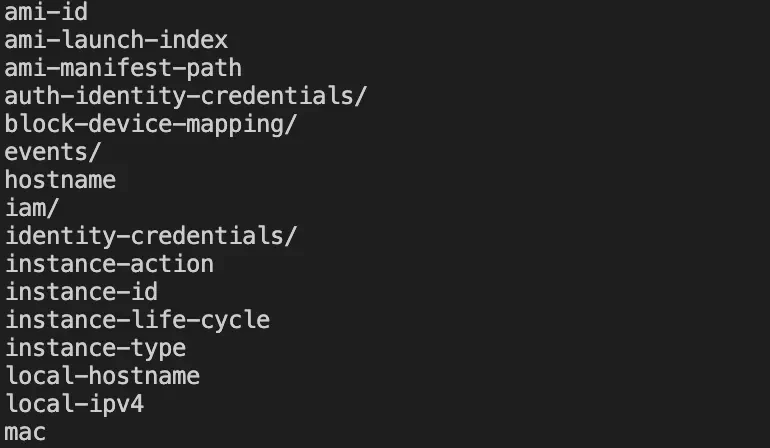
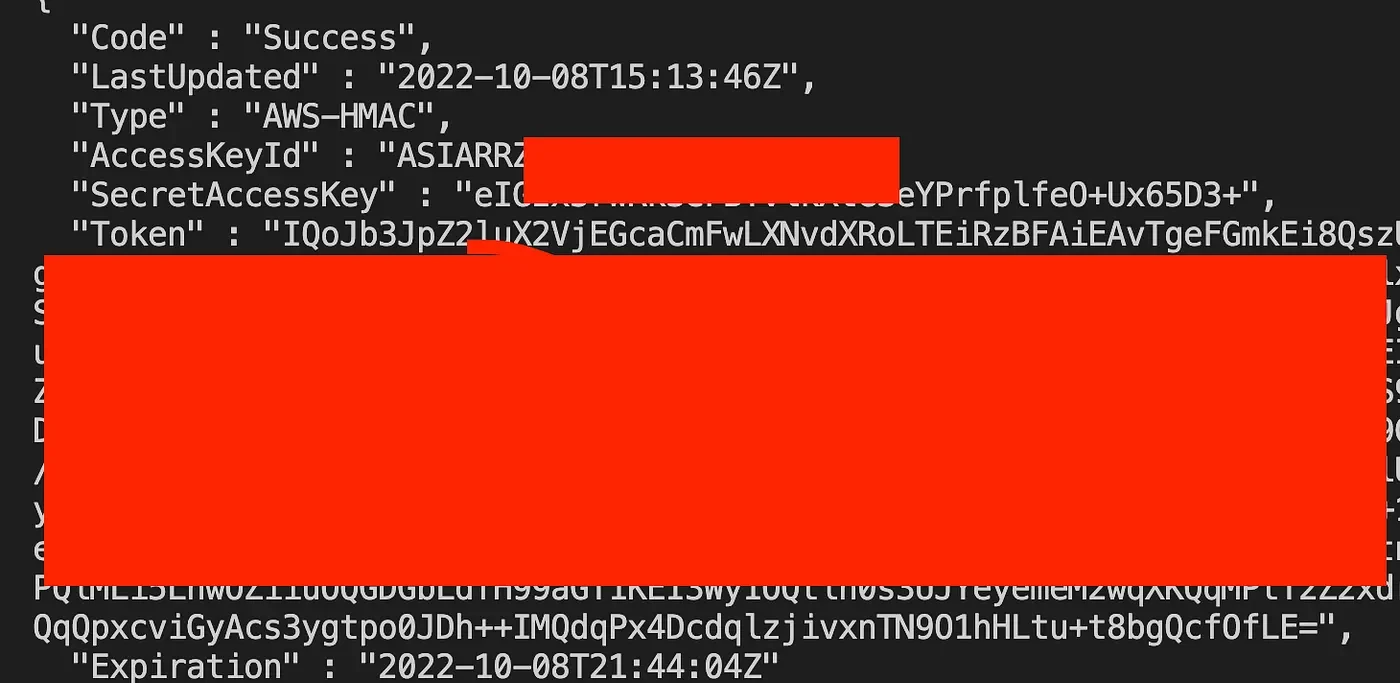
Fetching security credentials from instance metadata followed, and that confirmed the SSRF.
Step 2: Understand the escalation path
The researcher's stated principle is to escalate a vulnerability by trying out every possibility associated with it, since that increases the impact and fetches better rewards. AWS provides a service called AWS System manager to manage applications and infrastructure running in the AWS Cloud, usable from command-line tools as well. The reference given is the AWS CLI documentation for SSM: https://docs.aws.amazon.com/cli/latest/reference/ssm/index.html
The condition that made this work: to run remote commands on the instance via SSM, the instance must have a relevant role attached.
Step 3: Configure the AWS CLI with the stolen credentials
Install and configure the AWS CLI using the security credentials obtained from the metadata service:
$ export AWS_ACCESS_KEY_ID=$ export AWS_SECRET_ACCESS_KEY=$ export AWS_DEFAULT_REGION=$ export AWS_SESSION_TOKEN=
These four environment variables are what the AWS CLI reads to authenticate: the access key ID, the secret access key, the default region and the session token that temporary credentials from instance metadata require.
Step 4: Find the region
The region used in the first step can be found at:
http://[redacted]/latest/meta-data/placement/availability-zone
Step 5: Send the command with SSM
Use send-command to execute a command on the instance:
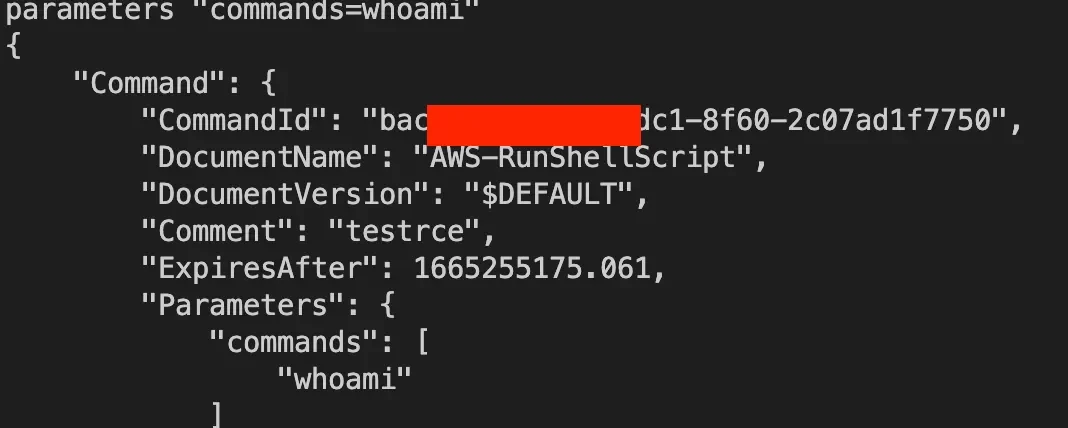
$ aws ssm send-command --document-name "AWS-RunShellScript" --comment "AnyComment" --instance-ids="[Instance-id]" --parameters "commands=whoami"
The --document-name "AWS-RunShellScript" selects the SSM document that runs a shell script on the target, --instance-ids names the instance, and --parameters "commands=whoami" is the command to run. The output of this command provides a CommandId.
Step 6: Get the instance ID
The instance ID used in the previous step comes from:
http://[redacted]/latest/meta-data/instance-id
Step 7: Read the command output
The final step is to see the output of the command executed in step 5 (whoami):
$ aws ssm list-command-invocations --command-id="[Command_Id]" --details
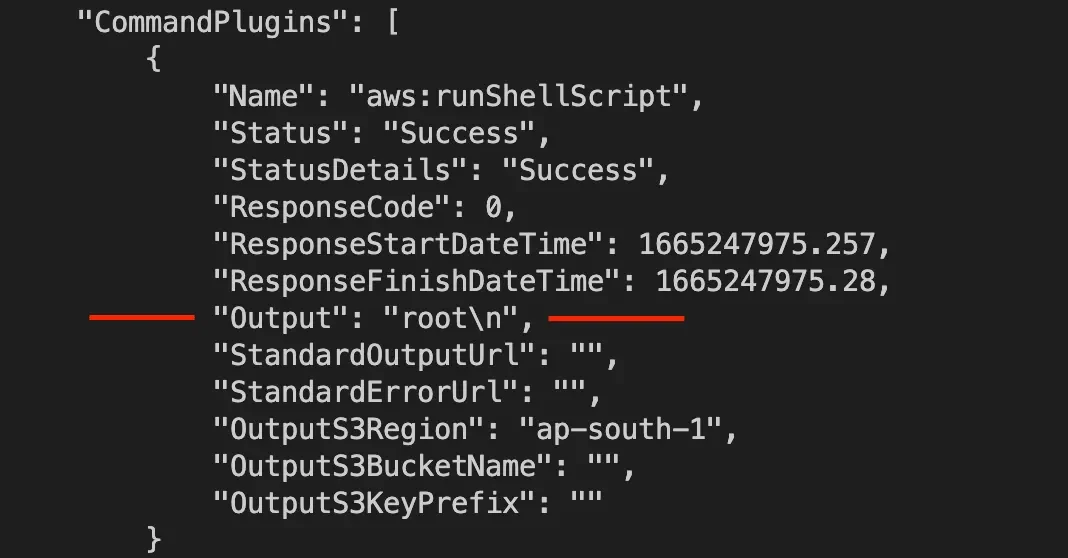
The command executed, and the output shown is root. That is how the AWS SSRF was escalated to remote code execution.
Root cause
The password reset endpoint accepted a user-controlled return_url and made a server-side request to it without restricting the destination. Because the server could reach [redacted], the link-local address of the EC2 instance metadata service, an attacker could read instance metadata, including the security credentials of the role attached to the instance.
The second half of the chain is a design issue rather than a code flaw: the instance role's credentials were usable against SSM, and the instance was registered with SSM in a way that allowed send-command with the AWS-RunShellScript document. The report does not describe any allow-list, IMDSv2 enforcement or least-privilege restriction that would have stopped either half; the researcher only notes that the attached role was what made the SSM path possible.
Impact
An attacker who controls the return_url value could make the server issue requests to arbitrary destinations, read the instance metadata, obtain the instance role's temporary credentials, and then use those credentials through SSM to run shell commands on the production instance as root. The report describes the target as a trading platform. The escalation depended on the instance having a relevant role attached; without that, the SSRF would have stopped at metadata access.
Fix
The report states that the bug was reported to the company on 8-Oct-2022, marked fixed on 12-Oct-2022, re-tested and the fix confirmed on 15-Oct-2022, and rewarded on 23-Oct-2022. It does not describe what the fix changed. The measures that would address the two halves of the chain are an allow-list of permitted return_url destinations (or removing the parameter's server-side fetch entirely), and, on the AWS side, enforcing IMDSv2 and scoping the instance role so that its credentials cannot invoke SSM send-command on the instance.
Variants to test
- Other redirect-style parameters. Look for parameters such as
return_url,redirect,next,callbackorurlon login, logout, password reset and OAuth flows. A positive result is an out-of-band DNS or HTTP interaction from the server, as Burp Suite reported here. - Metadata endpoints beyond the root. On a confirmed SSRF, request
http://[redacted]/latest/meta-data/iam/security-credentials/and then the role name it returns. A positive result is a JSON body containing temporary credentials. - Region and instance identity. Request
http://[redacted]/latest/meta-data/placement/availability-zoneandhttp://[redacted]/latest/meta-data/instance-id. A positive result is a valid AZ string and instance ID, which are the inputs SSM needs. - SSM reachability. With stolen credentials configured in the AWS CLI, run
aws ssm describe-instance-informationand thensend-commandwithAWS-RunShellScript. A positive result is a CommandId and, vialist-command-invocations --details, command output from the instance. - IMDSv2 enforcement. Repeat the metadata request without a token. If the instance requires IMDSv2, the plain request fails and the chain needs a way to obtain and send the token header.
What happened, in plain words
A security researcher spent months looking for bugs in companies' websites, a hobby and job called bug bounty hunting. At the start of one month he found a serious flaw in a trading platform, described in the report as one of India's growing trading startups. A trading platform is a website or app where people buy and sell financial instruments such as shares.
The flaw started in a very ordinary feature: the Password Reset function, the page where you type your email address and the site sends you a link to choose a new password. That page had a setting called return_url, which tells the site where to send you after the reset is done. The researcher noticed that the site would fetch an address put in that setting, including the cloud metadata address. That kind of flaw is called SSRF, short for Server-Side Request Forgery: the server makes a request on the attacker's behalf, to a place the attacker could not reach directly.
From there he reached a special internal address that every cloud server uses to describe itself, read the server's temporary access keys, and used those keys to run commands on the company's production machine. Production means the live system real customers use, not a test copy. The command he ran was whoami, which simply prints which user the command is running as, and the answer was root, the all-powerful administrator account on a Linux machine.
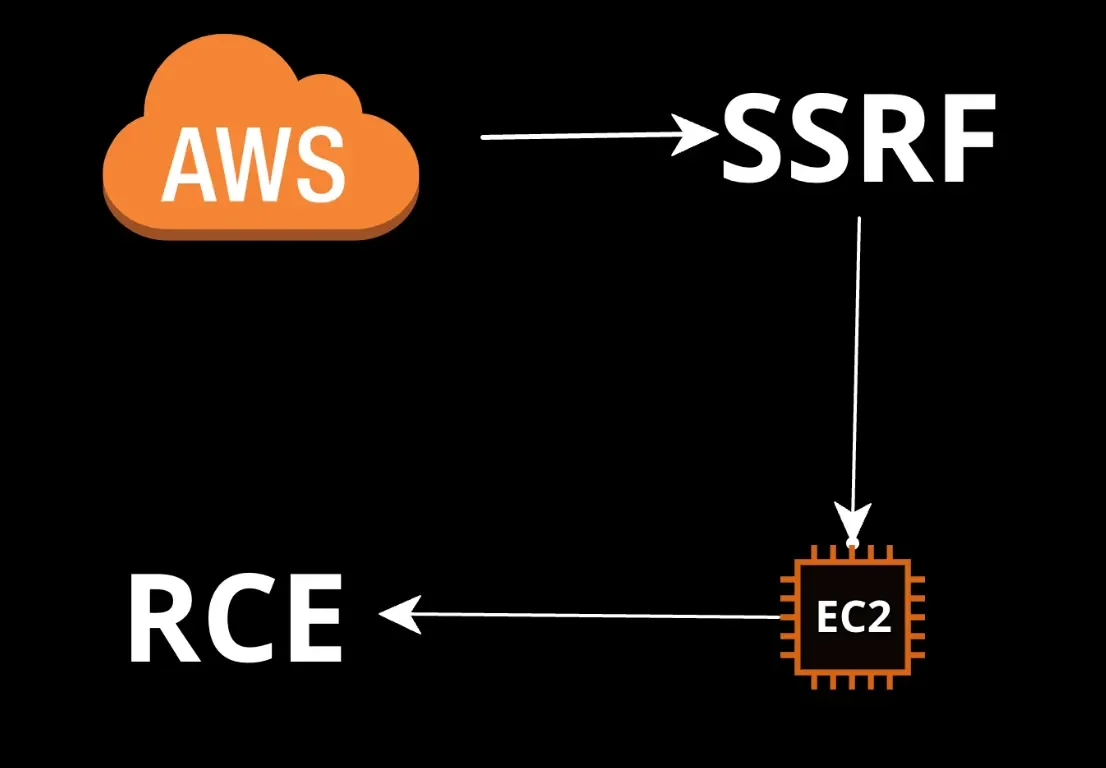
The image above is the title card of the write-up: how a well-known AWS SSRF was escalated to remote code execution in one of India's growing trading startups.
The setup: how he was working
Before finding anything, the researcher was doing two things at once:
- Clicking through the different sections of the application by hand, looking for API endpoints. An API is the part of a website that answers requests from software rather than drawing pages for people; an endpoint is one specific address in that API, like one counter in a large office. Sensitive endpoints are the ones that return private data or perform actions.
- Adding the target's address to a tool called Burp Suite, in its "Crawl and Audit" mode. Burp Suite is a program that sits between your browser and a website, records every request, and can automatically explore a site (crawl) and test it for common mistakes (audit). Think of it as a very thorough inspector who walks every corridor of a building and tries every door handle.
Two conditions made the later escalation possible, and the report names both:
- The application had to be able to make requests from the server side, including to the cloud instance's internal metadata address, using the value of
return_url. - The cloud server (an EC2 instance, which is a virtual machine rented from Amazon Web Services) had to have a relevant role attached. A role, in AWS, is a set of permissions that a machine or person can borrow temporarily; without the right role, the command-running service described later would refuse to act.
The researcher says plainly that the attached role was the one thing that ran in his favour.
Finding the entry point
While looking closely at the password reset endpoint, he noticed the return_url parameter. A parameter is a named value stuck onto the end of a web address, the part after the question mark, which the site reads and acts on. Parameters like return_url are known to carry easy-to-find bugs because the site trusts whatever address the user supplies.
Burp Suite's crawl and audit then reported an External service interaction (DNS) vulnerability on that same endpoint. DNS is the internet's phone book: it turns a name like example.com into a numeric address. An external service interaction means the server made a DNS lookup to a domain the tester controlled, which proves the server followed an address supplied by the user. On its own that is only a hint, not full SSRF, so the next move was to check whether the server could be made to fetch a full internal address.
While checking the HTTP response headers, the AWS footprint was obvious. Headers are small labels the server attaches to every reply. Two things stood out: the response header X-Amz-Cf-Id, which is added by Amazon CloudFront, Amazon's content delivery network, and an interaction with an S3 bucket used to fetch profile photos. S3 is Amazon's file storage service and a bucket is a folder inside it. Together these told him the application was hosted on AWS.
Step 1: Confirming the SSRF against the metadata service
Every AWS virtual machine can reach a special address, [redacted], which is not on the public internet. It is a link-local address, meaning it only works from the machine itself, like an internal extension number that only works inside one office. The service behind it is the instance metadata service: it answers questions about the machine, such as which region it runs in, what its instance ID is, and, crucially, what temporary security credentials it has been given.
The researcher tried to make the vulnerable parameter fetch the metadata root:
http://[redacted]/latest/meta-data/
This is a plain web address. http:// is the protocol, the way of speaking. [redacted] is the numeric address of the metadata service. /latest/meta-data/ is the path, the specific shelf inside that service where the general information lives. If the server fetches this address and returns the answer, the SSRF is real.
The response to the CURL request is shown below. CURL is a command-line tool for fetching web addresses; the researcher used it to send the request through the vulnerable parameter and see what came back.
Next he fetched the security credentials from the instance metadata, and that confirmed the SSRF for him.
Credentials here means the temporary keys the machine uses to prove to AWS who it is, the same way a staff badge proves an employee may enter a building. Because they belong to the machine's role, anyone who reads them can act with that role's permissions.
Step 2: Understanding the escalation path
The researcher's stated principle is worth repeating because it is the heart of the write-up: escalate a vulnerability by trying out every possibility associated with it, because that increases the impact of the bug and fetches much better rewards.
AWS provides a service called AWS Systems Manager, often shortened to SSM, to manage applications and infrastructure running in the AWS Cloud. It can be used from command-line tools as well. The reference he gives is the AWS CLI documentation for SSM: https://docs.aws.amazon.com/cli/latest/reference/ssm/index.html. The AWS CLI is a program you install on your own computer that lets you type AWS commands instead of clicking in a web console.
The condition that made this work: to run remote commands on the instance via SSM, the instance must have a relevant role attached. In other words, the stolen badge had to open the door to the command service, and in this case it did.
Step 3: Configure the AWS CLI with the stolen credentials
He installed and configured the AWS CLI using the security credentials obtained from the metadata service:
$ export AWS_ACCESS_KEY_ID=$ export AWS_SECRET_ACCESS_KEY=$ export AWS_DEFAULT_REGION=$ export AWS_SESSION_TOKEN=
Line by line, in plain words:
$is the shell prompt, the symbol showing you are typing a command into a terminal. It is not part of the command.exporttells the shell to put a value into an environment variable, a named slot that programs can read. Think of it as writing a label on a sticky note and putting it where every program in that terminal can see it.AWS_ACCESS_KEY_IDis the name of the slot for the access key ID, the public half of the credential, like a username.AWS_SECRET_ACCESS_KEYis the slot for the secret half, like a password. It must never be shared.AWS_DEFAULT_REGIONis the slot for the region, the geographic area of Amazon's data centres where the account lives, for example a city code. The CLI needs it to know which set of AWS servers to talk to.AWS_SESSION_TOKENis the slot for the session token, an extra string that temporary credentials require. Temporary credentials are handed out for a limited time, and the token proves they are still valid, a bit like a dated visitor pass.
The values after the equals signs are empty in the report. In practice each slot would be filled with the value read from the metadata service.
Step 4: Find the region
The region used in the first step can be found at:
http://[redacted]/latest/meta-data/placement/availability-zone
This is the same metadata address with a different path. placement/availability-zone asks where the machine is placed. An availability zone is one isolated data centre, or group of them, inside a region, and its name starts with the region code, so reading it tells you the region. He needed this because the AWS CLI must be pointed at the right region before it can talk to SSM.
Step 5: Send the command with SSM
He used send-command to execute a command on the instance:
$ aws ssm send-command --document-name "AWS-RunShellScript" --comment "AnyComment" --instance-ids="[Instance-id]" --parameters "commands=whoami"
Line by line:
awsis the AWS CLI program itself.ssmselects the Systems Manager service, the part of AWS that manages machines.send-commandis the action: send a command to a machine and run it there.--document-name "AWS-RunShellScript"selects the SSM document that runs a shell script on the target. A document here is a saved recipe that tells SSM what kind of action to perform; this particular recipe runs shell commands, shell being the text interface of the operating system.--comment "AnyComment"is a free-text note attached to the request. It has no effect on what runs.--instance-ids="[Instance-id]"names the instance. The square brackets are a placeholder: the real ID is filled in from the metadata service, as shown in the next step.--parameters "commands=whoami"is the command to run.whoamiis a standard command that prints the name of the user the command runs as. It is a harmless way to prove code execution without changing anything.
The output of this command provides a CommandId, a reference number for the job, like a ticket number at a repair desk. You use it later to collect the result.
Step 6: Get the instance ID
The instance ID used in the previous step comes from:
http://[redacted]/latest/meta-data/instance-id
Again the same metadata address, this time asking for the machine's own name tag. Every EC2 instance has a unique ID, and SSM needs it to know which machine should receive the command.
Step 7: Read the command output
The final step is to see the output of the command executed in step 5 (whoami):
$ aws ssm list-command-invocations --command-id="[Command_Id]" --details
Line by line:
aws ssmagain selects the AWS CLI and the Systems Manager service.list-command-invocationsasks for the record of commands that were sent, the way you ask a courier company for the delivery history of a parcel.--command-id="[Command_Id]"narrows the list to the job whose ticket number you got in step 5. The brackets are again a placeholder for the real value.--detailsasks for the full record, including the output the command produced.
The command executed, and the output shown is root. That is how the AWS SSRF was escalated to remote code execution. Remote code execution, or RCE, means running your own commands on someone else's machine over the network. Running as root means running with the highest level of permission on that machine, so nothing on it is off limits.
Why it worked: the root cause
The password reset endpoint accepted a user-controlled return_url and made a server-side request to it without restricting the destination. Because the server could reach [redacted], the link-local address of the EC2 instance metadata service, an attacker could read instance metadata, including the security credentials of the role attached to the instance.
The second half of the chain is a design issue rather than a code flaw: the instance role's credentials were usable against SSM, and the instance was registered with SSM in a way that allowed send-command with the AWS-RunShellScript document. The report does not describe any allow-list, IMDSv2 enforcement or least-privilege restriction that would have stopped either half. IMDSv2 is a newer version of the metadata service that requires a special token before answering, which blocks simple SSRF reads. Least privilege means giving each role only the permissions it actually needs. The researcher only notes that the attached role was what made the SSM path possible.
What an attacker could do with it
An attacker who controls the return_url value could make the server issue requests to arbitrary destinations, read the instance metadata, obtain the instance role's temporary credentials, and then use those credentials through SSM to run shell commands on the production instance as root. The report describes the target as a trading platform. The escalation depended on the instance having a relevant role attached; without that, the SSRF would have stopped at metadata access.
How it was fixed
The report states that the bug was reported to the company on 8-Oct-2022, marked fixed on 12-Oct-2022, re-tested and the fix confirmed on 15-Oct-2022, and rewarded on 23-Oct-2022. It does not describe what the fix changed. The measures that would address the two halves of the chain are an allow-list of permitted return_url destinations, or removing the parameter's server-side fetch entirely, and, on the AWS side, enforcing IMDSv2 and scoping the instance role so that its credentials cannot invoke SSM send-command on the instance. An allow-list is a list of things that are permitted, with everything else refused, the opposite of a blocklist.
Variants to test
If you want to look for the same pattern yourself, these are the places to start. Each one names what a positive result looks like.
- Other redirect-style parameters. Look for parameters such as
return_url,redirect,next,callbackorurlon login, logout, password reset and OAuth flows. OAuth is the "log in with Google" style of sign-in. A positive result is an out-of-band DNS or HTTP interaction from the server, as Burp Suite reported here. - Metadata endpoints beyond the root. On a confirmed SSRF, request
http://[redacted]/latest/meta-data/iam/security-credentials/and then the role name it returns. A positive result is a JSON body containing temporary credentials. JSON is a common text format for structured data, made of names and values in curly brackets. - Region and instance identity. Request
http://[redacted]/latest/meta-data/placement/availability-zoneandhttp://[redacted]/latest/meta-data/instance-id. A positive result is a valid availability zone string and instance ID, which are the inputs SSM needs. - SSM reachability. With stolen credentials configured in the AWS CLI, run
aws ssm describe-instance-informationand thensend-commandwithAWS-RunShellScript. A positive result is a CommandId and, vialist-command-invocations --details, command output from the instance. - IMDSv2 enforcement. Repeat the metadata request without a token. If the instance requires IMDSv2, the plain request fails and the chain needs a way to obtain and send the token header.
Glossary
- API: the part of a website that answers requests from software rather than drawing pages for people.
- Endpoint: one specific address in an API, like one counter in a large office.
- Bug bounty: a programme where companies pay researchers for reporting security flaws in their systems.
- Burp Suite: a program that sits between your browser and a website, records requests, and can automatically crawl and audit a site.
- Crawl and Audit: Burp Suite's mode that explores a site automatically and tests it for common mistakes.
- Parameter: a named value attached to a web address, after the question mark, that the site reads and acts on.
- return_url: the parameter that tells a site where to send the user after an action such as a password reset.
- SSRF (Server-Side Request Forgery): a flaw where the server makes a request on the attacker's behalf, to a place the attacker could not reach directly.
- DNS: the internet's phone book, turning names into numeric addresses.
- External service interaction (DNS): a sign that the server made a DNS lookup to a domain the tester controlled, proving it followed a user-supplied address.
- HTTP response header: a small label the server attaches to every reply, carrying metadata about the response.
- X-Amz-Cf-Id: a response header added by Amazon CloudFront, Amazon's content delivery network.
- AWS (Amazon Web Services): Amazon's cloud platform, where companies rent servers and services.
- S3 bucket: a folder in Amazon's file storage service, S3.
- EC2 instance: a virtual machine rented from AWS.
- Link-local address: an address that only works from the machine itself, not from the public internet.
- Instance metadata service: the internal AWS service at
[redacted]that answers questions about the machine, including its temporary credentials. - Credentials: the temporary keys a machine uses to prove to AWS who it is.
- Role: a set of permissions in AWS that a machine or person can borrow temporarily.
- AWS Systems Manager (SSM): an AWS service for managing machines, including running commands on them.
- AWS CLI: a program you install on your computer to type AWS commands instead of clicking in a web console.
- Environment variable: a named slot in a terminal that programs can read.
- Session token: an extra string that temporary AWS credentials require to prove they are still valid.
- Region: a geographic area of Amazon's data centres, identified by a code.
- Availability zone: one isolated data centre, or group of them, inside a region.
- SSM document: a saved recipe telling SSM what kind of action to perform, such as running a shell script.
- Shell: the text interface of an operating system, where you type commands.
- CommandId: a reference number for a command sent through SSM, used later to collect its result.
- Instance ID: the unique name tag of an EC2 instance.
- Remote code execution (RCE): running your own commands on someone else's machine over the network.
- root: the highest level of permission on a Linux machine, with access to everything.
- Production: the live system real customers use, as opposed to a test copy.
- IMDSv2: a newer version of the metadata service that requires a special token before answering.
- Least privilege: giving each role only the permissions it actually needs.
- Allow-list: a list of things that are permitted, with everything else refused.
- JSON: a common text format for structured data, made of names and values in curly brackets.
- OAuth: the "log in with Google" style of sign-in, where one service vouches for you to another.




