Blind XSS Accepted, No Payout: A Bug Bounty Lesson.
The application accepted SVG and HTML uploads without server-side sanitisation and emailed the original files to caseworkers, so a malicious SVG could execute JavaScript when opened in Outlook's rendering environment. An attacker could run script in a staff member's context.

medium.com
Published on medium.com
Blind Xss
The full write-up lives on its author's site
It belongs to its author, so we link to it rather than copy it. The other two tabs are our own rewrites, checked against it.
Context
The target was a licence application workflow, described in the write-up with the organisation name redacted. The relevant feature is Step 2 of the application, the upload step, where applicants submit files as proof of proficiency. The upload accepted multiple formats, including HTML, SVG, XML, and several document and image types.
After an upload, the backend emailed the original files as attachments to the caseworkers who review applications. That forwarding step is what turned an upload validation weakness into a path to a staff member's inbox and, from there, into a rendering context on the reviewer's machine.
Setup
The write-up does not describe the researcher's accounts, tooling, versions or any preconditions beyond being able to submit an application and reach the Step 2 upload. The only environment detail given is on the receiving side: the callback came from a staff member's Windows environment, and the execution context indicated the SVG was rendered through Outlook's embedded browser component.
Finding it
The upload accepted SVG and HTML files without proper server-side content sanitisation. Because the backend then emailed the original files as attachments to caseworkers, a malicious SVG could reach a staff member through an email attachment and execute embedded JavaScript when opened in the affected Microsoft Outlook rendering environment.
That is the whole attack path as the author describes it: upload of an active format, unchanged forwarding by email, and execution in the mail client's rendering component.
Exploitation
Step 1: Upload an active file format
The researcher submitted a live payload through the Step 2 upload, which accepted SVG among other formats. The write-up does not reproduce the payload itself, so there is no request or file content to show here.
Step 2: Wait for the backend to forward the file
The backend emailed the original uploaded file as an attachment to the caseworkers responsible for reviewing the application.
Step 3: Receive the callback
The payload executed and the researcher received a callback from the staff member's Windows environment. The execution context indicated the SVG was rendered through Outlook's embedded browser component, which confirmed execution in the intended context.
Step 4: What the payload collected
Beyond confirming execution, the payload collected the visitor's IP address, the Windows username, a screenshot, and other contextual details. The author states plainly that this decision affected the outcome of the report.

Root cause
The author attributes the vulnerability to several weaknesses acting together:
- Insufficient server-side sanitisation: SVG and HTML uploads were accepted without adequately neutralising active content.
- Unsafe email attachment handling: original user-uploaded files were forwarded directly to staff reviewers.
- Unsafe document rendering: the affected Outlook rendering environment executed JavaScript embedded in the SVG.
- Lack of safe document processing: uploaded files were not converted into a format suitable for safe review before being emailed.
The author notes that file extension checks alone are not sufficient, and that the organisation must consider the actual file content and how downstream systems process it. The write-up does not say which of these controls, if any, existed and failed, so the relative contribution of each is likely a matter of inference.
Impact
Under the conditions described, a malicious SVG uploaded at Step 2 could reach a caseworker by email and execute embedded JavaScript when opened in the affected Outlook rendering environment. The researcher demonstrated this with a live payload and a real callback from a staff member's Windows environment.
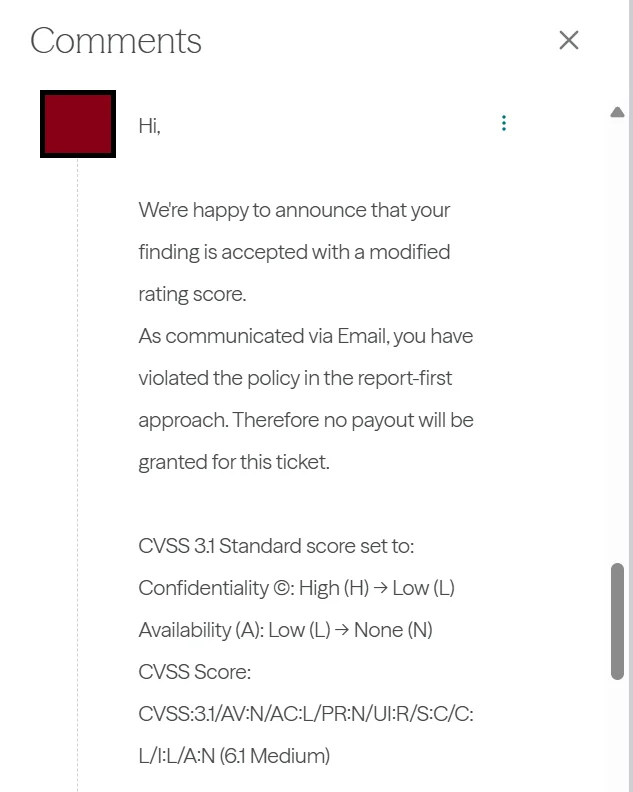
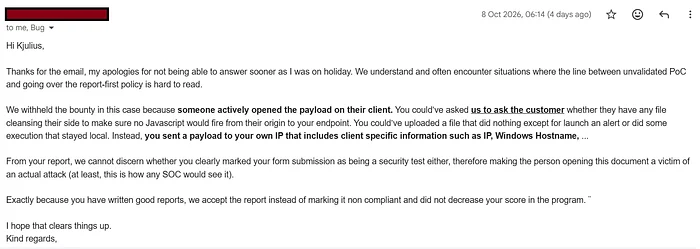
The program accepted the vulnerability but withheld the reward, explaining that the payload's data collection violated its "report-first" policy. The finding itself was accepted; the way the impact was demonstrated crossed a boundary defined by the program. The author's framing is that proving a vulnerability exists is not the same as being authorised to collect additional information from the affected system.
Fix
The write-up gives remediation guidance rather than describing changes that were made. The organisation should:
- Validate and sanitise uploads server-side. Enforce an explicit allowlist of necessary file formats and use appropriate content validation. Reject active formats such as HTML and SVG if they are not required.
- Avoid emailing untrusted files directly. Store uploads securely and provide staff with a controlled review mechanism.
- Convert files to safe formats. Where practical, convert submitted documents into a safe, non-executable format before staff review.
- Harden email and document handling. Configure supported systems to prevent active content from executing and avoid rendering untrusted files in privileged or sensitive contexts.
- Apply defence in depth. Use malware scanning, restrictive content-serving policies, and appropriate isolation for document processing.
Variants to test
- Other active formats in the same upload. Submit XML or HTML alongside SVG where the allowlist is broad. A positive result is a callback from the reviewer's environment after the attachment is opened.
- Same file, different rendering path. If reviewers can open attachments in a browser or preview pane rather than the mail client's embedded component, test whether execution still occurs there. A positive result is a callback whose context identifies the new renderer.
- Minimal proof of execution. Send a payload that only calls back, with no collection of IP address, username, screenshot or other context. A positive result is the same callback evidence, and it stays inside a report-first policy.
- Policy check before payload design. Read the program's testing and reporting rules first, and report promptly where a report-first approach is required. A positive result here is a report that is accepted without the payout being withheld on policy grounds.
What happened, in plain words
A security researcher found a way to make a file that a company's staff would open, and that file could run embedded JavaScript in the staff member's Outlook rendering environment. The company that ran the bug bounty programme (a scheme where companies pay people for finding security problems) agreed the problem was real. But they did not pay the researcher, because the way the researcher proved the problem involved collecting information from the staff member's computer that the programme had not authorised.
The lesson is simple: showing that a problem exists is one thing, and collecting extra data from someone else's system is another. The first is usually welcome. The second can break the rules even when the finding is genuine.
This article walks through the whole story from the beginning, explaining every technical idea as it comes up, so you can follow it even if you have never done security testing before.
The target: a licence application
The target was a licence application workflow. A licence application is a form-based process where a person or business asks an organisation for permission to do something, and staff at that organisation review the request. The organisation's name is redacted in the write-up, so we do not know who it was.
The relevant feature is Step 2 of the application, the upload step. In this step, applicants submit files as proof of proficiency, meaning evidence that they have the skills or qualifications the licence requires. The upload accepted multiple formats, including HTML, SVG, XML, and several document and image types.
A few of those words need explaining:
- HTML is the language web pages are written in. An HTML file can contain text, images, and also small programs written in JavaScript.
- SVG stands for Scalable Vector Graphics. It is a picture format, but unlike a JPEG or PNG photo, an SVG file is really a text file describing shapes. Because it is text-based and designed for the web, an SVG file can also contain JavaScript.
- XML is a general text format for structured data, a bit like a very strict outline. It is used in many places, including inside SVG files.
- JavaScript is the programming language that web browsers run. It is what makes web pages interactive.
So the upload accepted file types that can carry executable code, not just plain pictures.
After an upload, the backend emailed the original files as attachments to the caseworkers who review applications. The backend is the part of a website that runs on the company's servers, out of sight of the user; the frontend is what you see in your browser. A caseworker is a member of staff who processes applications.
That forwarding step is what turned an upload validation weakness into a path to a staff member's inbox and, from there, into a rendering context on the reviewer's machine. Rendering means turning a file into something you can see on screen. When you open a picture, your computer renders it. When you open an email attachment, the email program renders it too, and some email programs use a mini web browser inside themselves to do that.
Setting up
The write-up does not describe the researcher's accounts, tooling, versions or any preconditions beyond being able to submit an application and reach the Step 2 upload. In plain terms: the researcher could fill in the application like any normal applicant and upload a file at Step 2. That is all the access needed.
The only environment detail given is on the receiving side: the callback came from a staff member's Windows environment, and the execution context indicated the SVG was rendered through Outlook's embedded browser component.
A callback is a message sent back to the researcher by the payload when it runs. Think of it like a smoke alarm that phones you when it goes off: you are not in the building, but you know the alarm triggered. A payload is the piece of code you plant to prove the problem exists. Outlook is Microsoft's email program, and its embedded browser component is the mini web browser it uses to display HTML content inside emails. Windows is Microsoft's operating system.
Finding it
The upload accepted SVG and HTML files without proper server-side content sanitisation. Sanitisation means cleaning something up so that dangerous parts are removed or neutralised. Server-side means the cleaning would happen on the company's server, before the file is stored or forwarded, rather than in the user's browser where it could be bypassed.
Because the backend then emailed the original files as attachments to caseworkers, a malicious SVG could reach a staff member through an email attachment and execute embedded JavaScript when opened in the affected Microsoft Outlook rendering environment. Execute means run. So the JavaScript inside the SVG would run on the caseworker's computer when they opened the attachment.
This kind of problem is called Blind XSS. XSS stands for Cross-Site Scripting: a class of vulnerability where an attacker gets their own code to run in someone else's browser or application. It is called blind because the attacker cannot see the result directly. In a normal XSS attack, you watch your code run in your own browser. In blind XSS, you plant the code and wait for someone else, somewhere else, to trigger it, and you learn about it only through a callback.
An everyday comparison: imagine leaving a note inside a parcel that says "if you are reading this, call this number". You do not know who will open the parcel or when, but when your phone rings, you know the note was read. That is a blind attack.
That is the whole attack path as the author describes it: upload of an active format, unchanged forwarding by email, and execution in the mail client's rendering component. An active format is a file type that can contain code that runs, as opposed to a passive format like a plain photo that can only be looked at.
Exploitation
Step 1: Upload an active file format
The researcher submitted a live payload through the Step 2 upload, which accepted SVG among other formats. A live payload means a working one, not a harmless test string. The write-up does not reproduce the payload itself, so there is no request or file content to show here.
Why this step: the upload was the entry point. If the site had rejected SVG files, or cleaned them properly, the rest of the attack would not have been possible.
Step 2: Wait for the backend to forward the file
The backend emailed the original uploaded file as an attachment to the caseworkers responsible for reviewing the application.
Why this matters: the file was not just stored somewhere and viewed through a safe viewer. It was sent, unchanged, to a member of staff. That is what put the payload in front of a real person.
Step 3: Receive the callback
The payload executed and the researcher received a callback from the staff member's Windows environment. The execution context indicated the SVG was rendered through Outlook's embedded browser component, which confirmed execution in the intended context.
Execution context means the environment in which the code ran: which program, which operating system, which component. Knowing the context matters because it tells you how serious the problem is. Code running inside a mail client on a staff computer is very different from code running in a sandbox with no access to anything.
Why this step: the callback is the proof. Without it, the researcher would only have a theory. With it, there is evidence that a real staff member's machine ran the code.
Step 4: What the payload collected
Beyond confirming execution, the payload collected the visitor's IP address, the Windows username, a screenshot, and other contextual details. The author states plainly that this decision affected the outcome of the report.
An IP address is a number that identifies a device on a network, a bit like a postal address for computers. A Windows username is the name of the account the person is logged in as. A screenshot is a picture of the screen.
Why this step was a problem: the author's view is that a callback confirming execution can demonstrate the vulnerability without collecting screenshots, usernames or other sensitive information, and that collecting more than necessary crossed a line the programme had drawn.
PoC Images
PoC stands for Proof of Concept: a demonstration that a vulnerability is real. The images above are the author's proof-of-concept screenshots.
Root cause
The author attributes the vulnerability to several weaknesses acting together:
- Insufficient server-side sanitisation: SVG and HTML uploads were accepted without adequately neutralising active content.
- Unsafe email attachment handling: original user-uploaded files were forwarded directly to staff reviewers.
- Unsafe document rendering: the affected Outlook rendering environment executed JavaScript embedded in the SVG.
- Lack of safe document processing: uploaded files were not converted into a format suitable for safe review before being emailed.
The author notes that file extension checks alone are not sufficient, and that the organisation must consider the actual file content and how downstream systems process it. A file extension is the part of a filename after the dot, like .svg or .jpg. Checking only the extension is like judging a parcel by its label without opening it: someone can put anything inside. Downstream systems are the programs that handle the file after it leaves the upload form, such as the email server and the mail client.
The write-up does not say which of these controls, if any, existed and failed, so the relative contribution of each is likely a matter of inference.
Impact
Under the conditions described, a malicious SVG uploaded at Step 2 could reach a caseworker by email and execute embedded JavaScript when opened in the affected Outlook rendering environment. The researcher demonstrated this with a live payload and a real callback from a staff member's Windows environment.
Impact means what harm could come from the vulnerability in the real world. Here, the harm is that an outsider could get embedded JavaScript running in a staff member's Outlook rendering environment by submitting an application with a malicious SVG.
The programme accepted the vulnerability but withheld the reward, explaining that the payload's data collection violated its "report-first" policy. A report-first policy is a rule that says: if you find something, tell us promptly and do not go further on your own. The finding itself was accepted; the way the impact was demonstrated crossed a boundary defined by the programme. The author's framing is that proving a vulnerability exists is not the same as being authorised to collect additional information from the affected system.
An everyday comparison: if you notice a neighbour's door is unlocked, telling them is helpful. Walking in, looking around, and photographing their belongings is not, even if your intention was only to show them the door was open.
Fix
The write-up gives remediation guidance rather than describing changes that were made. Remediation means the fix. The organisation should:
- Validate and sanitise uploads server-side. Enforce an explicit allowlist of necessary file formats and use appropriate content validation. Reject active formats such as HTML and SVG if they are not required. An allowlist is a list of things that are permitted, with everything else refused by default.
- Avoid emailing untrusted files directly. Store uploads securely and provide staff with a controlled review mechanism.
- Convert files to safe formats. Where practical, convert submitted documents into a safe, non-executable format before staff review. A non-executable format is one that can only be displayed, not run as code.
- Harden email and document handling. Configure supported systems to prevent active content from executing and avoid rendering untrusted files in privileged or sensitive contexts. Hardening means tightening the configuration of a system to reduce risk.
- Apply defence in depth. Use malware scanning, restrictive content-serving policies, and appropriate isolation for document processing. Defence in depth means layering several protections so that if one fails, another still catches the problem. Isolation means running something in a contained environment so it cannot affect the rest of the system.
Variants to test
The technical write-up lists further tests that follow from the same finding. These are ideas for what else to check, not things the author reports having done.
- Other active formats in the same upload. Submit XML or HTML alongside SVG where the allowlist is broad. A positive result is a callback from the reviewer's environment after the attachment is opened.
- Same file, different rendering path. If reviewers can open attachments in a browser or preview pane rather than the mail client's embedded component, test whether execution still occurs there. A positive result is a callback whose context identifies the new renderer. A preview pane is the small window inside an email program that shows an attachment without fully opening it.
- Minimal proof of execution. Send a payload that only calls back, with no collection of IP address, username, screenshot or other context. A positive result is the same callback evidence, and it stays inside a report-first policy.
- Policy check before payload design. Read the programme's testing and reporting rules first, and report promptly where a report-first approach is required. A positive result here is a report that is accepted without the payout being withheld on policy grounds.
Lessons learned
For Blind XSS, a minimal proof of execution is often enough. A callback confirming JavaScript execution in the relevant context can demonstrate the vulnerability without collecting screenshots, usernames, or other sensitive information.
The author's key takeaways:
- Read the programme's testing and reporting policies before crafting a payload.
- Collect only the minimum evidence necessary to prove the vulnerability.
- Avoid accessing or transmitting sensitive information unless explicitly authorised.
- Report the issue promptly when the programme requires a report-first approach.
- Explain the potential impact clearly without unnecessarily expanding the proof of concept.
Final thoughts
The vulnerability was real, and the report was accepted. But the payout outcome reminded the author that technical success and responsible validation go hand in hand. In bug bounty hunting, proving impact matters, but how you prove it matters just as much.
Glossary
- Active format: a file type that can contain code which runs when opened, such as HTML or SVG, as opposed to a passive format like a plain photo.
- Allowlist: a list of permitted items, with everything not on the list refused.
- Backend: the part of a website that runs on the company's servers, out of sight of the user.
- Blind XSS: Cross-Site Scripting where the attacker cannot see the result directly and learns of execution only through a callback.
- Bug bounty programme: a scheme where organisations pay people for finding and reporting security problems in their systems.
- Callback: a message sent back to the researcher by a payload when it runs, proving execution.
- Caseworker: a member of staff who reviews and processes applications.
- Defence in depth: layering several protections so that if one fails, another still catches the problem.
- Downstream systems: the programs that handle a file after it leaves the upload form, such as email servers and mail clients.
- Embedded browser component: a mini web browser built into another program, used to display web content such as HTML emails.
- Execute: to run code.
- Execution context: the environment in which code ran, such as which program, operating system and component.
- File extension: the part of a filename after the dot, such as
.svgor.jpg. - Frontend: the part of a website you see and interact with in your browser.
- Hardening: tightening the configuration of a system to reduce risk.
- HTML: the language web pages are written in; HTML files can contain JavaScript.
- Impact: the real-world harm a vulnerability could cause.
- IP address: a number identifying a device on a network.
- Isolation: running something in a contained environment so it cannot affect the rest of the system.
- JavaScript: the programming language web browsers run, used to make pages interactive.
- Live payload: a working payload, as opposed to a harmless test string.
- Non-executable format: a file format that can only be displayed, not run as code.
- Outlook: Microsoft's email program.
- Payload: the piece of code planted to prove a vulnerability exists.
- PoC (Proof of Concept): a demonstration that a vulnerability is real.
- Preview pane: the small window inside an email program that shows an attachment without fully opening it.
- Remediation: the fix for a vulnerability.
- Rendering: turning a file into something visible on screen.
- Report-first policy: a rule requiring researchers to report a finding promptly and not go further on their own.
- Sanitisation: cleaning content so dangerous parts are removed or neutralised.
- Screenshot: a picture of the screen.
- Server-side: happening on the company's server rather than in the user's browser.
- SVG: Scalable Vector Graphics, a text-based picture format that can contain JavaScript.
- Windows: Microsoft's operating system.
- Windows username: the name of the account a person is logged in as.
- XSS (Cross-Site Scripting): a class of vulnerability where an attacker gets their own code to run in someone else's browser or application.
- XML: a general text format for structured data, used in many places including inside SVG files.



